Quote and invoice software: 9 tools that do both

Nnabuike Okoroafor ·
On this page · 11 sections
Disclosure: We make Charming Invoices. The Charming app does not do quotes or estimates, so it is not one of the nine tools compared here; we say at the end where it can still help and where it cannot.
General information, not legal or tax advice. Where this guide mentions tax, VAT or record-keeping it quotes or links the official page, and those rules vary by country and change; ask your accountant or your tax authority before you rely on any of it.
You price the job, the client says yes, the work gets done, and then you sit down and type the same lines again into an invoice. Or you keep quotes in one place and invoices in another, and lose track of which quotes were accepted and which deposits came in. Quote and invoice software exists to make that one record instead of two.
This guide compares nine tools that do both, sorted by how they handle the parts that matter: sending a quote, getting it accepted, taking a deposit and turning it into an invoice without retyping. Every price and limit comes from each vendor’s own pricing or feature page, read on 23 October 2026 and linked. If you are still working out whether you need a quote or an estimate in the first place, start with our guide to invoices, estimates and quotes and come back.
Quote and invoice software in short#
Here are the nine tools on one line each, at regular US prices as of 23 October 2026 (promotions left out, because they end).
| Tool | Quote to invoice | Free plan | Entry price | Best for |
|---|---|---|---|---|
| Zoho Invoice | Yes, one click or automatic | Yes: 500 invoices a year, 2 users | $0 (no paid tier listed) | Low-volume service businesses wanting free |
| Invoice Ninja | Yes, one click or on client approval | Yes: up to 5 clients | Pro, $14 a month or $140 a year | Freelancers who want a client portal |
| Square Invoices | Automatic on Plus; Free lists estimates | Yes | Plus, $49 a month per location | Card payments on the doorstep |
| Wave | Not stated on its pricing page | Yes (Starter), US and Canada | Pro, $19 a month or $190 a year | Free books plus estimates |
| FreshBooks | Yes, Convert to Invoice | No; 30-day trial | Lite, $23 a month (5 clients) | Hourly work with accounting |
| QuickBooks Online | Yes, “convert into invoices” | Yes: 2 invoices a month | Simple Start, $38 a month | Businesses whose accountant uses it |
| Jobber | Approved quote becomes a job | No; free trial | Core, $49 a month, or $29 a month billed yearly | Field-service crews |
| Joist | Yes, “Estimates to Invoices” | No; 14-day trial | Basics, $10 a month (5 documents a month) | Solo contractors quoting on site |
| Housecall Pro | “Send quick, accurate quotes, then invoice” | No; 14-day trial | Basic, $79 a month, or $59 billed yearly | Home-service teams |
- Free and genuinely capable: Zoho Invoice and Invoice Ninja both convert an accepted quote into an invoice at $0, within their limits (500 invoices a year on Zoho; 5 clients on Invoice Ninja).
- Card payments first: Square Free sends estimates and contracts with e-signature at $0 a month, with a listed fee on each card payment. Automatic conversion is a Plus feature.
- Trades: Joist is the cheapest dedicated estimate-to-invoice app; Jobber and Housecall Pro add scheduling and dispatch. Car repair shops have their own systems, compared in auto repair invoice software.
- Accounting included: FreshBooks, QuickBooks Online and Wave keep quotes, invoices and the books in one place.
- If you quote twice a year, a quote written in a document plus a separate invoicing app may be all you need. That option is covered below.
What to look for in quote and invoice software#
“Does estimates” on a feature list can mean anything from a printable PDF to a full approval flow. These are the parts that save the retyping and the chasing.
- Quote to invoice in one step. The accepted quote’s lines, prices and client carry over to the invoice. Check whether conversion is manual (a button) or automatic on acceptance, and which plan includes it.
- Client acceptance online. The client opens a link and accepts, declines or asks for changes, and the quote’s status updates. Some tools add an e-signature, which is useful for larger jobs.
- Deposits. Asking for part of the price on acceptance, and crediting it on the final invoice, is where most quote-first businesses protect their cash flow. Our guide to deposit invoices explains how the arithmetic should look.
- Progress or milestone billing. For longer jobs, the ability to bill the quote in stages. See progress invoicing, with a worked example.
- Expiry dates and quote numbers. A quote with an expiry date and its own number is easier to hold a client to and easier to find later.
- Card payments and their fee. Most tools here take card payments from the invoice for a percentage plus a fixed fee per payment. On larger jobs, that fee can cost more than the software.
- How the price grows. Per user (Jobber, Housecall Pro), per client (FreshBooks, Invoice Ninja Free), per document (Joist Basics) or per location (Square). Pick the model that matches how your business grows.
The quote-to-invoice workflow, on one job#
Here is one illustrative job, start to finish, so you can see what each tool is saving you from. Harbour Lane Decorating is an invented sample business, and the quote number is illustrative. Tax is left out to keep the arithmetic plain; check what applies where you work.
| Line | Quote Q-0042, Monday 5 October 2026 |
|---|---|
| Living room: prepare and paint walls and ceiling, two coats | $1,850.00 |
| Hallway, stairs and landing: prepare and paint | $1,250.00 |
| Materials: paint, filler and sundries | $500.00 |
| Quote total (valid 30 days, to Wednesday 4 November 2026) | $3,600.00 |
The client accepts on Tuesday 6 October 2026, and a 30% deposit is due before work starts: $3,600.00 × 30% = $1,080.00. The work is finished and the final invoice goes out on Wednesday 11 November 2026: $3,600.00 less the $1,080.00 deposit leaves $2,520.00 to pay.
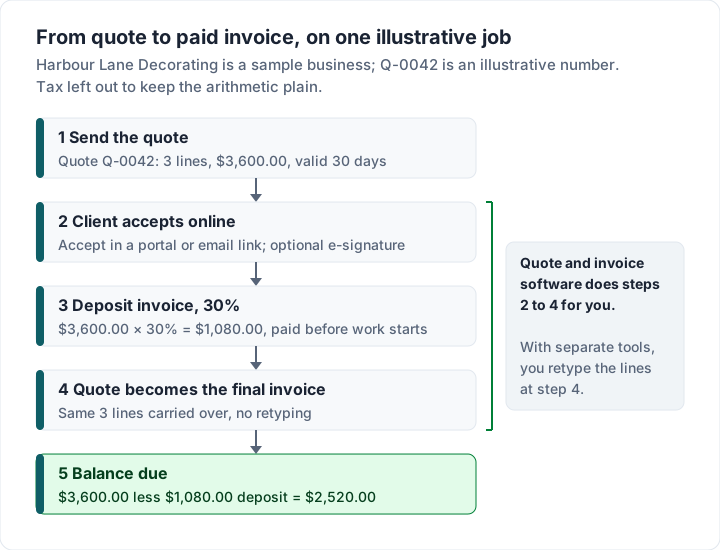
In quote and invoice software, steps 2 to 4 are a click or happen on their own. With a quote in a document and invoices elsewhere, step 4 means retyping three lines and remembering to credit the deposit. That is fine three times a year, and painful thirty times a month.
Quote and invoice tools compared, feature by feature#
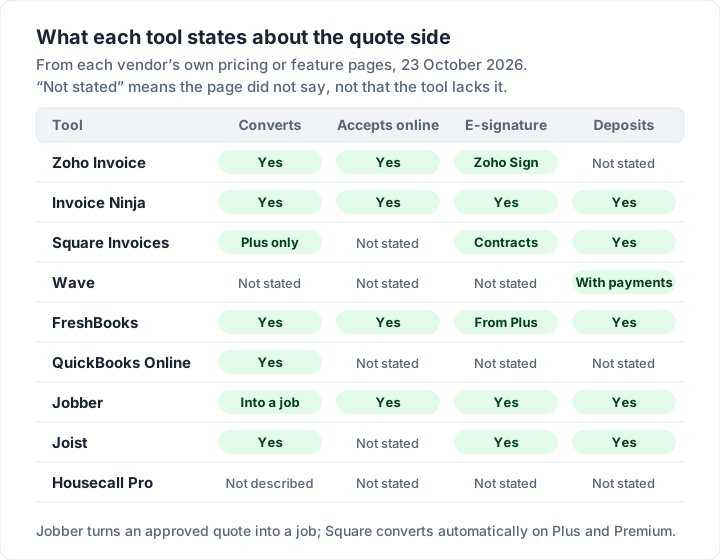
This is what each vendor’s own pages state about the quote side, as of 23 October 2026. “Not stated” means the page we read did not say, not that the tool lacks it; check it in a trial.
| Tool | Client accepts online | E-signature | Deposits | Card fee on an invoice |
|---|---|---|---|---|
| Zoho Invoice | Yes, accept, decline or negotiate in the customer portal | Through Zoho Sign | Not stated on the pages read | Through the gateway you connect |
| Invoice Ninja | Yes, approval in the client portal | Signature or approval checkbox | Yes, deposits and partial payments on Free | Through the gateway you connect |
| Square Invoices | Not stated for estimates | Contracts with e-signature on Free | Yes, on Free | 3.3% + 30¢ on Free; 2.9% + 30¢ on Plus |
| Wave | Not stated | Not stated | Through estimates, with online payments | 2.9% + $0.60 on Starter |
| FreshBooks | Yes, an Accept button in the email link | From Plus | Yes, every plan | 2.9% + $0.30 |
| QuickBooks Online | Not stated on the pricing page | Not stated | Not stated on the pricing page | 2.99% (rates “accurate as of 09/18/2026”) |
| Jobber | Yes, in its client hub | Signature approvals | Yes, after approval | 2.9% + 30¢ |
| Joist | Not stated | In-app digital signatures | Deposit and milestone payments | Not stated: “standard payment processing fees apply” |
| Housecall Pro | Not stated | Not stated | Not stated | From 2.59%; bank payments 1% |
The nine tools, one by one#
Zoho Invoice: free, with quotes that convert#
Quotes: Zoho’s quotes page says you can set expiry dates, let customers “accept, decline, or negotiate the terms of your quotes directly through a secure customer portal”, and “convert accepted quotes to invoices in a single click”, by hand or automatically. Signing quotes runs through Zoho Sign.
Price and limits: the pricing page calls it a “forever-free invoicing solution” and lists the limits: up to two users, a maximum of three projects and up to 500 invoices a year, with “Powered by Zoho Invoice” branding. No paid Zoho Invoice tier is listed.
Limits to know: 500 invoices a year, and a 3-project limit that matters if you bill time on many jobs at once. Our Zoho Invoice guide goes through every limit and the branding line.
Invoice Ninja: quotes, signatures and a portal#
Quotes: Invoice Ninja’s invoicing page lists “Approved Quotes Auto-Convert” (“Turn an approved quote into a payable invoice with one click — or allow automatic conversion on client approval”) and a client signature or approval checkbox before payment is accepted. The page does not say which plan each feature needs.
Price and limits: Free is $0 for up to 5 clients with unlimited invoicing, deposits and partial payments, recurring invoices and online payment gateways. Pro is $14 a month or $140 a year for unlimited clients, removes “Created by Invoice Ninja” and adds automatic payment reminders. Enterprise starts at $18 a month for 1 to 2 users.
Limits to know: up to 5 clients on Free, and automatic reminders listed on Pro. Our post on Invoice Ninja alternatives covers its licence and the self-hosted version.
Square Invoices: estimates free, conversion on Plus#
Quotes: Square’s invoices pricing page lists estimates (“Send by email or text or share a link”), contracts with e-signature and deposits on the Free plan. “Auto-convert estimates to invoices” (“Instantly convert accepted estimates to invoices”), multi-package estimates and milestone payment schedules are marked as not included on Free, and included on Plus and Premium.
Price and fees: Free is $0 a month, Plus $49 and Premium $149 a month per location. Online card payments on an invoice cost 3.3% + 30¢ on Free and 2.9% + 30¢ on Plus and Premium; ACH bank transfers 1% with a $1 minimum, capped at $10 on Plus and Premium.
Limits to know: automatic conversion is listed on Plus, not Free; our Square invoice guide covers converting an estimate yourself, from Square’s help article. On a $3,600.00 job paid online by card on Free, the fee is $3,600.00 × 3.3% + $0.30 = $119.10.
Wave: free estimates with the books#
Quotes: Wave’s pricing page lists “Create unlimited estimates, invoices, bills, and bookkeeping records” on Starter, at $0, and “Accept deposits through estimates” with online payments. It does not describe how an estimate becomes an invoice.
Price and limits: Pro is $19 a month or $190 a year and adds automatic late-payment reminders and lower card fees. On Starter, cards cost 2.9% + $0.60. Wave’s help centre says “users outside the US and Canada can no longer send invoices or reminders through Wave”, and that sending through Wave is part of online payments or Pro; otherwise you send invoices and estimates “through a PDF or link”.
Limits to know: sending through Wave is listed for the US and Canada, and conversion is not described on the page. Our Wave invoice guide has the detail.
FreshBooks: estimates on every plan, priced by clients#
Quotes: unlimited estimates on every plan. Per FreshBooks’ support article on estimates, the client gets an email with an accept button, and More Actions, Convert to Invoice turns it into an invoice; with UK English selected, estimates are called quotes. E-signatures, proposals and client retainers start on Plus. Deposits are on every plan.
Price and limits: Lite $23 a month for 5 billable clients, Plus $43 for 50, Premium $70 for unlimited, team members $11 a month each. The pricing FAQ says the limit counts both active and archived clients.
Limits to know: each plan is set by a client count, archived clients included, so count your clients before you choose. Our FreshBooks invoices guide explains the limit and works through 12 clients for a year.
QuickBooks Online: estimates inside your accounting#
Quotes: the pricing page says you can “see estimate status, and convert into invoices”, including on the Free plan. It does not mention deposits or progress invoicing for any plan, as of 23 October 2026.
Price and limits: Free lets you “Customize and send up to two invoices a month”, or unlimited if you qualify for and turn on QuickBooks Payments. Simple Start is $38 a month for 1 user, Essentials $85 for 3, Plus $140 for 5. Card payments on invoices cost 2.99% and ACH 1%, per Intuit’s rates page (“accurate as of 09/18/2026”).
Limits to know: it is accounting software, with the plan limits above. It suits you if your accountant already works in it; if you only quote and invoice, compare it with the invoice-focused tools here. Our QuickBooks invoice guide covers the invoicing side plan by plan.
Jobber: quotes that become jobs#
Quotes: Jobber’s quotes page says customers “approve, request changes, and pay deposits right in the client hub”, and that once a quote is approved, “Jobber converts it into a job with a single click, carrying over all the line items, pricing, and customer details.” The pricing page lists quoting “with customizable templates, signature approvals, and automated calendar reminders”.
Price and limits: Core is $49 a month for 1 user with no commitment, or $29 a month on its regular yearly price; extra users are $29 a month each. Automated quote and invoice follow-ups start on Connect, at $139 a month for 1 user. Card payments cost 2.9% + 30¢. The page was running an offer for new customers that ends 30 October 2026, left out here.
Limits to know: it is field-service software, and its plans include scheduling and a client hub. It suits you if you book and dispatch work; if you only quote and bill, compare the other tools here.
Joist: estimate-to-invoice for contractors#
Quotes: every Joist plan lists “Estimates to Invoices”, in-app digital signatures, and deposit and milestone payments, per its pricing page. Change orders start on Elite.
Price and limits: Basics is $10 a month for up to 5 documents a month; Pro is $17 a month for unlimited documents and clients and adds your logo; Elite is $32 a month. Yearly billing gives two months free. Joist says its free plan “is no longer available”; there is a 14-day trial. Since then Joist has added Run, with jobs and scheduling, at $100 a month (shown at an introductory $70 on 28 October 2026), plus an AI Receptionist add-on at $49 a month; our guide to Joist invoices has the current plans and fees.
Limits to know: Basics lists up to 5 documents a month, and your logo is listed from Pro; the page does not define whether a quote and its invoice count as two documents, so check. Card fees are not stated on the pricing page.
Housecall Pro: quotes inside a home-service platform#
Quotes: the pricing page lists “Estimates & invoicing: Send quick, accurate quotes, then invoice in seconds and let customers pay 24/7” on Basic, alongside scheduling, dispatch, online booking and a price book.
Price and limits: Basic is $79 a month, or $59 a month billed yearly, for 1 user. Essentials is $189 a month ($149 billed yearly) for 5 users. Card fees “start at 2.59%” and bank payments cost 1%.
Limits to know: Basic includes scheduling, dispatch and online booking as well as quotes, and is priced as a home-service system. Our guide to invoicing software for contractors compares it with Jobber by crew size. Jobber vs Housecall Pro puts the two side by side on invoicing and card fees.
Free quote and invoice software: what free includes#
Five of the nine have a $0 plan that sends quotes and invoices. Each free plan has a different limit, and the limit is what decides whether it works for you.
| Free plan | Quotes or estimates | Converts to invoice | The limit to know |
|---|---|---|---|
| Zoho Invoice | Yes, with portal acceptance | Yes | 500 invoices a year, 2 users, 3 projects, Zoho branding |
| Invoice Ninja Free | Yes | Yes (plan not stated) | 5 clients; no automatic reminders |
| Square Free | Yes, plus contracts with e-signature | Not automatically; automatic on Plus | Card fees of 3.3% + 30¢ online |
| Wave Starter | Yes, unlimited | Not stated on the pricing page | US and Canada only; sending through Wave needs online payments or Pro |
| QuickBooks Online Free | Yes | Yes | 2 invoices a month without QuickBooks Payments |
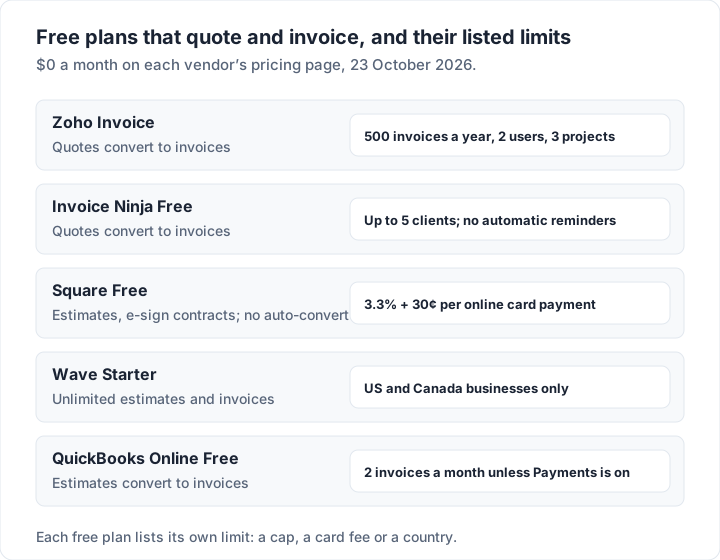
Several of these charge a listed fee when your client pays by card. If your clients pay by card anyway, a payment-led tool such as Square, or a free tool connected to your own gateway, gives you quotes as part of the deal. For more free options, including ones without quotes, see our round-up of the best free invoicing software.
What quote and invoice software costs over two years#
A two-year total is easier to compare than a monthly price. Here is each tool’s cheapest plan that sends both quotes and invoices, for 1 user, over 24 months at regular prices as of 23 October 2026. These are subscription costs only; card fees come on top.
| Tool and plan | How it is charged | Two-year cost |
|---|---|---|
| Housecall Pro Basic, monthly | $79 a month × 24 | $1,896 |
| Housecall Pro Basic, billed yearly | $59 a month × 24 | $1,416 |
| Jobber Core, monthly | $49 a month × 24 | $1,176 |
| Square Plus (automatic conversion) | $49 a month × 24 | $1,176 |
| QuickBooks Online Simple Start | $38 a month × 24 | $912 |
| Jobber Core, billed yearly (regular price) | $29 a month × 24 | $696 |
| FreshBooks Lite (5 clients) | $23 a month × 24 | $552 |
| Joist Pro, monthly | $17 a month × 24 | $408 |
| Wave Pro, billed yearly | $190 a year × 2 | $380 |
| Invoice Ninja Pro, billed yearly | $140 a year × 2 | $280 |
| Joist Basics, monthly (5 documents a month) | $10 a month × 24 | $240 |
| Zoho Invoice, Square Free, Wave Starter, Invoice Ninja Free, QuickBooks Free | $0 | $0, within the limits above |
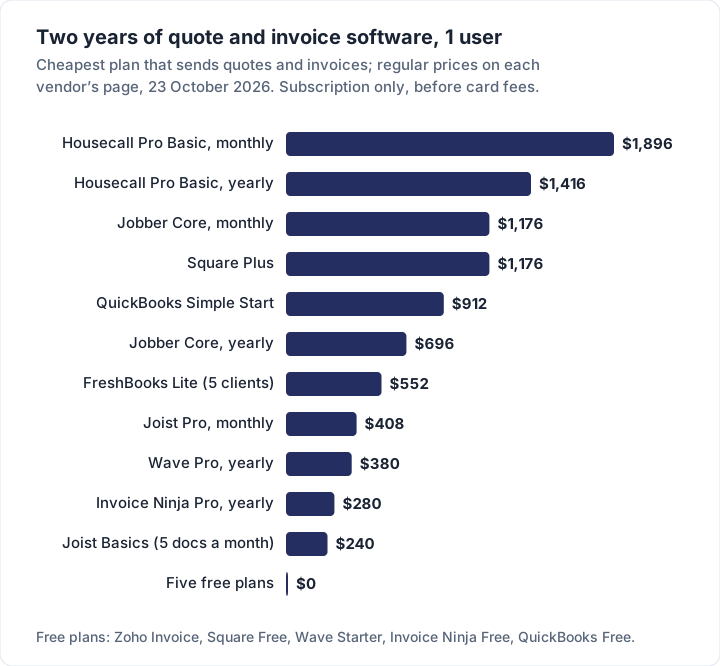
Read it fairly. Housecall Pro and Jobber cost the most because they run your whole working day. QuickBooks and FreshBooks are your books. The free plans cost nothing a month but carry a cap, a card fee or a country limit.
If you quote rarely: a quote document plus an invoicing app#
Not everyone needs quote software. If you send a handful of quotes a year, for example a consultant scoping one project a quarter, a quote written in a document and an invoicing app for the billing can be enough. What matters is that the terms are written down before the work starts. One person in a public design discussion we collected while researching invoicing (the people we quote are not Charming customers) put it this way:
The pro move was before the project: have a written agreement that includes scope, deliverables and payment schedule, even for family and friends.
Here is how to run quotes from a document without losing track:
- Write the quote in a document (Word or Google Docs, or our free estimate template in Word or Excel, which lays out the scope, valid-until date, deposit and acceptance lines): your details, the client, a quote number (Q-0042), the date, an expiry date, the lines and prices, what is not included, and the deposit you will ask for. Our quote and invoice template post shows that estimate file filled in and carried into the final invoice.
- Get a written yes. An email reply that says “accepted” is a record. For larger jobs, a signed copy is better.
- Invoice the deposit as its own invoice that names the quote (“Deposit, 30% of quote Q-0042”).
- Send the final invoice with the quote’s lines, credit the deposit and put the quote number in the notes or reference field, so the client can match the two.
- Keep both together. File the quote PDF with the client’s invoices, so you can answer “what did we agree?” in one place.
The cost is the retyping in step 4 and a little discipline. The saving is a subscription you do not need. For a filled example of the invoice half, see our consulting invoice template. Once you are quoting every week, the tools above pay for themselves in time.
Where Charming fits, and where it does not#
To be plain: the Charming Invoices app does not do quotes or estimates. The free estimate template above is a separate file you fill in yourself; in the app there is no quote document, no acceptance link, no e-signature and no quote-to-invoice conversion. If quoting is a daily part of your work, choose one of the nine tools above, or a phone-first app such as Invoice2go, which lists unlimited estimates on every plan (see our Invoice2go review).
Where Charming can help is the invoice half of the “quote in a document” route, checked against our code today:
- Deposits are built in. Bill the deposit on its own invoice, then enter it as a deposit on the final invoice: Charming credits it after tax, so the illustrative job above shows $3,600.00, less the $1,080.00 deposit, with $2,520.00 due.
- Unlimited invoices and clients on the free plan, for 1 business, with 60 templates in your logo, colours and fonts, a PO number field, notes for the quote reference, and numbering that assigns itself.
- Progress billing and retainage for staged jobs, on every plan.
- A private link and PDF your client opens without an account, with a button to your own payment link if you have one. Charming does not email invoices or send reminders: you download the PDF or copy the link and send it however you like.
- Paid plans (Individual $29 once, Team $79 once, Pro $12 a month or $99 a year) add recurring invoices as drafts you review, saved line items so you retype less, and AI line items from one sentence. See the pricing page.
The catches: no quotes or estimates in the app; no card payments through Charming, so you record payments yourself and mark the invoice paid; no time tracking, accounting or integrations; no app-store app; free invoices carry a small “Sent with Charming Invoices” line; and lifetime plans are final sale, with no refunds. If you quote rarely and bill by transfer, you can create a free invoice for your next deposit and see whether that pairing works for you. If you also need a timer or a client pipeline, time tracking and invoicing software and CRM with invoicing compare tools built around each.
Quote and invoice software questions#
Can I turn a quote into an invoice automatically?#
Yes, in most of these tools. Zoho Invoice and Invoice Ninja can convert an accepted quote automatically or with one click; Square does it automatically on Plus and Premium; FreshBooks, QuickBooks Online and Joist convert estimates to invoices; Jobber turns an approved quote into a job. Check which plan includes it before you buy.
Is there free quote and invoice software?#
Yes. Zoho Invoice, Invoice Ninja Free, Square Free, Wave Starter (US and Canada) and QuickBooks Online Free all send quotes or estimates and invoices at $0 a month, as of 23 October 2026. Each has a limit: invoices a year, clients, card fees, country or invoices a month.
What is the difference between a quote and an estimate in this software?#
Mostly the label. FreshBooks calls them estimates and renames them quotes when your account uses UK English; Zoho and Invoice Ninja say quotes; Square, Wave and Joist say estimates. The difference in how clients read them is covered in invoice vs estimate vs quote.
Do I need e-signatures on quotes?#
For small jobs, a written acceptance by email or a click in a client portal gives you a record of the yes. For larger jobs, many businesses prefer a signature as a clearer record of what was agreed; if a contract question matters, ask a lawyer where you work. Invoice Ninja, Square (on contracts), FreshBooks from Plus, Jobber and Joist list signatures.
Which quote and invoice app is best for contractors?#
Joist for a solo contractor who quotes on site, Jobber or Housecall Pro for crews with a schedule, and Square for card payments on the doorstep. Our guide to invoicing software for contractors sorts them by job type.
Can I send quotes from Charming Invoices?#
No. Charming makes invoices only. Write the quote in a document or use one of the tools above, then invoice the deposit and the balance.
The short version#
If you quote often, pick a tool that converts an accepted quote into an invoice: Zoho Invoice or Invoice Ninja for free, Joist for solo trades, Jobber or Housecall Pro for crews, FreshBooks, QuickBooks or Wave if you want the books too. Check which plan converts, whether clients can accept online and how the price grows. If you quote a few times a year, a quote document and a separate invoicing app is a fair, cheaper route.
Sources, all read 23 October 2026: Zoho Invoice pricing and quotes; Invoice Ninja pricing and invoicing and quotes; Square invoices pricing; Wave pricing and Wave help centre; FreshBooks pricing and FreshBooks estimates help; QuickBooks pricing and QuickBooks Payments rates; Jobber pricing and Jobber quotes; Joist pricing; Housecall Pro pricing. Prices change: check each page before you buy.
Free downloads
No sign-up and no email address. More on the free templates page.
- Download .docx: Estimate or quote template for Word
Estimate or quote template for Word
Word .docxThe estimate as a Word document: scope of work, prices, deposit and acceptance lines.
- Download .xlsx: Estimate or quote template for Excel
Estimate or quote template for Excel
Excel .xlsxPrice a job before you start: scope, line items, a valid-until date and an optional deposit.