Quote and invoice template: free estimate and invoice files

Nnabuike Okoroafor ·
On this page · 10 sections
Many jobs need two documents, not one. The quote (or estimate) goes out before the work and says what you expect to do and what it should cost. The invoice goes out after the work and asks for the money. A quote and invoice template pair keeps the two in step: the same layout, the same line items, the same numbers, so the client can lay one beside the other and see exactly what changed.
This page gives you that pair as free files, shows a filled-in estimate with its arithmetic, and then turns it into the final invoice line by line, including the deposit.
Quote and invoice template in short#
- A pair of files, one job. An estimate you send first, and an invoice you send when the work is done. Both are free, with no sign-up.
- The estimate file is the quote file. Its title says ESTIMATE; type QUOTE over it if that is the word you and your client use.
- The invoice repeats the estimate, with the actual quantities, any agreed extras, a new number and new dates, and the deposit taken off.
- The Excel files do the maths. The Word files look the same but you type every total yourself.
- Charming Invoices makes only the second document. It has no quotes or estimates; it can number and total the invoice once the work is agreed, and you download the PDF and send it however you like.
Download the quote and invoice templates#
All of these files are on the free downloads page. This table shows what each one does, so you can pick a pair:
| File | Format | What it does | Use it for |
|---|---|---|---|
| Estimate or quote template for Excel | Excel | 15 lines that calculate, one tax rate, a valid-until date, an optional deposit and the balance on completion | The quote, if you want the totals worked out |
| Estimate or quote template for Word | Word | The same layout with 8 lines; you fill in the totals | The quote, if you work in Word or Google Docs |
| Invoice template for Excel | Excel | 15 lines that calculate, a due date from your payment terms, Amount paid and Balance due | The invoice that follows an Excel estimate |
| Service invoice template for Word | Word | A description-of-work box, then labour and materials, ending “Less deposit paid” and “Balance due” | The invoice that follows a Word estimate |
There is no Excel copy of the Word service layout. The Word file's note points you to the general one instead: “The Excel invoice template (invoice-template.xlsx) does the maths for you.” It has the same From, Bill to and totals blocks, without the description-of-work box.
We built these files and checked their formulas by script; we have not opened them in Excel, Word or Google Sheets. Type in a test job and check the totals before you send a real one, as the files' own instructions say.
What the estimate template includes#
The estimate is laid out so the invoice can copy it later. Reading the Excel file by script, these are its parts, top to bottom:
- Title and logo box. ESTIMATE in large type, a cell you can type over, and a dashed box for your logo.
- From and Prepared for. Your business details, then the client's.
- Estimate details. Estimate number (EST-0001 to start), estimate date, “Valid for (days)” set to 30, a “Valid until” date the sheet works out, and a reference.
- Scope of work. A box for “What the job covers, where and when.” The Word file splits it into Job / project, Site address, Timing and Work included.
- Line items. Description, Quantity, Rate and Amount. Each amount is quantity times rate, rounded to the cent.
- Assumptions and exclusions. What the price depends on (access, materials, working hours) and what it leaves out.
- Totals. Subtotal, a fixed discount, one tax rate, the tax and the estimate total.
- Deposit to start. A percentage or a fixed amount, and the balance on completion.
- Acceptance. Lines for the client's name, signature and date.
A red check line under the totals flags five common slips, covered in the mistakes section below.
How to fill in the estimate#
Work down the sheet in this order and the invoice later becomes a copy-and-adjust job:
- Number it. Give every estimate its own number (EST-0001, EST-0002 and so on) in a separate series from your invoices, and save a copy per estimate.
- Date it and set the validity. Type the estimate date. “Valid until” is the date plus the days in “Valid for”, so change the 30 to suit how fast your prices and your calendar move.
- Write the scope as the client would describe the job. Where, what, and in which stages. Name anything the client provides, such as paint they have already bought.
- One line per part of the job. Labour in hours or by the job, each material, any call-out or disposal charge. Use the wording you will want on the invoice.
- Fill in the assumptions and exclusions. “Walls assumed sound; making good plaster is not included” can save a longer conversation later.
- Add tax if you charge it. Type the rate as a plain number: 8.25 for 8.25%.
- Ask for a deposit, or leave it blank. Type a percentage or an amount, not both.
- Send it as a PDF and ask the client to fill in the acceptance lines, or to reply in writing that they accept.
What an accepted estimate commits either of you to is a separate question. The file itself says it plainly: “What an accepted estimate commits either of you to depends on what you agreed and where you work. This file does not decide that.” Our guide to estimates, quotes and invoices covers that question with its sources.
Worked example: Copperbeck Joinery's estimate#
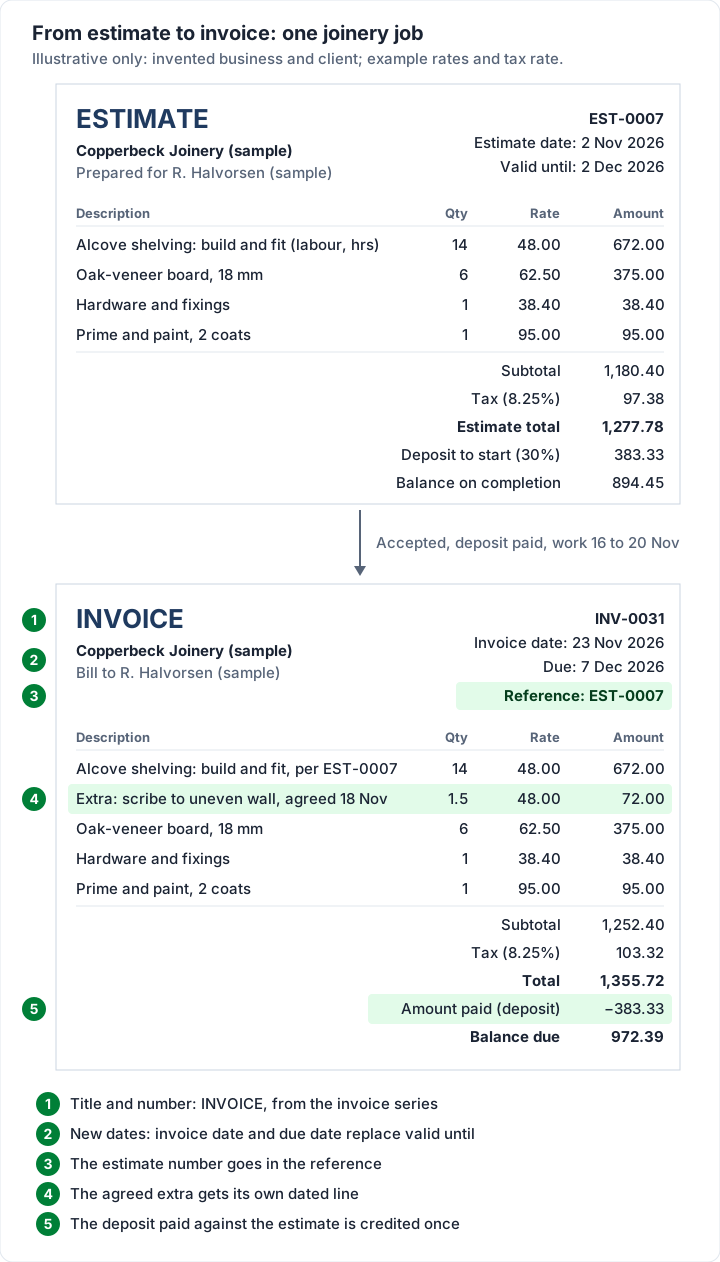
Here is the estimate filled in for a small joinery job. Copperbeck Joinery and its client, R. Halvorsen, are invented, and the rates and the 8.25% tax rate are examples, not market or real tax rates.
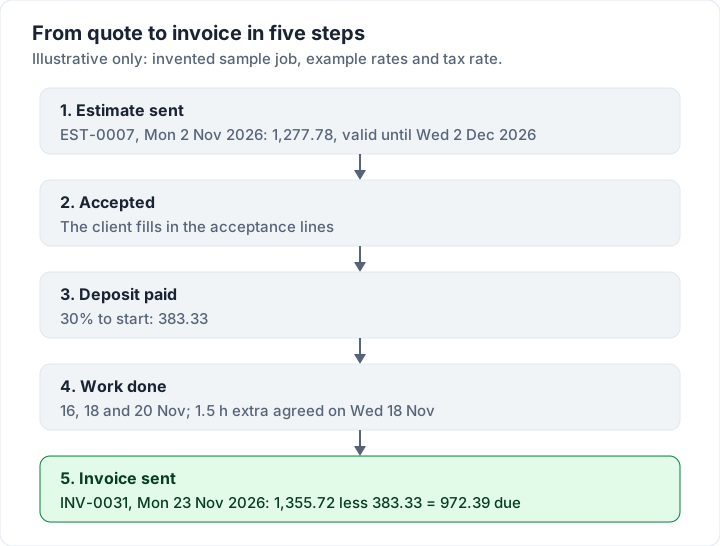
- Estimate EST-0007, dated Monday 2 November 2026, valid for 30 days, so valid until Wednesday 2 December 2026
- Scope: build and fit alcove shelving in 2 alcoves, then prime and paint
- Assumptions: clear access to both alcoves; walls assumed straight and sound
| Description | Qty | Rate | Amount |
|---|---|---|---|
| Alcove shelving: build and fit, 2 alcoves (labour, hours) | 14 | 48.00 | 672.00 |
| Oak-veneer board, 18 mm, 2440 x 1220 | 6 | 62.50 | 375.00 |
| Hardware and fixings | 1 | 38.40 | 38.40 |
| Prime and paint, 2 coats | 1 | 95.00 | 95.00 |
| Subtotal | 1,180.40 | ||
| Tax (8.25%, example rate) | 97.38 | ||
| Estimate total | 1,277.78 | ||
| Deposit to start (30%) | 383.33 | ||
| Balance on completion | 894.45 |
The arithmetic: 14 × 48.00 = 672.00 and 6 × 62.50 = 375.00, so the subtotal is 672.00 + 375.00 + 38.40 + 95.00 = 1,180.40. Tax is 1,180.40 × 8.25% = 97.383, rounded to 97.38. The deposit is 30% of 1,277.78, which is 383.334, rounded to 383.33, and 1,277.78 − 383.33 leaves 894.45 for completion.
R. Halvorsen signs the acceptance lines and pays the 383.33 deposit. The work is booked for Monday 16, Wednesday 18 and Friday 20 November 2026.
Then the job changes, as jobs do. On Wednesday 18 November one wall turns out to be uneven, and the shelves have to be scribed to it: 1.5 extra hours. Copperbeck tells the client before doing the work, and the client agrees that day. The extra goes on the invoice as its own line, dated, rather than disappearing into the labour line.
Whether a client accepts a change like that can depend on how the estimate was written. One commenter in a public freelance forum (not a Charming customer, like everyone quoted on this page), replying to a thread about a client who had gone quiet after the work was sent, put it this way:
I think at the end of the day is that it depends if you gave them an estimate and how far off you were from the estimate.
A written estimate, a valid-until date and a change agreed on a named day give both sides the same record to check against.
Turning the accepted quote into an invoice#
When the work is done, the invoice starts as a copy of the estimate. These are the things that change, and nothing else should:
- The title and the number. ESTIMATE becomes INVOICE, and the invoice takes the next number in your invoice series (INV-0031 here), not the estimate's number.
- The dates. An invoice date and a due date replace the estimate date and the valid-until date.
- The reference. The estimate number goes in the invoice's reference field, so the two match up. The estimate file's own instructions say the same: “When the work is done, quote the estimate number in the invoice's reference so the two match up.”
- Actual quantities. Estimated hours become the hours worked. Here the 14 hours held.
- Agreed extras, on their own lines. With the date they were agreed.
- The deposit, taken off. In the Excel invoice template, type the deposit into Amount paid and Balance due works itself out. In the Word service template, fill in “Less deposit paid”.
Here is Copperbeck's final invoice, INV-0031, dated Monday 23 November 2026 with 14-day terms, so due Monday 7 December 2026, reference EST-0007:
| Description | Qty | Rate | Amount |
|---|---|---|---|
| Alcove shelving: build and fit, 2 alcoves (labour), per EST-0007 | 14 | 48.00 | 672.00 |
| Extra: scribe to uneven wall, agreed 18 Nov | 1.5 | 48.00 | 72.00 |
| Oak-veneer board, 18 mm | 6 | 62.50 | 375.00 |
| Hardware and fixings | 1 | 38.40 | 38.40 |
| Prime and paint, 2 coats | 1 | 95.00 | 95.00 |
| Subtotal | 1,252.40 | ||
| Tax (8.25%, example rate) | 103.32 | ||
| Total | 1,355.72 | ||
| Amount paid (deposit, EST-0007) | 383.33 | ||
| Balance due | 972.39 |
The extra line is 1.5 × 48.00 = 72.00, so the subtotal rises to 1,252.40. Tax is 1,252.40 × 8.25% = 103.323, rounded to 103.32, for a total of 1,355.72. Take off the 383.33 deposit and 972.39 is due.
The client can check that against the estimate in one step. The estimate said 894.45 on completion; the invoice asks for 972.39. The difference, 77.94, is the agreed extra of 72.00 plus 5.94 of tax on it. If you write that in one sentence in the invoice notes, nobody has to work it out.
For the order of steps between yes and the final invoice (getting acceptance in writing, logging changes, warning the client before an estimated part runs over), see from accepted quote to invoice without surprises. If you want the deposit as its own invoice first, rather than a credit at the end, how deposit invoices work compares the two ways.
Mistakes the estimate file catches, and two it cannot#
The red check line under the Excel totals watches for five slips. Each one prints its own message:
- Tax typed as a fraction. “Check the tax rate: type 20 for 20%, not 0.2 or 20%.” Excel stores 20% and 0.2 the same way, so 0.0825 would charge 0.0825%, not 8.25%. The tax cell also refuses those entries when you type them.
- Deposit typed as a fraction. “Check the deposit: type 25 for 25%, not 0.25 or 25%.”
- Both deposit cells filled. “Fill in the deposit as a percentage or an amount, not both: the amount is used.”
- A discount bigger than the subtotal. The total stops at 0 rather than going negative, and the line says so.
- A deposit bigger than the total. It stops at the total.
Two mistakes no formula can see:
- A missing valid-until date. The sheet only works it out once you type the estimate date. An estimate with no date has no expiry, and a client can come back months later expecting the old price.
- A scope with no exclusions. “Fit shelving” invites the question of who fills the old screw holes. The assumptions box is where that answer goes, before anyone asks.
The Word estimate has no checks at all, because Word does not calculate. Add up its lines twice, or price the job in the Excel file and copy the figures across.
Quote template vs invoice template: what is different#
The two templates share a layout on purpose. The differences are few, and they are the point:
| Quote or estimate template | Invoice template | |
|---|---|---|
| Title and number | ESTIMATE or QUOTE, EST-0007 | INVOICE, INV-0031 |
| Dates | Estimate date and valid until | Invoice date and due date |
| Amounts | What the work should cost | What the work did cost |
| Deposit | Asks for it (“Deposit to start”) | Takes it off (Amount paid or “Less deposit paid”) |
| Client action | Accept and sign | Pay by the due date |
So can one template serve for both? You can retitle a document, but the fields above are different, and an invoice that still says “Valid until” can confuse the person paying it. Keep them as separate documents. For the full comparison of the documents themselves, including bids and proposals, see invoice vs estimate vs quote. If you are new to invoices altogether, how to make an invoice starts from zero.
Making the invoice in Charming#
Charming Invoices does not make quotes or estimates. You cannot create, send or convert one in the app, so the quote stays in the estimate file. Once the work is agreed, Charming does the invoice half of this page, on every plan including Free. Each of these was checked in the code on 28 October 2026:
- The estimate number on the invoice. The optional PO number field prints in the header. In the Template Studio you can rename its label, for example to “Estimate ref.”, and type EST-0007. The new label then shows on every invoice from that business, not just this one.
- The deposit taken off. Add a deposit received on the final invoice and it prints as a “Deposit received” line with the balance below it. You type the amount; Charming does not take the deposit or see it arrive.
- The same lines, ready to reuse. Units on each line, and sections such as “As estimated” and “Agreed extras” with their own subtotals once you switch on “Group lines by section” in the Template Studio. Quantities take up to 3 decimals, so 1.5 hours goes in as it is.
- The arithmetic done once, to the cent. Each line is rounded once, then one tax rate applies to the invoice, as in the Excel files.
The other limits, plainly: no card payments (your bank details or payment link print on the invoice and you mark it paid yourself), payment tracking is manual, and invoices on the free plan carry a small “Sent with Charming Invoices” line at the bottom. Paid plans hide it by default.
If you quote often and want the quote converted into an invoice inside one app, quote and invoice software compares nine tools that do both. If you quote now and then, the estimate file plus a free Charming account covers both halves. Create a free invoice and type in INV-0031 to see the deposit line work.
For trade versions of the invoice half, see the contractor invoice template for staged building work and the job invoice template for one-off jobs. The Excel invoice template guide and the Word invoice template guide walk through the invoice files field by field.
Quote and invoice template questions#
Is a quote the same as an invoice?#
No. A quote says what the work should cost before it starts; an invoice asks for payment for work done. In a public web design forum, one commenter replied to a poster whose prospective client had asked for an invoice and then gone quiet:
did you mean quotation? invoice means work has been rendered or an invoice to kickstart downpayment and they even know the fees involved.
Mix-ups like that are why the title on each document matters: ESTIMATE or QUOTE on the first, INVOICE on the second. A proforma invoice sits in between and is a different document again.
Can I use one template for both?#
You can retitle the estimate, but its fields (valid until, deposit to start, acceptance lines) do not belong on an invoice, and an invoice needs a due date and payment details the estimate leaves out. Two matching files are less work than one file you rewrite each time.
Does the estimate file work in Google Sheets?#
Its instructions cover it: upload the file to Google Drive, open it in Google Sheets, then save it as a Google Sheets file. The file also warns that Google can alter some features when it converts an Office file, so type in a test estimate and check the totals before you send a real one.
How long should a quote be valid?#
The file starts at 30 days, and that is a setting, not a standard. Shorten it if your material prices move quickly or your calendar fills up; lengthen it for a client who needs time to get approval. Whatever you choose, print the date, so nobody has to count.
Do I put the quote number on the invoice?#
Yes, in the reference or PO field. It lets the client, and their bookkeeper, match the invoice to the estimate they accepted without asking you.
Free downloads
No sign-up and no email address. More on the free templates page.
- Download .xlsx: Estimate or quote template for Excel
Estimate or quote template for Excel
Excel .xlsxPrice a job before you start: scope, line items, a valid-until date and an optional deposit.
- Download .docx: Estimate or quote template for Word
Estimate or quote template for Word
Word .docxThe estimate as a Word document: scope of work, prices, deposit and acceptance lines.
- Download .xlsx: Invoice template for Excel
Invoice template for Excel
Excel .xlsxThe general-purpose invoice: products, services or a mix, priced by quantity and rate.
- Download .docx: Service invoice template for Word
Service invoice template for Word
Word .docxFor a job: what you did, where and when, then labour and materials.