Invoice templates for contractors: free Excel and Word

Nnabuike Okoroafor ·
On this page · 10 sections
The job is finished, the client wants the invoice tonight, and the file you used last time has someone else's name in the header. You need invoice templates for contractors that already have room for the job address, the labour, the materials and the deposit the client paid up front, so all you do is type the numbers.
This page gives you the free downloads that fit construction and trade work, a construction invoice example filled in with real arithmetic, and a plain answer to when a one-page template stops being enough. Everything here is for contractors and builders who bill clients for jobs. If you are an independent contractor billing a company for your time (the 1099 sense of the word), the independent contractor invoice template is the page for you.
This is general information, not legal or tax advice. Tax on labour and materials, retainage and lien paperwork are set by contracts and by state or local rules, so check with your accountant, a construction lawyer or the agency for your area.
Free contractor invoice templates: which file to download#
The free templates page has Excel and Word invoice templates. No sign-up, no email address. Of the general invoice files below, the first two suit most contractors; the others are there for simpler jobs and hourly work.
| File | What it is | Best for |
|---|---|---|
| service-invoice-template.docx (Word) | A “Description of work” box for the job, site address, dates and work performed; a 6-row “Labour and materials” table; a “Less deposit paid” line before the balance due | A finished job with a deposit, billed once |
| invoice-template.xlsx (Excel) | 15 line items that calculate: amount, subtotal, a fixed discount, one tax rate, total, amount paid, balance due and due date by formula | Longer materials lists, or anyone who would rather not add up by hand |
| hourly-invoice-template.xlsx (Excel) | Date, description of work, hours, hourly rate; a Total hours line under the hours | Time-and-materials days, call-outs, small repairs billed by the hour |
| invoice-template.docx (Word) | A general 10-row table with Description, Qty, Rate, Amount | Simple jobs with no job box or deposit |
The Word files do not calculate: you type every amount and total yourself. The Excel files do the arithmetic, which is the main reason to choose them. Both formats are blank starting points that do not connect to any app.
Two more free files on the same page sit either side of the invoice. For the price before the job, there is an estimate template for Excel and Word; quote and invoice template shows one estimate filled in and then turned into the final invoice, deposit included. For travel to and from sites, the mileage log (Excel) records each trip and the billable miles; it has no rate filled in, so you type the rate you agreed with the client.
If you work in one trade, there is also a trade page per trade, each with a filled sample and a blank print-ready PDF (more on those further down). And if you would rather not keep files at all, Charming Invoices has 60 invoice templates in the app, including a Contractor layout and a Progress Billing layout, on the free plan; the last section of this page covers what they do and what they do not.
What a contractor invoice template should include#
A contractor invoice carries more than a freelance one: the job, the site, the split between your time and the materials, and any money already paid or held back. What a contractor invoice should show explains each part and why it matters. Here, the question is narrower: where each one goes in the free files.
| Field | Why the client needs it | Word service template | Excel templates |
|---|---|---|---|
| Invoice number and dates | To file and pay it on time | Invoice details block | Invoice details; due date by formula |
| Job and site address | The billing address is often not the job | Description of work box | The first line description, or Notes |
| Dates of work | To check the period billed | Date(s) of work | In the line, or the Date column (hourly file) |
| Quote, contract or PO number | To match the invoice to what was approved | Reference / PO | Reference / PO number |
| Labour lines with hours and rate | To check time against the quote | Item lines starting “Labour:” | Lines with quantity as hours |
| Materials lines with quantities | To see what they paid for | Item lines starting “Materials:” | Lines with a quantity and unit price |
| Deposit already paid | To see the full price and the credit | Less deposit paid | Amount paid |
| Payment details | To pay without phoning you | Payment details block | Payment details block |
Two things are missing from all of these invoice files: section headings with their own subtotals (Labour, then Materials), and a retainage line. The workarounds and the limits are below. For the PO side of things, how to put a PO number on an invoice covers what accounts teams look for.
Construction invoice example: a deck replacement with a deposit#
Here is the Word service template filled in for an invented job: a rear deck replaced over two weeks, with a deposit paid before work began. The business, client, address, quote number and every price are illustrative, not real rates. No tax is shown, because whether labour or materials are taxed depends on where the work is done (see the tax section below).
- Invoice: INV-0118, dated Friday 16 October 2026, due Friday 30 October 2026 (14 days)
- From: Northfield Deck & Fence (sample business)
- To: Dana Whitfield (sample client)
- Reference / PO: Quote Q-0457
- Description of work: Rear deck replacement, 12 x 20 ft, at 41 Sample Lane, 5 to 14 October 2026
| Item | Qty / hours | Rate | Amount |
|---|---|---|---|
| Labour: remove and dispose of old deck | 14 | 60.00 | 840.00 |
| Labour: framing, decking and railings | 46 | 60.00 | 2,760.00 |
| Materials: framing lumber and hangers | 1 | 1,385.00 | 1,385.00 |
| Materials: composite boards, 16 ft | 52 | 48.50 | 2,522.00 |
| Materials: aluminium railing, 6 ft | 7 | 129.00 | 903.00 |
| Dumpster hire and disposal | 1 | 395.00 | 395.00 |
| Subtotal | 8,805.00 | ||
| Total | 8,805.00 | ||
| Less deposit paid (received 28 September 2026) | 2,600.00 | ||
| Balance due | 6,205.00 |
Check it the way the client will. Labour is 14 + 46 = 60 hours at 60.00, which is 3,600.00. Materials are 1,385.00 + 2,522.00 + 903.00 = 4,810.00. Add the 395.00 for disposal and the subtotal is 8,805.00. With no tax and no discount, the total is the same, and taking off the 2,600.00 deposit leaves 6,205.00.
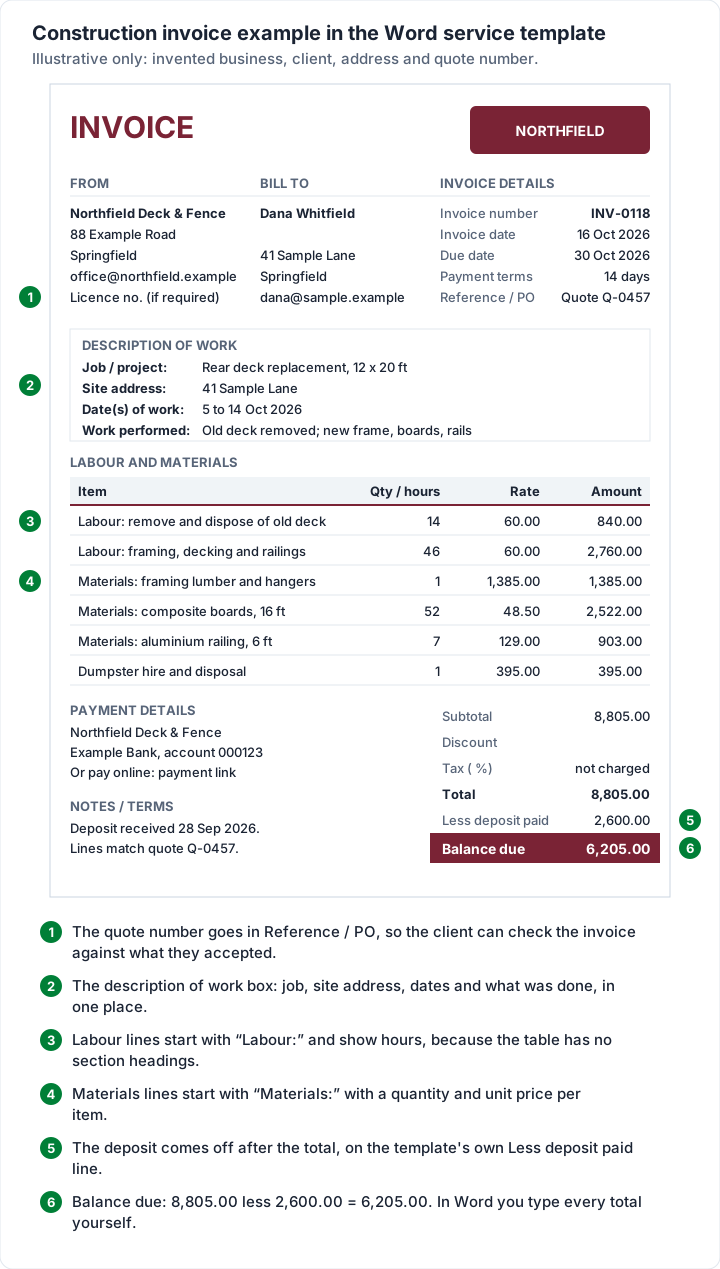
Three choices in this example are worth copying:
- The “Labour:” and “Materials:” prefixes. The Word table is one list with no section headings, so the prefix does the job of a heading. A client can add up the labour lines against the quote in seconds.
- The quote number in Reference / PO. The client accepted quote Q-0457; the invoice points straight back to it. If a commercial client issued a purchase order, its number goes there instead.
- The deposit after the total, with its date. The client sees the full value of the job first, then the money they already paid. How a deposit invoice works covers asking for the deposit in the first place.
The service template has six rows. A bigger job needs more: click in the last cell of the last row and press Tab, and Word adds a row. For a full walk-through of the Word file itself (logo, PDF export, Google Docs), see the Word invoice template guide.
The same job in the Excel contractor invoice template#
Typed into invoice-template.xlsx instead, the deck job takes the same six lines, and the file works out the rest. We set out the example against the file's own formulas, cell by cell:
- Amount on each line is quantity times rate, rounded to the cent: 52 × 48.50 = 2,522.00.
- Subtotal adds the Amount column: 8,805.00.
- Tax rate (%) is left blank, so Tax is 0.00 and Total is 8,805.00.
- The deposit goes in Amount paid (the Excel files call it that rather than “deposit”): 2,600.00.
- Balance due is total minus amount paid: 6,205.00.
- Due date is the invoice date plus the payment terms in days: 16 October 2026 plus 14 is 30 October 2026.
- Reference / PO number takes Quote Q-0457.
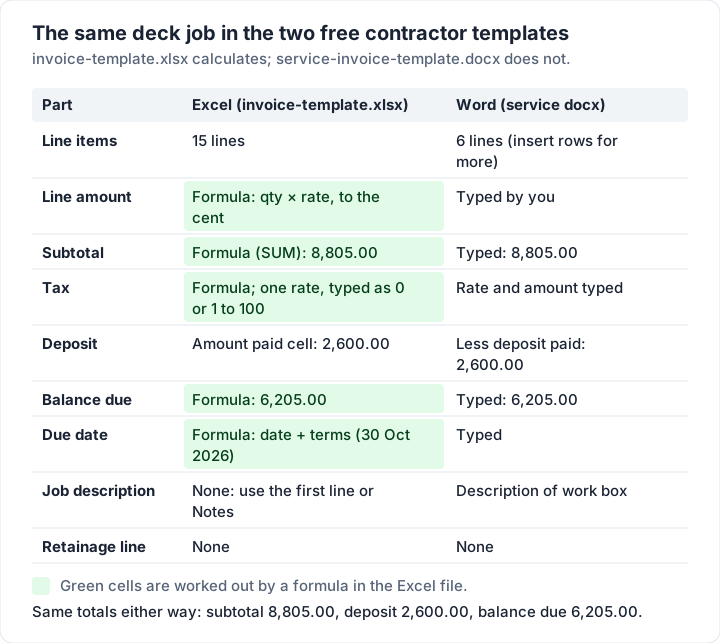
The Excel file has no description of work box, so put the job and site address in the first line or in Notes / terms, as in “Rear deck replacement at 41 Sample Lane, 5 to 14 Oct 2026”. Its 15 lines are also more room for a long materials list.
Two cells refuse some entries on purpose. The tax rate accepts 0, or a plain number from 1 to 100 (type 8.25 for 8.25%, not 8.25% or 0.0825), and a red note appears under the totals if a fraction gets in anyway. A discount larger than the subtotal stops the total at 0, with a red note saying so. The Excel invoice template guide explains every formula in the file.
Excel or Word: which contractor template to use#
Both work. The choice comes down to whether you want the arithmetic done for you, and whether the job needs a description box.
| Question | Excel (invoice-template.xlsx) | Word (service-invoice-template.docx) |
|---|---|---|
| Does it calculate? | Yes: amounts, subtotal, tax, total, balance due, due date | No: you type every amount and total |
| How many lines? | 15 | 6 (add rows yourself) |
| Job and site box? | No: use a line or Notes | Yes: job, site address, dates, work performed |
| Deposit line? | Amount paid | Less deposit paid |
| Tax | One rate for the whole invoice | Rate and amount typed by hand |
| Retainage line? | No | No |
Choose Excel when the materials list is long, when you bill by the hour (the hourly file adds a Date column and Total hours), or when a wrong sum would embarrass you. Choose Word when the client cares most about what was done, where and when, and the job has six lines or fewer.
Google Docs and Google Sheets. There are no Google-hosted copies of these files, and we have not tested the conversion. You can upload a file to Google Drive and open it in Docs or Sheets, but the files were made for Excel and Word, so type in a test invoice and check the totals before you send a real one. The Google Docs invoice template guide has more on working in Google's apps.
Paper. If you would rather write invoices by hand on site, the blank invoice template guide covers printable blanks.
Whichever you pick, send the client a PDF, not the editable file, and keep a copy of every invoice as you sent it.
Separating labour and materials on the invoice#
Splitting the lines is not only about clarity. In some places, how you state labour and materials on the contract and invoice affects how sales tax applies.
Texas is one example. The Texas Comptroller's guide to real property repair and remodeling (publication 94-116, revised March 2007, quoted as of 23 October 2026) describes work done under “a lump-sum contract (one price for the entire job)” or “a separated contract (you charge separately for materials and labor)”, and says: “Labor to repair, remodel, or restore residential real property is not taxable.” How tax applies under each contract type is set out on that page, and other states treat the same work differently.
So before you fill in the tax cell:
- Find your own state's rules. USA.gov notes that “Most states and municipalities have a sales tax and charge different percentages on different goods, or not at all for other items” (as of 23 October 2026), and its state taxes page points to each state's tax agency.
- Know the limit of the templates. Both the Excel files and the in-app invoices apply one tax rate to the whole invoice. If only the materials are taxable where you work, a single rate on every line will not fit; ask your accountant how to show it.
- Keep the split consistent with the contract. If the contract quoted labour and materials separately, the invoice should too.
Check with your accountant or your state's tax agency before you set a rate.
Templates for each trade, with filled samples#
For one trade's version of the same job, there are 12 trade template pages on the invoice templates gallery, each with a filled sample invoice (as an image and a PDF), a blank print-ready PDF and the line items that trade usually bills. These are the seven that suit contracting work, with what each sample shows:
| Trade | What the filled sample is |
|---|---|
| Roofing | A reroof for an insurance claim, priced by the square |
| Electrician | A 200 A panel upgrade |
| Plumbing | An after-hours leak and a new water heater |
| HVAC | A service invoice with refrigerant, parts and the agreement |
| Handyman | A five-job visit |
| Painting | An interior repaint in a 1971 house |
| Landscaping | A month of visits and a bed refresh |
If you are a roofer, the roofing invoice template and sample is the closest fit, and the gallery links the other trades. Use a trade page when your work is mostly one trade; use the files on this page when you are a general contractor, a builder or a remodeller whose invoices mix several trades. For a single small job, the job invoice template has a filled-in deck repair and a labour-only version, and the pest control invoice guide covers service-plan visits.
Progress billing and retainage: when one template stops working#
A single invoice works for a job you bill once, or a deposit and then the balance. Bigger jobs are often billed in stages against a contract value, with a percentage held back each time until the work is signed off. That is progress billing, and the held-back money is retainage (usually called retention outside the US).
Here is the pattern for an invented garage build, with a contract of 36,000.00, 5% retainage and no tax:
| Invoice | Work billed | Retainage held (5%) | Due on this invoice | Retainage held to date |
|---|---|---|---|---|
| 1: foundation and framing (30%) | 10,800.00 | 540.00 | 10,260.00 | 540.00 |
| 2: roof, windows, rough-in (40%) | 14,400.00 | 720.00 | 13,680.00 | 1,260.00 |
| 3: finishes and handover (30%) | 10,800.00 | 540.00 | 10,260.00 | 1,800.00 |
| Release, after sign-off | 1,800.00 | 0.00 |
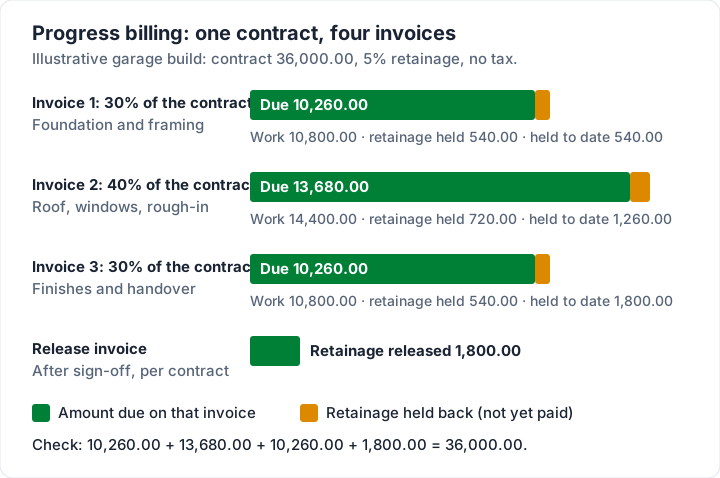
The four amounts due add up to the contract: 10,260.00 + 13,680.00 + 10,260.00 + 1,800.00 = 36,000.00.
The free files can bill one stage at a time, but they were not built for this. Neither has a contract value, a percentage complete, a previously billed figure or a retainage line, so you would keep that running summary somewhere else and type it into the notes on each invoice. Progress invoicing, explained walks through a schedule of values and the mistakes that cause disputes.
The contract sets retainage, not the invoice. The rate, when it is released and any paperwork that goes with each payment come from your contract. Some clients ask for a lien waiver or release with each payment; the forms and rules depend on the state, so ask a construction lawyer or your state's contractor licensing agency before you sign or send one.
Contractor invoice templates in Charming Invoices#
If the files are working for you, keep using them. If you are tired of retyping the same layout, Charming Invoices has 60 invoice templates on every plan, free included, and three suit contractors:
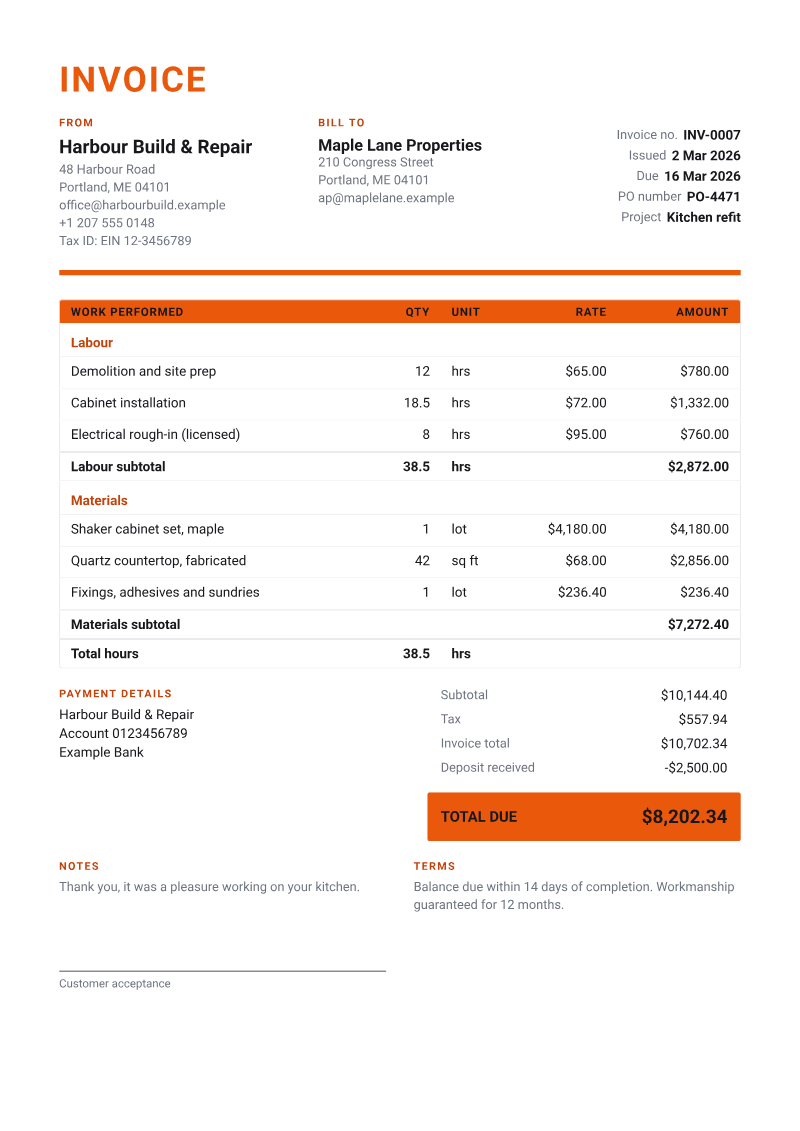
- Contractor: “Labour and materials in sections with subtotals, units and total hours, plus a sign-off line,” which is the description in the app. This is the section heading the Word file lacks.
- Progress Billing: “Contract value, % complete, retainage held and balance to complete for staged payments.” You enter the contract value, what was previously billed and a retainage percentage; completed to date and percent complete are worked out from your lines.
- Timesheet: time entries grouped by week or project, with a total hours line, for time-and-materials work.
The calculations behind them, checked in the code: a deposit is credited after tax, retainage is worked out on the work after any discount and before tax, and the amount due is calculated to the cent. Invoices carry a PO number field, and you can add units (hrs, sq ft, lot) to each line. There are also 12 trade starter kits that fill in a trade's usual line items, with every price left at 0.00 for you to set; there is no general-contractor kit.
The catches, stated plainly:
- Retainage is not tracked as money owed. It prints on each invoice, but it is not counted in your outstanding totals or statements, and there is no release step. Keep your own running total and bill the release on its own invoice.
- No quotes or estimates in the app. Charming does invoices only; the free estimate template above is a separate Excel or Word file, not part of Charming. Invoice vs estimate or quote covers the difference, and invoicing software for contractors compares tools that do quotes and scheduling too. If you mainly need quotes that turn into invoices, see our roundup of quote and invoice software. For one app built around estimates that convert to invoices on site, see our look at Joist invoices.
- No card payments through Charming. You can add bank details and one payment link of your own (Stripe, PayPal, Square or a bank page); the client pays you directly, and you record the payment and mark it paid.
- One tax rate per invoice, as in the Excel file. No per-line tax rates.
- No Word or Excel import or export. Invoices you made in the files stay in the files. Charming can export your invoices as CSV.
- Free invoices carry a small “Sent with Charming Invoices” line in the footer; paid plans hide it by default.
To try the Contractor layout with your own job, create a free invoice.
Contractor invoice template questions#
Is there a free invoice template for contractors?#
Yes. The invoice templates on the free templates page cost nothing and need no sign-up. For most contractors, the Word service template (job box, labour and materials, deposit line) or the Excel invoice template (calculates the totals) is the right one.
Can I use the contractor template in Google Docs or Google Sheets?#
You can upload the files to Google Drive and open them there, but there are no Google-hosted copies and we have not tested the conversion. Type in a test invoice and check the totals before you send a real one.
Does the Word template add up the totals?#
No. Word tables do not calculate by themselves, so you type each amount, the subtotal, tax, total, deposit and balance due. If you want the arithmetic done, use the Excel file.
How do I show a deposit on a contractor invoice?#
Show the full value of the work first, then the deposit as a credit with the date you received it, then the balance due. The Word service template has a “Less deposit paid” line for this; in the Excel files, put the deposit in Amount paid.
Can a subcontractor use these templates?#
Yes, for billing a main contractor for a job or a stage. Put their project and subcontract or PO number in Reference / PO, and their scope wording in the description. If they want this period, previously billed and retainage on each invoice, the Progress Billing layout fits better than the free files.
Can I import my Word or Excel invoices into Charming Invoices?#
No. Charming does not import or export Word or Excel invoices. You would start new invoices in the app; your old files stay as your record of what you sent.
Whichever you choose, the test is the same: could someone who was never on site read the invoice and see how you got to the total? Download a template from the free Excel and Word templates page linked at the top, or start free and pick the Contractor template.
Related: if you also clean homes or offices between building jobs, the cleaning invoice template has three filled samples.
Free downloads
No sign-up and no email address. More on the free templates page.
- Download .xlsx: Estimate or quote template for Excel
Estimate or quote template for Excel
Excel .xlsxPrice a job before you start: scope, line items, a valid-until date and an optional deposit.
- Download .docx: Estimate or quote template for Word
Estimate or quote template for Word
Word .docxThe estimate as a Word document: scope of work, prices, deposit and acceptance lines.
- Download .xlsx: Mileage log
Mileage log
Excel .xlsxFor trips you bill to clients: log each journey from the odometer, mark it billable, and total the miles at the rate you agreed.