Cleaning invoice template: free download and sample

Nnabuike Okoroafor ·
On this page · 9 sections
You finished the clean, the client is happy, and now you need a cleaning invoice template that does not take longer to fill in than the bathroom took to scrub. Most generic templates have nowhere to put the address you cleaned, the date of the visit or the rooms you did, which are exactly the things a cleaning client checks.
This page gives you free Word and Excel files that fit cleaning work, and three cleaning invoice samples filled in with real arithmetic: a one-off deep clean, a weekly house clean billed once a month, and an office cleaning contract with a purchase order number. Copy whichever is closest to your work. If you want the reasoning behind each line (billing rhythms, missed visits, price rises), how to write a cleaning invoice is the companion guide.
General information, not legal or tax advice. Where a rule is mentioned, we quote and link the official page; ask an accountant or lawyer about your own situation.
Free cleaning invoice template: which file to use#
There is a free cleaning invoice template for Excel and one for Word, with no sign-up and no email address. Both have cleaning lines printed in advance (a regular clean, a deep clean, add-ons, supplies and office contract visits) with every rate left blank, so you type your own prices and delete what you do not need. More free files, including general and hourly invoice templates, are on the Excel and Word invoice templates page.
| Your cleaning work | Best file | Why |
|---|---|---|
| Regular homes, offices and contracts | cleaning-invoice-template.xlsx (Excel) | A Date column for each visit, Qty / hours times rate, a Reference / PO number cell, a fixed discount, one tax rate and a “Less deposit paid” row, all calculated |
| One-off jobs: deep cleans, move-in or move-out, post-construction | cleaning-invoice-template.docx (Word) | A “Description of work” box for the job, site address, dates and work performed, starter lines for a deep clean, add-ons and supplies, and a “Less deposit paid” line |
| Hourly clients where you want the hours totalled | hourly-invoice-template.xlsx (Excel) | A Date column for each visit, hours times your hourly rate, and a Total hours line, all calculated |
What the formats do differently:
- The Excel files calculate. Each line amount is quantity times rate, rounded to the cent; the subtotal, discount, tax, total, amount paid, balance due and due date (invoice date plus payment terms) are formulas.
- The Word files do not. You type every amount and total yourself. A short italic note in each file sets out the arithmetic and asks to be deleted before sending.
- None of them is a Google file. There are no Google-hosted copies, and we have not tested the conversion: if you open one in Google Docs or Sheets, type in a test invoice and check the totals first.
Both formats are blank starting points that do not connect to any app. For the full tour of each file, see the Word invoice template guide and the Excel invoice template guide.
What to put on a cleaning invoice#
On top of the basics (your name and contact details, the client, an invoice number, the dates, the total and how to pay), a cleaning invoice needs the details that let a client confirm the visit happened and the price matches what was agreed.
| Field | Example | Why the client needs it |
|---|---|---|
| Service address | Apt 4B, 220 Sample Street | Landlords and offices pay for more than one address |
| Date(s) of service | Tue 13 Oct 2026, 9:00 to 13:30 | The question is often whether a visit happened, not what it cost |
| Areas or rooms cleaned | Kitchen, 2 baths, 2 bedrooms, living room | Shows the scope that was agreed |
| Frequency | Weekly clean, every Wednesday | Tells the client which arrangement this is |
| Add-ons | Inside oven and fridge | Extras on their own lines do not look like a price rise |
| Supplies | Washroom supplies: towels, tissue, soap | Only if you charge for them; otherwise say once that products are included |
| PO or contract number | PO-58213 | Many offices cannot pay without it |
| Deposit or booking fee | Booking deposit received 5 Oct 2026 | The client sees the full price and the credit |
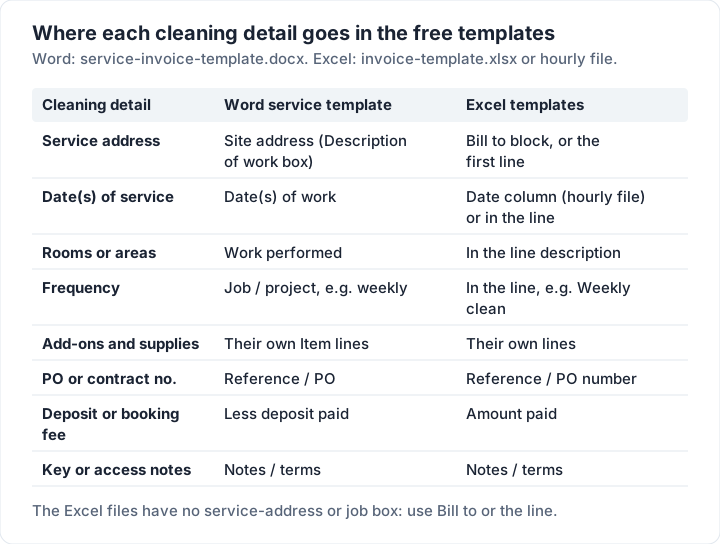
The free files do not have a field called “service address” or “frequency”, so each detail has a natural home in what they do have:
How to fill in the cleaning invoice template#
The first invoice takes the longest, because you set up the parts that never change. After that, each one is a few minutes.
- Make a master copy. Open the file, replace “Your business name”, the address and contact lines and the payment details with yours, add your logo in the dashed box, and save it as your master. You never send the master.
- Save a copy per invoice. Name it with the number and client, such as “INV-0057 Nair”, so the invoices you have sent stay exactly as they were.
- Fill in the client and the job. The client's name and billing address in Bill to; in the Word service template, the service address, date and rooms in the description of work box.
- Add one line per service, add-on or supply. In Excel, type the quantity (or hours) and the rate, and the amount fills in. In Word, work out each amount and type it.
- Check the totals. In Word, add them up twice. In Excel, look under the totals for a red note: it appears if the tax rate or discount looks wrong.
- Save as a PDF and send it. The client gets a file they cannot accidentally edit, and you keep the PDF with your records.
Once a month, compare the invoices you sent with the payments that arrived. The files do not track that for you.
Cleaning invoice sample 1: a one-off deep clean#
A move-out deep clean is a single job with a clear scope, often with a booking deposit taken to hold the date. A Word file with a description of work box fits it best, because the box carries the address, the time on site and the rooms. The cleaning Word file has one, and so does the general Word service template shown here.
Every name, address and price below is illustrative, not a real rate. No tax is shown (see the self-employed section below).
- Invoice: INV-0057, dated Tuesday 13 October 2026, due Tuesday 20 October 2026 (7 days)
- From: Larkspur Cleaning Co. (sample business)
- To: Priya Nair (sample client)
- Description of work: Move-out deep clean, 2-bed apartment, at Apt 4B, 220 Sample Street, on 13 October 2026 from 9:00 to 13:30: kitchen, 2 bathrooms, 2 bedrooms and living room
| Item | Qty / hours | Rate | Amount |
|---|---|---|---|
| Move-out deep clean, 2 cleaners | 9 | 45.00 | 405.00 |
| Add-on: inside oven and fridge | 1 | 60.00 | 60.00 |
| Add-on: interior windows | 8 | 6.00 | 48.00 |
| Carpet spot treatment, bedroom 2 | 1 | 35.00 | 35.00 |
| Supplies: limescale remover, degreaser | 1 | 14.50 | 14.50 |
| Subtotal and total | 562.50 | ||
| Less deposit paid (booking deposit, 5 October 2026) | 100.00 | ||
| Balance due | 462.50 |
The arithmetic: two cleaners on site from 9:00 to 13:30 is 4.5 hours each, 9 hours in all, so the main line is 9 × 45.00 = 405.00. Eight windows at 6.00 is 48.00. Then 405.00 + 60.00 + 48.00 + 35.00 + 14.50 = 562.50, and taking off the 100.00 booking deposit leaves 462.50.
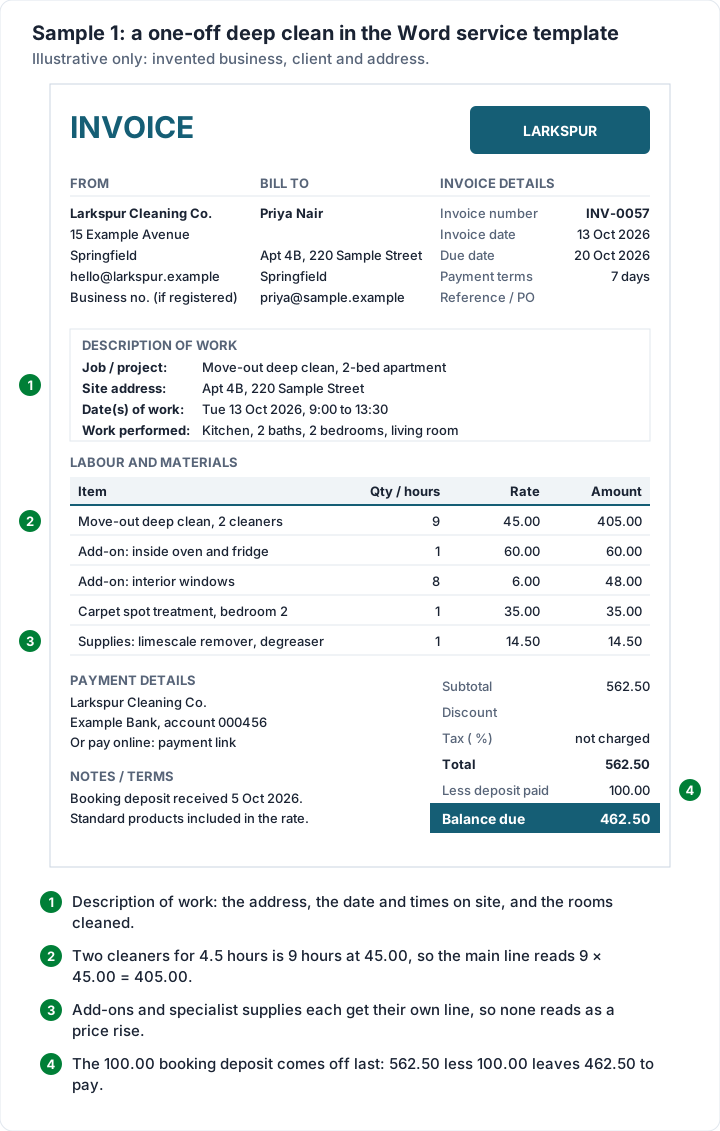
Two habits make this cleaning invoice easy to pay. The add-ons and the specialist supplies sit on their own lines, so the client sees what they asked for. And the notes say once that standard products are included in the rate, which stops the question before it is asked. If you take booking deposits regularly, how a deposit invoice works covers asking for one and crediting it.
Cleaning invoice sample 2: weekly house cleaning, billed monthly#
A weekly client is easier to bill once a month than every week, as long as each visit is listed with its date. If you charge by the hour, the hourly Excel file does it for you: one dated line per visit, the hours, your hourly rate, and a Total hours line under the column.
- Invoice: INV-0062, dated Friday 30 October 2026, payment terms 14 days, so the due date formula gives Friday 13 November 2026
- To: Tom and Alex Moreno (sample clients), 9 Example Court
- Reference: October 2026
| Date | Description of work | Hours | Hourly rate | Amount |
|---|---|---|---|---|
| 7 Oct 2026 | Weekly clean: kitchen, baths, floors | 3.00 | 38.00 | 114.00 |
| 14 Oct 2026 | Weekly clean | 3.00 | 38.00 | 114.00 |
| 21 Oct 2026 | Weekly clean + inside fridge | 3.50 | 38.00 | 133.00 |
| 28 Oct 2026 | Weekly clean | 3.00 | 38.00 | 114.00 |
| Total hours | 12.50 | |||
| Subtotal, total and balance due | 475.00 |
Each line is hours times rate: 3 × 38.00 = 114.00, and 3.5 × 38.00 = 133.00 for the visit with the fridge added. The four lines come to 114.00 + 114.00 + 133.00 + 114.00 = 475.00, and the 12.50 total hours is 3 + 3 + 3.5 + 3. With the tax rate left blank, tax is 0.00, the total is 475.00, and nothing has been paid yet, so the balance due is 475.00.
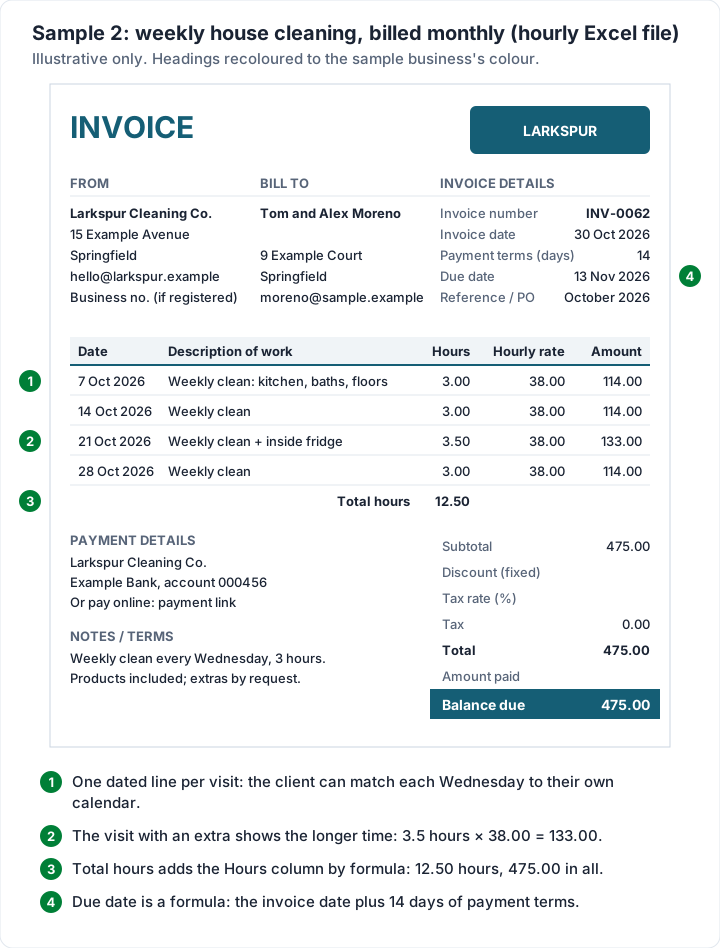
Every visit is a Wednesday, which the client can check against their own calendar. Clean every week at a flat rate rather than by the hour? Use the cleaning Excel file or the general Excel file instead, with one line such as “Weekly clean, 4 visits: 7, 14, 21 and 28 October” at a quantity of 4. The companion guide's sample house cleaning invoice shows a fortnightly client with a missed visit, if that is your situation.
Cleaning invoice sample 3: commercial office cleaning with a PO number#
Commercial cleaning is billed to an accounts team, not to the person who sees the clean. They match each invoice to a purchase order, and an invoice without the PO number often goes back unpaid. The cleaning Excel file and the general Excel file both have a Reference / PO number cell for it.
- Invoice: INV-0071, dated Monday 2 November 2026, payment terms 30 days, so due Wednesday 2 December 2026
- To: Harlow & Pike Architects, Accounts payable (sample client)
- Reference / PO number: PO-58213 (illustrative)
| Description | Quantity | Rate | Amount |
|---|---|---|---|
| Office cleaning, Mon/Wed/Fri, Oct 2026 | 13 | 120.00 | 1,560.00 |
| Washroom supplies: towels, tissue, soap | 1 | 186.40 | 186.40 |
| Carpet extraction, meeting room, 9 Oct | 1 | 240.00 | 240.00 |
| Subtotal, total and balance due | 1,986.40 |
October 2026 has 13 Mondays, Wednesdays and Fridays (the 2nd, 5th, 7th, 9th, 12th, 14th, 16th, 19th, 21st, 23rd, 26th, 28th and 30th), so the contract line is 13 × 120.00 = 1,560.00. Add 186.40 for supplies and 240.00 for the one-off carpet extraction, and the total is 1,986.40.
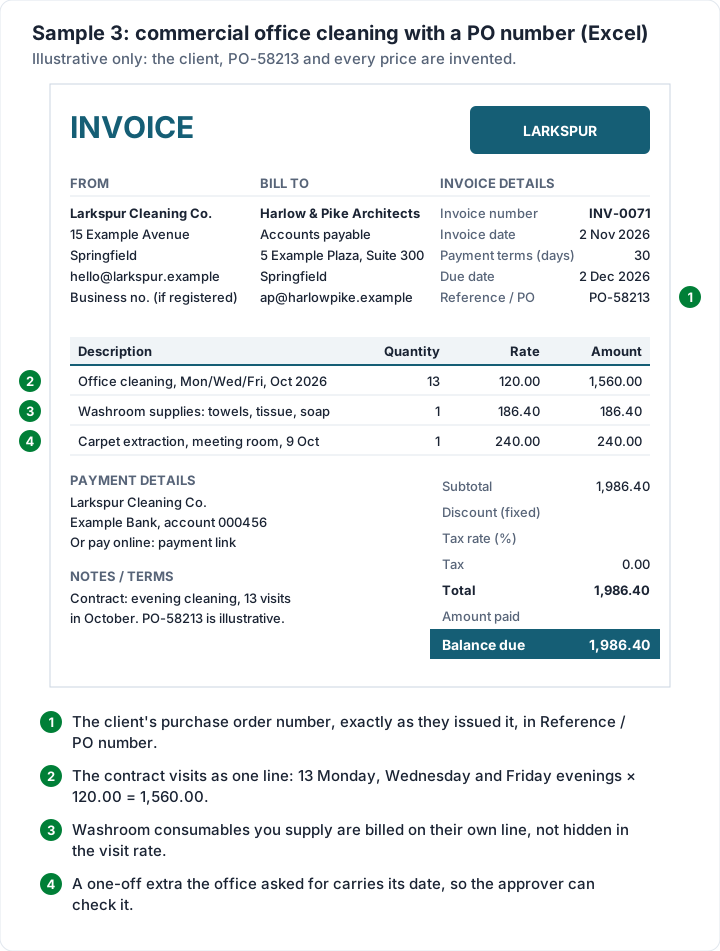
Three things make a commercial cleaning invoice go through first time:
- The PO number, copied exactly. Same letters, same dashes. Putting a PO number on an invoice covers where it goes and what happens when it is missing or wrong.
- Consumables on their own line. If your contract has you supplying paper towels and soap, bill them separately from the cleaning, so the client can match them to the contract.
- Extras with a date. “Carpet extraction, meeting room, 9 Oct” lets the approver check who asked for it.
Offices often pay on 30-day terms. What Net 30 means on an invoice explains how to set the terms and work out the due date, and our guide to pay by invoice covers what to check before you give a new client time to pay.
Self-employed cleaner? What your invoice should show#
If you clean on your own rather than through an agency, your invoice is also your record of what you earned. A self-employed cleaner invoice template needs the same fields as the samples above, plus a few habits:
- Your name or business name, and how to reach you. A trading name is fine; it should match the name on the account you are paid into, so the client's payment is not queried.
- A unique number on every invoice. INV-0001, INV-0002 and so on, never reused. How to number invoices covers simple schemes.
- Payment terms and payment details. Say when you expect to be paid and how: bank details, or a payment link you already use.
- A copy of every invoice as you sent it. Save each one as a PDF and keep the Excel or Word copy unchanged, so a later edit never rewrites what you sent.
Sales tax on cleaning depends on where you work and sometimes on whether the client is a household or a business. USA.gov notes that “Most states and municipalities have a sales tax and charge different percentages on different goods, or not at all for other items” (as of 23 October 2026), and its state taxes page points to each state's tax agency. Ask your accountant or your state's tax agency whether you need to collect it before you add a tax line.
For the wider picture of getting paid as a one-person business, how to invoice as a freelancer covers terms, follow-ups and records. If you also do yard work, the lawn care and landscaping invoice template has a filled sample for a month of visits.
Cleaning invoices in Charming Invoices#
The files work. The repetition is what wears thin: retyping the same client, the same weekly line and the same payment details every month. If that is where you are, this is what Charming Invoices does for a cleaning business, checked in the code:
- Unlimited invoices and clients on the free plan, with no card and no expiry. The free plan covers 1 business.
- 60 invoice templates on every plan. Classic or Minimal suit most cleaners; Timesheet groups time entries by week or project and adds a total hours line, which suits hourly cleaning.
- A PO number field and units on each line (visits, hrs, lot), so the commercial sample above fits as it is.
- A PDF and a private link. Issue the invoice, then download the PDF or copy its private link and send it however you like. Charming tracks what is paid and what is still owed, and flags overdue invoices.
- Recurring invoices weekly, monthly, quarterly or yearly, on the paid plans (from Individual, $29 once). Each one arrives as a draft for you to review, so you can add this month's visit dates and extras before issuing it. There is no fortnightly schedule. Recurring invoices vs subscriptions explains how the drafts work.
The catches:
- No card payments through Charming. You can add bank details and one payment link of your own (Stripe, PayPal, Square or a bank page), shown to the client as an “Open payment link” button while the invoice is unpaid. The client pays you directly, and you record the payment and mark it paid.
- No cleaning starter kit. The 12 trade kits cover trades such as landscaping and HVAC; cleaning lines you type yourself, or save them as reusable items on a paid plan.
- No email sending or reminders. Charming does not email the invoice or chase it; set a calendar reminder for the due date and follow up from your own inbox.
- One tax rate per invoice, and no per-line rates.
- No Word or Excel import or export. Invoices made in the files stay in the files.
- Free invoices carry a small “Sent with Charming Invoices” line in the footer.
If that fits how you bill, create a free invoice and try one of the samples above with your own clients.
Cleaning invoice template questions#
Is there a free cleaning invoice template?#
Yes. There is a cleaning invoice template for Excel and one for Word, free with no sign-up, with cleaning lines printed in advance and the rates left blank. Use the Excel file for regular clients, offices and contracts, and the Word file for one-off cleans. The general and hourly files on the free templates page work too.
What should a cleaning invoice include?#
Your details and the client's, an invoice number, the invoice and due dates, the service address, the date of each visit, the rooms or areas cleaned, add-ons and supplies on their own lines, the total, any deposit, and how to pay. Offices usually need a PO number too.
Can I use the cleaning invoice template in Google Docs or Google Sheets?#
You can upload the files to Google Drive and open them in Docs or Sheets, but there are no Google-hosted copies and we have not tested the conversion. Type in a test invoice and check the totals before you send a real one.
Should I bill a weekly cleaning client every week or once a month?#
Either works; the choice is about admin and the client's preference. Monthly billing with one dated line per visit, as in sample 2, means one invoice to send and one payment to match. The companion guide's billing-rhythm table compares per-visit, monthly and fixed recurring billing.
Does the Word cleaning invoice template add up the totals?#
No. Word tables do not calculate by themselves, so you type the amounts and totals. The Excel files calculate them.
Can I add my logo to the cleaning invoice template?#
Yes. The cleaning files, like the general invoice files, have a dashed “Your logo” box. In Word, insert your picture into it; in Excel, click the box, insert the picture and size it to fit.
For building and renovation work, the contractor invoice template has a filled construction example with labour, materials and a deposit.
Free downloads
No sign-up and no email address. More on the free templates page.
- Download .xlsx: Cleaning invoice template for Excel
Cleaning invoice template for Excel
Excel .xlsxFor cleaners: dated visits, deep cleans, add-ons, supplies and office contracts.
- Download .docx: Cleaning invoice template for Word
Cleaning invoice template for Word
Word .docxFor cleaners: dated visits, deep cleans, add-ons, supplies and office contracts.