Invoice numbers: formats, gaps and examples

Nnabuike Okoroafor ·
On this page · 11 sections
You have the client, the line items and the total. Then the form asks for an invoice number, and you realise nobody ever told you what goes there, whether it matters, or what happens if you get it wrong.
The short answer: an invoice number is a unique reference that identifies one invoice and nothing else. Any format works as long as each number is used once and they run in order. The longer answer, below, covers which format to pick, where to start, and the awkward cases that come up later: gaps, duplicates, cancelled invoices and credit notes.
What is an invoice number, and what is it for?#
An invoice number is the unique reference you give one invoice, so that it can never be mistaken for any other invoice from your business. On the page it usually sits near the top, next to the invoice date, often labelled “Invoice no.” or “Invoice #”.
What does an invoice number look like? Usually a short run of digits, sometimes with letters in front. All of these are ordinary invoice numbers:
- INV-0042: a prefix and a zero-padded count, the 42nd invoice.
- 2026-017: the year, then a count, the 17th invoice of 2026.
- 0042: plain digits, with no prefix at all.
- KM-2026-03: a client code, the year and a count, the third invoice of 2026 to a client called Kestrelmoor Analytics.
The number is yours, not your client’s. If a client gives you a purchase order number, that is their reference and it goes on the invoice as well; the PO number on an invoice explains where each one goes.
An invoice number does three jobs, and none of them is decoration.
- It lets a payment find its invoice. When your client pays, the invoice number is the reference that tells you which invoice the money is for. Without it, matching payments becomes guesswork. Invoice reconciliation shows how to match a payment to the right invoice.
- It gives both of you one name for one document. “Invoice 0014” means exactly one thing to you, your client and their accounts department. “The March invoice” might mean two.
- It makes your records checkable. A run of numbers with no holes and no repeats shows that every invoice you issued is accounted for. That is the kind of thing an accountant checks.
The first job is the one people feel most. Here is someone in a public online discussion about invoicing (not a Charming customer) describing what happens when payments arrive without references:
This weekend literally took 4 hours because three different clients paid multiple invoices in single lump sum transfers with zero reference information. So I'm sitting there with calculator trying to figure out which combinations of invoice amounts add up to each payment amount it's ridiculous.
A clear invoice number does not force a client to quote it. But it gives them something short to quote, and it gives you something to ask for: “Please include the invoice number as the payment reference.” If a client pays by cheque (a check, in the US), the memo line is the usual place for it.
Four habits every numbering system needs#
Whatever format you choose, these four habits matter more than the format itself.
- Unique. No two invoices from the same business ever share a number, even years apart, even for different clients.
- Never reused. A cancelled invoice keeps its number. The next invoice gets the next number.
- In order. Each new invoice number is higher than the last, so the sequence tells the story of when you billed.
- Short enough to read aloud. Your client may type it into a bank transfer reference field with a character limit. “INV-0042” survives that. “ACME-WEB-REDESIGN-PHASE2-2026-10-INV-3” does not.
Notice what is missing. None of the four needs the number to start at 1, carry a date or name the client. Those are choices.
Invoice number examples: sample formats and three numbering systems#
Most small businesses use one of three patterns, plus a few variations on them. Here they are side by side as sample invoice numbers (examples, not real data).
| Format | Sample invoice numbers | Starts at | Best for | Watch out for |
|---|---|---|---|---|
| Sequential | INV-0001, INV-0002, INV-0003 | INV-0001 | Almost everyone | Nothing tells you the year at a glance |
| Plain digits | 1001, 1002, 1003 | 1 or 1001 | People who want no prefix | Can be mistaken for a client’s order or PO numbers |
| Year-prefixed | 2026-001, 2026-002, 2027-001 | 2026-001 | People who think in tax years | Decide once whether the count restarts each year |
| Year and month | 202610-01, 202610-02, 202611-01 | 202610-01 | High volume, sorted by month | Long, and a monthly restart means the month has to travel with every number |
| Client prefix | ACME-001, ACME-002, NORTH-001 | 001 per client | A few long-running clients | Easy to break uniqueness and hide gaps |
| Client as a label | 0041-ACME, 0042-NORTH, 0043-ACME | 0001 | Seeing the client without a second series | The label is decoration; the count does the work |
Here is what each part of a number does, and how the systems look in a run, including the safer client-label variant described below:
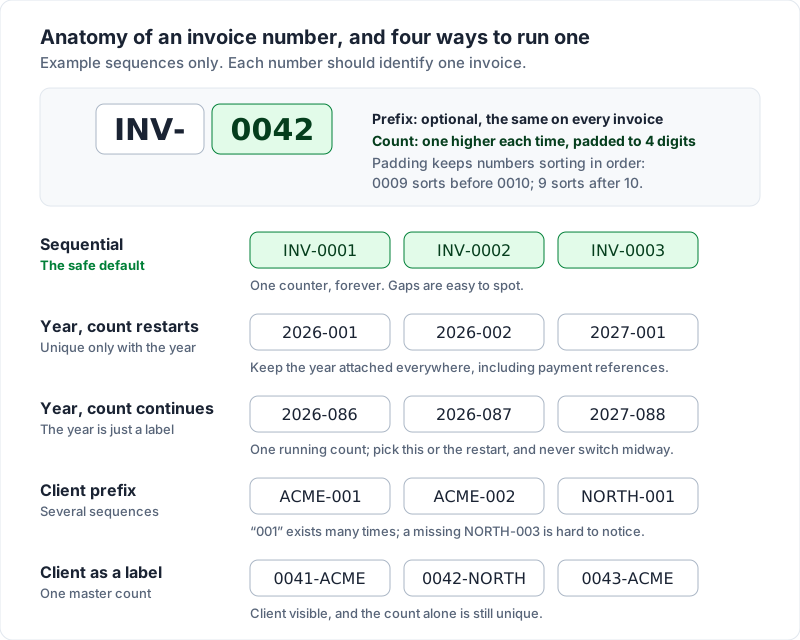
Sequential: the default that rarely goes wrong#
One counter, counting up forever: 0001, 0002, 0003. Add a short prefix if you like (INV-, or your initials), and pad with zeros so the numbers sort properly in a spreadsheet. Four digits gives you 9,999 invoices before the padding runs out, which is a good problem to have. INV is the usual short form of “invoice”; invoice abbreviations explains the others you will meet, from PO to Net 30.
This is the system to choose if you are not sure. It is the hardest to get wrong, the easiest to check for gaps, and it never needs a decision on 1 January.
Year-prefixed: useful, with one decision attached#
A year in front of a running count: 2026-001, 2026-002. It tells you at a glance which year an invoice belongs to, which helps when you sort records at year end.
The decision is whether the count restarts. If 2027 starts at 2027-001, every number is still unique because the year is part of it — but the year then has to stay attached everywhere, including in payment references. If you never restart (2026-087 is followed by 2027-088), you avoid that risk and the prefix becomes a label. Either works. Switching between the two halfway through does not.
Client prefix: tempting, and the one to be careful with#
A short code for each client: ACME-001, ACME-002, NORTH-001. It looks organised, and it lets a client see how many invoices you have sent them.
The trouble is that you now have several sequences instead of one. “001” exists many times over, so the prefix carries all of the uniqueness, and a typo in it creates a duplicate. Gaps are also harder to see: if NORTH-003 is missing, nothing in the ACME series tells you. If you want the client visible, a safer version keeps one master count and adds the client as a label: 0041-ACME, 0042-NORTH, 0043-ACME.
To see how a format reads over a run of numbers before you commit to it, try it in the free invoice number generator.
How to make an invoice number in three steps#
You do not need software to make an invoice number. You need a format, a starting point and somewhere to write each one down.
- Choose a format. Pick one row from the table above. If you are unsure, take the sequential one: a short prefix and a zero-padded count, such as INV-0001.
- Pick the starting number. Start at 1, or at the number after the last invoice you sent from another system. The next section covers both.
- Log every number as you use it. Write each number down once, with the date, the client and the amount, and take the next invoice’s number from the bottom of that list. Our free invoice numbering log is a spreadsheet for exactly this: you type in each number you issue, and it shows the next number, flags duplicates and gaps, and points out numbers that are out of order. It does not number invoices for you; you still type each one in.
If you build your invoices in a spreadsheet, you can number invoices in Excel with a formula that finds the highest number in your log and adds 1.
Starting at 1 or at 1001#
You can start anywhere. Starting at 1 (or 0001) is the honest default and nobody will think less of you for it — clients rarely notice invoice numbers unless something goes wrong.
Some people start at 1001 so the numbers have a consistent length from day one. That is a reasonable formatting choice; zero-padding (0001) does the same job. What is not worth doing is picking a high number to suggest a long client history. Nobody checks, and it makes your own records harder to read later.
The one good reason to start somewhere other than 1 is continuity. If you have already sent 37 invoices from a spreadsheet or another app, your next invoice should be number 38 in the same format, not a fresh 0001 that duplicates an old one. Switching invoicing apps without breaking your numbers walks through finding your last number and setting the next one before you send anything.
What to do about a gap in your invoice numbers#
Gaps usually happen for boring reasons: you numbered a draft, then never sent it; you deleted a file; a template’s counter skipped. Gaps are common, but a gap is a question someone may ask later, so the practical fix is to leave an answer.
- Do not renumber sent invoices to close the gap. Your clients already have those numbers. Changing them creates the very mismatch the number exists to prevent.
- Write down why the number is missing. One line in your records is enough: “0019 — drafted for Northside, not sent, cancelled 4 March 2026.” The numbering log is one place to keep those lines: it works alongside any app or template, and its Example tab shows a gap and a duplicate left in on purpose, so you can see how it reports them (“Missing: INV-0021 to INV-0022”).
- If the invoice was sent, cancel it rather than deleting it. Keep the document, mark it cancelled or void, and keep it with your records. Void or cancel an invoice walks through each case.
- Carry on from the next number. The fix for a gap is a note, not a new sequence.
The best prevention is to assign a number at the moment you send an invoice, not when you start drafting one. Drafts you abandon then never consume a number, which is one of the practical differences between a draft invoice and a final invoice.
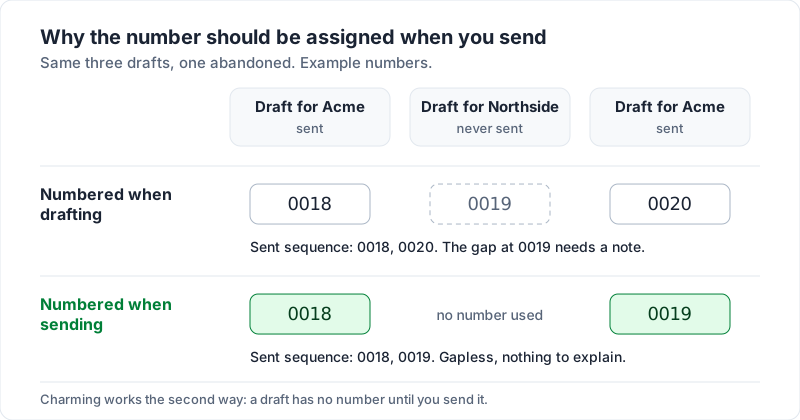
Duplicate invoice numbers, and how to fix one#
A duplicate is worse than a gap, because two different documents now answer to one name. It usually happens when two people invoice from separate files, when a template is copied without updating the number, or when you restart a count by accident. A log catches it early: the free numbering log marks every row whose number appears more than once, and it treats inv-0042 and INV-0042 as the same number.
If you catch it before the client pays, send a corrected invoice with a new, unused number and tell the client plainly which number replaces which: “Please disregard invoice 0042 dated 3 October. The correct invoice is 0043, attached.” Keep both copies in your records with a note.
If both invoices have been paid, leave them as they are. Make a note linking the two, and use one sequence from here on so it cannot happen again.
Cancelled invoices and credit notes#
Once an invoice has been sent, the usual practice is to leave it in your records rather than make it disappear. What you do next depends on whether money has moved.
- Sent but not paid, and wrong? Cancel or void it, keep it on file with its number, and send a new invoice with the next number.
- Already paid, or you need to reduce what is owed? Many businesses issue a credit note: a separate document that reduces or cancels the amount on an earlier invoice. It refers back to the original invoice number and date, and it usually has its own number.
Put together with the gap rules above, the decision looks like this:
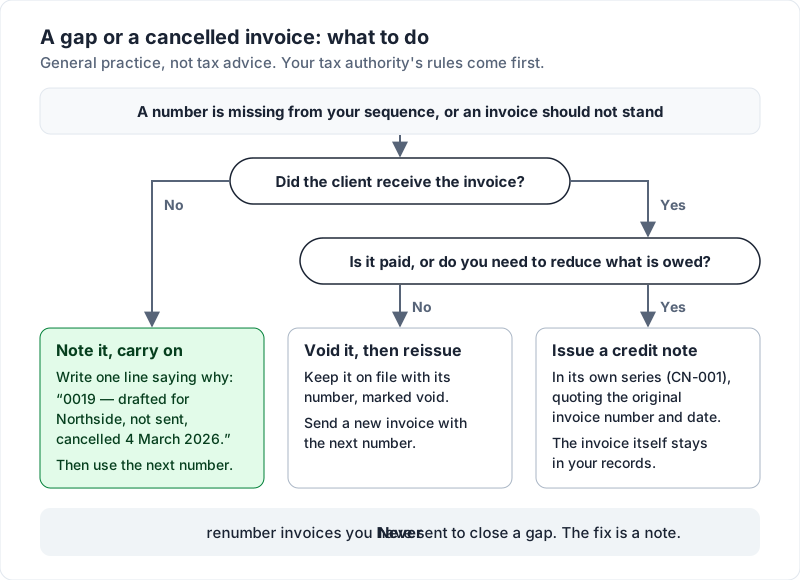
Credit notes are often numbered in their own series (CN-001, CN-002) so they never collide with invoice numbers. Whether you need one, and what it has to show, depends on where you are and whether you charge tax; check your tax authority’s guidance. Credit note vs invoice walks through an invoice, its credit note and the replacement invoice, numbers included.
What tax authorities say about invoice numbers#
This section is general information, not legal or tax advice.
Some tax authorities publish guidance on invoice numbering. As one example, here is what the UK pages said when we read them on 28 October 2026. GOV.UK’s guidance on what an invoice must include lists “a unique identification number”. For VAT invoices, HMRC’s VAT Notice 700, section 16.3.1, lists “a sequential number based on one or more series which uniquely identifies the document”, and section 18.2.3, “Valid credit notes”, lists “the identifying number and date of issue”.
Rules elsewhere differ, and they change. If you charge sales tax, VAT or GST, what a tax invoice is links the official guidance, and your own tax authority’s guidance, or your accountant, is the final word.
How Charming numbers invoices#
If keeping a counter by hand is the part you would rather not do, this is how Charming Invoices handles it. Each business has its own sequence. A draft has no number of its own; the next number is claimed at the moment you issue the invoice, so drafts you never issue do not use one and the sequence stays gapless unless you change it yourself. You set a prefix (INV- by default) and the number of digits (4 by default, so INV-0001), and you can raise the next number to carry on from invoices you sent elsewhere. The prefix and digits are saved on each invoice at the moment it is issued, so if you change the prefix later, invoices you already issued keep the number they went out with.
The limits, stated plainly. Only drafts can be deleted; an issued invoice can be voided, and it keeps its number. The counter can be raised but never lowered, so raising it does leave a gap you should note. The prefix is one fixed piece of text per business: Charming does not add the year for you, restart the count each January, or keep a separate series per client. And there is no credit note feature, so a credit for a paid invoice has to be handled outside the app.
A numbering checklist to copy#
- One sequence per business, counting up, never reused.
- A short prefix if you want one, and zero-padding so numbers sort.
- Start at 1, or at the next number after your old system.
- Numbers assigned when you send, not when you draft.
- Cancelled invoices kept with a note, never renumbered.
- Credit notes in their own series, referring to the original invoice number.
The invoice number is one field of eleven. For the rest, the field-by-field invoice checklist covers every line, and if this is your very first one, your first invoice: what actually has to be on it is the gentler place to start.
When you are ready, create a free invoice and by default your first one goes out as INV-0001.
Free download
No sign-up and no email address. More on the free templates page.
- Download .xlsx: Invoice numbering log
Invoice numbering log
Excel .xlsxA record of every invoice number you issue, from any app or template, that flags duplicates and gaps and suggests the next number.