How to void an invoice, and when to delete or cancel

Nnabuike Okoroafor ·
On this page · 8 sections
An invoice went out that should not have. It has the wrong rate, it went to the wrong client, you sent the same one twice, or the client cancelled the job before it started. Now you want it gone, and the button in front of you says Delete, Void or Cancel.
To void an invoice is to cancel it while keeping it on record: the invoice keeps its number and date, is marked as void so nobody pays it, and stays in your files as proof of what happened. Deleting removes the record entirely, which is only safe for a draft nobody has seen. A credit note and a replacement invoice are the other two tools, and each fits a different situation.
This guide covers what each option does to your invoice numbers and your records, a flowchart for choosing, a worked example with real figures, and wording to send the client. The figures and businesses are invented examples.
General information, not legal or tax advice. Tax and record-keeping rules vary by country and change; the official pages linked below are the source, and your accountant is the person to ask.
Void invoice meaning, in plain terms#
A void invoice is one that has been cancelled after it was issued but not erased. Three things are true of it:
- It keeps its number. The number is never reused for anything else.
- It is marked as void. Anyone looking at it, including you a year from now, can see it is not payable.
- It stays in your records. It no longer counts as money owed to you, but the document and the date you cancelled it are still there.
That is why voiding is the normal way to cancel an invoice your client already has. Their copy may already be sitting in their accounts. Your records should show the same invoice, plus the fact that it was cancelled.
What a “cancellation invoice” is#
You will also see the phrase “cancellation invoice”. In some countries and accounting systems, that is a separate document that reverses an earlier invoice in full, with its own number and a reference to the original. In effect it is a credit note for the whole amount. In everyday small-business use, “cancel an invoice” usually just means voiding it. If your accountant or tax authority uses the term, ask which one they mean. For how QuickBooks Online handles voiding, deleting and write-offs, see our QuickBooks invoice guide. To find an invoice deleted in QuickBooks, see our guide to QuickBooks invoice settings and fixes, which quotes Intuit on its audit log.
Delete vs void an invoice, credit note or replacement#
There are four tools. They differ in what happens to the number, to the record and to what the client owes.
| Delete | Void | Credit note | Replacement invoice | |
|---|---|---|---|---|
| Use it for | A draft nobody has seen | A sent invoice that should not be paid | A sent invoice that was paid, or a partial reduction | The corrected bill after a void or full credit |
| The original's number | Usually never issued | Kept, never reused | Kept | Original kept; replacement gets the next number |
| The original record | Gone | Kept, marked void | Kept, unchanged | Kept |
| What the client owes | Nothing changes | Drops to zero for that invoice | Goes down by the credit | The corrected amount |
| Tell the client? | No need | Yes | Yes, send the credit note | Yes, say what it replaces |
The habit underneath the table is simple. Once a client has seen an invoice, do not delete it or edit it in place. Cancel it in a way that leaves a trail: void it, or credit it.
Deleting a sent invoice leaves a number with no document behind it, and an unexplained gap is hard to account for later, to your accountant or to anyone else reviewing your records. Editing a sent invoice is worse: your copy and the client's copy now disagree, and neither of you can tell which is right. How to number invoices explains why gaps and duplicate numbers cause trouble.
Which one to use: a decision flowchart#
Work from the top. The first branch that matches your situation is the answer.
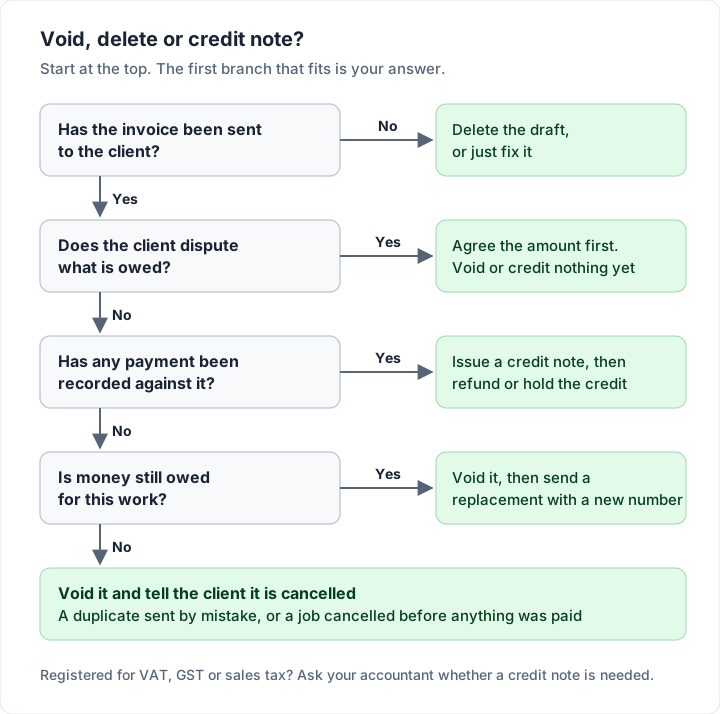
The same logic, case by case:
The draft was never sent#
Delete it, or just fix it. Nothing was issued, so there is nothing to cancel. One check: if your tool gives drafts a number before they are sent, deleting one may leave a gap in your sequence. Keep a one-line note of why (our free invoice numbering log has room for it next to each number), or switch to a tool that only numbers an invoice when it is issued. Draft invoice vs final invoice explains what changes when a draft is sent.
Sent, unpaid, and wrong#
A wrong rate, a wrong quantity, the wrong client, a missing purchase order number. Void the original and send a replacement with the next number in your sequence, saying which invoice it replaces. If the original was sent to the wrong client entirely, void it and send a fresh invoice to the right one.
A smaller error on an unpaid invoice can also be fixed with a credit note for the difference. Clients with an accounts team often prefer one clean replacement; ask if you are unsure.
Sent twice by mistake#
Void the duplicate, not the original. Keep the first one live, because that is the one the client is most likely to have entered already. Tell them which number to pay and which to ignore.
The client cancelled the job#
If nothing has been paid, void the invoice and confirm the cancellation in writing. If a deposit was paid, what happens to it depends on your agreement, which is why so many people in public discussions about getting paid push for it to be settled up front. One commenter in a photography forum (the people quoted in our research are not Charming customers) put it this way:
Compromise, get it in writing, and get half paid for upfront. Cancellation, breach of contract, or firing results in you keeping the half that was paid. It's literally how I would run a shop for walk in work.
If your terms say the deposit is non-refundable, the deposit invoice stays as it is and you void only the unpaid balance invoice. If you are giving the deposit back, issue a credit note against the deposit invoice and refund it. How deposit invoices work has wording for both.
Sent and already paid#
Do not void it. A void says the invoice was never payable, but your client did pay it, and that payment needs a document to sit against. Issue a credit note instead, then refund the money or hold it against their next invoice. Credit note vs invoice walks through what a credit note commonly shows, with a full example.
The client disputes the amount#
Hold off. Voiding or crediting before you have agreed what is owed gives away your position and can leave you reissuing twice. Settle the amount first; what to do when a client disputes an invoice covers that conversation.
A worked example: one void, one void-and-replace, one deleted draft#
An invented interior designer, Larkspur Studio, bills an invented client, Fenwick & Hale. The 10% tax rate is also an example. For a full interior design invoice with furnishings and a deposit, see the interior design invoice template.
On 2 October, Larkspur sends INV-0056 for a design consultation:
| Description | Qty | Rate | Amount |
|---|---|---|---|
| Design consultation (hours) | 8 | $125.00 | $1,000.00 |
| Subtotal | $1,000.00 | ||
| Tax (10%, example) | $100.00 | ||
| Total due | $1,100.00 |
A minute later, a double click sends the same invoice again as INV-0057, also for $1,100.00. That is a duplicate, so Larkspur voids INV-0057 the same day and keeps INV-0056 live.
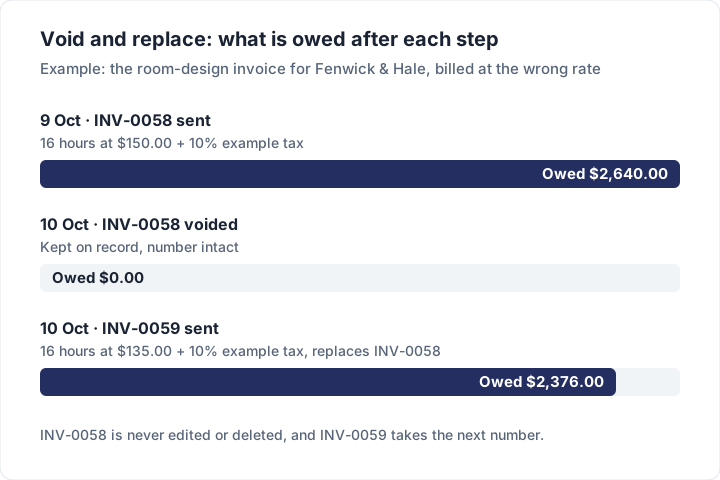
On 9 October, Larkspur sends INV-0058 for the room design, billed at $150.00 an hour instead of the agreed $135.00:
| Description | Qty | Rate | Amount |
|---|---|---|---|
| Room design (hours) | 16 | $150.00 | $2,400.00 |
| Subtotal | $2,400.00 | ||
| Tax (10%, example) | $240.00 | ||
| Total due | $2,640.00 |
Fenwick & Hale query the rate before paying. On 10 October, Larkspur voids INV-0058 and sends INV-0059 at the agreed rate, with the note “This invoice replaces INV-0058, which has been voided.”
| Description | Qty | Rate | Amount |
|---|---|---|---|
| Room design (hours) | 16 | $135.00 | $2,160.00 |
| Subtotal | $2,160.00 | ||
| Tax (10%, example) | $216.00 | ||
| Total due | $2,376.00 |
Here is what the amount owed on the room design looks like after each step:
Larkspur also started a draft for a different client that week, then dropped the job before sending it. That draft is deleted. It never left the studio, so there is nothing to keep.
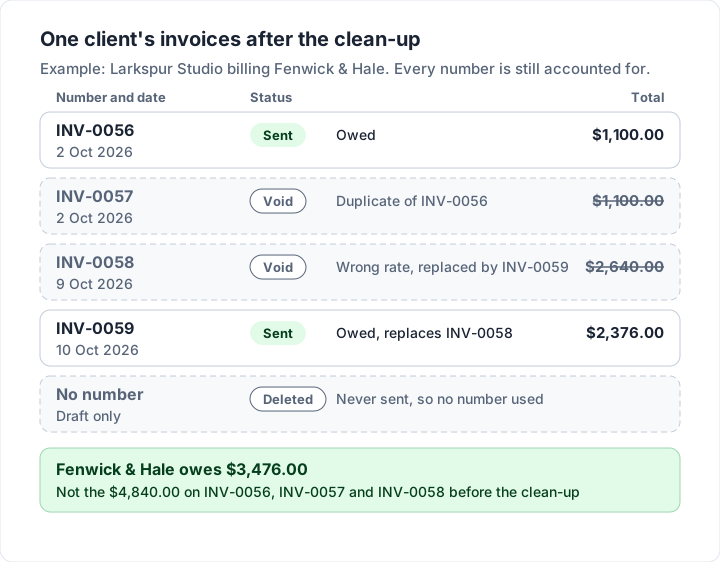
The result is a sequence with no unexplained gaps:
| Number | Date | Total | Status | Why |
|---|---|---|---|---|
| INV-0056 | 2 Oct 2026 | $1,100.00 | Sent | Consultation, owed |
| INV-0057 | 2 Oct 2026 | $1,100.00 | Void | Duplicate of INV-0056 |
| INV-0058 | 9 Oct 2026 | $2,640.00 | Void | Wrong rate, replaced by INV-0059 |
| INV-0059 | 10 Oct 2026 | $2,376.00 | Sent | Room design, owed |
| (none) | — | — | Deleted draft | Never sent |
Fenwick & Hale owe $3,476.00 ($1,100.00 plus $2,376.00). Before the clean-up, the client's accounts team was looking at $4,840.00 across three invoices (INV-0056, INV-0057 and INV-0058), $1,364.00 more than it owes, and might have paid some or all of it.
What to tell the client when you cancel an invoice#
Voiding an invoice in your own records does nothing to the copy in your client's inbox or their accounts system. Until you tell them, it is still a bill to them. Reply in the same email thread as the original so the history stays together, and name the numbers.
Voiding a duplicate:
Hi Dana, our system sent invoice INV-0057 twice by mistake. Please ignore INV-0057; it has been voided. INV-0056 for $1,100.00 is the one to pay, due 16 October. Sorry for the extra email.
Voiding and replacing:
Hi Dana, you were right about the rate on INV-0058. I have voided it, so please do not pay it. The corrected invoice, INV-0059 for $2,376.00 at the agreed $135.00 an hour, is attached. The due date is unchanged.
The client cancelled the job:
Hi Dana, following your message today, I have cancelled invoice INV-0061 for the kitchen project, so nothing is owed on it. Thanks for letting me know early.
Keep it short and factual. If you send invoices by email, how to email an invoice covers subject lines that make the replacement easy to find later.
Voided invoices and your records#
Record-keeping rules are set by tax authorities and vary by country, so treat the lines below as examples of where to look, quoted as of 23 October 2026, not as the rules for you:
- UK (VAT numbering): HMRC's VAT Notice 700, paragraph 16.3.1, lists “a sequential number based on one or more series which uniquely identifies the document.” HMRC's internal manual VATREC5010 asks: “What if there is a break in sequence, for example where I cancel an invoice or it is spoiled and never issued to a customer?” Its answer: “As long as you retain the cancelled or spoiled invoice in your accounting records, or you can provide an explanation for the break in sequence, this is acceptable.”
- UK (VAT corrections): paragraph 19.8 of the same notice says: “If you issue a credit note or supplementary invoice to correct an error in a VAT invoice, it should bear a reference to the number and date of that VAT invoice and show clearly both the correct and incorrect amounts of VAT.” If the correction raises the total, supplementary invoices and debit notes covers how businesses bill the difference.
- UK (VAT records): VAT Notice 700/21 says in paragraph 3.2 that “you must keep a copy of every VAT invoice you issue”, and in paragraph 2.4: “Generally, you must keep all your business records for VAT purposes for at least 6 years.”
- US (income tax): the IRS page on what kind of records to keep says: “You should keep supporting documents that show the amounts and sources of your gross receipts.” Its page on how long to keep records sets out different periods for different situations.
- Elsewhere: your national tax authority's record-keeping guidance. (The Canada Revenue Agency's record-keeping page did not load for our tools on 23 October 2026, so we do not quote it.)
In practice, many businesses keep voided invoices for as long as they keep the rest of their sales records, because a voided invoice is part of the explanation for the numbering. If you already counted the invoice as income (for example, you record sales when you invoice rather than when you are paid), your books will usually need a matching reversal; your bookkeeper or accountant can tell you how and when.
If you are registered for VAT, GST or sales tax, ask your accountant whether your tax rules call for a credit note rather than a void for a sent invoice. What a tax invoice is explains the extra fields such invoices commonly carry.
How voiding works in Charming Invoices#
Charming Invoices follows the habits above, and it is strict about them on purpose. Here is exactly what it does, including its limits:
- Drafts can be deleted. A draft has no invoice number yet: the number is assigned when you issue it. So deleting a draft never leaves a gap.
- Issued invoices cannot be edited or deleted. Once issued, an invoice is a frozen snapshot of what the client received.
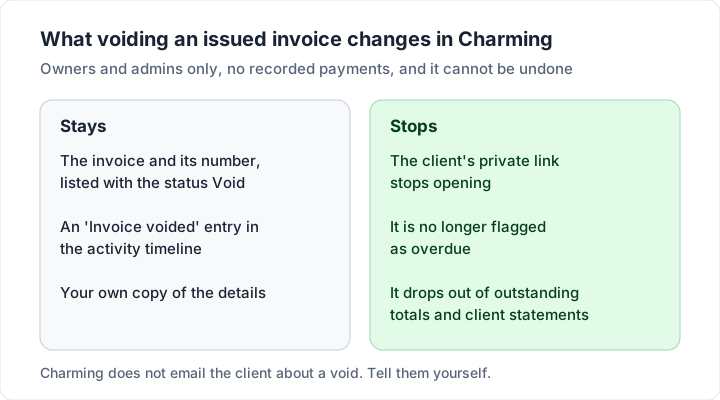
- A draft or issued invoice with no recorded payments can be voided by an owner or admin of the business. Members do not see the option.
- Voiding keeps the number. The invoice stays in your list with the status Void, and an “Invoice voided” entry is added to its activity timeline.
- The client's private link stops opening, the invoice is no longer flagged as overdue, and it drops out of your outstanding totals and client statements.
- “Duplicate” makes the replacement. It copies any invoice's client and line items into a new draft with today's dates. You fix the error, and the draft gets the next number when you issue it.
The catches, plainly:
- Voiding cannot be undone. If you void the wrong invoice, duplicate it and issue the copy, which gets a new number.
- Charming does not tell the client. Voiding does not email anyone. Send one of the messages above yourself.
- A paid or part-paid invoice cannot be voided until its recorded payments are removed with “Mark as unpaid”, which is kept in the activity log.
- There are no credit notes and no refund records in Charming. For a paid invoice you need to credit, issue the credit note outside the app and keep it with your records.
If that covers what you need, you can create a free invoice and try voiding and duplicating on a test draft first.
Questions people ask about voiding an invoice#
Can a voided invoice be un-voided?#
It depends on the tool. Some accounting software lets you reverse a void; others, Charming included, do not. The safe habit is the same either way: if you voided the wrong one, issue a new invoice with a new number rather than reviving the old one.
Can I reuse the number of a voided invoice?#
No. Each number should identify exactly one document. Reusing it gives two different invoices the same name, which is worse than a gap. The invoice number generator can help you set up a format that keeps counting up.
Does a voided invoice show up on a client statement?#
It should not appear as an open item, because nothing is owed on it. A statement lists what is outstanding; invoice vs statement explains the difference.
Is voiding the same as writing off a bad debt?#
No. Voiding says the invoice should never have been payable. Writing off says it was payable, but you have given up collecting it. They are recorded differently, and a bad debt can have its own tax treatment (ask your accountant), so do not void an invoice just because the client will not pay; when a client is not paying covers the options first.
Should a voided invoice be marked “VOID” on the PDF?#
If you keep paper or PDF copies outside your software, writing “VOID” and the date on your copy is a sensible habit. What matters most is that your records show it was cancelled, when, and why.
Free download
No sign-up and no email address. More on the free templates page.
- Download .xlsx: Invoice numbering log
Invoice numbering log
Excel .xlsxA record of every invoice number you issue, from any app or template, that flags duplicates and gaps and suggests the next number.