How to send an invoice: by email, link, text or post

Nnabuike Okoroafor ·
On this page · 17 sections
The invoice is finished. The numbers are right, the due date is on it, your bank details are at the bottom. Now it has to leave your computer and land in front of someone who will actually pay it, and that last step is where a surprising number of invoices stall.
This guide covers how to send an invoice every common way: by email (still the default), as a PDF attachment or a link, by text or WhatsApp, by post, through a client’s supplier portal and from invoicing software. It includes wording you can copy, a table for choosing the channel, when to send, how to follow up and the mistakes that quietly delay payment.
If you are still putting the invoice itself together, how to make an invoice walks through creating one, and what actually belongs on an invoice is the field-by-field checklist. This post starts once the document is ready.
How to send an invoice: the short answer#
- Save the invoice as a PDF with a clear file name, such as “Harbour-Studio-Invoice-INV-0014.pdf”. A PDF looks the same on every device and cannot be edited by accident.
- Find out who pays. Ask for the accounts payable address, and whether a PO number has to be on the invoice.
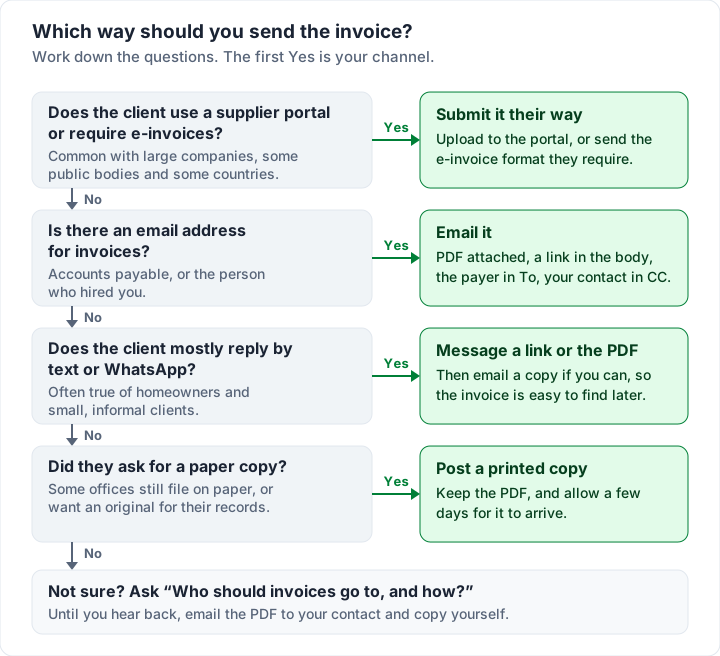
- Pick the channel the client uses: email for most clients, their supplier portal if they have one, a text or WhatsApp message for informal clients, post only if they ask for paper.
- Write a short message: what the invoice is for, the amount, the due date and how to pay.
- Send it the day the work is delivered, or on the date you agreed.
- Keep a copy and a date, and follow up on a schedule if the due date passes.
Everything below expands one of those steps.
Ways to send an invoice, compared#
There is no single right channel. The best one is the one your client’s accounts team actually reads, and that is usually email.
| Way to send | Best for | Watch out for |
|---|---|---|
| Email with the PDF attached | Almost every client, and anyone with an accounts department | Spam filters, the wrong inbox, a missing PO number |
| Email with a link to the invoice | Clients who read on a phone; seeing whether it was opened | Some clients distrust links or want the file itself |
| Text message or WhatsApp | Homeowners and small, informal clients who reply faster there | Messages get buried; hard to file; no record in accounts |
| Post (a printed copy) | Clients who ask for paper, some offices and older businesses | Postage time and cost; no proof it arrived unless you pay for it |
| Supplier portal or e-invoicing network | Large companies, public bodies, countries with e-invoicing rules | Registration first; the portal’s rules override your template |
| Invoicing software or an app | Sending regularly, reminders, a record of what went out and when | Each tool’s limits: payment options, send caps, what it tracks |
If you are unsure, work through the questions in order:
How to send an invoice by email#
Most invoices are sent by email. An “emailable invoice” is not a special kind of invoice, just one saved in a format that travels well by email, which in practice means a PDF.
Most invoice emails are written in about ten seconds. That is fine, as long as those ten seconds cover three jobs, in this order:
- Be found. Today, and again in three weeks when someone in accounts searches their inbox for your name or your invoice number.
- Be understood without opening anything. The amount, the due date and the invoice number should be readable in the email itself.
- Make paying easy. The invoice opens on any device, and how to pay is obvious.
Invoice email subject lines that are easy to find later#
The subject line is the part that gets searched, so it should carry the facts: the word “invoice”, the invoice number and your business name. The due date is a useful fourth item for a client who pays in batches.
Here are examples, from plainest to warmest:
| Subject line | Works best for |
|---|---|
| Invoice INV-0014 from Harbour Studio | Accounts departments, anyone who files by number |
| Invoice INV-0014 from Harbour Studio — due 4 December | Clients who pay on a fixed cycle |
| Invoice INV-0014 for the October product shoot | A client who hires several freelancers and needs the context |
| Your invoice from Harbour Studio (INV-0014) | A regular client you are on first-name terms with |
Avoid subject lines like “Payment”, “Quick one” or “Following up”. They say nothing about what is inside, and they are hard to find in a search. Leave out exclamation marks and all-capitals too. An invoice is routine paperwork, and the subject should read that way.
Whenever you send invoices, keep the same pattern, so a client who saw INV-0013 last month recognises INV-0014 at a glance.
What to say when you email an invoice#
The body needs four pieces of information and one human line: what the invoice is for, how much, when it is due, how to pay, and a thank-you. Three or four sentences is enough. Everything else is already on the invoice. For deposits, retainers, accounts payable and other situations, see more invoice email examples by situation. Those emails, with an overdue follow-up sequence, also come as a free Word file and a plain text file to keep and copy from.
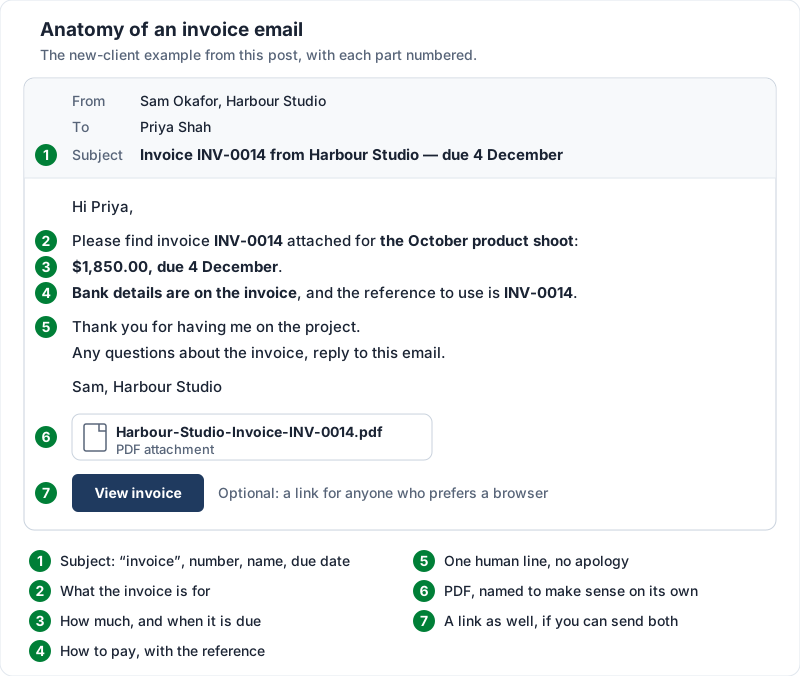
Here is a sample for a new client:
Hi Priya,
Please find invoice INV-0014 attached for the October product shoot: $1,850.00, due 4 December. Bank details are on the invoice, and the reference to use is INV-0014.
Thank you for having me on the project. Any questions about the invoice, reply to this email.
Sam, Harbour Studio
Here is that same email as it lands in Priya’s inbox, with each part numbered:
A sample for a regular client:
Hi Priya — October’s invoice is attached (INV-0014, $1,850.00, due 4 December). Same bank details as usual. Thanks again.
A sample for an accounts department you have never spoken to:
Hello,
Please find attached invoice INV-0014 from Harbour Studio for $1,850.00, due 4 December, for product photography commissioned by Priya Shah. The purchase order number is PO-5521 and is shown on the invoice. Payment details are on the invoice.
Kind regards, Sam Okafor, Harbour Studio
Notice what none of them say: “sorry to bother you”, “no rush” or “whenever you get a chance”. Those phrases tell the client the due date is optional. Asking for money without the awkwardness goes into why the apology creeps in and how to drop it.
Put the amount and due date in the body even though they are on the invoice, because many people read email on a phone and will not open the attachment straight away. And if your client needs a reference with the payment, say so in the email, not only on the document.
Sending the invoice from Gmail, Outlook or any email app#
Every email app works the same way for this: start a new message, add the subject and body above, attach the PDF (the paperclip icon) and check the attachment name before you press send. Three habits make it more reliable:
- Send from the address the client already knows, ideally the one you used throughout the project.
- Attach a PDF, not a Word or spreadsheet file. An editable file can be changed, may look different on the client’s machine, and some accounts systems only accept PDF.
- Keep the file small. A one- or two-page invoice PDF is usually well under 1 MB. If yours is much larger, a heavy logo image is the usual cause.
PDF attachment or link: send both if you can#
There are two ways to deliver the invoice itself: attach a PDF, or send a link to a page where the client can view and download it. Each has a real weakness.
| PDF attachment | Link to the invoice | |
|---|---|---|
| Opens without an internet connection | Yes | No |
| Easy to forward to accounts | Yes, it travels with the email | Yes, but the recipient has to click through |
| Can be filed straight into an accounts system | Yes | Usually after downloading |
| Tells you whether it was opened | No | Often, depending on the tool |
| Can be blocked or filtered | Large or unusual attachments sometimes are | Unfamiliar links sometimes are |
Some clients strongly prefer one or the other. An accounts team usually wants a file it can save and match to a purchase order; a client reading on a phone may find a link quicker than an attachment.
The safest default is both: the PDF attached, and a link in the body for anyone who prefers to view it in a browser. If you can only do one, attach the PDF. It is the format accounts departments expect, and it still works when the link is forgotten.
Name the file so it makes sense out of context: “Harbour-Studio-Invoice-INV-0014.pdf”, not “invoice final v2.pdf”. Someone in accounts may save dozens of invoices a week into one folder.
How to send an invoice by text message or WhatsApp#
Some clients answer a text in minutes and an email in days. A homeowner who hired you for a repair, a parent paying for tutoring or a small shop owner may all fit that pattern. For them, a message is a perfectly good way to send an invoice, as long as it carries the same facts as an email.
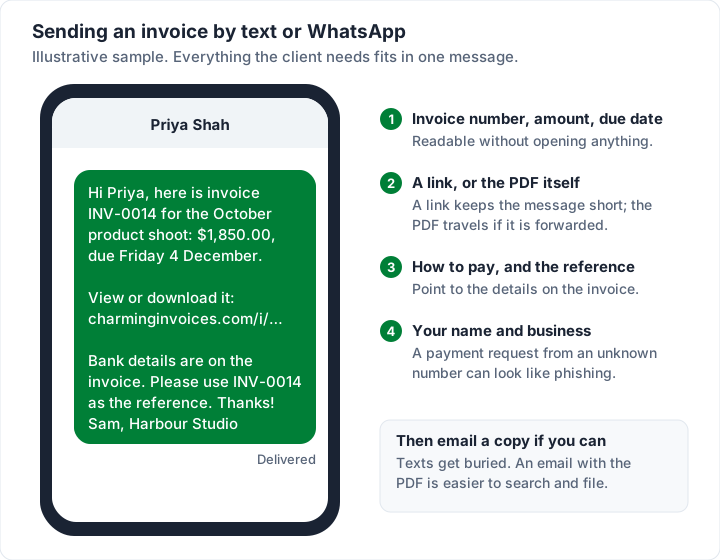
How to do it well:
- Send a link or the PDF, not a photo of the invoice. A photo is hard to read, cannot be filed and looks unofficial. Most messaging apps can send a PDF as a document.
- Say who you are in the first line. If the client does not have your number saved, “Sam, Harbour Studio” is the difference between an invoice and something that looks like a phishing text.
- Never change bank details by message. Tell clients your details will only ever change after a phone call. The same goes for email, as the checklist further down explains.
- Email a copy too, if you have an address. Messages scroll away, and the client may need to forward the invoice to someone else or keep it for tax records.
Text and WhatsApp suit small, informal clients. A company with an accounts department will almost always want the invoice by email or through its own system, whatever your contact prefers for chatting.
How to send an invoice by post#
Paper is rarer now, but some clients still ask for it: a few offices, some public bodies and older businesses that file by hand. If a client asks for a printed copy, post one. Otherwise there is little reason to, because post is slower, costs money and gives you no record that it arrived.
If you do post an invoice:
- Print the same PDF you keep on file, so the paper copy and your record match exactly.
- Allow for delivery time. If your terms are 30 days from the invoice date, a letter that takes several days to arrive shortens the client’s real time to pay. Some businesses date the invoice the day it is posted for that reason.
- Keep proof of posting for large amounts. Your postal service’s tracked or recorded options cost more but show when it was delivered.
- Email a PDF as well if the client agrees, so they are not waiting on the post to start their approval.
Supplier portals and e-invoicing#
Larger clients often do not want invoices emailed at all. They ask suppliers to upload invoices to a supplier portal, or to send them through an e-invoicing network, so the invoice goes straight into their accounts payable system. If a client gives you portal instructions, follow them exactly: an invoice emailed to someone who has asked for portal uploads may never reach the people who pay.
A few things to know:
- Registration comes first. Portals usually need you set up as a supplier, sometimes with tax forms, before you can submit anything. Ask about it before the work starts, not when the invoice is due.
- The portal’s fields win. You may have to retype your invoice number, PO number, amounts and dates into the portal, and upload your PDF as the supporting document. Make sure they match exactly. What a PO number is and where it goes on an invoice explains why the PO number matters so much here.
- Some countries have e-invoicing rules. An e-invoice in this sense is a structured data file, not a PDF. General information, not legal or tax advice: as one example, the European Commission’s eInvoicing in Belgium page says “Business-to-business (B2B) eInvoicing became mandatory in Belgium on 1 January 2026, as prescribed in the federal law modifying the vat code of 06.02.2024.” and “Sending a PDF invoice by email or via a platform will no longer be enough.” (read 28 October 2026). Other countries have their own rules and dates, and they change.
If you sell to businesses in a country with an e-invoicing rule, check that country’s tax authority or ask an accountant or a lawyer there. Our guide to electronic invoices explains what counts as an e-invoice and whether a PDF is enough.
Sending invoices from invoicing software or an app#
Invoicing software does most of the above for you. The usual pattern is: you create the invoice, press send, and the tool emails your client with the PDF attached or a link to view it, keeps a record of what was sent and when, and often shows whether the client opened it. Many tools can also send payment reminders on a schedule.
What differs between tools:
- How clients pay. Some tools let clients pay by card through the invoice and take a fee for each payment. Invoice payment methods compares the options and their costs.
- What tracking means. “Viewed” usually means the link was opened, not that the attachment was read (more on that below).
- Limits. Most tools cap how many emails you can send in a short time, to stop accounts being used to send spam.
If you invoice from your phone, the best free invoicing apps for iPhone and Android compares the options.
Who to send invoices to#
The person who hired you is often not the person who pays you. In a small business they may be the same person. In a larger one, the invoice usually has to reach an accounts payable inbox, sometimes with a purchase order number, before anyone can pay it. Invoicing a company covers what larger clients expect to see on the invoice.
An invoice that never reaches that inbox cannot be paid, however well it is written. So before the first invoice to a new client, ask one question: “Who should invoices go to, and do you need a PO number on them?” Many companies have a dedicated invoice email address, often something like accounts@ or invoices@ at their domain. If they give you one, use it, because that inbox is the one someone in accounts payable works through.
Accounts payable is the team that pays the company’s bills, so that is where your invoice goes. Accounts receivable is the team that collects money owed to the company; it deals with the invoices the company sends, not the ones it receives.
Once you know where it goes:
- Send it to the payer, and copy your contact. Accounts gets the document. The person who hired you sees it went out and can vouch for the work.
- Copy yourself so you have a record of exactly what was sent, and when.
- Use the client’s legal name on the invoice and in the email, as their accounts team knows it.
- Reply in the same thread for every follow-up, so the history stays in one place.
When to send an invoice#
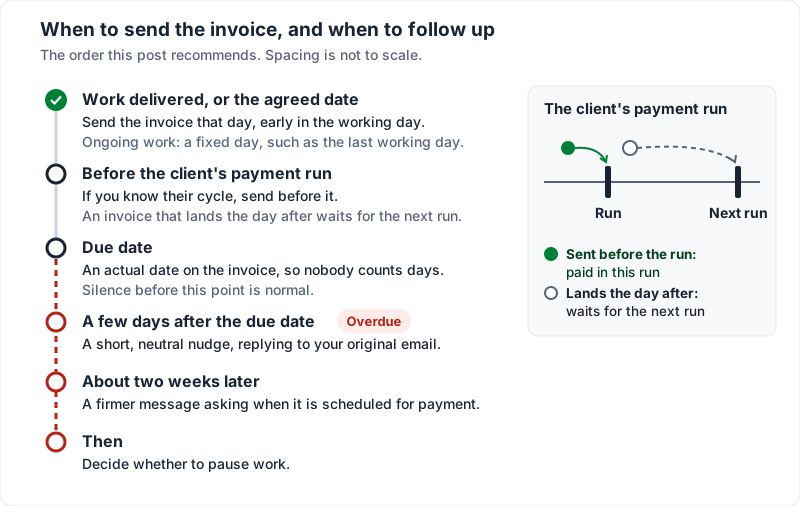
Send it as soon as the work is delivered, or on the date you agreed. For ongoing work, pick a fixed day (the last working day of the month, say) and keep to it, so the client learns to expect it.
There is no proven best hour. Early in a working day is a reasonable default, because the email arrives while people are working through their inbox rather than leaving it for the weekend. More important is the client’s payment cycle: some pay suppliers on a set day each month, and an invoice that arrives the day after that run waits for the next one. If you know a client’s cycle, send before it.
Payment terms decide when the money is due, not when the invoice goes out. Whatever terms you agreed, the due date on the invoice should be an actual date, so nobody has to count days. The free invoice due date calculator turns terms like net 30 into a date. Invoice payment terms like net 30 explains the common terms, and invoice due upon receipt covers what that phrase really asks of a client.
Before or after the work? Usually after, once the work or a stage of it is delivered. The exceptions are deliberate: a deposit invoice before you start, or payment in advance for regular work. And if the client has already paid, send a receipt rather than an invoice.
Put together with the follow-up order further down, the sequence looks like this:
Before you press send: a short check#
- Open the PDF you are about to attach. Check the amount, the due date, the client’s name and your payment details.
- Check the invoice number matches the subject line.
- Send from an address the client recognises. Ideally the one you have been using throughout the project.
- Check the payment details have not changed. If they ever do, tell the client by phone as well as by email. Invoice fraud often works by sending a convincing email with new bank details. Agree with each client that any change to your details is confirmed by a phone call on a number they already have for you, never one taken from the email itself. A client who knows you will never change your details by email alone is harder to fool. Our guide to fake invoices and invoice scams covers what to do when someone sends your clients a lookalike invoice in your name.
- Ask a new client to confirm it arrived. Invoice emails do land in spam folders, and from the outside that looks the same as no reply.
If you send from QuickBooks and an invoice shows a delivery status you do not expect, our QuickBooks sending guide collects Intuit’s own help pages.
Tracking whether your invoice was seen#
Many invoicing tools show a status for each invoice. The labels vary, so it helps to know exactly what each one tells you:
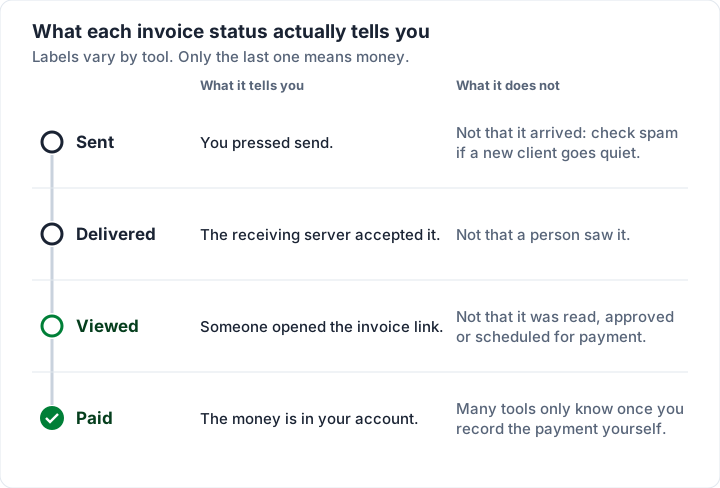
Opened is not the same as paid, or even as read properly. Knowing it was seen tells you the problem is not the inbox. It does not tell you what the problem is. If you sent by text or post, you will usually have no tracking at all, which is one more reason to ask a new client to confirm the invoice arrived.
Whatever the channel, keep your own list of what went out, when, and what is still owed. Our guide to keeping an invoice tracker shows the columns and formulas, and the free Invoice tracker for Excel works out each invoice’s balance, status and days overdue for you.
If nothing happens after you send it#
Silence before the due date is normal. Silence after it is still usually an inbox problem, not a decision not to pay. If you want to nudge before the due date, invoice reminders covers when to send one and what to say.
A sensible order: a short, neutral nudge a few days after the due date, replying to your original email; a firmer message around two weeks later, asking when it is scheduled for payment; and then a decision about pausing work. The wording for each stage is in how to write an overdue invoice follow-up email.
With the sample invoice above (illustrative dates), that looks like this:
| Step | Date | What you send |
|---|---|---|
| Invoice sent, net 30 | Wednesday 4 November | The invoice email, PDF attached |
| Due date | Friday 4 December | Nothing yet |
| Neutral nudge | Tuesday 8 December | A short reply in the same thread: is it scheduled? |
| Firmer follow-up | Tuesday 22 December | Ask for a payment date; mention late fees only if your terms include them |
| Decide next steps | Early January | Pause further work, a phone call, or the steps in what to do when a client is not paying |
Common mistakes when sending invoices#
- Sending it to the wrong person. Your contact may not pay invoices. Ask who does.
- A vague subject line. “Invoice” alone, or “Payment”, is hard to find in a search three weeks later.
- No amount or due date in the message. The client has to open the file to know what you want.
- An editable file. A Word or spreadsheet file can change between your screen and theirs; send a PDF.
- A missing PO number, when the client uses them. The invoice can sit unpaid until someone matches it.
- A photo of a paper invoice sent by text, instead of a PDF or a link.
- Changing bank details in an email or message. It trains clients to accept exactly what fraudsters send.
- Sending late. An invoice sent weeks after the work tells the client it is not urgent, and may miss their payment run.
- Not keeping a copy. If you cannot show what you sent and when, chasing it is harder.
- Silence after the due date. Most late invoices need one polite reminder, not a confrontation.
If you spot a mistake after sending, do not edit the old one and send it again under the same number; how to void or cancel an invoice covers the clean way to correct it.
Sending an invoice made in Charming#
Charming Invoices does not send the email for you. When the invoice is ready, you issue it: it takes the next invoice number, its design is fixed and its PDF is stored. Then you send it however you like:
- Email: use “Download PDF” and attach it to an email from your own inbox, with the wording above. You can also paste the private link from “Copy link” into the message; it opens the invoice in a browser, no client account needed.
- Text or WhatsApp: use “Copy link” on the invoice and paste the private link into any message. Charming does not send texts or WhatsApp messages itself.
- Post: use “Download PDF” or “Print” and post the paper copy. Charming does not post invoices.
- Supplier portals: download the PDF and upload it to the client’s portal. Charming does not connect to portals or send e-invoices through networks such as Peppol.
When the client opens the private link, the invoice’s timeline shows “Viewed by the client”. Charming does not send payment reminders. An issued invoice past its due date shows as Overdue, so set a calendar reminder for the due date and follow up from your own inbox.
The limits, plainly. Only opening the private link counts as a view. If your client reads the PDF you attached and never clicks the link, Charming cannot tell. Link-preview bots, including the previews messaging apps fetch, are filtered out on a best-effort basis, so treat a view as a strong hint, not proof. Clients pay you directly by bank transfer or your own payment link, not by card through Charming, and you mark the invoice paid yourself. On the free plan, the invoice PDF and its page carry a small “Sent with Charming Invoices” line; paid plans hide it by default, as the pricing page shows.
Frequently asked questions#
How do I send an invoice to a client?#
Save the invoice as a PDF, email it to whoever pays your client’s invoices with a short message stating the amount, due date and how to pay, and copy your contact. Use the client’s supplier portal instead if they have one.
What does “send an invoice” mean?#
It means delivering the finished invoice to the person who has to pay it, so they know what to pay, by when and how. Today that usually means emailing it, and “invoice sent” or “emailed invoice” simply describes an invoice that has gone out that way. Until it is sent, an invoice is a draft on your side that the client cannot act on.
How do I send an invoice to a company?#
Ask your contact which address invoices go to and whether a PO number is needed, then email the PDF to that accounts payable address with your contact in copy. Larger companies may ask you to upload it to a supplier portal instead. Invoicing a company covers what their accounts teams look for.
Can I send an invoice without a company, as a sole trader?#
Many sole traders and freelancers invoice in their own name, with no company set up, and send it the same way: a PDF by email. What the invoice has to show, and any registration you need, depend on where you work, so ask an accountant if you are unsure.
How do you politely send an invoice by email?#
Keep it short and factual: what the invoice is for, the amount, the due date, how to pay and a thank-you. Politeness comes from being clear, not from apologising for asking. The samples above, and more invoice email examples by situation, give wording to copy.
Can I send an invoice for free?#
Yes. Any email account will send a PDF invoice at no cost. Charming Invoices also has a free plan with no invoice cap: issue the invoice, download the PDF or copy its private link, and send it from your own email. Free invoices carry a small “Sent with Charming Invoices” line.
Can I send an invoice by text or WhatsApp?#
Yes. Send a link or the PDF, not a photo, with the invoice number, amount, due date and your business name in the message. Email a copy too if you can, so the client can file it.
Should I send an invoice as a PDF or a Word document?#
A PDF. It looks the same on every device, cannot be edited by accident and is what most accounts teams expect. Keep the Word or spreadsheet version as your own working copy.
Do you send an invoice before or after the work?#
Usually after the work, or a stage of it, is delivered. A deposit invoice is the common exception, sent before you start. If the client has already paid, send a receipt instead.
How do I send an invoice from my phone?#
Use your email app with the PDF attached, or an invoicing app or website that works in your phone’s browser. If the client prefers messages, send the invoice link or PDF by text or WhatsApp.
Is an emailed invoice valid?#
Emailing a PDF invoice is common business practice. Whether a PDF is enough for a particular sale depends on where you and your client are. In the Belgian example quoted above, the European Commission’s page says “Sending a PDF invoice by email or via a platform will no longer be enough.” Check the tax authority’s guidance where you sell, or ask an accountant.
What should the subject line of an invoice email be?#
The word “invoice”, the invoice number and your business name, for example “Invoice INV-0014 from Harbour Studio”. Add the due date for clients who pay in batches.
The short version#
Send the invoice the way your client’s payer reads it: usually email, with the PDF attached and a link if you can. Use a subject line with “invoice”, the number and your name, and write three or four sentences: what it is for, how much, when it is due, how to pay. Use texts for informal clients, paper only on request, and the client’s portal when they have one. Send it the day the work is done, and follow up on a schedule rather than on a feeling.
If this is the first invoice you have ever sent, your first invoice: what actually has to be on it covers the rest. When you are ready, create a free invoice, download the PDF and send it your way.
Free downloads
No sign-up and no email address. More on the free templates page.
- Download .docx: Invoice email templates for Word
Invoice email templates for Word
Word .docxEmails to send an invoice in 12 situations, and a 4-step follow-up for one that is overdue.
- Download .txt: Invoice email templates as plain text
Invoice email templates as plain text
Text .txtThe same emails as a plain text file, the easiest version to copy into any email app.
- Download .xlsx: Invoice tracker for Excel
Invoice tracker for Excel
Excel .xlsxEvery invoice you have sent on one sheet, with its balance, status and how many days late it is.