Fake invoices and invoice scams: how to spot them

Nnabuike Okoroafor ·
On this page · 12 sections
An invoice arrives for a directory listing you do not remember buying. It says "past due". Or an email that looks like it is from Apple says you have been charged for something, with a number to call. Or a supplier you really do use writes to say their bank details have changed, just in time for this month's payment.
Each of these is a fake invoice, and each relies on the same thing: that whoever pays the bills will assume it is real and pay it. This guide shows the common invoice scams that reach small businesses and freelancers, the tells on each, a short check to run before you pay anything, the scams aimed at you when you are the one sending invoices, and where to report a fake invoice in the US, UK and Canada. Every official quote below comes from pages we read on 23 October 2026. This is general information, not legal or financial advice.
Fake invoices in short#
- A fake invoice bills you for something you never ordered, or copies a real supplier's invoice with someone else's bank details on it.
- The tells are behavioural, not visual. Urgency ("past due", "final notice"), a phone number to call, new bank details, or a demand for wire transfer, gift cards or crypto.
- Check through a channel you already had. Call the company on a number from a contract, an earlier invoice or its real website, never one from the invoice or email.
- Fake invoices can arrive through real services. A genuine email from a payment or invoicing service can still carry a scammer's bill.
- If you have already paid, call your bank first, then report it: ReportFraud.ftc.gov and IC3 in the US, Report Fraud in England, Wales and Northern Ireland.
What a fake invoice is#
The US Federal Trade Commission describes the core scam plainly in its guide to scams and your small business: "Scammers create phony invoices that look like you ordered products or services for your business." The aim, it adds: "They hope the person who pays your bills will assume the invoices are real and make the payment."
In practice, a fake invoice comes in two forms:
- An invented bill. A company you have never dealt with, or a lookalike of one you know, bills you for a product or service you did not order. The FTC's May 2026 alert Run a small business? Pay your bills, not scammers names typical examples: "maybe tech support, domain registration, or search engine optimization services."
- A real invoice, redirected. The supplier and the work are genuine, but the invoice or a follow-up email carries different bank details. The bill is right; the account is not. This is usually called invoice redirection, mandate fraud or business email compromise.
There is a third, newer kind that is not really about the bill at all. The same FTC alert warns that an emailed invoice may be "a phishing scam designed to get access to your business's data and networks". The FTC's guide to recognising phishing lists, among the stories phishing emails tell, that they "include an invoice you don't recognize — it's fake". The invoice is bait for a link or an attachment.
Common invoice scams aimed at small businesses#
Here are the scams that most often arrive as a bill, with what to look for on each. The descriptions come from the FTC pages linked above unless the row says otherwise.
| Scam | What arrives | The tell |
|---|---|---|
| Directory or listing "renewal" | A bill for an online directory or advertising listing | You never bought it; the FTC warns of "a listing in a phony business directory" |
| Unordered services | A bill for tech support, a domain name or SEO | No purchase order, contract or person who asked for it |
| "Past due" notice | A bill marked overdue or "final notice" | Pressure to pay before anyone checks |
| Phishing invoice | An email with an invoice attachment or "view invoice" link | You do not recognise the sender or the charge |
| Changed bank details | A real supplier's invoice, or an email, with "new" account details | A change of account arriving by email, often with urgency |
| Brand lookalike | A receipt or renewal that borrows a well-known company's name | A phone number to call to cancel or dispute it |
The "past due" stamp deserves a special mention because it works so well. The FTC's alert puts it this way: "Adding to the confusion and urgency, some invoices arrive with a 'past due' notice." A bill that claims to be overdue invites whoever handles payments to pay first and ask later.
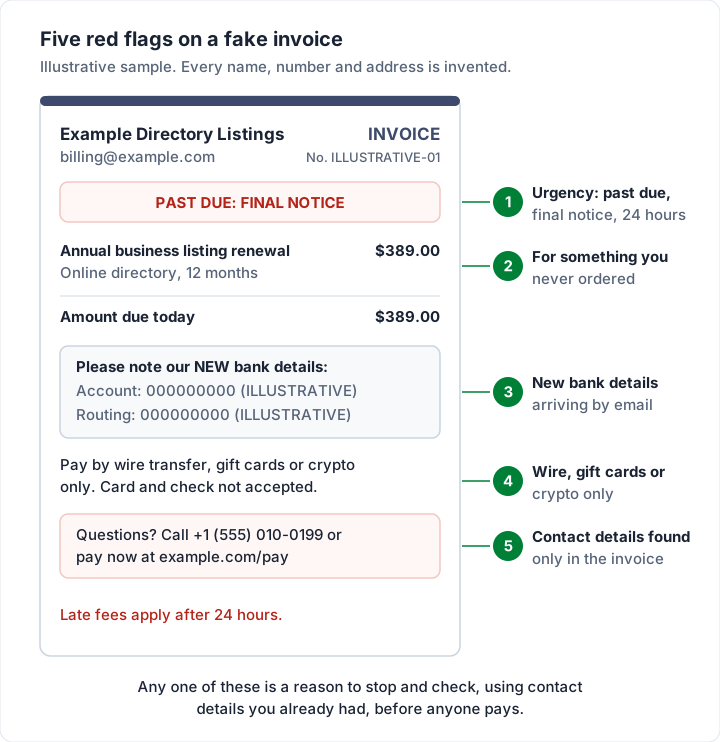
How a fake invoice asks to be paid is often the clearest tell of all. The FTC's guide is blunt: "If someone demands that you pay with a wire transfer, cryptocurrency, or gift cards, don't pay."
Emails that borrow a well-known company's name#
Some fake invoices are aimed at anyone with an inbox, and they borrow a well-known company's name. The companies and the FTC publish their own warnings, quoted below. The pattern is the same each time: a charge you did not make, and a reason to act now.
Messages using Apple's name. Apple's support page on phishing messages and phony support calls does not single out invoices, but the signs it lists fit them exactly. Among them: "The sender's email or phone doesn't match the name of the company that it claims to be from", "A link in a message looks right, but the URL doesn't match the company's website", and "The message is unsolicited and contains an attachment." Apple's own advice: "If you receive a suspicious email that looks like it's supposed to be from Apple, please forward it to [email protected]." It also says that Apple "will never ask you to log in to any website" or to give your password or two-factor code.
Messages using Geek Squad's name. The FTC's alert How to recognize a fake Geek Squad renewal scam (October 2022) describes messages saying you were or will be "charged hundreds of dollars to renew your Geek Squad membership", with pressure to "call a phone number within 24 hours". The FTC says the people on the other end may "ask for remote access to your computer". Its advice: "Do not use the number included in the message." If you think the message might be real, contact the company on a number you know is genuine.
Bills sent through a real payment service. A scam invoice can be sent through a genuine invoicing or payment service, so the email itself can come from a real service address. PayPal publishes its own warning signs and reporting steps, which we cover in our PayPal invoice guide.
The common thread is the phone number. A real company that has charged you by mistake does not need you to call a number printed in the email within the hour. Open the account yourself, through the app or a bookmark you already had, and look for the charge there.
Changed bank details: invoice redirection#
This scam is hard to spot because the invoice is real. A supplier you work with sends a genuine bill; someone who has compromised their email, or set up a lookalike address, follows it with "our bank details have changed". The FBI's Internet Crime Complaint Center calls this Business Email Compromise and describes it as "a sophisticated scam targeting both businesses and individuals performing a transfer of funds."
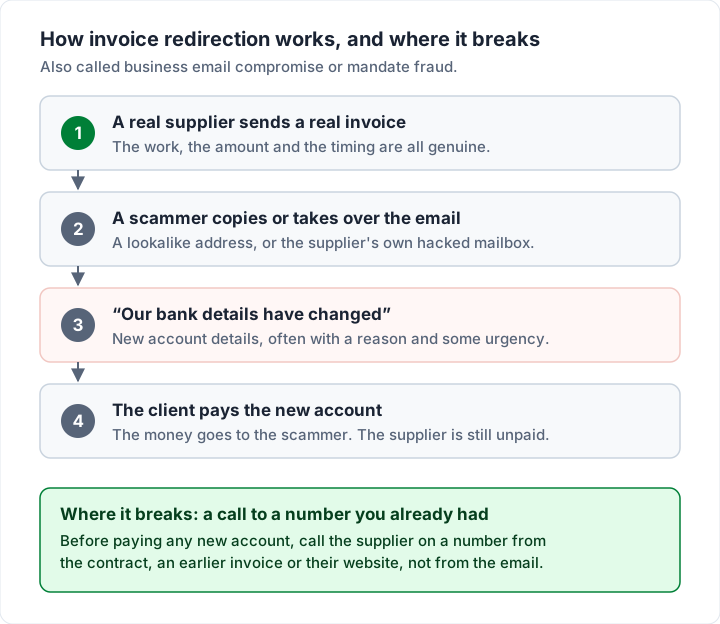
IC3's tips for staying protected start with the one that matters most: "Use secondary channels or two-factor authentication to verify requests for changes in account information with the intended recipient." It also advises checking that "the sender's address appears to match who it is coming from", especially on a phone, where only the display name may show.
We have a full five-step check for changed bank details, including the payee name checks some banks offer, in our guide to keeping payment details safe on an invoice. The short version: never act on new bank details that arrive by email alone. Call the supplier on a number you already had, and confirm the details with someone you know before the money moves.
Scams aimed at you as the one sending invoices#
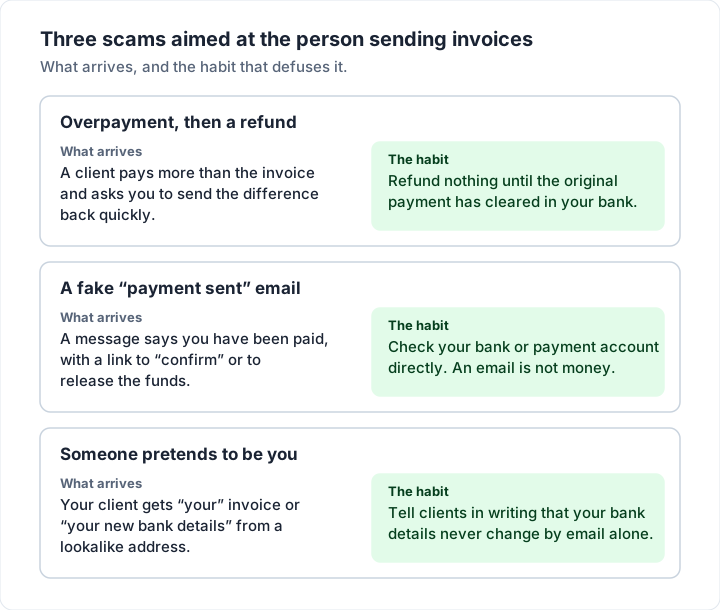
If you are a freelancer or small business sending invoices, the fake invoice can work in reverse. Watch for three.
Overpayment and a refund. A "client" pays you more than your invoice and asks you to send back the difference, fast. The FTC's guide to fake check scams describes buyers who "'accidentally' send a check for too much, and ask you to refund the balance. But that's a scam." The money in your account is not proof: "Even if you see the funds in your account, that doesn't mean it's a good check", and if it bounces, "you're stuck paying the money back to the bank."
In a public online discussion among illustrators about a fake commission (the commenter is not a Charming customer), one person explained the mechanics like this:
They send you too much money in some fashion by accident. Then there is an urgency for why they need the portion back that was sent on accident. Usually they give you some excuses as to why they really need the money back super fast as they are going to get in trouble by their boss, or whoever, for making an oopsie. It's so that you do a money transfer to them quickly, before your bank is able to determine that the initial check is fraudulent.
A fake "payment sent" message. An email or text says you have been paid and asks you to click to "confirm" or "release" the funds. A payment notice in your inbox is not money in your account. Open your bank or payment app directly, not through the message, and check the balance there. Our guide to Venmo and Zelle invoices has more on payment-app scams aimed at sellers.
Someone pretends to be you. Your clients can be targeted with "your" invoice or "your new bank details" from a lookalike address. You cannot stop someone copying your logo, but you can make the fake easier for your clients to spot, which is the section after next.
If a real client is not paying, or disputes a real invoice, that is a different problem with different steps: see what to do when a client is not paying and how to handle a disputed invoice.
How to check an invoice before you pay it#
The FTC's May 2026 alert puts a process first, not a technology: "Make sure your company's procedures are clear for approving purchases and invoices from vendors you actually work with." It also says "Ask your staff to check all invoices closely", and, for an unfamiliar company, "search online for the company's name with terms like 'review,' 'scam,' or 'complaint.'"
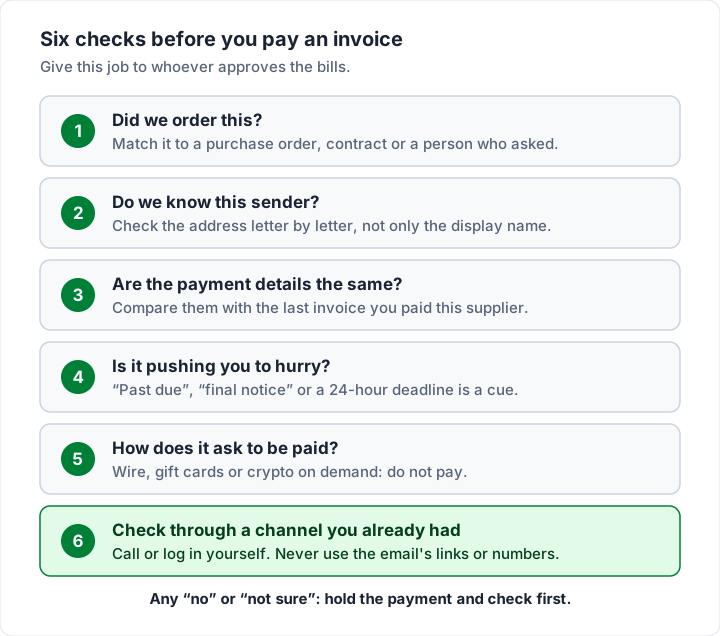
Turned into a routine you can hand to whoever approves the bills, that becomes six checks:
- Did we order this? Match the invoice to a purchase order, a contract, or a named person who asked for the work. Our guide to PO numbers on an invoice explains why that reference is so useful here.
- Do we know this sender? Read the email address letter by letter, not just the display name.
- Are the payment details the same? Compare them with the last invoice you paid this supplier.
- Is it pushing you to hurry? "Past due", "final notice" or a 24-hour deadline is a cue to slow down.
- How does it ask to be paid? Wire transfer, gift cards or crypto on demand: do not pay.
- Check through a channel you already had. The FTC's phishing guide says to "contact the company using a phone number or website you know is real — not the information in the email."
A matching habit on the books side helps too. When every payment is matched to an invoice you expected, a stray bill stands out; our guide to invoice reconciliation shows how.
How to make your own invoices hard to fake#
Nothing you do will stop a determined scammer from copying an invoice. What you can do is make your real invoices so consistent that a fake one looks wrong to your clients:
- Number every invoice in one sequence. A client who sees INV-0041 and INV-0042 from you will notice an invoice with a number that does not fit. Our guide to invoice numbers covers formats.
- Look the same every time. Use one layout, your logo and your business name exactly as registered. See logo on an invoice for placement.
- Send from one address. A client who always gets your invoices from the same place is more likely to notice a different one.
- Put your change rule in writing. A line such as "Our bank details never change by email; call us on our usual number before paying any new account" gives a careful accounts team a reason to stop.
- Never ask clients to call a number in a message to pay. Real invoices list how to pay; they do not route payment through a phone call.
If you make invoices with Charming Invoices, here is exactly what your client receives, checked in our code on 2 November 2026, so you can tell them what to expect:
- Charming does not email your client. You issue the invoice, then download the PDF or copy its private link and send it from your own email or however you usually do. So the message always comes from an address your client already knows: yours.
- The PDF is the invoice exactly as issued, with your business details, bank details and payment link printed on it.
- The private page needs no account or log-in. It shows the invoice, a "Download PDF" button and, while the invoice is unpaid, an "Open payment link" button that goes to your own link (a Stripe, PayPal or Square link, or your bank's page). Charming never takes the payment itself.
- Your bank details and payment link come from your own business settings, so they read the same on every invoice you send.
The limits, plainly: Charming does not detect or block fraud, cannot stop anyone imitating your invoices, and processes no payments. And like any real invoicing service, it could in principle be used by someone sending a bill you did not expect, which is why the check that matters is always "do I know this business, and did I expect this invoice?", not which app sent it.
If you want every invoice numbered and branded in one place, with your bank details printed the same way each time, create a free invoice. The free plan has unlimited invoices for 1 business, and its invoices carry a small "Sent with Charming Invoices" line.
If you have already paid a fake invoice#
Act quickly, and in this order.
- Call your bank or payment provider first, using the number on your card or its website. IC3's advice on business email compromise is to "Contact the originating Financial Institution as soon as fraud is recognized to request a recall or reversal", and adds that requesting a recall "as quickly as possible may reduce or eliminate your financial losses."
- Report it to the right agency below, with the invoice, the emails and the payment details.
- Change your passwords if you clicked a link or entered details anywhere, and turn on two-factor authentication.
- Tell the real supplier if their name was used, through a contact you already had.
Where to report an invoice scam#
Here is where to report a fake invoice or invoice fraud, using each agency's own wording where we could read it on 23 October 2026.
| Where you are | Report it to | What their page says |
|---|---|---|
| US, any fake invoice or scam | FTC, ReportFraud.ftc.gov | The FTC asks you to "report phishing attempts, fake invoices, and other scams to the FTC at ReportFraud.ftc.gov" |
| US, phishing email | Anti-Phishing Working Group, [email protected] | The FTC says to "forward it to the Anti-Phishing Working Group at [email protected]" |
| US, money lost to email or bank-detail fraud | FBI, IC3 | IC3 asks you to "File a detailed complaint with www.ic3.gov", including banking information |
| England, Wales, Northern Ireland | Report Fraud, or 0300 123 2040 | The NCSC says victims of fraud should report "to Report Fraud" |
| Scotland | Police Scotland, 101 | The NCSC says to "report to Police Scotland by calling 101" |
| UK, a suspicious email | NCSC, [email protected] | "If you have received an email which you're not quite sure about, forward it to [email protected]" |
| Canada | Canadian Anti-Fraud Centre, or 1-888-495-8501 | Its page directs online reports to reportcyberandfraud.canada.ca |
The UK entries quote the National Cyber Security Centre's page Report a scam email. In Australia, the government's Scamwatch covers false billing; check its site for the current reporting route.
For a fake email that uses a company's name, also tell the company: Apple asks for suspicious emails at [email protected], and PayPal's reporting steps are in our PayPal invoice guide.
Fake invoice questions#
Is a fake invoice email dangerous if I only open it?#
The bigger risks are the link, the attachment and the phone number. Apple's advice is: "Don't follow links or open or save attachments in suspicious or unsolicited messages." If you did click or enter details, change your passwords and contact your bank.
What should I do with an invoice I never agreed to?#
Do not pay it while you check. Look for a purchase order, contract or person who ordered it, and contact the company through details you already had. If it turns out to be a scam, report it using the table above.
How do I know if a supplier's bank details have really changed?#
Call the supplier on a number you already had, from a contract, an earlier invoice or their real website, and confirm the new details with someone you know. A genuine supplier will expect the call.
Can a fake invoice come from a real company's email system?#
Yes. Scam bills can be sent through genuine invoicing and payment services, so the sending address alone proves little. What matters is whether you know the business and expected the charge.
What is a falsified invoice?#
A real invoice that has been altered, most often by changing the bank details or the amount. It is why the payment details are worth comparing with the last invoice you paid.
The short version#
A fake invoice is either a bill for something you never ordered or a real bill with someone else's bank details on it. The tells are urgency, a number to call, new bank details by email and a demand for wire, gift cards or crypto. Check every unexpected invoice through contact details you already had, keep your own invoices consistent so fakes stand out, and if money has gone, call your bank first and then report it.
Sources, all read on 23 October 2026: FTC, Run a small business? Pay your bills, not scammers (May 2026); FTC, Scams and your small business: a guide for business; FTC, How to recognize and avoid phishing scams; FTC, How to recognize a fake Geek Squad renewal scam (October 2022); FTC, How to spot, avoid, and report fake check scams; FBI IC3, Business Email Compromise; Apple, Recognize and avoid social engineering schemes; NCSC, Report a scam email; Canadian Anti-Fraud Centre, Report fraud and cybercrime.