Venmo invoice and Zelle invoice: what each can do

Nnabuike Okoroafor ·
On this page · 11 sections
Your clients already pay you by Venmo or Zelle. It is quick, they like it, and it has worked fine for small jobs. Then a client asks for an invoice for a big job, and you find that neither app has a "send invoice" button.
This guide answers that question: what a Venmo invoice or a Zelle invoice can and cannot be, what each app's own terms say about business payments, fees and protection, and how to send a proper invoice that still lets the client pay the way they like. App facts come from Venmo's help centre, PayPal's invoicing pages and bank pages for Zelle, checked on 22 October 2026. The tax and protection points are general information, not legal or tax advice.
In short#
- Venmo has payment requests, not invoices. A Venmo business profile can request money (and add sales tax), but a request has no invoice number, line items or due date.
- Venmo business payments cost 1.9% + $0.10 per payment from another Venmo account, as of October 2026. For personal profiles, Venmo's FAQ names one exception for business payments: the sender tags the payment as a purchase.
- Zelle has no invoice at all. Some banks let business accounts send a Zelle request; the money moves bank to bank, and Chase says neither it nor Zelle offers purchase protection.
- The honest answer for both: send a proper invoice, and print your Venmo or Zelle details on it as a way to pay.
- The IRS on reporting income: in its words, "Whether or not you receive a Form 1099-K, you must still report any income on your tax return."
Can you send an invoice on Venmo?#
Not a full one. Venmo's help centre describes payment requests from businesses rather than invoices: when a business profile requests money, "that business has the option of including sales tax and other applicable tax rates", and the payer sees "(includes sales tax)" before paying (Buying from Business Profiles). That is a request for an amount, with a note. It is not a numbered invoice listing the work.
Two Venmo rules matter before you send any request for business:
- Personal profiles and business payments. Venmo's FAQ says "The only way to accept payments for goods and services on Venmo is to be explicitly authorized to accept Venmo for purchases", by "applying for a business profile" or by having the sender "tag a payment to a personal profile as a purchase" (Buying and Selling on Venmo FAQ, read 23 October 2026). It says personal profiles "may NOT otherwise be used to receive business, commercial, or merchant transactions".
- Business payments carry a fee. For a business profile, "The seller transaction fee is a standard rate of 1.9% + $0.10 of the payment total" for payments from another Venmo account, and Tap to Pay payments cost 2.29% + $0.10. The fee is charged to you, not the client, and Venmo says it is "not able to refund seller fees" (How do fees work for Venmo business profiles?).
Venmo and PayPal are often mentioned together for invoicing. PayPal has a full invoice. In Venmo's own help centre on 22 October 2026, we found business payment requests rather than an invoice feature. The closest thing to a "Venmo invoice" with line items is a PayPal invoice paid with Venmo: PayPal's Invoicing page lists Venmo (US only) as a payment option, at PayPal's invoicing rate of 3.49% + $0.49 per payment (PayPal business fees, last updated 1 October 2026). Our guide to the PayPal invoice covers that route step by step.
Can you send an invoice through Zelle?#
No. Zelle is a way to move money between US bank accounts, offered inside banks' own apps. It has no invoice, no line items and no due date. What some banks do offer business accounts is a request: Chase says "Eligible small business accounts can send, receive, or request money with Zelle®", and that it "does not charge additional fees for Zelle® transactions", though the checking account itself may carry fees (Chase, Zelle for business).
Three Zelle facts to know before you rely on it, from the same Chase page:
- Both sides need it through a bank. Chase customers need an eligible Chase checking account; other customers "should enroll with Zelle®" through their own bank's app or online banking.
- There are limits. Chase sets a daily dollar send limit, so a large invoice may be more than a client can send in one day.
- No purchase protection. "Neither Chase nor Zelle® offers purchase protection for payments made with Zelle®".
Chase is one bank's example. Every bank offers Zelle under its own terms, with its own eligibility, limits and fees, so check your own bank's Zelle terms (and Zelle's own site) before you rely on any of the above.
Venmo vs Zelle vs a proper invoice#
Here is what each one gives you and your client, as of October 2026:
| Venmo business request | Zelle payment or request | A proper invoice | |
|---|---|---|---|
| Invoice number | No | No | Yes |
| Line items and description of the work | A note only | A memo only, where the bank offers one | Yes |
| Due date and payment terms | No | No | Yes |
| Sales tax shown | Yes, as an option on the request | No | Yes |
| Your business name, address and tax details | Your profile name | Your enrolled name | Yes |
| Fee to you | 1.9% + $0.10 per payment (business profile) | None from Chase; check your bank | None to send; the payment method decides |
| Protection for the payer | Venmo Purchase Protection for eligible purchases | None, per Chase | Depends on how they pay |
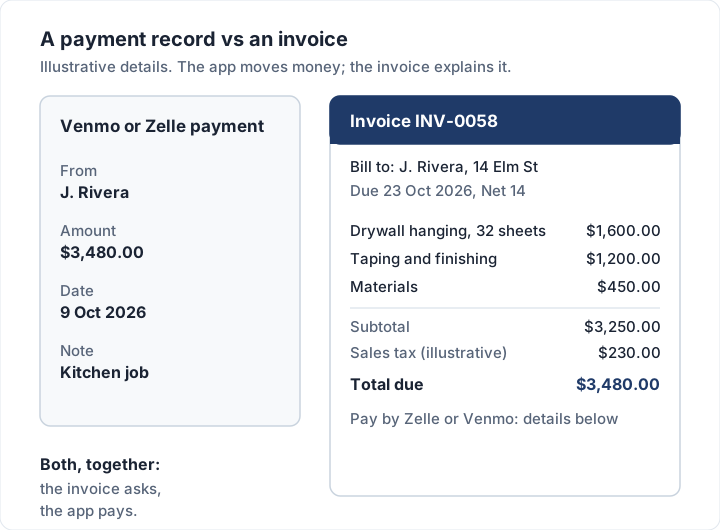
So the app and the invoice do different jobs. The app moves money; the invoice describes the sale and asks for payment. You usually want both: an invoice that says "pay by Venmo or Zelle, here are the details". Our field-by-field invoice checklist lists everything a client's accounts team expects on the invoice itself.
How to invoice a client who pays by Venmo#
- Set up a Venmo business profile, the route Venmo's FAQ names for accepting payments for goods and services. Use your business name.
- Write the invoice as normal: an invoice number, your business details, the client's details, line items, the total and a due date. Our guide to how to number invoices covers the number.
- Print your Venmo details in the payment section: the business profile handle exactly as it appears in Venmo, and ask the client to put the invoice number in the payment note.
- Send the invoice by email as a PDF or a link.
- Match the payment when it arrives. The fee comes off the payment, so record the full amount as paid and the fee as a business cost.
On a $450.00 invoice paid to a Venmo business profile from another Venmo account, the fee is $8.65 (1.9% of $450.00 is $8.55, plus $0.10) and $441.35 reaches your Venmo balance. The client still paid $450.00, so the invoice is fully paid.
How to invoice a client who pays by Zelle#
- Check your bank offers Zelle for your business account, and what its limits are.
- Write the invoice as normal, with a number, line items and a due date.
- Print the email address or US mobile number your Zelle is enrolled with, and the exact name the client will see when they send. Ask them to put the invoice number in the memo.
- Mention the limit for large invoices. If the total is above what the client's bank lets them send in a day, offer bank transfer details too, or split the payment over two days.
- Match the payment from your bank feed and mark the invoice paid.
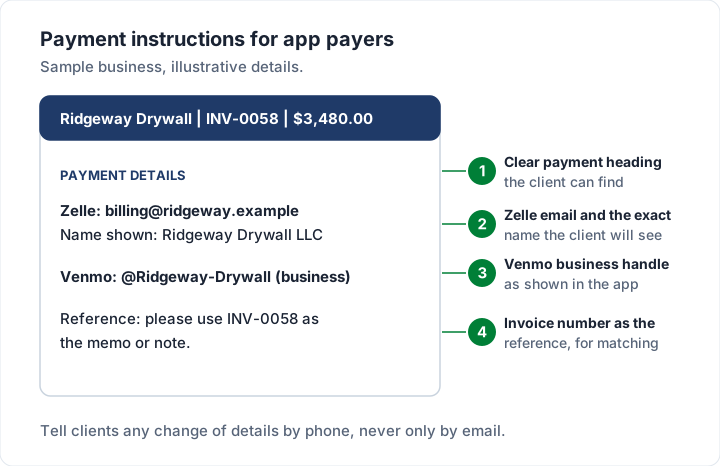
What to print for each method, so the client can pay without asking you a question:
| Payment method | What to print on the invoice | Why |
|---|---|---|
| Venmo | Your business profile handle, exactly as shown in Venmo, and "(business)" | Clients search by handle; the label tells them it is your business profile |
| Zelle | The enrolled email or US mobile number, and the name the client will see | The client can check the name before sending money |
| Either | "Please use invoice INV-0058 as the note or memo" | The reference is how you match the payment later |
| Bank transfer, as a back-up | Bank name, routing and account number | For large invoices above the client's daily Zelle limit |
Here is wording you can copy into the payment section and adjust:
Payment details
Zelle: billing@[yourbusiness].com (name shown: [Your Business LLC])
Venmo: @[YourBusinessHandle] (business profile)
Bank transfer: [bank name], routing [number], account [number]
Please use invoice INV-0058 as the memo or note.
If you want to compare these with bank transfer, checks and card links, our guide to what payment methods to offer on an invoice sets out the cost and speed of each.
Fees, buyer protection and taxes#
These differ more than the apps' similar look suggests. The figures below are from each provider's own page, as of October 2026.
| Venmo business profile | Zelle (Chase example) | PayPal invoice paid with Venmo | |
|---|---|---|---|
| Fee to you | 1.9% + $0.10 per payment; Tap to Pay 2.29% + $0.10 | Chase charges no additional fee; account fees may apply | 3.49% + $0.49 per payment |
| Fee refundable? | No, per Venmo | Not applicable | See PayPal's terms |
| Payer protection | Purchase Protection for eligible purchases | None, per Chase | PayPal's terms apply |
| Personal profile and business payments | Venmo's FAQ: only if the sender tags it as a purchase | Check your bank's terms | Not applicable |
Purchase-tagged payments to a personal Venmo account also carry a fee: Venmo's own example is a $100 payment tagged as a purchase arriving as $98. If you are invoicing regularly, a business profile is the cleaner set-up; read Venmo's terms for what applies to you. On protection, the same Venmo FAQ says eligible payments "will be covered by the Venmo Purchase Protection Program if this option is selected", and that "not all payment activity is eligible"; read Venmo's terms for what is covered.
What the IRS says about Form 1099-K. The IRS page Understanding your Form 1099-K (last reviewed 28 June 2026, read on 23 October 2026) says a payment app or online marketplace sends a Form 1099-K when payments "total over $20,000 in more than 200 transactions", and adds: "However, they may send you a Form 1099-K with lower amounts and/or transactions." It says money "you received from friends and family as a gift or repayment for a personal expense" should not be reported on one. And, in its words, "Whether or not you receive a Form 1099-K, you must still report any income on your tax return." Thresholds have changed before, so check that page for the figure that applies to your tax year. A numbered invoice for each job also gives you a record of what each payment was for.
For your own situation, ask a tax professional.
Payment fraud to watch for when clients pay by app#
Payment apps move money fast, and that cuts both ways. The FTC's guide to using payment apps safely (May 2022) warns that once you send money, "it's hard for you to get your money back", and tells you to "double-check the recipient's information". For a business receiving payments, that means:
- Check your balance, not a notification. An email or text saying you have been paid is not money in your account. Open the app or your bank directly.
- Never refund an "overpayment" before it has cleared. If a payer says they sent too much and asks for the difference back, confirm the original payment has arrived and is not reversible before you send anything.
- Give clients your details on the invoice, not in a later message. If you ever change your Zelle email or Venmo handle, tell the client by phone, so they can spot a fraudster's "new details" email.
- Do not share codes or log-ins. Treat an unexpected call or message asking for a one-time code as a warning sign, and contact your bank or Venmo through their own app instead.
The same tricks turn up as invoices too, from fake "payment sent" emails to lookalike bills: our guide to spotting fake invoices and invoice scams covers them, with checks to run before you pay and where to report one.
Recording a Venmo or Zelle payment against an invoice#
The app tells you money arrived; your records have to say which invoice it paid. A short routine keeps the two in step:
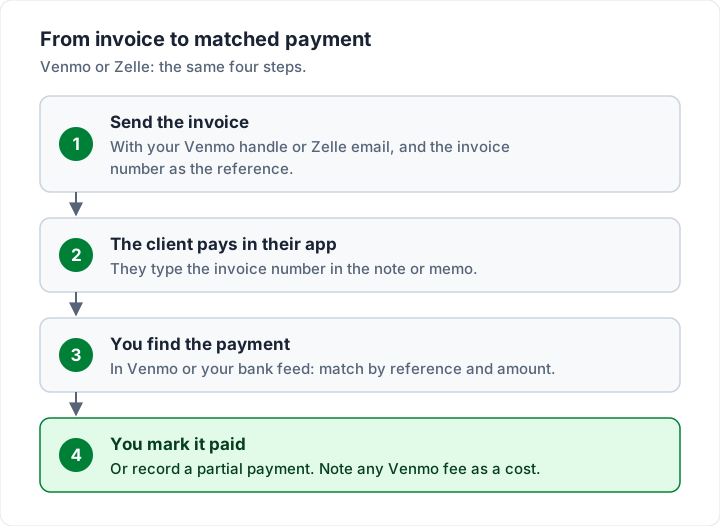
- Record the full amount the client paid, not what landed after a Venmo fee. The fee is your cost, recorded separately.
- Partial payments stay open. If the client sends part, record the part and keep the rest on the invoice. Our guide to open invoices shows how to keep that list under control.
- Send a receipt when asked. A paid invoice or a short receipt closes the loop; see the difference between an invoice and a receipt. Our invoice receipt template shows a short receipt filled in.
Where Charming fits, and where it does not#
Charming Invoices does not connect to Venmo or Zelle and does not take payments. It makes the invoice, you send it, and the client pays you in their app. Here is what it does, checked in our code on 22 October 2026:
- Your Venmo and Zelle details print on every invoice. The bank details box is free text, so it can hold a Zelle email or phone, a Venmo handle and your bank transfer details together, under "Payment details". A separate payment link field can hold any https link, such as a Venmo or PayPal payment link.
- The client gets a PDF and a private link. You issue the invoice, download the PDF or copy its link, and send it by email or message yourself; the client needs no account.
- You record the payment. Mark the invoice paid, or record a partial payment with a method label such as "Online payment" or "Other". Statuses such as Partially paid and Overdue show automatically.
- No automatic reminders. Charming does not send reminders; set a calendar reminder for the due date and follow up yourself.
The catches: Charming never sees the Venmo or Zelle payment, so tracking is manual; payment details are set per business and copied onto each invoice, not edited per invoice; and invoices on the free plan carry a "Sent with Charming Invoices" line. The free plan has unlimited invoices and clients for 1 business. If you run a home-service business, our guide to invoicing for cleaners and home services has examples, and tutors can follow how to write a tutoring invoice.
When you are ready, create a free invoice with your Venmo and Zelle details in the payment section.
The short version#
Neither Venmo nor Zelle offers an invoice document. Venmo business profiles can request money (with sales tax) for 1.9% + $0.10 a payment; Zelle moves money bank to bank with no invoice and, per Chase, no purchase protection. So send a numbered invoice with line items and a due date, print your Venmo handle or Zelle email on it, ask for the invoice number as the reference, and record the payment against the invoice when it lands. If you want PayPal's invoice with a Venmo button instead, the PayPal invoice guide covers it.
Sources, checked 22 October 2026 (the Venmo help articles on fees and buying and selling, Chase and IRS pages re-checked 23 October 2026): Venmo, How do fees work for Venmo business profiles?; Venmo, Buying and Selling on Venmo FAQ; Venmo, Buying from Business Profiles; PayPal Invoicing; PayPal business fees; Chase, Zelle for business; IRS, Understanding your Form 1099-K; FTC, mobile payment apps.