PayPal invoice: how it works, from send to paid

Nnabuike Okoroafor ·
On this page · 12 sections
We make Charming Invoices, an invoicing app that does not take payments or connect to PayPal. It appears only in the sections on printing a PayPal link on your own invoice. Every PayPal fact below comes from PayPal's own US pages, checked on 22 October 2026.
A client has asked you to "just send a PayPal invoice", or you already use PayPal and want to bill a client through it. Either way you want to know three things: how a PayPal invoice works, what it costs you when the client pays, and what your client will see.
This guide answers all three from the seller's side, in the order you will meet them: sending the invoice, what your client sees, the fee on one worked example, the "request money or invoice" choice, tracking and reminders, fake PayPal invoices, and when your own invoice with a PayPal link is the better fit.
In short#
- A PayPal invoice is a bill you create in your PayPal account. PayPal emails it to your client with a link to view and pay it online.
- Sending one is free. PayPal charges a fee when the client pays, and the rate depends on how they pay: 2.99% + $0.49 by card, 3.49% + $0.49 through PayPal or Venmo, 1% capped at $10.00 by bank (US rates, October 2026).
- Your client does not need a PayPal account in most countries. They can pay with a debit or credit card as a guest.
- A money request is not an invoice. A request carries an amount and a note; an invoice carries line items, a due date, tax and your business details.
- Fake PayPal invoices are common. PayPal's own advice: do not pay an invoice you do not recognise and do not call a phone number in its note.
What a PayPal invoice is#
A PayPal invoice is an invoice you write inside PayPal and send through PayPal. PayPal describes the service as a way to bill clients so they can pay "even if they don't have a PayPal account" and says you can use it "to keep track of all your invoices - paid and unpaid" (What is PayPal Invoicing and how does it work?).
According to PayPal's Invoicing page, an invoice can carry your company name, brand colours and logo, plus taxes, discounts, shipping details and notes. Your client can pay with PayPal, Venmo (US only), Apple Pay, a credit or debit card, Pay Later or Pay by Bank (ACH). You can share the invoice by email, text, a messaging app or a QR code for in-person payment.
So it is a full invoice, not just a payment request. It lives inside PayPal: the layout, the email and the payment page are PayPal's, and the payment goes through PayPal at PayPal's listed rates. If you also want the field-by-field view of what any invoice needs, our guide to how an invoice works, from draft to paid covers the basics.
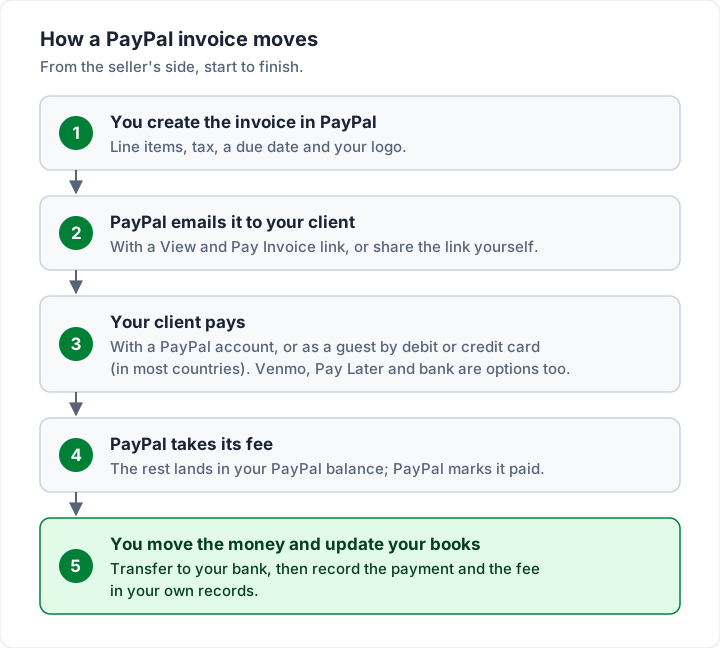
Here is the whole journey of one PayPal invoice:
How to send an invoice through PayPal, step by step#
PayPal's help article How do I create and send an invoice? gives the same four steps on the website and in the app.
On the website:
- Click Pay & Get Paid.
- Click Create an Invoice.
- Fill in the details: who you are billing, what they are paying for, and any notes or attachments.
- Review the invoice and click Send.
In the PayPal app:
- Tap Request.
- Tap Send an invoice to get paid.
- Fill in the same details.
- Review the invoice and tap Send.
A few options sit inside those steps, all from the same help article and PayPal's invoicing cost page:
- Partial payments. Tick "Allow partial payment" under payment options, and optionally set a minimum. The invoice shows "Partially Paid" until it is fully paid. PayPal adds that partial payments "aren't a credit product".
- Shipping. Tick the Ship Order box to ask for a shipping address and add a shipping cost.
- Repeating invoices. You can repeat an invoice weekly, monthly, yearly or at a custom interval, and later cancel one invoice in the series or the whole series.
- International clients. There is no extra step: you can send an invoice to any email address.
- A shareable link. You can copy an invoice's link from your invoice list (the three-dot menu) and send it any way you like.
Before you press Send, check the parts a client's accounts team will look for: an invoice number, a clear description of the work, the due date and your business name and address. Our field-by-field invoice checklist has the full list.
How your client pays a PayPal invoice#
This is the part your client will ask you about. PayPal's help article How do I pay a money request or invoice? sets out two routes.
If the client has a PayPal account:
- Select the invoice from their PayPal Dashboard or Activity.
- Select a payment method.
- Review and click Complete Purchase.
If the client has no PayPal account (guest payment):
- Find the invoice email from PayPal in their inbox.
- Click View and Pay Invoice.
- Click Pay with Debit or Credit Card.
- Enter the card details and click Pay Now.
PayPal's cost page says that "In most countries, they don't need a PayPal account to pay." If a client does not see the guest card option, it may not be offered in their country or for that payment; offer bank transfer as well, with your details on the invoice.
You can copy this short note into the email or the invoice's notes so the client is not left guessing:
You can pay this invoice online with a PayPal account, or as a guest with a debit or credit card: open the invoice, click View and Pay Invoice, then choose Pay with Debit or Credit Card. Please use the invoice number as your reference.
What a PayPal invoice costs you#
Creating and sending a PayPal invoice is free: PayPal says invoicing "has no set up or monthly fees". You pay a fee when the client pays, and the rate depends on the button they choose. Here is one $1,200.00 invoice worked through PayPal's US invoicing rates, from its business fees page (marked "Last Updated: October 1, 2026"):
| How the client pays a $1,200.00 PayPal invoice | Rate (US, October 2026) | Fee | You receive |
|---|---|---|---|
| Debit or credit card, Apple Pay | 2.99% + $0.49 | $36.37 | $1,163.63 |
| PayPal account, Venmo or PayPal Guest Checkout | 3.49% + $0.49 | $42.37 | $1,157.63 |
| PayPal Pay Later | 4.99% + $0.49 | $60.37 | $1,139.63 |
| Pay by Bank (ACH) | 1%, capped at $10.00 | $10.00 | $1,190.00 |
| International card payment | 2.99% + 1.50% + $0.49 | $54.37 | $1,145.63 |
Two things to notice. PayPal's table puts "PayPal Guest Checkout" in the 3.49% row with PayPal and Venmo, so a guest payment is not automatically the cheaper card rate. And on this invoice the bank option saves you $26.37 against a card, which grows as invoices get larger.
Moving money from PayPal to your bank is free by standard transfer when no currency conversion is involved; an instant transfer costs 1.50% (minimum $0.50), per the same fees page. For the full fee picture across PayPal, Square and Stripe at three invoice sizes, and the question of passing a card fee to the client, see what card payments on an invoice cost.
PayPal invoice vs request money#
PayPal offers two ways to ask for money, and they are built for different jobs. PayPal's own request money page pitches requests at personal uses: "Split a bill. Collect rent from your roomies. Get paid back for dinner." It also says an account with PayPal is required to send and receive money that way.
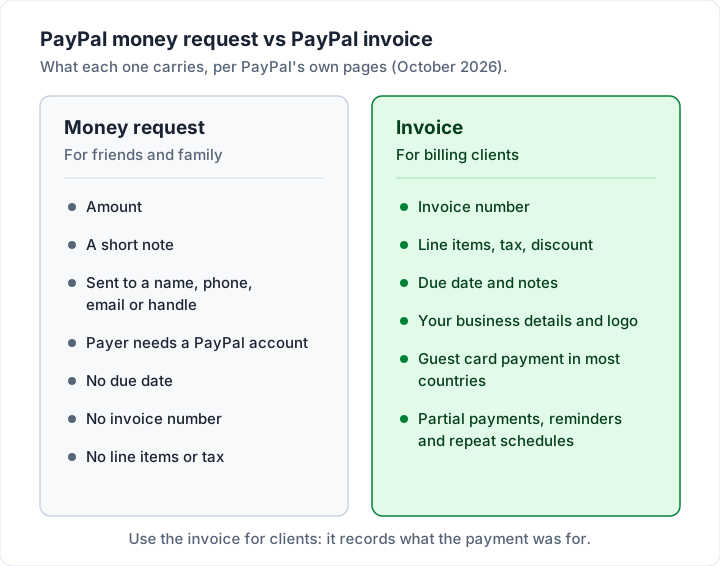
| PayPal money request | PayPal invoice | |
|---|---|---|
| Built for | Friends and family, informal debts | Billing clients for goods or services |
| What it carries | Amount and a note | Invoice number, line items, tax, discount, due date, notes, logo |
| Payer needs PayPal? | Yes, per PayPal's request page | Not in most countries: guest card payment |
| Partial payments, reminders, repeats | No | Yes |
| What it leaves you with | A payment in your activity | A numbered invoice, its status and its payments |
Which one should you use? For a client, use the invoice. A request does not give the client's accounts team an invoice number, a description of the work or a due date to approve against, and it gives you nothing to show for the sale except a line in your PayPal activity. Business payments carry a fee either way: alongside its invoicing rates, PayPal's fees page lists "Send/Receive Money for Goods and Services" at 2.99% for domestic payments received, as of October 2026.
Tracking, reminders and recurring PayPal invoices#
PayPal lists these follow-up features for its invoices:
- Tracking. PayPal says you can track when an invoice is sent, opened and paid.
- Manual reminders. You can send "up to 2 manual invoice reminders per invoice within a 24-hour period".
- Automatic reminders. You can set automatic reminders for all new invoices in your Invoicing settings, and schedule reminders when an invoice is overdue.
- Offline payments. If a client pays by cash or check, you can record the payment from the invoice's details page, including a partial payment such as a deposit (Can I archive, delete or cancel an invoice?).
- Cancelling. You can cancel an unpaid invoice so the client can no longer pay it. A paid invoice cannot be cancelled; PayPal points you to a refund instead.
PayPal's reminder is a nudge with a link. If a client goes quiet for longer, the wording matters more than the tool; our follow-up sequence for unpaid invoices has emails for each stage.
Before you switch a client to PayPal invoices, check with them first. Some clients' accounts teams pay only by bank transfer and will not click a payment link in an email at all; the section on your own invoice with a PayPal link, below, covers that case.
How to spot a fake PayPal invoice#
Scammers use PayPal's real invoice and money request system, so a fake invoice can arrive from a genuine PayPal address. PayPal's help article What are invoice scams and money request scams on PayPal? lists the warning signs and what to do.
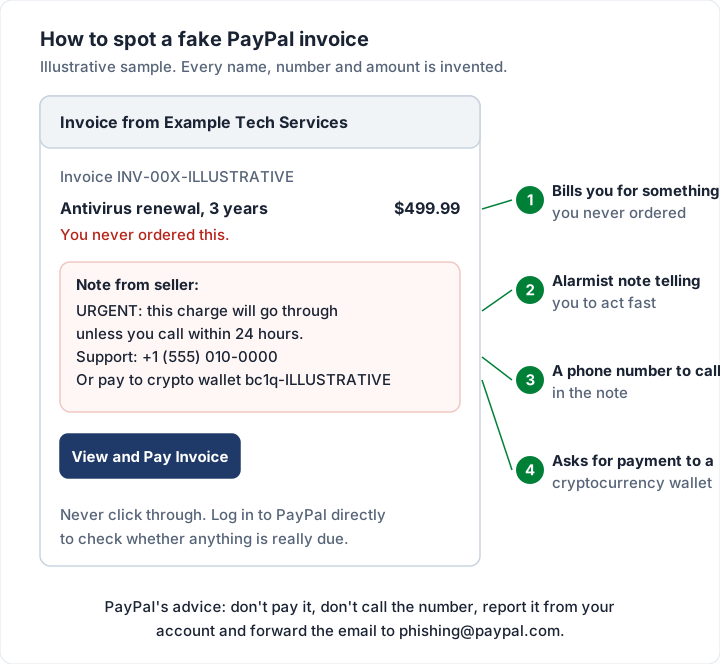
The warning signs PayPal lists:
- An invoice for something you never ordered. "You receive an invoice or money request through PayPal, but for a product/service you never ordered."
- Alarmist notes. PayPal warns about "alarmist messages in invoices and money requests warning you to call them quickly".
- A phone number in the note. "Don't call any phone numbers in the invoice note or open suspicious URLs."
- A cryptocurrency wallet. "Never send money to a cryptocurrency wallet mentioned in an invoice or money request."
What to do: do not pay it. Log in to PayPal directly (not through the email) to check whether anything is really due, report the invoice from your account, and forward a suspicious email to [email protected]. An unpaid invoice is not money taken from you; check your Activity to be sure. For the fake invoices that arrive outside PayPal, from lookalike Apple emails to changed bank details, see our guide to spotting fake invoices and invoice scams.
If you are the one sending invoices, the same scams make honest clients wary. Make yours easy to trust: send it only to clients who expect it, use your business name and the client's name, reference their purchase order or the job they agreed, and never put a phone number in the note asking them to call. Our post on keeping payment details safe on an invoice covers the related "changed bank details" fraud.
When your own invoice with a PayPal link may suit you#
A PayPal invoice is quick, and for many clients it is enough. Another route is your own invoice with a PayPal link on it. Which one suits depends on your clients:
| Your situation | PayPal invoice | Your own invoice with a PayPal link |
|---|---|---|
| Client pays by card and is happy to click a link | Good fit | Works too |
| Client's accounts team wants a PDF with your letterhead | PayPal's layout, with your logo and colours | Your own layout |
| Client pays some invoices by bank and some by card | Pay by Bank is PayPal's ACH, at 1% capped at $10.00 | List your bank details first, the link second |
| You also invoice clients who never use PayPal | PayPal invoices for some clients, another tool for the rest | One invoice, several ways to pay |
| You want every invoice numbered in one sequence | The sequence covers invoices sent through PayPal | One sequence for every client |
| You want PayPal to mark invoices paid automatically | Good fit | You record the payment yourself |
The second approach is simple: write the invoice in whatever tool you use, put your bank details in the payment section, and add a PayPal.Me link or another PayPal payment link you created in your PayPal account. The client chooses. A payment through your link is still a PayPal payment, charged at PayPal's commercial rates, so check its fees page for the rate that applies. If your clients would rather pay through Stripe, our guide to Stripe invoices and Stripe Payment Links weighs the same choice on Stripe's side.
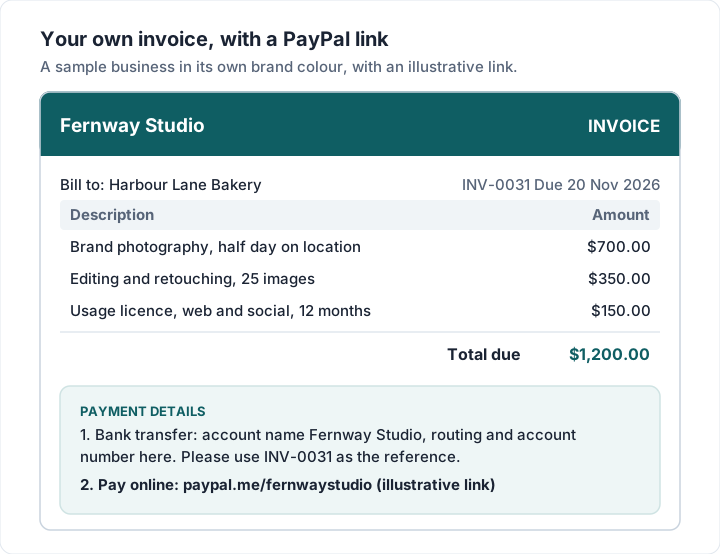
If that sounds closer to how you want to work, our guide to what payment methods to offer on an invoice shows how to word the payment section, and the free invoice templates give you a layout to start from.
Where Charming fits, and where it does not#
Charming Invoices is the second approach above. It does not send PayPal invoices, connect to your PayPal account or take payments of any kind. Here is what it does, checked in our code on 22 October 2026:
- Your PayPal link prints on the invoice. Each business has a payment link field (any https link, such as a PayPal.Me link) and a free-text bank details box. Both print under "Payment details" on the PDF.
- A button on the private invoice page. When you issue an invoice, you download the PDF or copy its private link and send it however you like; the client needs no account. While the invoice is unpaid, that page shows an "Open payment link" button that goes to your PayPal link.
- You record the payment. When PayPal tells you the money has arrived, you mark the invoice paid or record a partial payment with a method label such as "Online payment". Charming never sees the PayPal transaction.
- Overdue invoices are flagged. Charming does not send reminders, so follow up from your own inbox.
The catches, plainly: payment tracking is manual; the payment link and bank details are set per business, not per invoice; Charming does not email invoices or reminders; and invoices on the free plan carry a "Sent with Charming Invoices" line. The free plan has unlimited invoices and clients for 1 business.
If you want a numbered, branded invoice that carries your PayPal link and your bank details side by side, create a free invoice. If you would rather keep everything inside PayPal, that is a reasonable choice too, and what to check before choosing a free invoicing app lists the questions to ask of any free tool. Our free invoicing software compared looks at the wider field.
Questions people ask#
Can I send a PayPal invoice without a business account?#
PayPal's Invoicing page and help articles describe invoicing as a business tool and do not answer this directly for personal accounts, so check what your account offers under Pay & Get Paid or in the app's Request menu. If you bill clients regularly, a business account is the cleaner fit; check PayPal’s current terms for your account type.
Can a client pay a PayPal invoice without PayPal?#
In most countries, yes. They open the invoice email, click View and Pay Invoice and choose Pay with Debit or Credit Card. PayPal lists PayPal Guest Checkout at the 3.49% + $0.49 rate in the US, as of October 2026.
Can I cancel a PayPal invoice?#
Yes, while it is unpaid: cancel it from the More Options menu in your invoice list, and choose whether PayPal notifies the client. A paid invoice cannot be cancelled; refund the payment instead. If you also need to void an invoice in your own records, our guide on when to delete, void or cancel an invoice explains the difference.
Is a PayPal invoice the same as a receipt?#
No. The invoice asks for payment; a receipt confirms it was made. See is an invoice a receipt for what each must show.
What about Venmo and Zelle?#
Venmo payments can be taken through a PayPal invoice in the US. Zelle has no invoice of its own. Our guide to Venmo and Zelle invoices covers both.
The short version#
A PayPal invoice is a proper invoice that lives inside PayPal: free to send, paid by card, PayPal, Venmo or bank, and tracked for you. You pay when the client pays: on $1,200.00 that is $36.37 by card, $42.37 through PayPal or Venmo, or $10.00 by bank, at US rates in October 2026. Use the invoice, not a money request, for clients. Ignore any PayPal invoice you did not expect, and never call the number in its note.
If your clients pay in several ways, an invoice of your own with your bank details and a PayPal link may serve you better. Once invoices are out, our guide to keeping track of open invoices shows how to see what is still owed.
Sources, checked 22 October 2026 and fees, reminders and scam wording re-checked 23 October 2026: PayPal, What is PayPal Invoicing and how does it work?; PayPal Invoicing; PayPal, How do I create and send an invoice?; PayPal, How much does it cost to use PayPal Invoicing?; PayPal, How do I pay a money request or invoice?; PayPal, Can I archive, delete or cancel an invoice?; PayPal business fees; PayPal, request money; PayPal, invoice scams and money request scams.