Best free invoicing software: 8 tools and their listed limits

Nnabuike Okoroafor ·
On this page · 11 sections
We make Charming Invoices, which is one of the options covered here.
You want to send invoices without paying for software, and the limits quoted for the same free plan can differ from one list to the next. Free plans change over time, so a figure written a year or two ago may no longer be current.
So this guide does one thing differently: every limit below comes from the product’s own pricing, features or help page, read on 22 October 2026 and linked so you can check it yourself. Where a page did not state a limit, we say “not stated” rather than guess. There are no star ratings and no reviews, because we did not run a scored test and we will not invent one.
In short#
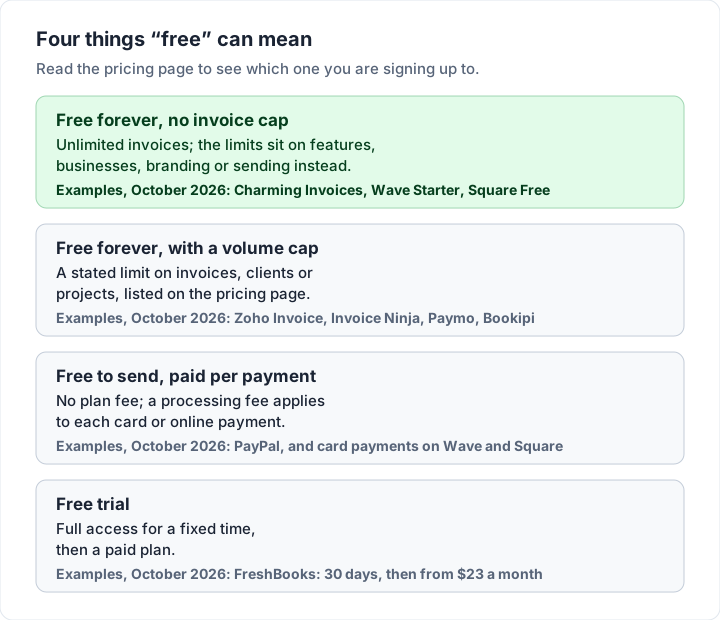
- “Free” means four different things: free with no invoice cap, free with a volume cap, free to send but paid per payment, and a free trial. Know which one you are signing up to.
- The caps to check first are on clients and invoices: Paymo Free allows 1 client, Invoice Ninja Free up to 5, Bookipi Free 3 invoices a month and Zoho Invoice 500 invoices a year.
- Card payments are never free. On a $500.00 invoice paid by card, the published fees run from $15.10 to $16.80 on the tools here.
- Several free plans here print the vendor’s name on your invoice. Check the exact wording before you send one to a client.
- Wave no longer lets users outside the US and Canada send invoices, according to its own help centre.
- For card payments, look at Square, PayPal or Wave. For bookkeeping too, Wave or Zoho Invoice. For branded invoices with no invoice cap and no payment fee, Charming Invoices, with 1 business on the free plan.
How we judged free invoicing software#
Before naming any product, here is what we looked for, so you can disagree with the method rather than the verdict. If you specifically want a program to install and use offline, our guide to free invoice software to download covers desktop options, and invoicing software for Mac covers Mac apps.
What counts as free. A plan that costs $0 with no end date. A free trial is not a free plan, so FreshBooks, whose pricing page offers a 30-day free trial and then plans from $23 a month (Lite, which sends invoices to 5 clients), is mentioned only as a contrast. Free invoice generators that make one PDF without an account are left out too: they do not number, track or remind, which is most of what software is for.
The four kinds of free look like this side by side.
The criteria. For each free plan we read the vendor’s own pages for six things:
| Criterion | The question we asked of each free plan |
|---|---|
| Invoice and client limits | Is there a cap on invoices, clients, projects or users, and what is it exactly? |
| Branding | Can you add your logo and colours, and does the vendor print its own name on your invoice? |
| Payments | Can clients pay online, and what is the published fee per payment? |
| Sending and reminders | Can you email invoices and send automatic reminders on the free plan? |
| Support | What support does the free plan get? |
| Data portability | Can you export your data, and what happens to it if you stop paying or stop logging in? |
What we did not do. We did not score the tools, rank them one to eight or read app-store reviews. Feature lists also change, so every fact carries the date we read it. If you are reading this months from now, open the linked page before you decide.
For the wider buyer’s checklist (team access, pricing red flags, a one-afternoon test), see how to choose invoicing software. This post narrows it to the free plans.
The best free invoicing software, compared#
The table puts the eight free plans side by side as of 22 October 2026. A dash means the vendor’s pricing page did not state it; it does not mean unlimited. Prices and limits change, and vendors sometimes run time-limited promotions on their paid plans; the figures here are standing prices, so check the vendor page before you decide.
| Free plan | Invoices | Clients | Vendor name on invoice | Online payments |
|---|---|---|---|---|
| Charming Invoices Free | Unlimited | Unlimited | “Sent with Charming Invoices” line | None (clients pay you directly) |
| Wave Starter | Unlimited | — | Wave branding in footers (removed on Pro) | Card 2.9% + $0.60 |
| Zoho Invoice | 500 a year | — | “Powered by Zoho Invoice” | Through your gateway |
| Square Invoices Free | Unlimited | — | — | Card online 3.3% + 30¢; ACH 1% ($1 minimum) |
| PayPal invoicing | — | — | — | Card 2.99% + $0.49; ACH 1% ($10 cap) |
| Invoice Ninja Free (hosted) | Unlimited | Up to 5 | “Created by Invoice Ninja” (removed on Pro) | Through your gateway |
| Paymo Free | Unlimited | 1 | — | — |
| Bookipi Free | 3 a month | — | — | — |
Two things stand out. Volume caps vary from 3 invoices a month to none at all, and each free plan here that states a branding rule prints the vendor’s name somewhere on the document.
The 8 free invoicing tools, one by one#
Each entry gives what the free plan includes, its stated limits, and the page we read. Facts are as of 22 October 2026.
Charming Invoices Free: unlimited branded invoices, no payment processing#
What is free: 1 business, unlimited clients and invoices, all 60 templates with your logo, colours (any brand hex colour), 30 fonts and a letterhead, PDF download, print and a private link your client opens without an account, and manual payment tracking, with overdue invoices flagged. Charming does not email invoices or send reminders: you send the PDF or link however you like. Every plan can export the invoice list as a CSV.
The trade-off: free invoices print a small “Sent with Charming Invoices” line. Free is 1 business, so a second brand needs a paid plan. There are no card payments, no estimates or quotes, no accounting integrations, no time tracker and no mobile app. Recurring invoices, AI-assisted drafting and the saved line-item library are paid. Paid plans are Individual at $29 once, Team at $79 once (up to 5 teammates), or Pro at $12 a month or $99 a year. Lifetime plans are final sale, with no refunds, and “lifetime” means for as long as Charming Invoices runs.
Best for: sending invoices that look like your business, at any volume, when clients pay by bank transfer or your own payment link. Source: our pricing page and the product code, checked 22 October 2026.
Wave Starter: free invoicing and bookkeeping, US and Canada only#
What is free: Wave’s pricing page lists Starter at $0 with “unlimited estimates, invoices, bills, and bookkeeping records”, your logo and brand colours on its templates, the mobile app, and optional online payments at 2.9% + $0.60 per credit card transaction (3.4% + $0.60 for Amex), subject to approval.
Limits on the free plan: on Starter, the pricing table lists sending documents automatically through Wave and automated late-payment reminders “with online payments” only; otherwise you send by link or PDF. Removing Wave branding from footers, adding users as admin, editor or viewer, and live chat and email support (on Starter, only with an optional add-on) sit with Pro, at $19 a month or $190 a year. Most important: Wave’s help centre (article updated 8 September 2026) says that users outside the US and Canada “can no longer send invoices or reminders through Wave.” How Wave invoicing works covers Starter, Pro and the fees on a real invoice.
Best for: a US or Canadian business that wants free bookkeeping beside its invoices and is happy for clients to pay by card.
Zoho Invoice: a broad free plan with a yearly cap#
What is free: Zoho’s pricing page says Zoho Invoice “has been made free” and lists quotes, recurring invoices, automatic payment reminders, a customer portal, expenses, time logging and mobile apps. It mentions 24/5 free email and voice support.
Limits on the free plan: the free plan allows up to two users, a maximum of three projects and “up to 500 invoices per year”, with up to two organisations per account. The pricing page says invoices include “Powered by Zoho Invoice” branding, and Zoho’s help article on removing branding says it cannot be removed on Zoho Invoice (as of 23 October 2026). The page does not say whether the 500-invoice limit follows the calendar year or a rolling 12 months. And a retention rule worth knowing: “if a user is inactive for over 180 days, their associated data will be deleted in the subsequent 20 days,” with a warning first. Our Zoho Invoice walkthrough goes through the limits and how sending works.
Best for: someone who wants quotes, time and expenses in one free tool and sends fewer than about 40 invoices a month.
Square Invoices Free: unlimited invoices, priced through card fees#
What is free: Square’s invoice pricing page lists Square Free at $0 a month per location, with invoices and recurring invoices, estimates and contracts, and projects, and says you can “send unlimited invoices”. There is no monthly fee on Free; you pay processing fees when a client pays.
Limits on the free plan: on Free, card payments made online or through an invoice cost 3.3% + 30¢, against 2.9% + 30¢ on the paid plans, according to Square’s fees help article. ACH bank payments through an invoice cost 1% with a $1 minimum, and the $10 fee cap applies only on Plus and Premium. Custom invoice templates are listed under Plus, not Free. Plus is $49 a month per location and Premium $149.
Best for: a business that takes card payments in person and online and wants invoices in the same account.
PayPal invoicing: free to send, paid per payment#
What is free: PayPal’s invoicing page says “creating and sending invoices is included with your account”, with your company name, brand colours and logo, automatic reminders and recurring invoices. Your client does not need a PayPal account to pay.
Limits on the free plan: the money comes from the payment. The page lists 2.99% + $0.49 per transaction for cards and Apple Pay, 3.49% + $0.49 for PayPal and Venmo, 4.99% + $0.49 for Pay Later, and 1% with a $10 cap for Pay by Bank (ACH). It states no invoice cap and no client cap, which is not the same as promising unlimited.
Best for: clients who already pay through PayPal or Venmo, and occasional invoices where convenience matters more than the fee. Our guide to how a PayPal invoice works covers sending one and what your client sees.
Invoice Ninja Free: source-available code, 5 hosted clients#
What is free: the hosted Free plan on Invoice Ninja’s pricing page offers “5 Clients + Unlimited Invoicing”, invoice templates, your logo, recurring invoices and auto-billing, deposits and partial payments, online payment gateways and a client portal. Its invoice templates page says free accounts include 4 templates and Pro or Enterprise unlock all 11 (read 23 October 2026).
Limits on the free plan: up to 5 clients only. Customising invoice designs, removing “Created by Invoice Ninja”, automatic payment reminders, API access and additional users are paid. Support on Free is the community forum and docs. Ninja Pro is $14 a month or $140 a year. The page also links to a self-hosting option; the code is public under the Elastic License 2.0, which its repository calls “source-available”. That is a different trade-off, which we cover in open source invoicing software.
Best for: a handful of regular clients, or anyone prepared to self-host.
Paymo Free: time tracking with invoicing for one client#
What is free: Paymo’s pricing page lists unlimited time tracking, unlimited invoices, unlimited tasks, desktop and mobile apps and 1 GB of storage.
What the free plan includes: 1 client, 2 projects and 1 user. Paymo’s main product is project management, and invoicing is one of its features.
Best for: billing tracked hours to a single client or retainer.
Bookipi Free: three invoices a month#
What is free: Bookipi’s pricing page lists a Free plan at US$0 forever with no credit card needed.
What the free plan includes: invoices “up to 3 per month”, and 3 eSignatures a month. The Starter plan, with unlimited invoices, is US$7.60 a month billed annually (US$91.20) or US$9.99 a month.
Best for: a side business that sends one to three invoices a month and may want proposals or contracts later. Bookipi is one of several small invoice apps; Tiny Invoice, Moon Invoice, Bookipi and Brisk compared sets their free limits side by side.
A worked example: does the free plan fit you?#
A free plan is only free if your work fits inside it. Here is one illustrative freelancer: 8 invoices a month (96 a year), 12 clients over the year, billing from 2 brands (say, a design studio and a print shop). We ran those numbers against each free plan’s stated limits.
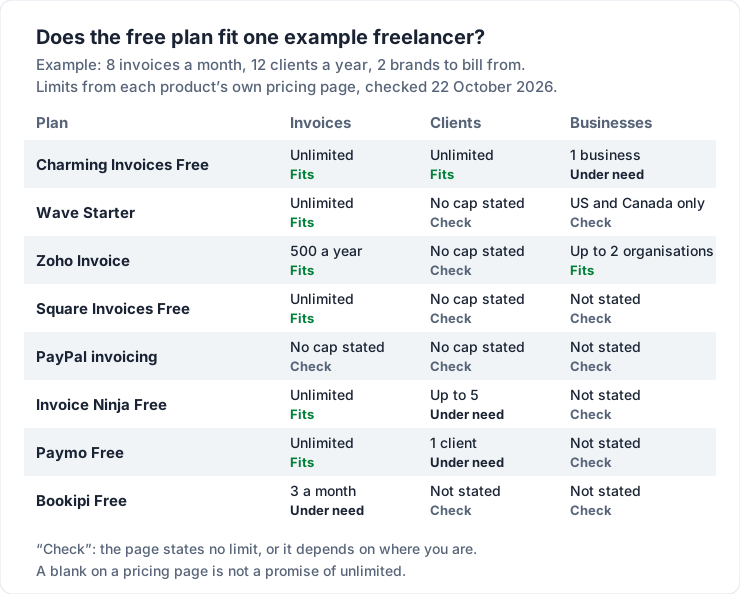
The useful lesson is not which tool wins. It is that every plan has a limit somewhere, and the one that matters depends on your shape of work:
| If your work looks like this | The limit to check first | Plans that state a limit there |
|---|---|---|
| Many small clients | Clients | Paymo Free (1), Invoice Ninja Free (up to 5) |
| High volume | Invoices | Bookipi Free (3 a month), Zoho Invoice (500 a year) |
| Two or more brands | Businesses or organisations | Charming Free (1 business), Zoho Invoice (up to 2) |
| A partner or bookkeeper | Users | Zoho Invoice (2), Paymo Free (1), Wave (roles on Pro) |
| Outside the US and Canada | Where the tool sends invoices | Wave (no invoice sending outside them) |
Run your own numbers, then add 50% for the month you get busy.
What card payments cost on a free plan#
Wave, Square and PayPal list a processing fee on each card or bank payment made through an invoice. Here is the published fee on one illustrative $500.00 invoice, and what it adds up to over 96 such invoices in a year, as of 22 October 2026.
| How the client pays | Fee on $500.00 | Over 96 invoices ($48,000.00) |
|---|---|---|
| Wave Starter, credit card (2.9% + $0.60) | $15.10 | $1,449.60 |
| PayPal, card (2.99% + $0.49) | $15.44 | $1,482.24 |
| Square Free, card online (3.3% + 30¢) | $16.80 | $1,612.80 |
| PayPal or Square Free, ACH bank (1%) | $5.00 | $480.00 |
| Charming Invoices, bank transfer to you | $0.00 from the app | $0.00 from the app |
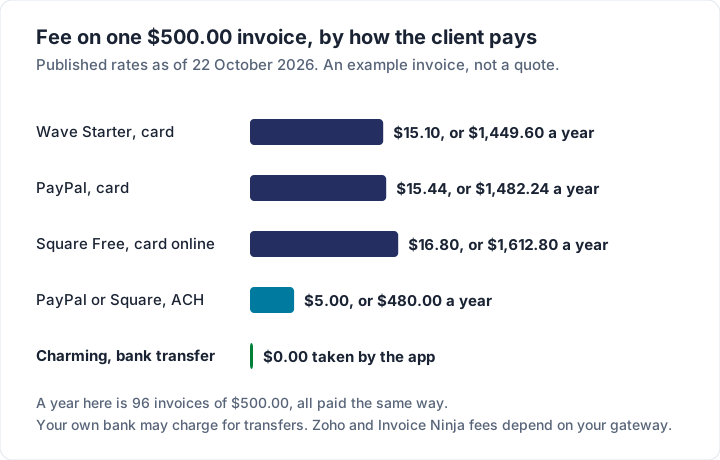
A card button can be worth its fee if your clients prefer cards or would otherwise pay later. Charming takes nothing because it processes nothing. Your client cannot pay by card from a Charming invoice, your own bank may charge for transfers, and you mark the invoice paid yourself. For a full breakdown of processor fees, see invoice payment fees on Square, PayPal and Stripe, and for the options clients actually use, invoice payment methods.
Which free invoicing software is best for you#
There is no single best free invoicing software, only the best fit for how you bill. By use case:
- If you need card payments from the invoice: Square Invoices Free, PayPal or Wave Starter (US and Canada). Compare the fee table above against how your clients pay. Charming is the wrong tool here.
- If you need accounting or bookkeeping: Wave Starter in the US and Canada, or Zoho Invoice (expenses, time and quotes, 500 invoices a year). Charming does not do bookkeeping and has no accounting integrations; it exports a CSV for whoever does your books.
- If you need estimates or quotes: Zoho Invoice (quotes), Wave Starter or Square Free (estimates). Charming has no estimates or quotes. Our guide to invoices versus estimates and quotes explains when you need one.
- If you track time for a client: Paymo Free, for one client.
- If you just need branded invoices: Charming Invoices Free puts your logo, colours, fonts and letterhead on unlimited invoices, with no invoice or client cap and no payment fee. The trade-off is the “Sent with Charming Invoices” line, 1 business and no card payments. You can create a free invoice and see a finished one in your brand.
- If you only send a few invoices a month: Bookipi Free covers 3, and a spreadsheet covers any number with more effort. Our guide to creating an invoice in Excel shows how, and the free invoice number generator keeps numbering in order.
- If you invoice from your phone: Wave, Zoho Invoice and Paymo list mobile apps; Charming has no mobile app. We compare phone options in free invoicing apps for iPhone and Android.
If you would rather answer questions than scan a list, the same choice runs as a flow.
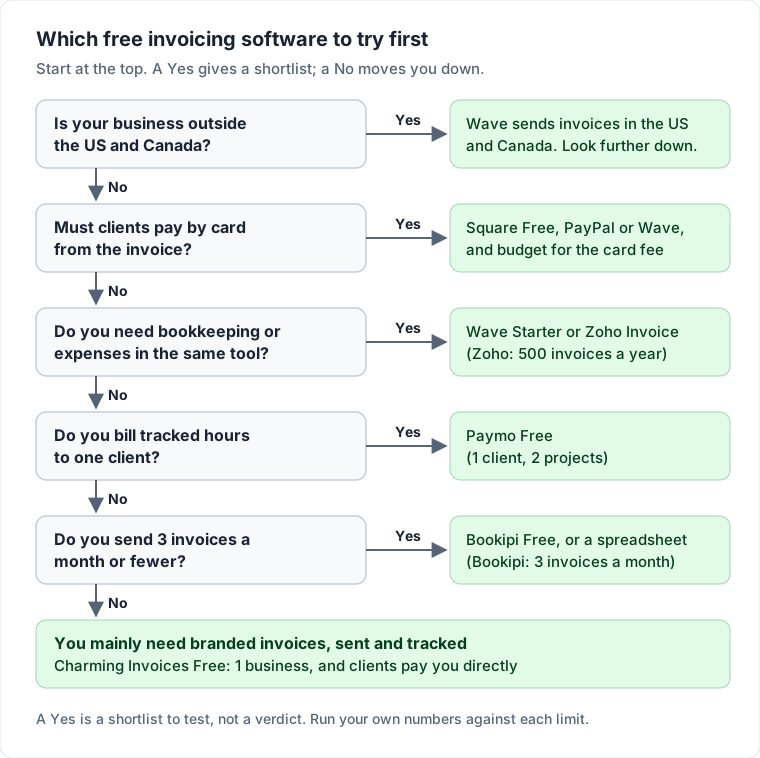
The list of small-business picks is wider once paid plans are on the table; see the best invoicing app for small business.
What to check before you commit#
A free plan suits you as long as your work fits inside it. Here is what to check on the eight plans above, as of today.
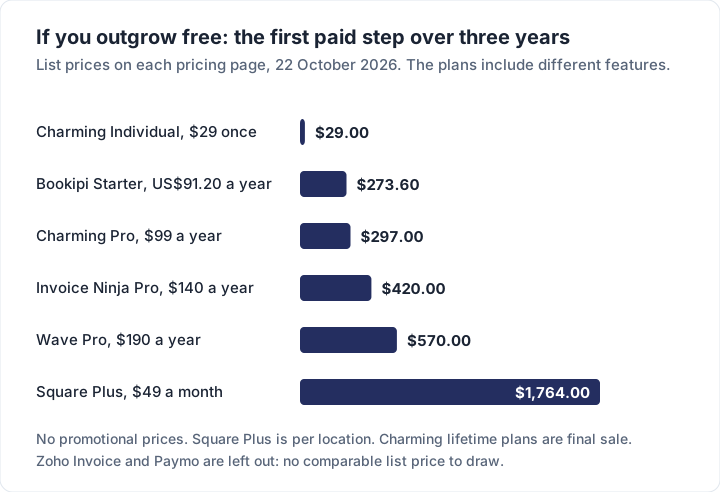
The upgrade, when you outgrow the cap. If a cap binds, the next step is a paid plan. The chart shows the first paid step on five of these tools over three years at list price. The plans include different features, so read it as what outgrowing free costs, not as a like-for-like ranking. Cheapest invoicing software: list prices compared ranks the paid plans by what they cost over two years.
The vendor’s name on your invoice. Charming prints “Sent with Charming Invoices”, Zoho “Powered by Zoho Invoice”, Invoice Ninja “Created by Invoice Ninja”, and Wave its branding in footers. Charming hides its line by default on a paid plan, and Invoice Ninja and Wave remove theirs on a paid plan, where removal is offered. For Zoho, its pricing page says invoices include the branding and its help article says it cannot be removed on Zoho Invoice (as of 23 October 2026). If you want your own name alone on the invoice, check where a paid plan removes the line.
Plan changes. Free plans can change over time, so note the date you read a pricing page and check it again before you rely on a limit. If a plan’s price depends on your client count, work out what it costs at the number of clients you expect next year.
Your data when you leave or stop logging in. Zoho’s pricing page says data of users inactive for over 180 days is deleted in the following 20 days, after a warning. Read each tool’s terms for what happens on a downgrade. Ours say that moving to a lower plan “locks features; it does not delete your invoices, clients or history.” Whatever you choose, export your invoices and clients once during your first week, so you know the exit works. Your tax authority sets how long you keep business records, and that can outlast any one free plan, so keep your own copies; how to choose invoicing software has more on getting your data out.
Your time. Check whether the free plan emails invoices and sends reminders for you, or whether you send them yourself. Count the minutes, not only the dollars.
Where Charming fits, and where it does not#
We hold our own free plan to the same test. Charming Invoices is an invoicing-only app that records payments rather than taking them. Its free plan has no invoice or client cap, all 60 templates with your own logo, colours and fonts, PDF download and a private link, client statements and CSV export. It does not email invoices or send reminders; you send the PDF or link from your own inbox.
It is the wrong choice if your clients expect a card button, if you want the app to email invoices and reminders for you, if you need bookkeeping, estimates, time tracking or a mobile app, or if you want a second brand without paying. In those cases Square, PayPal, Wave, Zoho Invoice or Paymo will serve you better, and we would rather you used one of them than left disappointed. The full plan list is on the pricing page, and our reasoning for one-time pricing is in why we built a lifetime plan.
Questions people ask about free invoicing software#
Is there invoicing software that is actually free forever?#
Yes. As of 22 October 2026, Charming Invoices, Wave Starter, Zoho Invoice, Square Invoices Free, Invoice Ninja Free, Paymo Free and Bookipi Free are all $0 plans with no stated end date. They differ in limits, branding and payment fees, as the table above shows.
Is Wave still free?#
Wave Starter is $0, with unlimited invoices and bookkeeping records. Sending invoices and reminders through Wave needs online payments switched on or the Pro plan, and Wave says users outside the US and Canada can no longer send invoices or reminders through it.
Is Zoho Invoice really free?#
Its pricing page says it is free, with up to 500 invoices a year, two users, three projects and “Powered by Zoho Invoice” branding. Check the vendor’s page for the current figure.
What is the best free invoice software for a small business with several clients?#
One with no client cap. Charming Invoices states unlimited clients on its free plan; Wave Starter, Square Free and Zoho Invoice state no client cap on their pricing pages; Invoice Ninja Free allows up to 5 and Paymo Free 1.
Do free invoicing apps put their logo on my invoice?#
Several of the plans here do. Charming, Invoice Ninja and Wave each say their free invoices carry a line or branding of their own, removed on paid plans where offered (Charming’s is hidden by default rather than removed). Zoho’s pricing page says its invoices include “Powered by Zoho Invoice” branding, and its help article says it cannot be removed on Zoho Invoice (as of 23 October 2026).
Can a free invoicing app take card payments?#
Several can, and none of them is free per payment. Wave, Square and PayPal publish card fees of roughly 2.9% to 3.3% plus a fixed amount. Charming does not take card payments at all.
The short version#
The best free invoicing software is the one whose limits sit outside your work: a client cap you will never reach, an invoice cap above your busiest month, a payment fee your clients make worthwhile, and a vendor line you can live with. Check the linked pages, run your own numbers against the table, and export your data in the first week. If an invoicing-only app with your brand on every invoice fits your row, start free with Charming Invoices.