Tiny Invoice, Moon Invoice, Bookipi and Brisk compared

Nnabuike Okoroafor ·
On this page · 12 sections
Disclosure: We make Charming Invoices, an invoicing app, so we are a competitor of every app in this post. Every fact about the other apps comes from their own pricing pages and app store listings, read on 28 October 2026 and linked. Where one of them is the better fit, we say so.
You found an invoice app by name. Maybe Tiny Invoice came up in the App Store, an ad showed you Moon Invoice, or someone in a forum mentioned Bookipi, Brisk Invoicing or Invoicely. The question is the same each time: what does it cost once you are past the first few invoices, and is it the right size for your business?
Searching the brand name mostly returns store pages and review sites, and their prices do not always match what the vendors show today. So we read each app’s own pages and put the five side by side, with the free-plan limit that stops you first, the prices we could pin down and the ones we could not.
In short#
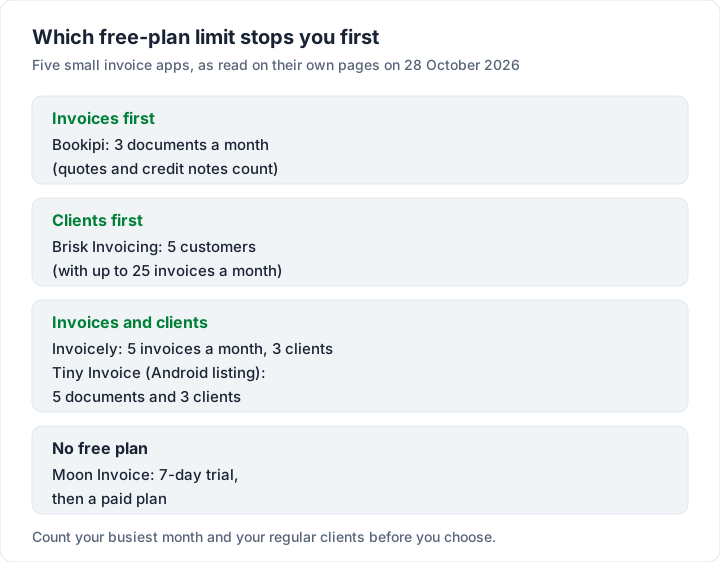
- Tiny Invoice is a phone and tablet app with estimates. Its iPhone listing is free with in-app purchases but states no free limit and no billing period for its Pro items. Its Android listing names a free limit of 5 documents and 3 clients. Two different App Store apps use the name, so check the seller.
- Moon Invoice offers a 7-day free trial and a 90-day money-back guarantee. Its pricing page showed no standard plan prices on 28 October 2026, during a promotion.
- Bookipi is free for up to 3 documents a month, then Starter costs US$9.99 a month or US$91.20 billed annually.
- Brisk Invoicing is a web app, free for up to 25 invoices a month but only 5 customers. Basic costs $4.85 a month, and the page does not say whether that is US or Canadian dollars.
- Invoicely is free for 5 invoices a month and 3 saved clients. Basic costs $9.99 a month.
- The free limits differ. On Bookipi it is invoices; on Brisk it is clients; on Invoicely it is both; Moon Invoice offers a trial rather than a free plan.
If you mainly want a free app for your phone, our guide to free invoice apps for iPhone and Android covers that question across more apps.
Five small invoice apps at a glance#
This table summarises each app as its own pages described it on 28 October 2026. “Cheapest paid plan” is the lowest standard price we could read cleanly, not an offer.
| App | Where it runs | Free option | Cheapest paid plan | Estimates | Card payments on the invoice |
|---|---|---|---|---|---|
| Tiny Invoice | iPhone, iPad, Mac, Android | Free download; Android listing names a 5-document, 3-client limit | No clean figure (see below) | Yes | Yes (“online payment”) |
| Moon Invoice | Web, iPhone, iPad, Mac | 7-day trial, no free plan | No price shown on the day | Yes | Yes, 15+ gateways |
| Bookipi | Web and mobile apps | 3 documents a month | Starter, US$9.99 a month | Yes | Yes |
| Brisk Invoicing | Web (works in a phone browser) | 25 invoices a month, 5 customers | Basic, $4.85 a month | Yes (quotes) | Yes, US and Canada only |
| Invoicely | Web | 5 invoices a month, 3 saved clients | Basic, $9.99 a month | Basic and up | PayPal on Free; cards on Basic and up |
Every app here does more than we can fit in one row. The sections below give each one its own fair hearing, and the eight free invoicing plans and their limits cover the wider free field.
Tiny Invoice: which one, and what it costs#
“Tiny Invoice” points at two different App Store apps, so start by checking which one you are looking at.
| The Tiny Invoice most people mean | The other one | |
|---|---|---|
| Name on the US App Store | Tiny Invoice - Invoice Maker | Go Invoice: Mobile Invoice App |
| Subtitle | Fast Estimates by Invoice Zip | Tiny Invoice & Proposal Maker |
| Seller | NEO PIXEL LABS PTE. LTD. (copyright “© TinyWork Apps”) | People Talent Tech Sdn. Bhd. |
| Listing | id679572722 | id1487589492 |
This post covers the first one, published by TinyWork Apps. Before you pay for either, check the seller name on the listing matches the app you meant to buy.
What it does. The iPhone listing describes “5 customizable professional invoice templates”, your logo and colours, estimates you can “convert them to an invoice with one tap”, sales reports, purchase orders, credit memos and expenses, reminders before the due date, “online payment directly through the invoice” and sync across devices. It runs on iPhone and iPad, and on Macs with an Apple M1 chip or later.
What it costs. The iPhone listing says “Free · In‑App Purchases” and does not state a free limit. Its in-app purchase list on 28 October 2026 showed these lines:
- “Pro Plan - 1 Business” at $9.99
- “Pro Plan - 2 Businesses” at $13.99
- “Premium Plan - Weekly” at $4.99, $5.99 and $8.99
The Pro lines do not say whether $9.99 is weekly, monthly or yearly. The description says “Weekly and annual subscriptions are available”, but no item in the list is labelled annual. With the period missing, we cannot turn those lines into a yearly cost, and we will not guess one. The price screen inside the app shows the period before you confirm; read it there.
The Android version names a limit. The Google Play listing, published as TinyWork Apps, says: “To break the limitations of 5 invoices/estimates/purchase orders/credit memos and 3 clients, we offer different subscription plans.” It does not say whether the 5 is per month or in total.
Where Tiny Invoice is the better pick: you want a native app on your phone or iPad, you send estimates before invoices, and you want sales and expense reports in the same place.
Moon Invoice: a trial, not a free plan#
Moon Invoice, made by Moon Technolabs, is a bigger app than its name suggests. Its App Store listing (read on 28 October 2026) lists “66+ readymade invoicing templates”, estimates, purchase orders and credit notes, recurring invoices “on auto mode”, payments through “15+ popular payment gateways”, Apple tap-to-pay, inventory with low-stock alerts, expenses, time logs and multiple users with admin roles. It runs in a browser and on iPhone, iPad and Mac.
A trial rather than a free plan. The pricing page offers “Free for 7 days” and a trial with “No credit card needed”. Its FAQ adds: “we give a 90-day money-back guarantee”.
Prices during a promotion. The pricing page lists four tiers (Starter, Standard, Premium and Enterprise). On 28 October 2026 the plan cards showed no standard figures while a Halloween promotion ran (its banner said “Offer ends November 1, 2026.”), so we print no price. Check the price on the checkout screen, and note which figure applies after any discounted period.
Where Moon Invoice is the better pick: you want invoices, estimates, purchase orders, stock and expenses in one app, for a team, and you are happy to pay from day one after the trial. If you need recurring invoice software that sends on a schedule, it does that too.
Bookipi invoice app: 3 free documents a month#
Bookipi runs on the web and as phone apps. Its pricing page listed these plans on 28 October 2026:
| Plan | Price | Invoices |
|---|---|---|
| Free | US$0 “forever” | “Up to 3 per month” |
| Starter | US$9.99 a month, or US$91.20 billed annually | Unlimited |
| Professional | US$52.00 a month, or US$468.00 billed annually | Unlimited |
Check what counts toward the free cap. A footnote says it “Includes quotations, credit notes, estimates, and others. Resets every 30 days.” So a quote and its invoice use 2 of your 3. Bookipi’s mobile app FAQ adds that on the free plan “Your invoices will have a Bookipi watermark”.
The App Store purchase list shows its own in-app prices; our free invoice app guide lists them. Compare the web and app prices before you subscribe.
Where Bookipi is the better pick: you send 3 or fewer documents a month, or you want a phone app with quotes, eSignatures and card payments, and you are happy to pay yearly for the lower price.
Brisk Invoicing: a web app with client caps#
Brisk Invoicing, from Brisk Cloudware Inc., is a web app. Its homepage FAQ says “you can create and send invoices from your phone or tablet”. It offers quotes that convert to invoices, recurring invoices that “automatically email invoices to customers on a set basis”, automatic reminders for unpaid invoices, and payments through Stripe, PayPal and Bambora.
Its pricing page listed four plans on 28 October 2026. The page does not name the currency, so read these as dollars of an unstated kind (the company also notes that card processing is “available for businesses in the United States or Canada only”):
| Plan | Price | Users | Customers | Invoices a month |
|---|---|---|---|---|
| Free | $0 a month | 1 | Up to 5 | Up to 25 |
| Basic | $4.85 a month | 1 | Up to 25 | Up to 100 |
| Standard | $9.85 a month | 2 | Up to 100 | Up to 200 |
| Plus | $18.85 a month | 2, then $4.85 a month each | Unlimited | Unlimited |
Every plan, including Free, lists “Accept Credit Card & PayPal Payments Online”. The homepage gives a card fee of “2.9% + $0.30”. The pricing FAQ says an annual plan with a discount exists, but shows no annual figure.
Count your clients. The free plan allows 25 invoices a month and 5 customers, so a sixth regular client moves you to Basic.
Where Brisk is the better pick: you have a handful of clients, want card payments on the invoice and are based in the US or Canada. Its Basic plan is the lowest monthly price in this post.
Invoicely: 5 invoices and 3 clients free#
Invoicely is a web app from Stack Holdings GmbH. Its pricing page listed these plans on 28 October 2026 (the yearly toggle showed no figures):
| Plan | Price | Invoices a month | Saved clients | Team members |
|---|---|---|---|---|
| Free | $0 | 5 | 3 | None |
| Basic | $9.99 a month | 100 | 25 | Up to 2 |
| Professional | $19.99 a month | 250 | 100 | Up to 10 |
| Enterprise | $29.99 a month | Unlimited | Unlimited | Up to 25 |
Free includes PayPal payments, payment reminders and 100 emails a month. Estimates, recurring invoices, Stripe card payments and time, expense and mileage tracking start on Basic. The comparison table marks PDF invoices on Free as “Branded only”; send yourself a test invoice to see what that looks like before you send one to a client.
Where Invoicely is the better pick: you need several team members on one account at a monthly price, or you want time and mileage tracking next to your invoices.
A year for one small business: what each costs#
Here is one example, worked through each app’s list prices on 28 October 2026. A one-person business sends 8 invoices a month to 6 regular clients, 96 invoices in the year, and wants to stay on the cheapest plan that fits.
| App | Does the free plan hold? | Cheapest plan that fits, 1 year |
|---|---|---|
| Bookipi | No: 3 documents a month | Starter, US$91.20 billed annually ($9.99 x 12 = $119.88 monthly) |
| Invoicely | No: 5 invoices a month and 3 clients | Basic, $9.99 x 12 = $119.88 |
| Brisk Invoicing | No: 25 invoices is enough, 5 customers is not | Basic, $4.85 x 12 = $58.20 (currency not named) |
| Tiny Invoice | No, if the Android limit of 3 clients applies | No figure: the Pro period is not stated |
| Moon Invoice | No free plan | No figure: no standard price shown |
| Charming Invoices | Yes: no invoice or client cap | $0, or Individual at $29 once |
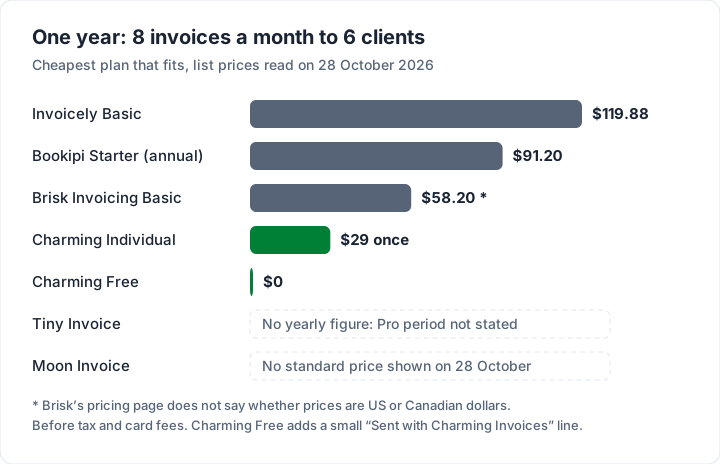
Three things change the result. Paying Bookipi yearly saves $28.68 against monthly billing. If your client list grows past 25, Brisk moves you to Standard at $9.85 a month. And a lower price does not matter if the app lacks what you need, such as estimates or a phone app.
How to read an app’s in-app purchase list before you subscribe#
An app store purchase list is not always a full price list. Before you tap Subscribe on any invoice app:
- Find the period. A price with no “weekly”, “monthly” or “yearly” next to it tells you nothing. The confirmation sheet shows the period; read it before you confirm.
- Check for a trial that converts. Tiny Invoice’s listing says a subscription renews “unless auto-renew is disabled at least 24 hours before the end of the current subscription period.” A trial that converts is a subscription with a start date.
- Know where to cancel. Its listing also says subscriptions “can be managed by going to Account Settings on the App Store after purchase.”
- Compare with the web price. Bookipi’s web and app prices differ; others may too.
- Count your clients, not only your invoices. Brisk and Invoicely cap clients on their free plans.
- Send yourself a test invoice to see whose name is on it.
You may not need a paid app at all. If you send only a few invoices a month, a free plan or a free template can be enough.
For the wider picture, see what to look for in invoicing software. If “simple” is the main thing you want, our guide to what simple should really mean turns it into six tests, and the cheapest invoicing software at regular prices costs two years across 14 tools.
Other small apps we reviewed#
Three more phone-first apps have their own reviews: Invoice Simple pricing and limits, Invoice Home pricing and Invoice2go plans and invoice caps.
Where Charming fits, and where these apps are the better pick#
Charming Invoices is a web app for branded invoices. Here is what it does, with the catch next to each part.
- No invoice or client cap on Free. Unlimited invoices and clients for 1 business, at $0 forever. Free invoices carry a small “Sent with Charming Invoices” line.
- One payment to hide that line. Individual is $29 once and Team is $79 once; Pro is $12 a month or $99 a year. Paid plans hide the line by default, and you can switch it back on. Lifetime plans are final sale, with no refunds.
- Design on every plan. All 60 templates, your logo, colours, fonts and a letterhead.
- PDF download, print and a private link. Issue the invoice, then download the PDF or copy a private link your client opens without an account, and send it however you like. It does not email invoices or send reminders.
And what it does not do, where the apps above win:
- No native phone app. Charming runs in your phone’s browser. Tiny Invoice, Moon Invoice and Bookipi have native apps.
- No estimates or quotes. All five apps here make them, Invoicely from Basic. Our guide to invoices, estimates and quotes explains when you need each.
- No card payments through Charming. Your client pays by bank transfer or your own payment link, and you mark the invoice paid yourself. Brisk, Bookipi, Moon Invoice and Invoicely take payments on the invoice.
- Recurring invoices are on paid plans only, and they create drafts for you to review and issue, never send themselves. Brisk and Moon Invoice send on a schedule.
- No inventory, expenses or accounting. Moon Invoice lists inventory and expenses, and Tiny Invoice records expenses and profit and loss.
If you invoice from a desk, are paid by bank transfer and send more than a few invoices a month, create a free invoice and see it in your own brand before you decide. Every plan is on the pricing page.
Questions people ask about small invoice apps#
Is Tiny Invoice free?#
The download is free with in-app purchases. The iPhone listing states no free limit; the Android listing says subscriptions lift “limitations of 5 invoices/estimates/purchase orders/credit memos and 3 clients”, as of 28 October 2026.
Does Moon Invoice have a free plan?#
No. It has a 7-day free trial and a 90-day money-back guarantee, according to its pricing page on 28 October 2026.
Is Bookipi free?#
Yes, for up to 3 documents a month, counting quotes and credit notes, with a Bookipi watermark on invoices. Starter, at US$9.99 a month or US$91.20 billed annually, removes the cap.
What is Brisk Invoicing?#
A web invoicing app from Brisk Cloudware Inc., with quotes, recurring invoices and card payments in the US and Canada. Its free plan allows 25 invoices a month and 5 customers.
How much does Invoicely cost?#
Its pricing page listed four plans on 28 October 2026, from $0 to $29.99 a month, with Free at 5 invoices a month and 3 saved clients.
The short version#
Pick the cap you can live with. Bookipi stops at 3 documents a month, Brisk at 5 customers, Invoicely at 5 invoices and 3 clients, and Moon Invoice after a 7-day trial. Tiny Invoice’s iPhone listing does not state the period for its Pro items, so read the confirmation screen. If you want a native phone app with estimates, one of these five is the better tool. If you want unlimited branded invoices from a browser, start free with Charming.