Invoice Simple review: pricing, plans and alternatives

Nnabuike Okoroafor ·
On this page · 13 sections
Disclosure: We make Charming Invoices, an invoicing app, and it is one of the alternatives covered here. This review is neutral: every Invoice Simple fact comes from Invoice Simple’s own website, help centre and app store listings, read on 22 October 2026 and linked, and we say plainly where Invoice Simple is the better choice.
You have probably met Invoice Simple on your phone. It sits near the top of the app stores, the download says “Free”, and within a few minutes you have a tidy invoice with your logo on it. Then the question arrives: what does it cost to keep going, and what happens when you send more than a handful of invoices a month?
This Invoice Simple review answers that from the vendor’s own pages. It covers the three plans and their invoice caps, what the free trial includes, how cancelling and refunds work, what card payments cost on a real invoice, and who should pick something else. It is not a star-rated test; we did not score the app, and we will not invent a score.
Invoice Simple in short#
- It is a phone-first invoice and estimate maker with a web app, made by Zenvoice Inc. according to its App Store listing. It also makes receipts, tracks expenses and takes card payments through Stripe or PayPal.
- There is no ongoing free plan. The app is a free download with a 14-day trial of the Premium plan; after that you choose a paid plan.
- Each plan is defined by an invoice cap. Essentials ($6.99 a month) allows 3 invoices a month, Plus ($14.99) allows 10, and Premium ($21.99) is unlimited. Yearly billing is $69.99, $149.99 and $219.99.
- Card fees are set by its payment partners. Invoice Simple’s help centre lists 3.49% + $0.49 for a US card payment through Stripe, and you can pass some or all of the fee to your client.
- Subscriptions are non-refundable under its stated policy, and app-store purchases are refunded (if at all) by Apple or Google.
- It suits tradespeople and side businesses who invoice on site, want clients to pay by card from the invoice, and send enough invoices to justify a monthly fee.
- Compare other options too if you want an ongoing free plan, or invoice from a desk and are paid by bank transfer.
What Invoice Simple is#
Invoice Simple calls itself an app to “Create & Send Customer Invoices in Seconds” and is built around the phone. Its App Store description pitches it for creating a document “on the spot while with your customer”, from “a landscaping invoice or estimate to a receipt”.
Here is what its homepage and store listings say it does, as of 22 October 2026:
- Estimates, invoices and receipts. Approved estimates turn into invoices “in 1-click”, and a receipt maker reuses the invoice details once you are paid.
- Templates and branding. “60+ templates”, with your logo, colours, photos and a signature.
- Sending. By email, text or WhatsApp, or as a PDF download, with alerts when an invoice is opened, paid or overdue.
- Payments. Cards, Apple Pay, Google Pay, PayPal, and ACH bank transfers and Venmo in the US only, through Invoice Simple Payments (Stripe, PayPal or both).
- Expenses. A receipt scanner and expense tracker with a summary report.
- Web and mobile. Separate iOS and Android apps plus a web app, all on the same account.
The site menu also lists bookkeeping, lending, homeowner financing and an AI receptionist. We did not review those, so this post says nothing more about them.
If you are new to the difference between the documents it makes, our guides to invoices, estimates and quotes and invoices versus receipts explain when you need each one.
Invoice Simple pricing and plans, October 2026#
Here are the plans as listed on Invoice Simple’s pricing page on 22 October 2026, in US dollars. The page notes that prices “may vary by local currency”, and its help centre says it now collects tax on subscriptions depending on your region.
| Plan | Monthly | Yearly | Invoices a month | What it adds |
|---|---|---|---|---|
| Essentials | $6.99 | $69.99 | Up to 3 | Autofill of client and item details, online payments, read receipts, the mobile app |
| Plus | $14.99 | $149.99 | Up to 10 | Photos on invoices, your signature, summary reports, due date reminders |
| Premium | $21.99 | $219.99 | Unlimited | Client signatures, premium templates, deposits, restoring previous invoices |
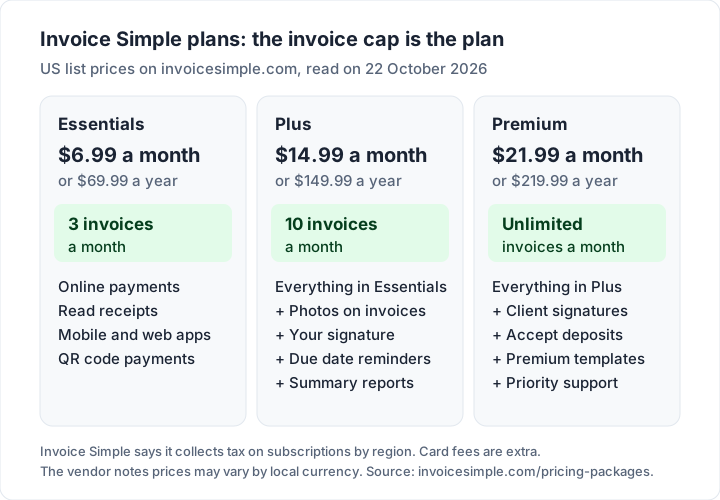
Three details on those pages change how you read the table:
- The cap resets each billing month. The help article for Essentials says you can create up to 3 “estimates and invoices” from “the start of your billing month to the end”. The wording suggests estimates may count towards the cap; if you send many estimates, ask support before you rely on a lower plan.
- Yearly billing is “2 months free”. Paying yearly costs roughly ten months of the monthly price.
- The pricing page and the store listing group features slightly differently. The pricing page lists autofill of client and item details under Essentials, while the App Store listing and the help centre place it in Plus; the store listing and help centre also list QR code payments in Essentials and priority support in Premium. If one feature decides it for you, check the plan screen inside the app before you buy.
What a year of Invoice Simple costs at your volume#
Because each plan is a cap, the real question is how many invoices you send. At regular yearly prices, before tax and card fees:
| Invoices you send a month | Cheapest plan that fits | Yearly billing | Monthly billing, 12 months |
|---|---|---|---|
| 1 to 3 | Essentials | $69.99 | $83.88 |
| 4 to 10 | Plus | $149.99 | $179.88 |
| 11 or more | Premium | $219.99 | $263.88 |
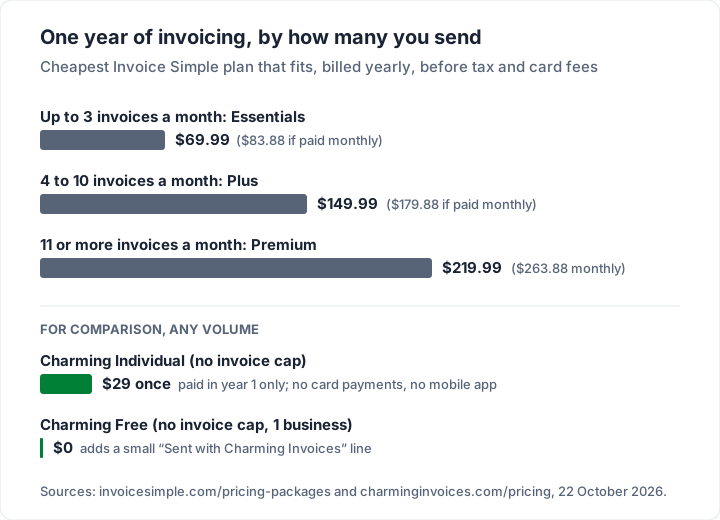
The step from 10 to 11 invoices a month is the one to plan for. For example, a painter who sends 8 invoices in a quiet month and 14 in a busy one needs Premium for the busy month. Count your busiest month, not your average one, when you choose a plan.
Is Invoice Simple free? The trial, explained#
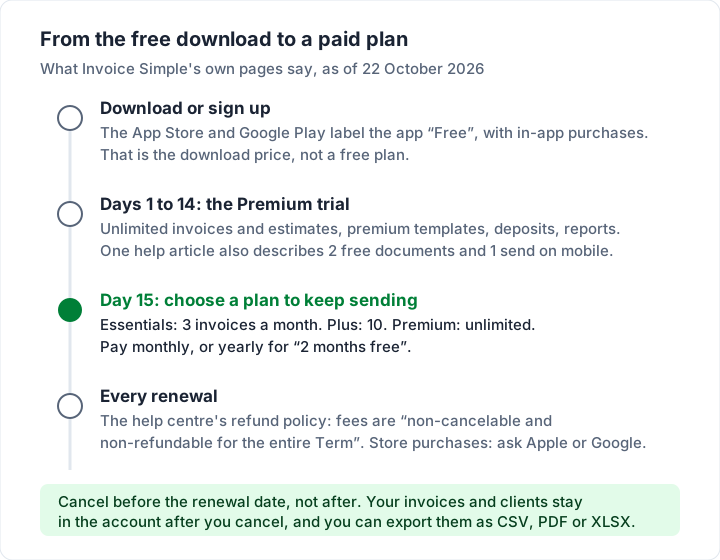
No, not for ongoing use. The App Store and Google Play label the app “Free” with in-app purchases, which is the price of the download. Its App Store description says “Start with a free trial, then choose the best plan for your business”, which matches what we found when we compared free invoicing apps for iPhone and Android.
What the trial includes, from Invoice Simple’s free trial help article: “For 14 days, create and send as many invoices and estimates as you like without having to purchase a subscription”, with Premium features such as premium templates, client signatures on estimates, online payments, deposits and business reports.
Two other vendor pages describe the free start a little differently:
- The mobile getting-started article says “Create up to 2 free documents & 1 send, no credit card required! After the free limit, choose the best plan for your business.”
- The web invoice generator page invites you to “Send your first invoice right now (it’s free!)” and says invoices are never branded: “Regardless of whether you have a registered account or not, your generated invoices are always 100% unbranded.”
The safe reading is the one all three agree on: you can try Invoice Simple without paying, and you need a paid plan to keep sending invoices. The last quote is worth noting: Invoice Simple says it does not put its own name on your invoices.
What happens when the trial ends, and how cancelling works#
When the 14 days end, the pricing page says “you’ll be able to select the plan with features that best match”. Plan changes are made under Settings, then Subscription, in the app or on the web, and Invoice Simple says “Any changes to feature limits will apply to your next billing cycle.”
Refunds. Invoice Simple’s refund policy article says “all fees are non-cancelable and non-refundable for the entire Term. There will be no refunds or credits for partial use of the Service, upgrade/downgrade refunds, nor refunds for months unused with an active account.” It adds that you can still email a refund request to its support team.
Where you bought it decides who refunds it. The same article says subscriptions bought through iTunes are refunded through Apple Support, and those bought through Google Play through Google. Cancel in the same store you paid through.
Your records stay. A help article on cancelling says your invoice history, estimates and client list “remain securely stored” after you cancel, and that you can export an invoice summary as a CSV, PDF or spreadsheet file for your own backup.
Export before you cancel, not after, and keep the file with your other business records. It is your copy, whatever happens to the account later.
How the plan structure has changed#
Invoice Simple’s help article on getting unlimited invoicing, dated 18 April 2025, says: “We’re now merging all accounts with unlimited invoicing into this current plan structure”, so unlimited invoicing is on the Premium plan.
Plans and prices for any subscription software can change over time. Before you commit to a year with any provider, a few checks help:
- Read the plan page on the day you buy, and note the date.
- Check what happens at renewal in the provider’s own terms.
- Keep your own export of invoices and clients, whatever app you use.
How to make an invoice in Invoice Simple#
From Invoice Simple’s getting-started article, pricing FAQ and store listing, the flow on the phone looks like this:
- Install the app and tap Get Started. The iOS and Android apps are separate downloads that work the same way; the web app needs only a name, email and password.
- Enter your business details. Name, address and contact details, which then fill every invoice.
- Upload your logo. You can skip this and add it later.
- Create an invoice. Add the client (the app can import from your phone contacts), then each product or service with its price, tax and any discount. Saved clients and items fill in as you type, on the plans that include autofill.
- Pick a template and colour. You can change both on an existing invoice.
- Turn on payments if you want them. Connect Stripe or PayPal and a “Pay Now” button is added to the invoice; you can also print a QR code.
- Send it. By email, text or WhatsApp, or download the PDF. You are notified when the client opens and pays it.
Whatever app you use, the invoice itself needs the same essentials: a unique number, dates, both parties, clear line items and payment terms. Our guide to how to number invoices covers the numbering part, which matters more than it looks if you ever switch app.
Invoice Simple payments and fees#
Invoice Simple does not set its own card rate. Its payments page says “Our payment providers set processing rates and periodically update them”, and the help centre lists them. Here are the US rates from its Stripe fees article, dated 21 May 2026, and its PayPal fees article, dated 14 August 2025:
| How the client pays | Fee listed by Invoice Simple | On a $500.00 invoice | On a $2,000.00 invoice |
|---|---|---|---|
| Credit or debit card (Stripe) | 3.49% + $0.49 | $17.94 | $70.29 |
| ACH bank transfer (Stripe) | 1% + $0.30, capped at $15 | $5.30 | $15.00 |
| PayPal or Venmo (PayPal) | 3.49% + $0.49 | $17.94 | $70.29 |
| Buy Now Pay Later (PayPal) | 4.99% | $24.95 | $99.80 |
| Bank transfer to your account, outside the app | No Invoice Simple fee | $0.00 | $0.00 |
The PayPal article says “The processing fee for US payments received through PayPal is 3.49% plus 49 cents and 4.99% for payments made with Buy Now Pay Later”, and adds that PayPal “periodically updates rates”. Both articles were still the current versions when we re-read them on 23 October 2026; check the rate in the app before you rely on it.
Card rates differ between apps and payment providers, so compare the listed rate for each option you are considering. Our invoice payment fee comparison works through Square, PayPal and Stripe on three invoice sizes, and our Stripe invoice guide shows what invoicing from Stripe directly costs.
You can pass the fee on. Invoice Simple lets you add any share of the processing fee (0 to 100%) to the client’s invoice, and its payments page says there are “No fees if you pass them to your clients”. Your client then pays the fee instead, so say so in your terms before the first invoice goes out.
App store ratings#
Ratings are third-party figures, not our judgement. As of 22 October 2026:
- App Store: 4.9 stars from about 123,000 ratings (listing).
- Google Play: 4.8 stars from 172,000 reviews, 5 million or more downloads, and an Editors’ Choice badge (listing).
- Invoice Simple’s own site shows 4.9 from 266,819 reviews.
A star rating says how an app felt to use at the moment someone rated it. It does not cover plan terms or renewal prices, so read the plan page alongside the ratings.
Who Invoice Simple suits, and who it does not#
Here is how its own feature list and prices line up with common situations.
| You... | What Invoice Simple lists |
|---|---|
| Invoice on site from your phone, often with the client present | It is designed for this: estimate, signature, invoice and payment in one app |
| Need clients to pay by card or Venmo from the invoice | Stripe and PayPal are built in; the listed US card rate is 3.49% + $0.49 |
| Send estimates and receipts as well as invoices | All three are in the app |
| Send 4 to 10 invoices most months | Plus covers up to 10 a month at $149.99 a year |
| Send 11 or more invoices a month | Premium, at $219.99 a year, has no invoice cap |
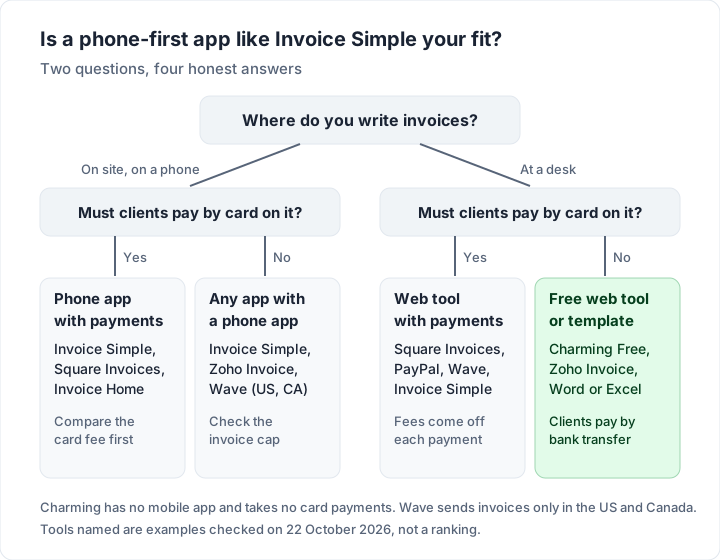
| Invoice from a desk, paid by bank transfer | Its features centre on the phone app and in-app payments, so a web tool or template may also suit you |
| Want to try it before paying | A 14-day Premium trial, rather than an ongoing free plan |
Contractors comparing it with the broader field will find more options in our guide to invoicing software for contractors.
Invoice Simple alternatives#
If your needs differ from what Invoice Simple offers, here are alternatives, each checked on its own page on 22 October 2026. “Free plan” means ongoing free use, not a trial. For smaller phone apps, Tiny Invoice, Moon Invoice, Bookipi and Brisk compared sets out their free limits and prices.
| Tool | Free plan and its main limit | Phone app | Card payments from the invoice | First paid step |
|---|---|---|---|---|
| Invoice Simple (reference) | None; 14-day trial | Yes | Yes, 3.49% + $0.49 by card | Essentials, $6.99 a month, 3 invoices a month |
| Zoho Invoice | Up to 500 invoices a year, 2 users, “Powered by Zoho Invoice” branding | Yes | Through your own gateway | No paid tier listed on the page |
| Square Invoices | Unlimited invoices | Yes | Yes, 3.3% + 30¢ online on Free | Plus, a monthly fee |
| Wave | Starter: unlimited invoices; sending only in the US and Canada | Yes | Yes, 2.9% + $0.60 per card on Starter | Pro, $19 a month or $190 a year |
| Invoice Home | Up to $1,000 invoiced in 30 days | Yes | Yes, PayPal or Stripe | Unlimited, $5 a month on its website |
| Charming Invoices | No invoice or client cap, 1 business | No | No | Individual, $29 once |
| A blank Word, Excel or PDF template | Free, no limit | Depends on your office app | No | None |
Square’s card rate is from its fees help article; Wave’s note on sending outside the US and Canada is from its help centre. For each free plan’s listed limits in one place, see the best free invoicing software, and for a shortlist by type of business, the best invoicing app for small business. For another phone-first app with invoice-capped plans, see our Invoice2go review.
Invoice Simple vs Invoice Home#
They are often compared because both are template-led and phone-friendly. Invoice Home’s free plan is capped by amount rather than number of invoices, its paid plan is cheaper, and it has over 100 templates against Invoice Simple’s 60-plus. Invoice Simple has more payment methods, client signatures and expense tracking. Our Invoice Home review covers its plans and listed prices.
Invoice Simple vs QuickBooks#
They solve different problems. QuickBooks Online is accounting software, with invoicing as one part of it. Invoice Simple is an invoice, estimate and receipt maker with expense tracking (its menu also lists a bookkeeping feature we did not review). If your accountant needs your books in QuickBooks, Invoice Simple will not replace it; if you only need to bill clients from a van, full accounting software may be more than you need. QuickBooks Online’s plan prices are compared in our small business shortlist linked above.
Invoice Simple vs Charming Invoices#
Charming is a web app for branded invoices, and it is a fair alternative only for some Invoice Simple users. What Charming does:
- No invoice cap on Free. Unlimited invoices and clients for 1 business, at $0 forever, with no card required.
- Design on every plan. All 60 templates, your logo, any brand colour, 30 fonts and a letterhead.
- Sharing and follow-up. Issue the invoice, then download the PDF or copy a private link your client opens without an account, and send it however you like. You get a “Viewed” mark when they open the link, and overdue invoices are flagged.
- Numbering that carries on. Invoice numbers assign themselves, and a “Next invoice number” setting continues an old sequence; it can be raised but never lowered below the current value.
- Your own payment details. Bank details and your own payment link (for example a PayPal.me or Stripe payment link) print on the invoice. The client pays you directly.
And the catches, next to those benefits:
- No mobile app. If you invoice standing next to the client, Invoice Simple is built for that and Charming is not.
- No card payments through Charming. The payment happens with your bank or your payment-link provider, at that provider’s fees, and you mark the invoice paid yourself.
- No estimates, quotes or receipts. Invoice Simple makes all three.
- Free invoices carry a small “Sent with Charming Invoices” line, and Free is 1 business. Individual hides the line by default for $29 once.
- No email sending or reminders. Charming does not email the invoice or send reminders; you send the PDF or link yourself and follow up from your own email.
- Lifetime plans are final sale, with no refunds. If you are unsure, use the free plan. The reasoning behind a one-time price is in why we built a lifetime plan, and the full plan list is on the pricing page.
If you only send a few invoices and are paid by bank transfer, you may not need an app at all. Our free Word and Excel invoice templates are free downloads with no sign-up; the Excel versions add up the totals for you.
Questions people ask about Invoice Simple#
Is Invoice Simple free?#
The download is free and there is a 14-day Premium trial, but there is no ongoing free plan. To keep sending invoices you choose Essentials, Plus or Premium, as of 22 October 2026.
How much does Invoice Simple cost?#
On its US pricing page on 22 October 2026: Essentials is $6.99 a month or $69.99 a year for up to 3 invoices a month, Plus is $14.99 a month or $149.99 a year for up to 10, and Premium is $21.99 a month or $219.99 a year for unlimited invoices. Tax and card fees are extra.
Can I cancel Invoice Simple and get a refund?#
You can cancel at any time, in the store or account you paid through. Its stated policy is that fees are non-refundable for the term, including unused months, though it accepts refund requests by email. App-store purchases are refunded, if at all, by Apple or Google.
Is there a desktop version of Invoice Simple?#
Yes. There is a web app that runs in a browser, alongside the iOS and Android apps, on the same account.
Does Invoice Simple put its logo on my invoices?#
Its invoice generator page says invoices are “always 100% unbranded”, with or without an account.
Does Invoice Simple do estimates and receipts?#
Yes. Estimates convert to invoices, and a receipt maker reuses the invoice details once you are paid.
The short version#
Invoice Simple is a capable, phone-first invoice and estimate maker with card payments built in. Its price depends on how many invoices you send: 3 a month on Essentials, 10 on Plus, unlimited on Premium at $219.99 a year. The trial lasts 14 days, its stated refund policy covers subscriptions, and card payments run at its partners’ listed rates. It is worth paying for if you bill on site and want card payments on the spot. If you invoice from a desk and are paid by bank transfer, create a free invoice with Charming instead and see a finished one in your own brand before you decide.