Invoicing software for contractors: 9 tools, by job type

Nnabuike Okoroafor ·
On this page · 12 sections
Disclosure: We make Charming Invoices, which is one of the options covered here.
General information, not legal or tax advice. Where this guide mentions tax, VAT or record-keeping it quotes or links the official page, and those rules vary by country and change; ask your accountant or your tax authority before you rely on any of it.
You finished the job, the client is happy, and the invoice is still a note in your phone. Or it is a carbon book in the van, or a Word file you retype every Friday night. Before you compare invoicing software for contractors, it helps to ask what kind of contractor you are.
That question decides everything. An electrician doing six service calls a day, a landscaping crew of four with a dispatch board, and a remodeller billing a kitchen in four stages need different tools. This guide sorts nine of them by job type. Every price and limit comes from the vendor’s own pricing or help page, read on 22 October 2026 and linked, so you can check it before you pay.
In short#
- One-person service calls, paid on the doorstep: Square Invoices Free (estimates, invoices and card payments at $0 a month) or Joist (estimates to invoices, from $10 a month on Basics for up to 5 documents a month, or $17 on Pro for unlimited, as of 23 October 2026).
- Crews with a schedule to run: Jobber (from $49 a month for 1 user) or Housecall Pro (from $79 a month, or $59 a month billed yearly). These are field-service tools; invoicing is one part.
- Builders billing in stages: you need deposits, progress invoices and retainage on the invoice. QuickBooks Online if your accountant runs your books in it; Charming Invoices if you want progress-billing invoices without a subscription.
- Card fees usually cost more than the software. On a $1,000.00 job paid by card, the published fees run from about $26 to $35, depending on the tool and plan.
- Charming has no estimates, no scheduling and no card payments. It is the right fit only if your clients pay you by transfer or your own payment link, and you want branded, deposit-aware invoices.
How we compared invoicing software for contractors#
We picked nine tools that contractors actually shortlist and that publish at least some of their prices: Jobber, Housecall Pro, Joist, Square Invoices, QuickBooks Online, FreshBooks, Invoice2go, Wave and our own. For each, we read the vendor’s own pages on 22 October 2026 and recorded:
- Entry price: the regular price of the cheapest plan that does the job. Several vendors were running time-limited promotions that day (Jobber’s banner said an offer ends 30 October; QuickBooks showed 50% off for 3 months; Housecall Pro listed a first-month price). We leave promotions out because a two-year budget runs on the regular price.
- Quotes or estimates: whether you can send one and turn it into an invoice.
- Scheduling: whether the tool books and dispatches jobs.
- Card payments: whether a client can pay by card from the invoice, and the published fee.
- Trade billing: deposits, progress or milestone billing, automatic reminders and QuickBooks sync.
We did not use star ratings or app-store scores. Where a pricing page did not state something, we say so instead of guessing. One tool, Buildertrend, is mentioned below but left out of the tables because we could not confirm a public price on 22 and 23 October 2026.
If you would rather judge any tool on a checklist than read a shortlist, our guide to how to choose invoicing software has eight questions to ask any invoicing app. And if “contractor” means you are an independent contractor billing companies for your time, rather than a trade, our best invoicing software for freelancers fits you better.
The comparison table, October 2026#
Here are the nine tools on the four things that sort contractors fastest. Prices are regular US prices, excluding tax, as of 22 October 2026. “Not on its pricing page” means we could not confirm it there, not that the tool lacks it.
| Tool | Entry price (regular) | Free plan | Quotes or estimates | Scheduling and dispatch |
|---|---|---|---|---|
| Jobber | Core, $49 a month (1 user), or $29 a month billed yearly | No; 14-day trial | Yes, every plan | Yes, every plan |
| Housecall Pro | Basic, $79 a month, or $59 a month billed yearly (1 user) | No; 14-day trial | Yes, “Quotes and proposals” | Yes, “Scheduling and dispatching” |
| Joist | Basics, $10 a month for up to 5 documents a month, or $8.34 a month billed yearly; Pro, $17 a month for unlimited documents, or $14.17 a month billed yearly (as of 23 October 2026) | No (“free plan is no longer available”); 14-day trial | Yes, “Estimates to Invoices” | Not on its pricing page |
| Square Invoices | Free, $0 a month | Yes | Yes, “Estimates and contracts” on Free | Not on its invoices pricing page |
| QuickBooks Online | Simple Start, $38 a month (1 user) | Yes, but 2 invoices a month unless you turn on QuickBooks Payments | Yes, convert estimates into invoices | Not on its pricing page |
| FreshBooks | Lite, $23 a month (5 billable clients) | No | Yes, “Create and send estimates” | Not on its pricing page |
| Invoice2go | No price shown in the page text we could read | None listed | Yes, unlimited on every plan | Not on its pricing page |
| Wave | Starter, $0; Pro, $19 a month or $190 a year | Yes (Starter) | Yes, unlimited | Not on its pricing page |
| Charming Invoices | Free, $0 (1 business); Individual, $29 once | Yes | No | No |
And here is what clients pay to pay you. Card fees come off every payment, so for most contractors this table matters more than the first.
| Tool | Card payment on an invoice | Bank (ACH) payment |
|---|---|---|
| Jobber | 2.9% + 30¢ | 1% |
| Housecall Pro | “as low as 2.59%” | 1% |
| Joist | Not stated: “standard payment processing fees apply” | Not stated |
| Square Invoices | 3.3% + 30¢ on Free; 2.9% + 30¢ on Plus and Premium (Square’s fees) | 1%, $1 minimum; $10 cap on Plus and Premium |
| QuickBooks Online | 2.99% | 1% |
| FreshBooks | 2.9% + $0.30 | 1% |
| Invoice2go | 3.5% on Starter, 3% on Professional, 2.9% on Premium | Free |
| Wave | 2.9% + $0.60 on Starter | Not compared here |
| Charming Invoices | None: clients pay you directly | None through Charming |
Two plain notes. Prices change, so open the vendor page before you buy. And Invoice2go sets invoice allowances by plan per year: 30 invoices a year on Starter and 100 on Professional, with unlimited on Premium, so count how many invoices you send in a year before you pick a plan. Our guide to Invoice2go sets out its plans, caps and card fees in more detail.
Best for one-person service calls#
You are an electrician, plumber, handyperson, locksmith or appliance tech, working alone or with a helper. You price the job on site, do it, and want paid before you drive away. Most of your clients are homeowners you will see once or twice.
What matters here is speed in the driveway: an estimate the client can approve on your phone, an invoice from that estimate, and a card button. One person in a public online discussion we collected for our research (the people quoted are not Charming customers) described the problem exactly:
I need something that gives me duplicate records automatically but doesn't require me to go back to the office every time. What systems do other field service businesses use to stay organized and look more professional with their paperwork?
What fits:
- Square Invoices Free costs nothing a month and includes invoices, recurring invoices, estimates and contracts on the free plan. Square’s page also lists deposits, a milestone “payment schedule” (shown under Plus, which the page’s fee table lists at $49 a month per location) and automatic reminders before, on or after the due date. You pay through card fees instead: 3.3% + 30¢ per online invoice payment on Free.
- Joist is built around estimates that become invoices, with deposit requests and “Deposit and milestone payments” listed. Basics is $10 a month for up to 5 documents a month, and Pro is $17 a month for unlimited documents and clients (as of 23 October 2026). Its page does not give a card rate. Since then Joist has added a Run plan with jobs and scheduling, listed at $100 a month and shown at an introductory $70 on 28 October 2026, and an AI Receptionist add-on at $49 a month; our guide to Joist invoices has every plan and Joist's card fees.
- Invoice2go has unlimited estimates on every plan, free bank transfers and card fees from 2.9% to 3.5% by plan. Check the yearly invoice allowances above against your volume.
- Wave Starter is free with unlimited estimates and invoices, but only for US and Canadian businesses: Wave’s help centre says users elsewhere can no longer send invoices through it. Wave’s pricing page ties automatic late-payment reminders to Pro or to its online payments.
Where Charming fits: only if you do not quote on site and your clients pay by bank transfer, Zelle, check or a payment link you already have. Charming has 12 trade starter kits (among them “Electrician service job”, “Plumbing service call”, “HVAC service visit”, “Handyman visit”, “Painting job”, “Roof replacement” and “Lawn and landscape”) that fill in the line-item structure for you, with prices left at 0.00 on purpose. The electrician invoice template shows one finished. But there are no estimates and no card button, so if you price in the driveway and take a card, Square or Joist is the better tool. For the difference between the two documents, see invoice vs estimate vs quote. For filled-in samples, see the job invoice template and the pest control invoice guide, which covers service plans and re-services.
If you mostly work from a phone, check that too. Charming is a web app in your phone’s browser, with no App Store or Google Play app and no offline mode; our guide to invoicing from a phone covers the options.
Best for field-service crews (scheduling and dispatch)#
Once you have two or more people in vans, the invoice is the last step of a longer chain: a request comes in, someone quotes it, someone books it, a tech does it, and the office bills it. Field-service software runs that whole chain, and that is what you are paying for. Car repair shops have their own category of shop-management systems, priced in auto repair invoice software.
Jobber lists quotes, online booking and scheduling, and invoices with online payments on every plan. Core is $49 a month for 1 user, or $29 a month on its regular yearly price (the first 12 months were $21 a month on 22 October 2026). Extra users are $29 a month each. Automatic quote and invoice follow-ups and QuickBooks Online sync start on Connect, at $139 a month for 1 user or $199 a month for 5. Job costing starts on Grow.
Housecall Pro lists quotes and proposals, scheduling and dispatching, invoices and payments, and automated reminders on Basic ($79 a month, or $59 a month billed yearly, for 1 user). Essentials covers 5 users at $189 a month ($149 billed yearly) and adds QuickBooks Online sync. Max covers 8 users at $329 a month, with more at $35 a month each. Every plan includes its iOS and Android app. Card fees “start at 2.59%”, and bank payments cost 1%. For the two side by side on invoicing, fees and two-year cost, see Jobber vs Housecall Pro.
Both offer a 14-day free trial with no card needed, according to their pricing pages. Use it on a real week, not a demo week: book jobs, send a quote, convert it, invoice it and take a test payment.
Where Charming fits: it does not. Charming has no scheduling, no dispatch and no job records; it is invoicing only. A crew that needs a dispatch board should pick Jobber or Housecall Pro. Where Charming can help a crew is the billing side alone: Team is $79 once for the owner and up to 5 teammates, with Owner, Admin and Member roles. That only makes sense if scheduling already lives somewhere else, such as a shared calendar. Cleaning and home-service crews have their own billing quirks, covered in invoicing for cleaners and home services.
Best for builders billing in stages#
Remodellers, general contractors, roofers and anyone on a job longer than a few weeks bill differently. A typical job runs: a signed contract, a deposit invoice, progress invoices as stages finish (often with retainage held back), change orders along the way, and a final invoice plus a retainage release. Here is that pattern on one illustrative job.
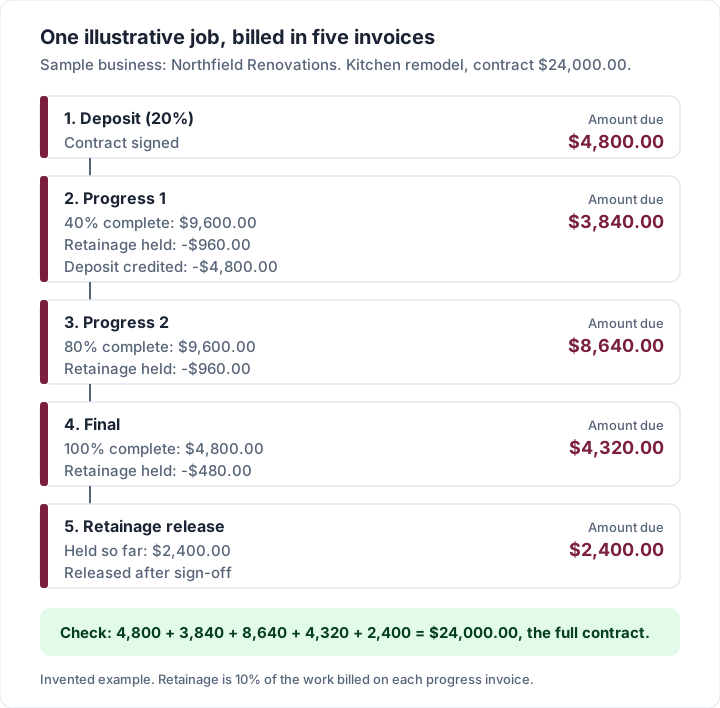
The arithmetic, line by line (an invented example, not a real job):
| Invoice | Work billed | Retainage held (10%) | Deposit credited | Amount due |
|---|---|---|---|---|
| Deposit (20%) | — | — | — | $4,800.00 |
| Progress 1 (40% complete) | $9,600.00 | −$960.00 | −$4,800.00 | $3,840.00 |
| Progress 2 (80% complete) | $9,600.00 | −$960.00 | — | $8,640.00 |
| Final (100% complete) | $4,800.00 | −$480.00 | — | $4,320.00 |
| Retainage release | — | +$2,400.00 | — | $2,400.00 |
| Total | $24,000.00 | $0.00 net | $24,000.00 |
The software question is which tool prints those invoices correctly and keeps the running totals straight. Our guide to progress invoicing, with a worked example explains schedules of values and retainage in detail, and deposit invoices: how they actually work covers the first row.
What fits:
- QuickBooks Online, if your accountant keeps your books in it, so progress invoices land in the same ledger. Simple Start is $38 a month for 1 user; project profitability tracking is listed from Plus, at $140 a month for 5 users. The pricing page we read did not mention progress invoicing by name, so confirm it on the plan you choose.
- Square Invoices, for deposits and a milestone payment schedule on a single invoice, with card payments.
- Construction-management software such as Buildertrend, if you also need selections, schedules and client logins for long builds. We could not confirm a public price on its site, so ask for a quote and budget accordingly.
- Charming Invoices, if you want the invoices themselves done properly without a subscription. The Progress Billing template prints the contract value, percent complete, retainage held and balance to complete. You enter the contract value, the amount previously billed and a retainage percentage; percent complete and the balance are worked out from your line items, so they cannot disagree. Deposits are credited, the PO number field takes a client’s purchase order, and the Contractor template groups labour and materials under their own subtotals. All of it is on the free plan. If an owner asks for AIA billing, how G702 and G703 pay applications work explains when a plain progress invoice is enough.
The catch, stated plainly: Charming does not track retainage as money owed. The amount held prints on each invoice, but it is not counted in your outstanding totals or client statements, and there is no release step: you keep the running total yourself and bill the release on its own invoice, as in the table above. There are no change-order documents either; agree changes outside Charming and bill them as their own lines. Our guide to what a contractor invoice should show explains how to set those lines out.
A worked example: two years of costs#
Monthly prices hide the real number. Here are two illustrative businesses (invented examples, not customers), costed over 24 months at the regular prices recorded above. Introductory offers would lower the first months; we left them out because they end. These are subscription costs only; card fees come after.
Example 1: a solo electrician#
One person, invoicing every job, wanting quotes and automatic reminders where the plan has them.
| Tool and plan | How it is charged | Two-year cost |
|---|---|---|
| Housecall Pro Basic, monthly | $79 a month × 24 | $1,896 |
| Housecall Pro Basic, billed yearly | $59 a month × 24 | $1,416 |
| Jobber Core, monthly | $49 a month × 24 | $1,176 |
| QuickBooks Online Simple Start | $38 a month × 24 | $912 |
| Jobber Core, billed yearly (regular price) | $29 a month × 24 | $696 |
| Joist Pro, monthly | $17 a month × 24 | $408 |
| Wave Pro, billed yearly | $190 a year × 2 | $380 |
| Charming Individual | $29 once | $29 |
| Square Invoices Free | $0 a month | $0 |
| Charming Free | $0, 1 business | $0 |
FreshBooks is left out of this table because its plans are priced by billable clients rather than per user (5 on Lite, 50 on Plus, unlimited on Premium at $70 a month, read 23 October 2026), so its cost depends on how many clients you bill. FreshBooks’ pricing FAQ explains how it counts clients; check it against your own client numbers.
Example 2: a crew of four#
An owner and 3 technicians, all of whom need to log in.
| Tool and plan | How it is charged | Two-year cost |
|---|---|---|
| Jobber Connect (5 users), monthly | $199 a month × 24 | $4,776 |
| Housecall Pro Essentials (5 users), monthly | $189 a month × 24 | $4,536 |
| Housecall Pro Essentials, billed yearly | $149 a month × 24 | $3,576 |
| QuickBooks Online Plus (5 users) | $140 a month × 24 | $3,360 |
| Jobber Core + 3 extra users, monthly | ($49 + 3 × $29) a month × 24 | $3,264 |
| Charming Pro, monthly (unlimited teammates) | $12 a month × 24 | $288 |
| Charming Team (owner + up to 5 teammates) | $79 once | $79 |
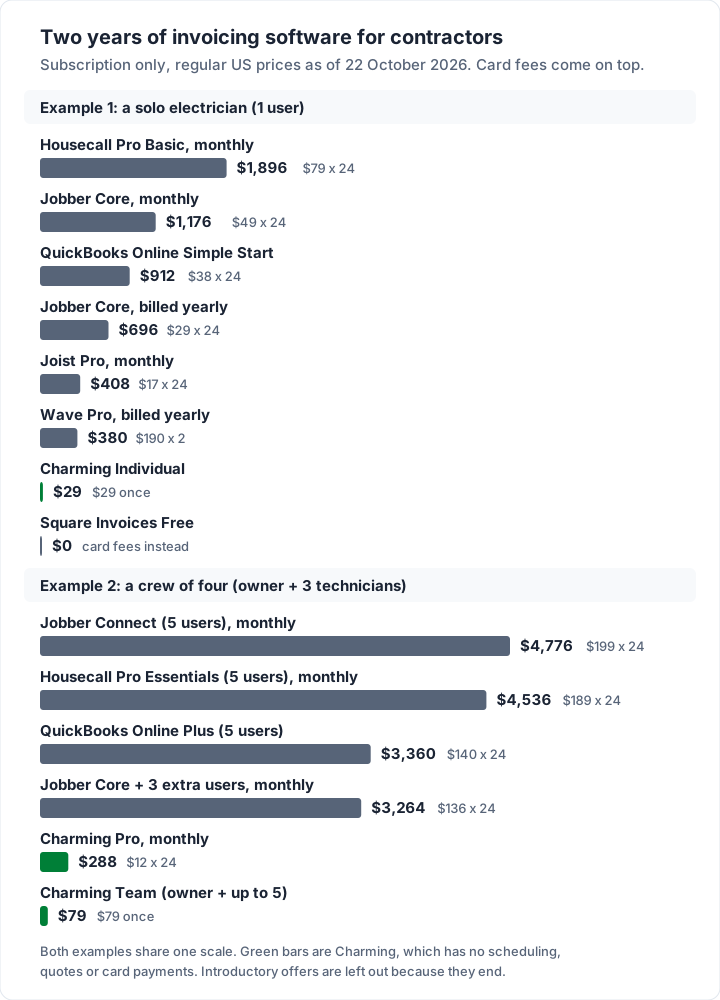
Read both tables fairly. Jobber and Housecall Pro cost the most because they run your whole day: requests, quotes, schedules, dispatch and payments. QuickBooks costs what it does because it is your books. Charming and Square Free cost the least because they cover fewer jobs, and Square Free charges per card payment instead of per month.
What card fees add on top#
The subscription is the smaller number for most trades. Here is the published fee on one illustrative $1,000.00 job, and on 100 such jobs, as of 22 October 2026.
| How the client pays | Fee on $1,000.00 | Over 100 jobs ($100,000.00) |
|---|---|---|
| Invoice2go Starter, card (3.5%) | $35.00 | $3,500.00 |
| Square Free, card online (3.3% + 30¢) | $33.30 | $3,330.00 |
| QuickBooks Payments, card (2.99%) | $29.90 | $2,990.00 |
| Jobber, card (2.9% + 30¢) | $29.30 | $2,930.00 |
| Housecall Pro, card at its lowest stated rate (2.59%) | $25.90 | $2,590.00 |
| Bank (ACH) payment at 1% (Jobber, QuickBooks, Square, Housecall Pro) | $10.00 | $1,000.00 |
| Bank transfer to you, invoiced from Charming | $0.00 from the app | $0.00 from the app |
A card button can be worth it: homeowners like paying on the spot, and a paid invoice today beats a check next week. But on 100 jobs, the gap between card and bank payment is close to $2,000. Our guide to what card payments on an invoice cost goes through the processors one by one. To be fair to our own row: Charming takes nothing because it processes nothing. Your client cannot pay by card from a Charming invoice, your bank may charge for transfers, and you mark the invoice paid yourself.
What contractors actually need from invoicing software#
Before you compare logos on a pricing page, write down what your work needs. This table maps the common kinds of contracting to the features that matter and the tools on this list that state them.
| Your work | What you actually need | Tools here that fit |
|---|---|---|
| Service calls, priced on site | Mobile estimates, invoice from estimate, card payment | Square Free, Joist, Invoice2go, Jobber |
| Recurring maintenance (lawns, pools, cleaning) | Scheduling, recurring invoices, automatic reminders | Jobber or Housecall Pro for the schedule; Square for recurring invoices and reminders |
| Crew of 2 to 10 | Dispatch, user roles, per-user pricing you can afford | Jobber, Housecall Pro |
| Staged jobs (remodels, roofing, builds) | Deposits, progress invoices, retainage, PO numbers | Square payment schedules, Charming; QuickBooks Online (confirm progress invoicing on your plan) |
| Commercial clients and GCs | PO numbers, clear contract references, net terms | Charming (PO field on every plan); check the others in a trial |
| Accountant-led books | Native accounting, or sync with it | QuickBooks Online, FreshBooks, Wave; Jobber and Housecall Pro by sync |
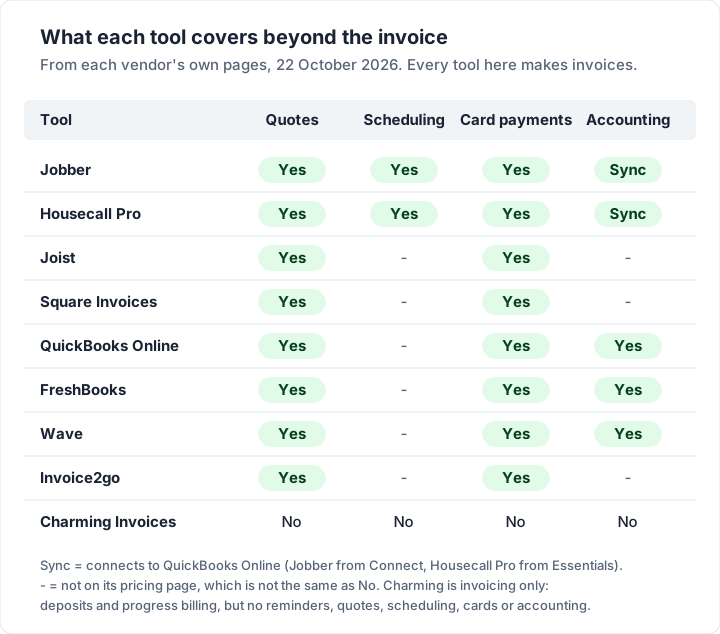
Then check the trade-billing features on your shortlist. This is what each vendor’s own pages say, as of 22 October 2026; blank means the page we read did not say.
| Feature | Jobber | Housecall Pro | Square | Charming |
|---|---|---|---|---|
| Deposits | Not on its pricing page | Not on its pricing page | Yes | Yes, every plan |
| Progress or milestone billing | Not on its pricing page | Not on its pricing page | “Payment schedule” on Plus | Progress Billing template, every plan |
| Retainage | Not on its pricing page | Not on its pricing page | Not on its pricing page | Printed, not tracked as owed |
| PO number field | Not on its pricing page | Not on its pricing page | Not on its pricing page | Yes, every plan |
| Automatic reminders | From Connect ($139 a month) | Basic and up | Yes (plan not named) | No; overdue invoices are flagged, you follow up yourself |
| QuickBooks Online sync | From Connect | From Essentials | Not compared here | No; CSV export only |
“Not on its pricing page” is not the same as “no”. Ask the vendor, or test it in the trial.
Which tool fits your contracting business#
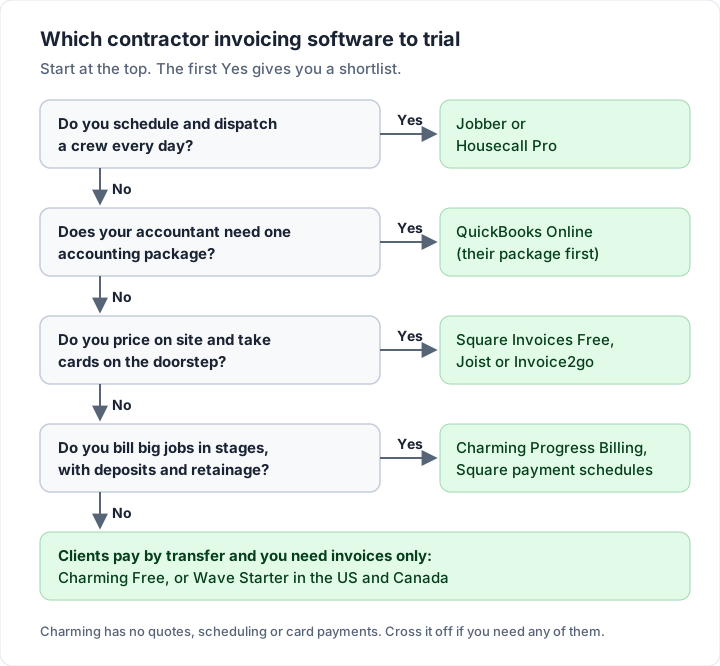
If you would rather answer questions than read sections, the same logic runs top to bottom.
Where Charming fits, and where it does not#
We hold our own product to the same test as the others, checked against our code today.
What you get on the free plan: unlimited invoices and clients for 1 business; 60 templates, including Contractor and Progress Billing, in your own logo, colours and fonts; deposits, progress billing and retainage on the invoice; the PO number field; quantity and unit columns with section subtotals; 12 trade starter kits; PDF download, print and a private link your client opens without an account, which you send however you like; a button to your own payment link if you have one; and overdue invoices flagged. Numbering is automatic when you issue an invoice, and you can continue from your old carbon book’s next number.
Paid plans: Individual is $29 once, Team is $79 once with up to 5 teammates, and Pro is $12 a month or $99 a year with unlimited teammates. Paid plans add unlimited businesses, recurring invoices (each cycle creates a draft you review and issue) and AI line items from one sentence. The plans are on the pricing page.
The catches:
- No estimates or quotes, and no change-order documents.
- No email sending or reminders. You send the PDF or link yourself and set a calendar reminder for the due date.
- No scheduling, dispatch or job records. It is invoicing only.
- No card payments. Clients pay you directly, by bank transfer, check or your own payment link, and you record the payment yourself.
- No mobile app. It runs in your phone’s browser, with no offline mode.
- No accounting integration. No QuickBooks sync; you export a CSV for your accountant.
- Retainage is printed, not tracked as a receivable.
- One tax rate per invoice, so a job with different tax on labour and materials needs care.
- Free invoices carry a small “Sent with Charming Invoices” line, and Free is 1 business.
- Lifetime plans are final sale, with no refunds. If you are unsure, use the free plan.
If your trade quotes on site, takes cards or runs a crew, the tools above will serve you better, and we would rather you chose one of them than bought the wrong thing. If you bill clients who pay by transfer, especially in stages, Charming covers the invoice end of the job.
Questions contractors ask#
What is the best invoicing app for contractors?#
It depends on what you need around the invoice. Crews that need scheduling look at Jobber or Housecall Pro. Solo trades that quote on site and take cards look at Square Invoices or Joist. Builders billing in stages need deposits, progress invoices and retainage. For one paragraph on each kind of small business, see the best invoicing app for small business.
Is there free invoicing software for contractors?#
Yes. Square Invoices Free, Wave Starter (US and Canada) and Charming Free all cost $0 a month as of 22 October 2026. Square and Wave list per-payment card fees; Charming takes no card payments. QuickBooks Online’s free plan sends 2 invoices a month unless you turn on QuickBooks Payments. Joist’s pricing page says its free plan is no longer available.
Do I need software that does quotes as well as invoices?#
If you price jobs before you start, yes, or you will retype every quote into an invoice. Jobber, Housecall Pro, Joist, Square, QuickBooks, FreshBooks, Invoice2go and Wave all list estimates or quotes. Charming does not. Quote and invoice software compared looks at nine tools that turn an accepted quote into an invoice.
Can contractors take card payments without monthly software?#
Yes. Square Invoices Free has no monthly fee and charges 3.3% + 30¢ per online card payment. Wave Starter charges 2.9% + $0.60. You pay per payment instead of per month.
Does invoicing software for contractors handle retainage?#
Some print it, fewer track it. Of the pricing pages we read, none listed retainage by name. Charming prints the retainage held on each progress invoice but does not count it as money owed. Whatever you use, keep a running total of retainage per job until it is released.
The short version#
Find your row first: service calls, crew, or staged jobs. Then cost your shortlist over two years at regular prices and add the card fees, because that is where the real money goes. If you run a crew, trial Jobber or Housecall Pro on a real week. If you take cards on the doorstep, start with Square Free or Joist. If your clients pay by transfer and you want deposit-aware, progress-billing invoices in your own brand, you can create a free invoice with Charming and see a finished one before you pay anyone. For the next step after choosing, our guide to automatic invoicing covers what to automate and what to check by hand.