Best invoicing software for freelancers: 9 tools by two-year cost

Nnabuike Okoroafor ·
On this page · 12 sections
Disclosure: We make Charming Invoices, which is one of the options covered here.
General information, not legal or tax advice. Where this guide mentions tax, VAT or record-keeping it quotes or links the official page, and those rules vary by country and change; ask your accountant or your tax authority before you rely on any of it.
You may pick an invoicing app when you have three clients. Then client number six arrives, or a client in another country. The plan that fits on day one depends on limits worth reading before you start.
So this guide judges the best invoicing software for freelancers on four things that matter as you grow: client limits, the vendor’s name on your invoices, billing clients abroad, and two-year cost. Every price and limit comes from the vendor’s own pricing or help page, read on 22 October 2026 and linked, so you can check anything before you pay. There are no star ratings, because we did not run a scored test and will not invent one.
In short#
- Count your clients before anything else. FreshBooks Lite ($23 a month) allows 5 billable clients and Invoice Ninja Free up to 5. Zoho Invoice, Wave, Square, PayPal and Charming state no client cap.
- Several free plans print the vendor’s name. Zoho’s pricing page says its invoices include “Powered by Zoho Invoice” (its help article says it cannot be removed), Invoice Ninja “Created by Invoice Ninja”, Charming “Sent with Charming Invoices”. Removing or hiding it costs anything from $29 once to an unpublished price.
- Card payments are a fee, never free. PayPal lists 2.99% + $0.49 per card payment, Square Free 3.3% + 30¢ online, Wave Starter 2.9% + $0.60, FreshBooks 2.9% + $0.30.
- Time tracking, proposals and contracts point you to Harvest, Bonsai or FreshBooks Plus. A pure invoicing app will not do them.
- Over two years, our worked example with 12 clients runs from $0 to $1,032 for the same invoices, depending on the tool.
How we judged invoicing software for freelancers#
General “best invoicing software” lists are written for small businesses with staff, stock and an accountant. A freelancer’s needs are narrower, so we judged each tool on what a freelancer actually runs into.
The criteria, and why each one matters to someone billing on their own:
| Criterion | Why it matters to a freelancer |
|---|---|
| Client cap | Freelancers win clients in bursts. Check the limit against your busiest month, not today. |
| Vendor branding | Your invoice is part of how a client sees your work. Check whether the plan prints a vendor line and how to remove it. |
| Payments and fees | Clients abroad and corporate clients often pay by transfer; consumers and small clients often want a card button. Each has a different cost. |
| Currency | A client in Germany may expect euros. Some tools put multi-currency on a higher plan. |
| Time tracking, proposals, contracts | Hourly and project work need different things. Count the features you will actually use. |
| Price model | A monthly fee repeats; a cap upgrade repeats; a one-time fee does not. Two-year cost is the easiest number to compare. |
What we did not do: rank the tools one to nine, quote review scores, or count introductory discounts. Discounts end, and a two-year budget runs on the regular price, so every figure below is the regular one.
If you would rather work through general buying questions first, our guide on how to choose invoicing software has eight questions to ask any vendor.
The comparison table, October 2026#
Here are the nine tools side by side, as of 22 October 2026. “Entry paid price” is the cheapest plan that costs money, at its regular monthly price in US dollars, without tax. A dash means the pricing page did not state it, not that the answer is “unlimited”.
| Tool | Free plan | Entry paid price | Client cap | Card payments from the invoice |
|---|---|---|---|---|
| Charming Invoices | Yes, 1 business | Individual, $29 once | None on any plan | No |
| Zoho Invoice | Yes, 500 invoices a year | No paid tier listed | — | Through your own gateway |
| Wave | Yes (Starter) | Pro, $19 a month or $190 a year | — | 2.9% + $0.60 on Starter |
| FreshBooks | No | Lite, $23 a month | 5 billable clients (Plus: 50) | 2.9% + $0.30; ACH 1% |
| Bonsai | No (7-day trial) | Basic, $15 a user a month; invoicing from Essentials, $25 | Basic lists “Unlimited clients” | Fees not stated on the page |
| Harvest | Yes, 1 seat and 2 projects | Teams, $11 a seat a month | — | Through Stripe and other integrations on paid plans |
| Invoice Ninja | Yes, up to 5 clients | Pro, $14 a month or $140 a year | 5 on Free | Through your own gateway |
| PayPal invoicing | Free to send | No subscription | — | 2.99% + $0.49 |
| Square Invoices | Yes | Plus, $49 a month per location | — | 3.3% + 30¢ on Free |
And the features that most often decide it for freelancers:
| Tool | Time tracking | Proposals or contracts | Recurring invoices | Vendor line on the cheapest plan |
|---|---|---|---|---|
| Charming Invoices | No (hours can go on lines) | No | Paid plans, as drafts you review | “Sent with Charming Invoices” on Free |
| Zoho Invoice | Yes, time logging | Quotes | Yes | “Powered by Zoho Invoice” |
| Wave | Not compared here | Estimates | See the Wave entry | Wave branding, removed on Pro |
| FreshBooks | Yes, every plan | Proposals from Plus | Yes, every plan | Branding removal listed only on Select |
| Bonsai | Yes, every plan | Proposals and contracts from Essentials | Not compared here | Not stated |
| Harvest | Yes, it is the core | No | Not compared here | Not stated |
| Invoice Ninja | Yes (time-tracking app) | Quotes | Yes, on Free | “Created by Invoice Ninja” on Free |
| PayPal | No | No | Yes | Not stated |
| Square | No | Estimates and contracts on Free | Yes, on Free | Not stated |
Prices change, and several vendors run time-limited promotions that are not shown here. Open the linked page before you buy.
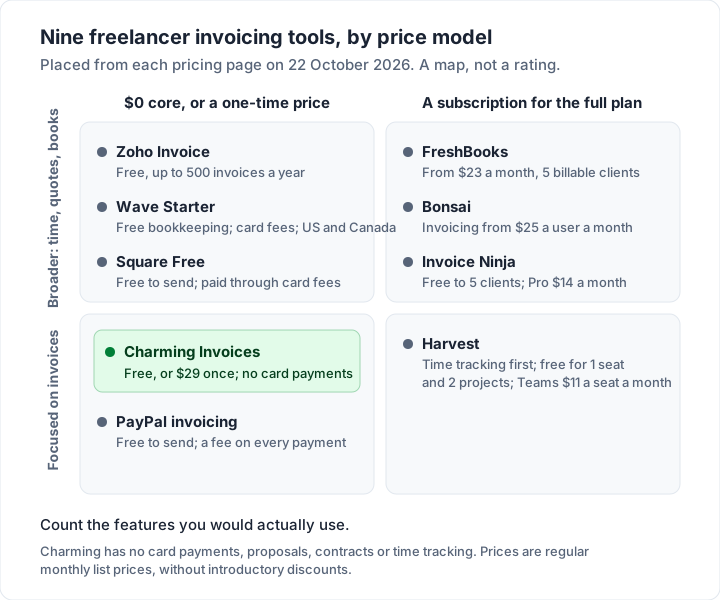
The tools, one by one#
Each entry says what the tool offers a freelancer, the limits to check, and who it fits. All facts are as of 22 October 2026, from the linked pages.
Charming Invoices: branded invoices, no client cap, no card button#
Good at: the free plan gives 1 business unlimited clients and invoices, all 60 templates with your own logo, colours and 30 fonts, a PDF to download or print and a private link your client opens without an account, which you send however you like, and payment tracking (including part payments) with overdue invoices flagged. A business can invoice in any of 16 currencies. Paid plans add unlimited businesses, recurring invoices and AI line items drafted from one sentence, and hide the footer line by default: Individual is $29 once, Team $79 once (up to 5 teammates), Pro $12 a month or $99 a year.
The catch: free invoices print “Sent with Charming Invoices”. Clients cannot pay by card through Charming: you print your bank details or your own payment link (a paypal.me link works) and mark the invoice paid yourself. Charming does not email invoices or send reminders: you send the PDF or link yourself. There are no proposals, contracts, time tracker or mobile app. Currency is set per business, not per invoice. Lifetime plans are final sale, with no refunds.
Fits: a designer, writer or consultant with many clients who pay by transfer, who wants invoices that look like their own studio.
Zoho Invoice: a broad free plan with a yearly cap#
Good at: Zoho’s pricing page calls it a “forever-free invoicing solution” and lists time logging with projects, a self-service customer portal, recurring invoices and automated payment reminders.
Limits to check: up to 500 invoices a year, two users, three projects and two organisations. The pricing page says invoices include “Powered by Zoho Invoice”, and Zoho’s help article on removing branding says it cannot be removed on Zoho Invoice (as of 23 October 2026). The pricing page does not say whether the 500-invoice limit follows the calendar year or a rolling 12 months. And a rule worth knowing: data of users inactive for over 180 days is deleted in the following 20 days, after a notice. Our Zoho Invoice guide covers the limits in detail.
Fits: a freelancer who wants quotes, time and invoices in one free tool and sends fewer than about 40 invoices a month.
Wave: free bookkeeping, US and Canada only#
Good at: Starter is $0 with unlimited estimates and invoices plus bookkeeping. Card payments, once approved, cost 2.9% + $0.60 (3.4% + $0.60 for Amex). Pro is $19 a month or $190 a year and makes the first 10 card transactions each month 2.9% + $0.
Limits to check: removing Wave branding sits with Pro. On Starter, the pricing table lists automated late-payment reminders only with Wave’s online payments switched on; Pro includes them. Wave’s own help centre says users outside the US and Canada can no longer send invoices or reminders through Wave, which matters if you live elsewhere. Our free invoicing software comparison has the detail. How Wave invoicing works goes through Starter, Pro and the fees.
Fits: a US or Canadian freelancer who wants free bookkeeping beside invoicing.
FreshBooks: accounting-grade, priced by client count#
Good at: time tracking, recurring invoices and automated late-payment reminders on every plan, estimates from Lite, and “estimates, proposals, and client retainers” from Plus. Card payments are 2.9% + $0.30, and bank transfers (ACH) 1%.
Limits to check: the price follows your client list. Lite is $23 a month for 5 billable clients, Plus $43 for 50, Premium $70 for unlimited (regular prices; its page also shows an introductory discount), and each extra team member is $11 a month. The pricing FAQ says the limit “refers to the number of both active and archived clients in your account” and that you “can delete them to free up spots for new clients” (read 23 October 2026). Removing FreshBooks branding is listed only on Select, which has no published price.
Fits: a freelancer who wants proper books and proposals, and either stays at 5 clients or is happy to pay for Plus. Our guide to FreshBooks invoices and client limits walks through creating, sending and marking one paid.
Bonsai: proposals, contracts and invoices together#
Good at: Bonsai’s pricing page lists time tracking from Basic and “Proposals & Contracts” and “Invoices & Payments” from Essentials, so one tool covers the whole client flow.
Limits to check: there is no free plan, only a 7-day trial, and pricing is per user. Invoicing starts at Essentials, $25 a user a month or $19 billed yearly. The page does not give its card fees; it says they vary by payment method. “Multi-currency Billing” appears in its feature list, but we could not tell which plan includes it, so ask before you buy. Our Bonsai invoices guide, read on 28 October 2026, lists the payment fees from Bonsai's help centre and works them on a $2,000.00 invoice.
Fits: a freelancer who sends a proposal and a contract to every new client and wants them in the same place as the invoice.
Harvest: time tracking that also invoices#
Good at: Harvest is time tracking first, with invoicing and expenses on every plan, including Free. Teams adds integrations with Stripe, QuickBooks Online, Xero and others for online payments.
Limits to check: Free is 1 seat and 2 projects. Teams is $11 a seat a month, or $9 billed yearly ($108 a year).
Fits: a developer or consultant whose invoices are built from tracked hours.
Invoice Ninja: broad and gateway-friendly, 5 clients on Free#
Good at: the hosted Free plan offers unlimited invoicing, invoice templates, recurring invoices with auto-billing, a client portal and online payment gateways. Its invoice templates page says 4 templates on Free and all 11 on Pro or Enterprise (read 23 October 2026). The code can also be self-hosted.
Limits to check: Free stops at 5 clients, and automatic late-payment reminders and removing “Created by Invoice Ninja” need Pro, at $14 a month or $140 a year. Its code is public under the Elastic License 2.0; our Invoice Ninja alternatives guide quotes the licence file and covers other options.
Fits: a freelancer with a few regular clients who want to pay by card through a gateway.
PayPal invoicing: free to send, paid per payment#
Good at: PayPal’s invoicing page says creating and sending invoices is included with your account, with your logo and colours, recurring invoices and automatic reminders. Clients can pay without a PayPal account.
Limits to check: every payment has a fee: 2.99% + $0.49 for cards, 3.49% + $0.49 for PayPal and Venmo, 4.99% + $0.49 for Pay Later, and 1% with a $10 cap for Pay by Bank (ACH).
Fits: occasional invoices to clients who already pay through PayPal.
Square Invoices: unlimited invoices, priced through card fees#
Good at: Square’s invoice pricing page lists invoices, recurring invoices, estimates and contracts on its Free plan and says you can “send unlimited invoices”. The page describes deposits, and lists a milestone “Payment schedule” under Plus.
Limits to check: Square’s fees article lists 3.3% + 30¢ for invoices paid online by card on Free, against 2.9% + 30¢ on Plus and Premium. ACH through an invoice is 1% with a $1 minimum, and the $10 cap applies only on the paid plans. Custom invoice templates are listed under Plus.
Fits: a freelancer who also takes card payments in person, such as at a market or a shoot.
Two more you will see recommended#
HoneyBook comes up often among photographers and event freelancers. It is not in the table because we could not confirm a current price on its own site on 22 or 23 October 2026. QuickBooks Online is accounting software first, from $38 a month for 1 user; its free plan sends 2 invoices a month unless you turn on QuickBooks Payments. It fits if your accountant already uses it; our guide to the best invoicing app for small business covers the accounting-first options.
Client caps, branding and currency: the limits to check#
Three of our four criteria come down to limits on each pricing page. Here they are in one place.
Client caps. Two tools here state a client cap. FreshBooks Lite allows 5 billable clients and Plus 50. Invoice Ninja Free allows 5. If you take on small one-off jobs, as many writers and designers do, five clients can be one busy month. Our guide to invoicing as a freelancer explains why each client should stay a separate record rather than being merged to dodge a cap.
The vendor’s name on your invoice. Here is what each tool says about its own branding, and what removing it costs:
| Tool | What the cheapest plan prints | Cost to remove it |
|---|---|---|
| Charming Invoices | “Sent with Charming Invoices” on Free | Hidden by default on any paid plan: from $29 once |
| Invoice Ninja | “Created by Invoice Ninja” on Free | Pro, $14 a month or $140 a year |
| Wave | Wave branding in footers | Pro, $19 a month or $190 a year |
| Zoho Invoice | “Powered by Zoho Invoice” | No paid tier listed on the pricing page |
| FreshBooks | Not stated for Lite, Plus or Premium | Listed only on Select, price not published |
Currency. If you bill clients abroad, check two things: can you invoice in their currency, and on which plan. Pricing pages do not always list currency support, so check each tool’s help centre, and the plan it names, before you rely on it.
Charming lists 16 currencies, including USD, EUR, GBP, CAD and AUD, on every plan. The catch is that currency belongs to the business, not the invoice. If you bill some clients in dollars and some in euros regularly, a second business (paid plans) keeps them apart; for a one-off, you can switch the business currency before you create the invoice, on any plan. Billing a client in another currency covers the rest.
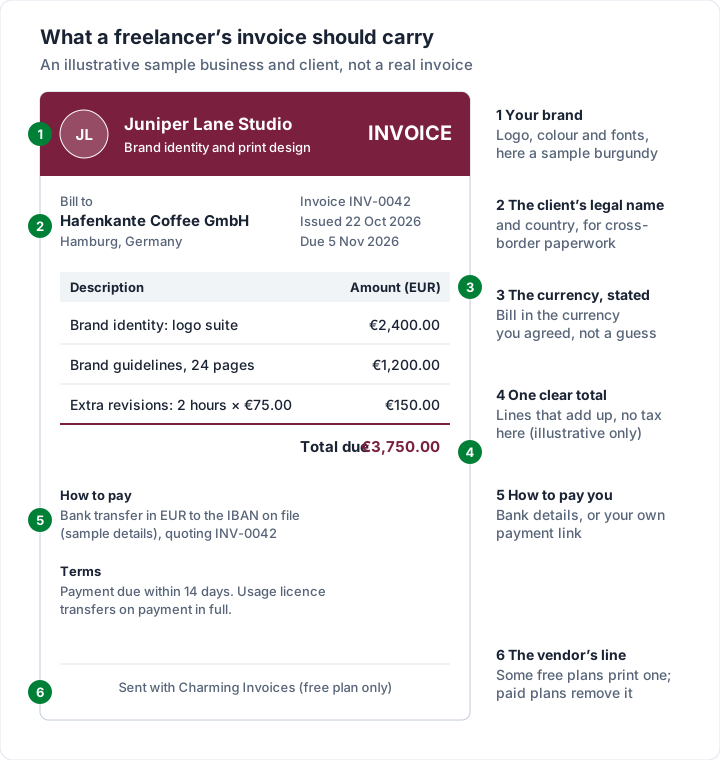
Here is what those pieces look like on one invoice.
What card payments cost on a freelance invoice#
A card button helps clients who prefer cards, and it may speed payment up. It is never free. Here is the published card fee on one illustrative $1,500.00 invoice, as of 22 October 2026.
| How the client pays | Published rate | Fee on $1,500.00 |
|---|---|---|
| FreshBooks Payments, card | 2.9% + $0.30 | $43.80 |
| Wave Starter, card | 2.9% + $0.60 | $44.10 |
| PayPal, card | 2.99% + $0.49 | $45.34 |
| Square Free, card online | 3.3% + 30¢ | $49.80 |
| Bank transfer to your own account | Set by your bank | No fee from the app |
On twelve such invoices a year, the card fee runs from $525.60 to $597.60. If most of your clients are businesses that pay by transfer, a card button may cost you more than the software. Our post on invoice payment fees on Square, PayPal and Stripe has the full breakdown.
A worked example: what 12 clients cost over two years#
Here is one illustrative freelancer (an invented example, not a customer): 12 clients, about 8 invoices a month, clients paying by bank transfer, wanting automatic reminders and preferring no vendor line on invoices. We costed the cheapest plan on each tool that allows 12 clients, at regular prices over 24 months.
| Tool and plan | How it is charged | Two-year cost | Notes |
|---|---|---|---|
| FreshBooks Plus (Lite allows 5 clients) | $43 a month × 24 | $1,032 | Branding removal is listed only on Select |
| Bonsai Essentials, billed yearly | $19 a month × 24 | $456 | Reminders not compared here |
| Wave Pro, billed yearly | $190 a year × 2 | $380 | Sending invoices only in the US and Canada |
| Invoice Ninja Pro, billed yearly (Free allows 5) | $140 a year × 2 | $280 | — |
| Harvest Teams, 1 seat, billed yearly | $108 a year × 2 | $216 | Reminders not compared here |
| Charming Individual | $29 once | $29 | No card payments, no time tracking, no reminders |
| Zoho Invoice | Free plan (96 invoices a year, within 500) | $0 | Includes “Powered by Zoho Invoice”; help article: cannot be removed |
| Charming Free | Free plan, 1 business | $0 | Keeps “Sent with Charming Invoices”; no reminders |
The chart shows how the same tools move as the client list grows from 5 to 12 to 60. FreshBooks steps up twice: $552 at 5 clients on Lite, $1,032 at 12 on Plus and $1,680 at 60 on Premium (Plus stops at 50). Invoice Ninja is $0 at 5 clients and $280 from client six. The rest stay flat.
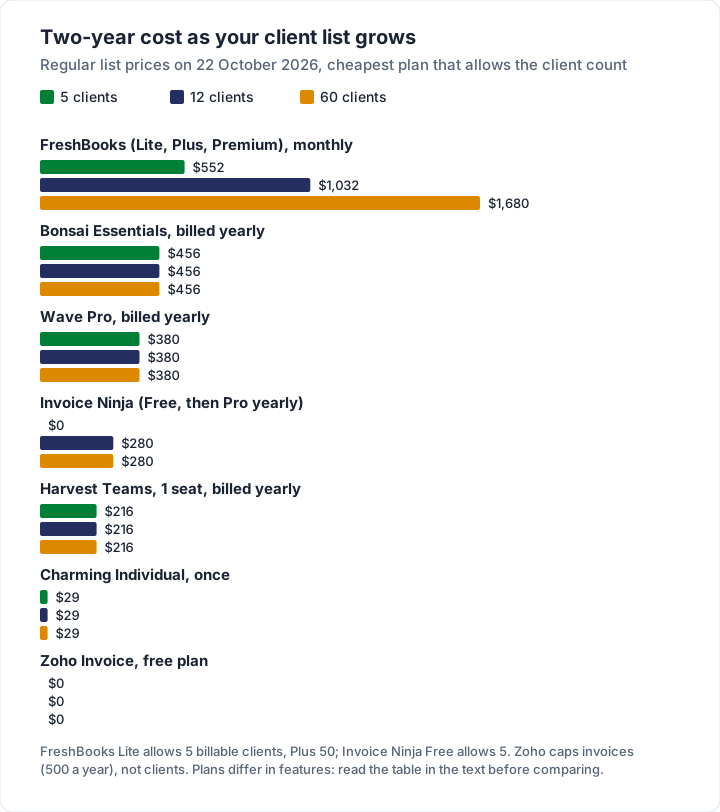
Read this fairly. The plans include very different things: Bonsai adds proposals and contracts, Harvest is time tracking, Wave and FreshBooks are bookkeeping, and Charming is invoicing only. If you would use those extras, they are worth paying for. The point of the table is to make sure you pay for features you want and know which limit you will reach first.
Which invoicing app fits which freelancer#
The best invoicing app for freelancers depends on how you bill. Here is a starting point by type of work:
| You are a... | What usually matters most | Shortlist to test |
|---|---|---|
| Designer | Branded invoices, deposits, proposals | Charming for branding, Bonsai Essentials for proposals and contracts |
| Writer or editor | Many small clients, often publications | Zoho Invoice, Charming Free, Wave (US and Canada); check client limits |
| Developer | Hourly billing, clients abroad | Harvest or Bonsai for time; check currency on your plan |
| Consultant | Retainers, recurring invoices, reminders | Zoho Invoice, FreshBooks; Charming paid plans for recurring drafts (no reminders) |
| Photographer | Deposits, contracts, cards at booking | Square, Bonsai, or Charming plus your own payment link |
For the invoices themselves, our line-by-line guides cover the freelance writer invoice and freelancing as a photographer, designer or videographer. Contractors and trades have a different checklist; see invoicing software for contractors.
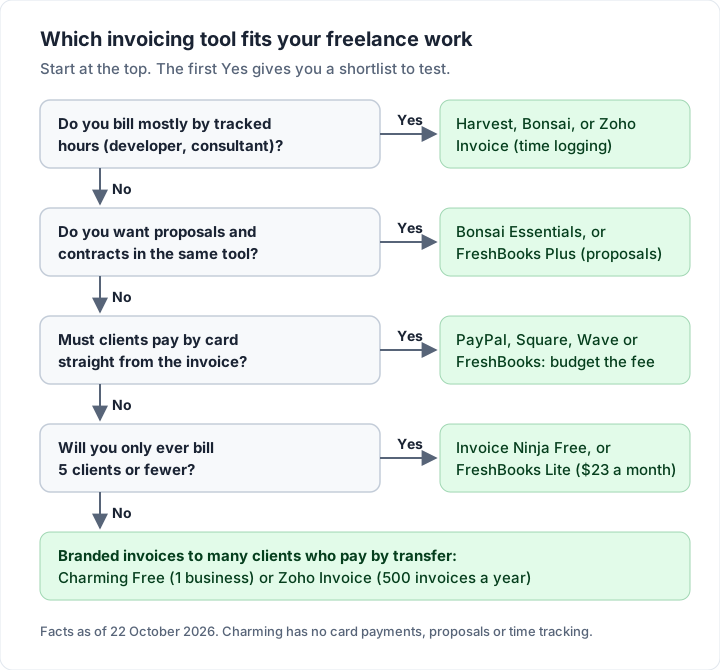
If you would rather answer questions than scan a table, the same choice runs as a flow.
Do you need invoicing software at all?#
Not always. If you send two or three invoices a month to the same clients, a good template and a spreadsheet will do. Our guide to creating an invoice in Excel shows the formulas, and a simple tracker with dates and amounts tells you who has paid.
Software starts to earn its place when any of these is true:
- You lose track. You have had to check your bank statement to work out whether a client paid.
- You chase by hand. You are writing reminder emails yourself, every month.
- Numbering slips. You have sent two invoices with the same number, or skipped one.
- Clients multiply. You have more than about five active clients at once.
- You look small next to your work. A plain spreadsheet invoice undersells a brand identity you just delivered.
A free plan with no client cap is the cheapest way to get past those without a subscription. Check each limit against your own numbers and add half again for your busiest month.
Where Charming fits, and where it does not#
We hold our own product to the same test. Checked against our code today:
Where it fits. A freelancer who wants every invoice to look like their own business, at any volume, with clients who pay by bank transfer or a payment link. The free plan has no client or invoice cap, all 60 templates (including Creative Studio, Photographer, Timesheet and Retainer layouts), your logo, colours and fonts, a private link your client opens without an account, “Viewed by the client” tracking, and overdue invoices flagged for you. You issue each invoice, then download the PDF, print it or copy its private link and send it however you like. Paid plans add unlimited businesses, recurring invoices and AI line items; our guide to how our AI drafting works shows what it can and cannot do.
Where it does not, stated plainly:
- No card payments. Charming does not process payments. Your payment link can print on the invoice, but the fee is whatever your payment provider charges, and you mark the invoice paid.
- No email sending or reminders. Charming does not email invoices or reminders to your client. You send the PDF or link from your own email, and set a calendar reminder for the due date.
- No proposals, contracts or time tracker. Use Bonsai, FreshBooks Plus or Harvest if you need them.
- Currency per business, not per invoice. A one-off second currency means switching the business currency (any plan); billing two currencies side by side means two businesses, which needs a paid plan.
- Free is 1 business and prints “Sent with Charming Invoices”.
- Recurring invoices are paid-plan only and create drafts for you to review; nothing is issued or sent for you.
- No mobile app and no accounting integrations. You can export invoices as a CSV for your accountant.
- Lifetime plans are final sale, with no refunds. If you are unsure, use the free plan. Pro can be cancelled any time, effective at the end of the billing period, also with no refunds.
Our reasoning for one-time pricing is in why we built a lifetime plan, and the full plan list is on the pricing page.
Questions freelancers ask about invoicing software#
What is the best free invoicing software for freelancers?#
It depends on your limit. Zoho Invoice is broad and free up to 500 invoices a year. Charming Free has no invoice or client cap for 1 business. Wave Starter adds bookkeeping in the US and Canada. Invoice Ninja Free fits up to 5 clients. Our comparison of free invoicing software lists every cap.
When does FreshBooks suit a freelancer?#
When you want accounting, time tracking and proposals in one place. Count your clients first: Lite allows 5 billable clients, and Plus, at $43 a month, allows 50.
Can I invoice clients in another currency?#
Usually, but check which plan includes it. In Charming, each business has one of 16 currencies at a time. For a one-off, switch the business currency before you create the invoice (any plan; issued invoices keep their currency); for a regular second currency, add a second business on a paid plan. Agree the currency with the client before you invoice.
Do I need an invoicing app with time tracking?#
Only if you bill by the hour and track time now. Harvest, Bonsai, FreshBooks and Zoho Invoice include it. If you bill by project or by the day, you do not.
Should a freelancer pay monthly or once?#
Work out the two-year cost. A $43 monthly plan is $1,032 over two years; a $140 yearly plan is $280; a $29 one-time plan is $29. Then check what each one leaves out, because the cheapest line is only cheaper if it does what you need.
The short version#
Choose the tool whose limits sit outside your work: a client cap you will never reach, a vendor line you can live with or afford to remove, a currency setup that matches your clients, and a price that fits your next two years. Test two tools with one real invoice each before you commit. If branded invoices to clients who pay by transfer is your row, create a free invoice with Charming and see a finished one in your brand.