FreshBooks invoices: plans, client limits and templates

Nnabuike Okoroafor ·
On this page · 11 sections
Disclosure: We make Charming Invoices, an invoicing app. This guide is neutral: every FreshBooks step, price and limit comes from FreshBooks’ own pricing, product and support pages, read on 23 October 2026 and linked, and we say plainly where FreshBooks is the better choice.
General information, not legal or tax advice. Where this guide mentions tax, VAT or record-keeping it quotes or links the official page, and those rules vary by country and change; ask your accountant or your tax authority before you rely on any of it.
You bill a handful of clients, someone recommended FreshBooks, and the pricing page asks how many clients you have. FreshBooks invoices are priced by the number of clients you bill, not by how many invoices you send. That one detail decides which plan you need, so count your clients before you count your invoices.
This guide covers FreshBooks invoicing from start to finish. It explains each plan and its billable-client limit, how to create and send a FreshBooks invoice, how to customize the template, mark an invoice paid, set up recurring invoices and reminders, and change the invoice number. It also covers the free invoice generator and templates, and what 12 clients cost over a year. At the end there is a note on when FreshBooks fits and when an invoicing-only tool will do.
FreshBooks invoices in short#
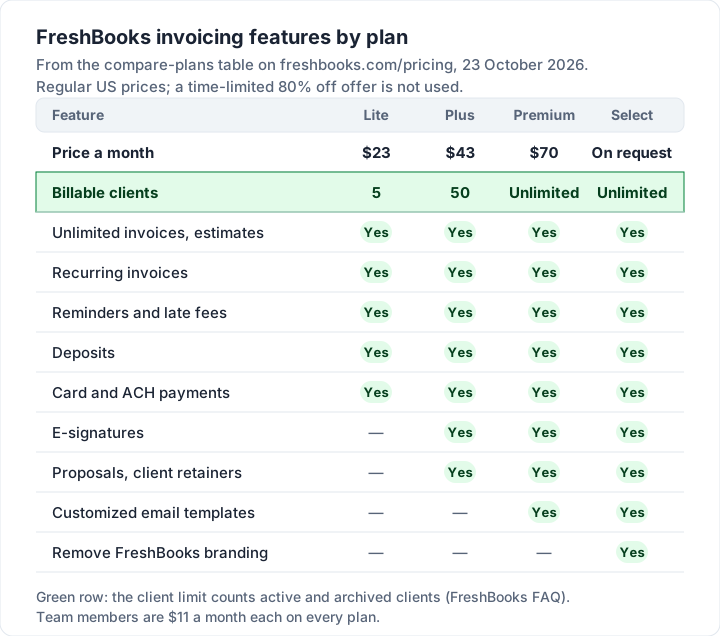
- Every paid plan sends unlimited invoices. What changes is the number of clients: Lite allows 5 billable clients, Plus 50, and Premium and Select are unlimited.
- Regular US prices, as of 23 October 2026: Lite $23 a month, Plus $43, Premium $70. Select has no published price. Extra team members are $11 a month each.
- There is no free plan. FreshBooks offers a 30-day free trial with no card, and a 30-day money-back guarantee on purchases. The pricing page was also showing “80% off” for the first 4 months on the day we checked; we use the regular prices below.
- Recurring invoices, automatic reminders, late fees, deposits and estimates are on every plan, Lite included. E-signatures, proposals and client retainers start on Plus.
- Card payments cost 2.9% + $0.30 per transaction through FreshBooks Payments, and bank (ACH) transfers 1%.
- The free invoice generator makes one invoice in your browser with 2 layouts and a colour, then emails you the download. The template gallery has Word, Excel, PDF, Google Docs and Google Sheets files.
FreshBooks plans and billable-client limits#
Here are the four plans as FreshBooks’ pricing page listed them on 23 October 2026, at regular US monthly prices (excluding tax). The page also offers yearly billing with an extra discount and a time-limited promotion; neither is used here, because a budget runs on the standing price.
| Plan | Regular price | Billable clients | What it adds for invoicing |
|---|---|---|---|
| Lite | $23 a month | 5 | Unlimited invoices and estimates, recurring invoices, reminders, late fees, deposits, card and ACH payments |
| Plus | $43 a month | 50 | E-signatures, proposals, client retainers; double-entry accounting reports and accountant access |
| Premium | $70 a month | Unlimited | Customized email templates, automated client emails with dynamic fields, project profitability |
| Select | “Let’s Talk” | Unlimited | Removes FreshBooks branding from client emails, lower card fees, 2 team member accounts included |
Three add-ons sit on top of any plan: team members at $11 a month per person, Advanced Payments at $20 a month (included on Select) and FreshBooks Payroll at $40 a month plus $6 a month per user.
What counts as a billable client#
FreshBooks’ pricing FAQ says, word for word:
The client limit on each of FreshBooks plans refers to the number of both active and archived clients in your account. If you’re no longer billing or working with a client, you can delete them to free up spots for new clients. Deleted clients’ invoices and information will still remain accessible to you, and you can always undelete clients at a later date.
So an archived client still counts towards your 5 or 50. The FAQ names deleting as the way to free a spot, and says a deleted client’s invoices stay accessible. If you bill many one-off clients, as most trades and many designers do, plan around the client count, not the invoice count.
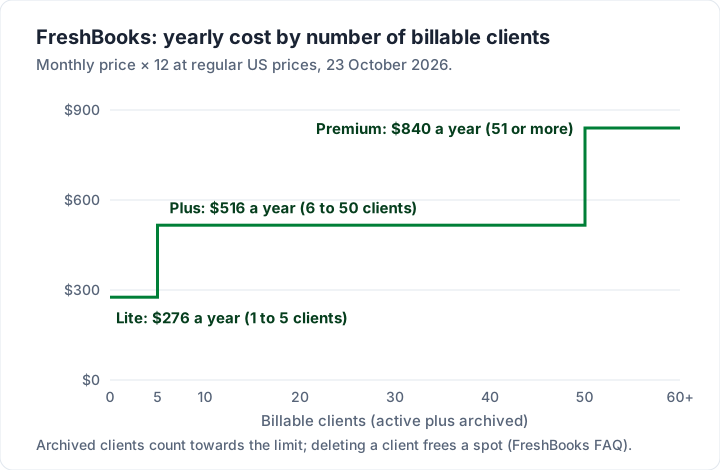
The yearly figures are the monthly prices times 12: $23 × 12 = $276, $43 × 12 = $516 and $70 × 12 = $840, before team members or add-ons.
How to create and send an invoice in FreshBooks#
These steps follow FreshBooks’ support article How do I create an invoice?, read on 23 October 2026. Button names are FreshBooks’ own.
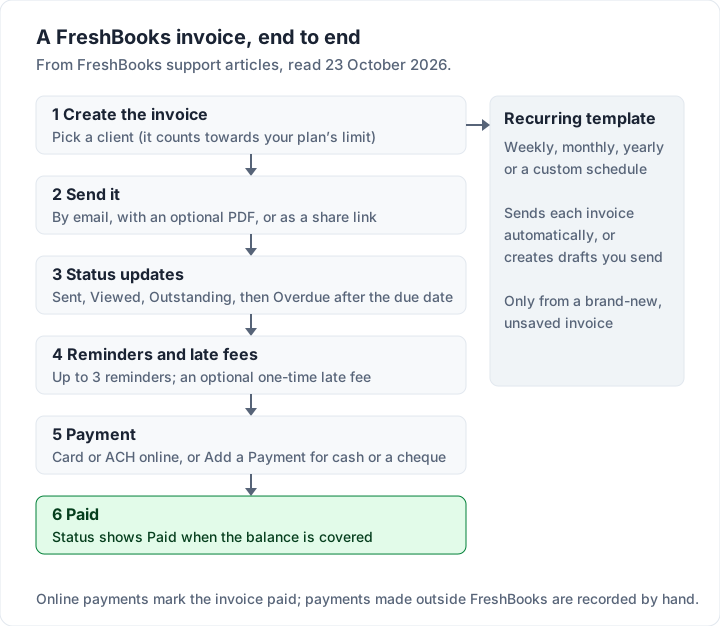
- Start a new invoice. On the Dashboard select Create New, then Invoice. You can also start from the Invoices section (New Invoice) or from a client’s Invoices tab.
- Pick the client. Under Billed To, choose Add a Client for an existing client or Create a Client for a new one. A new client counts towards your plan’s limit.
- Check the dates. Date of Issue defaults to today. Due Date can be on the issue date, after a number of days, or a custom date. The 25-character Reference field takes a PO number, project code or work order number.
- Add line items. Select Add a Line and pick a saved item or service, or type a new one with name, description, rate and quantity. Add Taxes applies up to two sales taxes per line.
- Adjust the total. You can add an amount or percentage discount, apply a client credit, Request a Deposit or Add a Payment Schedule of instalments on different dates.
- Add notes, terms and attachments. Notes belong to this invoice only. Terms carry over from your last invoice, so bank details placed there repeat on the next one. Attachments go up to 30MB each.
- Save or send. Save keeps a new invoice as a draft. Send... To emails it (with an optional PDF attached) or creates a link to share. Once sent, the invoice is marked as sent and appears in your reports.
After sending, the invoice moves through FreshBooks’ statuses: Sent, Viewed, Outstanding (not yet due), Overdue, Partially Paid, Paid, and Disputed during a chargeback. If you sent one by mistake, the article’s answer is to duplicate it, save the copy as a draft and delete the original; there is no “unsend”.
Customizing a FreshBooks invoice template#
FreshBooks calls its design settings Brand Appearance (Settings, then Business Profile, then Brand Appearance). Its support article How do I customize my brand appearance? lists what you can change, as of 23 October 2026:
| Setting | Options |
|---|---|
| Template | Simple (logo top left), Modern (a full-width banner) or Classic (client and business details top left, for window envelopes; adds a PAID stamp to the PDF once paid) |
| Colour | Five preset colours, or a custom colour, applied to lines and text |
| Font | Modern or Classic |
| Logo or banner | JPEG, GIF or PNG; logo about 266 x 200 px, Modern banner 778 x 200 px |
Changes apply to new invoices, estimates and proposals, and to active recurring templates; invoices already created keep their old look. You can also change the theme on a single invoice while editing it. The same design covers estimates and proposals, so your documents match.
In total, the article lists three layouts, two font styles and one colour per document. If your brand depends on a particular typeface or layout, check a test invoice in the trial before you commit. Removing FreshBooks branding from client emails is listed only on Select.
Marking paid, recurring invoices, reminders and numbers#
These are the how-tos people search for most after the first invoice. Each comes from FreshBooks’ own support pages, read on 23 October 2026.
How to mark a FreshBooks invoice as paid#
Payments made online through FreshBooks Payments or Stripe are recorded for you. For cash, a cheque or a bank transfer, you record the payment yourself. FreshBooks’ article How do I add, edit, or delete a payment? gives three routes:
- On the invoice: open it, select More Actions, then Add a Payment. The amount fills in with the full balance, the deposit or the next instalment; you can change it, pick the method and date, and tick Send client a payment notification email.
- In the Payments section: select the + button next to All Invoice Payments and enter the invoice number. This route has no receipt email.
- In bulk: tick up to 30 unpaid invoices in the same currency, then Bulk Actions, Add a Payment.
FreshBooks recurring invoices#
FreshBooks calls them recurring templates. Per its article How do I create a recurring template?, you set the frequency (weekly, monthly, yearly or custom), the next issue date and how many invoices to generate, then choose Send invoices automatically or Create draft invoices and send manually. Variables such as ::month:: in the description or notes fill in the month when each invoice is generated. Two details from the same pages: Make Recurring is only available on a brand-new, unsaved invoice, and recurring templates are deactivated if your account is suspended or cancelled. Recurring invoices are on every plan, Lite included. For when recurring billing makes sense at all, see our guide to recurring invoices versus subscriptions.
Reminders and late fees in FreshBooks#
Once a client is on the invoice, Send Reminders sets up to three personalised payment reminders at intervals you choose, and Charge Late Fees adds a one-time flat or percentage fee a set number of days after the due date. Both are on every plan. You can also send a one-time reminder from More Actions on any unpaid invoice. Whether a late fee is appropriate, and what you can charge, depends on your agreement and where you work; our guide to late fees on invoices covers the general points.
Changing the invoice number in FreshBooks#
The first invoice is numbered 0000001 by default. You can type your own alphanumeric number of up to 10 characters, and the next invoice counts up by one from the last one created. FreshBooks’ create-an-invoice article adds three rules: a number can never be reused, even after the invoice is archived or deleted; when a number runs out of digits an extra character is added (#9999 becomes #10000); and leading zeros avoid that. In some countries the field is labelled Tax Invoice Number.
There is one behaviour to plan around. The recurring-template article says each generated invoice’s number “will increment +1 based off the most recently created invoice, whether that invoice was made by a recurring template or manually”. So one sequence runs across all your clients, whatever prefix the last invoice used. If you want per-client prefixes, test them in the trial first. Our guide to how to number invoices covers schemes that survive a busy month.
Deposits, payment schedules and estimates#
Deposits and estimates are on every FreshBooks plan. You can request a deposit on an invoice or an estimate, or split an invoice into a payment schedule of instalments. Estimates can be accepted by the client from the email link and turned into an invoice with More Actions, Convert to Invoice, according to FreshBooks’ article How do I create an estimate? (with UK English selected, estimates are renamed quotes). The compare-plans table lists “Accept E-Signatures” from Plus. If quoting first is central to how you work, our comparison of quote and invoice software puts FreshBooks next to eight other tools that do both.
Exporting, importing and bad debt#
From the Invoices section, More Actions, Export Invoices downloads your active and archived invoices as a CSV file, per FreshBooks’ article How do I manage my invoices?. For historical invoices in bulk, the create-an-invoice article points to FreshBooks’ import help. An invoice that will never be paid is cleared by adding a negative “Bad Debt” line equal to the unpaid amount, then a zero payment, so it stops triggering reminders and late fees.
FreshBooks’ free invoice generator and templates#
FreshBooks has two free tools for people who are not subscribers, and they are different things.
The free invoice generator is a form in your browser: your logo, Bill From and Bill To, invoice number, date, line items with rate and quantity, a discount, tax, notes and terms. Under Invoice Settings you can choose the Simple or Modern template and a theme colour. To download, you confirm your email address and select “Get My Invoice”; the page says the link is shown on screen and sent to your email. The settings for online payments, recurring invoices, reminders and late fees lead to the FreshBooks trial; they are not part of the free tool.
The invoice templates gallery offers downloadable files in Word, Excel, PDF, Google Docs and Google Sheets, plus industry versions (trades, legal, creative, medical, auto and more). The page says “Every template in the gallery is completely free to download and use.” These are blank files you fill in by hand, so the arithmetic in the Word and PDF versions is yours to check.
| Free option | What you get | What it does not do |
|---|---|---|
| Invoice generator | One invoice built in the browser, 2 layouts, a colour, your logo; download after confirming your email | No sending, reminders or payment tracking |
| Template gallery | Word, Excel, PDF, Google Docs and Sheets files, many by industry | You fill them in and send them yourself |
| 30-day free trial | The full software, no card required | Ends; then a paid plan |
If you want a free route that keeps going, our guide to the best free invoicing software sets out each free plan’s listed limits.
Worked example: 12 clients for a year#
Here is an illustrative freelancer (an invented example, not a customer) who bills 12 clients a year, sends about 20 invoices a month and works alone. Twelve clients is over Lite’s 5, so FreshBooks means Plus. The table compares regular prices as of 23 October 2026, before card fees, with two free or low-cost invoicing tools that have no client cap at that size, and our own plans.
| Tool and plan | How it is charged | Year 1 | Year 2 total |
|---|---|---|---|
| FreshBooks Plus + 1 team member | ($43 + $11) a month × 12 | $648 | $1,296 |
| FreshBooks Plus (Lite allows 5 clients) | $43 a month × 12 | $516 | $1,032 |
| Invoice Ninja Pro, billed yearly (Free allows 5 clients) | $140 a year | $140 | $280 |
| Charming Individual | $29 once | $29 | $29 |
| Zoho Invoice (500 invoices a year) | $0 | $0 | $0 |
| Charming Free (1 business) | $0 | $0 | $0 |
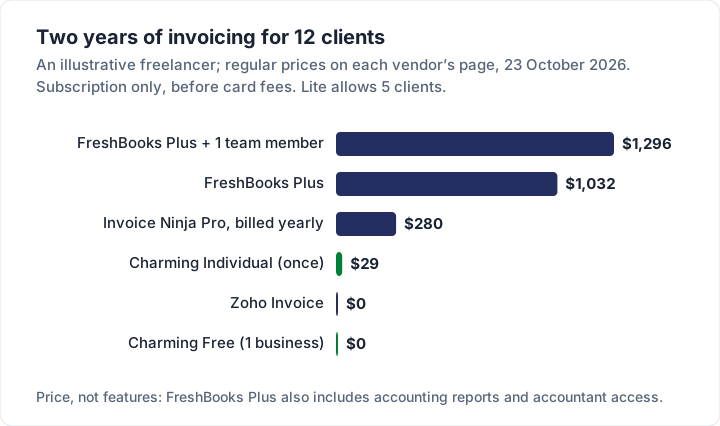
The Invoice Ninja and Zoho figures are from their own pricing pages on 23 October 2026: Invoice Ninja’s Free plan stops at 5 clients and Pro is $140 a year; Zoho Invoice is free with a cap of 500 invoices a year and 2 users. With today’s FreshBooks promotion (80% off for 4 months, if it still runs when you sign up), year 1 on Plus would be 4 × $8.60 + 8 × $43 = $378.40; year 2 returns to $516.
The bars measure price, not value. FreshBooks Plus includes bookkeeping, expenses, time tracking, estimates, proposals and accountant access. If you would use those, the comparison changes. At 100 clients you are on Premium, at $70 a month, or $840 a year.
Where FreshBooks is the better fit#
FreshBooks is a strong choice, and in these cases we would point you to it:
- You want invoicing and the books in one place. Plus adds double-entry accounting reports, bank reconciliation and accountant access; every plan has expenses, bank import and tax-time reports.
- You bill by the hour. Unlimited time tracking is on every plan, and unbilled time pulls straight onto an invoice or a recurring template.
- You quote before you invoice. Estimates on every plan, e-signatures and proposals from Plus, and Convert to Invoice on an accepted estimate.
- Your clients want to pay by card in the invoice. Card, ACH, Apple Pay, Google Pay and buy now, pay later options are on every plan, at 2.9% + $0.30 per card payment through FreshBooks Payments.
- You have few, steady clients. At 5 or fewer, Lite is $23 a month with recurring invoices, reminders and late fees.
If accounting is the main need, compare it with QuickBooks invoicing, Xero invoicing and Wave’s invoicing; if free matters most, Zoho Invoice is the closest free alternative. For a side-by-side list of freelancer tools, see the best invoicing software for freelancers.
Where Charming fits, and where it does not#
We hold our own product to the same test, checked against our code today.
What Charming does: unlimited invoices and unlimited clients on the free plan, for 1 business, with no card and no trial clock. Your thirteenth or hundred-and-first client costs nothing extra. You get 60 templates and 30 fonts on every plan, any brand colour, your logo or a full-page letterhead; a PDF to download or print and a private link your client opens without an account; numbering that assigns itself with your own prefix when you issue an invoice; deposits credited on the final invoice; client account statements; and overdue invoices flagged automatically.
What it costs: Free is $0 forever. Individual is $29 once, Team is $79 once (up to 5 teammates) and Pro is $12 a month or $99 a year. Paid plans add recurring invoices (each cycle creates a draft you review and issue), more businesses and AI line items. The details are on the pricing page, and the reasoning behind one-time pricing is in why we built a lifetime plan.
The catches, plainly:
- No card payments through Charming. You can print your bank details and a button to your own Stripe, PayPal or Square payment link, but Charming does not know when it is paid: you record the payment or mark it paid.
- No estimates or quotes, no time tracking, no expenses and no accounting. FreshBooks does all four.
- No accounting integrations and no import. You can export invoices as CSV; you cannot import FreshBooks clients or invoices.
- No app-store mobile app; it runs in your phone’s browser.
- No email sending or reminders. You issue the invoice, then send the PDF or link yourself; FreshBooks emails invoices and reminders for you.
- Free invoices carry a small “Sent with Charming Invoices” line, and Free is 1 business.
- Lifetime plans are final sale, with no refunds. If you are unsure, use the free plan.
If you need accounting, time tracking or card payments in the invoice, FreshBooks will serve you better. If you only need to send branded invoices to a growing list of clients who pay you by transfer, you can create a free invoice and see whether Charming is enough.
FreshBooks invoice questions#
Is FreshBooks free?#
No. There is a 30-day free trial with no card required and a 30-day money-back guarantee on purchases, then a paid plan from $23 a month (regular US price, 23 October 2026). The free invoice generator and template downloads need no account, but they do not send or track invoices.
Does archiving a client free up a spot in FreshBooks?#
Not according to FreshBooks’ pricing FAQ, which says the client limit counts “both active and archived clients”. The FAQ names deleting a client as the way to free a spot, and says deleted clients’ invoices stay accessible and can be undeleted later.
Can I use FreshBooks just for invoices?#
Yes. Every plan sends unlimited invoices, and you do not have to use the accounting side. The cost is set by your client count, so a small client list on Lite is the cheapest way to use it for invoices alone.
How much does FreshBooks charge per invoice payment?#
FreshBooks’ pricing FAQ lists 2.9% + $0.30 per card transaction and 1% for bank (ACH) transfers through FreshBooks Payments, as of 23 October 2026. Select lists lower card and capped ACH fees. For how that compares with Square, PayPal and Stripe, see what card payments on an invoice cost.
Does FreshBooks have recurring invoices on the Lite plan?#
Yes. The compare-plans table on FreshBooks’ pricing page ticks “Automated Recurring Invoices” on Lite, Plus, Premium and Select, as of 23 October 2026.
FreshBooks or Zoho Invoice?#
Zoho Invoice is free with a 500-invoice yearly cap and 2 users, and includes quotes, recurring invoices and a client portal. FreshBooks costs from $23 a month but adds bookkeeping and a deeper payments set. If you only invoice, start with the free one and move if you hit its limits; our Zoho Invoice guide covers those limits in detail.
The short version#
Count your clients first, including the ones you have archived: 5 or fewer is Lite at $23 a month, up to 50 is Plus at $43, and beyond that Premium at $70. FreshBooks earns that price if you use its accounting, time tracking, estimates or card payments. If you only need invoices, your client count is the number to check against each plan, ours included.
Sources, all read 23 October 2026: FreshBooks pricing; FreshBooks invoicing; FreshBooks invoice generator; FreshBooks invoice templates; FreshBooks support: create an invoice, recurring templates, add a payment, manage invoices, brand appearance, estimates; Invoice Ninja pricing; Zoho Invoice pricing. Prices change: check each page before you buy.