Xero invoicing: plans, templates and reminders explained

Nnabuike Okoroafor ·
On this page · 11 sections
Disclosure: We make Charming Invoices, an invoicing app. This guide is neutral: every Xero price, limit and feature comes from Xero’s own pricing, product and fee pages, read on 23 October 2026 and linked, and we say plainly where Xero is the better choice.
General information, not legal or tax advice. Where this guide mentions tax, VAT or record-keeping it quotes or links the official page, and those rules vary by country and change; ask your accountant or your tax authority before you rely on any of it.
You want to send invoices, and Xero keeps coming up: your accountant uses it, a friend swears by it, or a client’s bookkeeper asked whether you are “on Xero”. But Xero is accounting software, and its invoicing is one part of it. Before you sign up, it helps to know which plan you would actually need, how many invoices it lets you send, what the invoices can look like and what getting paid through it costs.
This guide puts Xero invoicing on one page: the US and UK plans and their invoice caps, how creating and sending an invoice works, branding themes (Xero’s word for invoice templates), reminders and online payments with the fee table, repeating invoices and quotes, a one-year cost example, and an honest section on when Xero is the right tool and when it is more than you need.
Xero invoicing in short#
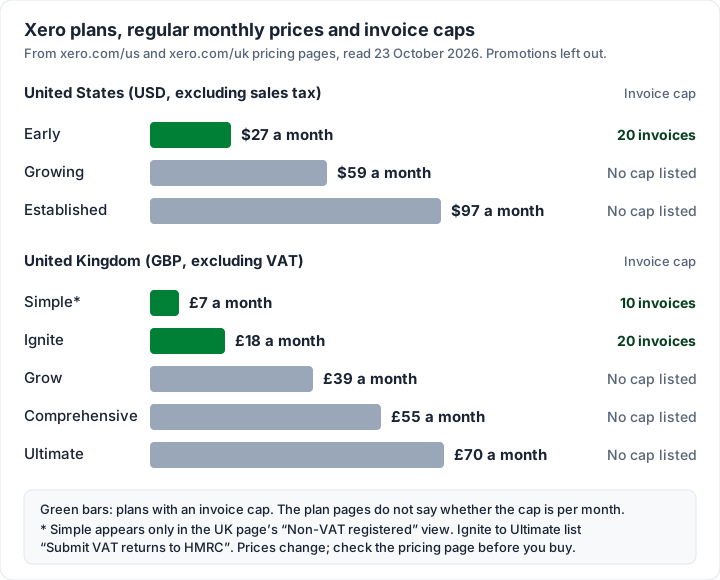
- Every Xero plan sends invoices. The entry plans cap them: Early in the US allows 20 invoices, Ignite in the UK allows 20, and Simple (listed in the UK page’s view for businesses that are not VAT-registered) allows 10. Xero’s plan pages do not say over what period.
- Regular prices, as of 23 October 2026: in the US, Early is $27 a month, Growing $59 and Established $97. In the UK, Simple is £7 a month, Ignite £18, Grow £39, Comprehensive £55 and Ultimate £70, all excluding VAT.
- Invoice templates are called branding themes. Xero says they hold your logo, contact details and payment terms, and you can keep several.
- Online payments go through partners. Stripe and GoCardless, through a “Pay now” button on the invoice, with fees on top of your plan.
- Reminders are automatic. Before and after the due date, on a schedule you choose, stopping when the payment arrives.
- If you only need invoices, you would be paying for accounting you may not use. If you need the books, bank feeds or VAT returns, that is what the price buys.
| Question | Xero’s answer (23 October 2026) |
|---|---|
| Cheapest plan that sends invoices | US: Early, $27 a month (20 invoices). UK: Simple, £7 a month excl. VAT (10 invoices) |
| Plans without a listed invoice cap | US: Growing and Established. UK: Grow, Comprehensive and Ultimate |
| Users | “No per-user license fees” on the pricing pages |
| How invoices are sent | Email, SMS or PDF, from a browser or the iOS and Android app |
| Card and direct debit payments | Through Stripe or GoCardless; payment fees apply |
| Free trial | “Get one month free” is offered on the pricing pages |
Which Xero plans include invoicing, and the invoice caps#
Every plan on Xero’s US pricing page and UK pricing page sends invoices. What changes between plans is the cap, the accounting features around it and the price. Both pages were also showing a promotion on 23 October 2026: 90% off for the first 6 months for new customers (the US terms say the offer is available until 2 November 2026). The tables below use the regular prices, because that is what you pay from month seven.
United States (USD, “All prices are listed in USD and do not include applicable taxes”):
| Plan | Regular price | Invoices | Also on the plan card |
|---|---|---|---|
| Early | $27 a month | “Send quotes and 20 invoices” | 5 bills, bank reconciliation, sales tax, 30-day cash flow forecast |
| Growing | $59 a month | “Send invoices and quotes” | Bill automation, auto-reconcile, 60-day forecast |
| Established | $97 a month | “Send invoices and quotes” | Multiple currencies, projects, expense claims, 180-day forecast |
United Kingdom (GBP, “All prices are in GBP per month and exclude VAT”):
| Plan | Regular price | Invoices | Also on the plan card |
|---|---|---|---|
| Simple | £7 a month | “Send quotes and 10 invoices” | Shown only in the “Non-VAT registered” view; MTD for Income Tax ready |
| Ignite | £18 a month | “Send quotes and 20 invoices” | “Submit VAT returns to HMRC”, 10 bills |
| Grow | £39 a month | “Send invoices and quotes” | Payroll for 1 person, auto-reconcile |
| Comprehensive | £55 a month | “Send invoices and quotes” | Payroll for 5, multiple currencies |
| Ultimate | £70 a month | “Send invoices and quotes” | Payroll for 10, projects for 10 users |
Three things the tables cannot hold:
- What counts against the cap. The US pricing page says: “Invoice limits for the Early plan apply to both approving and sending invoices. Transactions initiated by app partners may automatically contribute to your invoice limit.” So an app that creates invoices in Xero for you uses up the allowance too.
- The period. The plan pages say “20 invoices” or “10 invoices” and point you to the next plan “for more”, but do not say per month. If you are close to the line, ask Xero before you buy.
- The UK has two views. The UK page switches between “VAT registered” and “Non-VAT registered”. Simple, described as “For non-VAT registered businesses”, appears only in the second. Ignite and up list “Submit VAT returns to HMRC”; Simple, below them, does not.
Both pages also say subscriptions “auto-renew monthly until they are cancelled”, and the plan pages say you can cancel with one month’s notice.
How to create and send an invoice in Xero#
Xero’s step-by-step help articles live on Xero Central, which did not load for our tools on 23 October 2026 (it builds its pages in the browser). So the steps below come from Xero’s own product pages, and the exact button names in your account may differ. Xero’s invoicing page summarises the process like this:
Start by choosing a customizable invoice template. Then add your logo, branding, and payment terms. Enter your line items (customer details auto-fill after the first invoice). Finally, send via email, SMS, or PDF with one click.
Put as steps, with what the pricing and product pages add:
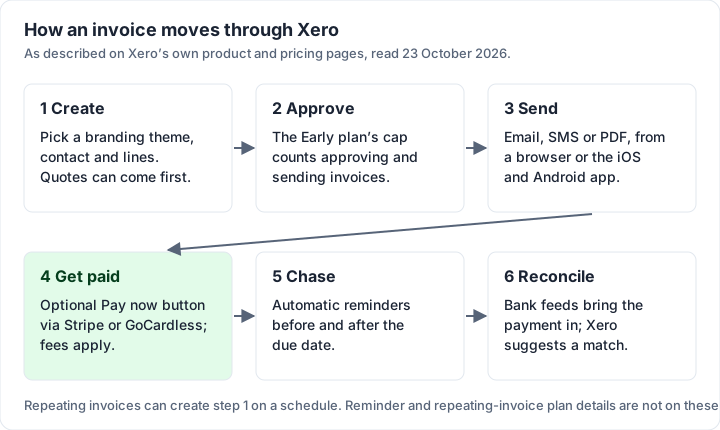
- Set up a branding theme once: your logo, contact details and payment terms (see the next section).
- Create the invoice for a contact, and add your line items. Xero fills in the contact’s details after the first invoice.
- Approve it. Approval is a real step: the Early plan’s cap counts approving as well as sending.
- Send it by email, SMS or PDF, from a browser or the Xero Accounting app on iOS and Android.
- Add a payment option if you have connected Stripe or GoCardless, so the invoice carries a “Pay now” button.
- Track it. Xero says “Invoice tracking lets you know the moment a customer opens your invoice”, and reminders can follow up (below).
Xero also advertises an AI assistant, JAX, that it says can “create, edit, and send Xero quotes and invoices with personalized emails” from a plain-language instruction, in Xero, WhatsApp or SMS. The pages we read do not say which plans include it.
Xero invoice templates: branding themes#
When people search for a “Xero invoice template”, they usually mean one of two different things.
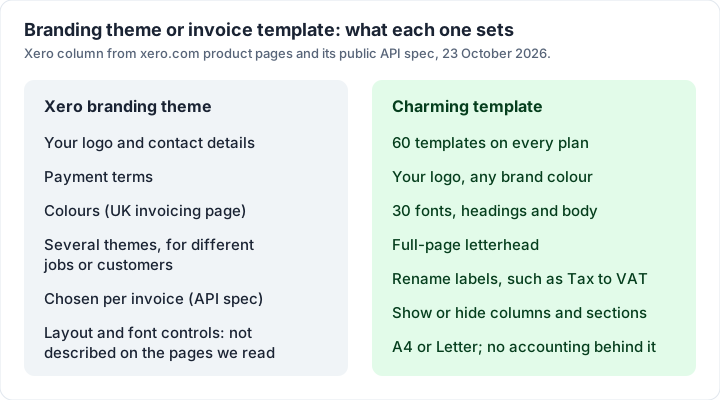
Branding themes (inside Xero). This is how you style the invoices Xero sends. Xero’s invoicing FAQ says: “Xero's customizable invoice templates – called branding themes – let you add your business logo, contact details, and payment terms. You can create multiple templates for different types of jobs or customers.” The UK invoicing page adds colours: “Add your logo, colours and payment terms once, then save them as your default.”
Xero’s public API specification (on GitHub, read 23 October 2026) shows the same shape from the inside: a branding theme has a name and a logo, its type is “Always INVOICE”, the default theme sorts first, and each invoice carries the ID of the theme it uses. What the pages we read do not describe is the finer layout control: which fonts you can choose, whether columns can be renamed or hidden, or how far the layout can move. Those details are in Xero Central, which we could not read. If your invoice’s look matters to how you sell, open a trial and build one before you commit.
The free downloadable template (outside Xero). Xero’s free invoice template page offers a form-gated download: “an editable PDF with tax and non-tax versions, plus a worked example”, with a how-to guide. You fill in your details, and the page says the template updates the totals when you enter quantities, rates and a tax rate. It is a separate document for people not yet on Xero, not the invoice Xero itself sends.
Invoice reminders and online payments in Xero#
Reminders. Xero’s US invoicing page says its reminders “nudge customers before and after their due date with your own message. As soon as payment arrives, Xero stops sending.” You can “Choose how often to send reminders – daily, weekly, or on a custom schedule”, and Xero keeps track of the reminders it has sent. The UK page adds that Xero “keeps an eye on your bank so it knows which are still outstanding”. Neither page says which plans include reminders, so check the plan you are considering. If you are still deciding how hard to chase, our guide to automatic invoicing covers which reminders to automate and which to send by hand.
Online payments. Xero does not process cards itself. Its invoicing page says: “Connect payment services like Stripe and GoCardless to your Xero account so customers can pay online from your invoices.” The methods it lists are “direct debit, debit card, credit card, Google Pay, Apple Pay, and Klarna”, with ACH debit in the US. In the UK, GoCardless can take a direct debit “on the due date of your Xero invoice”.
Paired with bank feeds, that means a direct debit collected through GoCardless can be matched back to the invoice it paid.
What Xero’s Stripe fees come to on one invoice#
Xero publishes a Stripe pricing and fees page. It applies to “Xero customers whose Stripe pricing and fees are managed by Xero”, and says the fees are “separate to your Xero monthly subscription fee, and are subject to change”. If your Stripe account is not managed by Xero, Stripe’s own pricing applies instead; our walkthrough of how a Stripe invoice works covers that pricing. GoCardless fees are not on that page, and we have not stated them.
Here is what the listed rates come to on one illustrative invoice of $1,500.00 in the US and £1,500.00 in the UK, as of 23 October 2026:
| How your client pays | Xero’s listed rate | Fee on $1,500.00 or £1,500.00 |
|---|---|---|
| US domestic card | 2.9% + 30¢ | $43.80 |
| US ACH debit | 1%, capped at $9.00 | $9.00 (1% would be $15.00) |
| UK standard domestic card | 1.5% + 20p | £22.70 |
| UK premium domestic card (commercial, corporate, business and all American Express) | 1.9% + 20p | £28.70 |
| UK Pay by Bank | 0.5% + 20p, capped at £5 | £5.00 at most |
Rates are excluding sales tax (US) and VAT (UK), as the page states. For how these compare with paying through Square, PayPal or Stripe directly, see our guide to Square, PayPal and Stripe fees.
Quotes, repeating invoices and proforma invoices in Xero#
Quotes. Every plan card lists quotes alongside invoices (“Send quotes and 20 invoices” on Early; “Send invoices and quotes” above it). Our guide to invoices versus estimates and quotes explains the difference between the documents.
Repeating invoices. Xero’s word for recurring invoices. The UK invoicing page says: “For customers you bill regularly, set up repeating invoices in Xero and they'll go out automatically on the schedule you choose.” Xero’s public API specification describes the schedule as a number of weeks or months (“1 (every 1 week), 2 (every 2 months)”). The pages we read do not say which plans include repeating invoices. If you are weighing a repeating invoice against a card-on-file subscription, see recurring invoices versus subscriptions.
Proforma invoices. None of the Xero pages we could read on 23 October 2026 mention proforma invoices, and Xero Central, where the how-to would be, did not load. We are not going to guess. Ask Xero, or read Xero Central in your browser. What a proforma is, and why it is not a demand for payment, is in our guide to the proforma invoice.
eInvoicing. For UK VAT-registered businesses, Xero’s UK invoicing page says you “can send and receive eInvoices directly through the Peppol network”, where an invoice arrives in the customer’s software “as a draft bill”.
Worked example: a year on Xero vs an invoicing-only app#
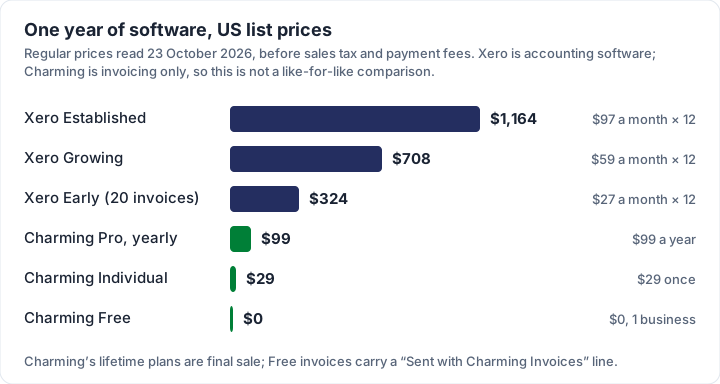
Take an illustrative freelance designer in the US who sends about 12 invoices a month, wants automatic reminders, and is paid by bank transfer or card. Here is a year of software at the regular prices read on 23 October 2026, before sales tax and before any payment fees.
| Option | How it is priced | One year |
|---|---|---|
| Xero Established | $97 a month | $1,164 |
| Xero Growing (no invoice cap listed) | $59 a month | $708 |
| Xero Early (20-invoice cap) | $27 a month | $324 |
| Charming Pro | $99 a year | $99 |
| Charming Individual | $29 once | $29 |
| Charming Free | $0, 1 business | $0 |
The UK equivalents: Simple at £7 a month is £84 a year and Ignite at £18 a month is £216 a year, both excluding VAT.
This is not a like-for-like comparison, and that is the point of doing the sum. The Xero rows buy accounting software: bank feeds, reconciliation, bills, reports and, in the UK, VAT returns. The Charming rows buy invoicing only, with no automatic reminders: you send the invoices and the follow-ups yourself. If you need the books, the right question is which Xero plan, not whether to pay for one. If you only need to send invoices and see who has paid, $324 to $708 a year is the cost of features you would not use.
Card fees apply either way: a client paying a $1,500.00 invoice by card through Xero’s Stripe costs $43.80 at the listed domestic rate, and a client paying through a payment link you add to any invoice pays your payment provider’s own fees instead.
Where Xero is the better fit#
Xero is the stronger choice when the invoice is one part of the job:
- Your accountant works in Xero. This outranks everything else. Every invoice lands in the books they reconcile, and they can log in.
- You want bank feeds and reconciliation. Xero says bank transactions “flow automatically into Xero” and it “can suggest matches to help you reconcile payments”. Our guide to invoice reconciliation explains what that matching involves.
- You are VAT-registered in the UK. Ignite and up list “Submit VAT returns to HMRC”, and the UK page says “Xero is HMRC-recognised and MTD-compliant software.” If you need several VAT rates on one invoice, Xero’s public API gives each invoice line its own tax type. What goes on a VAT invoice is covered in our guide to the VAT invoice.
- You want card and direct debit payments inside the invoice, with the payment matched to the invoice automatically.
- You need payroll, bills, inventory or multiple currencies in the same system.
If you are comparing accounting suites, our guides to the QuickBooks invoice, the Wave invoice, the Zoho Invoice and FreshBooks invoices cover the same ground for each, and the best invoicing app for small business compares them in one table. If your accountant works in Sage, Sage invoicing explains which Sage product to invoice from and what each plan costs.
Where Charming fits, and where it does not#
Charming Invoices is an invoicing-only app, so here is what it does and does not do, next to each other.
- Free with no invoice or client cap, for 1 business. Paid plans add unlimited businesses: Individual is $29 once, Team is $79 once with up to 5 teammates, and Pro is $12 a month or $99 a year. Lifetime plans are final sale. See the pricing page.
- Your brand on the invoice: 60 templates, your logo, any brand colour, 30 fonts and a full-page letterhead, on every plan. Labels can be renamed, so “Tax” can read “VAT”. Free invoices carry a small “Sent with Charming Invoices” line; paid plans hide it by default.
- Sharing and statements: a PDF to download or print and a private link for each invoice, which you send however you like, an Overdue status once the due date passes, and client account statements as PDF.
- Records for your bookkeeper: a CSV export of your invoices.
- What it does not do: no email sending or reminders, no accounting, no bank feeds, no VAT returns, no Xero integration, sync or import, no card payments through Charming, no quotes or estimates, no per-line tax rates and no app-store app. Payment tracking is manual: your client pays you directly, by bank transfer or through a payment link (Stripe, PayPal, Square or your bank’s page) that you print on the invoice, and you mark it paid.
If your accountant needs your invoices inside Xero, use Xero. If you are paying for accounting to send a dozen invoices a month, you can create a free invoice in Charming and compare the PDF before you change anything. How to choose invoicing software has a checklist if you are still deciding what you need.
Xero invoicing questions#
Can I use Xero just for invoicing?#
Yes. Every plan sends invoices, and the entry plans (Early in the US, Simple and Ignite in the UK) are the cheapest way to do it, with an invoice cap. You still pay for an accounting product, which is why some people who only invoice choose an invoicing-only tool.
How many invoices can I send on Xero’s cheapest plan?#
As of 23 October 2026: 20 on Early (US), 10 on Simple and 20 on Ignite (UK). The plan pages do not say over what period. In the US, approving an invoice counts towards the limit, and so can invoices created by connected apps.
Does Xero have invoice templates?#
Yes, as branding themes: your logo, contact details, payment terms and, per the UK page, colours, with several themes allowed. Separately, Xero offers a free downloadable PDF invoice template with a tax and a non-tax version and a completed example.
Can Xero send invoice reminders automatically?#
Yes. Xero says reminders go before and after the due date, on a daily, weekly or custom schedule, with your own message, and stop when payment arrives. The pages we read do not say which plans include them.
How much does Xero charge for online invoice payments?#
For Stripe accounts managed by Xero, as of 23 October 2026: 2.9% + 30¢ for US domestic cards, 1% capped at $9.00 for US ACH debit, and 1.5% + 20p for standard UK domestic cards, all on top of the plan price. Check Xero’s fee page for your country and card type.
Does Xero do proforma invoices?#
The Xero pages we could read on 23 October 2026 do not mention them, and Xero’s help centre did not load for us. Ask Xero, or search Xero Central in your browser.
The short version#
Xero invoicing is the invoicing part of accounting software. The entry plans cap invoices (20 on US Early and UK Ignite, 10 on UK Simple), branding themes set your logo, contact details and terms, reminders and Stripe or GoCardless payments are built in, and repeating invoices and quotes are there too. If your accountant, your bank feed or your VAT return lives in Xero, it earns its price. If you only send invoices, compare it with an invoicing-only tool before you pay for books you will not keep.