Zoho Invoice: what the free plan includes and where it stops

Nnabuike Okoroafor ·
On this page · 12 sections
We make Charming Invoices, an invoicing app, and it appears in one section near the end of this guide. Everything else is neutral: every Zoho fact below comes from Zoho's own US pricing, help and app-store pages, checked on 22 October 2026.
General information, not legal or tax advice. Where this guide mentions tax, VAT or record-keeping it quotes or links the official page, and those rules vary by country and change; ask your accountant or your tax authority before you rely on any of it.
You have probably landed on Zoho Invoice because someone told you it is free, and it is. The question is what "free" covers once you are sending real invoices to real clients: how many, with whose name on them, for how many people, and what happens if you stop logging in for a while.
This guide reads the Zoho Invoice free plan line by line from Zoho's own pages, shows you how to make and send an invoice in it, works out what the 500-invoices-a-year cap means at your pace, and explains where Zoho Books takes over. It ends with the situations where another tool fits better, Zoho's sister product included.
Zoho Invoice in short#
- Zoho Invoice is free. Zoho's pricing page calls it a "forever-free invoicing solution" and lists no paid Zoho Invoice tier, as of 22 October 2026.
- The free plan has four limits: up to 500 invoices a year, 2 users, 3 projects and 2 organisations per account.
- Invoices carry Zoho's name. The pricing page says Zoho Invoice "includes "Powered by Zoho Invoice" branding".
- Quiet accounts are deleted. If a user is inactive for over 180 days, Zoho says their data is deleted in the following 20 days, after a notice.
- Zoho charges nothing to take online payments; the gateway you connect (Stripe, PayPal, Square and others) charges its own fee.
- Outgrow it and the next step is Zoho Books, which is free while your revenue stays under $50K a year and costs from $15 a month billed yearly after that.
What Zoho Invoice is, and how it relates to Zoho Books#
Zoho Invoice is an invoicing app from Zoho Corporation, the company behind a large family of business apps (CRM, mail, accounting and more). It runs in the browser and as apps for iPhone, Android, Windows and Mac. Zoho's product page describes it as "Free online invoicing software for small businesses".
It covers the invoicing side of a small business. You can send quotes and convert them to invoices, bill time against projects, record expenses and re-bill them, and let clients pay online and see everything in a customer portal. What its pricing page does not list is bookkeeping: no bank reconciliation, no balance sheet.
That is the job of Zoho Books, Zoho's accounting product. Books includes invoicing too, so the two overlap. The simplest way to think of it: Zoho Invoice is the free invoicing app; Zoho Books is the accounting app that also invoices. Zoho Invoice's pricing page lists integrations with Zoho Books, CRM and Analytics, and points businesses that need "a more powerful solution" to contact its support team.
What the Zoho Invoice free plan includes#
Here is everything Zoho's US pricing page lists for the free plan, as of 22 October 2026. The limits are quoted word for word, because the vendor's own page is the source to check.
| Free plan item | What Zoho's pricing page says |
|---|---|
| Price | "$0", described as a "forever-free invoicing solution" |
| Invoices | "Send up to 500 invoices per year." |
| Users | "Add up to two users." |
| Projects | "Create a maximum of three projects." |
| Organisations | "you can have up to two organizations under the same Zoho Invoice account" |
| Branding | "Zoho Invoice includes "Powered by Zoho Invoice" branding" |
| Support | "Access 24/5 free email and voice support from anywhere." |
| Inactive accounts | Data of users inactive for over 180 days "will be deleted in the subsequent 20 days" |
The same page lists what you get inside those limits: invoices you email or save as PDFs, quotes, recurring invoices, automated payment reminders, customisable templates, expense tracking, time logging and project management, a self-service customer portal, sales and receivables reports, and online payments through a gateway.
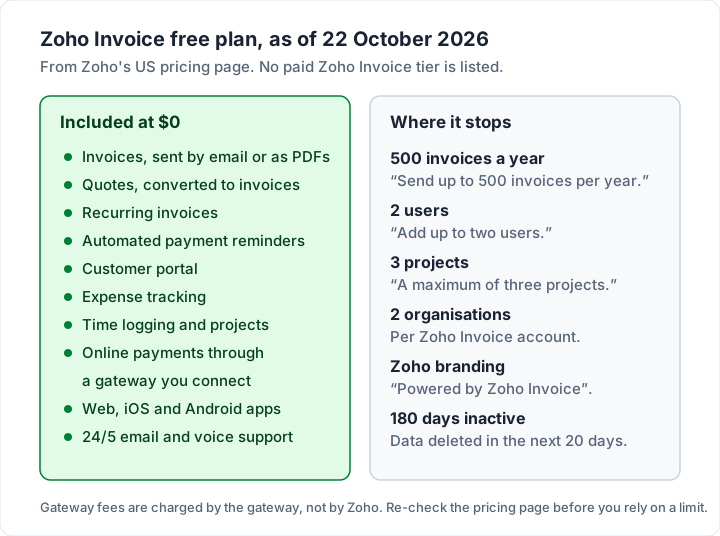
That is a broad free plan: quotes, time tracking, expenses and a client portal, all at $0. The six limits on the right are the whole story of whether it suits you, so the rest of this guide spends most of its time there.
How to create and send an invoice in Zoho Invoice#
These are the steps from Zoho's help article Creating an Invoice, checked on 22 October 2026. Field names are Zoho's.
- Go to Invoices in the left sidebar and click + New.
- Choose the client in Customer Name, or click + New Customer to add one.
- Check the Invoice#. Zoho numbers invoices for you; the gear icon changes the prefix or lets you type numbers by hand. Numbers must be unique, void invoices included.
- Add an Order Number if the client gave you a purchase order.
- Set the Invoice Date and choose Terms: Net 15, 30, 45 or 60, end of this or next month, Due on receipt, or Custom.
- Add lines in Item Details: pick an item or click + Add New Item, then the quantity, tax and any discount.
- Use Adjustment for rounding if you need it, then add Notes for the client and your Terms & Conditions.
- Pick an online payment option from the gateways you have connected, and tick Allow customer to make partial payments for this invoice if you want to.
- Click Make Recurring if this invoice should repeat on a schedule.
- Click Save and Send to email it now, or Save as Draft to send later. The dropdown also offers Save and Share, Save and Print and Save and Send later.
Once sent, the invoice also appears in the client's customer portal. If the client already paid you (cash on the day, say), tick I have received the payment while creating it, choose the payment mode and amount, and Zoho saves the invoice as paid.
If you started with a quote, you do not retype it: Zoho lets you convert an issued quote into an invoice. If you are not sure whether your client needs a quote, an estimate or an invoice first, our guide to invoices versus estimates and quotes explains the difference. To compare Zoho's quote-to-invoice flow with eight other tools, see quote and invoice software compared.
Two settings are worth getting right on the first invoice, because they follow every invoice after it: the numbering prefix and your default payment terms. Our guides to numbering invoices and choosing payment terms such as Net 30 cover both, whatever tool you use.
How clients pay a Zoho invoice, and who charges the fee#
Zoho Invoice does not process payments itself. You connect a payment gateway, and your client pays through it from the invoice or the portal. Zoho's US help page Online Payments lists eight: Zoho Payments, Authorize.net, CSG Forte, Stripe, Square, Braintree, PayPal and Verifone.
On cost, the help page is plain about it: "Zoho does not charge a fee for receiving online payments. However, the payment gateway may apply its own charges." So a card payment on a Zoho invoice costs you whatever Stripe, PayPal or Square would charge for any other card payment. We work those fees out in dollars on three invoice sizes in what card payments on an invoice cost.
Your client can also simply pay by bank transfer outside Zoho, with your bank details in the invoice notes, and you record the payment. That costs nothing at Zoho's end and usually nothing at the gateway's either, because no gateway is involved.
So the software is free, card payments carry the gateway's fee, and a bank transfer outside the gateway is usually the lowest-cost route.
The limits that matter in practice#
Each limit below is from Zoho's pricing page as of 22 October 2026. Here is what each one means for an ordinary week of invoicing.
The 500-invoices-a-year cap, worked out#
Five hundred sounds like a lot until you divide it by 52. It is about 9.6 invoices a week, every week. Zoho's page does not say whether the year is a calendar year or a rolling 12 months, so read the table below as a rough guide.
| Your steady pace | Invoices a year | Inside the cap? | When you reach 500 |
|---|---|---|---|
| 2 a week | 104 | Yes | Never |
| 5 a week | 260 | Yes | Never |
| 8 a week | 416 | Yes, with 84 to spare | Never |
| 10 a week | 520 | No | Week 50 |
| 15 a week | 780 | No | Week 34 |
| 20 a week | 1,040 | No | Week 25 |
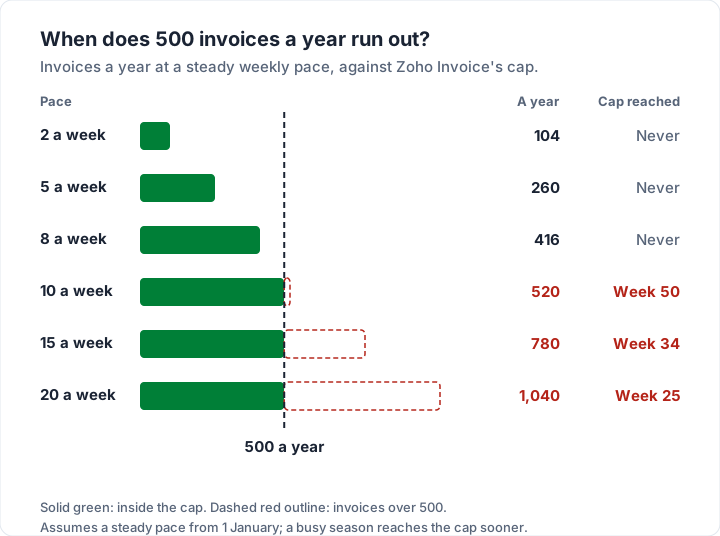
Most freelancers and sole traders sit comfortably in the top three rows. The people who hit the cap are those who invoice per visit or per job: a cleaner with 15 regular clients, a tutor billing every lesson, a mobile mechanic. Zoho's page does not single out recurring invoices, so assume each one counts: a weekly recurring invoice for 10 clients is 520 a year on its own.
What happens at 500? Zoho's pricing page does not say. It invites businesses that are scaling and "require a more powerful solution" to email [email protected], and it points to Zoho Billing as an "advanced solution". If you are near the cap, ask Zoho before you plan around a particular answer.
The 180-day inactivity rule#
Word for word, from the pricing page: "As per our data retention policy, if a user is inactive for over 180 days, their associated data will be deleted in the subsequent 20 days. Users will also be informed about the same before the deletion. To retain their data, users can either log back in to Zoho Invoice or create a data backup."
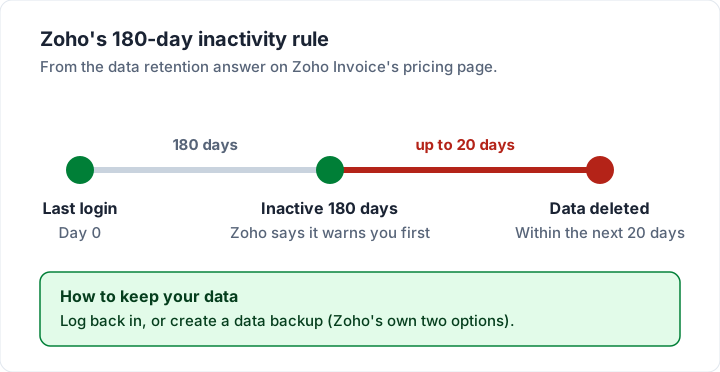
If you invoice every month, you will never notice it. If you run a seasonal business, take a long break, or move to another tool and leave Zoho as your archive, set a reminder to log in, and take a backup of your invoices before you leave. Official record-keeping guidance talks in years, not months; in the US, for example, see the IRS page on how long to keep records, and ask your accountant what applies to you. Switching invoicing apps without breaking invoice numbers covers what to export and how to carry your numbering on.
“Powered by Zoho Invoice” on your invoices#
The pricing page says Zoho Invoice "includes "Powered by Zoho Invoice" branding to help spread the goodwill and support other growing businesses." That is the vendor's name on the document your client reads.
Zoho's help pages describe removal in two ways. A Zoho knowledge-base article, How do I remove the Powered by Zoho branding, describes a setting under Settings, Preferences, Branding to turn off "I would like to keep Zoho Branding on my Invoices and Estimates", and does not mention a plan. A second Zoho help article, Remove Zoho's branding, says "the Zoho branding cannot be removed" on Zoho Invoice, and points to Zoho Billing for invoices without it (both read 23 October 2026). Before you rely on either, send a test invoice to yourself and look at the footer.
Users, projects and organisations#
- 2 users. You and one other person: a partner, an assistant or your bookkeeper. A third person means another tool or Zoho Books.
- 3 projects. Projects are how Zoho Invoice tracks time to bill. If you bill hourly across more than three live jobs at once, this is the limit you will hit first, long before 500 invoices.
- 2 organisations. Each organisation is a separate business with its own invoices. Charming's free plan, for comparison, covers 1 business.
The Zoho Invoice app on iPhone and Android#
Zoho Invoice has apps for both phones, and the same free plan applies. Here is what the two store listings said on 22 October 2026.
| App Store (US) | Google Play (US) | |
|---|---|---|
| Listing name | Zoho Invoice Maker App | Zoho Invoice - Invoice Maker |
| Price | Free, with In-App Purchases | Free, with "Digital Purchases" |
| Rating shown | 4.9 from 15K ratings | 4.8 from 32.7K reviews, 1M+ downloads |
| Last update shown | Version 5.3.1, 13 October | 23 September 2026 |
The Google Play description lists invoices, estimates, expense tracking with receipts, time tracking on projects, more than 30 reports and a client portal where clients can save cards and pay. If an app on your phone is a must, Zoho Invoice is one of the stronger free options; our round-up of free invoicing apps for iPhone and Android compares it with the rest.
When to move from Zoho Invoice to Zoho Books#
Move when you need the books, not just the invoices. Here is how the two compare on Zoho's US pricing pages, as of 22 October 2026.
| Zoho Invoice | Zoho Books Free | Zoho Books Standard | |
|---|---|---|---|
| Price | $0 | $0 while revenue stays under $50K a year | $15 a month billed yearly, $20 monthly |
| Invoices a year | Up to 500 | Up to 1,000 | Up to 5,000 |
| Users | 2 | 1 user + 1 accountant | 3 |
| Bank reconciliation | Not listed | Yes | Yes, plus bank feeds |
| Quotes, recurring invoices, reminders, portal | Yes | Yes | Yes |
The Books figures come from the Zoho Books pricing page, which says its free plan is "available indefinitely" as long as your revenue for the financial year does not exceed the $50K threshold. Professional is $40 a month billed yearly ($50 monthly) with 5 users and up to 10,000 invoices.
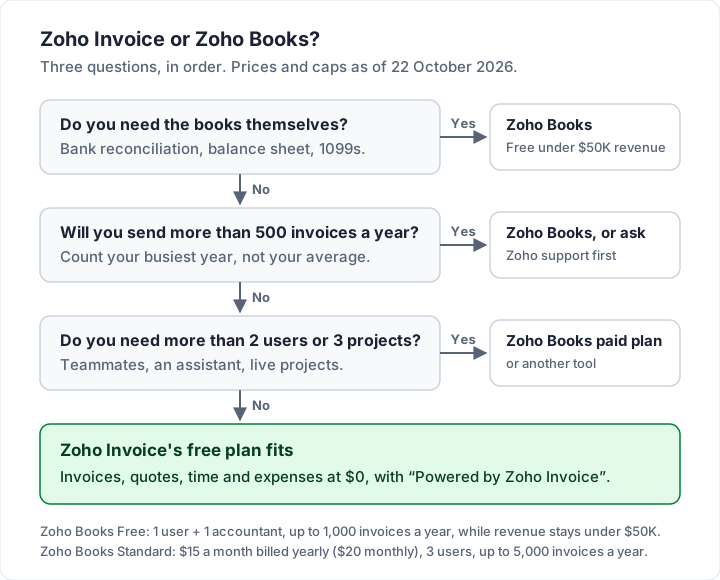
Notice the odd corner: Zoho Books Free allows more invoices a year (1,000) than Zoho Invoice (500), but only one user plus your accountant. If you are a solo business under $50K in revenue and want your bookkeeping in the same place, Books Free may suit you better than Invoice from day one. If your accountant works in Xero instead, Xero invoicing explained covers which Xero plans include invoicing and their invoice caps.
Zoho Invoice alternatives by situation#
Zoho Invoice is a strong free plan, and for many people it is the right answer. Here is where something else fits better, with each vendor's own figures as of 22 October 2026.
| If this is your situation | Consider | What to know |
|---|---|---|
| Clients must pay by card on the invoice, with no setup | Square Invoices (Square Free) | 3.3% + 30¢ per online card payment; no multi-currency |
| You want bookkeeping too | Zoho Books Free, or Wave Starter ($0) | Books Free: 1 user, under $50K revenue. Wave card fee 2.9% + $0.60 |
| You want to self-host your invoicing | Invoice Ninja | Free hosted plan is "5 Clients + Unlimited Invoicing"; Pro $14 a month or $140 a year |
| More than 500 invoices a year, invoices only | An app with no invoice cap | Check the client cap and branding instead |
| A branded invoice is the whole point | An app built around design | Check whether the free plan adds the vendor's name |
For the full field, with every free plan's caps side by side, see our comparison of free invoicing software. If you are leaving Invoice Ninja rather than Zoho, Invoice Ninja alternatives compares Zoho with the others for that move, and freelancers choosing a first tool will find invoicing software for freelancers more useful.
Where Charming fits, and where it does not#
Charming Invoices is narrower than Zoho Invoice, on purpose. It is an invoicing app for people who want a well-designed invoice without a yearly invoice cap. It is worth considering if you send more than 500 invoices a year or design is your priority. Checked in our code on 22 October 2026:
- No invoice or client cap on the free plan. Free covers 1 business with unlimited invoices and clients, with no expiry.
- Design is the focus. 60 invoice templates, 30 fonts, any brand colour, your logo or a full-page letterhead, and labels you can rename.
- Continue your numbering. A "Next invoice number" setting lets your first invoice carry on from your last Zoho number. It can be raised but never lowered below the current value.
- PDFs, links and statements. Issue the invoice, then download the PDF or copy a private link and send it however you like, plus client statements as PDFs. Charming does not email invoices or send reminders.
The catches, plainly. Charming has no quotes or estimates, no time tracking, no expense tracking and no mobile app, all of which Zoho Invoice includes for free. It does not take card payments: you can print a payment link from Stripe, PayPal or Square on the invoice, but you record payments yourself. It cannot import your Zoho clients or invoices. And free invoices carry a "Sent with Charming Invoices" line of their own; the paid plans that hide it by default start at $29 once, and a second business needs a paid plan too.
If Zoho's limits fit your work, stay on Zoho. If you mainly need a good-looking invoice with no yearly cap, create a free invoice and compare, or see the plans on the pricing page.
Questions people ask#
Is Zoho Invoice really free forever?#
Zoho's pricing page calls it a "forever-free invoicing solution" and lists no paid Zoho Invoice plan, as of 22 October 2026. Free comes with limits: 500 invoices a year, 2 users, 3 projects, 2 organisations, Zoho branding and the 180-day inactivity rule.
What happens after 500 invoices in Zoho Invoice?#
Zoho's pricing page does not say. It asks businesses that need "a more powerful solution" to contact [email protected]. Zoho Books allows up to 1,000 invoices a year on its free plan and up to 5,000 on Standard.
Can I remove “Powered by Zoho Invoice”?#
The pricing page says invoices include the branding. One Zoho help article describes a Branding preference to turn it off, without mentioning a plan; another says the branding cannot be removed on Zoho Invoice. Test it on your own account by sending yourself an invoice.
Is Zoho Invoice the same as Zoho Books?#
No. Zoho Invoice is invoicing only. Zoho Books is accounting software that also invoices, with bank reconciliation and financial reports. Books is free while your yearly revenue stays under $50K.
Does Zoho charge a fee when clients pay online?#
Zoho says it "does not charge a fee for receiving online payments". The gateway you connect, such as Stripe, PayPal or Square, charges its own fee.
Does Zoho Invoice work outside the US?#
Yes. Zoho runs regional editions of Zoho Invoice (Zoho's site lists editions for several countries), and its help pages for other regions list different payment gateways. Check your own region's pricing and help pages, because the US pages are what this guide reads.
The short version#
Zoho Invoice is a genuinely broad free invoicing app: quotes, recurring invoices, reminders, time, expenses, a client portal and phone apps, at $0. Its limits are 500 invoices a year, 2 users, 3 projects and 2 organisations, with "Powered by Zoho Invoice" on your invoices and data deleted after 180 days of inactivity plus up to 20, with notice.
If those fit, it is hard to beat. If you need the books, look at Zoho Books; if you need card payments built in, look at Square invoices; if you need a branded invoice with no yearly cap, look at the invoice-only tools.
Sources, all checked 22 October 2026: Zoho Invoice pricing; Zoho Invoice product page; Zoho Invoice help, Creating an Invoice; Zoho Invoice help, Online Payments; Zoho Invoice knowledge base, Powered by Zoho branding; Zoho Books pricing; Zoho Invoice on the App Store; Zoho Invoice on Google Play; Square fees; Wave pricing; Invoice Ninja pricing.