Square invoices: how they work, cost and who they suit

Nnabuike Okoroafor ·
On this page · 12 sections
We make Charming Invoices, an invoicing app that does not take card payments or connect to Square. It appears only in the sections on putting a Square payment link on your own invoice. Every Square fact below comes from Square's own US pages, checked on 22 October 2026.
A client wants to pay by card, or you already take card payments with Square and wonder whether its invoices fit the way you bill. You want to know how a Square invoice works from start to finish, what you pay when the client pays, whether you need Square Plus, and what the client actually sees.
This guide answers those in order: what Square Invoices is, how to send an invoice with Square on the web and in the app, how your client pays, the fee on one worked example, deposits and milestone payments, estimates, what to check before you choose, and when your own invoice with a Square payment link is the better fit. If you meant Squarespace rather than Square, see Squarespace and Wix invoices.
Square invoices in short#
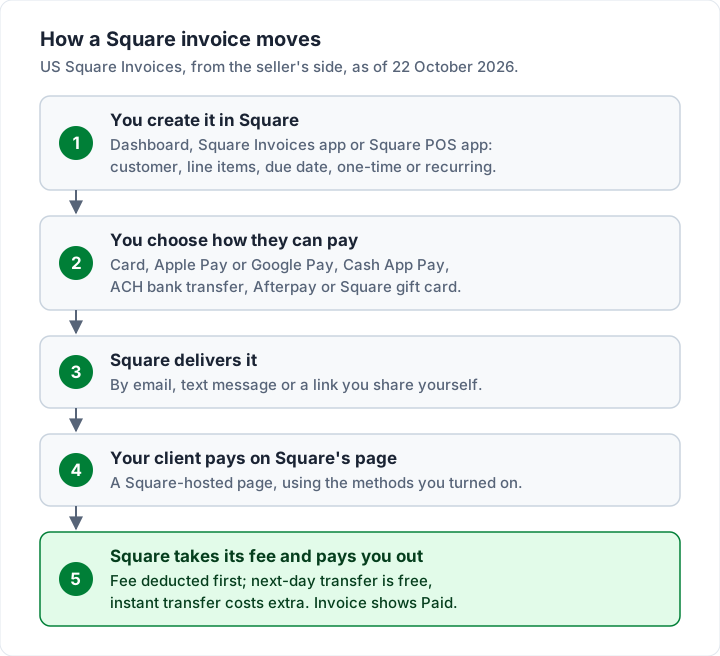
- Square Invoices is Square's invoicing tool, part of every Square account. You create invoices in the Square Dashboard, the Square Invoices app or the Square POS app.
- Sending is free and unlimited on Square Free. Square charges when the client pays: 3.3% + 30¢ for an online card payment, or 1% ($1 minimum) by ACH bank transfer, as of 22 October 2026.
- Square Plus is $49 a month per location. It lowers the online card rate to 2.9% + 30¢, caps ACH at $10, and adds milestone payment schedules, custom invoice templates and batch invoices.
- Deposits, recurring invoices, estimates, contracts and automatic reminders are on the free plan.
- Your client pays on a Square-hosted page by card, Apple Pay, Google Pay, Cash App Pay, ACH, Afterpay or a Square gift card, depending on what you turn on.
- Square is the better fit when clients must pay by card. If most pay by bank transfer, a plain invoice with your bank details, and a Square link as a second option, avoids a processing fee on the bank payments.
What Square Invoices is: Square Free vs Square Plus#
Square Invoices is the invoicing part of Square, the payments company best known for its card readers. Square's invoices page describes sending "digital invoices in seconds via email, SMS, or a shareable link", tracking what is "paid, unpaid, or overdue", and taking payment by card, Apple Pay, Google Pay, Cash App Pay, ACH bank transfer or Afterpay.
In the US, Square's invoices pricing page compares invoicing across its Square Free, Square Plus and Square Premium plans. Here is Free against Plus, as of 22 October 2026:
| Square Free | Square Plus | |
|---|---|---|
| Monthly price | $0 | $49 a month per location |
| Invoices and recurring invoices | Unlimited | Unlimited |
| Deposits | Yes | Yes |
| Estimates, contracts and e-signature | Yes | Yes |
| Automatic payment reminders | Yes | Yes |
| Payment schedules (milestones) | No | Yes |
| Custom invoice templates and custom fields | No | Yes |
| Batch invoices, multi-package estimates | No | Yes |
| Auto-convert accepted estimates to invoices | No | Yes |
| Online card payment fee | 3.3% + 30¢ | 2.9% + 30¢ |
| ACH bank transfer on an invoice | 1%, $1 minimum | 1%, $1 minimum, $10 cap |
Square Premium, at $149 a month per location, has the Plus invoicing features at the same online rates, plus 24/7 phone support. Square also lists custom pricing for businesses processing over $250,000 a year.
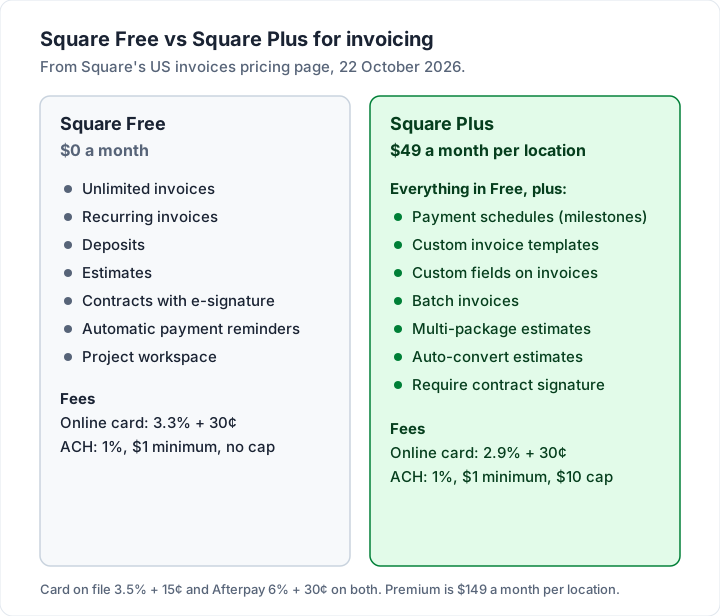
Is Square Plus worth it for invoices? On card fees alone, Plus saves 0.4% of your online card payments and costs $49 a month per location, so it pays for itself at about $12,250 a month of invoice card payments. The $10 ACH cap adds savings on large bank payments, and milestone schedules may matter more than either if you bill big jobs in stages. Below that, Square Free is the cheaper way to invoice.
How to send an invoice with Square#
These steps come from Square's US help article Create and send invoices, checked on 22 October 2026. Menu names vary a little between accounts, so look for the nearest match.
On the web (Square Dashboard):
- Go to Invoices (under Orders & payments, Invoices & Payments or Payments) and click Create invoice, or Send an invoice from the Overview page.
- Add a new or existing customer. An invoice can go to up to nine recipients.
- Enter the invoice details and an optional message.
- Choose One-time, with a due date and optional service date, or Recurring, with a start date, frequency and an end date or number of repeats.
- Add line items: items from your library, new items or a custom amount, plus discounts, taxes, shipping, service charges, a deposit or a payment schedule.
- Under Payment options, tick the methods you accept and, if you want, turn on Partial payments, Tipping or Allow customer to save payment cards on file.
- Under Communication, choose email, text message or share link.
- Click Preview, Save as Draft or Create, or Schedule it for a later date.
In the Square Invoices app or the Square POS app:
- Tap (+) and then Send invoice, or open Invoices and tap (+). In the POS app's standard mode, go to More, then Invoices.
- Add the customer and the items or a custom amount.
- Tap Make this invoice recurring if it repeats.
- Choose the accepted Payment methods, and turn on Send payment reminders if you want them.
- Choose the delivery method (email, text or a link you share) and tap Send.
A few details from the same article are worth knowing before your first invoice. Text delivery works only if the customer has asked for invoices by text and has a mobile number in their profile, and text invoices get no automatic reminders. A shared link sends nothing by email; you send the link yourself. You can attach up to 10 files, 25 MB in total. Saved invoice templates are not available in the POS app, only in the Dashboard and the Invoices app.
The Square Invoices app itself is free on the App Store ("Square Invoices: Invoice Maker", from Block, Inc., rated 4.8 from 93K ratings on 22 October 2026). Before you send, check that the invoice has what your client's accounts team will look for: your business details, a clear description, a due date and the invoice number. Our field-by-field invoice checklist has the full list.
How your client pays a Square invoice#
Your client gets an email or text with a link to the invoice. Square's developer documentation describes the payment page as a "Square-hosted web page where the customer can view and pay the invoice" (Pay or refund invoices). They choose one of the methods you enabled and pay there.
What the client can use depends on your Payment options for that invoice:
| Payment method | Who it suits | Fee you pay (US, 22 October 2026) |
|---|---|---|
| Credit or debit card, Apple Pay, Google Pay | Most clients; quickest | 3.3% + 30¢ on Free, 2.9% + 30¢ on Plus |
| ACH bank transfer | Larger invoices, business clients | 1%, $1 minimum; capped at $10 on Plus |
| Card on file (saved card, auto-pay) | Recurring work | 3.5% + 15¢ |
| Afterpay | Consumers who want to pay in instalments | 6% + 30¢ |
| Cash or check, recorded by you | Clients who pay offline | Free |
Every row comes from Square's fee table. A card issued outside the US adds 1.5%, per Square's fees help article.
Square's invoices page says clients can pay "through their computer, in person, or from their mobile device". If you allowed it, they can also save their card for future invoices. Square can send a text or email receipt for every payment, which answers the "can I have a receipt?" question for you. For other ways clients can pay you, Square or not, see our guide to invoice payment methods.
What Square charges on an invoice#
Creating and sending a Square invoice costs nothing. You pay when the client pays, and the fee is deducted before the money reaches your bank. Here is one illustrative $1,500.00 invoice worked through Square's published US rates as of 22 October 2026:
| How the client pays $1,500.00 | Square Free | Square Plus |
|---|---|---|
| Card online | $49.80 | $43.80 |
| ACH bank transfer | $15.00 | $10.00 |
| Saved card on file | $52.65 | $52.65 |
| Afterpay | $90.30 | $90.30 |
That is the whole fee story for one invoice. For Square against PayPal and Stripe on $250, $2,500 and $12,000 invoices, and the question of passing a card fee to the client, see our worked comparison of the Square invoice fee against PayPal and Stripe.
Two fee details to know. First, refunds do not return the processing fee: Square's refunds help article says "When you refund a payment, the processing fees for the payment aren't refunded back to you." So if a client pays the $1,500.00 invoice above by card online ($49.80 on Square Free) and then asks you to refund it and reissue the invoice because they used the wrong card, that $49.80 is not returned, and the second payment carries its own fee. Check the card before you refund, or agree in your terms who covers the fee.
Second, getting paid out is free by default. Square's invoices page says you can transfer funds to your bank "the next day for free — or instantly for a fee", or keep them in a Square Checking account, where Square's help says ACH fees are $0.
Deposits, milestones and recurring invoices in Square#
This is where Square Invoices is strongest for contractors and project work.
Deposits (all plans). You can "Request a deposit upfront, then set a separate due date for the remaining balance", per Square's pricing page. The client pays the deposit from the same invoice, and the balance stays open until it is due. If deposits are new to you, our guide to how a deposit invoice works covers how much to ask for and how to word it.
Milestone payment schedules (Plus, Premium or Invoices Plus). Square's help article on payment schedules says these subscribers "can schedule multiple payments for any job or project", and "You can set up to 12 milestone payments on an invoice", not counting the deposit. You set them up with Add Payment Schedule, then turn on the deposit and the milestone split.
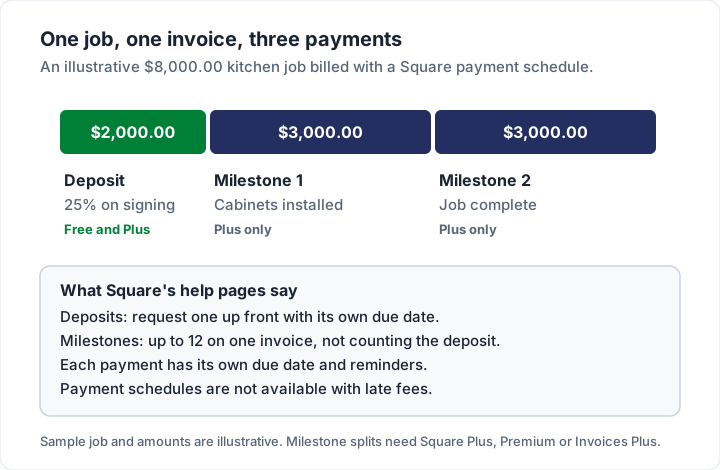
Two points from Square's help pages: "Payment schedules are not available with late fees", and Afterpay does not support recurring invoices or payment schedules. A milestone schedule splits one invoice into several payments; if you bill large jobs in stages with retainage, our guide to progress invoicing explains how that method works.
Recurring invoices (all plans). Square's pricing page says you can send recurring invoices "on a daily, weekly, monthly, or yearly schedule", and its help article says you can allow automatic payments with a card on file, so the client is charged each cycle. Remember the card-on-file rate is 3.5% + 15¢, higher than an online card payment. For the difference between a recurring invoice and a subscription, see recurring invoices vs subscriptions.
Turning a Square estimate into an invoice#
Estimates are free on every Square plan: Square's pricing page says you can "Provide clients detailed estimates. Send by email or text or share a link." Once the client accepts, the estimate has to become an invoice before they can pay.
According to Square's US help article Create and manage estimates, you can do that by hand from the estimates list in the Dashboard: click (•••) next to the estimate and choose Convert to invoice.
Converting automatically the moment a client accepts is a Plus feature, as are multi-package estimates that offer the client several options. Not sure whether you need an estimate or a quote at all? Our guide to invoices, estimates and quotes explains when each one fits. If you are choosing a tool for quotes and invoices together, our comparison of quote and invoice software sets Square beside eight other tools that do both.
What to check before you choose Square#
Square Invoices is built around Square's payments. These points come from Square's own US pages:
- Square processes the payment. The pay button on a Square invoice is Square's, at Square's rates. You cannot route it through another processor.
- Currency. Square's invoices FAQ says: "No, Square does not support multi-currency acceptance today." Clients abroad pay in your account's currency, and a foreign card adds 1.5%.
- This guide covers the US. Square publishes separate pricing and help pages for other countries, with different plans and rates.
- Partial payments. Square's help article says customers can make partial payments of up to $50,000 toward the balance.
- Text delivery. Invoices sent by text have no automatic reminders and no extra recipients.
- Refunds. As above, the processing fee is not returned when you refund a payment.
- Accounting. Square's FAQ says it integrates with QuickBooks Online and Xero for your books.
Using a Square payment link on any invoice#
You do not need a Square invoice to take a Square payment. Square Payment Links lets you create a link from the Payment Links section of the Square Dashboard: choose Collect a payment, enter a title and the amount, and save. You can put that link on an invoice made anywhere: in Word or Excel, in another invoicing app, or in a PDF you designed yourself.
Square's payment links page says there is no monthly fee and lists "Square standard eCommerce processing fee of 3.3% + 30¢ per transaction", with Afterpay at 6% + 30¢, as of 22 October 2026. One practical difference from an invoice: Square's page describes entering the amount when you create the link, so a link made for one invoice's total does not fit the next. Create one per invoice, or check in your Square Dashboard whether a link can let the client enter the amount.
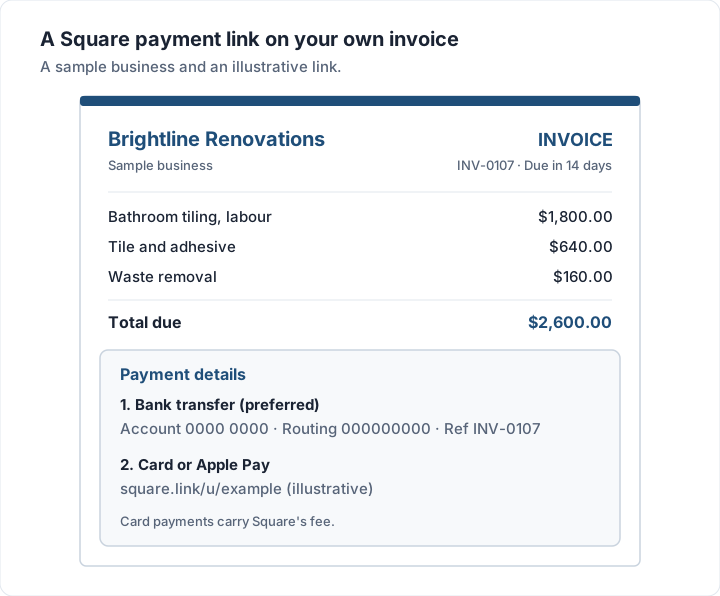
Here is how the two approaches compare:
| Your situation | Square invoice | Your own invoice with a Square link |
|---|---|---|
| Clients expect a pay-by-card button | Good fit | Works too |
| Most clients pay by bank transfer | ACH at 1% ($10 cap on Plus) | Bank details first, no processor fee |
| You want deposits, milestones and auto-pay in one place | Good fit (milestones on Plus) | You send separate invoices |
| You want your invoice to carry your own design | Square's layouts with your logo and colours | Any design you like |
| You want Square to mark invoices paid for you | Good fit | You record the payment yourself |
| You also take PayPal or Venmo | A second system | One invoice, several links |
If your clients split between card and bank, the second approach means no processor fee on the bank payments. Our guides to the PayPal invoice and to Venmo and Zelle for invoices cover the other links you might list beside Square's, and our guide to Stripe invoices and Stripe Payment Links covers Stripe's.
Where Charming fits, and where it does not#
Charming Invoices is the second approach above. It does not send Square invoices, connect to your Square account or take payments of any kind. Here is what it does, checked in our code on 22 October 2026:
- Your Square link prints on the invoice. Each business has a payment link field (a Square, PayPal or Stripe link you created there) and a bank details box. Both print in the invoice's payment section.
- A button on the private invoice page. When you issue an invoice, you download the PDF or copy a private link the client opens without an account, and send it however you like. While the invoice is unpaid, that page shows an "Open payment link" button that goes to your Square link.
- Deposits and staged billing. You can show a deposit already received on an invoice, and the Progress Billing template handles percent-complete billing with retainage, on every plan.
- Overdue invoices flagged. Charming does not send reminders; you follow up from your own inbox.
The catches, plainly: clients cannot pay by card through Charming itself, and payment tracking is manual, so you record the payment when Square tells you it has arrived. There is no payment schedule that charges the client automatically, no email sending or reminders, and no estimates.
The payment link is set per business, not per invoice, so a fixed-amount Square link only fits if you update it or your link lets the client enter the amount. Invoices on the free plan carry a "Sent with Charming Invoices" line. The free plan covers 1 business with unlimited invoices and clients.
If Square's own invoices do everything you need, stay with them. If you want a branded invoice that lists your bank details first and your Square link second, create a free invoice. Contractors comparing the wider field will find invoicing software for contractors useful, and if you are weighing Square against a free invoicing app with quotes and time tracking, our guide to Zoho Invoice's free plan covers what it includes.
Questions people ask#
Can you send an invoice with Square for free?#
Yes. On Square Free you can send unlimited invoices with no monthly fee. Square charges when the client pays: 3.3% + 30¢ for an online card payment or 1% ($1 minimum) for ACH, as of 22 October 2026. Cash and checks you record yourself are free.
Does my client need a Square account to pay?#
The invoice opens on a Square-hosted payment page, and the client pays with one of the methods you allowed, such as a card, Apple Pay, Google Pay, Cash App Pay or a bank transfer. Square's pages describe no account step for the payer.
What does Square Invoices Plus cost?#
In the US, the Plus invoicing features come with the Square Plus plan, $49 a month per location as of 22 October 2026. Square's US help article on payment schedules still names "Square Invoices Plus" subscribers alongside Square Plus and Premium, so older accounts may see that name.
Can I add a late fee to a Square invoice?#
Square's help pages mention late fees on invoices, and say payment schedules are not available with them. Check the rules on charging late fees first; our guide to late fees on invoices covers them in general terms.
Can I mark a Square invoice paid myself?#
Yes. Square's help article says that from the Dashboard you open the invoice's (•••) menu, or More, to take a payment or mark it as paid; in the apps you tap Add payment. What to send the client once it is paid is covered in our guide to paid invoices.
Is a Square invoice a receipt?#
No. The invoice asks for payment; the receipt Square sends after payment confirms it. Both are useful records.
The short version#
Square invoices are free to send, quick for the client to pay by card, and strong on deposits, recurring billing and reminders. You pay when the client pays: on $1,500.00 that is $49.80 by card or $15.00 by ACH on Square Free, as of 22 October 2026. Square Plus, at $49 a month per location, adds milestone schedules and lower rates; on card fees alone, its price is covered at about $12,250 a month of online card payments. If most of your clients pay by bank transfer, an invoice that lists your bank details first and a Square link second may serve you better.
Sources, all checked 22 October 2026: Square Invoices; Square invoices pricing; Square fees; Square help, fees; Square help, Create and send invoices; Square help, payment schedules; Square help, estimates; Square help, refunds; Square developer docs, pay or refund invoices; Square Payment Links; Square Invoices on the App Store.