Square invoice fee vs PayPal and Stripe, worked out

Nnabuike Okoroafor ·
On this page · 12 sections
We make Charming Invoices, which is one of the options covered here. Charming does not process payments, so it appears only in the section on pairing an invoice with a processor or a bank transfer. Where surcharging comes up, this is general information, not legal advice.
In short
- Sending an invoice is free on all three. The fee arrives when the client pays, and it depends on how they pay.
- By card, expect roughly 3% of the invoice. On a $2,500 invoice that is $72.80 to $87.74 across the options below, as of October 2026.
- By bank (ACH), the fee is much smaller and usually capped. The same $2,500 invoice costs $10.00 to $25.00.
- The bigger the invoice, the more the payment method matters. On $12,000 the gap between card and bank is $276.30 or more.
- Passing a card fee to the client is a rules question. Card networks, your processor and, in some places, the law have a say. Pricing it into your rates is usually simpler.
You have finished the job, written the invoice and you want the client to be able to pay it with one click. The question is what that click costs you. The Square invoice fee, the PayPal invoicing fee and the Stripe invoice fee are published as percentages, so this guide works them out in dollars on three real-sized invoices instead of quoting rates and leaving the arithmetic to you.
Every rate below comes from each provider's own US pricing page, checked on 22 October 2026, and is linked so you can check it again. Rates change: if you are reading this much later, treat the numbers as a worked method and re-check the pages.
The Square invoice fee, PayPal and Stripe rates side by side#
Here are the published US rates for a client paying a one-off invoice online, as of October 2026. Percentages apply to the amount paid; the fixed part is charged per payment.
| Provider and payment type | Card rate | Bank (ACH) rate | Monthly cost |
|---|---|---|---|
| Square, Square Free plan | 3.3% + $0.30 | 1%, $1 minimum | $0 |
| Square, Plus or Premium plan | 2.9% + $0.30 | 1%, $1 minimum, $10 cap | $49 or $149 per location |
| PayPal invoicing, card | 2.99% + $0.49 | Pay by Bank: 1%, $10 cap | $0 |
| PayPal invoicing, PayPal or Venmo checkout | 3.49% + $0.49 | (as above) | $0 |
| Stripe card plus Invoicing Starter | 2.9% + $0.30, plus 0.4% per paid invoice | ACH Direct Debit: 0.8%, $5 cap, plus 0.4% per paid invoice | $0 |
Sources: Square's fee table and Square's help article on fees; PayPal's business fees page (marked "Last Updated: October 1, 2026"); Stripe's pricing page and Stripe Invoicing pricing.
Two details matter before the arithmetic. Square's table lists the $10 ACH cap only for its Plus and Premium plans; for Square Free it lists 1% with a $1 minimum and no cap. And Stripe's Invoicing fee is a second layer: Stripe says Invoicing has no fixed fees "but Stripe Payments pricing will apply", so a paid Stripe invoice carries both.
What a card payment costs on a $250, $2,500 and $12,000 invoice#
Here the rates are applied to three invoice sizes. Each figure is the published rate applied to the full invoice, rounded to the cent. Processors may round slightly differently, so expect the odd cent of difference.
| If the client pays by card | $250 invoice | $2,500 invoice | $12,000 invoice |
|---|---|---|---|
| Square, Square Free plan | $8.55 | $82.80 | $396.30 |
| Square, Plus or Premium plan | $7.55 | $72.80 | $348.30 |
| PayPal invoicing, card | $7.97 | $75.24 | $359.29 |
| PayPal invoicing, PayPal or Venmo checkout | $9.22 | $87.74 | $419.29 |
| Stripe card plus Invoicing Starter | $8.55 | $82.80 | $396.30 |
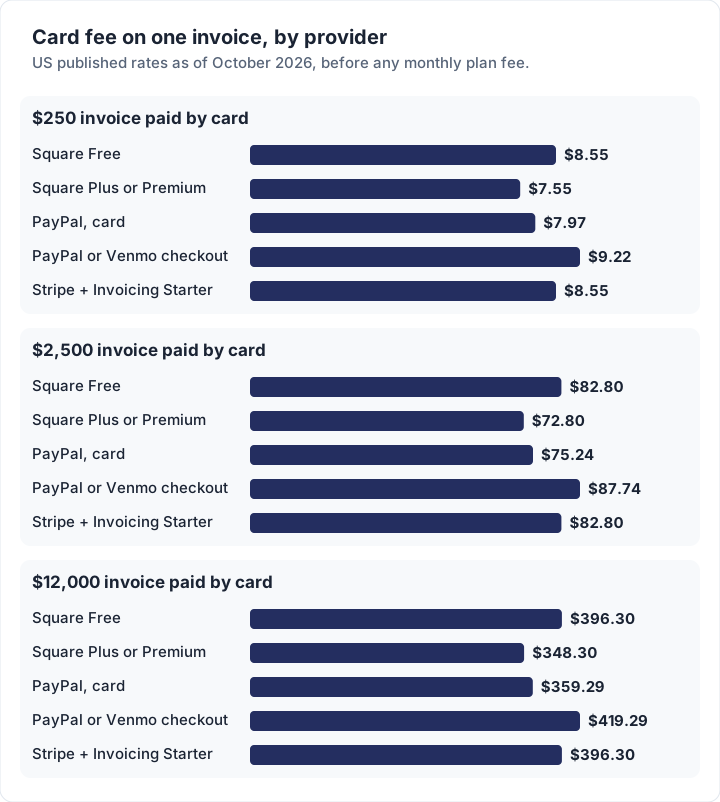
Three things stand out.
- The fixed fee only matters on small invoices. On $250, PayPal's $0.49 fixed fee is a fifth of a percent of the invoice. On $12,000 it is noise.
- Square Free and Stripe land on the same number. 3.3% + $0.30 on one side; 2.9% + $0.30 plus 0.4% on the other. The bills are built differently and total the same.
- The client's choice of button changes your fee. On PayPal, the same invoice costs you $12.50 more at $2,500 if the client pays through PayPal or Venmo checkout instead of with a card.
How one card fee is built#
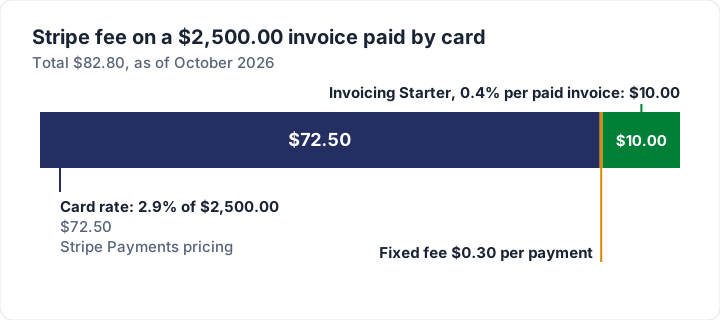
Stripe's fee has two parts, so here is the $2,500 invoice taken apart.
How much does Square charge for invoices?#
Creating and sending a Square invoice costs nothing; Square charges when the client pays. As of October 2026, its fee table lists online and invoice card payments at 3.3% + $0.30 on Square Free and 2.9% + $0.30 on Square Plus and Square Premium. Rates can vary by account, so confirm the rate your own account is charged in the Square Dashboard. How a Square invoice is sent, what Free and Plus include and how deposits work are covered in our guide to Square invoices.
Other Square invoice fees worth knowing, all from the same table:
- Card on file or a keyed-in card: 3.5% + $0.15 on every plan. Charging a saved card for an invoice costs more than letting the client pay online.
- Afterpay: 6% + $0.30. You are paid at once and the client pays in four instalments, at nearly double the card fee.
- ACH bank transfer on an invoice: 1% with a $1 minimum, capped at $10 on Plus and Premium. Square's help article adds that ACH fees are waived for transfers deposited into Square Checking.
Is Square Plus worth it for the lower rate? On card fees alone, Plus saves 0.4% of your online card volume and costs $49 a month per location, so it pays for itself above about $12,250 a month in invoice card payments. Below that, Square Free is cheaper for invoicing, whatever else Plus offers.
PayPal invoicing fees#
PayPal sends invoices for free and charges what it calls the invoicing transaction rate when the invoice is paid. As of October 2026 (page last updated 1 October 2026), the US rates are:
| How the client pays a PayPal invoice | Fee |
|---|---|
| Credit or debit card, Apple Pay or other wallets | 2.99% + $0.49 |
| PayPal Checkout, Pay with Venmo or PayPal Guest Checkout | 3.49% + $0.49 |
| PayPal Pay Later | 4.99% + $0.49 |
| Pay by Bank (ACH) | 1%, capped at $10.00 |
| International invoice (extra, all payment types) | +1.50% |
Yes, a client can pay a PayPal invoice with a credit card. Note that PayPal's table puts PayPal Guest Checkout in the 3.49% row, not the 2.99% card row, so the route the client takes on the payment page decides which rate you pay. Currency conversion carries a separate spread on PayPal's page, so a client paying in another currency costs more again. For the rest of the process, from sending the invoice to spotting a fake one, see how a PayPal invoice works.
Stripe invoice fee#
Stripe's invoice fee comes in two layers. The payment itself is charged at Stripe's standard rate, which as of October 2026 is 2.9% + $0.30 for a domestic card, plus 1.5% for an international card and 1% if currency conversion is needed. On top of that, Stripe Invoicing charges 0.4% per paid invoice on its Starter plan and 0.5% on Plus, which adds quotes.
For bank payments, Stripe lists ACH Direct Debit at 0.8% with a $5.00 cap, and the 0.4% Invoicing fee still applies to the paid invoice. Stripe's Invoicing page lists no cap on that 0.4%, though it invites businesses with large invoices to contact sales. That is why the Stripe bank figure grows with the invoice in the next table while the others stop at their caps.
For the steps behind those fees, from building the invoice in the Stripe Dashboard to the hosted page your client pays on, see our guide to creating and sending a Stripe invoice. Website builders set their own rates; Squarespace and Wix invoices lists what each takes per payment.
Bank transfer and ACH: the cheaper way to get paid#
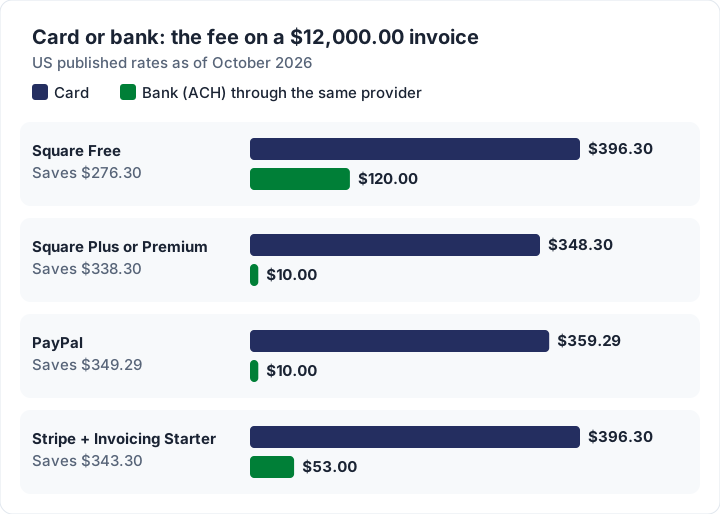
Here is the same three-invoice comparison when the client pays by bank through each provider's invoice.
| If the client pays by bank (ACH) | $250 invoice | $2,500 invoice | $12,000 invoice |
|---|---|---|---|
| Square, Square Free plan | $2.50 | $25.00 | $120.00 |
| Square, Plus or Premium plan | $2.50 | $10.00 | $10.00 |
| PayPal invoicing, Pay by Bank | $2.50 | $10.00 | $10.00 |
| Stripe ACH Direct Debit plus Invoicing Starter | $3.00 | $15.00 | $53.00 |
There is a third option the tables leave out: a plain bank transfer, where your bank details are printed on the invoice and the client sends money from their own bank. No processor is involved, so no processor fee applies. What your bank charges to receive a transfer, if anything, is on its fee schedule; look it up rather than assuming it is zero, especially for incoming wires.
The trade-offs are real. A bank transfer takes longer to arrive than a card payment, the client has to type your details correctly, and matching the money to the invoice is your job. Plenty of people decide card fees are worth it for exactly those reasons, and on a $250 invoice the fee is a few dollars. On a $12,000 one it is about $350. Our guide to invoice payment methods covers the other ways a client can pay you.
How to avoid payment processing fees on invoices#
You cannot avoid the fee on a card payment; you can make card the less likely choice, or a cheaper one.
- List bank transfer first. Put your bank details at the top of the payment section and the card link second. Many clients simply take the first option that works.
- Ask for a reference. Ask the client to use the invoice number as the payment reference, so a bank payment is as easy to match as a card one. Our post on how to number invoices has the numbering side.
- Use the processor's bank option when you want a pay button. Square, PayPal and Stripe all offer ACH on invoices, at a fraction of the card fee and capped on most plans.
- Check the higher-rate options before you turn them on. Card on file (Square, 3.5% + $0.15), Pay Later (PayPal, 4.99% + $0.49) and Afterpay (Square, 6% + $0.30) all cost more than a plain online card payment.
- Split large jobs. A deposit invoice paid by bank before work starts takes the largest share of the money off the card rail entirely.
- Agree the method in writing. If you want bank payment for large invoices, say so in the quote and in your payment terms before the first invoice, not after it.
You can copy this payment section and adjust it:
Payment options
1. Bank transfer (preferred, no card fee): [bank name], account [number],
   routing [number]. Please use invoice INV-0042 as the reference.
2. Card: pay online at [your payment link]. Card payments carry the
   processor's fee, which is included in our rates.
Passing the fee to the client: where to check first#
Adding a card surcharge to an invoice is not only your decision. Card networks publish rules for merchants, your payment processor has its own terms, and some US states have their own laws. We do not summarise those rules here, because they differ by card type, state and processor, and they change. Where to read them:
- Visa: Merchant Surcharging Considerations and Requirements (PDF) and its merchant regulations page.
- Other networks: Mastercard and the other card networks publish their own merchant rules.
- Your processor: Square, PayPal and Stripe each set terms for their own accounts.
- The FTC: its FAQ on the fees rule explains which businesses that rule covers.
Ask your processor, and a lawyer if you need one, before you add a surcharge line to an invoice.
Pricing the fee in instead#
The simpler route is to treat card fees as a cost of doing business and build them into your rates, the same way you build in software or insurance. No surcharge line, no disclosure question, no awkward conversation.
If you want to net a specific amount after a card fee, the arithmetic is: (amount you want + fixed fee) divided by (1 − percentage rate). Worked on a $2,500 job:
| To receive $2,500.00 after the fee | Invoice the client | Fee taken |
|---|---|---|
| PayPal invoicing, card (2.99% + $0.49) | $2,577.56 | $77.56 |
| Square Free or Stripe with Invoicing Starter (3.3% + $0.30 in total) | $2,585.63 | $85.63 |
Notice the fee is larger than on a $2,500 invoice, because it is now charged on the bigger total. If you show the result as a separate "card fee" line rather than in your rate, you are into surcharging, so check the sources in the previous section first. Our guide to late fees on invoices covers the separate question of charging for late payment.
When the fee matters and when it does not#
The fee is a percentage, so whether it is worth fighting depends on the invoice and the client.
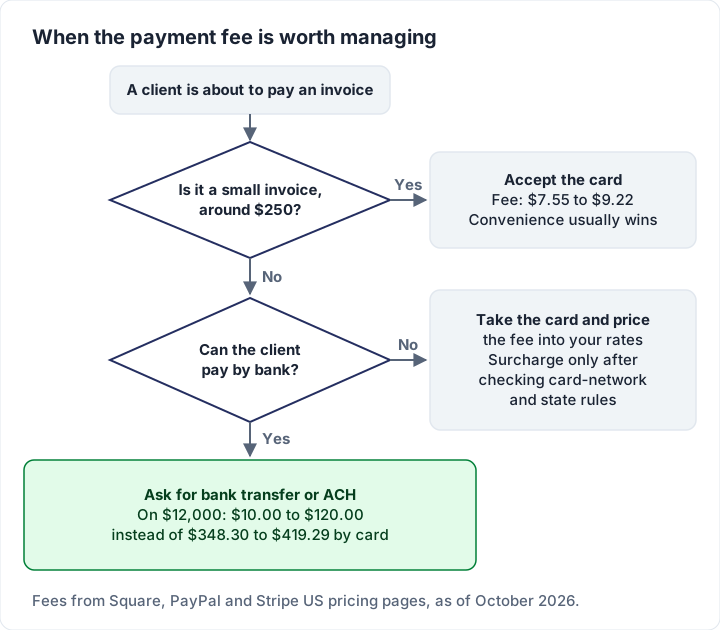
A rough way to see it over a year, using the $2,500 figures above: 40 invoices of $2,500 ($100,000 billed) paid by card on Square Free cost $3,312.00 in fees. The same 40 paid through PayPal's or Square Plus's capped bank option cost $400.00. That gap is the case for asking, politely, for bank payment on your larger invoices.
Where Charming fits, and where it does not#
Charming Invoices does not take payments and charges no payment fees, because no money passes through it. It is not a Square, PayPal or Stripe alternative for accepting cards; it is the invoice itself. You would pair it with one of them, or with a plain bank transfer.
What it does, verified in our code today:
- Your bank details and your payment link print on the invoice. Each business has a bank details field and a payment link field (a PayPal, Square or Stripe link you created there). Both print in the invoice's payment section, and the private invoice link shows an "Open payment link" button until the invoice is paid.
- You record payments by hand. When money arrives, you mark it paid or record a partial payment, with the method (bank transfer, card, cash, check, online payment or other).
The catches: clients cannot pay by card through Charming itself, payment tracking is manual, and invoices on the free plan carry a small "Sent with Charming Invoices" line. Whatever your processor charges on its own link is exactly what it would charge anyway. The free plan covers 1 business with unlimited invoices and clients; the pricing page has the paid plans, from $29 once.
If you are still choosing the invoicing side, how to choose invoicing software has a checklist, and how to make an invoice walks through the document field by field. When you are ready, create a free invoice with your bank details listed first.
Frequently asked questions#
Does Square charge a fee to send an invoice?#
No. Square charges when the client pays, at the rate for the payment method they use: 3.3% + $0.30 for a card on Square Free, as of October 2026.
Is Stripe's invoicing fee on top of the card fee?#
Yes. Stripe Invoicing's 0.4% (Starter) or 0.5% (Plus) per paid invoice is added to Stripe's payment pricing, so a $2,500 card payment costs $72.80 in payment fees plus $10.00 in Invoicing fees.
Which is cheapest for a large invoice?#
Of the options here, a capped bank payment: $10.00 on a $12,000 invoice through Square Plus or Premium, or PayPal's Pay by Bank. A plain bank transfer with no processor costs whatever your own bank charges, if anything.
Can I add the card fee to the invoice?#
Check before you do. Card networks, your processor and some state laws set rules on surcharges; the section above links where to read them. Pricing the fee into your rates avoids the question.
Sources, all checked 22 October 2026: Square fee table, Square fees help article, PayPal business fees, Stripe pricing, Stripe Invoicing pricing, Visa surcharging guidance, Visa merchant regulations, FTC fees rule FAQ.