How to make an invoice, step by step

Nnabuike Okoroafor ·
On this page · 13 sections
You did the work, the client is happy, and now you need to send something that turns that into money. If you have never done it before, the question is a fair one: how to make an invoice that looks right, adds up and gets paid without a round of questions first.
This guide goes through it in the order you will actually do it: what to gather before you start, the fields from top to bottom, a complete worked example, how to send it, what to do afterwards, the five mistakes behind most invoice queries, and whether to use a template, a spreadsheet or an app.
Three related guides go deeper on single pieces, and we point to them rather than repeat them. If this is your very first invoice and you mainly want to know you are not doing it wrong, your first invoice: what actually has to be on it is the gentler version. If you want every field explained with its edge cases, the field-by-field invoice checklist is the reference. And if you have already chosen a spreadsheet, how to create an invoice with Excel covers the formulas.
This is general information, not legal or tax advice. What an invoice must show differs by country, sometimes by state or region, and the rules change. We flag the places where that matters.
In short#
- Gather first, type second. Six things, listed below, before you open anything.
- Fill it in top to bottom. Your details, “Invoice”, number and dates, the client, line items, totals, how to pay.
- Make every line checkable. Quantity times unit price equals the line total.
- Send a PDF with a short email when the work is delivered.
- Follow up the day after the due date if nothing has arrived.
- Use the tool you already have until copying old files starts causing mistakes.
How to invoice someone, start to finish#
If you landed here asking how to invoice someone, the whole job is five steps. The rest of this guide expands each one.
- Agree the price before the work. An invoice records a price both of you already know; it is a poor place to announce one.
- Make the invoice. Fill in the fields below, in order, in whatever you have: a Word or Google Docs template, a spreadsheet, an invoice book or an invoicing app. Writing it up by hand and typing it up in a document are equally valid, as long as the numbers add up.
- Send it to the person who pays. Usually a PDF attached to a short email, addressed to the billing contact rather than only the person who hired you.
- Write it down. Invoice number, client, amount, due date. One row in a list is enough.
- Follow up if the due date passes. Politely, the day after, with the invoice number and amount.
Invoicing a person and invoicing a company work the same way on the page. The difference is the paperwork around it: companies often want a purchase order number, a supplier form or a specific inbox before they will pay. Invoicing a company covers what larger clients usually ask for.
Before you make an invoice: six things to have ready#
Most of the work of making an invoice happens before you open a template. With these six things in front of you, filling it in takes minutes.
- The agreed price and scope. Find the quote, email or message where you and the client agreed what you would do and what it would cost. The invoice should match it. If the job changed along the way, note what changed and whether the client agreed to the extra cost.
- The client's exact billing details. The legal name of the person or company paying, their billing address, and the email address the invoice should go to. If you are unsure, ask: “Who should I address the invoice to, and where should I send it?” is a completely normal question. If the client uses purchase orders, ask for the PO number now, not after the invoice bounces.
- Your payment details. How you want to be paid: bank transfer details in the format your country uses, a payment link, or both. If you accept more than one method, decide which you prefer.
- Your next invoice number. Pick a scheme and keep to it: 001, 002, 003, or 2026-001, 2026-002. The only hard rule is that no two invoices share a number.
- Your tax position. Whether you charge sales tax, VAT or GST. If you do not, there is no tax line. If you do, your tax authority's guidance sets what the invoice shows; if you are unsure whether you should be charging tax, ask an accountant.
- Your payment terms. When the money is due. “Net 14” means 14 days from the issue date and “Net 30” means 30; “due on receipt” means now. Pick one before you start, because the due date goes near the top.
Filling out an invoice, field by field#
This is the order the fields sit on a conventional invoice, and the order to fill them in. Each step is short on purpose; what to include on an invoice explains each field's edge cases and shows a sample invoice as a field table.
- Your details. Your business name, or your own legal name if you work under it. An email address at minimum; a phone number or address if you are comfortable sharing them. Your logo if you have one. Any tax or company registration number you actually hold, and nothing in that field if you do not.
- The word “Invoice”. At the top, easy to see. It tells the client's accounts team that this is a request for payment, not a quote, an estimate or a receipt.
- The invoice number. The next one in your sequence.
- The issue date. The day you send it. Your payment terms count from this date.
- The due date. A real date, with the terms beside it: “Due 17 November 2026 (Net 14)”. A phrase alone makes the client work it out, and their system wants a date.
- Bill to. The client's legal name, the person or department it should reach, the billing address, and the PO number if they gave you one.
- The line items. One row per thing you are charging for, each with a description, a quantity, a unit price and a line total.
- The totals. The subtotal, then any discount, then any tax with its rate stated, then the total due, with the currency named (“USD”, not only “$”).
- How to pay. Bank details or a payment link, plus the reference you want the client to quote. The invoice number is the usual choice.
- Notes. Optional: what the payment covers, any late-payment terms you agreed before the work started, and a one-line thank you.
Some countries ask for more than this list; the rules section near the end has examples and sources.
A worked example invoice#
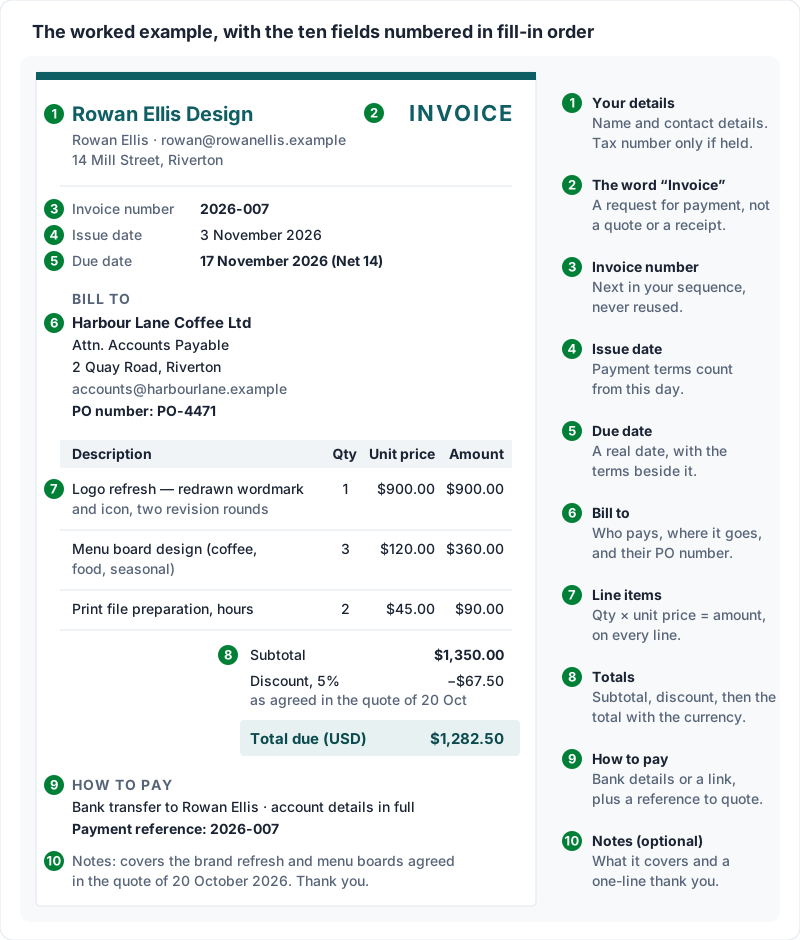
Here is a complete invoice for an invented designer billing an invented café. Every name, address and number is illustrative. Read it top to bottom, the way the client's accounts team will.
The header
| Field | Example |
|---|---|
| From | Rowan Ellis Design (Rowan Ellis), [email protected], 14 Mill Street, Riverton |
| Document | Invoice |
| Invoice number | 2026-007 |
| Issue date | 3 November 2026 |
| Due date | 17 November 2026 (Net 14) |
| Bill to | Harbour Lane Coffee Ltd, attn. Accounts Payable, 2 Quay Road, Riverton |
| Send to | [email protected] |
| PO number | PO-4471 |
The line items and totals
| Description | Qty | Unit price | Amount |
|---|---|---|---|
| Logo refresh — redrawn wordmark and icon, two revision rounds | 1 | $900.00 | $900.00 |
| Menu board design (coffee, food, seasonal) | 3 | $120.00 | $360.00 |
| Print file preparation, hours | 2 | $45.00 | $90.00 |
| Subtotal | $1,350.00 | ||
| Discount, 5% as agreed in the quote of 20 October | −$67.50 | ||
| Total due (USD) | $1,282.50 |
Payment and notes
- How to pay: bank transfer to Rowan Ellis. Account name, account number and routing or sort code printed here in full. Please quote 2026-007 as the payment reference.
- Notes: covers the brand refresh and menu boards agreed in the quote of 20 October 2026. Final files are delivered on payment. Thank you, it was a pleasure to work on.
Put together on one page, it looks like this, with the ten fields from the list above numbered in the order you fill them in.
Why each part is written this way#
- The logo line names the deliverable and the revision rounds, so nobody has to ask what “design services” meant.
- The menu boards are quantity 3 at a unit price, so anyone can check that 3 × $120.00 is $360.00.
- The hourly line shows the hours and the rate, not a lump sum.
- The discount says where it was agreed. A discount that appears from nowhere invites a question about why, and one that disappears on the next invoice invites another. Our guide to showing a discount on an invoice has the wording and where the line goes.
- There is no tax line, because this example business does not charge tax. If you do not charge tax, leave the tax line off rather than adding a line for tax you are not collecting.
- The PO number and payment reference let the client match the invoice to their order, and you match the payment to the invoice.
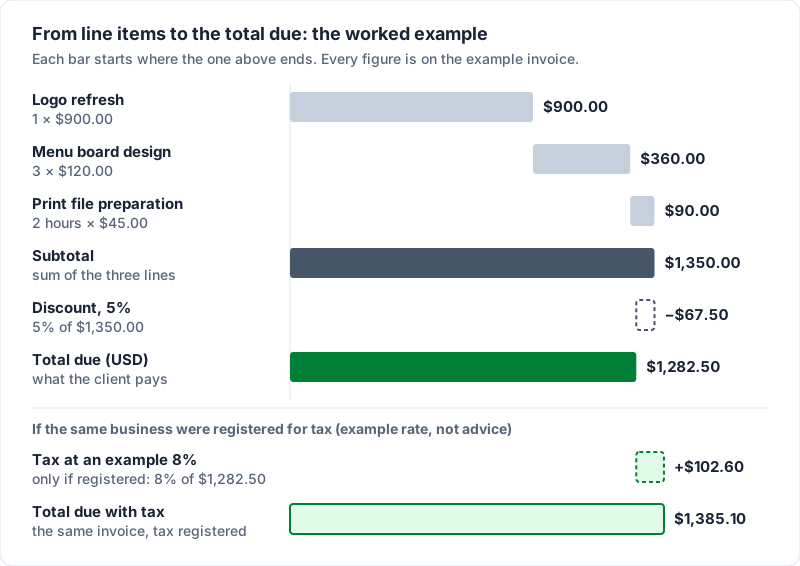
If the same business charged tax at an illustrative rate of 8% on the discounted amount, the tax line would read $1,282.50 × 8% = $102.60, and the total due would be $1,385.10. Whether tax is worked out before or after a discount, and at what rate, is set by your tax authority, so check theirs rather than copying ours.
How to fill out an invoice line by line#
The line items are where most of the questions come from, so it helps to know how each way of charging looks on the page. The quantity and unit price change; the rule that they multiply to the line total does not. If you write invoices by hand in a carbon copy book, how to fill out an invoice book goes through the page box by box.
| How you charge | Quantity | Unit price | Example description |
|---|---|---|---|
| By the hour | Hours worked | Hourly rate | “Copy editing, chapters 1 to 4” — 6.5 hours at $40.00 = $260.00 |
| By the day | Days | Day rate | “On-site shoot, 4 and 5 November” — 2 days at $650.00 = $1,300.00 |
| A fixed fee | 1 | The fee | “Five-page website build, as quoted” — 1 at $2,400.00 |
| Per item | Items | Price each | “Decorated cookies, 4 dozen” — 4 at $36.00 = $144.00 |
| Materials or expenses | Items, or 1 | Cost, plus any markup you agreed | “Tiles and adhesive, receipt attached” — 1 at $186.40 |
A few rules that keep the lines honest:
- Work each line out to the cent before you add them up. Rounding at the end instead can leave the total a cent away from the sum of the lines, and someone will notice.
- Use the client's words. If they called it “the spring campaign”, so should the invoice.
- One currency per invoice. If you work in two currencies, send two invoices.
- Nothing new. An invoice is not the place to introduce a charge the client has not heard about. Agree it first, then invoice it.
Check it before you send#
Two minutes here saves a week of back-and-forth later.
- Is the client's name the entity that is actually paying, and is the invoice going to the right inbox?
- Is the invoice number one you have never used?
- Does each line total equal quantity × unit price, and do the lines add up to the subtotal?
- Does the total match what the client agreed to?
- Is the currency named?
- Is the due date an actual date?
- Are your payment details right? Read the account number against your banking app, digit by digit.
- Save it as a PDF and open the PDF once. Check that nothing is cut off and the totals are where you expect them.
For a paper version, print the free invoice fields checklist (A4, or US Letter) and check any invoice against it. If this is your very first, the first-invoice checklist (A4, or US Letter) is shorter.
How to send an invoice#
How you make an invoice matters less than whether it arrives somewhere useful. The common, unglamorous version works well:
- Send a PDF. It looks the same on every device and cannot be edited by accident. Name the file so it can be found later: “Invoice 2026-007 Rowan Ellis Design.pdf”.
- Email it to the billing contact, and copy the person who hired you if they are someone else.
- Write a subject line that says what it is: “Invoice 2026-007 from Rowan Ellis Design — $1,282.50, due 17 November”.
- Send it on time: when the work is delivered, or on the date you agreed. An invoice sent weeks late tells the client there is no hurry.
A sample email body you can adapt:
Hi Priya,
Please find attached invoice 2026-007 for the brand refresh and menu boards: $1,282.50, due 17 November. Payment details are on the invoice; please quote 2026-007 as the reference.
Thanks again, it was a good project.
Rowan
More subject lines, wording for different situations and the attachment-or-link question are in how to send invoices by email.
One safety habit worth starting now. Invoice fraud often works by someone impersonating a business over email and changing the bank details. The US Federal Trade Commission's cybersecurity guidance for small businesses tells businesses to call and confirm wire transfer requests received by email and, when phoning to check a suspicious message, to use “a number you know to be correct, not the number in the email or text.” For you, that means two things: if you ever change your bank details, tell existing clients through more than one channel, and do not be offended when a careful client phones to check. Our guide to spotting fake invoices and invoice scams covers the scams aimed at people who send invoices, and how to make yours harder to fake.
How to get the invoice paid#
Sending is half the job. The rest is calm, dull record-keeping and one or two polite emails. None of this guarantees a payment date, but it means nothing slips because you lost track. Payment is also easier when it is easy to make: invoice payment methods covers what to offer and how to print your bank details, and Square, PayPal and Stripe invoice fees shows what card payments cost.
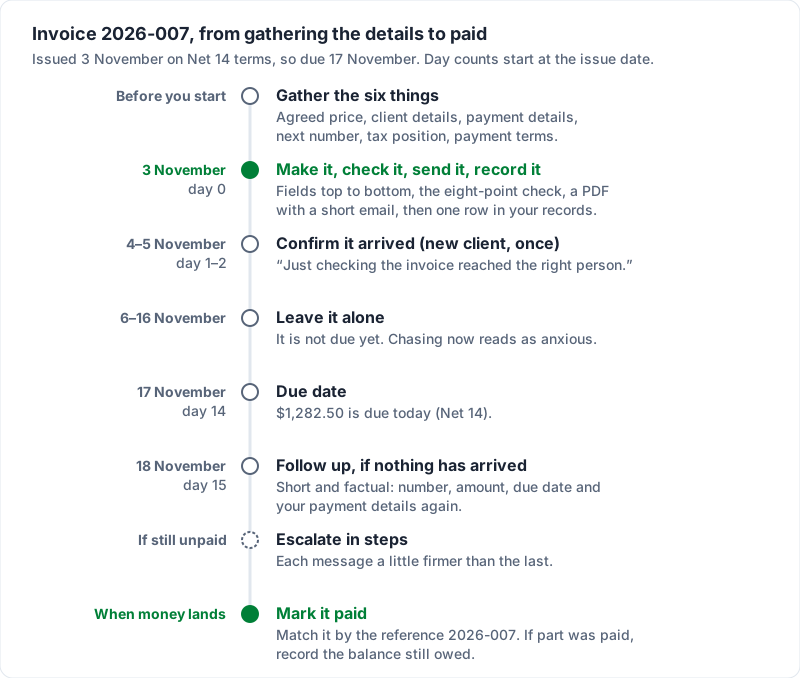
- Record it. Write down the invoice number, client, amount, sent date and due date. One row in a spreadsheet is enough.
- Confirm it arrived, once, for a new client. A day or two after sending: “Just checking the invoice reached the right person.” Accounts teams often want invoices in a specific inbox, and this is how you find out.
- Leave it alone until the due date. Chasing an invoice that is not due yet reads as anxious, not organised.
- Follow up the day after the due date. Short and factual: the invoice number, the amount, the original due date and your payment details again. A late invoice has often been missed rather than disputed, so write the first follow-up as if it was.
- Escalate in steps if it stays unpaid. Each message a little firmer than the last. The overdue invoice email, step by step has a four-email sequence with wording you can copy.
- Mark it paid when the money lands, and match the payment to the invoice using the reference. If the client pays part, record what is still owed so the balance is never a guess.
On the worked example, with Net 14 terms, those steps fall on these dates.
The five mistakes that cause invoice queries#
Most invoices that come back with a question have one of these problems.
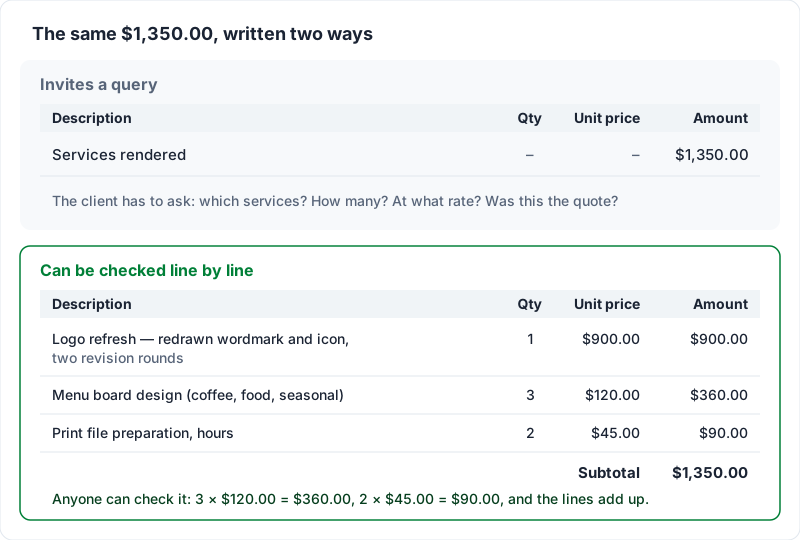
- Lines nobody can recognise. “Services rendered — $1,350.00” makes the client reconstruct the project from memory before they can approve it. Name the deliverable, the quantity and the dates.
- The wrong name, the wrong inbox, or no PO number. An invoice addressed to the person who hired you, rather than the company that pays, can sit unapproved. If the client uses purchase orders, an invoice without the PO number may not get into their system at all.
- A figure the client is seeing for the first time. If the total is higher than the quote and there is no explanation, the invoice turns into a negotiation. Agree changes before you bill them, and name them on the invoice when you do.
- Arithmetic that does not check out, or a currency that is not named. A total the client cannot reproduce from the lines reads as a mistake, even when it is only rounding. “$” alone covers several currencies; write “USD” or whichever applies.
- No clear way to pay, or a due date the client has to calculate. Missing bank details, a payment link that has expired, or “Net 30” with no date all leave the client with a reason to wait.
The first mistake is the most common, and the fix costs nothing but a few more words. Here is the same amount both ways.
Template, spreadsheet or app: which to use#
The worry behind this choice is usually how the invoice will look. Someone in a public online discussion about how freelancers create their invoices put it plainly. They are not a Charming customer; the quote comes from research we did into public discussions before building the product:
I don't want to overcomplicate things, but I also don't want to look unprofessional by sending a random spreadsheet or a payment request with no details.
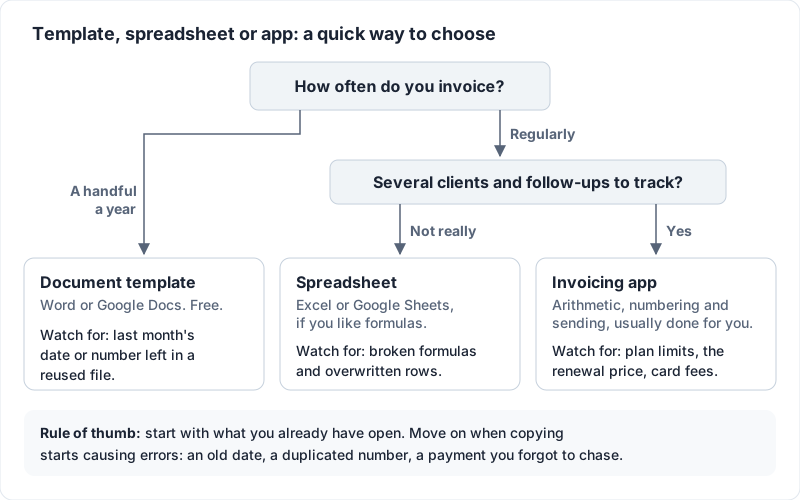
All three options can produce a correct, professional invoice. They differ in how much of the repetitive work they do for you.
| Document template (Word, Google Docs) | Spreadsheet (Excel, Google Sheets) | Invoicing app | |
|---|---|---|---|
| Cost | Free | Free, or software you already have | Free plans exist; paid plans vary widely |
| Arithmetic | You type it and check it | Formulas, once you set them up | Worked out for you |
| Invoice numbers | You remember the next one | You keep a log | Usually assigned for you |
| Sending | Export a PDF, attach it to an email | Export a PDF, attach it to an email | Usually emailed from the app |
| Knowing who has paid | Your own list | A column you keep up to date | Invoice statuses, often updated by you |
| Suits | A handful of invoices a year | Regular invoicing, if you like spreadsheets | Regular invoicing, several clients, follow-ups |
| Watch for | Last month's date or number left in a reused file | Broken formulas and overwritten rows | Plan limits, the renewal price, card payment fees |
If you want the table as a quick decision, it comes down to two questions.
Volume is a reasonable guide. A one-person business invoicing 5 to 10 clients a month asked in another public thread what to use, and one reply said:
For 5–10 invoices a month, people usually stick with a simple template or lightweight tracker.
A practical rule: start with whatever you already have open, and move when the copying starts causing errors — a reused file with the old date, a duplicated number, a payment you forgot to chase. If you want a finished design to start from rather than a blank page, you can download a free Word or Excel invoice template, or see the invoice templates we built for the app.
We make an invoicing app, so weigh this paragraph accordingly. Charming Invoices' free plan covers 1 business with unlimited invoices and clients, and no card is needed to start. It assigns the next invoice number in your sequence when you issue the invoice, works out the subtotal, discount and tax to the cent as you type, and gives you a PDF and a private link your client can open without an account. It does not email the invoice for you: you download the PDF or copy the link and send it however you like. The catches: free-plan invoices carry a small “Sent with Charming Invoices” line in the footer; clients cannot pay by card through Charming, so your bank details or your own payment link go on the invoice; and payment tracking is manual, meaning you mark it paid when the money arrives. It does not do estimates or quotes, accounting integrations or a mobile app.
What the rules say about invoices#
Rules differ by country and sometimes by state or region, and they change. The quotes below are what each official page said when we read it on 23 October 2026; they are examples, not a complete list, so read the page itself and ask your accountant or a lawyer about your own case.
- United Kingdom. GOV.UK's page on what an invoice must include opens its list with “Your invoice must include:”, starting with “a unique identification number” and ending with “the total amount owed”, and says: “You must use VAT invoices if you and your customer are VAT registered.” (as of 23 October 2026).
- European Union. The EU's Your Europe page on VAT rules and rates says: “The EU has standard rules on VAT, but these rules may be applied differently in each EU country.” (as of 23 October 2026). Check your own country's tax authority for its invoice rules.
- Keeping copies. As a matter of practice, keep every invoice you send. How long the tax authority expects you to keep records depends on where you are and on the situation; the IRS page on how long to keep records says: “The length of time you should keep a document depends on the action, expense, or event which the document records.” (as of 23 October 2026). Other countries set their own rules.
If you charge sales tax, VAT or GST, the extra fields are where an accountant's hour is well spent.
Your first invoice does not have to be perfect#
If you came here asking how to make an invoice, the honest answer is that it is mostly gathering: the agreed price, the right name, your payment details and a number you have not used. The rest is fields in order and arithmetic that adds up. A clear invoice with checkable lines and a way to pay, sent today, does its job. The design can improve later.
If you have never invoiced anyone before and want the short, reassuring version first, read our page on sending your first invoice. When you are ready to make one, create a free invoice and fill in the fields in the order above.
Free downloads
No sign-up and no email address. More on the free templates page.
- Download .pdf: What belongs on an invoice: field checklist (A4)
What belongs on an invoice: field checklist (A4)
PDFCheck any invoice against the 11 essentials before it goes out.
- Download .pdf: What belongs on an invoice: field checklist (US Letter)
What belongs on an invoice: field checklist (US Letter)
PDFCheck any invoice against the 11 essentials before it goes out.
- Download .pdf: First-invoice checklist (A4)
First-invoice checklist (A4)
PDFFor your very first invoice: the seven things it needs, ticked off one by one.
- Download .pdf: First-invoice checklist (US Letter)
First-invoice checklist (US Letter)
PDFFor your very first invoice: the seven things it needs, ticked off one by one.