How to fill out an invoice book (carbon copy invoices)

Nnabuike Okoroafor ·
On this page · 10 sections
You finish a job, the client is standing in the doorway, and the invoice book is on the van seat. A paper invoice book is still one of the quickest ways to hand someone a bill on the spot: no signal, no battery, no login. It only works, though, if the copy you keep is as readable as the one you hand over, and the numbers in the book stay in order.
This guide covers how to fill out an invoice book box by box, with a filled example page, which copy goes to whom, how to void a page you spoil, how long to keep the book, and the point where paper starts costing you more than it saves. If you would rather print or type a blank page, free blank invoice templates include printable PDFs and Word and Excel files.
In short#
- Put the cover flap under the page you are writing on, so your writing does not go through to the next set.
- Press firmly with a ballpoint pen. Carbonless copies only pick up pressure.
- Fill every box, including the date, the client's address and the payment terms, and add up the total twice.
- Top copy to the client, the copy behind it stays in the book. Check your book's own instructions for 3-part sets.
- Never tear out a spoiled page. Write VOID across every copy and leave it in place, so the numbering has no gaps.
- Keep the books for as long as your tax authority requires; the periods vary by country and situation.
What is in an invoice book#
An invoice book is a pad of pre-printed invoice forms, usually numbered in order. Most are carbonless (often called NCR, for “no carbon required”): each set is two or three sheets of chemically coated paper, so writing on the top sheet makes a copy on the sheets behind it without a separate carbon sheet.
A typical page has:
- A printed number in the top corner, in sequence through the book
- Boxes for the date and your client's name and address (“Sold to” or “Bill to”)
- Order details: a customer order number, who took the order, and terms
- A line-item grid: quantity, description, unit price and amount
- Totals at the bottom: subtotal, tax and total, sometimes with a deposit or “paid” box
- A signature line for the client to acknowledge receipt of goods or work
Stock books leave the top blank for your business name, often with space for a rubber stamp. A custom-printed book carries your name, address and logo on every page. Logo on an invoice covers what makes a logo print well at small sizes, which is worth knowing before you order one.
Before you write: pen, pressure and the divider#
Three habits make the difference between a clear copy and an unreadable one:
- Use the divider. Most books have a stiff cover flap or a loose card. Slide it under the last sheet of the set you are writing on. Without it, your pen marks go through to the next set's pages, leaving ghost writing on an invoice you have not used yet.
- Use a ballpoint pen and press firmly. Carbonless paper copies pressure, not ink. A gel pen or felt tip glides too lightly and the bottom copy comes out faint. Do not press so hard that you tear the top sheet.
- Write on a hard surface. A clipboard or the book's own cover, not your knee. Every soft spot under the page is a faint spot on your copy.
Check the bottom copy after the first line or two. If it is faint, press harder now, not after you have written the whole page.
How to fill out an invoice book, box by box#
Work from the top of the page down. The meaning of each field is the same as on any invoice; how to make an invoice, step by step explains each one in more depth. This is what to write on paper:
| Box | What to write | Example |
|---|---|---|
| Invoice number | Already printed. Do not change it or write another number | No. 0458 |
| Your details | Stamp or write your business name, phone and address if the book is not custom-printed | Ridgeway Repairs, 555-0186 |
| Date | The date you issue it, written in full so it cannot be misread | 22 Oct 2026 |
| Sold to / Bill to | The client's full name and billing address, not just a first name | Mrs J. Okafor, 14 Hollins Road |
| Customer order no. | Their purchase order or job reference, if they gave you one | PO 7731, or leave blank |
| Terms | When payment is due | Due on receipt, or Net 14 |
| Qty | How many: hours, units or metres | 1.5 |
| Description | What you did or supplied, specific enough to recognise later | Replace kitchen mixer tap, labour |
| Unit price | Price for one unit, with cents | 60.00 |
| Amount | Qty times unit price, worked out and checked | 90.00 |
| Subtotal | The sum of the Amount column | 207.00 |
| Tax | Only if you charge tax, at the rate your tax authority sets | 12.42 |
| Total | Subtotal plus tax, written clearly and underlined | 219.42 |
| Signature | The client signs to acknowledge the work or goods, if your book has the line | — |
A few rules that matter more on paper than on a screen:
- Separate labour and materials. Itemised lines are easier for a client to check than one lump sum, and easier for you to explain later. What a contractor invoice should include covers itemising labour and materials.
- Rule off unused lines. Draw a diagonal line through the empty rows of the grid, so nothing can be added after the client has their copy.
- Add the total twice, once down the column and once from the subtotal and tax. Paper has no formula to catch a slip.
- Tax lines only if you charge tax. If you do not charge sales tax or VAT, leave the box empty or strike it through. What makes an invoice a tax invoice points to the official guidance on what tax authorities ask for.
A filled example page#
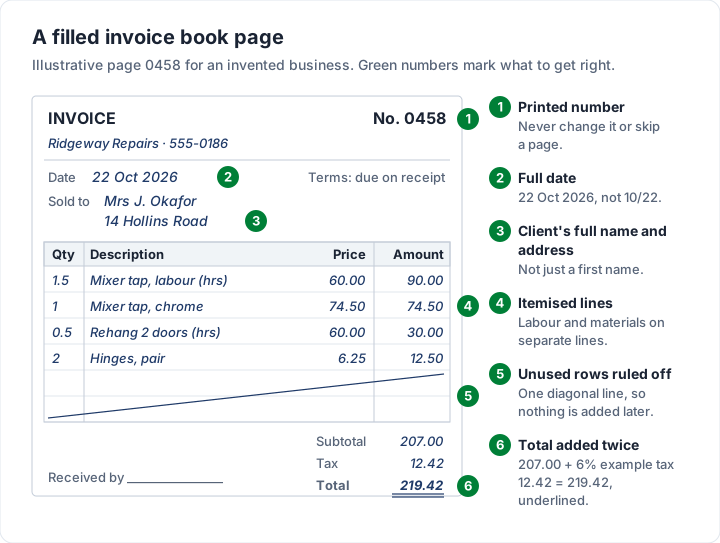
An invented handyman business, Ridgeway Repairs, fills out page 0458 for a kitchen job. The 6% tax rate is an example.
| Qty | Description | Unit price | Amount |
|---|---|---|---|
| 1.5 | Replace kitchen mixer tap (labour, hours) | $60.00 | $90.00 |
| 1 | Mixer tap, chrome (materials) | $74.50 | $74.50 |
| 0.5 | Rehang two cupboard doors (labour, hours) | $60.00 | $30.00 |
| 2 | Hinges, soft close, pair (materials) | $6.25 | $12.50 |
| Subtotal | $207.00 | ||
| Tax (6%, example) | $12.42 | ||
| Total | $219.42 |
Checked: 90.00 + 74.50 + 30.00 + 12.50 is 207.00, and 6% of 207.00 is 12.42, so the total is 219.42. The page is dated Thursday 22 October 2026, with terms of due on receipt.
Which copy goes where#
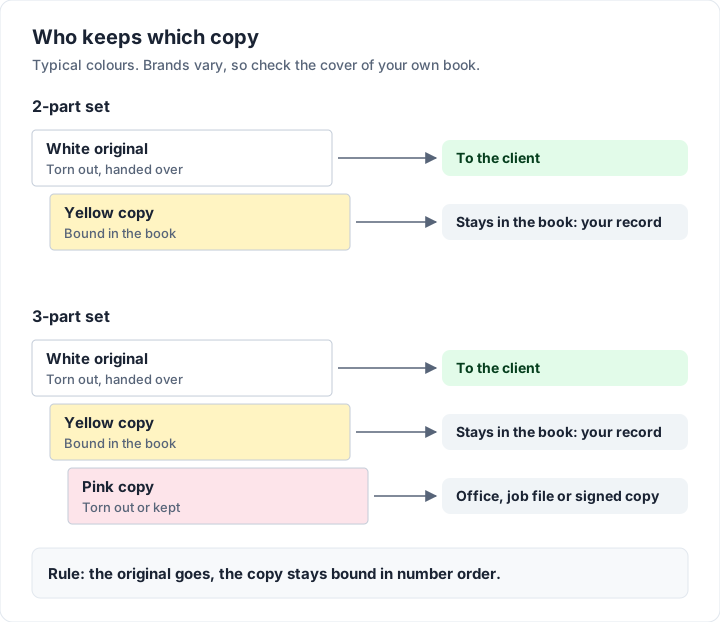
Carbonless books come in 2-part and 3-part sets. Colours vary by brand, so check the cover of your book, but a common arrangement is:
| Copy | Typical colour | Who keeps it | What it is for |
|---|---|---|---|
| Top (original) | White | The client | Their invoice, to pay from and file |
| Second | Yellow | You, left in the book | Your record of the sale, in number order |
| Third (3-part only) | Pink | You or the office | A job-file or accounts copy, or a signed delivery copy |
The copy that stays in the book is your sales record. Do not tear it out to file elsewhere; the book, in order, is the file. If you use a 3-part book, decide once what the third copy is for and stick to it.
If a client pays on the spot, write “Paid”, the amount, the date and the method (cash, check or card on your own reader) on both copies. A paid invoice is not quite the same document as a receipt; invoice vs receipt explains the difference and when you need both. If they want a separate receipt, our invoice receipt template guide shows what to write on one.
Mistakes, voids and missing pages#
Paper cannot be edited cleanly, so mistakes need a clear routine.
A small slip on a line: draw a single line through the wrong figure so it stays readable, write the correct one beside it and initial it. Do this on every copy. Never use correction fluid; it hides what was there and does not reach the copies underneath.
A spoiled page: write VOID in large letters across the original and every copy, add a word on why (“wrong client”, “spoiled”), and leave all copies in the book. Then start again on the next page. Do not tear out the original and throw it away: a missing number leaves a gap in your records that you would have to explain. As one official example, HMRC's internal manual page VATREC5010, written for VAT-registered businesses in the UK, answers a question about cancelled or spoiled invoices with: “As long as you retain the cancelled or spoiled invoice in your accounting records, or you can provide an explanation for the break in sequence, this is acceptable.” (as of 23 October 2026).
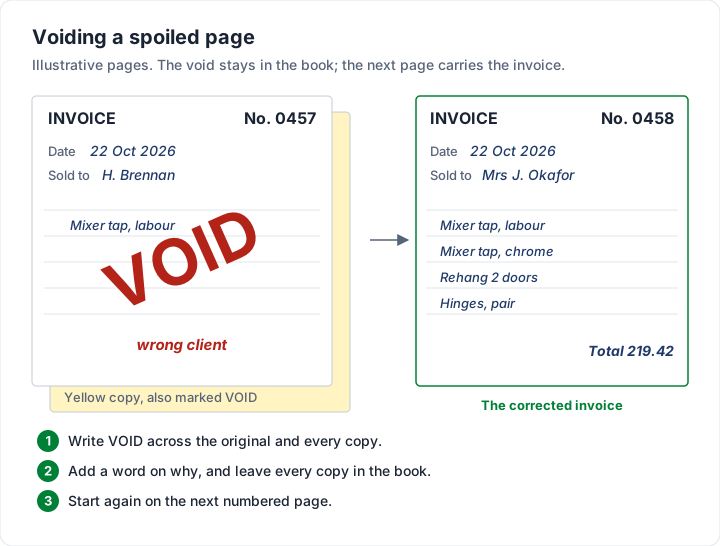
A page already handed to the client that was wrong: do not write over your copy. Void it in your book, tell the client, and issue a new invoice on the next page that says which number it replaces. How to void an invoice covers the wording and the record-keeping.
A missing page: if a page is lost before use, write a note on the copy before and after it (“0461 lost, never issued”) and keep a list in the back of the book. What to do about a gap in your invoice numbers covers why an explained gap is fine and an unexplained one is not.
A new book: start where the last book ended if the printed numbers allow it. If the new book starts at a different number, write the last number of the old book on the inside cover of the new one, so the two can be matched later.
How long to keep your invoice book#
The yellow copies are your sales records, and tax authorities set how long to keep them. General information, not legal or tax advice: the rules vary by country and situation and they change, so read the official page where you work and ask your accountant. Two official pages, as we read them on 23 October 2026:
- United States: the IRS page on how long to keep records says: “The length of time you should keep a document depends on the action, expense, or event which the document records.” It then lists periods for different situations.
- United Kingdom (self-employed): GOV.UK's page on how long to keep your records says: “You must keep your records for at least 5 years after the 31 January submission deadline of the relevant tax year.”
Store finished books somewhere dry, labelled with the number range and dates on the spine or cover. Handwritten copies can fade or smudge over time, so a phone photo or scan of each finished book is a cheap backup.
When a paper invoice book stops being enough#
Paper is fast at the door. It is slow everywhere else: every invoice exists in one place only, in your handwriting, and nothing about the book tells you who has paid. The signs it is time to change:
- You chase payments from a pile of yellow copies, working out who has paid by memory.
- Clients ask for a PDF or an emailed invoice for their accounts team, so you write it twice.
- Totals and tax are added by hand, and a slip means a void and a new page.
- You need copies of old invoices and have to find the right book first.
| Paper invoice book | Invoicing app | |
|---|---|---|
| Works without signal | Yes | Usually needs a connection |
| Numbering | Pre-printed, in order | Automatic in most apps |
| Arithmetic | By hand | Calculated |
| Copy for you | Carbon copy in the book | Stored and searchable |
| Who has paid | Your own notes | Status on each invoice |
| Sending | Handed over or posted | Email with a PDF |
| Cost | A book every so often | Free to paid |
Moving from a paper book to Charming Invoices#
We make Charming Invoices, so here is what it does for someone moving off paper, and what it does not:
- Carry on your numbering. Set the “Next invoice number” to the page after your last book page (for example 459), and Charming continues from there, assigning each number when you issue the invoice. It can be raised but never lowered, and it pads to 4 digits by default with an INV- prefix you can change.
- Start from a trade kit. Starter kits for trades such as Handyman, Plumbing, Electrician and Painting put typical lines for that trade on a new invoice; prices are left at 0.00 for you to fill in. The handyman invoice example shows the kind of lines they include.
- Issue the invoice from the job, then download the PDF or copy a private link the client opens without an account and send it however you like, and see at a glance which invoices are Issued, Overdue, Partially paid or Paid once you record payments.
The catches: Charming is a web app in your phone's browser, with no app store app and no offline mode, so you need a signal to create or issue an invoice. Clients pay you directly; Charming does not take card payments, and you record each payment yourself. Free invoices carry a small “Sent with Charming Invoices” line. If you work where there is no signal, keep a paper book for the doorstep and type the invoice up later, or see invoicing from a phone for apps that work offline. If it fits, you can create a free invoice and set it to continue from your last book number.
The short version#
Slide the divider under the set, press firmly with a ballpoint, fill every box, rule off the unused lines and add the total twice. The top copy goes to the client and the copy behind it stays in the book, in order. Void spoiled pages instead of tearing them out, keep the books for as long as your tax authority requires, and move to software when the chasing and rewriting start costing more than the book saves.