Free invoice apps for iPhone and Android: an honest guide

Nnabuike Okoroafor ·
On this page · 13 sections
We make Charming Invoices, which is one of the options covered here.
You have just finished a job, the client is at the door, and the laptop is at home. You want to send the invoice now, from your phone, without signing up for another subscription. Search for free invoice apps for iPhone or Android and you get a long scroll of apps that all say “Free”, and the word covers several different things.
This guide covers the three ways to invoice from a phone, what to check before you trust a free app with your billing, how to read a Google Play listing if you want an invoice app for Android, step-by-step instructions for a professional invoice using only the free apps Apple and Google make, and an honest list of the mistakes phones make easy. Every app fact below comes from the app’s own store listing or the vendor’s own pages, re-read on 28 October 2026 and linked. Listings change often, so check them again before you decide.
In short#
- “Free” on a store listing is the download price, not a plan. On the App Store, four of the five invoicing apps we checked are labelled “Free · In-App Purchases”. One of them, Invoice Simple, says in its own description that you “start with a free trial”. Our Invoice Simple review checks its plans, monthly invoice caps and card fees against its own pages.
- You may not need an invoicing app at all. Numbers and Pages on iPhone, and Google Docs and Sheets on Android, are free, export a PDF and send it through Mail, Messages or Gmail. Apple’s Numbers listing mentions templates “from a home budget to an invoice”.
- The trade-off is doing the bookkeeping by hand. A document app does not number invoices, remember clients, send reminders or show who has paid.
- On Google Play, the same apps can be labelled differently. Square Invoices shows “In-app purchases” on Google Play but none on the App Store; Zoho Invoice is the other way round. Read the listing for the store you actually use.
- Check five things before relying on a free app: the cap, the vendor’s name on your invoice, how to export your data, the in-app price against the web price, and how to cancel.
- Phones make particular mistakes easy: decimal slips, autocorrected names, an old client left on a copied invoice, and duplicate numbers. A one-minute check before you tap Send catches most of them.
- Charming Invoices has no app on the App Store or Google Play. It is a web app that fits a phone screen in the browser and can be added to your home screen as a web app. It needs a connection.
Three ways to invoice from your phone#
There are three routes, and each one suits a different kind of week. The table compares them on the things that matter when you are standing on a job site.
| Native invoicing app | Invoicing web app in the browser | Document or spreadsheet app | |
|---|---|---|---|
| What it is | An app from the App Store or Google Play built for invoices | An invoicing website that fits a phone screen, optionally added to your home screen | Numbers, Pages, Google Docs or Google Sheets with an invoice layout |
| Cost to start | Free download; limits and in-app purchases vary | Free plans vary by vendor | Free |
| Invoice numbers | Automatic | Automatic | You type them |
| Client details | Saved | Saved | Copied from the last invoice |
| Reminders and paid status | Often, sometimes on paid plans only | Often | None: you keep track |
| No signal | Depends on the app; test it | Usually needs a connection | Docs and Sheets can work offline once you turn it on |
| Where your records live | The vendor’s account, sometimes only on the phone | The vendor’s account | Your own files |
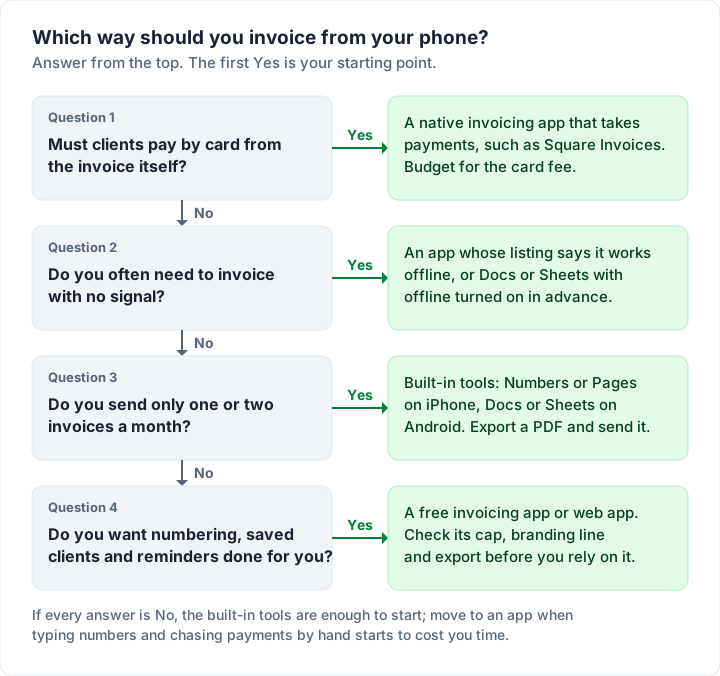
If you would rather answer four questions than read a table, the same choice runs as a flow.
What “free” means on the App Store and Google Play#
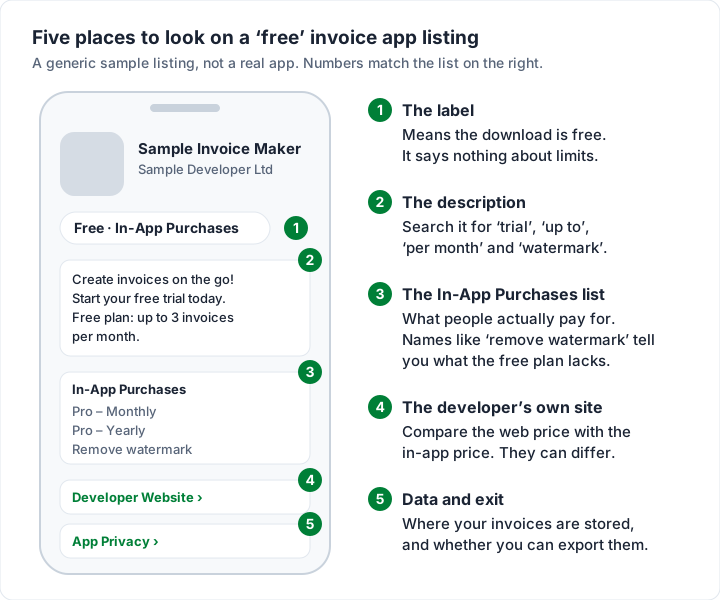
The App Store shows a button and, near it, a line such as “Free · In-App Purchases”. That line tells you the download costs nothing. It does not tell you whether invoicing in the app is free, capped or a trial. The detail sits lower down: in the description, in the In-App Purchases list and on the developer’s own website.
Here is what the US App Store listings, and the vendor pages we name, said on 28 October 2026 for invoice apps that come up again and again in searches, next to Apple’s and Google’s own document apps. The Google Play listings for the same apps are in the Android section below.
| App | Store label | What the listing or vendor says about free | In-app purchases listed |
|---|---|---|---|
| Numbers (Apple) | Free · In-App Purchases | Creating, viewing and editing “does not require a subscription”; exports PDF and Excel | Apple Creator Studio, $12.99 a month or $129.00 a year |
| Pages (Apple) | Free · In-App Purchases | Same wording for documents; exports PDF and Word | The same Creator Studio plan |
| Google Docs and Sheets | Google Play: Install, no “In-app purchases” line | Both listings mention working offline | None shown |
| Zoho Invoice | Free · In-App Purchases | Listing: “free forever”; pricing page: up to 500 invoices a year, 2 users, “Powered by Zoho Invoice” branding | Basic, Standard and Professional plan items from $6.99 to $32.99 a month and $69.99 to $229.99 a year; the listing does not say what they add |
| Square Invoices | Free | “no monthly fees”; on the Free plan, card payments online or through an invoice cost 3.3% + 30¢ (pricing page) | None |
| Wave | Free · In-App Purchases | For small businesses “in the US and Canada” | Pro Plan $19.00 a month or $190.00 a year; mobile receipts $8.00 a month or $72.00 a year |
| Invoice Simple | Free · In-App Purchases | “Start with a free trial, then choose the best plan for your business” | Subscription items from $6.99 to $21.99 |
| Bookipi | Free · In-App Purchases | “risk-free for your first 3 documents”; its mobile FAQ says free users get 3 documents a month and a Bookipi watermark | Unlimited Documents items, including $12.99 a month and $129.99 a year (others listed at $7.49 to $14.99), plus Full History Access at $9.99 |
Two things stand out. Only Square Invoices showed no in-app purchases on the App Store, and its pricing page lists a fee on card payments instead (its Google Play listing does show one; see below). And the most useful line on each listing was never the label: it was the description or the purchase list. Invoice2go, another app that comes up often, is not in the table; our Invoice2go review reads its plans, yearly invoice caps and 30-day trial from its own pages.
The in-app price can differ from the web price. Bookipi is a clear example. Its mobile FAQ lists USD$12.99 a month or USD$129.99 a year, bought through the App Store or Google Play. Its web pricing page lists the Starter plan at US$9.99 a month, or US$91.20 billed annually. The pages do not say whether the two are identical plans, so ask before you pay, and compare both prices whichever app you choose. Tiny Invoice, Moon Invoice, Bookipi and Brisk compared sets the free limits and prices of the small invoice apps side by side.
Free invoice apps for Android: reading a Google Play listing#
Google Play lays a listing out differently from the App Store, so the checks move. There is no “Free” label next to the button. A free app shows Install, and an app that sells anything inside it shows an “In-app purchases” line under the developer’s name. That line says something is for sale, not what or how much.
Before you install an Android invoicing app, look at five places on its Google Play page:
- The “In-app purchases” line. If it is there, open About this app: its app details can show an in-app purchase price range per item. A wide range usually means several plans, so find them on the developer’s pricing page.
- The description. As on the App Store, the free plan’s limits, if the listing states them at all, are in the text, not the label.
- Data safety. This section summarises what the developer says the app collects and whether it shares data with third parties. Google’s own wording on the page is that the developer provided the information “and may update it over time”. Invoices carry your clients’ names, addresses and amounts, so read it.
- Ratings. The star rating and rating count sit under the name. Look at the date of the most recent ratings as well as the average.
- Updated on. The date of the last update, under About this app. A date from long ago is worth a question to the developer before you trust the app with your invoices.
Here is what the US Google Play listings showed on 28 October 2026 for four invoice apps from the App Store table, and for Google’s own Docs and Sheets.
| App on Google Play | Line under the name | In-app purchase range (About this app) | Updated on | Data safety summary |
|---|---|---|---|---|
| Zoho Invoice - Invoice Maker | None | None shown | 23 September 2026 | No data shared with third parties |
| Square Invoices: Invoice Maker | In-app purchases | $20.00 per item | 27 October 2026 | No data shared with third parties |
| Wave: Small Business Software | In-app purchases | $8.00 to $190.00 per item | 2 October 2026 | May share personal info, app activity and 2 other types |
| Bookipi Invoice Maker & Estimate App | In-app purchases | $7.49 to $174.99 per item | 12 October 2026 | May share location |
| Google Docs | None | None shown | 28 October 2026 | No data shared with third parties |
| Google Sheets | None | None shown | 26 October 2026 | No data shared with third parties |
The same app can be labelled differently in the two stores. Zoho Invoice lists plan purchases on the App Store but shows no “In-app purchases” line on Google Play. Square Invoices is the reverse: no in-app purchases on the App Store, one item at $20.00 on Google Play, listed without a name. Bookipi’s Google Play range runs higher than anything in its App Store list. None of this tells you which is better. It tells you to read the listing in the store you will actually buy from, then the developer’s own pricing page.
Wave’s Google Play description repeats the App Store one: it is for small businesses “in the US and Canada”. Listings change often, and the figures above are a snapshot, not a ranking.
The best free invoice app for Android is the same answer as on iPhone: the one whose limits sit outside your work. If you send a few invoices a month, Google Docs or Sheets will do, with the steps further down. If you want numbering, saved clients and reminders, compare the free caps in the App Store table above (Zoho Invoice up to 500 invoices a year, Bookipi 3 documents a month), then run the five checks in the next sections. An Android tablet uses the same Google Play listing; Google’s Docs and Sheets listings both say they work on an Android phone or tablet.
What to look for in a free invoice app for iPhone or Android#
Feature lists tell you what exists. The useful question is whether a feature works on your phone, on your plan, in the conditions you work in. Each of these takes a few minutes to test before you send a real invoice.
| Check | Why it matters on a phone | How to test it |
|---|---|---|
| Automatic invoice numbers | Typing numbers by hand is how duplicates happen | Create two test invoices; the second should take the next number |
| Saved client details | Retyping an address on a small keyboard invites typos | Add a client once, start a new invoice, pick them from a list |
| Your logo and colours | Your client judges the document, not the app | Upload your logo and open the PDF preview |
| A real PDF you can share | You need to send it by Mail, Messages or WhatsApp, and keep a copy | Export a PDF and open it in the Files app |
| Tax and discount maths | Mental arithmetic on a job site goes wrong | Enter one line with tax and check it with a calculator |
| Reminders and paid status | Otherwise you track every invoice in your head | Look for reminder settings on the free plan, not only in the feature list |
| Working without a signal | Basements, rural jobs and plant rooms have none | Turn on Airplane Mode and create a draft |
| Export | Your records should outlive your interest in the app | Find the export option before you have 50 invoices in it |
| Readable outdoors | Low-contrast screens fail in daylight | Open the app outside at full brightness |
Most of these can be tested on a free plan. If one needs a trial or a paid plan, note it as a paid feature when you compare.
Before you rely on a free app: five checks#
A free app is fine until it is the only place your invoices live. Run these five checks in the first week.
- Find the cap. Some caps are by month, some by year, some by client. Bookipi’s free plan is 3 documents a month; Zoho Invoice’s is 500 invoices a year. Set the cap against your busiest month, not your average one.
- Find the vendor’s name on your invoice. Bookipi’s FAQ says free invoices carry a Bookipi watermark; Zoho’s pricing page says invoices carry “Powered by Zoho Invoice” branding; our own free plan adds a “Sent with Charming Invoices” line. Send a test invoice to yourself and look at it as your client would.
- Test the exit. Export your clients and invoices once, early. Some vendors also have rules for quiet accounts: Zoho’s pricing page says that if a user is inactive for over 180 days, their data will be deleted in the following 20 days, after a warning.
- Read the trial terms. Apple’s support page on cancelling a subscription says to cancel a trial “at least 24 hours before the trial ends” if you do not want it to renew. Put the date in your calendar the day you start.
- Know how to cancel. On iPhone, Apple’s steps are: Settings, tap your name, Subscriptions, tap the subscription, Cancel Subscription. On Android, Google’s subscription help says: “When you uninstall the app, your subscription won’t cancel.” Deleting the app is not cancelling.
Free plans can change, so re-read the plan page now and then. The best free invoicing software compares eight free plans line by line.
How to make an invoice on iPhone with Numbers or Pages#
If you send a handful of invoices a month, Apple’s own apps may be all you need. Numbers and Pages are free on the App Store, and the listings say creating and editing does not need the optional Apple Creator Studio subscription. The current versions list iOS 26.0 or later.
The steps below follow Apple’s Numbers and Pages user guides. Menu labels shift a little between versions.
In Numbers:
- Open Numbers and tap Choose a Template at the top. If you do not see it, tap Create Spreadsheet (Apple’s guide).
- Tap the category names along the top to browse. Apple’s listing says the templates include an invoice; if you see one, tap it. If not, start from a blank sheet and use the layout in the next section.
- Tap cells to replace the placeholder text with your business, your client and your line items. Numbers saves as you go.
- Rename the file with the invoice number and client, such as “0042 Chen”, so you can find it again.
- To send it, tap More, then Export, then PDF. Choose a layout, tap Export, then choose Mail or Messages, enter your client’s address and send (Apple’s export guide).
In Pages: open your invoice document, tap More, then Export, then PDF, tap Export, and choose Mail or Save to Files (Apple’s Pages guide). Pages suits a letter-style invoice; Numbers does the sums for you.
Always send the PDF, not the Numbers or Pages file. A PDF opens the same way on your client’s laptop, and they cannot change it.
How to make an invoice on Android with Google Docs or Sheets#
Google Docs and Sheets are free on Google Play. The steps below follow Google’s Docs Editors Help pages. On a computer, how to make an invoice in Google Docs covers the full build, including totals when Docs cannot calculate.
- Open Docs or Sheets, tap New in the bottom corner, then Choose template (Google’s guide). Use an invoice template if your list has one; otherwise start blank and use the layout below.
- Before you need it on site, turn on offline access. In the app’s Settings, turn on “Make recent files available offline”, or tap More next to your invoice file and choose “Make available offline” (Google’s offline guide).
- For each new invoice, make a copy of the last one from the file’s More menu, then change the number, date, client and lines. Change all four, every time.
- Send it as a PDF. Google’s help confirms the Docs app exports PDF and keeps sharing and printing under More, then Share and export. Look there for the option to send or save a copy as a PDF (the exact label varies by version), then choose Gmail.
Spreadsheets do arithmetic; documents look more like letters. If you want the sums done for you, use Sheets, and see how to create an invoice in Excel: the formulas carry over to Sheets and Numbers almost unchanged.
The invoice layout to type: a worked example#
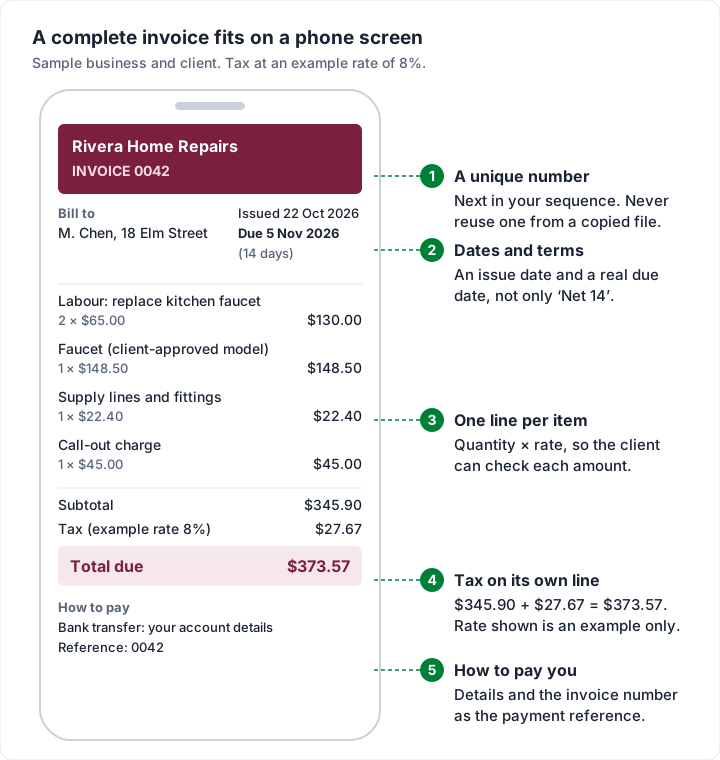
Whichever app you use, the content is the same. Here is a sample invoice for an invented handyman business, small enough to build on a phone. The tax line uses an example rate of 8% to show the arithmetic; whether you charge tax, and at what rate, depends on where you work and what you sell. This is general information, not tax advice.
Header: Rivera Home Repairs (sample), with address, email and phone. Invoice 0042, issued 22 October 2026, due 5 November 2026 (14 days). Bill to: M. Chen, 18 Elm Street.
| Description | Qty | Rate | Amount |
|---|---|---|---|
| Labour: replace kitchen faucet | 2 | $65.00 | $130.00 |
| Faucet (client-approved model) | 1 | $148.50 | $148.50 |
| Supply lines and fittings | 1 | $22.40 | $22.40 |
| Call-out charge | 1 | $45.00 | $45.00 |
| Subtotal | $345.90 | ||
| Tax (example rate 8%) | $27.67 | ||
| Total due | $373.57 |
How to pay: bank transfer to your account details, quoting 0042 as the reference.
Two of our free tools help with the parts people get wrong on a phone. The invoice due date calculator turns “14 days” into a real date, and the invoice number generator gives you a format to stick to. For every field and why it is there, see what actually belongs on an invoice. Trades that bill like this can also start from the handyman invoice template.
Where phones make invoicing error-prone#
Phones are good at sending things quickly. They are harder for the careful part: small text, small keys and bright light. These are the mistakes it leads to, and the fix for each.
| Mistake | How it happens on a phone | The fix |
|---|---|---|
| Decimal slip | A missed tap turns 148.50 into 1485.00 | Compare the total with the figure you quoted |
| Wrong name or street | Autocorrect “fixes” a surname or address | Save the client once; copy from their email, not memory |
| Old client on a new invoice | You copied last week’s file and changed only the lines | Change number, date, client and lines, in that order, every time |
| Duplicate invoice numbers | Copied files, or two devices with their own lists | One numbering list in one place, or an app that numbers for you |
| Columns cut off | The PDF layout does not fit the page | Open the exported PDF before sending, not just the editor |
| Wrong attachment | The share sheet offers recent files first | Name files with the number and client, and check the attachment name |
| Lost phone, lost records | Invoices saved only on the device | Keep files in iCloud Drive or Google Drive, or use an app with an account |
The decimal slip is worth seeing, because nothing about it looks wrong on a small screen.
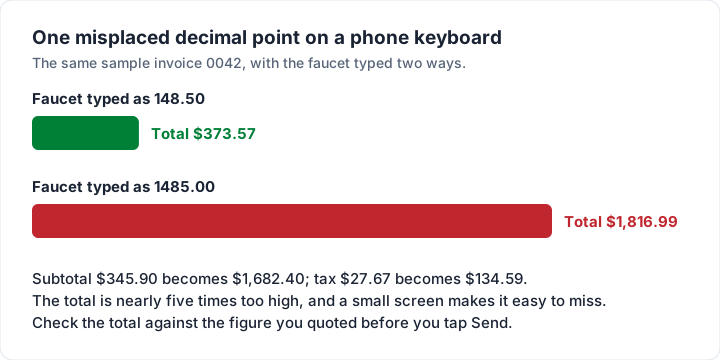
The one-minute check before you tap Send:
- The client’s name and email are the right ones.
- The invoice number is new, and the date is today’s.
- The total matches what you quoted, within the extras you agreed.
- The due date is a date, not only “14 days”.
- Your payment details are on it and correct.
- You opened the PDF itself, not just the editor.
For the covering message, our guide to how to email an invoice has short wording you can paste into Mail or Gmail.
Does Charming Invoices work on a phone?#
We make Charming Invoices, so here is exactly what we checked, and what we did not. We re-checked the code on 28 October 2026; the phone-width test of the live site below was run on 22 October 2026.
What it is. Charming is a web app. There is no Charming app on the App Store or Google Play, for iPhone or for Android. You use it in your phone’s browser, signed in to the same account as on a laptop.
What we verified:
- It fits a phone screen. We loaded the public pages (home, sign-up, sign-in, pricing and templates) at iPhone width in a test browser, and none scrolled sideways. Inside the app, the invoice editor turns each line item into its own card with labelled fields on small screens, and the invoice list shows one card per invoice with a sort menu instead of a wide table. We checked those screens in the code, not on a device.
- It can sit on your home screen as a web app. Charming has a web app manifest that asks to open in its own window, without the browser’s address bar, and lists app icons at 192 and 512 pixels, including one shaped for Android’s launcher. It has no service worker, so the home-screen icon opens the live site, not an offline copy. On iPhone, Apple’s guide to turning a website into an app is: in Safari, tap Share, then Add to Home Screen, turn on Open as Web App and tap Add. On Android, Google’s web apps guide is: in Chrome, tap More, then Install and create shortcut, then Install (if Chrome offers only a shortcut, use that).
- Issuing works from the phone. Issue invoice gives the invoice its number and stores the PDF. Copy link puts a private link that opens without an account on your clipboard to paste into Messages, WhatsApp or your own email, and Download PDF saves a copy to attach. Charming does not send the email for you.
- The bookkeeping is done for you. Invoice numbers assign themselves per business, clients are saved, sums calculate to the cent, overdue invoices are flagged, and you mark an invoice paid when the money arrives. Charming does not send reminders; set a calendar reminder for the due date.
The catches:
- No offline mode. Charming has no offline support, so you need a signal to create or issue an invoice. If you often work without one, a document app with offline turned on is the better tool on site.
- Set up your brand on a bigger screen. The Template Studio puts its controls beside a live preview on wide screens; on a phone they stack, so you scroll between them. Choosing your template, logo and colours once on a laptop or tablet is quicker. Day-to-day invoicing works fine on the phone.
- The free plan’s limits. Free is 1 business, and free invoices carry a small “Sent with Charming Invoices” line. Paid plans are Individual at $29 once, Team at $79 once or Pro at $12 a month or $99 a year; lifetime plans are final sale.
- What it does not do. Clients cannot pay by card from a Charming invoice: they pay you directly, by bank transfer or your own payment link, and you record the payment yourself. There are no estimates or quotes, no time tracker and no accounting integrations. If you need card payments from the invoice, Square Invoices or another payments app is the better fit; our guide to invoice payment methods helps you choose.
If an invoicing app in your browser fits how you work, you can create a free invoice on your phone now, with no card and no invoice cap. The full plan list is on the pricing page.
Questions about free invoice apps for iPhone and Android#
What is the best free invoice app for iPhone?#
The one whose limits sit outside your work. If clients pay by card, look at an app with payments, such as Square Invoices, and count the fee. If you send a few invoices a month, Numbers costs nothing and has no cap. If you want numbering and your brand, look at free plans like Zoho Invoice (500 invoices a year) or a web app such as Charming (no invoice cap, but no reminders). Our guide to choosing invoicing software has a one-afternoon test.
Can I make an invoice on my iPhone without downloading an invoice app?#
Yes. Numbers and Pages are Apple’s own free apps; download them from the App Store if they are not on your phone. You can also use an invoicing web app in Safari, which needs no download.
Is there a free invoice app for Android with no limits?#
Every option has a limit somewhere. Google Docs and Sheets have no invoice cap but leave numbering and tracking to you. Square Invoices has no monthly fee but charges on card payments. Zoho Invoice is free up to 500 invoices a year.
Does Charming Invoices have an Android or iPhone app?#
No. Charming is not on Google Play or the App Store. It is a web app you open in Chrome or Safari, and you can add it to your home screen, where it opens in its own window. It does not work offline.
What should I check on a Google Play listing before installing?#
The “In-app purchases” line and its price range under About this app, the description for the free plan’s limits, the Data safety section, the rating and the Updated on date. Then check the developer’s own pricing page, because a listing often does not say what each purchase is.
Do invoice apps work offline?#
Some say they do; test it in Airplane Mode before you rely on it. Google Docs and Sheets work offline once you switch it on. Charming does not work offline. For desktop programs that work offline, see free invoice software to download.
Will deleting an app cancel my subscription?#
No. Google says uninstalling does not cancel a Google Play subscription, and Apple’s steps cancel through Settings, under your name and Subscriptions.
Can my client pay by card from an invoice I send from my phone?#
Only if your app takes payments, and that always costs a fee per payment. A PDF from Numbers, Pages, Docs, Sheets or Charming lists your payment details; your client pays you directly.
The short version#
Free invoice apps for iPhone and Android are free to download, not always free to use. Read past the label to the description and the purchase list, test the five checks in your first week, and do not let a free app be the only place your records live. If you send a few invoices a month, Numbers, Pages, Docs or Sheets will do, with a careful check before you send. If you want the numbering and branding handled, and you can live with needing a signal and sending the PDF yourself, start free with Charming Invoices in your phone’s browser.