Free invoice software to download: desktop, offline and web

Nnabuike Okoroafor ·
On this page · 9 sections
We make Charming Invoices, which is a web app rather than a download. We cover it near the end, with its limits, and say plainly where a desktop program is the better fit.
You want invoice software you can download for free, install on your own PC or Mac, and use without a monthly bill. Search for it and you get a mix of download directories, vendor pages, Excel files, and some pages that are not what they claim to be. Part of the reason is the word itself: “download” covers three quite different things, and the right one depends on how many invoices you send and where you want your records to live.
This guide sorts that out. Every vendor fact below comes from the vendor’s own page, read on 28 October 2026 and linked, so you can check it before you install anything.
In short#
- “Free invoice software download” means one of three things: a desktop program you install, a Word or Excel file you copy, or a web app you open in a browser (no download at all).
- Free desktop programs exist, with conditions. As of 28 October 2026, NCH’s Express Invoice has a free version for home users or businesses with 1 user; Invoiso is a free, offline billing app for Windows, macOS and Linux; GnuCash is free accounting software with invoicing built in.
- Offline means your invoices live on one computer. That is private and works without a connection, but backups and moving to a new machine are your job.
- Download from the publisher’s own site, and scan the installer. Search results for this phrase include pages hosted on unrelated organisations’ websites.
- If you send a few invoices a month, a free Word or Excel template may be all you need.
- Charming Invoices is a web app, not a download. There is no Windows, Mac, iPhone or Android app and no offline mode. On a phone? See our round-up of free invoice apps for iPhone and Android.
“Download” can mean three things: a program, a file or a web app#
Before choosing a product, choose the kind of tool. The three behave very differently once you have sent your tenth invoice.
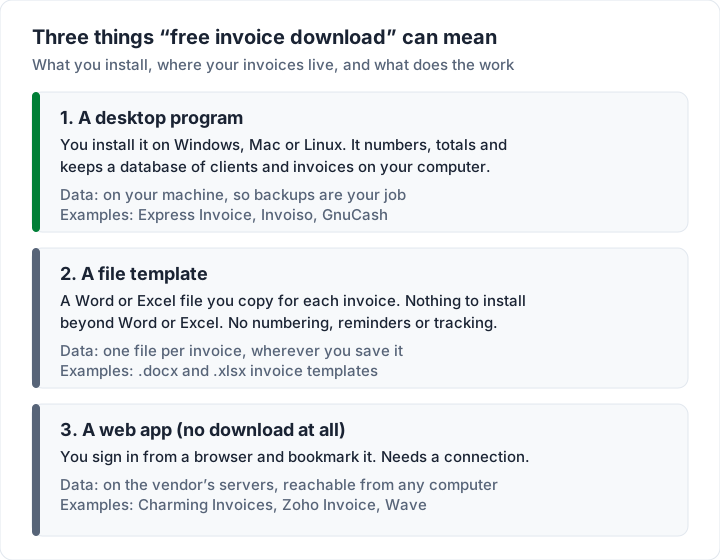
Here is the same choice as a table.
| Desktop program | Word or Excel template | Web app | |
|---|---|---|---|
| What you download | An installer | A .docx or .xlsx file | Nothing; you sign in |
| Works offline | Usually, once installed | Yes | No |
| Numbering, client list, reports | Yes | No, you do it by hand | Yes |
| Where your invoices live | Your computer | Wherever you save each file | The vendor’s servers |
| Who backs them up | You | You | The vendor (export your own copy too) |
| Use from another computer | Only if the program syncs | Copy the files across | Sign in anywhere |
“Free” also varies inside each row. A desktop program may be free for 1 user and paid for more; a web app may be free with an invoice cap or a vendor line on your invoices. Our comparison of free invoicing software sets out each free plan’s listed limits.
Free invoice software you can download for Windows#
These are programs that install on a Windows PC and work from your own computer. Each entry quotes the vendor’s page as of 28 October 2026. We did not install or test them; check the page again before you download, because free editions change.
Express Invoice (NCH Software): free version for 1 user#
NCH’s Express Invoice page says: “A free version is available for home users or businesses with 1 user.” It describes that free version as one “which does not expire and includes most of the professional version features.”
The page lists creating invoices, quotes and orders, saving or sending invoices as PDF files, recurring invoices, multiple businesses, payment reminders and reports, and says you can “Generate invoices and quotes when you are offline or the internet is down”. Its system requirements read “Works on Windows (7 to 11)” and macOS 10.5 or above (a script on the page shows Mac visitors “Works on macOS 10.9 and above” instead), and it lists Android and iPhone apps that sync with the desktop.
Those phone apps are not a way into your desktop data from anywhere. A footnote on the same page reads: “* The iOS and Android apps do not have the web access feature, instead install the desktop version for remote access and log in remotely using the Internet browser on mobile devices.” In other words, remote access runs through the desktop program on your own computer.
NCH also sells a paid edition, Express Invoice Plus. Its Plus page, as of 28 October 2026, lists “Supports multiple users with web access mode”, “Run multiple businesses from within the same program.” and “Automatically send statements to customers with overdue payments.” It explains the web access this way: “Weblet allows other users within the organisation to access data and create invoices.” That page lists older system requirements than the main page, so check the main page for what runs on your computer today.
Before you install: prices are on a separate purchase page, and the feature list does not split the free and professional versions line by line, so check the edition when you install. The free version is for 1 user, so a second person needs the paid edition. Read the licence terms that come with the installer before you rely on it.
Invoiso: free, offline billing for Windows, macOS and Linux#
Invoiso’s download page says: “Create GST-ready PDF invoices offline. No account, no subscription.” Its FAQ adds: “Invoiso is free and open source. There is no subscription, no trial period and no account to create.” And on data: “After installation Invoiso works fully offline and your billing data stays on your own computer.”
The page offers builds for Windows, macOS and Linux, with the files hosted on GitHub. The project’s GitHub repository shows an MIT License file, and its latest release on 28 October 2026 was v4.4.9, published 23 October 2026.
Check first: it is built around India’s GST, so check that its tax fields suit your country. The installation guide says the first sign-in uses username “admin” and password “admin”, after which you set your own; do that straight away. It also says that if Windows SmartScreen appears, click “More info” then “Run anyway”. We explain what that warning is in the safety section below.
GnuCash: free accounting software that also invoices#
The GnuCash home page describes it as “personal and small-business financial-accounting software, freely licensed under the GNU GPL and available for GNU/Linux, BSD, Solaris, Mac OS X and Microsoft Windows.” The current download is 5.17, listed for Windows 8/10/11, macOS 11 or later on Apple Silicon and 10.13 or later on Intel, and Linux.
Its features page says: “Simplify managing a small business with Customer and Vendor tracking, Jobs, Invoicing and Bill Payment, and Tax and Billing Terms.”
Worth knowing: GnuCash is double-entry accounting software first. Invoicing sits inside a full set of books, so expect to set up accounts before your first invoice. It suits someone who wants free bookkeeping on their own machine more than someone who only wants to send a nice-looking invoice.
Zoho Invoice on the Microsoft Store#
Zoho Invoice has a Microsoft Store listing for Windows. We could not read the listing’s details on 28 October 2026, so we do not describe it here. Zoho Invoice itself is a cloud service: its pricing page says the product “has been made free” and lists a cap to “Send up to 500 invoices per year.” Do not assume the Windows app works offline unless the listing says so. Our guide to what the Zoho Invoice free plan includes covers the limits.
Self-hosted options#
A third kind of “download” is software you install on a server and open in a browser, such as Invoice Ninja’s self-hosted edition or InvoicePlane. That gives you control of the data, but you run the server, updates and backups. We compare those projects and their licences in self-hosted invoicing software compared.
The desktop options side by side#
This table summarises the vendor pages above, as of 28 October 2026. “Not stated” means the page did not say.
| Program | Free condition | Windows | Mac | Offline | Kind of tool |
|---|---|---|---|---|---|
| Express Invoice | Free version for home users or businesses with 1 user | 7 to 11 | 10.5 or above (10.9 shown to Mac visitors) | Yes, per the page | Invoicing |
| Invoiso | Free; MIT License on GitHub | Yes | Yes | Yes, per the page | Billing (GST-focused) |
| GnuCash | Free; GNU GPL | 8/10/11 | 10.13+ (Intel), 11+ (Apple Silicon) | Desktop program | Accounting with invoicing |
| Zoho Invoice (Store app) | Free plan, up to 500 invoices a year | Store listing | Not stated | Not stated | Cloud invoicing |
On a Mac? All three desktop programs above list a Mac build, as the table shows, and web apps run in Safari or Chrome with nothing to install. Our guide to invoicing software for Mac covers the Mac options in detail.
Offline vs cloud: what changes when the data lives on your computer#
“Offline invoice software” sounds simply better: no subscription, no internet needed, nobody else holding your data. It is a real advantage. It also moves three jobs onto you.
- Backups. Your invoice database is one file or folder on one machine. If the laptop is lost, stolen or dies, the invoices go with it unless you copied them elsewhere.
- Moving machines. A new computer means reinstalling, finding the data folder and moving it across. Check the program’s export or backup option before you need it.
- Sharing. Your accountant or bookkeeper cannot look at your invoices unless you send them files or exports.
Licences matter on desktop software too. Some paid desktop products are sold as versions, and a later version can cost extra. NCH’s Express Invoice versions page says, as of 28 October 2026: “Please be aware if you purchased more than 6 months ago you may need to purchase an upgrade to use the current version.” If you buy a paid desktop licence, keep your registration details and allow for the chance of a paid upgrade later.
Whatever program you choose, read its licence terms for what happens after a year or three, and how you would export your records, before you commit years of invoices to it. If you are weighing QuickBooks in particular, our guide to how QuickBooks invoicing works covers the online product. Two paid desktop programs that also send invoices, Sage 50 and Quicken Classic, are covered in Sage invoicing and how Quicken invoicing works.
A worked example: what a lost laptop costs#
Say you send 6 invoices a month, which is 72 a year, from an offline program.
| How often you back up | Worst case if the laptop dies | Invoices to re-create |
|---|---|---|
| Never | Everything since you started | All of them (72 in year one) |
| Once a month | Up to one month of work | Up to 6 |
| Once a week | Up to one week of work | Up to 2 |
| After every invoice | Nothing since the last one | 0 |
Re-creating an invoice is not only typing. You also need the right next invoice number, so your sequence has no gaps, and a record of which invoices were paid. A weekly copy to a USB drive or a cloud folder makes the worst case small. For more on what to ask any tool about your data, see eight questions to ask any invoicing app.
How to download invoice software safely#
When we searched “free invoice software download” on 28 October 2026, several results were “download” pages hosted on websites that do not belong to any software publisher. Download only from the publisher’s own site or an official app store.
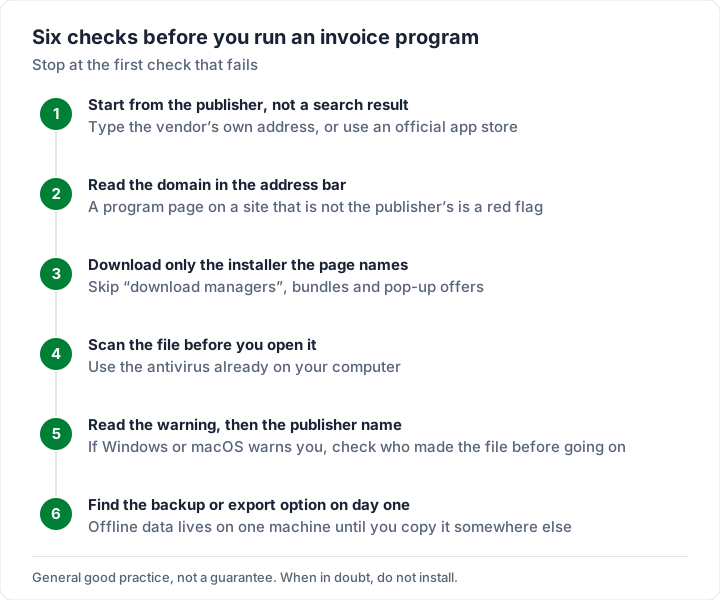
- Start from the publisher. Type the vendor’s own web address, or use an official app store, instead of clicking the first search result.
- Read the domain. The address should belong to the company that makes the program. A program page on an unrelated organisation’s site is a red flag.
- Download only the named installer. Skip “download manager” wrappers, bundled offers and pop-ups.
- Scan the installer. Run it past the antivirus already on your computer before you open it.
- Read the warning, then the publisher name. Windows SmartScreen and macOS both warn about files they do not recognise. Invoiso’s own FAQ says “SmartScreen warns about apps that are not yet widely downloaded” and tells users to click through. Whether you do is your decision: confirm the file came from the publisher’s own page or official release list first, and if anything does not match, do not install.
- Find the backup option on day one. Then use it.
The same habits protect you from invoice fraud in the other direction; our guide to invoice scams covers fake invoices sent to your business.
When a template or a web app is enough#
You may not need a program at all.
A template is enough when you send a handful of invoices a month and are happy to number them and track payment yourself. We publish free Word and Excel invoice templates: two .docx files and two .xlsx files, no sign-up. The Excel versions do the arithmetic; the Word versions are typed by hand. A template does no numbering, reminders or tracking for you. For walkthroughs, see how to create an invoice with Excel, our free Excel invoice template guide and the free Word invoice template guide.
A web app is enough when you have a connection most of the time and want numbering, a client list and sent invoices in one place, without installing or backing anything up. Several have free plans, with different caps and vendor lines; we have free invoicing software compared, with each plan’s limits checked on its own page.
A desktop program makes sense when you work offline often, want your records only on your own machine, or need accounting on the same computer, as with GnuCash.
Charming is a web app, not a download#
Charming Invoices runs in your browser. There is no installer, no Windows or Mac app and no App Store or Google Play app. It has no offline mode built in, so plan on a connection to create or issue an invoice. Installing it as an app from Chrome or Edge, and any use offline, are untested, so we do not describe either. To get to it quickly, bookmark it or pin the tab.
What it does on the free plan:
- Unlimited clients and invoices for 1 business. The catch: free invoices print a small “Sent with Charming Invoices” line, and a second business needs a paid plan.
- All 60 templates with your logo, colours and fonts.
- A PDF of every invoice to download or print, and a private link your client opens without an account. Charming does not email invoices for you: you send the PDF or link however you like.
- Your data is not stuck on one laptop. Sign in from any computer, and export your invoice list as a CSV. The catch: there is no import, so you cannot bring old invoices in from a desktop program.
What it does not do: card payments (clients pay you directly, and you mark invoices paid yourself), estimates or quotes, accounting or bookkeeping, a time tracker, or a mobile app. If you need those, the desktop or web tools above, or a full accounting package, will suit you better.
Paid plans are Individual at $29 once, Team at $79 once (up to 5 teammates) and Pro at $12 a month or $99 a year; lifetime plans are final sale. The details are on the pricing page. If a browser tool suits you, create a free invoice with no card and no invoice cap.
Questions about free invoice software downloads#
Is there free invoice software for Windows 10 and 11?#
Yes. As of 28 October 2026, Express Invoice lists Windows 7 to 11 and has a free version for home users or businesses with 1 user; GnuCash lists Windows 8/10/11; Invoiso offers a Windows installer. Check each vendor’s page for the current conditions before you install.
Is there invoice software that works offline?#
Yes. Invoiso’s page says it “works fully offline” after installation, Express Invoice says you can create invoices and quotes when offline, and GnuCash is a desktop program. Web apps, including Charming, need a connection.
Is free invoice software safe to download?#
It can be, if it comes from the publisher’s own site or an official app store and you scan the installer first. Avoid download pages hosted on unrelated websites, and read any Windows or macOS warning before you go past it.
Can I download Charming Invoices?#
No. Charming is a web app with no desktop or mobile download and no offline mode. You sign in from a browser on any computer or phone. If you want a file instead, our Word and Excel templates are free to download.
What is the difference between invoice software and an invoice template?#
Software keeps a client list, numbers invoices and records what was paid. A template is a single document you fill in each time, so you do those jobs by hand.
The short version#
Decide which “download” you need first. If you work offline and want your records on your own machine, Express Invoice (free for 1 user), Invoiso and GnuCash are free desktop options as of 28 October 2026; get them from the publisher, scan the installer and set up backups on day one. If you send a few invoices a month, a free Word or Excel template may be enough. And if you would rather skip installing altogether, a web app does the numbering and storage for you: start free with Charming Invoices, with your brand on every invoice.