Invoicing software for Mac: native apps, web apps and Numbers

Nnabuike Okoroafor ·
On this page · 12 sections
We make Charming Invoices, which is one of the options covered here. It is a web app, not a Mac app, and we say where a native Mac app is the better choice.
You work on a Mac, you need to send invoices, and you would like the tool to feel at home there.
This guide sorts the choice into three kinds of tool: native Mac apps that install on your computer, web apps that run in Safari or Chrome, and Apple’s own Numbers and Pages. Every vendor fact below comes from the vendor’s own page or its App Store listing, read on 28 October 2026 and linked. Prices and listings change, so check them again before you pay.
In short#
- There are three kinds of Mac invoicing. A native app installs on your Mac and can work offline. A web app runs in your browser and keeps your records on the vendor’s servers. Numbers or Pages turns a spreadsheet or document into an invoice that you export as a PDF.
- Native apps are the better fit for offline work and local data. GrandTotal’s page says your financial data stays on your own computer; NCH’s Express Invoice page says you can generate invoices offline.
- “Free” on the Mac App Store is the download price, not a plan. Every invoicing listing we read was labelled “Free · In-App Purchases”, so open the in-app purchase list and the description to see what the plans cost.
- Check the macOS requirement. Requirements we read ranged from macOS 10.5 to macOS 26.0. Numbers and Pages now list macOS 26.0 or later.
- Charming Invoices is a web app in your Mac browser. There is no native Mac app, no Mac App Store listing and no offline mode. On a phone instead? See our free invoice apps for iPhone and Android.
Three ways to invoice on a Mac#
Each route moves a different job onto you. Native apps make you look after the data. Web apps make you depend on a connection and a vendor. Numbers and Pages make you do the numbering and tracking by hand.
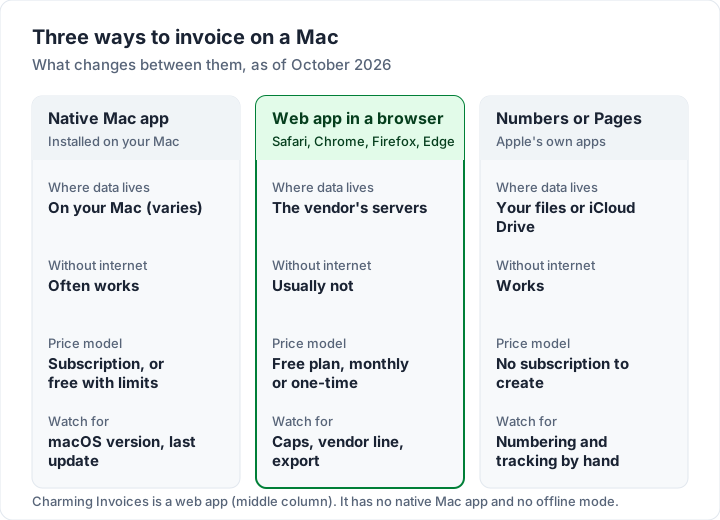
The same comparison as a table, with the questions that usually decide it:
| Native Mac app | Web app in a browser | Numbers or Pages | |
|---|---|---|---|
| Install | From the vendor’s site or the Mac App Store | Nothing; sign in at the vendor’s site | Apple’s apps, from the Mac App Store |
| Works with no internet | Often; check the vendor’s page | Usually not | Yes, for your own files |
| Same records on iPhone or a PC | Varies; some sync, some relay to the Mac | Yes, any browser | Through iCloud, with Apple’s apps |
| Invoice numbers, clients, reminders | Usually built in | Usually built in | You do them by hand |
| How you pay | Subscription, one-time or free with limits | Free plan, subscription or one-time | No subscription needed to create |
Native Mac invoicing apps, checked on 28 October 2026#
These are apps that install on your Mac. We include only those whose own page or App Store listing we read today, and we report what those pages say, not what roundups say about them. If you already track your money in Quicken Classic for Mac, how Quicken invoicing works explains how it sends invoices.
GrandTotal#
GrandTotal, from Media Atelier, calls itself “Invoicing Software for Mac”. The page lists four subscription plans billed in euros: S at €5.90 a month, M at €7.90, L at €9.90 and XL at €14.90. Billed yearly, the page’s prices are €59.00, €79.00, €99.00 and €149.00. The page says it “Requires macOS 10.15 or newer” and invites you to download a free trial.
The reason to choose it is where your records live. In GrandTotal’s own words:
Your financial data stays on your own computer — no external server, no forced cloud.
It also offers more than Charming does in some areas. The M plan lists estimates, and the feature list mentions Stripe payments and e-invoice formats. For your phone or tablet, GrandTotal’s page describes a relay: the file stays on the Mac and the relay passes encrypted data along.
Express Invoice (NCH Software)#
NCH’s Express Invoice page says: “A free version is available for home users or businesses with 1 user.” It adds that this version “does not expire and includes most of the professional version features.” The page lists macOS 10.5 or above (a script on the page shows Mac visitors “Works on macOS 10.9 and above” instead), Windows 7 to 11, and says you can generate invoices and quotes when you are offline or the internet is down. It did not show prices for the paid editions.
The Mac App Store listing for Express Invoice Plus, also from NCH Software, reads differently. Its label is “Free · In-App Purchases”, its description opens with the line “This is a Paid Trial app, advertised feature requires additional subscription”, and its in-app purchase list shows “Express Invoice Subscription” at $10.99, without saying how often. It requires macOS 10.9.0 or later and had been updated the day before we read it.
The website download and the App Store app are listed separately, with their own terms, so read the page for the one you plan to install, and ask NCH if you are unsure which suits you. If you also invoice from a Windows PC, our guide to free invoice software to download covers Windows programs and safe-download checks.
InvoiceAir#
The InvoiceAir listing is from Moon Technolabs Private Limited and covers iPhone, iPad and Mac. On the Mac it requires macOS 12.0 or later. It is labelled “Free · In-App Purchases” and “Contains Advertising”. The in-app purchase list runs from “InvoiceAir Weekly” at $1.99 to “Gold Yearly” at $199.99, with Bronze, Silver, Gold and Lite tiers in between. To see what each tier includes, open the app before you buy.
Native Mac invoicing apps compared#
This table sets the native apps beside Apple’s Numbers, a free plan you use in a browser, and our own product. Every row comes from the linked vendor page or App Store listing, read on 28 October 2026. Charming Invoices is our product, so treat its row as a competitor’s claim and check it on the pricing page. “Not stated” means the page did not say.
| Tool | Kind | Mac requirement | Price as listed | Without internet |
|---|---|---|---|---|
| GrandTotal | Native Mac app | macOS 10.15 or newer | €5.90 to €14.90 a month, or €59.00 to €149.00 a year; free trial | Data stays on your computer, per the page |
| Express Invoice (NCH website) | Native Mac and Windows app | macOS 10.5 or above (10.9 and above shown to Mac visitors) | Free version for home users or businesses with 1 user | Works offline, per the page |
| Express Invoice Plus (Mac App Store) | Native Mac app | macOS 10.9.0 or later | Free · In-App Purchases; subscription $10.99 | Not stated |
| InvoiceAir | App Store app for iPhone, iPad and Mac | macOS 12.0 or later | Free · In-App Purchases; $1.99 a week to $199.99 a year | Not stated |
| Numbers (Apple) | Spreadsheet app | macOS 26.0 or later | Free · In-App Purchases; creating “does not require a subscription” | Your own files |
| Zoho Invoice | Web app | A web browser | Free plan: up to 500 invoices a year, 2 users | Not stated |
| Charming Invoices (ours) | Web app | A modern web browser | Free for 1 business; $29 once, $79 once, or $12 a month or $99 a year | No offline mode |
Web invoicing apps that work in Safari or Chrome#
A web app needs nothing from the Mac App Store. You sign in at the vendor’s website, and the same account works on a PC, an iPhone or a borrowed laptop. The trade is that your records live with the vendor and you need a connection.
Most of the big names are web apps, and we have checked each against its own pages in a separate post:
- QuickBooks Online. See how QuickBooks invoicing works.
- FreshBooks. See how FreshBooks invoicing works for its plans and client limits.
- Zoho Invoice. Zoho’s pricing page says the free plan lets you “Send up to 500 invoices per year” and “Add up to two users”, with “Powered by Zoho Invoice” branding on invoices. More in what the Zoho Invoice free plan includes.
- Invoice Ninja. See Invoice Ninja pricing for its hosted and self-hosted options.
If a free plan is what you are after, we have free invoicing software compared, with each plan’s caps and branding read from its own page.
How to make an invoice in Numbers or Pages on a Mac#
If you send a few invoices a month, you may not need invoicing software at all. Numbers and Pages are Apple’s own apps. The Numbers listing and the Pages listing both say that creating, viewing and editing “does not require a subscription”. Both list an optional Apple Creator Studio purchase, $12.99 a month or $129.00 a year, and both now require macOS 26.0 or later. On an older Mac, check what the App Store offers you.
The Numbers listing mentions Apple-designed templates “from a home budget to an invoice”. If you see an invoice template, use it. If not, start blank and use the layout in the worked example below.
In Numbers (from Apple’s Numbers for Mac guide):
- Open Numbers from the Dock or the Applications folder. If the template chooser does not appear, click New Document in the bottom-left corner.
- Click a category in the sidebar to narrow the choices, then double-click a template, or double-click Blank to start from scratch.
- Click a cell and type to replace the placeholder text with your business, your client and your line items.
- Name the file with the invoice number and client, such as “0042 Okafor”, so you can find it later.
- To send it, choose File, then Export To, then PDF, pick a page layout and image quality, and save (Apple’s export guide). Attach the PDF to an email.
In Pages: the export route is the same, File, then Export To, then PDF (Apple’s Pages for Mac guide). Pages suits a letter-style invoice; Numbers does the sums for you.
Always send the PDF, not the Numbers or Pages file. Your client may not have the app, and a PDF opens the same way in Preview, Acrobat or a phone.
If you would rather start from a ready file, we publish free Word and Excel invoice templates. They are made for Word and Excel; Pages and Numbers may open them after conversion, but we have not checked that, so check the totals before you send one. Our guides to the free Excel invoice template and the free Word invoice template walk through each one, and building an invoice in a spreadsheet covers the formulas.
Worked example: a designer’s invoice in Numbers#
Here is a sample invoice for an invented design studio, the kind you can build in a blank Numbers sheet.
Header: Harbour Lane Studio (sample), with address and email. Invoice 0042, issued 28 October 2026, due 11 November 2026 (14 days). Bill to: A. Okafor, Okafor Bakery.
| Description | Qty | Rate | Amount |
|---|---|---|---|
| Logo design: 3 concepts and 2 revision rounds | 1 | $1,200.00 | $1,200.00 |
| Brand guidelines, 12-page PDF | 1 | $650.00 | $650.00 |
| Social media templates | 6 | $45.00 | $270.00 |
| Total due | $2,120.00 |
How to pay: bank transfer, quoting 0042 as the reference.
In Numbers, type an equals sign in each Amount cell and multiply Qty by Rate, then add a SUM under the column. The sheet then catches the mistake a hand-typed total would not: 6 templates at $45.00 is $270.00, not the $240.00 a tired brain might type.
What Numbers will not do is the bookkeeping around the invoice. You choose 0043 for the next one, you remember who has paid, and you chase the late ones. That is the point where most people move to an invoicing app.
What to check on a Mac App Store listing before you buy#
Every Mac App Store listing has the same fields, and the useful ones are below the fold. Here is what each told us today, using the listings above.
| Field on the listing | What to look for | What we saw on 28 October 2026 |
|---|---|---|
| Price label | “Free” alone, or “Free · In-App Purchases” | Both invoicing apps, and Numbers and Pages, showed “Free · In-App Purchases” |
| Description, first lines | Trial or subscription wording | Express Invoice Plus opens with “This is a Paid Trial app” |
| In-App Purchases | Names and prices of plans | InvoiceAir lists 10 items, from $1.99 to $199.99 |
| Compatibility | The macOS version you need | From macOS 10.9.0 (Express Invoice Plus) to 26.0 (Numbers) |
| Seller | The company you are trusting with your records | NCH Software; Moon Technolabs Private Limited; Apple |
| Version history | When it was last updated | Express Invoice Plus and InvoiceAir were both updated in the last few days |
| App Privacy | What data the developer says it collects | Each listing shows the developer’s own data labels; read them for any app you shortlist |
Look at the last update date before you commit. An app that has not been updated in years may stop working after a macOS upgrade. Both App Store invoicing apps above had a recent update; check again on the day you buy.
Subscription or one-time: a three-year worked example#
How you pay matters as much as the monthly figure, because invoicing software tends to stay for years. Here is the cost over three years at the prices listed on 28 October 2026. GrandTotal prices are in euros as the vendor lists them; we have not converted them.
| Option | How it is priced | Cost over 3 years |
|---|---|---|
| Numbers or Pages | No subscription to create | $0 |
| Charming Invoices Free | $0 forever, 1 business | $0 |
| Charming Invoices Individual | $29 once | $29 |
| Charming Invoices Pro, yearly | $99 a year | $297 |
| Charming Invoices Pro, monthly | $12 a month | $432 |
| GrandTotal S, yearly | €59.00 a year | €177.00 |
| GrandTotal S, monthly | €5.90 a month | €212.40 |
| GrandTotal XL, monthly | €14.90 a month | €536.40 |
The sums are simple: €5.90 × 36 months is €212.40, and $99 × 3 years is $297. Express Invoice Plus and InvoiceAir are left out because their listings do not say how often each subscription item renews.
The cheapest line is not automatically the right one. GrandTotal’s higher plans include estimates and other features Charming does not offer, and it keeps your data on your Mac. If those matter, the subscription buys them. If you only need to send branded invoices and track who has paid, a one-time payment costs less over time. We explain our reasoning in why we built a lifetime plan. Lifetime plans are final sale, so try the free plan first.
Which one fits you#
Four questions settle most cases. Answer from the top and stop at the first Yes.
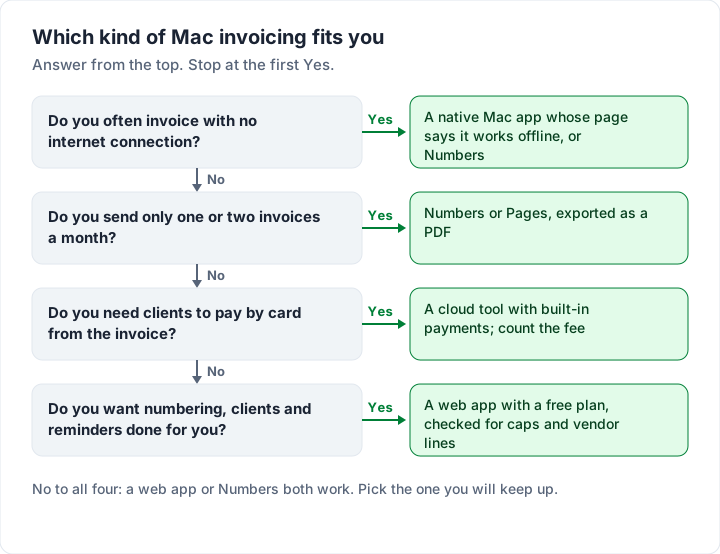
Charming fits the last box, not the third: it does not take card payments.
For a fuller test of any app, use our eight questions to ask any invoicing app.
On an iPad#
Several of the tools above run on Mac, iPhone and iPad from one listing, so the iPad answer is mostly the same list.
- Numbers and Pages list iPhone, iPad and Mac, and need iPadOS 26.0 or later on an iPad. Files saved in iCloud Drive open on each device.
- InvoiceAir lists iPad as well as Mac, with iPadOS 15.0 or later.
- GrandTotal describes using it on your phone and tablet while the Mac stays in the office, with the file kept on the Mac.
- Web apps, Charming included, open in Safari on an iPad like any website. They need a connection.
On a phone rather than a tablet, our guide to free invoice apps for iPhone and Android checks the phone listings one by one.
Where Charming fits on a Mac, and where it does not#
We make Charming Invoices, so here is exactly what it is on a Mac, with the catches next to the benefits.
What it is. Charming is a web app. You sign in at charminginvoices.com in your browser, and the same account works on a PC or a phone. There is no native Mac app and no Mac App Store listing. We have not tested it as a Safari web app in the Dock, so we give no steps for that here; bookmark it or keep it in a pinned tab.
What you get on the free plan:
- Unlimited clients and invoices for 1 business. The catch: free invoices carry a small “Sent with Charming Invoices” line, and a second business needs a paid plan.
- Your brand on every invoice. 60 invoice templates, 30 fonts set separately for headings and body, any brand colour, your logo and a full-page letterhead, A4 or Letter.
- A PDF and a private link. Issue an invoice, then download the PDF or copy a private link that opens without an account, and send it from Mail or however you like. The PDF opens in Preview like any other.
- Records. Overdue invoices flagged automatically, client statements as PDF, and a CSV export of your invoices. Charming does not send reminders; set one in Calendar for the due date.
The catches:
- No offline mode. You need a connection to create or issue an invoice. If you often work offline, a native app is the better tool.
- No card payments. Clients pay you directly, by bank transfer or your own payment link, and you mark the invoice paid yourself.
- No estimates, time tracker or accounting integrations. If you need a timer on your Mac, use a separate time tracker; Charming does not track time. If you need estimates, GrandTotal’s M plan or a cloud tool with quotes fits better.
- Paid plans. Individual is $29 once, Team is $79 once for up to 5 teammates, and Pro is $12 a month or $99 a year. Paid plans add unlimited businesses, recurring invoice drafts, saved line items, AI line-item drafting, and the footer line hidden by default. Lifetime plans are final sale. Full details are on the pricing page.
If a web app in your Mac browser fits how you work, you can create a free invoice now, with no card and no invoice cap.
Questions about invoicing software for Mac#
Is there free invoicing software for Mac?#
Yes, in three forms. Numbers and Pages are free to create with. NCH’s website offers a free version of Express Invoice for home users or businesses with 1 user. Several web apps have free plans you use in Safari: Zoho Invoice allows up to 500 invoices a year, and Charming has no invoice cap for 1 business. Each has limits, so read them; our comparison of the best free invoicing software sets them side by side.
Which Mac invoice apps work offline?#
Native apps are the ones to look at. NCH’s page says Express Invoice can generate invoices when you are offline, and GrandTotal keeps your data on your Mac. Numbers and Pages work on your own files without a connection. Test any app with Wi-Fi turned off before you rely on it. Charming does not work offline.
Is there a one-time-purchase invoicing app for Mac?#
Of the native apps we read today, none listed a one-time price: GrandTotal lists monthly subscriptions, the App Store apps list subscription items, and NCH’s page did not show prices for its paid editions. Charming’s Individual plan is $29 once and Team is $79 once, but Charming is a web app, not a Mac app.
Does Charming Invoices have a Mac app?#
No. Charming runs in your Mac’s web browser. There is no Mac App Store listing and no offline mode.
The short version#
Invoicing software for Mac comes in three kinds. A native app keeps your data on your Mac and can work offline, usually for a subscription. A web app works in Safari or Chrome with nothing to install, and needs a connection. Numbers and Pages cost nothing to create with and leave the bookkeeping to you. Read past the “Free” label on any App Store listing, check the macOS requirement and the last update, and pick the kind that matches how and where you work. If that is a web app with no invoice cap and a one-time price when you upgrade, start free with Charming Invoices.