Invoice Ninja: review, pricing and 8 alternatives

Nnabuike Okoroafor ·
On this page · 16 sections
Disclosure: We make Charming Invoices, which is one of the options covered here. Charming is not open source and cannot be self-hosted, and we say where Invoice Ninja is the better choice.
Invoice Ninja is an invoicing app you can use hosted, on its own servers, or run on yours. If you came here only to log in, the hosted app is at app.invoicing.co: the “Sign in” button on Invoice Ninja’s website leads there. If you are deciding whether to use it, or comparing it with other tools, read on.
This guide starts with what Invoice Ninja does, what it costs and what self-hosting it involves, all from Invoice Ninja’s own pricing page, documentation and code repository, read on 23 October 2026 and linked. Then it compares eight alternatives and matches each one to a need: more than 5 clients on a free plan, invoices with no vendor line, a one-time price, an app focused on invoicing only, or a particular licence. The alternatives’ prices and limits come from each vendor’s own pages, read on 22 October 2026.
General information, not legal advice: where a licence comes up, we quote it and link it rather than interpret it.
In short#
- Invoice Ninja is a broad, actively maintained app. Online payment gateways on the free plan, recurring invoices with auto-billing, a client portal, quotes, projects and time tracking, and a codebase you can self-host.
- Its hosted Free plan stops at 5 clients. Pro, at $14 a month or $140 a year, lifts the cap, removes “Created by Invoice Ninja” and adds automatic late-payment reminders (as of 23 October 2026).
- Self-hosting is free to download, not free to run. You supply the server, updates and backups; a $40-a-year white-label licence removes its branding from client-facing pages.
- Its code is public under the Elastic License 2.0. The repository calls it “source-available”. If the licence matters to your use, read it yourself or ask a lawyer.
- If you need more than 5 clients at $0: Zoho Invoice, Wave Starter, Square Free and Charming Free state no client cap on their free plans.
- If clients must pay by card from the invoice: Square, PayPal, Wave or FreshBooks, or stay on Invoice Ninja. Charming takes no card payments.
Invoice Ninja at a glance#
As listed on Invoice Ninja’s own pages on 23 October 2026:
| Question | Answer, from Invoice Ninja’s pages |
|---|---|
| Hosted plans | Free ($0, up to 5 clients); Ninja Pro ($14 a month or $140 a year); Enterprise ($18 to $300 a month, by number of users); Premium Business (from $280 a year) |
| Self-hosted | Free to download from GitHub; optional white-label licence, $40 a year |
| Where to log in (hosted) | app.invoicing.co |
| Demo | react.invoicing.co/demo, linked from the README |
| Apps | iOS, Android, macOS, Windows and Linux, plus the web app (apps page) |
| Payment gateways | Stripe, PayPal, Square, GoCardless and more (gateway list) |
| Support | Community forum and docs on every plan; “Priority direct support” from Pro |
| Licence | Elastic License 2.0; the README calls the code “source-available” |
| Latest release | v5.13.50, published 21 October 2026 |
Invoice Ninja review: what it does and who it suits#
This is not a star-rated review. We did not run a scored test, and we will not invent one. What follows is what Invoice Ninja’s own pages, documentation and repository say, as of 23 October 2026, with the limits next to the features.
It is broad. The GitHub repository describes “a source-available invoice, quote, project and time-tracking app built with Laravel”.
Invoices, quotes and recurring billing#
The pricing page lists unlimited invoicing on Free, with “Auto-Billing & Recurring Invoices”, “Accept Deposits & Partial Payments”, a real-time PDF preview, automatic currency conversions and product and inventory management. Quotes sit beside invoices: the invoicing page is headed “Invoicing, Quotes & Payments”. If quotes are the main reason you are looking, our comparison of quote and invoice software covers how Invoice Ninja turns an accepted quote into an invoice, next to eight other tools.
Plan note: “Auto Late-Payment Reminder Emails” are listed from Pro up, so on Free you send reminders yourself.
Payment gateways#
Online payments are on every plan. Invoice Ninja’s gateways page lists Stripe, PayPal and Venmo, Square, GoCardless, Authorize.net, Mollie, Checkout.com, PayFast and Braintree, and “also supported” PayTrace, RazorPay, Eway Rapid, csg Forte and BTCPay (Bitcoin), plus custom payment instructions such as bank wire details. Its gateway docs say you can connect more than one gateway and route payments between them, for example by invoice amount.
How the money moves: payments go through the gateway you connect. You open an account with the gateway and pay its fee on each payment; for what that costs on Stripe, see how a Stripe invoice works and what it costs.
Client portal#
Free includes a “Client-Side Invoice & Payment Portal”, where clients view invoices and pay. A branded portal address is paid: Pro lists “YourSite.invoicing.co” and Enterprise “Billing.YourCompany.com”.
Time tracking and projects#
Free lists “Create Projects & Track Billable Time” and “Kanban Boards for Projects”. The tasks docs describe a task as “a time entry”, with a start and stop timer and an “Invoice Task” action that creates an invoice from it. The apps page also lists a Chrome “Tasks” extension. For payroll, use dedicated payroll software alongside whichever invoicing app you choose.
Invoice templates and designs#
The pricing page lists “11 Professional Invoice Templates”. Its invoice templates page says “All free accounts include 4 beautifully designed invoice templates” and that Pro or Enterprise unlocks all 11. Customising invoice designs is listed from Pro up. If the number matters, check the template list in a free account.
The templates docs cover something different: HTML and CSS documents built with the Twig templating engine, with prebuilt ones for statements, payment receipts, refund receipts and delivery notes.
Integrations, import and the API#
- Automation platforms: the pricing table lists “Zapier / Make / n8n” on every plan, and the automations page also names Integrately, Pabbly Connect, Boost.space, Pipedream and OttoKit.
- REST API: Pro and Enterprise only.
- QuickBooks Online: the QuickBooks docs describe a connection that imports from QuickBooks and pushes Invoice Ninja records to it, and say “Only Push is supported for ongoing synchronisation.” The page does not name a plan.
- Bank account sync: Enterprise, through Yodlee or GoCardless.
- CSV import: the import and export docs cover CSV imports with column matching, plus imports from FreshBooks, Invoice2go, Invoicely, Wave and Zoho files.
- WooCommerce: if you sell through WooCommerce, our WooCommerce invoice guide compares free PDF invoice plugins instead.
Apps for desktop and mobile#
The apps page lists iOS and Android apps, an Android APK and an F-Droid listing, desktop apps for macOS (Mac App Store), Windows (Microsoft Store) and Linux (Snap; the README adds Flatpak), and the web app. The README says “The self-hosted options do support the desktop and mobile apps.” One note from the docs: the desktop and mobile apps load all company data at login, so for large accounts or many users the docs recommend the web app.
Support#
The pricing table lists “Community forum & docs” on every plan and “Priority direct support” from Pro up; Premium Business adds a developer concierge. Paid plans come with a “30-day money back promise”, per the pricing FAQ.
Who it suits#
It suits a business that wants card or direct-debit payments from the invoice without a monthly fee, quotes and time tracking in the same app, or the option to run the software on its own server. The plan facts to note: Free covers up to 5 clients and prints “Created by Invoice Ninja”, and automatic reminders and design customisation are on paid plans. If those fit how you work, you may not need an alternative at all.
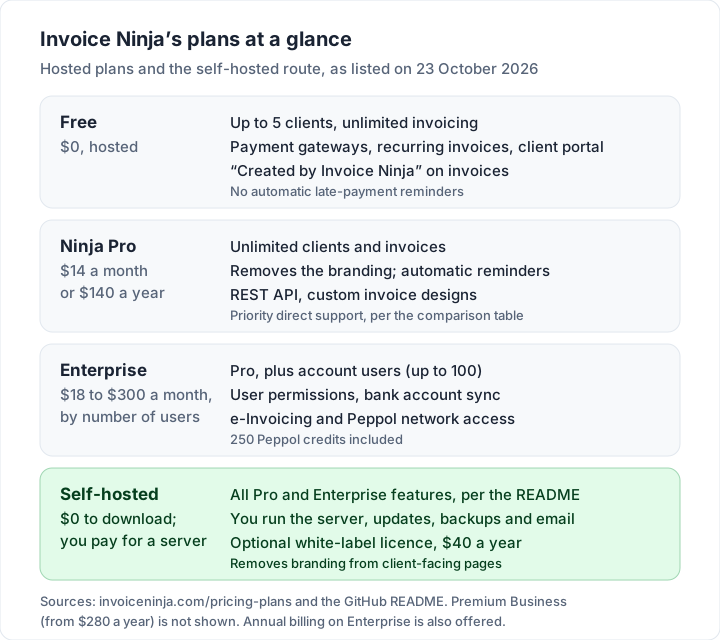
Invoice Ninja pricing and limits, October 2026#
Here are the hosted plans as listed on Invoice Ninja’s pricing page on 23 October 2026.
| Plan | Price | Clients | What it adds |
|---|---|---|---|
| Free | $0, “Forever free” | Up to 5 | Unlimited invoicing, payment gateways, recurring invoices, client portal, projects and time tracking |
| Ninja Pro | $14 a month, or $140 a year | Unlimited | Removes “Created by Invoice Ninja”, automatic late-payment reminders, REST API, custom invoice designs, email via Gmail, MSN or your own SMTP |
| Enterprise | From $18 a month (1–2 users) to $300 a month (51–100 users) | Unlimited | “Add Account Users (up to 100!)”, user permissions, bank account sync, e-invoicing and Peppol access with 250 credits |
| Premium Business | “Custom”, from $280 a year | Unlimited | All Pro and Enterprise features, plus priority support, a developer concierge and an invoice design service |
Three more points from the same pages:
- Yearly billing is “2 months free”. The FAQ’s example: Pro is “$14/month billed monthly, or $140 billed annually”.
- Enterprise is priced by user count. The FAQ gives $18 a month for 1 to 2 users and $300 for 51 to 100; the price for each band in between shows when you pick a user count on the page.
- White-label pricing is in the README: “We offer a $40 per year white-label license to remove the Invoice Ninja branding from client-facing parts of the app.” That licence is for self-hosted copies; on hosted plans, Pro removes the branding.
Self-hosting Invoice Ninja: what it involves#
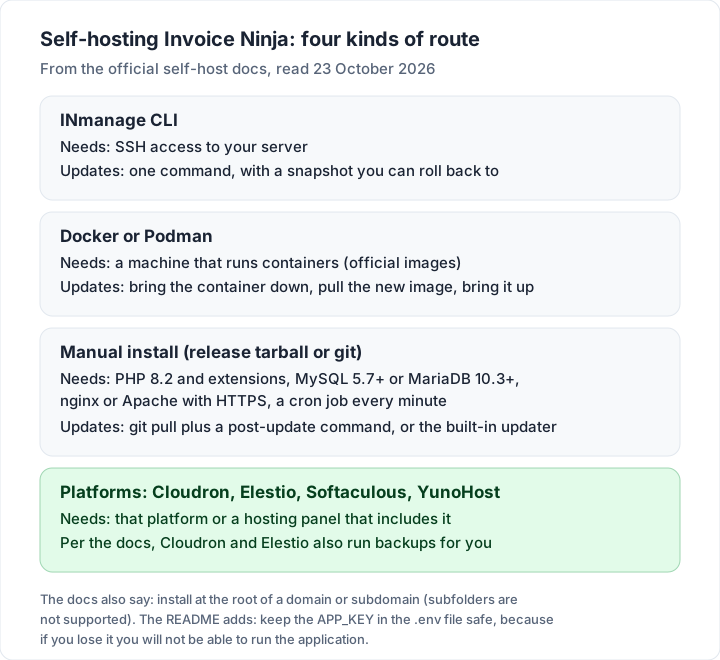
Self-hosted Invoice Ninja is the same app on your own server. The README says “All Pro and Enterprise features from the hosted app are included in the source-available code”, which includes Pro’s unlimited clients. What it adds is work. This section sums up Invoice Ninja’s own self-host installation guide and updating guide, read on 23 October 2026. It is a map, not a security guide: follow the docs themselves when you install.
What the server needs. The installation guide lists PHP 8.2 with a set of extensions, MySQL 5.7+ or MariaDB 10.3+, and nginx or Apache “with HTTPS enabled”, plus a cron job that runs the scheduler every minute and, once you have root access, a queue worker. It must be installed at the root of a domain or subdomain; the guide says subdirectories “are not supported”. Shared hosting can work if the host allows cron and a few PHP functions the guide names.
The install routes. The guide offers the INmanage command-line tool (which “Requires SSH access”), official Docker images, a manual install from the release tarball or git, and one-click or managed routes through Cloudron, Softaculous, Elestio and YunoHost. For git installs it notes that “The React UI is not included and needs to be wired manually”, so check the guide’s recommended route for production use.
Updates. Each route updates differently: one command with the CLI, pulling a new image with Docker, a git pull and a post-update command for git installs, or the built-in updater for ZIP builds. You decide when to update, and you do it.
Branding and e-invoicing. The white-labelling docs say the licence removes Invoice Ninja branding from client-facing pages and PDFs, while the admin interface and admin notification emails keep it. The same page says that “to support e-invoicing” you add the white-label licence key to the configuration file.
Support for self-hosted copies. The self-host troubleshooting page says “Consult the Invoice Ninja forum for community support.”
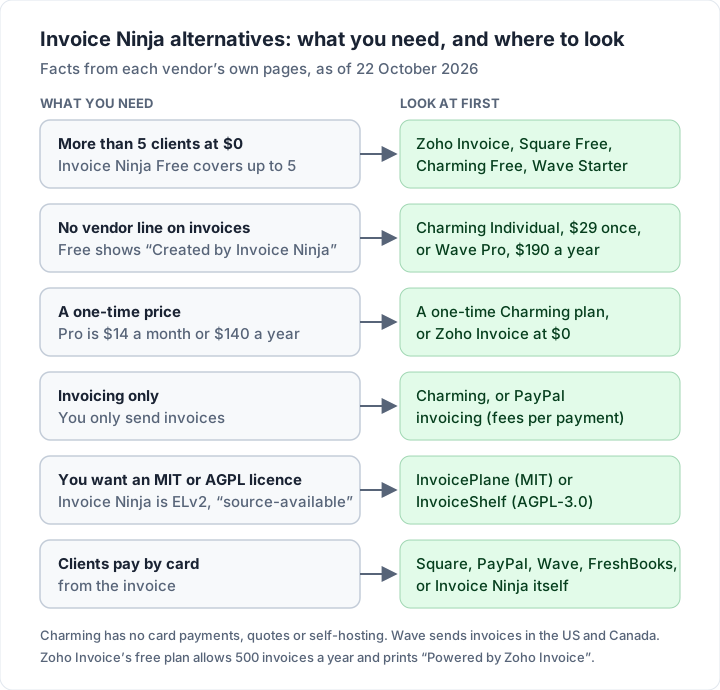
Here is what changes between the two, side by side:
| What it takes | Hosted Invoice Ninja | Self-hosted Invoice Ninja |
|---|---|---|
| Software | Free up to 5 clients; Pro $140 a year | $0 to download |
| Removing the branding | Pro or higher | White-label licence, $40 a year |
| Server | Run by Invoice Ninja | Yours, with PHP, a database and a web server |
| Updates | Not your job | Yours, by the route you installed with |
| Email sending | Built in; Pro adds Gmail, MSN or your own SMTP | You configure a mail service |
| Help | Forum and docs; direct support from Pro | The troubleshooting page points to the forum |
For an illustrative yearly server cost and a comparison with six other self-hosted projects, see our guide to open source invoicing software.
What to weigh when you compare#
From the pricing page and the licence, five points decide most comparisons. Here they are, with the listed facts for each.
1. Number of clients. Free covers up to 5 clients. A freelancer with 12 regular clients would use Pro or a self-hosted copy.
2. The line on free invoices. Free invoices carry “Created by Invoice Ninja”. Pro removes it for $140 a year on hosted plans; on a self-hosted copy, the README says the $40-a-year white-label licence removes it.
3. Subscription or one-time price. Pro is a subscription: over five years at the yearly price it is $700.
4. How many features you need. Projects, time tracking, quotes, credits, expenses and a client portal are all in the app. If you only send invoices and track who has paid, a narrower tool may also suit you.
5. The licence. Invoice Ninja’s repository uses the Elastic License 2.0, and its README describes the code as “source-available”. If a particular kind of licence matters to you, the section below quotes the file and points you to the full text.
What licence does Invoice Ninja use?#
The first line of the repository’s LICENSE file reads “Elastic License 2.0 (ELv2)”, and the README’s licence section says “Invoice Ninja is released under the Elastic License.” Under “Limitations”, the file says:
You may not provide the software to third parties as a hosted or managed service, where the service provides users with access to any substantial set of the features or functionality of the software.
It has two more limitations, on the licence-key functionality and on licensing notices. We have not summarised them because the exact wording matters. The README describes the code as “source-available”. Both texts were unchanged when we re-read them on 23 October 2026.
Invoice Ninja also publishes a licence page in its docs that sets out, in its words, “our interpretation of the license”, with examples. We link it rather than summarise it.
We are not giving a legal reading of what the licence allows in your case: read the full file yourself or ask a lawyer. If you want software under a different licence, our guide to open source invoicing software lists the licence each of six self-hosted projects states, read on 22 October 2026.
The alternatives compared#
Here are the eight alternatives side by side, with Invoice Ninja as the reference row. Prices are regular list prices in US dollars from each vendor’s own page, as of 22 October 2026 (Invoice Ninja’s re-read on 23 October 2026); several vendors run time-limited promotions that are not shown. “Not checked” means we did not verify that feature, not that the tool lacks it.
| Tool | Free plan and its main limit | Card payments from the invoice | Quotes or estimates | First paid step |
|---|---|---|---|---|
| Invoice Ninja (reference) | Up to 5 clients, unlimited invoicing | Yes, through your gateway | Yes | Pro, $14 a month or $140 a year |
| Zoho Invoice | 500 invoices a year, 2 users | Through your gateway | Yes, quotes | No paid tier listed |
| Wave | Starter: unlimited invoices; US and Canada only | Yes, 2.9% + $0.60 per card on Starter | Yes, estimates | Pro, $19 a month or $190 a year |
| FreshBooks | No free plan; 30-day trial | Yes, 2.9% + $0.30 per card; 1% bank transfer | Yes, from Lite | Lite, $23 a month, 5 billable clients |
| Square Invoices | Free: unlimited invoices | Yes, 3.3% + 30¢ on Free | Yes, estimates | Plus, $49 a month per location |
| PayPal invoicing | Free to send; paid per payment | Yes, 2.99% + $0.49 per card | Not checked | None: fees per payment |
| Charming Invoices | Unlimited invoices and clients, 1 business | No | No | Individual, $29 once |
| InvoicePlane (self-hosted) | Free to download, MIT | Through gateways you set up | Yes, quotes | None; you pay for the server |
| InvoiceShelf (self-hosted) | Free to download, AGPL-3.0 | Not checked | Yes, estimates | None; you pay for the server |
The column that matters most depends on what you need, so the next sections take each tool in turn.
Hosted Invoice Ninja alternatives, one by one#
Facts below are as of 22 October 2026, from the pages linked in the table, unless another date is given.
Zoho Invoice: the closest like-for-like at $0#
What you get: Zoho’s pricing page calls it a “forever-free invoicing solution”, with quotes, recurring invoices, automated payment reminders, a self-service customer portal and time logging. That is much of Invoice Ninja’s free feature list, with reminders added.
Plan details: “up to 500 invoices per year”, up to two users, a maximum of three projects, up to two organisations, and “Powered by Zoho Invoice” branding on your invoices. Its help article on branding names Zoho Billing as the route to invoices without it. Our Zoho Invoice guide covers its free plan in detail.
Choose it if: you need more than 5 clients at $0 and send fewer than about 40 invoices a month.
Wave: free invoicing plus bookkeeping, in two countries#
What you get: Starter is $0 with unlimited estimates, invoices and bookkeeping records. Online card payments cost 2.9% + $0.60 per transaction on Starter (3.4% + $0.60 for Amex). Pro, at $19 a month or $190 a year, removes Wave branding and makes the first 10 card transactions each month 2.9% + $0.
Plan details: automated late-payment reminders are listed on Pro, or with Wave’s online payments. Wave’s help centre says sending invoices and reminders through Wave is for users in the US and Canada.
Choose it if: you are in the US or Canada and want bookkeeping beside your invoices.
FreshBooks: the accounting-first choice, priced by client count#
What you get: estimates, time tracking, recurring invoices and automated late-payment reminders on every plan, plus card payments at 2.9% + $0.30 and bank transfers at 1%. Lite is $23 a month, Plus $43 and Premium $70, with team members at $11 a month each.
Plan details: plans are priced by client count. Lite allows 5 billable clients, Plus 50 and Premium unlimited. FreshBooks’ pricing FAQ (re-read on 23 October 2026) says “The client limit on each of FreshBooks plans refers to the number of both active and archived clients in your account”. Removing FreshBooks branding is listed on its Select plan. Our guide to FreshBooks invoices covers its plans and client limits in full.
Choose it if: you want full accounting software with invoicing inside and are happy to pay monthly. If accounting is the point, our guide to Xero invoicing covers another accounting-first option.
Square Invoices: free invoicing, paid for by card fees#
What you get: Square’s invoice pricing page says you can “Send unlimited invoices” on its Free plan, with recurring invoices, estimates and contracts, deposits and automatic reminders before, on or after the due date. Plus adds custom invoice templates and a milestone payment schedule, for $49 a month per location, according to the pricing page’s fee table (Premium is $149).
Fees: Square’s fees help article lists 3.3% + 30¢ for an invoice paid online by card on Free, and 2.9% + 30¢ on Plus and Premium. Bank (ACH) payments through an invoice cost 1% with a $1 minimum, with a $10 cap only on Plus and Premium.
Choose it if: your clients pay by card, or you already use Square at a till.
PayPal invoicing: no subscription, fees on every payment#
What you get: PayPal’s invoicing page says “Creating and sending invoices is included with your account”, with your logo and brand colours, recurring invoices and automatic reminders.
Fees: each payment costs 2.99% + $0.49 by card, 3.49% + $0.49 by PayPal or Venmo, 4.99% + $0.49 for Pay Later, and 1% with a $10 cap by bank. On a $1,000.00 invoice paid by card, that is $30.39.
Choose it if: your clients already pay through PayPal or Venmo and you invoice occasionally.
Charming Invoices: unlimited clients on Free, a one-time price for the rest#
What you get: Charming’s free plan has no invoice or client cap for 1 business, all 60 templates with your own logo, any brand colour, 30 fonts and a letterhead, a PDF to download or print and a private link your client opens without an account, invoice numbering, manual payment tracking with part payments, overdue invoices flagged automatically, and CSV export of your invoices. Paid plans add unlimited businesses and recurring invoices: Individual is $29 once, Team is $79 once with up to 5 teammates, and Pro is $12 a month or $99 a year.
The catches, next to the benefits:
- No payment gateways. Clients cannot pay by card from a Charming invoice. Your bank details or your own payment link print on it, the client pays you directly, and you mark it paid.
- No quotes or estimates, no time tracking, no expenses, no client portal and no app-store mobile app.
- Not open source and not self-hostable. The code is not public.
- CSV export, but no import. You can export your invoices as CSV; clients and invoices from another app are re-entered by hand.
- Free invoices carry a small “Sent with Charming Invoices” line, and Free is 1 business. Paid plans hide the line by default.
- No email sending or reminders. You issue the invoice, then send the PDF or link however you like.
- Recurring invoices create drafts for you to review and issue; nothing is sent or charged automatically.
- Lifetime plans are final sale, with no refunds. “Lifetime” means for as long as Charming Invoices runs. If you are unsure, use the free plan.
Choose it if: you want branded invoices for any number of clients, your clients pay by bank transfer or your own payment link, and you would rather pay once than every year.
Self-hosted Invoice Ninja alternatives, in brief#
If self-hosting is the point, there are projects under other licences, such as MIT and AGPL-3.0. We compare six of them, with release activity, e-invoicing support and an illustrative cost of running a server, in open source invoicing software. The two most often named next to Invoice Ninja, as read on GitHub on 22 October 2026:
- InvoicePlane: MIT licence plus trademark terms on its name and logo. Invoices, quotes, clients and payment tracking with reminders and gateways. Latest stable release v1.7.2, 28 August 2026.
- InvoiceShelf: AGPL-3.0. Invoices and estimates, payments, expenses, recurring invoices and a client portal. Latest stable release 2.4.7, 21 October 2026. Its default branch is a 3.x preview that its README says is “not for production data”, so production users should take the 2.x release.
One honest point: self-hosted Invoice Ninja is itself an alternative to hosted Invoice Ninja. If you like the app and need more than 5 clients without a subscription, running your own copy keeps everything you know. You take on updates, backups and the server instead of a subscription.
Which alternative fits what you need#
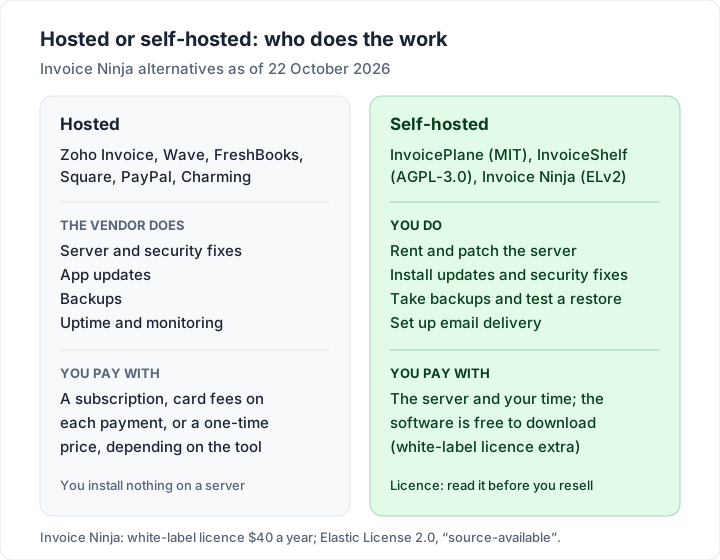
Find your main need in the left column.
| What you need | Look at first | Also check |
|---|---|---|
| More than 5 clients at $0 | Zoho Invoice, Square Free, Charming Free, Wave Starter | Zoho Invoice: 500 invoices a year; Wave: sending in the US and Canada; FreshBooks Lite: 5 billable clients |
| Invoices with no vendor line | Charming Individual ($29 once), Wave Pro ($190 a year) | Zoho Invoice’s free plan lists “Powered by Zoho Invoice” on invoices |
| A one-time price | Charming Individual or Team (one-time), Zoho Invoice ($0) | Lifetime plans are final sale |
| An app focused on invoicing only | Charming, PayPal invoicing | No quotes or card payments on Charming; PayPal charges per payment |
| You want an MIT or AGPL licence | InvoicePlane (MIT), InvoiceShelf (AGPL-3.0) | Read the licence; you run the server and the updates |
| You need accounting too | Wave (US and Canada), FreshBooks | FreshBooks prices by client count |
| Clients pay by card on the invoice | Square, PayPal, Wave, FreshBooks, or stay on Invoice Ninja | Card fees of roughly 2.9% to 3.3% plus a fixed amount |
Zoho Invoice or Wave?#
They are the two free options people weigh most. Zoho Invoice lists quotes, a portal, time logging and reminders on its free plan and is available outside North America; its free plan allows 500 invoices a year and shows “Powered by Zoho Invoice” on invoices. Wave adds bookkeeping and lists unlimited invoices on Starter; sending through Wave is for users in the US and Canada, and reminders and branding removal are listed on Pro or with online payments. Outside the US and Canada, Zoho Invoice is the one of the two that sends invoices for you.
What the switch costs: a two-year worked example#
Here is one illustrative freelancer (an invented example, not a customer): 12 regular clients, about 10 invoices a month, clients paying by bank transfer, and a wish to send invoices with no vendor name on them. That rules out Invoice Ninja Free on clients and branding, so the question is what each route costs over 24 months at regular list prices (Invoice Ninja’s read on 23 October 2026, the others on 22 October 2026).
| Route | How it is charged | Two-year cost | Note |
|---|---|---|---|
| Invoice Ninja Pro, monthly | $14 a month × 24 | $336.00 | You keep the app you know |
| Invoice Ninja Pro, yearly | $140 a year × 2 | $280.00 | You keep the app you know |
| Self-hosted Invoice Ninja with white-label licence | $40 a year × 2, plus a server | $80.00 plus the server and your time | You run updates and backups |
| FreshBooks Plus (Lite allows 5 clients) | $43 a month × 24 | $1,032.00 | Branding removal is listed on Select |
| Wave Pro, yearly | $190 a year × 2 | $380.00 | Sends in the US and Canada |
| Charming Individual | $29 once | $29.00 | No card payments or quotes |
| Zoho Invoice | Free plan | $0.00 | “Powered by Zoho Invoice” on invoices |
For the server, our open source invoicing software post works through an illustrative estimate of $93.60 a year in cash for a small server with daily backups, before your time. The cheapest line here is not automatically the right one: if your clients pay by card, a tool without a card button costs you in other ways. For what card fees add up to, see invoice payment fees on Square, PayPal and Stripe.
How to switch without losing your records#
Changing invoicing app is mostly bookkeeping hygiene. Do it in this order.
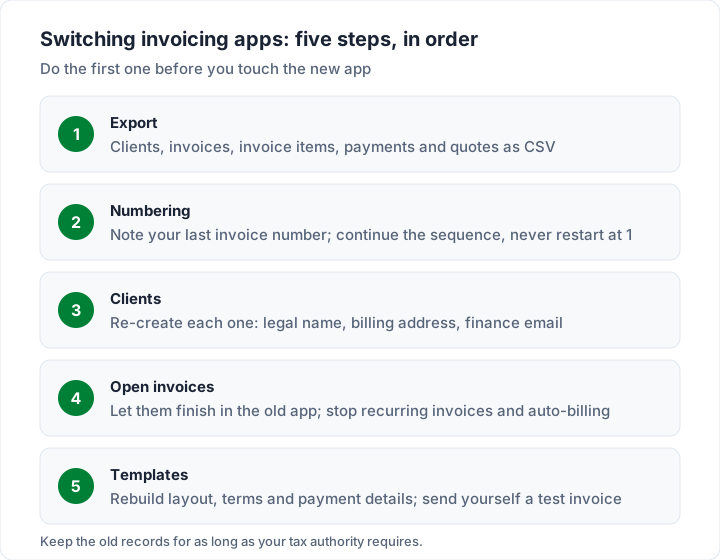
- Export everything first. Invoice Ninja’s reports guide says “Export generates a CSV you can open in Excel, Google Sheets, or LibreOffice”, and the report types include Clients, Invoices, Quotes, Payments, Credits, Expenses, Recurring Invoices, Products and Invoice Items. Export each one you use, and keep a PDF of any sent invoice you may need to show later.
- Stop recurring invoices and auto-billing in the old app. Do this before your first invoice goes out from the new one, or a client may be billed twice.
- Let open invoices finish where they started. An unpaid invoice already has a number and has been sent. Record its payment in Invoice Ninja rather than re-issuing it under a new number in the new app. Keep the old account until the last one is paid or you have exported the final state.
- Carry your numbering on. Note your last invoice number and start the new app from the next one, so your records have no gap or duplicate. Our guide to how to number invoices explains why a continuous sequence matters. In Charming, a “Next invoice number” setting lets you continue from an old sequence; it can be raised but never lowered below the current value. Switching invoicing apps without breaking invoice numbers covers voided numbers, year-reset formats and open invoices in more detail.
- Re-create your clients. Check each client’s legal name, billing address and finance email as you go. Charming has no CSV import, so clients are re-entered by hand: a few minutes for 5 clients, longer for 50.
- Rebuild your template and payment details. Logo, colours, payment terms, bank details and any payment link. Send yourself a test invoice before sending a real one.
- Tell your clients what changed. If your payment details or link changed, say so in the first invoice email from the new app.
- Keep the old records. Invoices often need keeping for years, longer than you may keep any one app. Our guide to how to choose invoicing software quotes the official US, UK and Australian pages on keeping records; ask your accountant what applies to you.
If you used Invoice Ninja’s quotes, note that some alternatives (including Charming) have none. Our guide to invoices, estimates and quotes explains when you need a separate quote document.
Where Invoice Ninja is the better fit#
Invoice Ninja is the stronger choice in several cases:
- Card or direct-debit payments from the invoice, without a subscription. Gateways are on Invoice Ninja’s free plan. Charming has none.
- Quotes, projects and time tracking in one app. Charming has none of the three.
- Self-hosting with the full feature set. Every Pro and Enterprise feature is in the source-available code.
- Importing your history. Invoice Ninja imports CSV files and files from several other apps. Charming has no data import.
- E-invoicing. Hosted Enterprise lists Peppol access. Charming produces no e-invoice formats.
- Five clients or fewer, happy with the branding. Then Invoice Ninja Free costs nothing and you do not need to move.
Where Charming fits, and where it does not#
Charming fits someone who wants any number of clients on a free plan, or invoices with no vendor line for a one-time price, and whose clients pay by bank transfer. The free plan has no client or invoice cap for 1 business, the design tools (60 templates, your logo, any brand colour, 30 fonts, a letterhead and a brand importer that reads your website, free the first time and 5 credits after that) are all on Free, and hiding the “Sent with Charming Invoices” line by default costs $29 once on Individual.
It does not fit if you need card payments from the invoice, invoices or reminders emailed for you, quotes, time tracking, e-invoicing, an app-store mobile app, data import, self-hosting or an open source licence. In those cases one of the tools above, or Invoice Ninja itself, will serve you better. For freelancers weighing a wider field, see the best invoicing software for freelancers. The full plan list is on the pricing page.
Questions people ask about Invoice Ninja#
Where do I log in to Invoice Ninja?#
For the hosted app, at app.invoicing.co. The “Sign in” button on invoiceninja.com points to app.invoiceninja.com/login, which redirected there when we checked on 23 October 2026. A self-hosted copy has its own address on your server, and the README lists a separate client portal login at /client/login.
Is Invoice Ninja on GitHub, and where do I download it?#
Yes. The code is at github.com/invoiceninja/invoiceninja, under the Elastic License 2.0. Server downloads are on its releases page; the latest, v5.13.50, was published on 21 October 2026. The desktop and mobile apps download from the app stores linked on its apps page. To try it first, the README links a demo.
Does Invoice Ninja have a desktop or mobile app?#
Yes. As of 23 October 2026 its apps page lists iOS, Android, macOS, Windows and Linux apps, and the pricing FAQ says “Invoice Ninja has native apps for macOS, Windows, Linux, iOS, and Android.” The README says the apps also work with self-hosted servers.
Can I import a CSV into Invoice Ninja?#
Yes. Its import and export docs describe CSV imports with column matching, including invoices (each needs a unique invoice number, and line items sharing a number become one invoice), quotes, recurring invoices and products. It also imports files exported from FreshBooks, Invoice2go, Invoicely, Wave and Zoho.
Which payment gateways does Invoice Ninja support?#
Its gateways page lists Stripe, PayPal and Venmo, Square, GoCardless, Authorize.net, Mollie, Checkout.com, PayFast, Braintree, PayTrace, RazorPay, Eway Rapid, csg Forte and BTCPay, plus custom instructions for bank transfers, as of 23 October 2026. Gateways are on the free plan; each gateway charges its own fees.
How much does Invoice Ninja cost?#
As of 23 October 2026, hosted Free is $0 for up to 5 clients, Pro is $14 a month or $140 a year with unlimited clients, and Enterprise runs from $18 a month for 1 to 2 users to $300 a month for 51 to 100. Self-hosting is free to download, with an optional $40-a-year white-label licence to remove its branding.
Is Invoice Ninja free?#
Yes, with limits. The hosted Free plan allows up to 5 clients, carries “Created by Invoice Ninja” and has no automatic late-payment reminders. A self-hosted copy has no client cap, but you pay for the server and run it yourself.
What licence does Invoice Ninja use?#
Its repository’s LICENSE file is the Elastic License 2.0, and its README calls the code “source-available”. The file quotes a limitation on providing the software to third parties as a hosted or managed service. Read the file yourself, or ask a lawyer, if the licence matters to your use.
What is the best free alternative to Invoice Ninja?#
It depends on what you need. For more than 5 clients at $0: Zoho Invoice (500 invoices a year), Square Free, Wave Starter in the US and Canada, or Charming Free (1 business, no card payments). Our free invoicing software comparison sets out each free plan’s listed limits.
Can I move my data out of Invoice Ninja?#
Yes. Its reports can export clients, invoices, invoice items, payments, quotes and more as CSV files. Whether the new app can import them depends on that app; Charming cannot, so clients are re-entered by hand.
The short version#
Invoice Ninja is a capable, actively maintained app with payments, quotes and time tracking on its free plan and a self-hosted route for people who want to run it themselves. When you compare it with other tools, five points usually decide it: how many clients you have, the line on free invoices, a subscription or a one-time price, how many features you need, and the licence. Match the alternative to your need, check its own pricing page, export your data first, stop recurring billing in the old app and carry your invoice numbers on. If you want branded invoices for any number of clients without a subscription, you can create a free invoice with Charming and see a finished one in your brand before you move anything.
Invoice Ninja sources, all read 23 October 2026: pricing, invoicing, payment gateways, apps, automations, invoice templates and projects pages; the GitHub repository, its README, LICENSE file and releases; and the documentation pages linked above. The alternatives’ sources are linked in the comparison table.