Switching invoicing apps without breaking invoice numbers

Nnabuike Okoroafor ·
On this page · 13 sections
You have outgrown your invoicing app, and the new one is open in another tab. What makes people hesitate is everything already in flight: unpaid invoices, clients who quote invoice numbers, a sequence that has run for years.
A switch goes wrong in predictable ways: a fresh INV-0001 that duplicates an old invoice, an unpaid invoice nobody chases, or a recurring invoice that bills a client twice. This guide is the order of operations that avoids all three, for any pair of apps, with Charming Invoices as the worked example, limits included.
In short#
- Export everything first: invoices, clients, payments and a PDF of every sent invoice, and check that the files open.
- Write down your last invoice number, counting voided invoices and anything else that shared the sequence.
- Let open invoices finish in the old app, and switch off its recurring invoices and automatic reminders.
- Set the prefix, digits and next number in the new app before the first send, so your first new invoice carries the sequence on.
- Keep the old records where you can reach them, in a format that does not need the old app.
Why the invoice number matters when you switch#
An invoice number is the one name that you, your client and your client’s accounts team all use for one document. A switch can break that in three ways:
- A duplicate. A new app usually starts its count at 1 (Charming does, by default). If your old sequence already used INV-0001 to INV-0137, a new INV-0001 now names two different invoices.
- Two unrelated sequences. Start the new app at 0001 under a new prefix and anyone checking your records has to work out why.
- Payment references that stop matching. Clients who pay by bank transfer often quote the invoice number. Re-create open invoices under new numbers and next week’s payment quotes a number the new app has never seen.
The fix for all three is the same: carry the sequence on. Formats, starting points and gaps in general are covered in how to number invoices. This guide is about keeping one sequence intact across two apps.
What one tax authority says about continuing a sequence#
This section is general information, not legal or tax advice. Rules differ by country, so treat what follows as one example.
In the UK, HMRC’s internal manual on VAT trader records, VATREC5010, answers a question about starting a sequence somewhere other than 1. The question it quotes is: “In order to avoid the appearance of having only just started in business I do not want to start at Invoice no.1 and would prefer to commence with, say, Invoice no 1135. Is this allowed?” Its answer, as of 28 October 2026: “Yes, as long as the invoice series runs consecutively from that point.”
That is HMRC’s answer for its own system. Other countries’ rules can differ, so before you continue a sequence in new software, check your own country’s rules with your accountant.
Before you switch, export everything#
Do this while you still have full access to the old app, before you cancel or downgrade anything.
- Sent invoices as a spreadsheet: number, client, dates, amounts, status and amount paid.
- A PDF of every sent invoice, the document the client actually received.
- Clients: names, billing addresses, email addresses, tax IDs and any PO or reference numbers they expect.
- Payments: dates, amounts and which invoice each one paid.
- Credit notes, estimates and receipts, if the old app kept them.
- Recurring schedules: which clients, how much, how often and the next date.
Then open every file somewhere the old app is not installed. A CSV and a folder of PDFs are records you can keep for years; a backup only the old app can read is not.
If the old system was a spreadsheet, the export is the spreadsheet itself. How to track invoices in a spreadsheet shows a layout that keeps the last number easy to find.
Plan your next exit while you are here. Pick a new app whose export you have tried. In Charming, for example, the invoice list exports to CSV on every plan, with these columns: Invoice number, Status, Client, Client email, PO number, Issue date, Due date, Currency, Subtotal, Discount, Tax rate (%), Tax, Invoice total, Retainage, Deposit received, Paid from retainer, Total, Amount paid, Balance due, Issued at and Paid at. The limits: an export holds up to 10,000 rows and follows the filters on screen, exports are rate-limited per person, and it covers invoices only, not the client list or line items. Each issued invoice also has its own PDF to download.
Find your last invoice number, including voided ones#
The number you need is the highest number the old system ever issued, not the number on the last invoice that was paid.
- Voided or cancelled invoices count. A voided INV-0137 still used 0137. The next number is 0138.
- Check whether anything else shared the sequence. Some apps number credit notes, receipts or estimates from the same list; a number they used is still taken.
- Sort the export by number, not by date, so a backdated invoice cannot hide the highest number. Or paste the numbers into our free invoice numbering log, which shows the highest number, flags gaps and duplicates, and suggests the next one.
- Paper books: the last used page of the latest book, spoiled pages included; see how to fill out an invoice book.
If the old app is QuickBooks, Zoho Invoice or FreshBooks, our guides to how QuickBooks invoicing works, Zoho Invoice explained and how FreshBooks invoicing works each say where that app keeps its invoice number setting. Moving from Invoice Ninja has its own checklist in alternatives to Invoice Ninja.
Set the next number before you send anything#
Most invoicing apps have three numbering settings: a prefix (fixed text such as INV-), the digits (how far the number is padded) and the next number. Copy the first two from your old invoices, and set the third to your last number plus one.
Do this before the first send. Once the new app has issued an invoice, its counter has moved, and in some apps, Charming included, it cannot be moved back.
Worked example: one plumber, two apps, one sequence#
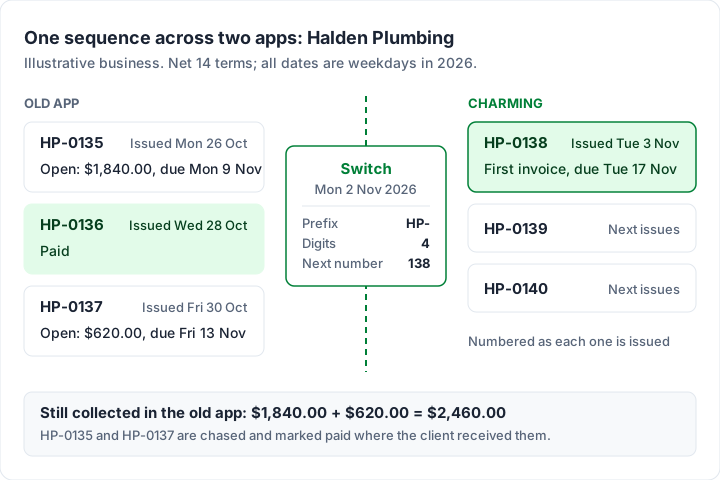
Halden Plumbing (an illustrative business) numbers invoices HP-0001 onwards on Net 14 terms and moves to Charming on Monday 2 November 2026. The two open invoices finish in the old app. Here is the run either side of the switch (dates checked by script; all weekdays):
| Invoice | Where | Issued | Due | Status at the switch |
|---|---|---|---|---|
| HP-0135 | Old app | Monday 26 October 2026 | Monday 9 November 2026 | Open, $1,840.00 |
| HP-0136 | Old app | Wednesday 28 October 2026 | Wednesday 11 November 2026 | Paid |
| HP-0137 | Old app | Friday 30 October 2026 | Friday 13 November 2026 | Open, $620.00 |
| None | Charming settings | Prefix HP-, Digits 4, Next number 138 | Set before the first send | |
| HP-0138 | Charming | Tuesday 3 November 2026 | Tuesday 17 November 2026 | First invoice in the new app |
At the switch, $1,840.00 + $620.00 = $2,460.00 is still owed on old-app invoices. Those two are chased and marked paid there; the new app starts at HP-0138.
If the old system was a spreadsheet whose last row is 0037, the same rule applies: leave the prefix empty, set 4 digits and next number 38, and the first new invoice is 0038. That is the continuity sentence from how to number invoices, put into settings.
When your old numbering format will not carry over#
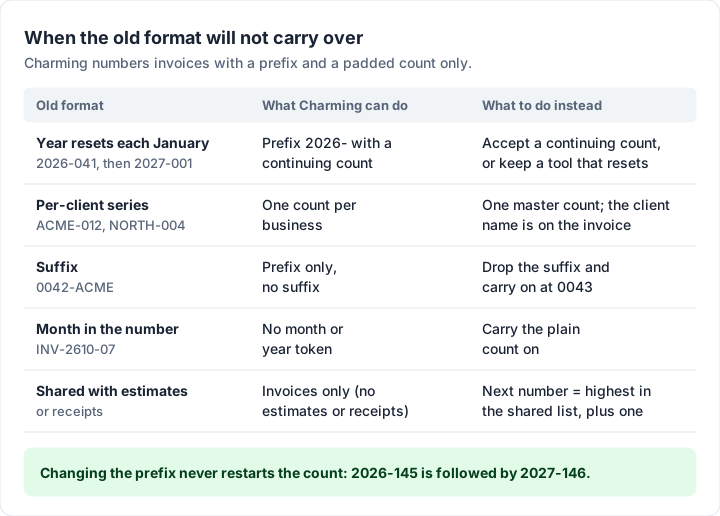
A prefix and a counter carry plain sequential numbers across. Some formats do not survive a move, because the new app cannot build them. Here are the common ones, with Charming as the example of an app that numbers with a prefix and a padded count only.
| Old format | Example | What Charming can do | What to do instead |
|---|---|---|---|
| Year that resets each January | 2026-041, then 2027-001 | Prefix 2026- with a continuing count | Accept a continuing count, or keep a tool that resets |
| Per-client series | ACME-012, NORTH-004 | One count per business | One master count; the client name is on the invoice already |
| Suffix | 0042-ACME | Prefix only | Drop the suffix and carry on at 0043 |
| Month in the number | INV-2610-07 | No month or year token | Carry the plain count on |
| One list shared with estimates or receipts | Q-0090 took 0090 | Invoices only, no estimates or receipts | Next number = highest number used in the shared list, plus one |
Year-reset numbering: a worked example#
Say the old tool’s last number was 2026-041, and it restarts at 2027-001 each January. In Charming you would set the prefix to 2026-, the digits to 3 and the next number to 42, so the next invoice you issue is 2026-042.
Now suppose 104 invoices go out in the rest of 2026, from 2026-042 to 2026-145 (145 − 42 + 1 = 104). On Monday 4 January 2027 you change the prefix to 2027-. The next invoice is 2027-146, not 2027-001. Invoice numbers are unique per business whatever the prefix, and the counter cannot go down, so changing the prefix never restarts the count.
That leaves two honest choices: accept a continuing count, which how to number invoices treats as a valid format, or stay with a tool that resets yearly. Do not create a second business just to restart the count; it splits your clients and records in two.
To preview a format over a run of numbers, try the free invoice number generator. It shows year and month formats too, but Charming itself uses a prefix and a padded count only, so a per-client series becomes one master count and a suffix label moves to the notes.
A list shared with estimates or receipts#
If the old app numbered estimates, receipts or credit notes from the same list as invoices, the highest number in that list is the one to beat, even if an estimate used it. Charming has no estimates, receipts or credit notes, so after the switch its sequence is invoices only.
Several businesses, several sequences#
If you invoice from more than one business, each keeps its own sequence and its own last number. In Charming every business has its own counter, prefix and branding. The catch: the free plan has 1 business, and paid plans have unlimited businesses. Running more than one business from one login shows how that works, and the pricing page lists the plans.
Open invoices: let them finish where they started#
An invoice your client already has is best left as they received it, in the app that sent it. The client may already have entered it into their accounts.
- Finish open invoices in the old app. Record payments and chase there, and export once more when the last one is paid.
- Or void and reissue, if you have to close the old app now. Void the open invoice in the old app, keep it on file with its number, and send a new invoice from the new app with the next number, saying which number it replaces. How to void an invoice has the wording.
- Never send a second invoice for the same work without voiding the first. Two live invoices for one job is how clients pay twice, or pay neither.
- Switch off recurring invoices in the old app before the new app’s first cycle. A retainer that runs in both apps bills the client twice. How recurring invoices work explains how a recurring invoice differs from a subscription.
- Switch off automatic reminders in the old app for anything voided or reissued.
Tell clients what changes, and what does not#
Clients mostly notice that the invoice looks different and the email comes from a new address. A short note before the first new invoice prevents a query. A sample to adapt:
From our next invoice, HP-0138, our invoices come from a new system. The numbering carries on as before and our bank details have not changed. Invoices HP-0135 and HP-0137 are still payable as sent.
If your bank details are changing, say so separately and ask the client to confirm them by phone or another channel they already trust. A new-looking invoice with new bank details is what invoice fraud looks like, so make the real change easy to verify; spotting fake invoices and invoice scams covers the checks.
How long to keep the old invoices#
This is general information, not legal or tax advice. The US Internal Revenue Service’s page How long should I keep records? opens with: “The length of time you should keep a document depends on the action, expense, or event which the document records.” (as of 28 October 2026). Other countries set their own periods; ask your accountant.
Whatever the period, keep the old records in a form you can open without the old app: the CSV export and the PDFs, backed up in two places.
A switching checklist to copy#
- Export invoices, clients, payments and recurring schedules, plus a PDF of every sent invoice.
- Check the exports open without the old app.
- Write down the highest number ever issued, voided invoices included.
- Decide which open invoices finish in the old app and which are voided and reissued.
- Switch off the old app’s recurring invoices and reminders.
- Set up the new app: business details, logo, bank details and clients.
- Set the prefix, digits and next number before the first send.
- Tell clients, and confirm any new bank details through a second channel.
- Send the first invoice and check its number on the PDF.
- Keep the old exports and PDFs, backed up.
Switching to Charming: what carries over and what does not#
The numbering settings. Create the business first. The “Invoice numbering” card appears only when you edit an existing business, so open the business’s settings after creating it and set the numbering before you issue your first invoice. Numbers are assigned when an invoice is issued, so drafts never consume one. The card has three fields:
- Prefix, up to 20 characters (INV- by default; it can be left empty).
- Digits, from 1 to 10 (4 by default; the card notes “4 digits renders as 0007.”).
- Next number, which is the number your next issued invoice gets (1 by default, so the first invoice is INV-0001). Under it the card says “Change only to align with invoices issued elsewhere.”
Only a business’s owner or an admin can change these settings. The next number can be raised but never lowered, so type it carefully: a number set too high cannot be lowered, and the gap it leaves is worth a note in your records. Each issued invoice keeps the prefix and digits it was issued with, so a later prefix change never relabels invoices already issued.
What comes across from your old app, and what stays behind:
| From your old app | In Charming |
|---|---|
| Your last invoice number | Carried on: set Next number to it plus one |
| Your prefix and digits | Carried on, if the format is a prefix and a padded number |
| Year, month, suffix or per-client formats | Not supported; see the format table above |
| Client list | Re-entered by hand; there is no import |
| Past invoices | Stay in the old app’s exports and PDFs; there is no import, and anything you issue takes the next number |
| Open invoices | Best finished in the old app, or voided there and reissued |
| Recurring invoices | Set up again on paid plans; each cycle creates a draft to review, numbered only when you issue it |
| Credit notes | Not supported; an issued invoice can be voided (keeping its number) only if no payment is recorded on it |
The other catches, stated plainly. Charming has no integrations with accounting software. It does not take card payments: clients pay you by the bank details or payment link you add, and you mark each invoice paid yourself. It does not email invoices or send reminders: you send the PDF or link yourself. It is a web app, with no native mobile app. Free invoices carry a small “Sent with Charming Invoices” line, which paid plans hide by default. Paid plans are Individual at $29 once, Team at $79 once and Pro at $12 a month or $99 a year, and the lifetime plans are final sale.
What you get: unlimited invoices on the free plan, your logo, colours and fonts on every one, a sequence that carries on from your old app, and a CSV export you can leave with. Create a free invoice, set the next number first, then send.
Questions people ask#
Can I keep my invoice numbers when I change software?#
Usually, yes, if the new app lets you set the next number. Match the prefix and digits, and set the next number to your last number plus one before the first send. Invoices already sent keep their numbers in the old app’s records.
What invoice number should I start with in a new app?#
The highest number your old system ever issued, plus one, voided invoices included. With no earlier invoices, start at 1 (or 0001); how to number invoices covers the alternatives.
Do I have to restart numbering in a new system?#
It depends on where you are. HMRC’s internal manual, quoted above, accepts a starting number other than 1 “as long as the invoice series runs consecutively from that point.” Elsewhere the answer can differ, so check with your accountant before you continue a sequence in new software. This is general information, not legal or tax advice.
What happens to unpaid invoices from my old app?#
They stay where they are. Keep chasing and recording them in the old app until they are paid, or void them there and reissue them from the new app, saying which number replaces which.
Can I import my old invoices into Charming?#
No. Charming has no import for invoices or clients. Past invoices stay in your old app’s exports and PDFs, clients are re-entered by hand, and every invoice you issue takes the next number. What carries over is the sequence itself.
The short version#
Export first, write down the last number, let open invoices finish where they started, and set the new app’s prefix and next number before anything is sent. Your records then show one unbroken run across two apps.
When you are ready, create a free invoice, set your next number in the business settings, and send the first invoice of the new run.
Free download
No sign-up and no email address. More on the free templates page.
- Download .xlsx: Invoice numbering log
Invoice numbering log
Excel .xlsxA record of every invoice number you issue, from any app or template, that flags duplicates and gaps and suggests the next number.