Open source invoicing software: 6 projects compared

Nnabuike Okoroafor ·
On this page · 11 sections
We make Charming Invoices, which is one of the options covered here. Charming is not open source, and we say so plainly below.
You are looking at open source invoicing software because you want more control: no monthly fee per seat, code you can read, and your client list on a server you choose. Running your own copy can give you that. Sometimes it is the right call.
But “open source” is used loosely for projects under very different licences, and self-hosting swaps a subscription for a job: you become the hosting company, the security team and the backup service. This guide sets out what you gain, what you take on, and how six well-known projects compare, using only facts from their own repositories, licences and docs, read on 22 October 2026.
General information, not legal advice. We quote the licences rather than interpret them: read each licence in full, or ask a lawyer, before you rely on it.
In short#
- Read the licence, not the label. InvoicePlane and SolidInvoice ship the MIT licence. Kimai and InvoiceShelf ship AGPL-3.0. Invoice Ninja uses the Elastic License 2.0 and calls its code “source-available”. Akaunting uses the Business Source License 1.1, with an additional use grant that mentions “two users or one company or one thousand invoices”.
- You gain control: your server, your data, no per-seat fees, and code you can read.
- You take on the work: updates, security fixes, backups, restore tests, email delivery, scheduled jobs and any e-invoice formats your clients ask for.
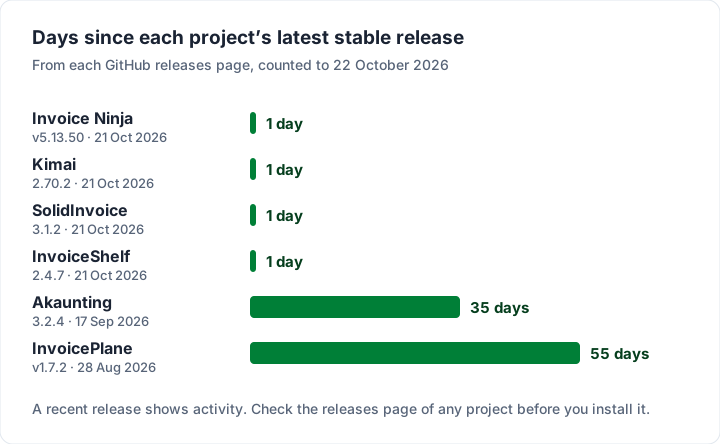
- Check the project is active. Four of the six shipped a stable release the day before we checked. Look at the releases page of any project before you install it.
- Self-hosting is cheap in cash and expensive in time. Our illustrative year one is $187.20 for a small server with daily backups, or $1,087.20 if you also count an assumed 18 hours of your time at an assumed $50 an hour.
- Hosted is simpler if nobody you trust will patch a server, or if you need support with a phone number on it.
What “open source” means for invoicing software#
“Open source” has a published definition. The Open Source Initiative keeps the Open Source Definition and a list of approved licences. One of the definition’s criteria, read on 23 October 2026, says: “The license must not restrict anyone from making use of the program in a specific field of endeavor.” Whether a given licence is on that list is for you to check on the OSI’s site; we report only what each project’s own files say. Invoice Ninja’s repository, for example, describes its own code as “source-available”.
In invoicing, you will meet three families of licence. We read each project’s licence file on GitHub to place it.
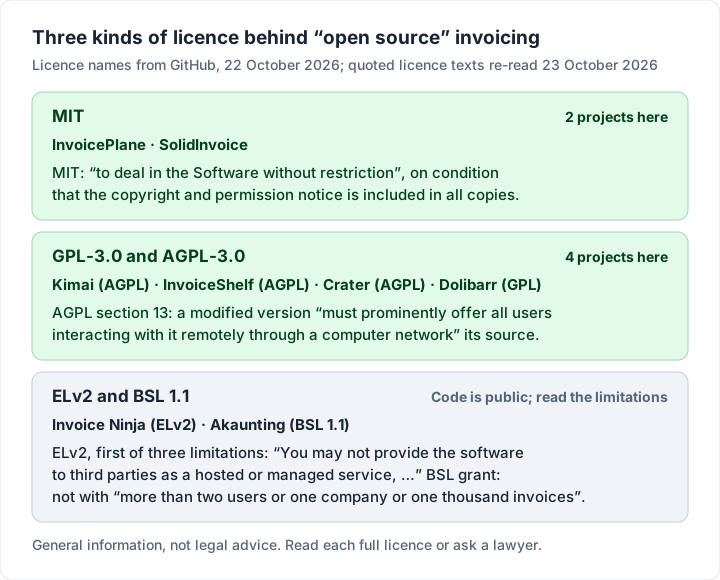
Here is one line from each licence text, quoted exactly as we re-read it on 23 October 2026. We do not summarise what they allow in your case: the full texts are linked from each repository.
| Licence | Projects here | A line from the licence text |
|---|---|---|
| MIT | InvoicePlane, SolidInvoice | Permission “to deal in the Software without restriction”, subject to: “The above copyright notice and this permission notice shall be included in all copies or substantial portions of the Software.” |
| AGPL-3.0 | Kimai, InvoiceShelf | Section 13: if you modify the program, your modified version “must prominently offer all users interacting with it remotely through a computer network” an opportunity to receive its source (full text) |
| Elastic License 2.0 | Invoice Ninja | “You may not provide the software to third parties as a hosted or managed service, where the service provides users with access to any substantial set of the features or functionality of the software.” |
| BSL 1.1 | Akaunting | “You may make production use of the Licensed Work, provided you do not use it in any of the following ways: (1) Use the Licensed Work with a total of more than two users or one company or one thousand invoices.” Two more exclusions follow |
For the Elastic License 2.0, Invoice Ninja’s LICENSE file grants a licence “to use, copy, distribute, make available, and prepare derivative works of the software, in each case subject to the limitations and conditions below”. The hosted-service line in the table is the first of three limitations; the other two concern its licence-key functionality and its licensing notices.
Two more lines are easy to miss. InvoicePlane’s licence file opens with a trademark notice, which lists among the things you are “NOT allowed to” do: “sell or redistribute the application under the name 'InvoicePlane' and the InvoicePlane logo.” Akaunting’s licence file sets a “Change Date: Four years from the date the Licensed Work is published” and a “Change License: GPLv3”. If you plan to rebrand, resell or host any of these for clients, read the full licence or ask a lawyer.
What you gain by self-hosting#
The reasons people self-host are real, and worth naming precisely.
- No per-seat or per-client fees. The software costs nothing to download. Invoice Ninja’s README says “All Pro and Enterprise features from the hosted app are included in the source-available code”; its hosted Free plan lists up to 5 clients.
- Your data stays where you put it. The database sits on your server, in the country you choose.
- You can read the code. Add a field, change a PDF layout, connect it to your own tools, within the terms of the project’s licence.
- Your running costs are yours to set. Apart from the server and your time, nothing is billed per month.
- Many of these projects go well beyond basic invoices. Quotes, recurring invoices, client portals, payment gateways, multi-company setups and APIs are common in their READMEs. Card payments through a gateway still cost the processor’s fee, whoever hosts the app; see invoice payment fees on Square, PayPal and Stripe.
What you take on when you self-host#
Here is the honest part. A hosted invoicing app does a lot of invisible work. When you self-host, every line in this table becomes yours.
| Job | On a hosted app | When you self-host |
|---|---|---|
| Server and operating system | The vendor | You: rent it, harden it, patch it |
| App updates and security fixes | Applied for you | You: watch releases, install them, fix what breaks |
| Backups | The vendor’s policy | You: schedule them, store them off the server, test a restore |
| Encryption keys and secrets | The vendor | You: lose the key and you may lose the data |
| HTTPS certificate | The vendor | You: set up and renew it |
| Email delivery | The vendor | You: connect a sending service so invoices do not land in spam |
| Scheduled jobs | The vendor | You: keep the cron job running, or reminders and recurring invoices silently stop |
| PHP and database upgrades | The vendor | You: every project here needs a recent PHP version |
| E-invoice formats | The vendor, if it supports them | You: check the project produces the format your clients ask for |
| Support | A support channel | Usually a forum, Discord or GitHub issues |
Three of those deserve a closer look.
Security fixes only protect you once installed. Every actively maintained project publishes fixes, and a copy nobody updates keeps running without them. Watch each project’s releases and security advisories page, and install updates promptly. InvoicePlane’s own README puts it plainly: “Security releases matter here.”
Keys and backups are unforgiving. Invoice Ninja’s README warns that the APP_KEY in its configuration file “is used to encrypt data, if you lose this you will not be able to run the application.” A backup that has never been restored is a guess. Restore one to a spare server before you rely on it.
E-invoice formats are something you keep up with yourself. Several governments now publish e-invoicing rules, and they change. Two official pages, quoted as we read them on 23 October 2026: Belgium’s federal e-invoicing portal says that from 1 January 2026 “the structured electronic invoice will become mandatory for transactions between Belgian VAT-registered companies”, sent “systematically via the Peppol network” (einvoice.belgium.be); and the European Commission says that under the VAT in the Digital Age package, “Mandating eInvoicing and near real-time reporting for intra-EU transactions will be effective from 1 July 2030” (European Commission). For Germany, start with the finance ministry’s e-invoicing FAQ (it did not load for our tools) or the Berlin Chamber of Commerce and Industry’s e-invoice guide. What applies to you is a question for your tax adviser. The practical point: if your clients ask for a particular e-invoice format, the project has to produce it, and someone has to keep it current. For background on the documents themselves, see what is a tax invoice and what actually belongs on an invoice.
Six open source invoicing projects, compared#
The table puts the six projects side by side, as of 22 October 2026. Licences come from each repository’s licence file, releases from its GitHub releases page, and features from its own README. “E-invoice support” records only what we could see in the code: an e-invoice library in the project’s dependency list, or an e-invoice module in its source.
| Project | Licence | Latest stable release | What it is | E-invoice support we could see |
|---|---|---|---|---|
| Invoice Ninja | Elastic License 2.0 (“source-available”, per its README) | v5.13.50, 21 Oct 2026 | Invoices, quotes, projects and time tracking; hosted or self-hosted | ZUGFeRD, UBL and Facturae libraries |
| InvoicePlane | MIT, plus trademark terms | v1.7.2, 28 Aug 2026 | Invoices, quotes, clients, payments | E-invoice XML from templates you add (since 1.6.3) |
| InvoiceShelf | AGPL-3.0 | 2.4.7, 21 Oct 2026 | Invoices, estimates, payments, expenses | None found |
| SolidInvoice | MIT | 3.1.2, 21 Oct 2026 | Quotes, invoices, recurring billing, payments | None found |
| Akaunting | Business Source License 1.1 | 3.2.4, 17 Sep 2026 | Accounting software with invoicing | None found |
| Kimai | AGPL-3.0 | 2.70.2, 21 Oct 2026 | Time tracking with invoicing | ZUGFeRD library |
Release activity is worth checking for any project you plan to run. Here it is as a picture.
Invoice Ninja: the most complete, under the Elastic License#
What it offers: the repository describes “a source-available invoice, quote, project and time-tracking app”, and the README lists mobile and desktop apps that also work with self-hosted servers, and install routes including Docker, Cloudron and Softaculous. All Pro and Enterprise features are in the self-hosted code. A “$40 per year white-label license” removes Invoice Ninja branding from client-facing parts of the app. Its dependency list includes ZUGFeRD, UBL and Facturae libraries, and the hosted Enterprise plan lists “e-Invoicing & PEPPOL Network Access” with 250 Peppol credits.
Worth knowing: the repository itself calls the code “source-available”, under the Elastic License 2.0. Its limitations, quoted in the licence section above, include one on providing the software to third parties “as a hosted or managed service” and one on its licence-key functionality. Read the full file, or ask a lawyer, if the licence matters to your use.
Fits: someone who wants the broadest feature set and may switch to the hosted plans later (Pro is $14 a month or $140 a year; Free allows up to 5 clients, as of 22 October 2026). To compare it with other hosted and self-hosted options, see Invoice Ninja alternatives.
InvoicePlane: MIT-licensed and long-running#
What it offers: invoice and quote management, clients, products, tasks, payment tracking with reminders and gateways, custom templates and reports. A container image is available, and since 1.6.3 it can generate e-invoice XML from template files you place in the install; examples live in a separate repository.
Worth knowing: e-invoice output comes from template files you add yourself. The README calls its bundled Docker Compose file “for local development/testing only”, with separate production instructions.
Fits: a technical freelancer who wants a plain, permissively licensed invoicing app and will keep it patched.
InvoiceShelf: AGPL, with a production branch and a preview branch#
What it offers: invoices and estimates with PDF export, payments, expenses and taxes, recurring invoices, a client portal, and multiple companies with team roles. The 3.x preview needs PHP 8.4 or 8.5 and supports MySQL or MariaDB, PostgreSQL and SQLite; Docker images include the runtime.
Worth knowing: the default branch is the 3.x alpha. The README warns it is “not for production data” and points production users to 2.x. Choose the right download.
Fits: a small business that wants estimates, expenses and a client portal under a copyleft licence.
SolidInvoice: MIT, with a hosted option from the same team#
What it offers: quotes that convert into invoices, recurring invoices, multi-currency, 8 built-in PDF templates, payment reminders, Stripe and PayPal through your own gateway accounts, two-factor login, multiple companies and “full company data export”. The team also hosts it for “a flat $8/month”, which its README says removes SolidInvoice branding and adds daily managed backups.
Worth knowing: the self-hosted column of its own comparison table lists updates as “Manual” and backups as “You manage”.
Fits: someone who wants an MIT licence with the option to hand the hosting back.
Akaunting: accounting first, with a licence to read closely#
What it offers: online accounting for small businesses and freelancers, with invoicing inside it and an app store for add-ons. It requires PHP 8.1 or higher and Node.js 18 or 20.
Worth knowing: the licence terms. Its additional use grant, quoted in the licence section above, excludes use “with a total of more than two users or one company or one thousand invoices” and two other uses, a “rebranded” or “white labeled” version and an “Accounting Service” for third parties. The same file says: “If your use of the Licensed Work does not comply with the requirements currently in effect as described in this License, you must purchase a commercial license from the Licensor, its affiliated entities, or authorized resellers, or you must refrain from using the Licensed Work.” Read it in full before you plan around it.
Fits: a small company, one or two people, who want bookkeeping and invoicing together and have checked their use against the licence.
Kimai: time tracking that also invoices#
What it offers: professional time tracking with invoicing, rates per user, client or project, budgets, reporting, 2FA and a JSON API. Its dependency list includes a ZUGFeRD library. It needs PHP 8.2 or later, MariaDB 10.6 or MySQL 8.4 or newer, and its own subdomain. A cloud version is offered for people who do not want to host.
Worth knowing: invoicing is built around tracked time. If you bill fixed prices or products, check that its invoice flow fits how you work.
Fits: consultants and agencies who bill by the hour.
Before you install any project#
Software that handles client data and logins needs security fixes. Whichever project you pick, check its releases page for a recent stable release, read its security advisories page, and confirm the PHP and database versions it needs.
Bigger suites such as Dolibarr (GPL-3.0, an ERP and CRM with invoicing) also exist. They make sense when you need stock, orders and accounting as well as invoices.
What self-hosting costs: an illustrative estimate#
The software is free; the server, the backups and your time are not. Here is one illustrative estimate, using DigitalOcean’s published droplet prices on 22 October 2026: a Basic droplet with 1 GiB of memory is $6 a month and one with 2 GiB is $12 a month, and daily backups cost 30% of the droplet price. We did not test which size each project needs; check its requirements.
The time figures are our assumptions, not measurements: 6 hours to set up, and 1 hour a month for updates and checks, valued at an example rate of $50 an hour.
| Item | 1 GiB server | 2 GiB server |
|---|---|---|
| Server, 12 months | $72.00 | $144.00 |
| Daily backups (30%), 12 months | $21.60 | $43.20 |
| Cash cost, year one | $93.60 | $187.20 |
| Setup, 6 hours at $50 (assumption) | $300.00 | $300.00 |
| Upkeep, 12 hours at $50 (assumption) | $600.00 | $600.00 |
| Year one including assumed time | $993.60 | $1,087.20 |
| Year two including assumed time (no setup) | $693.60 | $787.20 |
Not included: a domain name, an email-sending service and any paid add-ons, such as Invoice Ninja’s $40-a-year white-label licence. Against that, here is what hosted options cost on the same date.
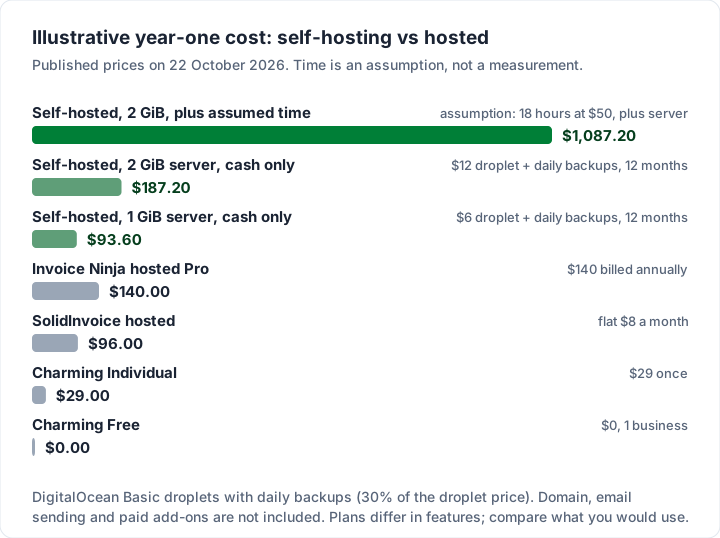
Read the chart fairly. The hosted plans include different features, so this is not a like-for-like ranking. And if you enjoy running servers, or already run one, the time cost may be close to zero. Your skills and spare hours are the real variable.
For questions to ask about any free plan before you commit, see what to check before choosing a free invoicing app.
Should you self-host? A decision flowchart#
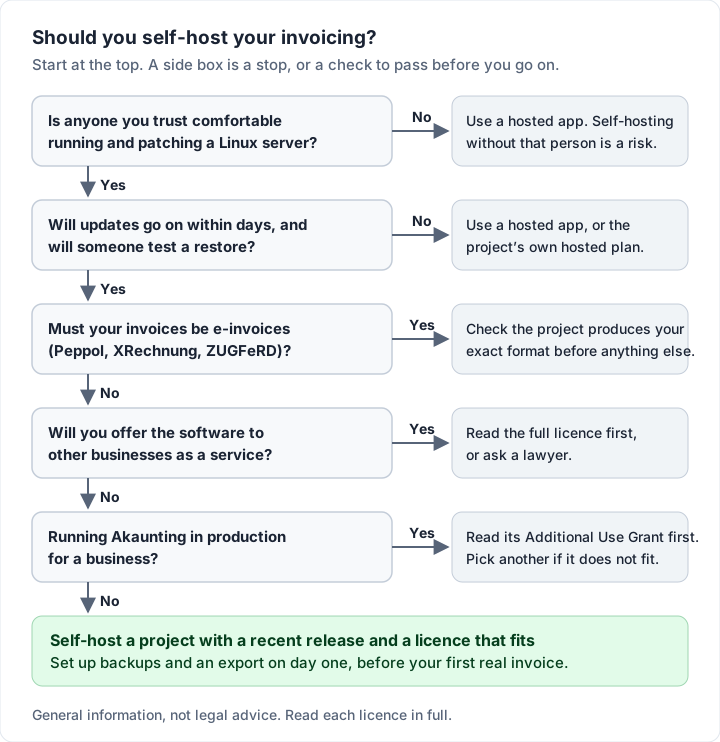
If you would rather answer questions than weigh a table, run through this.
When hosted invoicing software is simpler#
Self-hosting is a good choice for some people. Hosted is simpler when:
- Nobody will own the server. An invoicing app holds client names, addresses, amounts and sometimes bank details. Unpatched, it is a liability.
- Invoices are your only reason to run a server. If you do not already self-host other things, you are learning a new trade to save a small fee.
- You need e-invoicing that just works. A hosted provider that supports your country’s format carries the job of keeping up with rule changes.
- You want support from someone who is paid to help. Community forums are generous, but nobody is obliged to answer.
- You send a handful of invoices a month. A hosted free plan or even a spreadsheet covers it; our guide to creating an invoice in Excel shows how, and the free invoice number generator keeps numbering in order.
If you are unsure, two of the six projects here offer a middle path: SolidInvoice and Invoice Ninja sell hosted versions of the same code, so you can start hosted and move to your own server later, or the reverse. For a buyer’s checklist that applies to any tool, see how to choose invoicing software, for the free hosted plans compared limit by limit, the best free invoicing software, and for paid hosted picks, the best invoicing app for small business.
Charming is not open source: what we offer instead#
To be plain: Charming Invoices is not open source. Its code is not public, it has no open source licence, and you cannot self-host it. If owning and changing the code is the point for you, one of the projects above is the right choice, and we would rather you chose well than chose us.
What Charming offers instead is the hosted version of the trade-off, with the work in the table above done for you.
- A free plan with no invoice or client cap. 1 business, unlimited clients and invoices, all 60 templates with your logo, colours and fonts, and a PDF download and private link your client opens without an account. Charming does not email invoices or send reminders, so there is no sending service to run: you send the PDF or link from your own email.
- Your data can leave with you. Every plan, including Free, can export the invoice list as a CSV: number, status, client, dates, currency, subtotal, discount, tax, totals, amount paid and balance due. Our terms say that moving to a lower plan “locks features; it does not delete your invoices, clients or history.”
- Hosting and backups handled. Our privacy policy says the app, its database and stored files run on a Hetzner server in Nuremberg, Germany, with daily backups kept for 7 days and off-site copies on Cloudflare R2 storage.
- No subscription needed for the extras. Individual is $29 once and Team is $79 once (up to 5 teammates); Pro is $12 a month or $99 a year. Our reasoning is in why we built a lifetime plan.
The catches, stated next to the benefits: free invoices carry a small “Sent with Charming Invoices” line, and Free covers 1 business. There are no card payments: your client pays you directly and you mark the invoice paid yourself. There is no e-invoicing (no Peppol, XRechnung or ZUGFeRD output), no accounting integrations, no estimates or quotes, no time tracker and no mobile app. The CSV export covers invoices, not a full database dump you could load into another app. Lifetime plans are final sale, and “lifetime” means for as long as Charming Invoices runs. If you need e-invoicing or time tracking, Invoice Ninja or Kimai, hosted or self-hosted, will serve you better. See the pricing page for the full plan list.
Questions people ask about open source invoicing software#
Is Invoice Ninja open source?#
Its own repository describes the code as “source-available”, and its LICENSE file is the Elastic License 2.0. The file lists three limitations; the first reads: “You may not provide the software to third parties as a hosted or managed service, where the service provides users with access to any substantial set of the features or functionality of the software.” The code is public and free to download. Read the full licence, or ask a lawyer, if it matters to your use.
Is there free self-hosted invoice software?#
All six projects here can be downloaded without a licence fee, as of 22 October 2026. Each licence sets its own terms: Akaunting’s additional use grant, for example, excludes use with “more than two users or one company or one thousand invoices”, and Invoice Ninja sells a $40-a-year white-label licence to remove its branding. Read the licence for your use. The server and your time still cost money. If you want a free program for one computer rather than a server, see free invoice software to download.
Is self-hosted invoicing more secure?#
It can be, or it can be much less. You control who has access and where the data lives, but you also own every update. A well-patched self-hosted copy is a reasonable setup; a forgotten one with known advisories is not.
Which open source invoicing software supports e-invoicing?#
In the code we checked, Invoice Ninja includes ZUGFeRD, UBL and Facturae libraries, Kimai includes a ZUGFeRD library, and InvoicePlane generates e-invoice XML from templates you add. Check the exact format your clients ask for, and test a file in an official validator before relying on it. For what an e-invoice is, and whether a PDF counts, see our guide to electronic invoices.
How much maintenance does a self-hosted invoicing app need?#
There is no official figure. Our illustrative estimate assumes 1 hour a month for updates and checks, plus longer sessions when a major version or PHP upgrade lands. If a project ships releases every few days, as several here do, plan for frequent small updates.
What happens if a project stops being maintained?#
Your copy keeps running, but security fixes stop. Whether someone else can pick the code up depends on its licence. Either way, export your data regularly in a format you can open elsewhere, so you can move. How long to keep your invoices is a question for your tax authority or accountant; how to choose invoicing software quotes the official US, UK and Australian pages on keeping records.
The short version#
Open source invoicing software gives you control, no per-seat fees and code you can read. It also makes you the host, the security team and the backup service. Read the licence, because two of the best-known projects use the Elastic License and the Business Source License, check the releases page, and test a restore before your first real invoice. If that sounds like a job you will not do, a hosted app is the safer choice. If what you mainly need is branded invoices without a subscription, create a free invoice with Charming and see a finished one in your brand.