What to check before choosing a free invoicing app

Nnabuike Okoroafor ·
On this page · 7 sections
A free invoicing app can be exactly the right choice. Before you build your billing on one, it is worth spending ten minutes on four questions, because the answers decide what the app costs you over a year and how easily you can move later.
We make Charming Invoices, which has a free plan of its own. The questions below apply to every app, ours included, and our own answers are at the end, with the limits stated.
Here are the four questions side by side, before the detail on each.
| Question | What it grows with | When you feel it | What to check first |
|---|---|---|---|
| What does each card payment cost? | How much you bill by card | On every card payment | The listed fee per payment, and whether clients can pay by bank transfer |
| What are the plan’s limits? | How busy you are | The first month you reach a limit | Whether the limit is on invoices, clients, users or sending |
| What happens if the price or plan changes? | How long you rely on it | At a renewal or a plan change | What the terms say about notice and about your existing invoices |
| Can you take your data with you? | How much history is inside it | When you want to move | Whether you can export your invoices and clients today |
1. What does each card payment cost?#
Many invoicing apps let your client pay by card from the invoice, and the payment processor charges a fee on each payment. That fee is listed on each provider’s pricing page. Across five pricing pages we read on 28 October 2026, the standard card rate for an online or invoice payment ran from 2.9% to 3.3%, plus a fixed 30 to 60 cents per payment; each of our guides to Wave, Square, PayPal, Stripe and FreshBooks gives that provider’s exact figure and where it comes from.
The fee is the price of taking cards, and many businesses are glad to pay it. It is still worth working out at your own volume. As an illustration, one $1,750.00 invoice paid by card at 2.9% + $0.60 costs $51.35 in fees, leaving a payout of $1,698.65. Across a working year of $60,000.00, all paid by card, 2.9% comes to $1,740.00, before the fixed fee on each payment.
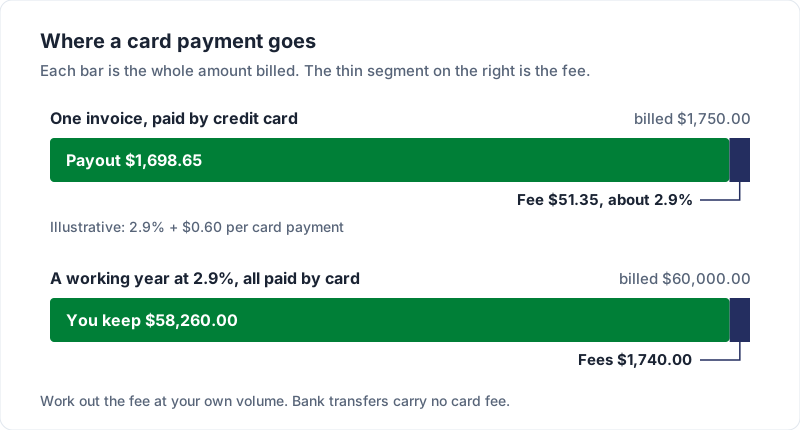
Questions to ask: what is the listed fee per card payment and per bank payment? Can your client pay by bank transfer instead, with your details on the invoice? Bank transfers carry no card fee; how to put bank details on an invoice is in invoice payment methods, and what Square, PayPal and Stripe each list for a real invoice is worked out in Square invoice fees vs PayPal and Stripe.
2. What are the plan’s limits?#
Most free plans list a limit on something: a number of invoices, clients or users, or a feature such as emailing the invoice from the app. Two examples from the vendors’ own pricing pages, read on 28 October 2026: Invoice Ninja’s hosted Free plan lists “5 Clients + Unlimited Invoicing”, and Zoho Invoice’s pricing page lists “Send up to 500 invoices per year.” Our Invoice Ninja alternatives and Zoho Invoice guides check the rest of each plan.
A limit is not a problem in itself. What matters is whether it fits how you work, including in your busiest month. Count your clients and your invoices for the last year, and compare them with the limit.
Questions to ask: is the limit on invoices, clients, users or a feature? What happens when you reach it: can you still send, and can you still see your old invoices? What does the first paid plan cost? Cheapest invoicing software: real prices compared shows where the free limits and first paid plans sit across the main apps, and simple invoicing apps includes a test for a free plan whose limit you will not reach.
3. What happens if the price or plan changes?#
Any software company can change its plans and prices. That is normal, and it applies to us too. What you want to know in advance is how a change would reach you.
Questions to ask:
- Notice. Do the terms say you will be told before a price change, and how far ahead?
- Existing invoices. If a feature moves to a paid plan, or you move to a lower plan, do your invoices, clients and history stay where they are?
- Renewal. If you pay by subscription, when does it renew, and at what price?
Read the vendor’s own terms and pricing page, note the date you read them, and keep a copy.
4. Can you take your data with you?#
Your client list, your invoice history, your numbering sequence and your templates all live inside whichever tool you pick. Moving is easier if you can export them. Switching invoicing apps lists what to export before you move, and how to choose invoicing software has a checklist and a one-afternoon test that bring these questions out before you commit. If you would rather host the software yourself, open source invoicing software compares six projects you can run on your own server, with their licences and hosting costs.
Questions to ask: can you export your invoices and clients today, on the free plan, and in what format (CSV, PDF, both)? Can you set your own next invoice number in a new tool, so your sequence carries on?
For completeness, there is also the free option you build yourself: a spreadsheet. If you want a starting point, our free Invoice template for Excel calculates line amounts, tax, the total and the balance due (its formulas were checked by script), and there is an Invoice template for Word if you would rather type; Excel invoice template walks through the spreadsheet route. The cost is manual invoice numbering and copy-paste mistakes: changing the date, the number and the client’s details by hand on every invoice. The free Invoice numbering log flags duplicate and missing numbers. If you send two invoices a month, a template is a completely rational answer.
Our answers: what the Charming free tier is#
Here are our own answers to the four questions, with the limits stated.
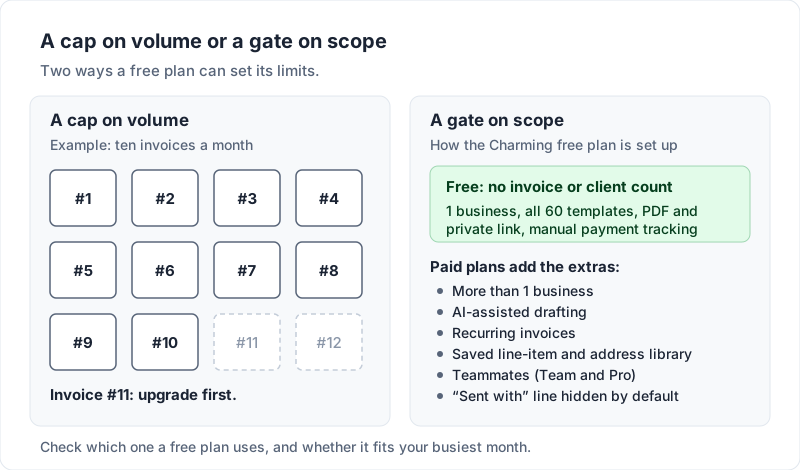
- 1 business
- Unlimited clients and invoices: no monthly invoice count, no client count
- Your logo, colours, fonts and letterhead: any brand colour, 30 fonts
- All 60 invoice templates, fully customizable
- PDF download and print, with a private link for your client (you send it however you like)
- Manual payment tracking
- No card, no trial clock, no expiry
Card fees: Charming Invoices does not process payments at all, so there is no per-transaction fee from us. You put your bank details, or your own payment link, on the invoice; whatever your processor charges is between you and them. Charming never holds your money.
Export: every plan, including Free, can export the invoice list as a CSV. The CSV covers invoices, not a full database you could load into another app.
What our free tier does not include#
- Free invoices carry a small “Sent with Charming Invoices” line. Paid plans hide it by default.
- AI-assisted drafting is paid, because every draft is an API call that costs us real money per use.
- Recurring invoices and the saved line-item and address library are paid.
- Teammates come with Team (up to 5 per business) and Pro (unlimited). Individual has none.
- Free is one business. Paid plans allow unlimited businesses.
- There are no card payments through Charming: your client pays you directly, and you mark the invoice paid yourself.
We chose to put the free plan’s limits on these extras rather than on invoice count, so the free plan keeps working the month you get busy. For how other free plans draw the line, the best free invoicing software compared lists eight with their listed limits. If you want a program on your own computer instead, free invoice software to download covers the desktop options.
How our own prices can change#
You should ask us question 3 as well. Here is what our terms say:
- There is no transaction fee to change, because we do not touch your money.
- Individual ($29) and Team ($79) are one-time payments. Our terms say: “Price changes never affect a lifetime plan you have already bought.” Lifetime plans are final sale, so try Free first, and “lifetime” means for as long as Charming Invoices runs. We explained that reasoning in why we built a lifetime plan.
- Pro is a subscription ($12 a month or $99 a year), and our terms say a change to its price “applies from your next renewal, and we will email you before it does so you can cancel first.”
The whole numbers are on the pricing page. If something there is less clear than this post, tell us and we will fix the page.
Free downloads
No sign-up and no email address. More on the free templates page.
- Download .xlsx: Invoice template for Excel
Invoice template for Excel
Excel .xlsxThe general-purpose invoice: products, services or a mix, priced by quantity and rate.
- Download .docx: Invoice template for Word
Invoice template for Word
Word .docxThe general invoice as a Word document, for people who would rather type than use cells.
- Download .xlsx: Invoice numbering log
Invoice numbering log
Excel .xlsxA record of every invoice number you issue, from any app or template, that flags duplicates and gaps and suggests the next number.