Simple invoicing apps: what simple should really mean

Nnabuike Okoroafor ·
On this page · 9 sections
Disclosure: We make Charming Invoices, one of the apps in this post. Every fact about the other apps comes from their own pricing pages, read on 28 October 2026 and linked, and we say where each one is the better fit.
You tried an accounting package and it asked about your chart of accounts before you could bill anyone. Or you have been sending invoices from a spreadsheet and keep losing track of who has paid. Either way, you want the least-effort way to send a proper invoice and get paid.
“Simple” is a word every app can use, so it helps to pin down what it means for you. This guide turns “simple” into six tests you can run on any app during a free plan or trial, then shows how seven apps and Charming measure up and what each costs in a year once its free limit bites.
In short#
- A simple invoicing app lets you send a branded invoice without setting up accounting, has a free plan or price whose limit you will not hit, lets your client view and pay without an account, reminds clients for you, and lets you export your data when you leave.
- The limit is where simple apps differ most. On 28 October 2026, Zoho Invoice allowed 500 invoices a year free, Bookipi 3 documents a month, Invoicely 5 invoices and 3 clients, Brisk Invoicing 25 invoices and 5 customers, and Invoice Home $1,000 invoiced in 30 days. Invoice Simple has a 14-day trial, then a plan capped at 3 or 10 invoices a month unless you pay for Premium.
- Simple has a cost. For a freelancer sending 6 invoices a month, a year ranges from $0 to $149.99 across the apps below.
- Simple is not always enough. If you need payroll, stock, bank feeds or an accountant working in your books, you need accounting software instead.
For a broader, brand-free checklist, see what to look for in invoicing software. This post is the short list for one requirement: simple.
What a simple invoicing app should do, and what it should skip#
Start with the job. A simple invoicing app needs to do four things well:
- Make the invoice. Your details, the client, line items, totals, tax and a due date, with your logo.
- Send it. As a PDF or a link, by email.
- Track it. Sent, viewed, paid or overdue, at a glance.
- Chase it. Reminders that go out without you writing each one.
What it can skip, if you do not need them: bookkeeping, bank feeds, payroll, inventory, project management and a sales pipeline. Each is useful to someone. Each also adds screens and settings, so leave out what you will not use.
Six tests for a simple invoicing app#
Run these during the free plan or trial, before you load in a year of clients. None needs more than a test invoice sent to yourself.
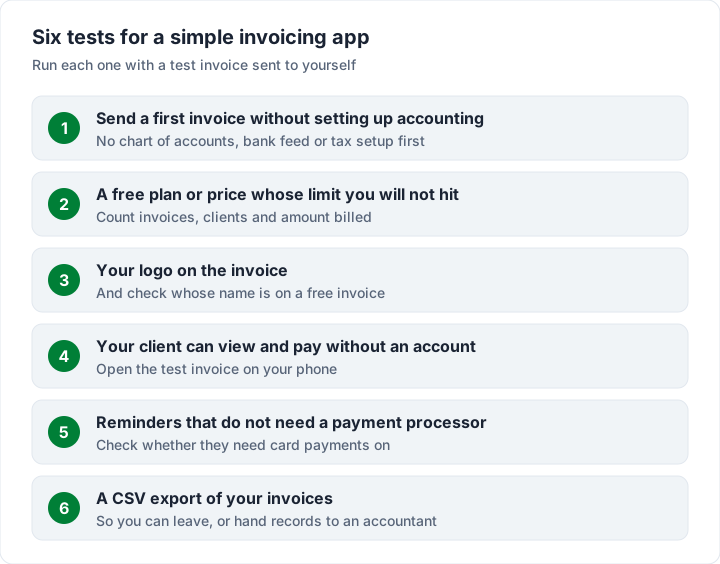
1. You can send a first invoice without setting up accounting#
Sign up and see how many screens stand between you and a sent invoice. A simple app asks for your business name, your logo and how you want to be paid, then lets you invoice. If it asks for a chart of accounts, a bank connection or a tax registration before the first invoice, it is accounting software with invoicing inside.
2. A free plan or price whose limit you will not hit#
Every free plan has a limit. The useful question is which limit, and when you will reach it:
- Invoices: Bookipi’s free plan allows “Up to 3 per month”, counting quotes and credit notes; Zoho Invoice says “Send up to 500 invoices per year.”
- Clients: Invoicely Free allows 3 saved clients; Brisk Invoicing Free allows up to 5 customers.
- Money: Invoice Home Free lets you “Invoice up to $1,000 for the past 30 days”.
Set the limit against your busiest month, not your average one. Our comparison of free invoicing software lays out more free plans and their limits.
3. Your logo goes on, and you know whose name is on the free invoice#
Branding should be there on the free plan. Then check whose name is printed next to yours. Zoho’s pricing page says its free plan includes “Powered by Zoho Invoice” branding. Bookipi’s mobile FAQ says free invoices “will have a Bookipi watermark”. Charming’s free invoices carry a small “Sent with Charming Invoices” line. A line like that may not matter to you, but you should choose it knowingly.
4. Your client can view and pay without an account#
Your client should open the invoice from an email, read it and pay, with no sign-up. Send a test invoice to a personal email address and open it on your phone. If it asks you to create an account before you can see the invoice, your clients will be asked too.
5. Reminders without a payment processor#
Automatic reminders mean you do not write each follow-up yourself. Check whether they depend on taking card payments through the app. On Wave’s pricing page, the plan comparison lists automated late payment reminders on Starter “with online payments”, and on Pro. If you are paid by bank transfer and do not want card processing, look for reminders that work without it.
6. You can leave with your data#
Find the export before you need it. A CSV of your invoices (number, client, dates, totals, amount paid) lets you move apps, hand records to your accountant or keep your own spreadsheet invoice tracker. Read the provider’s terms on data retention, too, so you know how long your records stay available.
The easiest invoice software, compared#
Here is how the apps people search for measure up on the tests that their pricing pages answer, as read on 28 October 2026. “Free option” means ongoing free use, not a trial.
| App | Free option and its limit | Name on free invoices | Automatic reminders | Phone app |
|---|---|---|---|---|
| Zoho Invoice | 500 invoices a year, 2 users | “Powered by Zoho Invoice” | Listed | Yes |
| Wave Starter | Unlimited invoices | Wave branding (removing it is a Pro feature) | “with online payments” | Yes |
| Brisk Invoicing | 25 invoices a month, 5 customers | Not stated | Listed | Works in a phone browser |
| Invoice Home | $1,000 invoiced in 30 days | See our review | See our review | See our review |
| Bookipi | 3 documents a month | Bookipi watermark | Listed | Yes |
| Invoicely | 5 invoices a month, 3 saved clients | PDFs marked “Branded only” | Payment reminders on Free | Web app on any device |
| Invoice Simple | None: 14-day trial | — | Due date reminders from Plus | Yes |
| Charming Invoices | Unlimited invoices and clients, 1 business | “Sent with Charming Invoices” | No; overdue invoices are flagged | No (web app) |
“Listed” means the vendor names the feature without saying which plan includes it, so confirm it on the free plan before you rely on it.
Two lines on each, with where it is the better pick:
- Zoho Invoice packs the most into a free plan of the apps here: quotes, recurring invoices, expenses, time tracking and a client portal, free for up to 500 invoices a year. Better if you want more than invoicing at $0 and do not mind Zoho’s name on the invoice. Our Zoho Invoice guide covers it in depth.
- Wave gives unlimited invoices and bookkeeping free, and Pro is $19 a month or $190 a year (USD). Better if you want card payments and simple books together; the Wave invoicing guide explains what Starter can send without online payments.
- Brisk Invoicing is free for 25 invoices a month but only 5 customers; Basic is $4.85 a month, in a currency the page does not name. Better if you have a handful of clients and want card payments in the US or Canada.
- Invoice Home is free up to $1,000 invoiced in 30 days, then $5 a month (“Pricing is in USD”). Better for low-value invoices with lots of templates; our Invoice Home review compares its web and app prices.
- Bookipi is free for 3 documents a month, then Starter is US$9.99 a month or US$91.20 billed annually. Better if you send very few invoices from a phone, with quotes and eSignatures.
- Invoicely is free for 5 invoices a month and 3 saved clients, then Basic is $9.99 a month. Better for a small team that wants time and mileage tracking on a paid plan.
- Invoice Simple is phone-first with estimates and card payments: Essentials $6.99 a month for 3 invoices, Plus $14.99 for 10, Premium $21.99 unlimited, or $69.99, $149.99 and $219.99 a year. Better if you invoice on site with the client in front of you. Our Invoice Simple pricing and limits review has the detail.
If you invoice from a phone on a job site and need quotes, a native app is simpler for you than any web app, Charming included. Our guide to invoicing from a phone compares the options. For shortlists by type of business, see invoicing apps for small business compared; for the five small apps people search by name, see Tiny Invoice, Moon Invoice, Bookipi and Brisk compared.
What a simple app costs in a year#
Price is part of simple. Here is one example, worked through list prices on 28 October 2026. A freelancer sends 6 invoices a month (72 a year) to 5 regular clients and bills about $2,400.00 a month.
| App | Does the free plan hold? | Year-one cost |
|---|---|---|
| Zoho Invoice | Yes: 72 is under 500 a year | $0, with “Powered by Zoho Invoice” |
| Wave Starter | Yes: unlimited invoices | $0; sending and reminders through Wave need online payments, which carry card fees |
| Brisk Invoicing | Yes: 6 invoices a month and 5 customers fit | $0, until a sixth regular client |
| Invoice Home | No: $2,400.00 a month is over $1,000 | $5 x 12 = $60 |
| Bookipi | No: 3 documents a month | US$91.20 billed annually ($9.99 x 12 = $119.88 monthly) |
| Invoicely | No: 5 invoices a month and 3 clients | Basic, $9.99 x 12 = $119.88 |
| Invoice Simple | No free plan; Essentials stops at 3 a month | Plus, $149.99 billed yearly ($179.88 monthly) |
| Charming Invoices | Yes: no invoice or client cap | $0 with the footer line, or Individual at $29 once |
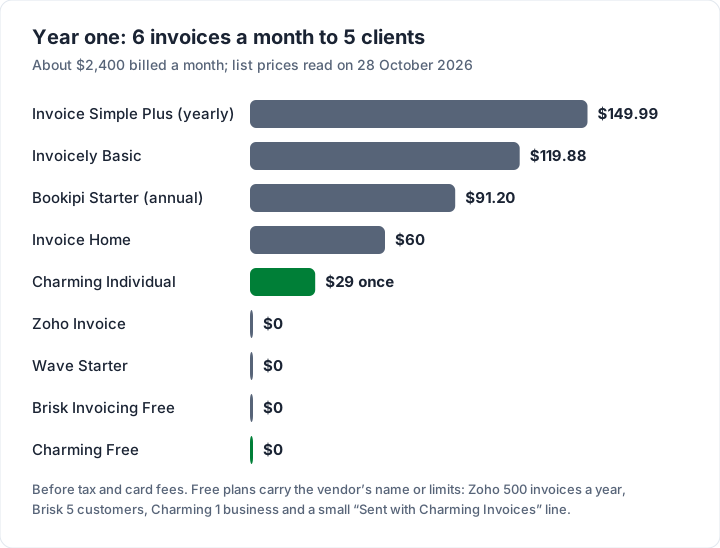
Over three years, at the same list prices: Invoice Simple Plus billed yearly comes to $449.97, Invoicely Basic $359.64, Bookipi Starter $273.60 and Invoice Home $180, against $29 once for Charming Individual. Card fees, if you take card payments, come on top on every app that offers them. For 14 tools costed over two years at regular prices, see the cheapest invoicing software.
When simple is too simple#
Simple is a choice to leave things out, which means a simple app will not fit every business. Signs you need more than an invoicing app:
- Your accountant wants your books in one system. Accounting software records every invoice against your income and receivables. Our guide to how an invoice is recorded shows what that involves.
- You run payroll or track stock. Neither belongs in a simple invoicing app.
- Clients must pay by card on the invoice. Pick an app with payments built in (Wave, Zoho Invoice, Brisk, Bookipi or Invoice Simple) and budget for the card fee.
- You need quotes that turn into invoices. Every app above except Charming offers quotes or estimates on some plan.
- Several people invoice from one account. Zoho Invoice allows 2 users free; Invoicely and Brisk add users on paid plans.
How taxes are recorded and reported varies by country and by business. Check your tax authority’s official guidance and ask an accountant if you are unsure. This is general information, not legal or tax advice.
Charming as a simple invoicing app, and what it leaves out#
We built Charming Invoices around the four jobs above. Here is what it does, with the catch beside each part:
- No accounting setup. Add your business name, logo and payment details, then invoice. There is no bookkeeping, bank feed or report beyond your invoices.
- No invoice or client cap on Free. Unlimited invoices and clients for 1 business, at $0 forever. Free invoices carry a small “Sent with Charming Invoices” line.
- One payment to hide that line. Individual is $29 once and Team is $79 once; Pro is $12 a month or $99 a year. Paid plans hide the line by default, and you can switch it back on. Lifetime plans are final sale, with no refunds.
- Your brand on every plan. All 60 templates, your logo, colours, fonts and a letterhead.
- No account for your client. You issue the invoice, download the PDF or copy its private link, and send it however you like; your client opens either without signing up. There are no card payments through Charming: your client pays by bank transfer or your own payment link, and you mark the invoice paid yourself.
- No automatic reminders. This is where Charming does not pass test 5: it does not email invoices or reminders. Overdue invoices are flagged, and you follow up from your own inbox.
- You can leave. Export your invoices as a CSV, with number, status, client, dates, totals, amount paid and balance, up to 10,000 rows per export.
What it leaves out: there is no native phone app (it runs in your phone’s browser), no email sending or reminders, no estimates or quotes, no card payments, no expenses and no accounting. If you need any of those, the apps above are the better fit.
If the four jobs are all you need and you are happy to send invoices from your own inbox, create a free invoice and run the six tests on Charming yourself. Every plan is on the pricing page.
Questions people ask about simple invoicing apps#
What is the simplest invoicing app?#
The one that passes the six tests at your volume. For a desk-based freelancer paid by bank transfer, a free web app with no invoice cap is simplest. For someone invoicing on site, a phone app with estimates is.
Is there a simple free invoicing app?#
Yes. As of 28 October 2026, Zoho Invoice (500 invoices a year), Wave Starter (unlimited invoices), Brisk Invoicing (25 invoices a month, 5 customers) and Charming Invoices (unlimited invoices and clients, 1 business) all have free plans with no end date.
What is the easiest invoice software for a small business?#
It depends on how you work. Zoho Invoice suits businesses that want quotes, a client portal and 2 users free. Invoice Simple suits on-site invoicing with card payments. Charming suits desk-based invoicing with your own branding and no cap.
Do I need accounting software to send invoices?#
No. An invoicing app or even a template is enough to send an invoice. Accounting software matters when you need your books, payroll or tax reports in one place. Ask an accountant if you are unsure which you need.
The short version#
Simple is testable. Send a first invoice without accounting setup, pick a limit you will not hit, check whose name is on the free invoice, make sure your client needs no account, look for reminders that work without card processing, and find the export. Then compare the year-one cost at your own volume. If a browser app with unlimited branded invoices fits how you work, start free with Charming.