Invoice Home review: pricing, features and free alternatives

Nnabuike Okoroafor ·
On this page · 12 sections
Disclosure: We make Charming Invoices, an invoicing app, and it is one of the alternatives covered here. This review is neutral: every Invoice Home fact comes from invoicehome.com and its app store listings, read on 22 October 2026 and linked, and we say where Invoice Home is the better choice.
You found Invoice Home because you needed an invoice that looks finished, quickly. It offers a long gallery of designs, fills in the arithmetic and emails a PDF, and the first invoice costs nothing. The questions come a little later. Is it really free? What is the limit? And is an online template maker the right tool, or would a downloaded template or an invoicing app suit you better?
This Invoice Home review answers those from Invoice Home’s own sign-up page, features page, FAQ, terms and app listings. It is not a star-rated test, and we did not score it. Where its pages list different figures, we show each one.
Invoice Home in short#
- It is an online invoice maker built around templates. Invoice Home says you can “Choose from 100 templates”, add your logo or one of its stock logos, and email or download the result as a PDF. It also makes receipts, estimates, quotes and other business documents.
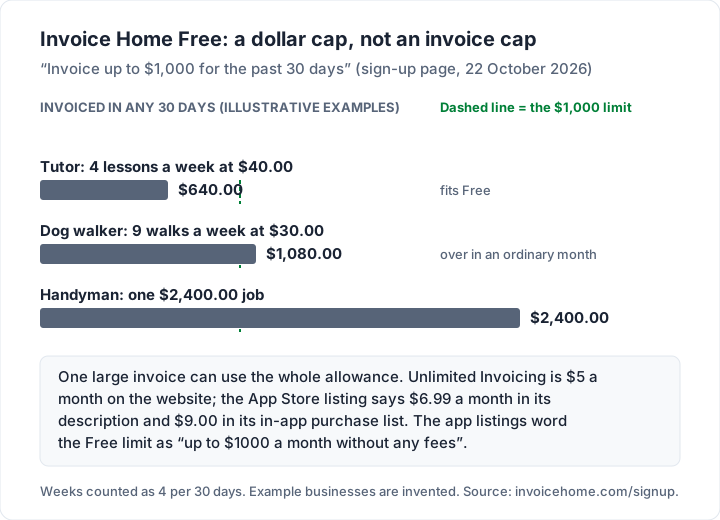
- The free plan is capped by amount, not by number of invoices. The sign-up page reads: “Invoice up to $1,000 for the past 30 days”.
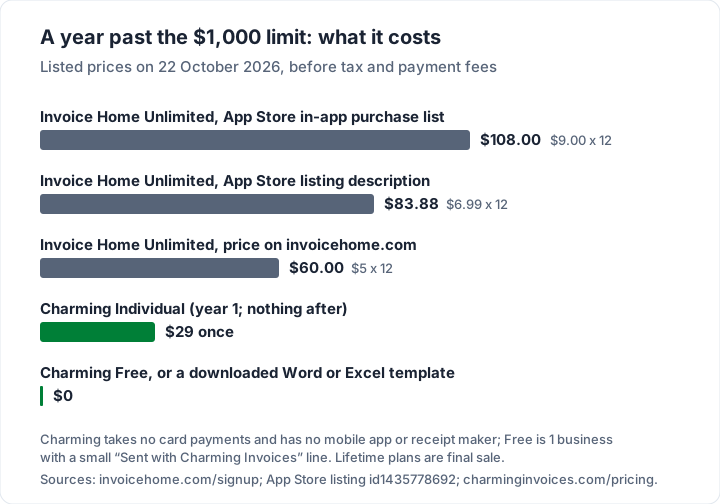
- The paid plan is called Unlimited Invoicing. It is $5 a month on invoicehome.com. Its App Store listing’s description quotes $6.99 a month for the same plan, and the listing’s in-app purchase list shows Unlimited Invoicing at $9.00, so where you subscribe may change the price.
- Clients can pay online through PayPal or Stripe, and online payments mark the invoice paid automatically.
- Fees are non-refundable under its terms, and subscriptions renew automatically until you cancel.
- It suits occasional invoicers who want a polished design and a card or PayPal button without building anything.
- Compare other options too if you regularly invoice more than $1,000 a month and want to stay on a free plan, or if you only need a printable template.
What Invoice Home is#
Invoice Home is run by Invoice Home Inc., the company named in its terms of service and as the seller on its app listings. Its iPhone app was first released in November 2018. It works in a web browser and in iOS and Android apps that sync with the same account.
It is best described as a template-led invoice maker. You pick a design, type into the fields, and Invoice Home lays out the document, adds up the totals and numbers it. Its features page lists:
- Templates and logos. “Over 100 Invoice Templates”, your own logo, and (per its app listing) a “Collection of 500 pre-designed logos” if you do not have one.
- Basic and advanced forms. Its free invoice page says the advanced form adds a shipping address, a purchase order number and quantities, and you can switch forms on the fly.
- Auto numbering. “Based on the initial invoice number, the next invoice is numbered automatically.”
- Several taxes on one invoice, and a choice of currency symbol or ISO code ($100 or 100 USD).
- Email with a payment link, printer-friendly PDFs, copying an old invoice to start a new one, and a one-click download of all your invoices.
- “Unlimited Storage”: “You can have as many invoices and clients as you want, no limit.”
Its free invoice page and app listings say it supports over 150 currency symbols.
Invoice Home pricing and the free plan, October 2026#
The plans are listed on Invoice Home’s sign-up page, which is where its “plans” link leads. There is no separate pricing page.
| Plan | Price on invoicehome.com | What the page says | Price in the App Store listing |
|---|---|---|---|
| Free Plan | $0 a month | “Invoice up to $1,000 for the past 30 days” | Free; the listing says “up to $1000 a month without any fees” |
| Unlimited Invoicing | $5 a month, “Pricing is in USD” | “Unlimited emails”, “Unlimited customers”, “Unlimited documents”, “Cancel anytime, no contracts” | “$6.99 USD (or local equivalent) per month” in the description; $9.00 in the in-app purchase list |
Three details are worth knowing before you choose.
The limit is a rolling dollar amount. It is not 10 invoices or 30 days of access: it is the total you have invoiced over the past 30 days. One $1,200.00 job puts you over it on its own. A tutor billing $640.00 a month never reaches it.
The price is listed per channel. The website lists $5 a month ($60.00 a year). The App Store description lists $6.99 a month ($83.88 a year), and the listing’s in-app purchase list shows Unlimited Invoicing at $9.00 ($108.00 a year). Apple’s listing describes a one-month, auto-renewing subscription charged to your Apple account. If you are going to pay, check the price where you subscribe, on the day you do it.
Test before a large invoice. Before you rely on the free plan for an invoice that takes you past $1,000, send a test to yourself and read what the app tells you about the limit and how free invoices look.
So, is Invoice Home free?#
Yes, up to a point, and with no time limit that we could find on its pages. You can keep using the free plan for as long as you invoice no more than $1,000 in any 30 days. Above that, the plan that removes the limit is Unlimited Invoicing at $5 a month on its website, as of 22 October 2026.
That makes Invoice Home’s free plan unusual. Most free invoicing plans cap the number of invoices, clients or businesses, not the value. For a side business that sends one or two modest invoices a month, the dollar cap may never bite. For anyone in a trade, one ordinary job can.
Cancelling and refunds#
Invoice Home’s terms of service (effective 28 August 2025) say subscriptions renew automatically for the same period “if you do not take cancellation steps”, and that “ALL FEES AND CHARGES ARE NONREFUNDABLE AND THERE ARE NO REFUNDS OR CREDITS FOR ANY PARTIALLY USED PAID SERVICES”, except where the law requires one. To downgrade to the free service, the terms say to open Settings, then the “My Plan” tab, then “Cancel my subscription”.
If you subscribed through the App Store, Apple’s listing says auto-renewal must be turned off at least 24 hours before the end of the period, in your account settings.
Templates and customisation#
Templates are the reason most people choose Invoice Home. Its template gallery is sorted by document type, and the free invoice page describes “over 100 free invoice template designs”, each in a choice of colours. Fields carry over as you browse, so you can see your own details in each design before you pick.
What you can change, from its own pages:
- Your logo, or one of its pre-designed stock logos.
- Colours for each template.
- Basic or advanced form, which decides whether shipping, PO numbers and quantities appear.
- Taxes, with several on one invoice.
- Language and currency, with PDFs in several languages.
If design is your main reason for choosing a tool, our guides to customizing an invoice and putting a logo on an invoice cover what to change and what to leave alone, whichever tool you use. If you already have a logo, use it: it is what your clients will recognise.
Receipts, estimates and payments in Invoice Home#
The receipt maker#
Invoice Home’s template gallery lists 12 document types: invoice, tax invoice, proforma invoice, receipt, sales receipt, cash receipt, quote, estimate, credit memo, credit note, purchase order and delivery note. Its app listing says you can “Turn invoices into receipts with the receipt maker”, and its FAQ explains that converting one document into another type keeps “all details in tact”.
That is a genuine strength. If your clients expect a separate receipt after they pay, Invoice Home makes one from the invoice you already have. Our guide to invoices versus receipts explains when a receipt is expected and what it should show.
Estimates and quotes#
Estimates and quotes are separate document types, and the FAQ says you convert one to an invoice by choosing the new format next to “Switch to”. For when to send which, see invoice, estimate or quote.
Getting paid#
Clients pay online through PayPal or Stripe, using a payment link in the invoice email. The free invoice page also names Authorize.net. Invoices paid online are marked paid automatically; for cash or check, the FAQ says to click the orange “Unpaid” label and choose “Set as Paid”. Deposits and part payments go in as their own line: the FAQ suggests a line called “Advance Payment” with a negative amount.
The pages we read do not list a processing fee of Invoice Home’s own. The payment provider charges its usual fee: Stripe’s pricing page, for example, lists “2.9% + 30¢” for a standard US card payment as of 22 October 2026, which is $29.30 on a $1,000.00 invoice. Check the rate in your provider account, and see our invoice payment fee comparison for worked examples on Square, PayPal and Stripe. If you would rather invoice from Stripe directly, our Stripe invoice guide shows how Stripe's own invoices work and what each paid invoice costs.
How to make an invoice with Invoice Home#
From its features page and FAQ, the steps are:
- Sign up on the web or in the app, and choose the free plan or Unlimited Invoicing.
- Pick a template from the gallery, and the basic or advanced form.
- Add your business details and logo. Invoice Home saves them for the next invoice.
- Set the first invoice number. Later invoices count up from it. If you are moving from another tool, start from your next number, not 1; our guide to how to number invoices explains why.
- Add the client and line items, with tax, discounts and payment terms.
- Send it by email with a payment link, or download the PDF to print or send yourself.
- Mark it paid when the money arrives, or let an online payment do it for you.
To print, the FAQ says to download the PDF and print it from your computer. To start the next invoice faster, use “Copy” on an old one.
App store ratings#
Ratings are third-party figures, not our judgement. As of 22 October 2026:
- App Store: “Invoice Maker by Invoice Home” has 4.6 stars from 378 ratings (listing).
- Google Play: 4.3 stars from about 7,510 reviews, 1 million or more downloads and an Editors’ Choice badge (listing).
Check the developer name before you download. The app described in this review lists Invoice Home Inc. as its seller.
Is Invoice Home legit?#
On the facts we could check, yes: it is a named company with published terms of service, apps on both stores since at least 2018 (iOS), and an Editors’ Choice badge on Google Play. Whether it is right for you depends on the free plan’s dollar limit and its terms, so read both before you pay.
Template maker, downloaded template or invoicing app?#
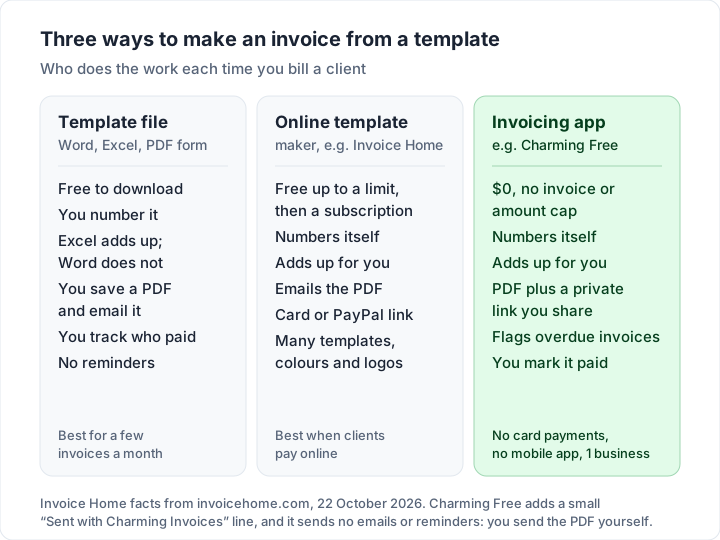
Invoice Home sits between two other ways of making an invoice: a template file you download and fill in yourself, and an invoicing app that keeps your clients and records for you. Each moves different work off your plate.
| What you get | Downloaded template (Word, Excel) | Online template maker (Invoice Home) | Invoicing app (for example Charming Free) |
|---|---|---|---|
| Cost | Free | Free up to $1,000 in 30 days, then $5 a month on its website | $0 with no invoice or amount cap; 1 business |
| Numbering | You type it each time | Automatic | Automatic |
| Totals | Excel calculates; Word is typed by hand | Calculated | Calculated |
| Sending | Save a PDF and attach it to an email | Emails the PDF with a payment link | PDF download, print, private link; no email sending or reminders |
| Card payments | No | PayPal or Stripe | No; your own payment link can print on it |
| Receipts and quotes | Separate files | Yes, built in | No |
Who Invoice Home suits, and who it does not#
| You... | What Invoice Home lists |
|---|---|
| Send a few small invoices a month | A free plan up to $1,000 invoiced in 30 days |
| Want a finished design without building one | Over 100 templates, colours and stock logos |
| Need receipts, quotes and purchase orders too | 12 document types in one place |
| Want clients to pay by card or PayPal from the email | PayPal and Stripe links; invoices paid online are marked paid |
| Bill more than $1,000 in most months | Unlimited Invoicing, $5 a month on its website |
| Only need to print an invoice now and then | A downloaded template is another free option |
Free alternatives to Invoice Home#
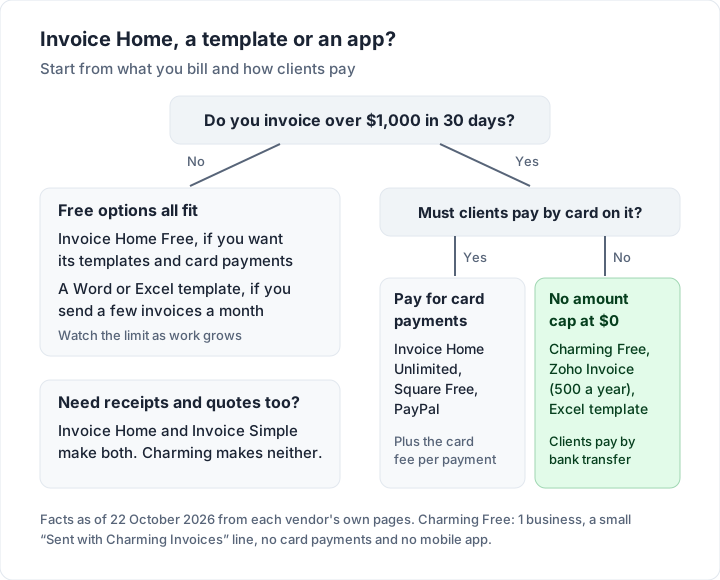
If you want a free route above $1,000 in 30 days, or a different kind of tool, here are options, with the limits each one lists. Facts are as of 22 October 2026, from each vendor’s own pages.
A free Word or Excel template#
For a few invoices a month, a template file is the cheapest tool there is. We publish free Word and Excel invoice templates with no sign-up: two Excel files (a general invoice and an hourly one) where the line amounts, subtotal, discount, tax, total and due date are calculated for you, and two Word files (a general and a service invoice) where you type the totals yourself. You can also open them in Google Sheets and Docs; check the totals after converting. The catch: you number, send and track every invoice by hand. Our guides to the Word invoice template and the Excel invoice template explain every field, and creating an invoice in Word and in Excel show how to build one from scratch.
If you work in a trade, our invoice templates include printable blank PDFs for 12 trades, from plumbing to DJ work.
Charming Invoices, free#
Charming is a web app for branded invoices. Its free plan has no invoice, client or amount cap for 1 business, at $0 forever with no card required, and includes all 60 templates, your logo, any brand colour, 30 fonts and a letterhead. It numbers invoices for you when you issue them, gives you a PDF to download or print and a private link your client opens without an account (you send them however you like), flags overdue invoices, and stamps “PAID” across the PDF once an invoice is paid (on by default).
The catches, plainly:
- No card payments through Charming. Your bank details or your own payment link (for example PayPal.me or a Stripe payment link) print on the invoice, and you record payments or mark the invoice paid yourself.
- No receipt maker, estimates or quotes. The PAID stamp on a paid invoice’s PDF is the closest thing, and it is not a separate receipt document. If you need receipts, Invoice Home does this better.
- No mobile app.
- Free invoices carry a small “Sent with Charming Invoices” line, and Free is 1 business. Individual hides it by default for $29 once; lifetime plans are final sale, with no refunds.
- No invoice emails or reminders. Charming does not send anything to your client; you send the PDF or link yourself.
Other free apps#
- Zoho Invoice: its pricing page calls it a “forever-free invoicing solution” with up to 500 invoices a year and two users, and “Powered by Zoho Invoice” branding.
- Square Invoices: its pricing page says “Send unlimited invoices” on Free, paid for through card fees of 3.3% + 30¢ online per its fees help article.
- Invoice Simple: not free beyond a 14-day trial, but often compared with Invoice Home; our Invoice Simple review covers its invoice-capped plans.
Our free invoicing software comparison sets out each free plan’s listed limits side by side, and our round-up of free invoicing apps for iPhone and Android covers the phone side. Our Invoice2go review covers another phone-first app, with no free plan and a yearly invoice cap on each plan.
Questions people ask about Invoice Home#
Is Invoice Home free?#
Yes, up to $1,000 invoiced in any 30 days, according to its sign-up page on 22 October 2026. Above that, Unlimited Invoicing is $5 a month on its website. In the App Store, the listing’s description says $6.99 a month and its in-app purchase list shows $9.00.
How much does Invoice Home cost?#
$0 on the free plan, or $5 a month for Unlimited Invoicing on invoicehome.com, in US dollars, as of 22 October 2026. The App Store listing’s description quotes $6.99 a month “or local equivalent”, and its in-app purchase list shows $9.00. Fees are non-refundable under its terms.
Does Invoice Home have a receipt maker?#
Yes. Receipts, sales receipts and cash receipts are document types in its gallery, and the app can turn an invoice into a receipt.
Can I download my invoices from Invoice Home?#
Yes. You can download any invoice as a PDF, download all your invoices in one archive, and, per its Google Play listing, export reports to Excel.
Is there an Invoice Home app?#
Yes, “Invoice Maker by Invoice Home” on iPhone and Android, made by Invoice Home Inc., which syncs with your web account. Check that the seller listed is Invoice Home Inc.
Is Invoice Home legit?#
It is a real product from a named company, Invoice Home Inc., with published terms and apps on both stores since at least 2018. Whether it suits you depends on how much you invoice in 30 days and on its subscription terms above the free limit.
The short version#
Invoice Home is a template-first invoice maker with over 100 designs, receipts and quotes, and PayPal or Stripe payments. Its free plan covers up to $1,000 invoiced in 30 days, measured on value rather than the number of invoices. Above that it is $5 a month on its website, with different prices listed in the App Store. If you mostly need a polished invoice and a card button, it does the job. If your clients pay by bank transfer and you want a free plan with no amount cap, create a free invoice with Charming and see a finished one in your brand first.