Stripe invoice: how to send one, and what it costs

Nnabuike Okoroafor ·
On this page · 13 sections
We make Charming Invoices, an invoicing app that does not take payments or connect to Stripe. It appears only in the sections on printing a Stripe Payment Link on your own invoice. Every Stripe fact below comes from Stripe's own pages and docs, checked on 23 October 2026.
General information, not legal or tax advice. Where this guide mentions tax, VAT or record-keeping it quotes or links the official page, and those rules vary by country and change; ask your accountant or your tax authority before you rely on any of it.
You already take card payments with Stripe, or a client has asked whether you can “just send a Stripe invoice”. You open Stripe and find a product built for developers: APIs, webhooks, Billing, Invoicing, Payment Links. The core question is simple. Can you send a proper invoice from Stripe without writing code, what will your client see, and what does it cost you when they pay?
This guide answers that from the seller's side, with no code: what Stripe Invoicing is, what it costs on its two plans, how to create and send a Stripe invoice in the Dashboard, what the hosted invoice page shows your client, recurring invoices, reminders, voids and credit notes, one invoice worked through in dollars, and when a Stripe Payment Link on an invoice of your own is the better pairing.
Stripe invoices in short#
- Stripe Invoicing is the invoice tool inside a Stripe account. You create an invoice in the Stripe Dashboard, Stripe emails it with a link to a Stripe-hosted page, and your client pays there.
- No code is needed. Stripe's docs describe creating, customizing and sending an invoice “from the Dashboard, with no code required”. The API is there if you want to automate it.
- It costs two layers. Stripe Invoicing charges 0.4% per paid invoice on Starter or 0.5% on Plus, and Stripe's payment fees apply on top: 2.9% + 30¢ for a US domestic card, or 0.8% capped at $5.00 for ACH Direct Debit (US standard pricing, as of 23 October 2026).
- Your client pays on a hosted invoice page by card, US bank account, bank transfer or the other methods you turn on. They can also download the PDF.
- A Payment Link is the lighter option. It is a reusable Stripe checkout link with no Invoicing fee, which you can print on an invoice made anywhere else.
Here is the whole picture on one table:
| Question | Stripe Invoicing, as of 23 October 2026 |
|---|---|
| Monthly fee | None. Stripe says Invoicing “has no fixed fees or setup costs” |
| Invoicing fee | 0.4% per paid invoice (Starter) or 0.5% (Plus, which adds quotes) |
| Payment fee | Stripe Payments pricing, for example 2.9% + 30¢ per US domestic card |
| Where you build it | The Stripe Dashboard invoice editor, or the Invoicing API |
| Where the client pays | A Stripe-hosted invoice page, linked from the email and the PDF |
| Does the client need a Stripe account? | No. The invoice is a private link |
| Recurring invoices | Through Stripe Billing subscriptions, priced separately |
| Reminders | Automatic reminders before, on or after the due date |
What Stripe Invoicing is, and who it suits#
Stripe is a payments company first. Its Invoicing pricing page says plainly that “Stripe Invoicing is built on top of Stripe Payments”, which accepts “credit cards, debit cards, bank transfers, and mobile wallets around the world”. Invoicing adds the paperwork around a payment: a numbered invoice with line items, tax and a due date, an email to the client, a page to pay on, reminders and status tracking.
Stripe's Invoicing docs split the product into two routes. There is “no-code invoicing” in the Dashboard, and there is an Invoicing API for teams that want their own software to create, send and reconcile invoices automatically. This guide covers the Dashboard route, because that is what most freelancers and small businesses searching “how to create an invoice in Stripe” actually need.
Stripe Invoicing suits you well if:
- You already use Stripe for card payments on a website or for subscriptions, so your customers, products and payouts are already there.
- Your clients pay by card or US bank debit and like paying from a link.
- You want the payment to mark the invoice paid without you touching it.
- You bill internationally. Stripe's Invoicing page lists “25+ languages, 135+ currencies, and 100+ global payment methods”.
Another approach may fit better if most clients pay by plain bank transfer to your own account, or if you want an invoice layout of your own design. We come back to both below.
What Stripe Invoicing costs: Starter vs Plus#
Stripe charges nothing to set up or to send an invoice. It charges when an invoice is paid, in two separate layers. Here are both, from Stripe Invoicing pricing and Stripe's pricing page, US standard pricing as of 23 October 2026:
| Invoicing Starter | Invoicing Plus | |
|---|---|---|
| Invoicing fee | 0.4% per paid invoice | 0.5% per paid invoice |
| Hosted invoice page, customer portal, reminders | Included | Included |
| Invoice auto-reconciliation (ACH credit, wire) | Included | Included |
| Quotes | No | Included |
| Plus the payment fee | 2.9% + 30¢ per US domestic card; +1.5% international card; +1% if currency conversion is needed; ACH Direct Debit 0.8%, $5.00 cap | Same |
A few details from the same pages are worth knowing before you choose:
- There is no monthly fee. Stripe's pricing FAQ says it does not charge setup fees or monthly fees.
- Large invoices. The pricing page says: “If you're a business with large invoice amounts, contact sales to discuss pricing options.”
- Plus is mainly about quotes. The plan card describes Plus as “Includes Invoicing Starter features as well as quotes.” If you do not send quotes from Stripe, Starter covers the rest of what the comparison table lists.
- You pick a plan in the Dashboard. Stripe's Dashboard guide says that to start using Invoicing features you “select a Billing plan” first.
- Disputes. Stripe lists a $15.00 fee for each card dispute you receive.
We work these numbers through on one invoice further down. For the same arithmetic set against Square and PayPal at three invoice sizes, see our breakdown of Square, PayPal and Stripe invoice fees.
How to create and send a Stripe invoice in the Dashboard#
These steps follow Stripe's Use the Dashboard guide, read on 23 October 2026. The labels in bold are Stripe's.
- Open the invoice editor. In the Dashboard, go to the Invoices page and click Create Invoice. Stripe saves a draft whenever you leave the editor.
- Choose the customer. Select an existing customer or click Add new customer. A name is required; add an email address if Stripe is to send the invoice.
- Set the currency and tax display (optional). The overflow menu in the Items section opens Items Options, where you choose the currency and how tax is shown.
- Add line items. Select Add one-time item for a single charge, or Create new product to save it for next time. Enter the Quantity and Price.
- Add tax, a coupon or a supply date (optional). Each item has Item options for a tax rate, coupon or supply date.
- Write a memo (optional). The Memo box is for a note to your client, such as a thank-you or the project name.
- Choose how it is delivered. Stripe offers four options: Automatically charge a payment method on file, Send invoice or payment page link manually, Email invoice with link, or Email invoice without link (PDF only).
- Schedule it (optional). Select Schedule send date to finalize and send it later.
- Add custom fields (optional). Under Advanced options you can add custom fields, such as a purchase order number.
- Review and send. Click Review invoice, add any extra email recipients, and send.
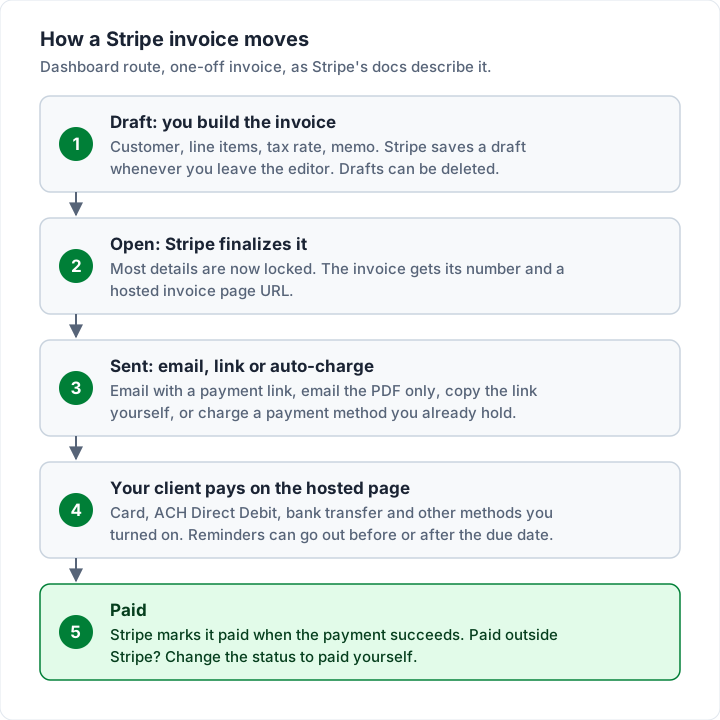
That locking matters. Stripe's guide to how invoicing works says that once an invoice is finalized “You can no longer change most details”, and its invoice management guide adds that you cannot change the due date of a finalized invoice: you void it and send a new one. If you made a mistake, Stripe's own advice is to duplicate the invoice, correct the copy, send it, and void the original.
If you searched for a Stripe invoice generator, this editor is Stripe's version of one. Every invoice is built here, saved as a draft, and turned into a PDF and a hosted page when it is finalized.
What your client sees: the hosted invoice page and PDF#
This is the part your client experiences, and the reason many sellers choose Stripe. Stripe's hosted invoice page docs say the page gives your client “a secure, private URL” where they can view the details, amounts and status, pay with any of the enabled payment methods, and “Download PDF copies of the invoice and receipt”.
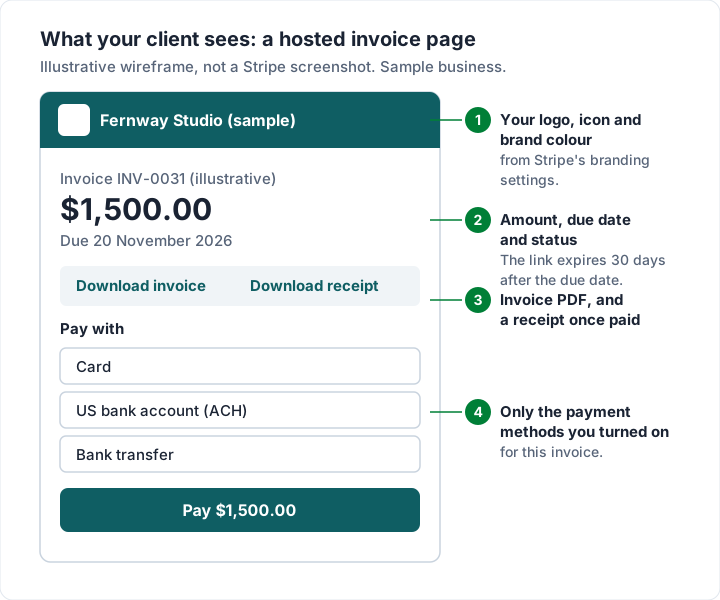
Four details from the same docs are worth knowing before you send your first one:
- The link expires. “Invoice URLs expire 30 days after the due date”, or 30 days after finalizing if there is no due date, and never more than 120 days. A client who opens an expired link sent by email can request a fresh copy.
- The link prints on the PDF too. When you turn on the payment link setting, the hosted page URL appears in the email and “The footer of invoice PDFs”, so a client who prints the invoice can still pay online.
- You choose the payment methods. You set defaults in your invoice settings or pick them per invoice. Stripe's payment methods list for Invoicing includes cards, ACH Direct Debit, bank transfer, Apple Pay, Google Pay, Klarna, Affirm and many local methods, each with its own currency and country limits.
- Partial payments are possible. You can let clients pay a custom amount towards the balance, switched on in your invoice settings.
Bank transfers inside Stripe work differently from your own bank details. Stripe's bank transfer docs explain that Stripe creates “a unique virtual bank account number” and shows it on the PDF and the hosted page, then reconciles the transfer to the invoice automatically. The money goes to Stripe, not straight to your business account, and it never exposes your own bank details. Check the bank transfer rate for your country on Stripe's pricing pages before you rely on it.
How to customize a Stripe invoice template#
Stripe's docs describe customizing one invoice design through settings, rather than choosing from a gallery of layouts. According to Stripe's Customize invoices guide, you can change:
| What you can change | Where | Note from Stripe's docs |
|---|---|---|
| Icon, logo, brand colour, accent colour | Branding settings | Logos must be JPG or PNG, under 512kb, at least 128px by 128px; they apply across your Stripe account |
| Invoice numbering | Invoice settings | Per customer (a prefix per customer) or one sequence across the account; Stripe picks the default by your account's country |
| Memo and footer | Invoice settings or per invoice | The footer is “often used for contractual or legally required text” |
| Custom fields | Invoice editor | Up to four key-value pairs in the invoice header, such as a PO number |
| Tax IDs | Invoice settings | Printed on invoice PDFs and email receipts |
| PDF page size | Invoice editor, Advanced options | A4 or Letter |
Stripe also has “invoice rendering templates”, which store the memo, footer, custom fields and line-item grouping rules for a group of customers. Those are reusable field values, not different designs. And it reminds you that “you know more about your customers and your business than Stripe does”: what your invoices need to show is a question for your accountant, not your invoicing tool. Our field-by-field invoice checklist helps with that.
Stripe can also calculate tax. Its product page describes setting a tax rate by hand “or automatically collect sales taxes” with Stripe Tax, which is priced separately. Whether you need to charge tax is a question for your accountant, not your invoicing tool; see Stripe's taxes docs for how the settings work.
Recurring invoices, reminders, voids and credit notes#
These are the four follow-up jobs most sellers ask about. Each answer below comes from Stripe's docs as read on 23 October 2026.
Recurring Stripe invoices#
For a repeating bill, Stripe's docs point you to Stripe Billing: “Use Stripe Billing to send a subscription or recurring invoice. No-code subscriptions are available.” Billing has its own price. The Billing pricing page lists pay-as-you-go Billing at 0.7% of Billing volume, a fee it says “Excludes one-off invoices”, plus monthly plans. If you are unsure whether a retainer is a recurring invoice or a subscription, our guide to recurring invoices vs subscriptions explains the difference.
Stripe invoice reminders#
Stripe's automatic collection docs describe a setting, Send reminders if a one-off invoice hasn't been paid, under the advanced invoicing features in your invoice settings. You add reminders and schedule each one “before, on, or after the invoice due date”. You can also resend an invoice by hand from its page. For a wider view of what to automate and what to keep personal, see automatic invoicing.
How to void a Stripe invoice#
You cannot delete a finalized Stripe invoice. You void it. Stripe's overview explains that voiding “maintains a paper trail, which allows you to look up the invoice by number”, and that a voided invoice is treated as zero and cannot be paid. You can void an invoice only while it is open or uncollectible. The steps:
- Go to the Invoice details page.
- Click the overflow menu (⋯) and select Change invoice status.
- In the dialog, select Void.
The same Change invoice status dialog lets you mark an invoice Paid if the client paid outside Stripe, for example by check. Our guide to voiding or cancelling an invoice covers when to void and when to issue a correction instead, and Stripe itself notes that local rules may require “another invoice or credit note instead”.
Stripe credit notes#
A credit note reduces a finalized invoice without voiding it. Stripe lists uses such as “Correcting an overcharge” and “Granting a negotiated discount after finalization”. Against an open invoice it lowers the amount due; against a paid one, the credit can be refunded, kept as a credit balance for future invoices, or recorded as handled outside Stripe. For the difference between the two documents, see credit note vs invoice.
Worked example: one $1,500.00 Stripe invoice#
Here is what Stripe keeps from one $1,500.00 invoice, using the US standard rates above as of 23 October 2026. All figures are rounded to the cent.
| How it is paid | Payment fee | Invoicing fee | Total fee | You receive |
|---|---|---|---|---|
| Card, Invoicing Starter | $43.80 (2.9% + $0.30) | $6.00 (0.4%) | $49.80 | $1,450.20 |
| Card, Invoicing Plus | $43.80 | $7.50 (0.5%) | $51.30 | $1,448.70 |
| ACH Direct Debit, Starter | $5.00 (0.8% is $12.00, capped) | $6.00 | $11.00 | $1,489.00 |
| Card through a Payment Link, no Stripe invoice | $43.80 | $0.00 | $43.80 | $1,456.20 |
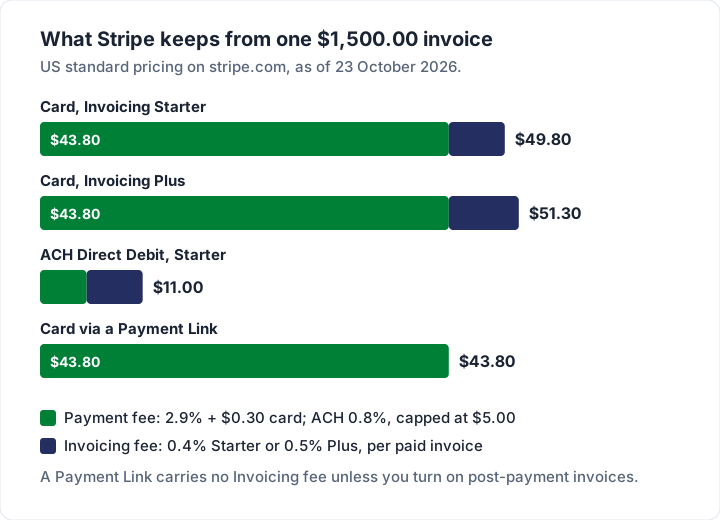
Two things stand out. The plan choice moves the total by $1.50 on this invoice; the payment method moves it by $38.80. And the Invoicing fee is a percentage, so it scales with the invoice amount. If you want the same sum on $250, $2,500 and $12,000 invoices, and set against Square and PayPal, our Stripe, Square and PayPal fee comparison has it.
If the client pays by card, a card fee applies whichever processor you use. What you control is whether the client is offered a cheaper route as well, and whether you also pay a per-invoice fee on top.
Using Stripe without Stripe Invoicing: Payment Links#
Stripe has a second no-code way to get paid, and it is easy to mix up with an invoice. A Payment Link is a link to a Stripe-hosted checkout page that you can “share on social media, in emails, or on your website”. Stripe's pricing page describes them as “No-code links to sell online without a website”, and accepting payments through one is “Included with Payments”: you pay the payment fee and no Invoicing fee.
Stripe's own docs compare the two:
| Stripe invoice | Stripe Payment Link | |
|---|---|---|
| Built for | “one-time or recurring payments from a specific customer” | Selling “a product, a subscription, or accept a donation” |
| Who can pay | The customer it is addressed to | “Anyone with the link” |
| Reuse | Not reusable; you duplicate it | Reusable with many customers |
| Partial payments or payment plans | Supported | Not supported |
| Client chooses the amount | No | Supported |
| Auto-reconciliation of bank payments | Yes | Simple reconciliation through URL parameters |
| Invoicing fee | 0.4% or 0.5% per paid invoice | None, unless you turn on post-payment invoices |
One note on that last row. A Payment Link can create an invoice after the purchase: Stripe lists “Post-payment invoices” at 0.4% of the transaction total, capped at $2.00 per invoice. That is a receipt-style record after payment, not a bill sent before it.
A Payment Link has a price set when you create it. For billing work that changes in amount, Stripe offers a Customers choose what to pay option, which its create a payment link guide describes as “Best for donations, tipping, or pay-what-you-want”, with a default maximum of 10,000.00 USD. If you plan to use it for client invoices, check that use with Stripe first.
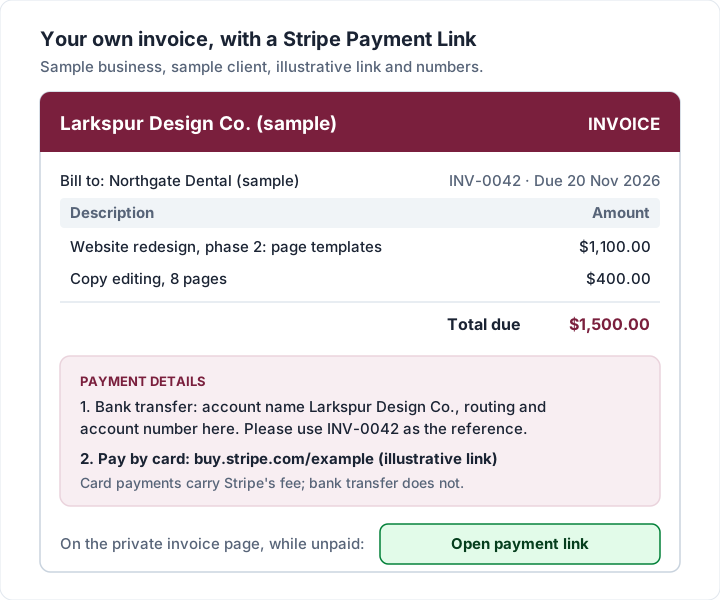
So when is your own invoice plus a Payment Link the better pairing? When most clients pay by bank transfer and only some want a card option; when you bill the same amount each time, such as a fixed monthly retainer; or when you want an invoice design of your own. When every client pays by card, and you want payments to mark invoices paid on their own, a Stripe invoice is the cleaner tool.
Where Stripe is the better fit#
Stripe is the better tool in plenty of cases:
- Subscriptions and SaaS. If you charge the same customers every month, Stripe Billing was built for it, with saved cards and automatic retries.
- Automatic charging. Stripe can charge a saved payment method on the invoice date, which no plain invoice can do.
- Card-first clients. If clients expect to click and pay by card, Stripe's hosted page does that well, in many languages and currencies.
- Automatic reconciliation. Payments mark the invoice paid, and Stripe matches ACH credit and wire payments to invoices through virtual account numbers.
- Developers and platforms. The Invoicing API, webhooks and Connect let your own software create and reconcile invoices.
- Accounting sync. Stripe's product page says you can “Sync your data in real time to NetSuite, Xero, QuickBooks, and other accounting and ERP systems” with apps from its App Marketplace. It also works from the other side: our guides to Xero invoicing and FreshBooks invoices cover two accounting tools that take Stripe payments on their own invoices.
If the client is paying through Stripe anyway, creating the invoice there keeps everything in one place. PayPal works the same way; see our guide to how a PayPal invoice works, and to Square invoices if you take card payments in person too. If you sell through a Shopify store, the same logic points to Shopify's own draft-order invoice; see Shopify invoices. If your site runs on Squarespace or Wix, Squarespace and Wix invoices covers their built-in invoicing.
Where Charming fits, and where it does not#
Charming Invoices is the “own invoice plus a link” approach. It does not send Stripe invoices, connect to your Stripe account or take payments of any kind. Here is what it does, checked in our code on 23 October 2026:
- Your Stripe Payment Link prints on the invoice. Each business has a payment link field (any https link, such as a Stripe Payment Link) and a free-text bank details box. Both print in the invoice's payment section.
- An “Open payment link” button for your client. When you issue an invoice, you can download the PDF and copy a private link the client opens with no account to create, then send them however you like. While the invoice is unpaid, that page shows an “Open payment link” button that goes to your link.
- Invoices that look like your business. 60 templates on every plan, any brand colour, your logo and 30 fonts, with invoice numbers that assign themselves in a gapless sequence.
- Overdue invoices are flagged. Charming does not email invoices or send reminders; you follow up from your own email.
- No fee on the invoice. Charming takes nothing from a payment, because no payment passes through it. Your client pays Stripe's fee only if they choose the card link.
The catches, plainly. Payment tracking is manual: Charming never sees the Stripe payment, so you record it or mark the invoice paid. The payment link is set per business, not per invoice, and is copied onto each invoice when you save it, so it suits a link that works for any amount or a fixed amount you bill repeatedly. There is no card button of our own, no automatic charging, no quotes and no accounting integration. Recurring invoices need a paid plan (see pricing), and they arrive as drafts for you to review, not sent on their own. Invoices on the free plan carry a small “Sent with Charming Invoices” line; the free plan has unlimited invoices and clients for 1 business.
If you want a branded invoice that carries your bank details and a Stripe link side by side, create a free invoice. For a wider look at the options, our guide to the best invoicing app for a small business compares the field, and what payment methods to offer on an invoice shows how to word the payment section.
Stripe invoice questions#
Is Stripe invoicing free?#
Sending is free and there is no monthly fee. Stripe charges 0.4% per paid invoice on Starter or 0.5% on Plus, plus the payment fee, such as 2.9% + 30¢ for a US domestic card, as of 23 October 2026. On a $1,500.00 invoice paid by card on Starter that is $49.80.
Can I customize a Stripe invoice template?#
Yes, through settings. You can set your icon, logo, brand and accent colours, memo, footer, up to four custom fields, tax IDs, numbering and A4 or Letter. The customization guide we read describes these settings rather than a choice of layouts.
Can I send a Stripe invoice without a website?#
Yes. The Dashboard needs no website and no code: Stripe emails the invoice, or you copy the hosted invoice link and send it yourself.
Can a client pay a Stripe invoice by bank transfer?#
Yes, if you turn it on. Stripe Invoicing supports ACH Direct Debit in the US and bank transfers to a virtual account number in several regions, as listed in its payment methods docs. If a client pays you outside Stripe instead, change the invoice status to paid yourself.
How do I get a Stripe invoice PDF?#
On the Invoices page, hover over the overflow menu (⋯) and click Download PDF. Stripe's docs note that for a paid invoice this downloads the receipt; open the invoice details page for the original invoice.
What if my client wants to pay later, on terms?#
A Stripe invoice can carry a due date and wait for payment, rather than charging a card at once. If you are weighing up letting business clients pay on Net 30, our guide to pay by invoice covers the trade-off.
The short version#
A Stripe invoice is a proper invoice built in the Stripe Dashboard, sent by email or link, and paid on a Stripe-hosted page. It needs no code and no monthly fee. Two fees apply when the client pays: the Invoicing fee, 0.4% on Starter or 0.5% on Plus, and the payment fee. On $1,500.00 that is $49.80 by card or $11.00 by ACH Direct Debit on Starter, as of 23 October 2026.
If your clients pay by card and you want invoices to mark themselves paid, Stripe Invoicing is a good fit. If most pay by bank transfer, an invoice of your own with your bank details first and a Stripe Payment Link second avoids a card fee on those payments and carries your own design.
Sources, all checked 23 October 2026: Stripe Invoicing pricing; Stripe pricing; Stripe Billing pricing; Stripe Invoicing; Stripe docs, Invoicing; Stripe docs, Use the Dashboard; Stripe docs, How invoicing works; Stripe docs, Manage invoices; Stripe docs, Hosted invoice page; Stripe docs, Customize invoices; Stripe docs, Payment methods for Invoicing; Stripe docs, Bank transfer; Stripe docs, Automatic collection; Stripe docs, Taxes; Stripe docs, Payment Links; Stripe docs, Create a payment link.