Shopify invoices: how to create, send and print one

Nnabuike Okoroafor ·
On this page · 13 sections
We make Charming Invoices, an invoicing app with no connection to Shopify: it does not import Shopify orders, create checkout links or take payments. It appears only in the section on billing that happens outside your store. Every Shopify step and quote below comes from Shopify's own Help Center and App Store pages, read on 28 October 2026. Shopify changes its admin often, so check the linked page if a button has moved.
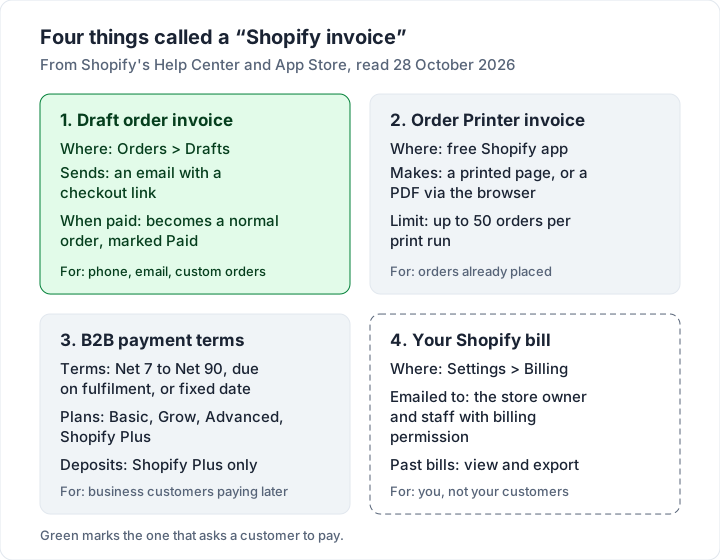
A customer has phoned in an order, a wholesale buyer wants to pay later, or someone has just asked for “an invoice for my order”. You run a Shopify store, so the answer should be somewhere in your admin. It is, but Shopify does not have one thing called “an invoice”. It has four, and it helps to know which one you need.
This guide separates them, then gives you Shopify's exact steps for each: sending an invoice from a draft order, printing or saving a PDF invoice for an order already placed, letting business customers pay on terms, and finding the bill Shopify sends you. It ends with the cases where the invoice belongs outside Shopify altogether, and a worked deposit-and-balance example.
Shopify invoices in short#
- To ask a customer to pay, create a draft order and click Send invoice. The customer gets an email with a link to your checkout. Paying turns the draft into a normal order.
- To print or PDF an invoice for an order already placed, install Shopify Order Printer, a free app made by Shopify, and print from the Orders page. You save a PDF through your browser's print dialog.
- To let business customers pay later, use B2B payment terms (Net 7 to Net 90, due on fulfilment or a fixed date). Shopify B2B is not on the Starter or Retail plans, and deposits on terms are Shopify Plus only.
- To find the invoice Shopify sends you for your plan and apps, go to Settings > Billing.
- For work that is not a store order (a commission, an installation, a wholesale client paying by bank transfer), a separate invoice may fit better. More on that below.
Which Shopify invoice do you need?#
Here are the four things people call a “Shopify invoice”, side by side. Pick the row that matches your situation and jump to its section.
| What you want | What Shopify calls it | Where it lives | What the customer gets |
|---|---|---|---|
| Ask a customer to pay for an order you set up | Draft order invoice | Orders > Drafts | An email with a checkout link |
| A printable invoice for an order already placed | Order Printer document | Shopify Order Printer app | A printed page or a PDF you send |
| Let a business customer pay on Net 30 or similar | B2B payment terms | Customers > Companies, or the draft order | An order with a due date; they pay later |
| See what you owe Shopify | Your Shopify bill | Settings > Billing | Nothing: this one is for you |
How to send an invoice from a draft order#
A draft order is an order you build on the customer's behalf. Shopify's draft orders page puts it this way: “You can create draft orders on behalf of customers when you need to process orders through phone, email, or in-person sales.” You can add catalogue products, custom items (a one-off product, service or fee that is not in your catalogue), discounts, shipping and taxes.
The steps below come from Shopify's help article Sending invoices for draft orders, read on 28 October 2026.
On desktop (Shopify admin):
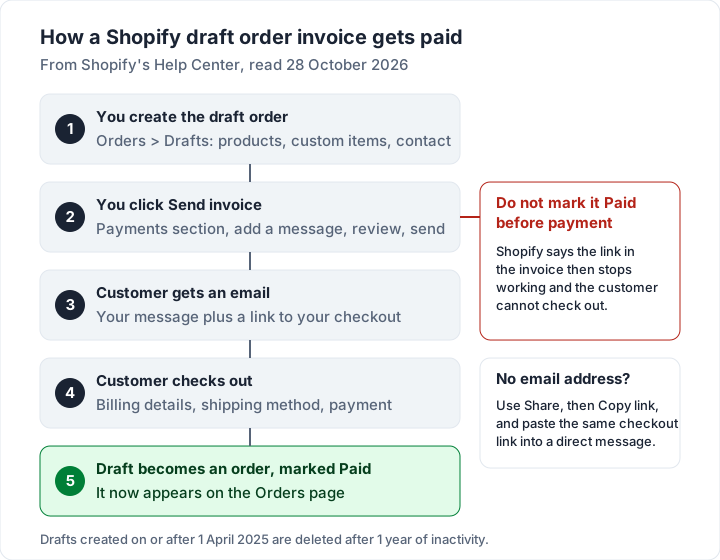
- Go to Orders > Drafts.
- Open an existing draft order, or click Create order to start a new one. Add the products and the customer.
- In the Payments section, click Send invoice.
- In the Send invoice dialog, type the message you want the customer to read.
- Optionally, change the Product prices lock (prices are locked by default), tick Discount codes to let the customer add a code, or tick the option to ignore all checkout rules.
- Click Review invoice, check it, then click Send invoice.
In the Shopify mobile app: open the Orders menu, tap Draft orders, open the draft (or tap + to create one), tap Send invoice in the Invoice section, set the same options, then tap Review and Send.
What the customer gets is an email with a link to your checkout, not a document with a balance due. When they complete checkout, “the draft order becomes an order in the Orders page and is automatically marked as Paid”, per the same article.
Five things to check before you click Send invoice#
Shopify's article lists several considerations. In its own words where it matters:
- Add contact details first. “Before you complete the draft order you need to add the customer’s email address or phone number. If you don’t include contact information, then the order confirmation won’t be sent, and you can’t send it after the draft order is created.”
- Do not mark it Paid early. “Be careful not to mark the draft order as Paid before receiving the customer's payment, or else the link in the invoice won't work, and the customer won't be able to complete the checkout process.”
- Stock blocks checkout. If a product on the invoice has no available inventory, the customer is told it is out of stock and cannot complete the sale. Shopify suggests adding and reserving inventory, or taking payment in the admin instead.
- Added items do not update shipping. If you add a product after sending the invoice, shipping rates already calculated do not update to include it.
- Inactive drafts are deleted after a year. “To optimize performance, draft orders created on or after April 1, 2025, are automatically deleted after 1 year of inactivity. Any type of edit to the draft order resets the timer.”
One more, if you sell in several currencies: when a draft order on payment terms is in a local currency other than your store currency, Shopify says you can only collect payment by credit card or by marking the order as paid, not by sending an invoice.
Share a checkout link instead of an invoice#
If the customer asked on Instagram or by direct message, you may not have their email yet. Shopify's article covers this too: open the draft order, click Share, set the same price and discount options, click Copy link, then paste the link into your message.
It is the same checkout as the invoice, minus the email. The article also notes that you cannot switch on the option for customers to add discount codes themselves when you share the link from a mobile device; you have to do that from a desktop.
How to print or PDF an invoice for an existing order#
Once an order exists (from your online store, POS or a paid draft), the invoice for it comes from Shopify Order Printer. The Order Printer help page says: “You can use the Order Printer app to print custom invoices, packing slips, receipts, labels, and other documents for your orders.”
The App Store listing describes it as “This free app”, lists Shopify as the developer and gives a launch date of May 15, 2024. If you still have the older app, Shopify's printing article (linked below) asks you to migrate your templates to the new one.
To print from the admin, per Shopify's printing article:
- Go to Orders and select the orders you want.
- Click More actions, then Print with Order Printer.
- In Templates, choose the documents (an invoice, a packing slip or both).
- Click Print.
Three details from the same article:
- Batch size: “You can print up to 50 orders at a time with the Order Printer app.” For more, Shopify suggests exporting orders to a CSV file.
- PDF: Order Printer uses your browser's print function. In Chrome, choose Save as PDF as the destination; on a Mac, use the PDF button in the print dialog. Untick Headers and footers in the browser's print settings for a clean page.
- Point of sale: add the Order Printer tile to your POS smart grid and print invoices to any standard printer your device supports.
An invoice and a receipt are not the same document, even if Order Printer prints both. An invoice asks for payment; a receipt confirms it. If your customer has already paid at checkout and wants “an invoice”, they often mean a receipt with your business details. Our guide to invoice vs receipt explains which to send.
Customizing the Shopify invoice template#
Order Printer templates are code. The help page says you can customize them “using HTML, CSS, and Liquid code”, which controls the layout, styling and what appears on the page. Add your logo, your business address, an invoice number format and payment instructions by editing that template.
On help with changes, the page says: “Shopify Support can assist with minor customizations, but larger customizations need to be done by an experienced third-party designer.” The App Store listing adds: “Customizing POS printer receipts is not supported.”
If you would rather not edit Liquid, that is where third-party invoice apps come in (see below).
Letting business customers pay later with payment terms#
A checkout link asks for payment now. For wholesale and trade buyers who expect to pay in 30 days, Shopify has payment terms. This is what “pay by invoice” usually means on Shopify; our guide to what pay by invoice means covers the idea outside Shopify.
Which plans. Shopify's B2B page says: “Shopify B2B is available on the Basic, Grow, Advanced, and Shopify Plus plans. It isn't available on the Starter or Retail plans.” You set business customers up as companies, then give each company or location its terms.
Which terms. Per Shopify's payment terms article, as of 28 October 2026:
| Payment term | When payment is due | Where you can set it |
|---|---|---|
| No payment terms (default) | Immediately | Company location or a draft order |
| Net 7, 15, 30, 45, 60 or 90 | That many days after the order is placed | Company location or a draft order |
| Due on fulfilment | When all items are fulfilled | Company location or a draft order |
| Fixed date | A calendar date you choose | Individual draft orders only |
If Net 30 is new to you, here is what Net 30 actually means on an invoice. Draft orders also have a Payment due later option with similar terms, per Shopify's creating draft orders article; check that page for what your plan shows.
Two points from the payment terms article:
- Deposits are Plus only. “Deposit requirements are available only on the Shopify Plus plan.”
- Nothing charges the customer automatically. “Payments aren’t automatically captured when the payment terms expire.” If a buyer saved a card, you charge it yourself in the admin. Customers can pay any time from their account with Pay now; after the due date, the order shows as Overdue to them.
Billing other companies brings its own paperwork, such as purchase order numbers and an accounts payable contact. Our guide on how to invoice a company covers what a business buyer's accounts team will check.
Shopify's free invoice generator and invoice apps#
Two more things turn up when you search for a Shopify invoice:
- Shopify's free invoice generator. At shopify.com/tools/invoice-generator, Shopify runs a three-step form: your company details, your customer and invoice details, then the items. You can add a logo. Its FAQ says “The invoice generator is free to use for both personal and commercial use”, and to the question of whether you need to be a Shopify customer: “No. The invoice generator can be used by everyone and anyone.” The page says your completed invoice is emailed to you as a PDF. It is not connected to your store, so nothing in it comes from an order.
- Invoice apps from the Shopify App Store. Third-party apps add features such as automatic PDF invoices attached to order emails or invoices in several languages. Features, prices and limits differ app by app and change often, so read each app's own listing before you install, and check its plan against your monthly order count.
Finding the invoice Shopify sends you#
If you were looking for Shopify's bill to you, for your plan, apps or transaction charges, it is not in Orders. Shopify's billing help page says you manage your bills from Settings > Billing, where Past bills lists your history and lets you export any bill for your records.
You should also have it by email: “Shopify emails each bill to the store owner, and to staff that have the View billing and receive billing emails permission.” If your bookkeeper needs every bill, give them that permission rather than forwarding emails.
When the invoice belongs outside Shopify#
Orders that live in Shopify should be invoiced in Shopify. The checkout, stock, taxes and order history all stay in one place, and your customer pays through the same checkout they already trust.
Some billing never touches your store, though:
- Custom commissions agreed by message, where the price is set after a conversation.
- Services you sell alongside products: installation, workshops, repairs, design work.
- Wholesale clients paying by bank transfer, who want a formal invoice with your bank details rather than a checkout link.
- A second business that does not have a store at all.
For these, any proper invoice works: a spreadsheet, a template or an invoicing app. Our guide on how to make an invoice, step by step covers what it must show, and our guide on how to list bank details on an invoice covers the payment section. If the client wants to pay by card, a payment link from Stripe or Square can go on the invoice; see how a Stripe invoice works and what card payments on an invoice cost before you choose.
Where Charming fits, and where it does not#
Charming Invoices is one option for that outside-the-store billing. To be clear first: it has no Shopify integration. It cannot import orders, create a checkout link, take card payments or know when a client has paid. Never use it to move a Shopify order off Shopify's checkout.
What it does, checked in our code on 28 October 2026:
- Unlimited invoices and clients on the free plan, for 1 business, with your logo, colours and fonts and all 60 templates.
- Bank details and one payment link per business print on every invoice. Your client opens the invoice from a private link without an account, and sees an “Open payment link” button while it is unpaid.
- Deposit and balance invoices you track separately, and a “Viewed” marker when the client opens the private link.
- A PDF you can download, print or share by link, sent however you like once the invoice is issued. Overdue invoices are flagged; Charming does not email invoices or send reminders.
- A CSV export of your invoices for your accountant. There is no import and no accounting integration.
The catches: payment tracking is manual, so you mark each invoice paid yourself; free invoices carry a small “Sent with Charming Invoices” line; and the paid plans (Individual at $29 once, Team at $79 once, or Pro at $12 a month or $99 a year) are needed for more than 1 business, with the lifetime plans sold as final sale. Create a free invoice, or start from our Excel and Word templates if you prefer a file.
Worked example: a custom order with a deposit and a balance#
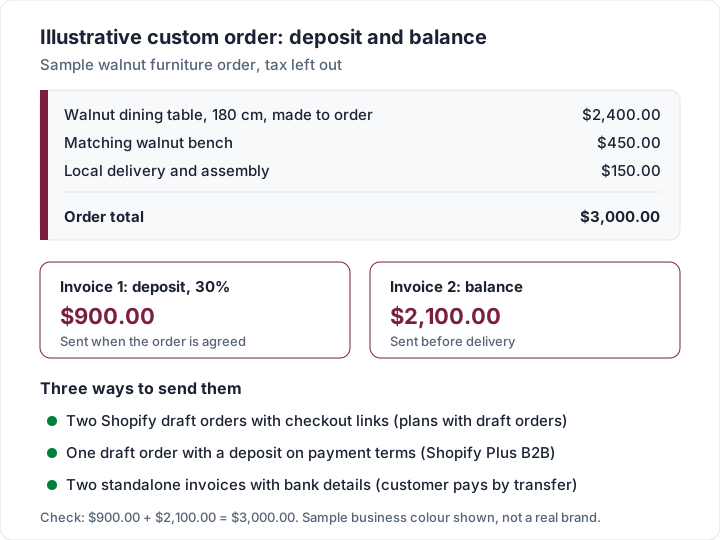
Here is an illustrative custom furniture order, agreed by email, for a sample maker who sells through Shopify. The customer wants a walnut dining table and bench, with local delivery. The maker asks for 30% up front and the balance before delivery.
| Line item | Qty | Rate | Amount |
|---|---|---|---|
| Walnut dining table, 180 cm, made to order | 1 | $2,400.00 | $2,400.00 |
| Matching walnut bench | 1 | $450.00 | $450.00 |
| Local delivery and assembly | 1 | $150.00 | $150.00 |
| Order total | $3,000.00 | ||
| Deposit, 30% | $900.00 | ||
| Balance before delivery | $2,100.00 |
Tax is left out to keep the arithmetic clear; your store adds whatever tax applies.
In Shopify, on any plan with draft orders: create a draft order with a custom item, “Deposit (30%): walnut dining table and bench”, at $900.00, and send the invoice. When the customer checks out, it becomes a paid order for the deposit. When the table is ready, send a second draft order for the $2,100.00 balance, or a draft with the products themselves and a $900.00 discount, so the final order shows the full items.
On Shopify Plus with B2B: a draft order can carry a percentage deposit as part of its payment terms, and Shopify's payment terms article says the deposit amount is then shown on the invoice you send.
Outside Shopify: if this customer is paying by bank transfer, two invoices from any invoicing tool, one for $900.00 and one for $2,100.00 marked as the balance, do the same job. Our guide to deposit and balance invoices shows how to word each one.
Questions people ask about Shopify invoices#
Does Shopify send invoices automatically?#
Not as a PDF in the help pages we read. A draft order invoice is something you send by hand, and an Order Printer invoice is something you print or save. Your customers do get Shopify's order notifications. If you want a PDF invoice attached to every order email, look at invoice apps in the Shopify App Store and check each listing.
Can I edit a Shopify invoice after sending it?#
You can edit the draft order and send the invoice again from the same Send invoice button. Shopify's article warns that if you add a product after sending, shipping rates already calculated will not update, so check the shipping line before you resend.
What does a Shopify invoice look like?#
A draft order invoice is an email: your message, the order summary and a button to the checkout. An Order Printer invoice is a printable page built from a template you can edit with HTML, CSS and Liquid.
Can I do a GST or tax invoice in Shopify?#
What a tax invoice must show depends on where you and your customer are, and the rules vary. Check your tax authority's own pages and ask an accountant, then edit your Order Printer template to match. Our guide to what a tax invoice is explains the general idea. This is general information, not legal or tax advice.
Does Shopify make commercial invoices for shipping abroad?#
Customs paperwork is a separate document from a sales invoice. Check Shopify Shipping's own help pages for what it generates in your country, and see the commercial invoice guide for what the document is.
How is this different from an eBay invoice?#
eBay invoices work inside eBay's checkout with their own rules. If you sell there too, see how to send an invoice on eBay. WooCommerce stores and Squarespace or Wix sites have their own versions, covered in WooCommerce invoices and Squarespace and Wix invoices.
The short version#
A Shopify invoice is usually one of three things you send to customers: a draft order invoice that emails a checkout link, an Order Printer invoice for an order already placed (free app, up to 50 orders per print run, PDF through your browser), or B2B payment terms that let business customers pay later on Basic, Grow, Advanced or Shopify Plus. Shopify's bill to you is in Settings > Billing. Keep store orders in Shopify, and use a standalone invoice only for the work that never goes through your checkout.
Sources, all read 28 October 2026: Shopify Help Center, draft orders and invoices; Sending invoices for draft orders; Creating draft orders; Order Printer; Printing order documents; Shopify Order Printer on the App Store; Shopify B2B; Setting up payment terms in B2B; Managing your Shopify bills; Shopify free invoice generator.