Send an invoice on eBay: steps for sellers and buyers

Nnabuike Okoroafor ·
On this page · 13 sections
We make Charming Invoices, an invoicing app with no connection to eBay: it does not send eBay invoices, import eBay orders or take payments. It appears only in the section on sales you make outside eBay. Every eBay step and policy line below is quoted or taken from eBay's own help pages, read on 23 October 2026. Where policy or tax comes up, this is general information, not legal or tax advice: check eBay's current pages.
A buyer has won three of your auctions and wants them in one parcel. Or someone bought an item a week ago and still has not paid. Or a buyer messages to say they need "an invoice" for their records. All three send you looking for the same button, and eBay's word "invoice" means something slightly different in each case.
This guide covers how to send an invoice on eBay as a seller, how to combine items and shipping into one total, how buyers ask for that total, and where the other eBay documents people call invoices actually live: order details for buyers, and the monthly tax invoice eBay sends sellers for their fees.
Sending an invoice on eBay, in short#
- An eBay invoice is a new total you send a buyer before they pay. You use it to combine several purchases, change the shipping, or remind a buyer who has not paid.
- You send it from Orders in Seller Hub or My eBay: Actions, then Send invoice.
- There is a 30-day limit. eBay's help page says: "You can't send an invoice if it's been more than 30 days since the listing ended."
- Buyers ask for a combined total from their cart with Request combined shipping, if your shipping preferences allow it.
- The buyer still pays through eBay. An eBay invoice is not a way to take payment outside eBay; eBay's policy page says “Offering to buy or sell outside of eBay is not allowed.”
- Your own business invoice is a different thing. eBay's invoice is a payment request inside eBay, not a tax invoice or a document from your own invoice sequence.
When you need to send an invoice on eBay#
Most eBay sales never need one. The buyer clicks Buy It Now or wins an auction, goes through eBay checkout and pays the price and shipping shown in the listing. eBay's help page Sending invoices to buyers says you may need an invoice "If your buyer hasn't gone directly through eBay checkout", and lists three situations:
- "The buyer is purchasing several items from you, and you want to combine them into a single purchase"
- "You need to change some of the transaction details, such as shipping charges or payment method (although this should only be done at the buyer's request)"
- "The buyer hasn't paid for an auction they've won, and you want to send them a reminder"
The first is by far the most common. A buyer picks up four items from your shop over an afternoon, and one parcel should carry one shipping charge, not four.
The clock matters. The invoice option is tied to the listing, not the buyer. eBay's export help page on invoices puts it this way: "The option to send an invoice is available within 30 days from the end of the listing (winning the auction item, accepting the offer by you or your buyer)."
How to send an invoice on eBay, step by step#
You can send or revise an invoice from Seller Hub or from My eBay. The steps below are eBay's, from its help page, as they read on 23 October 2026.
From Seller Hub:
- In Seller Hub, select Orders.
- Select Awaiting payment.
- From Actions, select Send invoice.
- Make any changes you need, such as shipping charges.
- Select Send invoice.
From My eBay:
- In My eBay, select Orders.
- From Actions, select Send invoice.
- Make any changes you need.
- Select Send invoice.
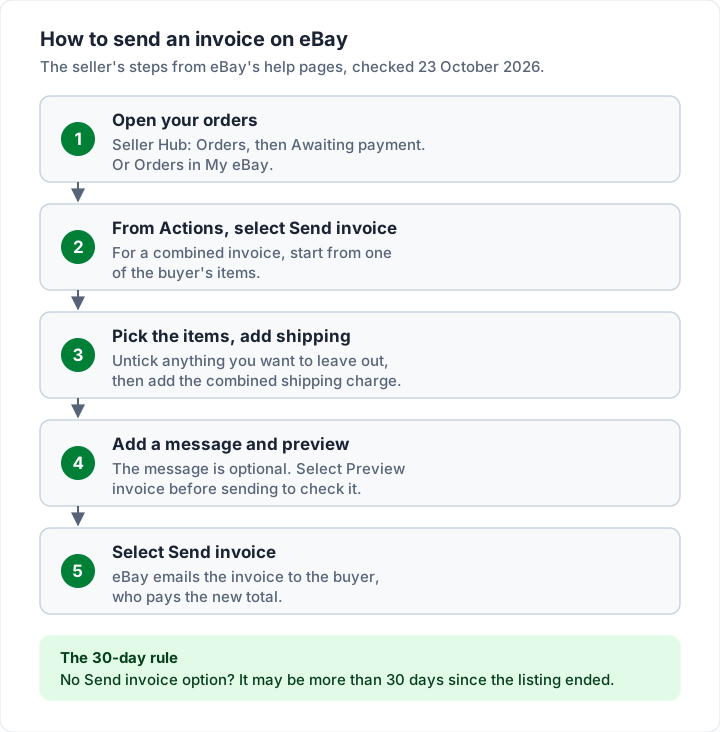
Two details from eBay's export help page fill in the rest. After you respond to a buyer's offer, you may see a "Send the buyer invoice" link straight away. And once the invoice is sent, "the buyer will receive an email shortly after and will be able to pay you based on the instructions and payment methods you specified."
On the eBay app. eBay's invoice help pages describe My eBay and Seller Hub only; neither page we read gives steps for the mobile app. If you sell from your phone and cannot find Send invoice in an order's menu, open eBay in your phone's browser and use the steps above.
How to combine items and shipping into one eBay invoice#
A combined invoice is the reason most sellers ever touch this feature. The buyer gets one total with one shipping charge, and you pack one parcel.
First, allow it in your shipping preferences. eBay's two help pages describe this setting in slightly different words, which is worth knowing if you cannot find it:
- The US page Offering combined shipping says: on the Shipping Preferences page, select Edit beside Allow invoice requests, set "Requests allowed" to Yes, choose the time period you are willing to combine purchases for, and select Save.
- The export help page calls it Allow combined payments and shipping, with a box to "Allow buyers to send one combined payment for all items purchased" and the same time-period choice.
The label in your account may match either one. Both lead to the same place: buyers can ask you for a combined total, and you can send one.
Then send the combined invoice. From eBay's Sending invoices to buyers:
- Find the items in Orders in Seller Hub or My eBay.
- Select Send invoice next to one of the items you want to include.
- eBay shows every item that buyer has bought from you. Remove the check from any you do not want on this invoice.
- Add shipping charges.
- Add a message to the buyer if you like, and select the payment methods you accept.
- Select Preview invoice before sending, then Send invoice.
Adding to an invoice you already sent. If the buyer buys one more thing, find the order, then use More actions beside the buyer's username and select Send invoice again. eBay's note: "If you don't see the Send invoice option, you can no longer add to this invoice and will need to send a separate one."
Here is what combining does to a buyer's total. The items and prices are illustrative:
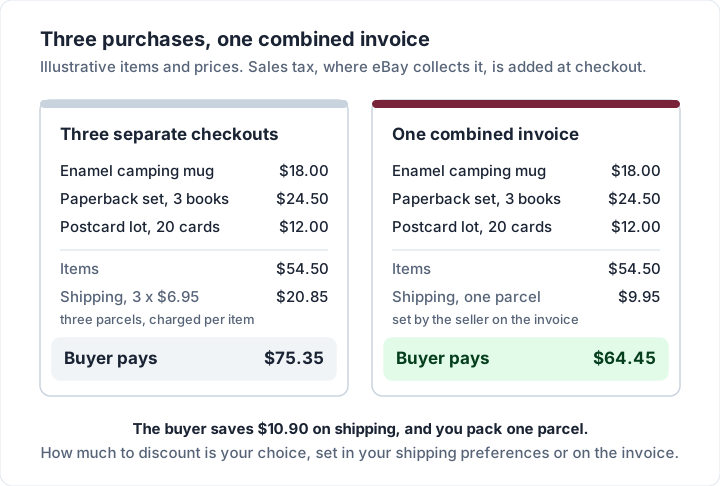
| Illustrative order | Separate checkouts | One combined invoice |
|---|---|---|
| Items (3) | $54.50 | $54.50 |
| Shipping | 3 x $6.95 = $20.85 | One parcel: $9.95 |
| Buyer pays | $75.35 | $64.45 |
When items cannot be combined. eBay's combined shipping page lists items that are not eligible, so the buyer pays shipping on each one even if you have set up combined shipping. As of 23 October 2026 the list was:
- Items in the PSA Vault
- Items listed with Local pickup
- "Most items that require Authenticity Guarantee checks, except for multiple quantity purchases of the same streetwear item or sneakers"
- "Items that are purchased with Best Offer"
- "eBay International Shipping items in specific categories"
The same page says a buyer cannot request combined shipping from the cart "if the items are discounted, free shipping is already offered, or the listings are set up to require immediate payment, such as eBay Live listings."
If the buyer has already paid. You can still give back the shipping difference. eBay's page says you can offer a combined shipping discount "by sending a partial refund to the buyer from Orders in Seller Hub or My eBay."
How buyers request a combined total on eBay#
If you are the buyer, you do not send an invoice; you ask the seller for one. eBay's buyer page Saving through combined shipping gives these steps:
- Go to your cart and select Request combined shipping.
- Select the eligible items you want shipped together. You can also leave a message for the seller.
- When the seller combines your items, they send you an invoice and you see the updated shipping costs in your cart.
- Go to checkout and complete the purchase to get any discount the seller offered.
Two points on that page are worth knowing before you ask. "Even if an item is eligible for combined shipping, it is the seller's decision whether they will combine eligible items or offer any combined shipping discounts." And if the listing does not state shipping costs for extra items, "you'll need to ask the seller before you pay."
If you have already paid for several items and they have not shipped, eBay says the seller "may still be able to combine shipping if you contact the seller." In that case the seller's tool is the partial refund above, not a new invoice.
| Who | What they do | Where |
|---|---|---|
| Buyer | Selects Request combined shipping | Shopping cart |
| Seller | Allows invoice requests, then sends the combined invoice | Shipping preferences, then Orders |
| Buyer | Pays the updated total at checkout | Cart and checkout |
| Seller, after payment | Refunds the shipping difference if it was overpaid | Orders: partial refund |
Using an eBay invoice as a payment reminder#
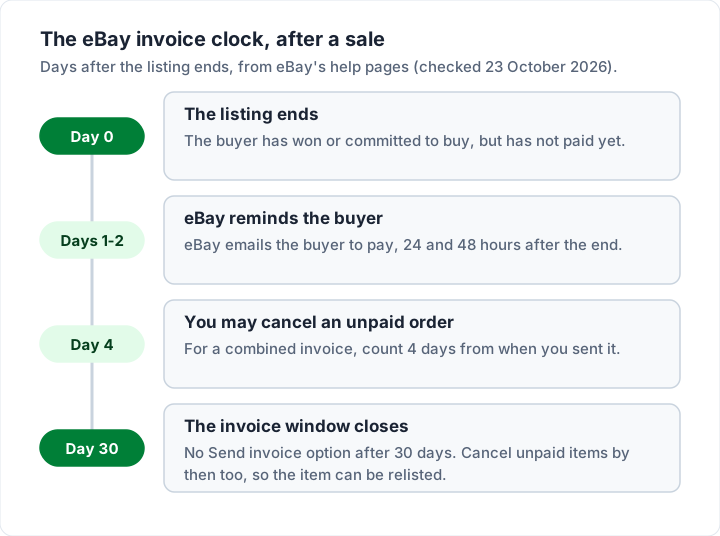
The third use of an invoice is a nudge for a buyer who has not paid. eBay does much of this for you. Its page Resolving unpaid items with buyers says eBay emails the buyer "24 hours and 48 hours after the listing ended", and that you can cancel the order once 4 calendar days have passed without payment.
Sending your own invoice changes that count. The same page says: "If you've sent a combined invoice, you'll be able to cancel the order 4 or more days after the date the invoice was sent to the buyer." And it adds a deadline on the other end: "It's important to cancel any unpaid items within 30 days from the day the buyer commits to buy so the item can be relisted."
If you would rather not chase at all, eBay's Preferences for items awaiting payment can cancel unpaid orders automatically after the time you set. The page notes it works only when buyers pay through eBay checkout, "not cash on delivery or with a check", and that "For combined invoices, the time frame is based on when the most recent item on the invoice was purchased."
How to find or print an eBay invoice or receipt as a buyer#
People searching "how to print an invoice on eBay" are usually buyers who need proof of a purchase. eBay's help pages do not describe a printable "buyer invoice" as such. What they describe is your order details, which carry the information a receipt would:
- Order details. eBay's page Your eBay order number says your order details hold "all the information about a purchase, including shipping address, order number, and tracking details". To open them: select Purchase History, find the item, then select View order details.
- Your 12-digit order number is in the order details, in Purchase History and in the order confirmation email.
- Older purchases. eBay's purchase history page says: "You'll find all your orders from the past 7 years in your purchase history." It shows the last 60 days first; choose a year from See orders from to go further back.
- Guest purchases do not appear in purchase history. eBay says to use the order confirmation email instead.
To print, open the order details and use your browser's print command, or save the page as a PDF. If your employer or accountant needs a formal invoice with the seller's business details and tax shown, that has to come from the seller, which is the subject of the section after next. Our guide to the difference between an invoice and a receipt explains what each document is meant to prove.
eBay's tax invoice for sellers is a different document#
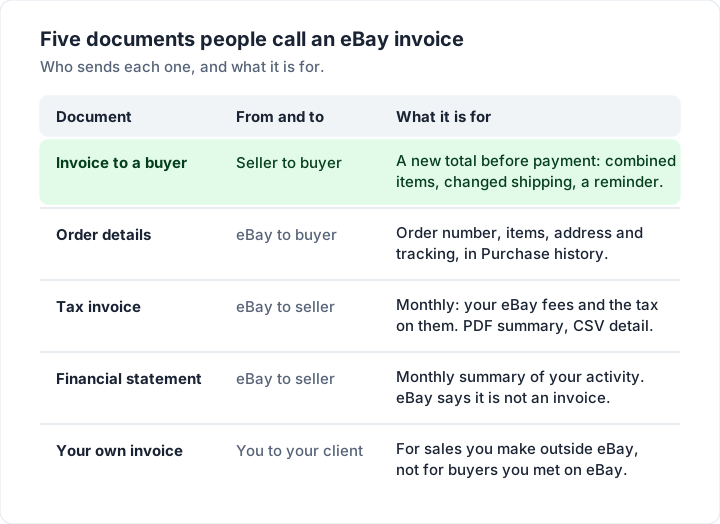
If you sell on eBay, you will also receive invoices from eBay, and these are what many searches for "eBay invoice" or "eBay billing invoice" are after. They bill you for eBay's fees; they have nothing to do with your buyers.
eBay's page Reconciling your eBay sales transactions lists the documents, all downloadable in Seller Hub (several also in My eBay) under Payments, then Reports:
- Tax invoice. It "is issued for services rendered and includes all applicable seller fees and other costs." The summary is a PDF and the detail a CSV, and eBay emails you at the start of each month when it is ready.
- Financial statement. A monthly PDF summary of your activity. eBay is explicit: "The statement is not an invoice and does not replace existing reports."
- Transaction report. A CSV for any date range, with order IDs, fees, payouts, and "Claim: Charges or credits related to eBay Money Back Guarantee (eMBG) refunds".
- Credit note summary. When fees, charges or taxes are reversed, "eBay will issue a credit note along with a PDF summary and a CSV file".
- Form 1099-K. eBay describes it as "an IRS information return for eBay sellers within a certain threshold" and links its own article on it.
Do you have to pay an eBay fee invoice separately? Usually not: eBay's export help page says "Your fees and other selling costs are automatically deducted from your sales proceeds", and that you need a valid payment method on file in case your proceeds do not cover them.
To match those reports against your bank and your own books, our guide to invoice reconciliation walks through the method, and credit note vs invoice explains what a credit note does to a balance. eBay itself recommends that you "consult your financial advisor for financial reconciling of this information."
Do not send a PayPal invoice for an eBay item#
A few searches ask how to send a PayPal invoice for an eBay sale. Read eBay's rules before you do. Its Offering to buy or sell outside of eBay policy says: "Offering to buy or sell outside of eBay is not allowed." Among the things buyers and sellers cannot share before completing a sale, it lists "Payment information" and "Bank details", and it warns that "Transactions conducted outside of eBay are not eligible for eBay protection programs and the eBay Money Back Guarantee."
eBay's related payment methods policy is summarised on that page in one line: "Only payment methods offered at eBay checkout are allowed." So for an eBay sale, the eBay invoice above is the tool. If you sell outside eBay and want to bill through PayPal, our guide to the PayPal invoice covers how that works and what it costs.
The same caution applies the other way round. If a buyer or "eBay" emails you an invoice or a payment request that you did not expect, do not pay from the email: open eBay directly and check Purchase History or your Orders. eBay's policy page asks members to report offers to trade outside eBay. Our guide to spotting fake invoices and invoice scams covers the warning signs.
When an eBay invoice is not enough#
An eBay invoice asks a buyer to pay a total inside eBay. It is not the kind of invoice a business keeps for its accounts, and it does not come from your own numbered sequence. Three situations come up:
- A business buyer asks for an invoice for their records. For an order they have already paid on eBay, they can start with the order details above. If they need more, such as your business name and address, a tax ID or a line-by-line breakdown, read eBay's policy page before you reply: it lists “Payment information” and “Bank details” among the contact details not to share before completing a sale. The same page lists “Use contact information obtained through an eBay transaction to offer to buy or sell an item outside of eBay” among the things not allowed.
- Tax on the invoice. Whether you need to issue a tax invoice (a VAT, GST or similar invoice) is a question for your tax authority or accountant; eBay's invoice tool does not settle it. On the US side, eBay's page Paying tax on eBay purchases says that in "marketplace responsibility" states, "applicable sales tax will be collected by eBay and included in the order total at checkout." For what a tax invoice is and what it usually shows, see what is a tax invoice; for VAT, our guide to the VAT invoice covers what one usually shows.
- Sales you make outside eBay. If you also sell to your own clients, at markets, to trade customers or from your own website, those sales need your own invoices. For a business customer, our guide to invoicing a company covers purchase orders and accounts-payable details, and for a one-off sale of a used item, bill of sale vs invoice explains which document fits. Shipping goods abroad yourself usually also means a commercial invoice for customs. If you also run a Shopify store, our guide to Shopify invoices covers that platform's draft-order invoices and Order Printer. For a WooCommerce store or a Squarespace or Wix site, see WooCommerce invoices and Squarespace and Wix invoices.
Invoicing your sales outside eBay with Charming#
For the sales that happen off eBay, Charming Invoices is one way to make a proper invoice. To be clear about the limits first: Charming has no eBay integration. It cannot import eBay orders, send eBay invoices or take payments, and it is not for billing buyers you met on eBay.
What it does, checked in our code on 23 October 2026:
- Unlimited invoices and clients on the free plan, for 1 business, with no card and no expiry.
- Numbers that assign themselves, in one gapless sequence per business, with your own prefix. Our guide to invoice numbering explains why that matters to an accountant.
- 60 templates, with your logo and brand colour, plus fields for a PO number, payment terms, due date and notes.
- A PDF and a private link. Issue the invoice, then download the PDF or copy the link and send it however you like. Your client opens the invoice without creating an account.
- Your own payment details. Bank details and one payment link (for example a PayPal or Stripe link you already have) print on the invoice, and the private page shows an "Open payment link" button while it is unpaid.
- A CSV export of your invoices for your bookkeeper.
The catches: Charming processes no card payments and does not know when a client has paid, so you record payments and mark invoices paid yourself; there is no import of orders from eBay or anywhere else; and invoices on the free plan carry a small "Sent with Charming Invoices" line.
If a spreadsheet suits your volume better, our free Excel and Word invoice templates need no sign-up; the Excel files calculate the totals, the Word files do not. If you want numbered, branded invoices for your off-eBay customers, create a free invoice. For the full walk-through of any invoice, see how to make an invoice, step by step.
eBay invoice questions#
Can I send an invoice on eBay after the buyer has paid?#
Not to change the total. Once a buyer has paid, eBay's route for giving back overpaid shipping is a partial refund from Orders. A new invoice is for orders still awaiting payment.
Can I edit or resend an eBay invoice?#
Yes, within the 30-day window. eBay's help page says you can "send or revise an invoice" from the same Send invoice action, and you can add newly bought items to an existing combined invoice until that option disappears.
Why can't I see the Send invoice button?#
eBay's tip: "If you don't see a Send invoice option for an item, it may have been more than 30 days since the listing ended." For a combined invoice, eBay adds that when the option is gone you "will need to send a separate one."
Does eBay send invoices to buyers automatically?#
eBay sends payment reminder emails to buyers who have not paid, at 24 and 48 hours after the listing ends. An invoice with a changed total comes from the seller.
What is the eBay invoice I get every month as a seller?#
That is eBay's tax invoice for your seller fees, with a PDF summary and a CSV detail, under Payments, Reports in Seller Hub or My eBay. It is separate from anything you send to buyers.
The short version#
To send an invoice on eBay, go to Orders in Seller Hub or My eBay, choose Send invoice from Actions, adjust the items and shipping, preview and send, all within 30 days of the listing ending. To combine purchases, allow invoice requests in your shipping preferences first; buyers then use Request combined shipping in their cart. Buyers find their proof of purchase in Purchase History, under View order details. The monthly invoice eBay sends you is its bill for your fees. Keep eBay payments inside eBay, and use your own invoices only for the sales you make elsewhere.
Sources, all read on 23 October 2026: eBay, Sending invoices to buyers; eBay export help, How to send invoices to buyers; eBay, Offering combined shipping; eBay, Saving through combined shipping; eBay, Resolving unpaid items with buyers; eBay, Your purchase history; eBay, Your eBay order number; eBay, Reconciling your eBay sales transactions; eBay, Offering to buy or sell outside of eBay policy; eBay, Paying tax on eBay purchases.