Invoice reconciliation: match every payment to its invoice

Nnabuike Okoroafor ·
On this page · 11 sections
Your bank statement says $2,450.00 arrived from a client on the 3rd. Your invoice list says that client owes you four invoices, none of them $2,450.00. Another deposit is $29.30 short of the invoice it should pay, one is $50.00 over, and one is a $350.00 transfer with a reference you do not recognise. Until each of those is matched to an invoice, you do not really know who still owes you what.
That matching is invoice reconciliation, and learning to reconcile an invoice against your bank takes one routine and six cases. This guide explains what it means for a business that sends invoices (and, briefly, for one that pays them), a month-by-month routine, how to handle the six awkward cases with worked numbers, and a simple reconciliation sheet you can build in Excel or Google Sheets.
General information, not accounting or tax advice. How fees, overpayments and exchange differences go into your books depends on your country and your accounting method; ask your accountant.
In short#
- Invoice reconciliation means matching each payment you receive to the invoice it pays, so every invoice shows the right balance and every deposit in your bank is explained.
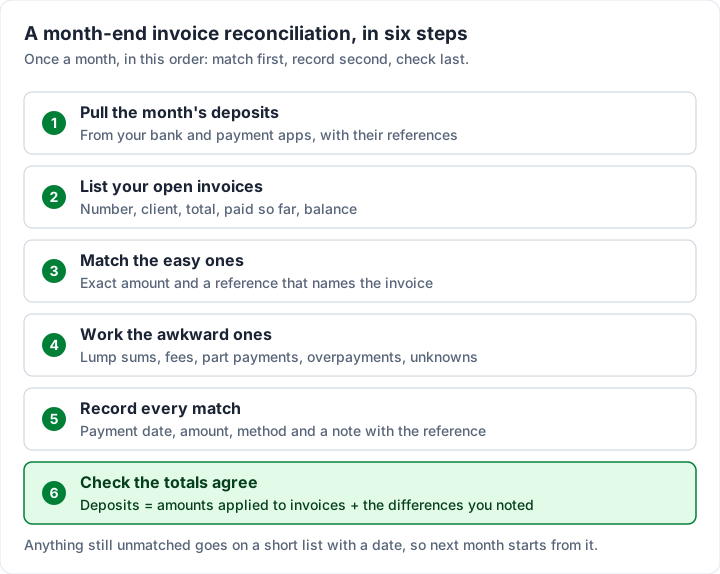
- Do it monthly at least, in a fixed order: pull the deposits, list open invoices, match the easy ones, work the awkward ones, record every match, check the totals agree.
- Most of the work is in six cases: lump sums, fees taken off, part payments, overpayments, deposits you cannot identify and currency differences.
- Never guess at a lump sum. Ask the client which invoices it pays. In our worked example, two different pairs of invoices add up to the same amount.
- Software can automate the matching if it can see your bank. Without a bank feed, a short monthly routine and one sheet do the job.
What is invoice reconciliation?#
Invoice reconciliation is checking invoices against the records that should agree with them and fixing the differences. What those records are depends on which side of the invoice you are on:
| If you send invoices (seller) | If you pay invoices (buyer) | |
|---|---|---|
| What you match | Payments received against the invoices they pay | Supplier invoices against purchase orders and delivery records |
| The question | “Which invoice did this money pay, and what is still owed?” | “Should we pay this invoice, and how much?” |
| The usual source | Your bank statement and payment app payouts | The purchase order, the goods received note, the invoice |
| Typical problems | Lump sums, fees deducted, part payments, overpayments, unknown deposits | Wrong quantities, wrong prices, duplicate invoices, missing deliveries |
| Result | An accurate list of open invoices; paid ones marked paid | Approved invoices paid; disputed ones held |
Most search results describe the buyer's side, because large accounts payable teams do it at scale. If you are a freelancer or small business sending invoices, the seller's side is the one that affects you every week, so it is most of this guide. The buyer's version is covered further down. Invoices in accounting explains the receivable and payable sides in plain terms.
Invoice reconciliation is related to, but not the same as, bank reconciliation. A bank reconciliation checks that your books and your bank statement agree on the balance. Invoice reconciliation is the part that explains each deposit in terms of the invoices it pays. Do the second well and the first becomes easy.
How to reconcile an invoice against your bank#
The IRS's guide for new businesses, Publication 583 (revised December 2024, as of 23 October 2026), puts the habit plainly: “You should reconcile your checking account each month.” And: “When you receive your bank statement, make sure the statement, your checkbook, and your books agree.” For a business that invoices, “your books” starts with knowing which invoice each deposit paid.
Here is a routine that works for most small businesses, once a month:
- Pull the month's deposits from your bank and from any payment apps or card processors that pay out to it, with the date, amount and reference of each.
- List your open invoices: number, client, total, amount paid so far and balance. Anything already marked paid stays off this list.
- Match the easy ones first: a deposit whose amount equals one invoice's balance and whose reference names the invoice or the client.
- Work the awkward ones: lump sums, fees, part payments, overpayments, unknown deposits and currency differences, using the cases below.
- Record every match against the invoice: payment date, amount, method and a note with the bank reference. A part payment leaves the invoice open with a smaller balance.
- Check the totals agree: the month's deposits should equal the amounts you applied to invoices plus the differences you noted (fees, charges, overpayments, unknown deposits). If they do not, something is unmatched.
Weekly is better than monthly if you send a lot of invoices, because a payment matched the week it arrives is still fresh in everyone's memory. The weekly routine for open invoices starts with the same step: match payments before you chase anyone.
A worked month: six deposits, six different cases#
Here is one month for an invented design studio: six deposits from its September 2026 bank statement. Every client and amount is invented for illustration; the arithmetic is real.
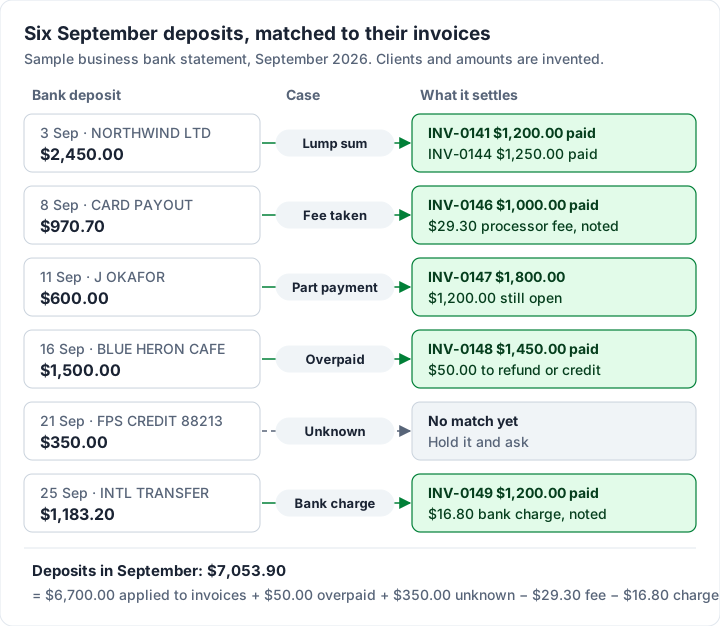
Every deposit here needs a decision, and none of them is unusual. Creating the invoice is the quick part; knowing which invoices are really paid is the part that takes care.
The awkward cases, and how to handle each#
These six cases cover most of what does not match first time. The amounts are from the worked month above.
| Case | How you spot it | What to record | What to do next |
|---|---|---|---|
| Lump sum | One deposit, several open invoices for that client | A separate payment on each invoice it covers | Ask for the remittance advice before you split it |
| Fee deducted | Deposit is slightly less than the invoice; a processor payout | The full invoice amount as paid; the fee noted separately | Nothing with the client; note the fee for your books |
| Part payment | Deposit is well under the invoice total | The amount received; the invoice stays open | Confirm the balance and when it will come |
| Overpayment or duplicate | Deposit is more than the balance, or pays an invoice twice | The invoice as paid; the extra separately | Agree a refund or a credit, in writing |
| Unknown deposit | No reference you recognise, no matching amount | Nothing against an invoice yet | Hold it as unidentified; ask your bank and likely clients |
| Currency or bank charge | International payment arrives short, or in another currency | The invoice as paid in its own currency; the difference separately | Ask your accountant how to treat exchange differences |
Lump sums with no reference#
Northwind Ltd paid $2,450.00 on Thursday 3 September with no reference. It had four open invoices: INV-0139 for $950.00, INV-0141 for $1,200.00, INV-0144 for $1,250.00 and INV-0145 for $1,500.00. Two different pairs add up to exactly $2,450.00:
- INV-0141 + INV-0144: $1,200.00 + $1,250.00 = $2,450.00
- INV-0139 + INV-0145: $950.00 + $1,500.00 = $2,450.00
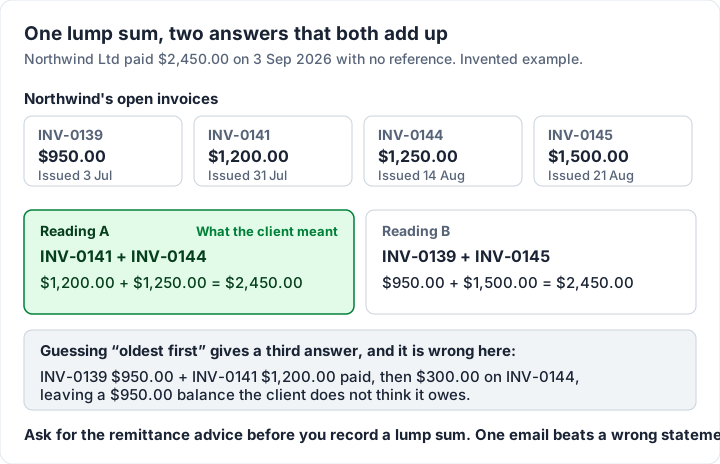
A common fallback is to apply a lump sum to the oldest invoices first. Here that gives a third answer: INV-0139 and INV-0141 paid ($2,150.00), $300.00 on INV-0144, and a $950.00 balance on an invoice the client believes it has paid. The next statement you send would then disagree with theirs.
So ask. A one-line email (“Could you confirm which invoices your payment of $2,450.00 on 3 September covers?”) usually brings back a remittance advice. In this example it arrived on Friday 4 September and named INV-0141 and INV-0144. Two habits make lump sums rarer: ask clients to quote the invoice number as the payment reference (our guide to payment instructions on an invoice has wording), and keep invoice numbers unique and easy to type, as covered in how to number invoices. Our guide to remittance on an invoice covers what a remittance advice shows.
Fees deducted by a processor or bank#
The 8 September card payout was $970.70 against INV-0146 for $1,000.00. The client paid $1,000.00; the processor kept $29.30 before paying you. For matching purposes, the invoice is settled and the $29.30 is a fee to note separately, not $29.30 the client still owes. How the fee goes into your books is a question for your accountant. Chasing a client for a fee your processor charged is a fast way to sour a relationship. What each processor takes is covered in what Square, PayPal and Stripe charge per invoice.
The 25 September international transfer is similar: $1,183.20 arrived against INV-0149 for $1,200.00, with $16.80 taken by a bank along the way. Whether you absorb that or ask the client to cover it in future depends on your payment terms. Either way, record what happened and decide once, for every client.
Part payments#
J Okafor paid $600.00 against INV-0147 for $1,800.00. Record $600.00 against the invoice; it stays open with $1,200.00 outstanding. Then confirm with the client: “Thanks for the $600.00 received on 11 September against INV-0147. That leaves $1,200.00; can you let me know when to expect it?” A part payment that is not acknowledged tends to become a dispute about what was agreed.
Overpayments and duplicates#
Blue Heron Cafe paid $1,500.00 against INV-0148 for $1,450.00, $50.00 too much. Mark the invoice paid and keep the $50.00 visible as a separate item, then agree with the client whether you refund it or credit it against their next invoice. If it becomes a credit, when to issue a credit note explains how to document it. Do not raise the invoice total to match the money; the invoice should still say what you billed.
Deposits you cannot identify#
The $350.00 on 21 September carries a reference, “FPS CREDIT 88213”, that matches nothing on your list. Do not attach it to the nearest invoice. Hold it as unidentified, check whether any client has an open balance of $350.00 or a set of invoices that add up to it, and ask your bank for the payer's details if you cannot find it. Publication 583's advice for deposits applies here too: “You should also note on the deposit slip the source of the deposit and keep copies of all slips.” A deposit with no known source is exactly what you want to resolve before year end.
Payments in another currency#
If you invoice in one currency and are paid in another, the amount that lands will rarely match the invoice to the cent, because exchange rates move between the invoice date and the payment date. For matching, a simple approach is to record the payment against the invoice in its own currency so the invoice reads as paid, and keep the converted amount and the difference alongside it. How to treat exchange gains and losses depends on your country and your accounting method, so ask your accountant.
Buyer-side reconciliation: two-way and three-way matching#
If you also buy from suppliers, invoice reconciliation means checking their invoices before you pay. The two standard checks are:
- Two-way matching: the supplier's invoice against your purchase order: same items, quantities and prices.
- Three-way matching: the invoice, the purchase order and the goods received note (or delivery record) all agree, so you only pay for what was ordered and actually arrived.
| Document | What it proves | Checked in |
|---|---|---|
| Purchase order | What you agreed to buy, at what price | Two-way and three-way |
| Goods received note or delivery record | What actually arrived | Three-way only |
| Supplier invoice | What you are being asked to pay | Two-way and three-way |
If you sell to larger companies, this is why their accounts team asks for a PO number on your invoice: without it, your invoice cannot pass their match and sits unpaid. See why a client wants a PO number on an invoice, and sales order vs sales invoice for how orders, delivery notes and invoices fit together.
An invoice reconciliation template for Excel or Sheets#
You do not need software to reconcile invoices; one sheet with one row per deposit is enough. These are the columns that matter, filled in with the worked month:
| Date | Bank description | Received | Invoice(s) | Applied | Difference | Note |
|---|---|---|---|---|---|---|
| 3 Sep | NORTHWIND LTD | $2,450.00 | INV-0141, INV-0144 | $2,450.00 | $0.00 | Remittance advice 4 Sep |
| 8 Sep | CARD PAYOUT | $970.70 | INV-0146 | $1,000.00 | −$29.30 | Processor fee |
| 11 Sep | J OKAFOR | $600.00 | INV-0147 | $600.00 | $0.00 | Part payment; $1,200.00 open |
| 16 Sep | BLUE HERON CAFE | $1,500.00 | INV-0148 | $1,450.00 | +$50.00 | Overpaid; refund agreed |
| 21 Sep | FPS CREDIT 88213 | $350.00 | none yet | $0.00 | +$350.00 | Unidentified; asked bank |
| 25 Sep | INTL TRANSFER | $1,183.20 | INV-0149 | $1,200.00 | −$16.80 | Intermediary bank charge |
| Total | $7,053.90 | $6,700.00 | +$353.90 |
How to set it up:
- Difference = Received − Applied on each row, as a formula.
- The check: total Received should equal total Applied plus total Difference ($6,700.00 + $353.90 = $7,053.90). If it does not, a row is wrong.
- Every non-zero Difference needs a note that says what it is: a fee, a charge, an overpayment or an unknown. Those notes are what your accountant will ask about.
- Keep a second tab of open invoices (number, client, total, paid, balance). After the month's matches, its balances are what each client still owes.
If you already keep invoices in a spreadsheet, creating an invoice in Excel covers the invoice side, and the same workbook can hold both tabs. To check the result with a client who has several invoices open, send them a statement of account: if their records disagree with yours, a statement surfaces it quickly. To keep the invoice side as a running list, an invoice tracker in Excel or Sheets adds balance, status and ageing formulas, and our free Excel invoice tracker has them ready to fill in.
Invoice reconciliation software: what can automate it#
The matching above is what accounting software does when it can see your bank. The general pattern: the software imports your bank transactions (a bank feed), suggests an open invoice for each deposit, and records the payment when you confirm. Two examples, from each vendor's own help pages, checked 22 October 2026:
- QuickBooks Online. Intuit's help article on linking a bank deposit to an invoice (updated August 2026) says: “When you receive bank deposits from your customer, you need to link them to an invoice. This keeps your records accurate and helps avoid errors when it's time to reconcile your accounts.” For applying credits, importing invoices and other QuickBooks invoicing tasks, see our QuickBooks invoicing help guide.
- Xero. Xero calls its manual matching tool Find & Match; its help article on Find & Match covers matching a bank statement line that has no suggested match. Read the current steps there, including how to match one deposit to more than one invoice. For the invoicing side, Xero invoicing explained covers which Xero plans include it and their invoice caps.
What to expect from any of them: suggested matches are only as good as your references, so a lump sum with no reference still needs you to decide; not every plan of every product includes a bank feed, so check what yours includes; and someone still has to look at the unmatched items each month. Choose software for the whole of your bookkeeping, not only this step, and check the vendor's current plans and prices on the day.
What Charming does, and does not do#
Charming Invoices is invoicing, not bookkeeping, so it covers the invoice side of reconciliation and stops at your bank. Checked in our code on 22 October 2026, on every plan including the free one:
- Record payments against each invoice with the amount, date, method (bank transfer, card, cash, check, online payment or other) and an optional note, where the bank reference goes. Part payments keep the invoice open as partially paid; it becomes Paid when your payments cover the total.
- Export your invoices as CSV, with Invoice number, Status, Client, PO number, Issue date, Due date, Total, Amount paid, Balance due, Issued at and Paid at among the columns. That is the open-invoices tab of the sheet above, ready-made.
- Client statement PDFs listing a client's open invoices with ageing buckets, for checking a balance with them.
- Payment details on the invoice: your bank details and a payment link, so clients have what they need to pay with the right reference.
The limits, plainly. There is no bank feed, no automatic matching and no accounting integration: you look at your bank and record payments yourself. Charming does not import transactions or invoices from other tools. A lump sum is recorded as a separate payment on each invoice it covers. A payment cannot exceed the invoice's balance, so an overpayment is tracked outside the app, and there are no credit notes. Charming does not process card payments and never sees your money. Free-plan invoices carry a “Sent with Charming Invoices” line, and the free plan covers 1 business with unlimited invoices and clients.
If your invoices live in a mix of documents and emails today, create a free invoice and record payments against it as they arrive; the export gives you the reconciliation list each month. Once a payment closes an invoice, what to send when an invoice is paid covers the confirmation.
Questions people ask#
What is invoice reconciliation in simple terms?#
Making sure every payment you received is matched to the invoice it paid, so each invoice shows the right balance and every deposit is explained.
How often should I reconcile invoices?#
At least monthly, when your bank statement arrives; the IRS's Publication 583 says “You should reconcile your checking account each month.” Weekly is easier if you send many invoices.
How is it different from bank reconciliation?#
Bank reconciliation checks that your books and your bank agree on the balance. Invoice reconciliation explains each deposit by the invoices it pays. The second feeds the first.
What do I do with a payment I cannot match?#
Hold it as unidentified, with a note. Do not attach it to the nearest invoice. Check for open balances that add up to it, ask likely clients, and ask your bank for the payer's details.
What are the steps of invoice reconciliation?#
Pull the deposits, list open invoices, match the easy ones, work the awkward ones, record every match, and check that the totals agree. The checklist above has the detail.
Is there an invoice reconciliation template for Excel?#
The column layout above works as one: Date, Bank description, Received, Invoice(s), Applied, Difference and Note, with Difference = Received − Applied and a check that the totals agree. For the invoices themselves, our free Excel invoice template already has Amount paid and Balance due cells.
The short version#
Invoice reconciliation is matching money to invoices. Once a month, at least, take your deposits and your open invoices, match the obvious ones, then deal with the lump sums, fees, part payments, overpayments, unknown deposits and currency differences one by one. Ask before you split a lump sum; note fees separately, not as unpaid balances; keep anything you cannot identify on a dated list. When the deposits equal what you applied plus the differences you noted, the month is reconciled and your open invoices are true.
Sources, checked 22 October 2026: IRS Publication 583, Starting a Business and Keeping Records (revised December 2024; quotes re-read 23 October 2026); Intuit QuickBooks, Link a bank deposit to an invoice; Xero Central, Find & Match.
Free download
No sign-up and no email address. More on the free templates page.
- Download .xlsx: Invoice tracker for Excel
Invoice tracker for Excel
Excel .xlsxEvery invoice you have sent on one sheet, with its balance, status and how many days late it is.