Best invoice app for small business: 8 compared by type

Nnabuike Okoroafor ·
On this page · 14 sections
Disclosure: We make Charming Invoices, which is one of the options covered here.
General information, not legal or tax advice. Where this guide mentions tax, VAT or record-keeping it quotes or links the official page, and those rules vary by country and change; ask your accountant or your tax authority before you rely on any of it.
The best invoice app for small business is not one app. A plumber who quotes every job and gets paid by card on the doorstep needs something different from a designer billing eight clients by bank transfer, and both need something different from a five-person agency whose accountant insists on one particular package.
This guide sorts them by the kind of small business you run instead. Every price and limit below comes from each product’s own pricing or feature page, checked on 22 October 2026 and linked, so you can re-check anything before you pay. We left out any product whose current price we could not read on its own site.
In short#
- Solo service provider, clients pay by transfer: start with a free plan. Zoho Invoice, Wave Starter and Charming Free all allow unlimited or near-unlimited invoices at $0. FreshBooks Lite is $23 a month for up to 5 billable clients.
- Contractor or trades: look at Jobber (quotes, jobs and invoices, from $49 a month) or Square (free plan with quotes, invoices and card payments). In our worked example below, card fees cost more than the subscription.
- Shop or product seller: Square, because invoices sit beside the till you already use.
- Team of 2 to 10: watch per-user pricing. Xero charges no per-user licence fee; FreshBooks adds $11 a month per team member; QuickBooks Online Plus covers 5 users at $140 a month.
- Accountant-led: use what your accountant uses, usually QuickBooks Online or Xero. That outranks everything else here.
- Two-year costs in our three worked examples run from $0 to $3,520 for the same job, depending on the app and how your clients pay.
How we compared invoicing apps for small business#
We picked seven widely used invoicing apps and invoicing systems for small business that publish their prices, plus our own. For each one we recorded, from its own site:
- Entry price: the regular monthly price of the cheapest paid plan, not any introductory discount. Several of these apps run time-limited promotions for new customers; we leave them out, because they end and a two-year budget runs on the regular price.
- Limits: invoices, clients, users or businesses.
- Payments: whether clients can pay by card from the invoice, and the published fee.
- Accounting: whether it is accounting software with invoicing inside, or invoicing only.
- Recurring invoices and automatic reminders: whether the page says they exist, and on which plan.
We did not use star ratings or scores, because a score cannot tell you whether an app fits your business. If we could not verify a fact on the vendor’s own page, it is not in this post.
If you would rather judge apps on criteria than on a shortlist, our guide on how to choose invoicing software walks through eight questions to ask any vendor. If you want free tools only, see the best free invoicing software.
The comparison table: entry prices and limits, October 2026#
Here are the eight apps side by side. “Entry paid tier” is the cheapest plan that costs money, at its regular monthly price. All prices are in US dollars and exclude tax.
| App | Free plan | Entry paid tier (regular) | Key limit at entry | Card payments from the invoice |
|---|---|---|---|---|
| FreshBooks | No | Lite, $23 a month | 5 billable clients; extra team members $11 a month each | Yes: 2.9% + 30¢ per card payment, 1% for bank (ACH) |
| QuickBooks Online | Yes: 1 user, 2 invoices a month unless you turn on QuickBooks Payments | Simple Start, $38 a month | 1 user | Yes, through QuickBooks Payments: 2.99% for invoiced cards, 1% for ACH |
| Xero | No | Early, $27 a month | 20 invoices and 5 bills (the plan card does not state a period) | Yes, with Stripe fees charged separately |
| Zoho Invoice | Yes | No paid tier listed | 500 invoices a year, 2 users | Yes, through payment gateways (gateway fees apply) |
| Wave | Yes (Starter) | Pro, $19 a month or $190 a year | Unlimited invoices on both plans | Yes: 2.9% + 60¢ on Starter; on Pro the first 10 a month are 2.9% + $0 |
| Square | Yes | Plus, $49 a month per location | Monthly fee is per location | Yes: 3.3% + 30¢ on Free, 2.9% + 30¢ on Plus |
| Jobber | No (14-day trial) | Core, $49 a month, or $29 a month billed yearly | 1 user; more users $29 a month each | Yes: 2.9% + 30¢ per card, 1% for ACH |
| Charming Invoices | Yes, 1 business | Individual, $29 once (or Pro, $12 a month) | Free is 1 business; Individual is solo | No |
And the features that most often decide it:
| App | Accounting built in | Recurring invoices | Automatic reminders | Quotes or estimates |
|---|---|---|---|---|
| FreshBooks | Expense tracking on Lite; double-entry reports and bank reconciliation from Plus ($43 a month) | Yes, all paid plans | Yes, all paid plans | Not compared here |
| QuickBooks Online | Yes, full accounting | Yes (the plan is not named on the invoicing page) | Yes | Not compared here |
| Xero | Yes, with bank reconciliation | Yes, “repeated invoicing” (plan not named) | Yes (plan not named) | Yes, on every plan |
| Zoho Invoice | No; expense tracking and time logging | Yes | Yes | Yes, quotes |
| Wave | Yes, bookkeeping | Pro, or Starter with Wave’s online payments | Pro, or Starter with Wave’s online payments | Yes |
| Square | No | Yes, on Free | Yes (the pricing page does not name the plan) | Yes, on Free |
| Jobber | No | Not stated per plan | Listed from Connect ($139 a month) | Yes, every plan |
| Charming Invoices | No | Paid plans; creates drafts you review | No; overdue invoices are flagged, and you send reminders yourself | No |
Two rows need a plain warning. Prices change, and several of these vendors run time-limited promotions for new customers that are not shown here, so check the vendor page for the current price before you buy. And “not compared here” means we did not check that feature, not that the app lacks it.
Best invoice app for a solo service provider#
This is the consultant, designer, writer, tutor, photographer or bookkeeper who bills a handful of regular clients, usually by bank transfer, and does not want accounting software. You need clean invoices, numbering you do not have to think about, a reminder when someone is late, and a record of who has paid. If clean invoices are all you want, what a simple invoicing app should really mean gives six tests, and cheapest invoicing software compares real prices.
What fits:
- Zoho Invoice is free, with up to 500 invoices a year and 2 users, recurring invoices and automated reminders on the free plan. If you never outgrow those limits, it is hard to argue with $0.
- Wave Starter is free with unlimited invoices. Recurring billing and automatic late-payment reminders need either Wave Pro ($19 a month or $190 a year) or Wave’s own online payments, so if your clients pay you by transfer outside Wave, budget for Pro.
- Charming Free is free with unlimited invoices and clients for 1 business, all 60 templates in your own logo, colours and fonts, and a PDF or private link you send however you like. The catches are no automatic reminders, a small “Sent with Charming Invoices” line on free invoices and no card payments. Individual hides the line by default for $29 once.
- FreshBooks Lite at $23 a month fits only if you bill 5 clients or fewer. Its next plan, Plus, is $43 a month for up to 50 clients.
If a plan sets a client limit, check it against the month you win new work, not today. Run your client count, add half again, and check every plan’s limit. If FreshBooks is on your list, how FreshBooks invoices and client limits work runs the numbers for 12 clients over a year. For the invoices themselves, our guide to how to invoice as a freelancer covers what to put on them and when to send them.
Best invoicing app for contractors and trades#
A contractor, electrician, plumber, cleaner or landscaper has a different day. You quote the job, often on site, do the work, then want paid before you drive away. Your clients are more likely to pay by card, and you may have a crew.
What fits:
- Jobber is built around that cycle: quotes, jobs and invoices with online card payments on every plan. Core is $49 a month for 1 user, or $29 a month billed yearly at its regular annual price, with more users at $29 a month each. Automatic invoice follow-ups and QuickBooks Online sync are listed from Connect, at $139 a month for 1 user. Our Jobber vs Housecall Pro comparison sets its plans and fees beside Housecall Pro's.
- Square has quotes (“estimates”), invoices and recurring invoices on its $0 Free plan, and its pricing page lists automatic payment reminders without naming a plan. You pay per transaction instead: 3.3% + 30¢ for an invoice paid online by card on Free, 2.9% + 30¢ on Plus.
- QuickBooks Online suits a trade business that also wants proper books, from $38 a month. Our QuickBooks invoice guide covers the plan each invoicing step needs and the Payments fees.
Where Charming fits, and where it does not: we have trade layouts such as plumbing, electrician and handyman, plus deposit and progress-billing invoices. But Charming has no quotes or estimates and no card payments, so if you quote on site and take a card on the doorstep, one of the apps above is the better fit. Our guide to what a contractor invoice should include applies whichever you choose, and the difference between an invoice and an estimate or quote explains why you may need both documents. For a fuller comparison sorted by job type, see invoicing software for contractors. Garages that need repair orders, parts and inspections should read auto repair invoice software, which prices four shop systems.
Best invoice app for a shop or product seller#
If you sell products, in person or online, and invoice some customers (trade accounts, wholesale orders, event bookings), the deciding factor is usually the till you already use.
Square is the natural shortlist: invoices, card payments and in-person sales sit in one account, and the invoicing features are on the $0 plan. The online invoice card rate is 3.3% + 30¢ on Free; bank (ACH) payments on an invoice are 1% with a $1 minimum, and Plus caps that fee at $10. Plus and Premium are charged per location, at $49 and $149 a month.
If you need stock, cost of goods and sales tax reporting, you are shopping for accounting software (QuickBooks Online or Xero) rather than an invoice app. Charming is not built for product sellers: it has no inventory, no point of sale and no card payments, and it prints one tax rate per invoice.
Best invoicing system for a small team of 2 to 10#
Once two or more people send invoices, per-user pricing matters more than the headline price.
- Xero says “No per-user license fees” on every plan, so a team pays the plan price: Growing is $59 a month.
- FreshBooks adds $11 a month for each extra team member on Lite, Plus and Premium.
- QuickBooks Online prices by user bands: Essentials covers 3 users at $85 a month, Plus 5 users at $140 a month.
- Jobber charges $29 a month per extra user, or sells bundles (Connect for 5 users is $199 a month).
- Zoho Invoice allows 2 users on its free plan.
- Charming Team is $79 once for the owner and up to 5 teammates with roles; Pro is $12 a month or $99 a year with unlimited teammates.
If your team bills under more than one brand, check that too. Charming’s paid plans include unlimited businesses, each with its own clients, branding and numbering; our post on running several businesses from one account explains how that works.
Best invoicing software for small business with an accountant#
If an accountant or bookkeeper does your books, ask them first. Many accountants work in one package and prefer their clients to use it too. Accounting software with invoicing inside (QuickBooks Online, Xero, FreshBooks Plus and up, Wave) puts every invoice straight into the books your accountant reconciles. An invoicing-only app means someone moves the data across. If your accountant works in Xero, Xero invoicing explained covers which plans include invoicing, their invoice caps and reminders.
Charming is invoicing only. It has no accounting integrations: you export your invoices as a CSV file and hand it over. If your accountant is happy with a CSV, that works; if they want live access to your ledger, choose their package.
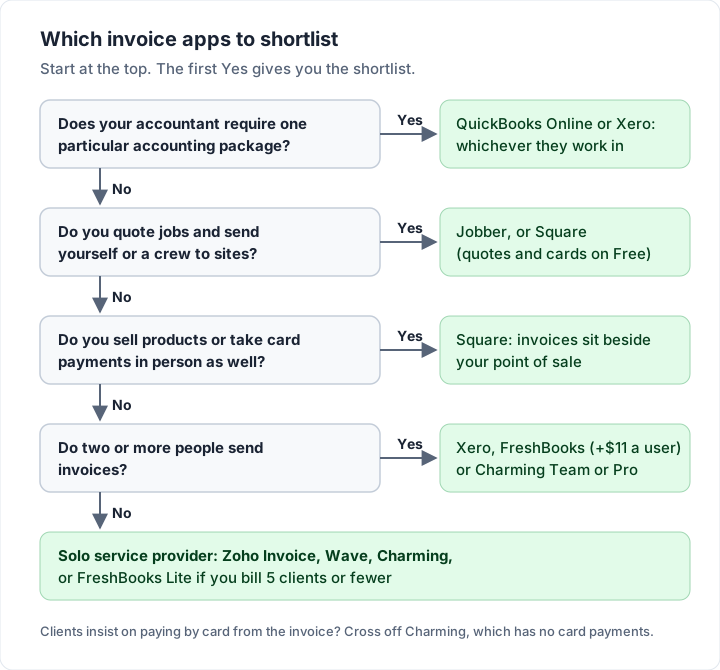
The decision flowchart#
If you would rather answer questions than read sections, the same logic runs top to bottom.
Three worked examples: what each app costs over two years#
A two-year total is easier to compare than a monthly price. Here are three illustrative businesses (invented examples, not customers) costed over 24 months, using only the regular published prices and fees recorded above. Introductory discounts would lower year one; we left them out because they end.
Example 1: a solo service provider#
A freelance designer with 8 clients, about 10 invoices a month, clients paying by bank transfer, wanting reminders and recurring invoices for two retainers.
| App and plan | How it is charged | Two-year cost |
|---|---|---|
| FreshBooks Plus (Lite allows 5 clients) | $43 a month × 24 | $1,032 |
| QuickBooks Online Simple Start | $38 a month × 24 | $912 |
| Wave Pro, billed yearly (needed for reminders without Wave payments) | $190 a year × 2 | $380 |
| Charming Individual (recurring invoices, footer line hidden by default; no automatic reminders) | $29 once | $29 |
| Zoho Invoice | Free plan (120 invoices a year, within 500) | $0 |
| Charming Free (no recurring invoices or automatic reminders) | Free plan, 1 business | $0 |
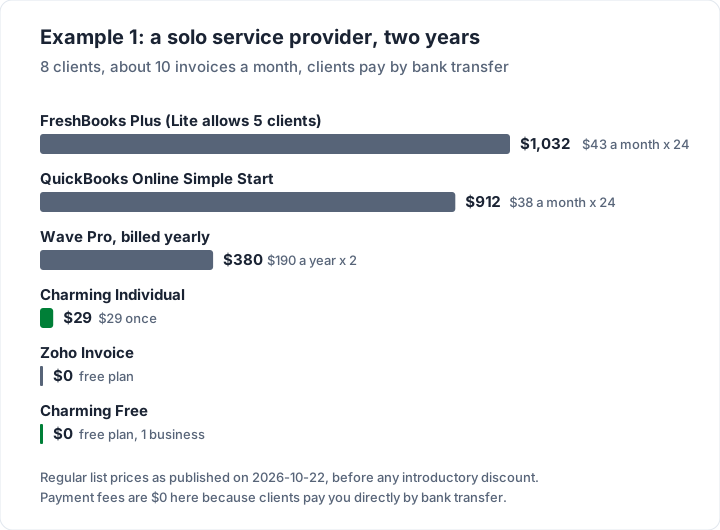
The full accounting packages cost the most here because you are paying for bookkeeping this designer may not use. If you do want it, that money buys something real.
Example 2: a one-person trade business paid by card#
A handyman running 80 jobs over two years, each invoiced at $1,000.00 and every one paid online by card. Card fees are worked out from each app’s published online rate: 2.9% + 30¢ is $29.30 per $1,000.00 invoice, so $2,344 over 80 invoices.
| App and plan | Subscription (24 months) | Card fees (80 × $1,000.00) | Two-year cost |
|---|---|---|---|
| Square Plus | $1,176 | $2,344 | $3,520 |
| Jobber Core, monthly | $1,176 | $2,344 | $3,520 |
| QuickBooks Online Simple Start | $912 | $2,392 | $3,304 |
| Jobber Core, billed yearly | $696 | $2,344 | $3,040 |
| Square Free | $0 | $2,664 | $2,664 |
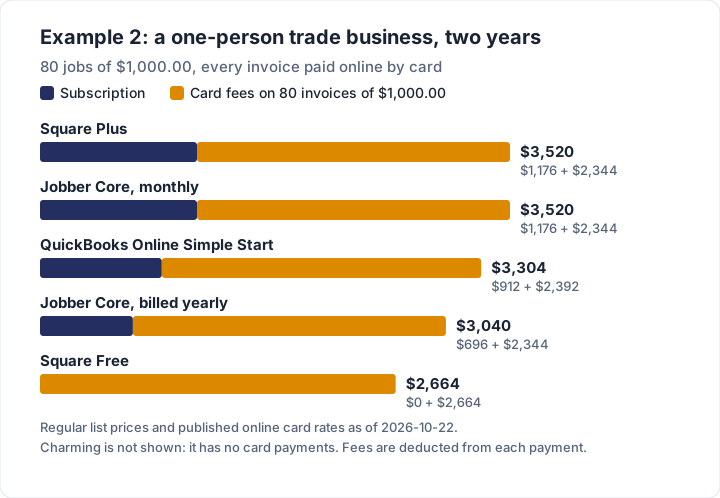
The lesson is that the payment method matters more than the plan. If the same 80 clients paid Square invoices by bank transfer instead, the fee would be 1% with a $1 minimum: $10 per invoice, or $800, against $2,664 by card. Charming is not in this chart because it cannot take card payments; if your clients pay by transfer using the details on the invoice, it costs $0 on Free or $29 once. For the full fee picture, see invoice payment fees on Square, PayPal and Stripe and the payment methods you can offer on an invoice.
Example 3: a team of five with an accountant#
A small agency: the owner plus 4 people who send about 30 invoices a month, with an outside accountant at year end.
| App and plan | How it is charged | Two-year cost |
|---|---|---|
| QuickBooks Online Plus (5 users) | $140 a month × 24 | $3,360 |
| FreshBooks Plus + 4 team members | ($43 + 4 × $11) a month × 24 | $2,088 |
| Xero Growing (no per-user fee) | $59 a month × 24 | $1,416 |
| Charming Pro, monthly | $12 a month × 24 | $288 |
| Charming Team (owner + up to 5 teammates) | $79 once | $79 |
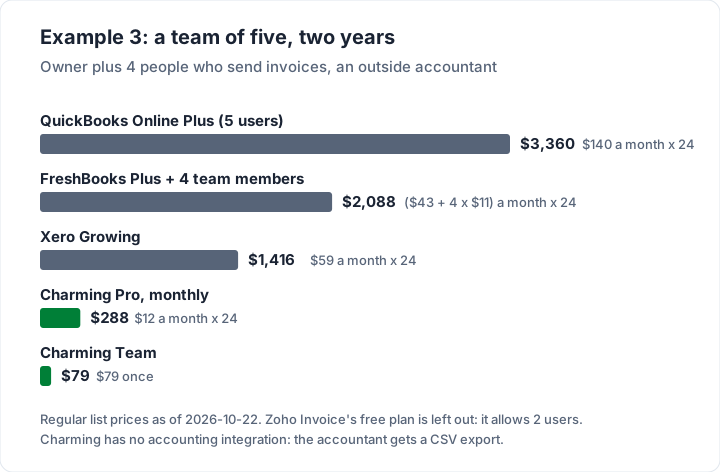
Zoho Invoice’s free plan is left out because it allows 2 users. Read this table with the accountant section in mind: QuickBooks and Xero cost more because they are the books. The Charming rows are cheaper because they are not, and your accountant gets a CSV export rather than a live ledger.
What to ask before paying for an invoicing app#
Copy this checklist and run it against each app on your shortlist. Anything the pricing page does not answer is a question for the vendor.
- What is the regular price after any introductory discount ends, and when does it end?
- Is the limit on clients, invoices, users or locations, and which one will I hit first?
- What does the next plan up cost, the month I go over?
- What fee comes off each card payment, and each bank payment?
- Can my clients still pay me by bank transfer with no fee?
- Are recurring invoices and reminders on this plan, or only higher ones?
- Do I need quotes or estimates as well as invoices?
- Does my accountant need live access, or is an export enough?
- Can I export every invoice and client today, on this plan?
- What happens to my invoices if I downgrade or stop paying?
- Is there a per-user charge, and does it apply to a bookkeeper who logs in once a year?
Keep the answers with the date you read them, so you can compare them again at renewal. If recurring billing or a client pipeline is the deciding factor, recurring invoice software and CRM with invoicing compare the tools for each.
Where Charming fits, and where it does not#
We hold our own product to the same standard as the others. Checked against our code today:
What you get. The free plan has unlimited invoices and clients for 1 business, all 60 templates with your logo, colours and fonts, a PDF to download or print and a private link your client opens without an account, invoice numbering when you issue an invoice, payment tracking including part payments (overdue invoices are flagged), client statements and CSV export. Paid plans add unlimited businesses, recurring invoices, saved line items and AI-assisted drafting, and hide the footer line by default: Individual is $29 once, Team is $79 once with up to 5 teammates, and Pro is $12 a month or $99 a year with unlimited teammates.
The catches, stated plainly:
- No card payments. Your bank details or your own payment link print on the invoice, your client pays you directly, and you mark it paid. If your clients expect a card button, choose Square, Jobber, FreshBooks or Wave.
- No email sending or reminders. You issue the invoice, then send the PDF or link from your own email; set a calendar reminder for the due date.
- No accounting and no integrations. No bookkeeping, no bank reconciliation, no sync with QuickBooks or Xero. You export a CSV.
- No quotes, estimates or mobile app, and one tax rate per invoice.
- Free is 1 business and carries a small “Sent with Charming Invoices” line.
- Recurring invoices create drafts for you to review; nothing is sent automatically.
- Lifetime plans are final sale, with no refunds. “Lifetime” means for as long as Charming Invoices runs. If you are unsure, use the free plan. Pro can be cancelled any time, effective at the end of the billing period, also with no refunds.
The reasoning behind one-time pricing is in why we built a lifetime plan, and the plans are on the pricing page.
Common questions about small business invoice apps#
What is the best free invoicing app for a small business?#
For a solo provider, Zoho Invoice (500 invoices a year, 2 users), Wave Starter and Charming Free all invoice at $0, each with its own limits. Square Free has no monthly fee and suits card payments, with a 3.3% + 30¢ fee on each online card payment. Our free invoicing software comparison goes deeper.
Do I need QuickBooks just to send invoices?#
Not necessarily. QuickBooks Online is accounting software; Simple Start is $38 a month for 1 user. If you only need to send invoices and track payment, an invoicing-only app may cost less. If your accountant works in QuickBooks, using it keeps your invoices and books in one place.
Do I need accounting software or just an invoice app?#
If you need bank reconciliation, expenses and tax reports in one place, you need accounting software. If you need to send invoices and know who has paid, an invoice app is enough, and a spreadsheet can be enough at very low volume.
Can I switch invoicing apps later?#
Usually, if you export your invoices and client list first. Test the export on the plan you are considering, before you depend on it, and keep the exported records; your accountant can tell you for how long.
The short version#
Find your row first: solo provider, trades, shop, team or accountant-led. Then cost your shortlist over two years at regular prices, including card fees, because that is where the totals differ most. If you bill clients who pay by transfer and want invoices that look like your business, you can create a free invoice on Charming and see whether it fits before you pay anyone.