Jobber vs Housecall Pro: invoicing, fees and two-year costs

Nnabuike Okoroafor ·
On this page · 11 sections
We make Charming Invoices, an invoicing app. It is not a field-service app: it does no scheduling or dispatch and takes no card payments, so it competes with Jobber and Housecall Pro only for owners who need invoices and nothing else. Every Jobber and Housecall Pro fact below comes from the vendor's own pages, read on 28 October 2026.
You run a trade or home-service business, you are choosing between Jobber and Housecall Pro, and both cover scheduling, routing and much more. The part that decides whether you get paid, and how much of each invoice you keep, is invoicing and payments.
This comparison looks only at that part: how each app creates and chases invoices, what each charges to take a card or bank payment, what the plans cost at their regular prices, and what that adds up to over two years. It ends with an honest question: does your business need a field-service app at all?
Jobber vs Housecall Pro in short#
- Both send invoices and take payments on every plan. Jobber Core and Housecall Pro Basic both include invoicing with online payment, as of 28 October 2026.
- Jobber is cheaper for one person. Core is $49 a month, or $29 a month billed annually. Housecall Pro Basic is $79 a month, or $59 a month billed annually.
- Housecall Pro includes more people. Essentials includes 5 users and Max includes 8. Jobber prices most plans by team size, and Core is 1 user plus $29 a month for each extra user.
- Card fees differ a little. Jobber charges 2.9% + 30¢ online. Housecall Pro says card rates are “as low as 2.59%”. Both charge 1% on bank payments.
- Automated follow-ups and QuickBooks sync cost more on Jobber. They start on Connect ($139 a month for 1 user). Housecall Pro lists reminders on Basic and QuickBooks Online sync from Essentials.
- If your clients mostly pay by bank transfer and you do not dispatch a crew, you may not need either. A good invoice with your bank details on it can do the job, which is where we come in, with limits we spell out below.
For the wider field (Joist, Square, QuickBooks and others), see our guide to invoicing software for contractors.
Jobber vs Housecall Pro at a glance#
This table covers invoicing and payments only, from Jobber's pricing page and Housecall Pro's pricing page, as of 28 October 2026. “From” means the cheapest plan that lists the feature.
| Jobber | Housecall Pro | |
|---|---|---|
| Invoices and online payments | Every plan (Core and up) | Every plan (Basic and up) |
| Online card fee | 2.9% + 30¢ (US, Canada and UK) | “as low as 2.59%” |
| Card on site | Tap to Pay, 2.7% + 30¢ | Tap to Pay, card reader, card on file |
| Bank payment fee | 1% (ACH, US) | 1% |
| Instant payouts | Extra 1% | Not priced on the pricing page |
| Progress invoicing | Every plan | “Progress billing” on its invoicing page |
| Automatic invoice follow-ups | From Connect | Reminders listed on Basic |
| Automatic payments | From Connect (US and Canada) | Not listed on the pricing page |
| QuickBooks Online sync | From Connect (with Xero) | From Essentials |
| Users included | Core 1; other plans 1, 5, 10 or 15 | Basic 1, Essentials 5, Max 8 |
| Free trial | 14 days on Grow, no card | 14 days, no card |
Neither offers a free plan. Both quote prices in US dollars, excluding sales tax.
How invoicing works in Jobber#
Jobber's invoicing feature page describes invoices built from the job. When the work is done, you “instantly generate a professional, digital invoice and send it to your customers by text or email.”
Jobber also prompts you to invoice “after each visit, when the job is complete, or at the same time every month.” That suits recurring work such as lawn care or cleaning, where one visit rarely equals one invoice.
The other invoicing features, with the plan each needs as of 28 October 2026:
- Batch invoicing (every plan). Jobber's pricing page lists “batch invoicing” with invoicing on all plans, for when you have fallen behind or prefer to send a week's invoices at once.
- Progress invoicing (every plan). “Bill as you go, so you can take on bigger jobs and not worry about cash flow.” If you are new to staged billing, our guide to progress invoicing, with a worked example explains how it differs from a deposit.
- Automated invoice follow-ups (Connect and up). Jobber “automatically sends a customized email or text follow-up” until the client pays. On Core, you chase by hand.
- Automatic payments (Connect and up). Jobber can charge a client's saved card for recurring work, in the US and Canada, at card rates.
- Images and attachments on invoices (Grow and up). Photos, receipts and documents attached so the client sees the work.
- Client hub (every plan). A self-serve page where clients approve quotes, check appointments and pay invoices.
Jobber's quotes sit alongside its invoices on every plan. If you are weighing several tools on quoting, our comparison of estimate and invoice software covers that side.
How invoicing works in Housecall Pro#
Housecall Pro's invoicing page (the /features/invoicing/ address redirects to its plumbing invoicing page) leans on the mobile app. You “send plumbing invoices by text or email from the mobile app the minute the job’s completed.”
On every plan, the pricing page lists “Estimates & invoicing” and “Payments & consumer financing”, and says you can “Create invoices in seconds, automate reminders, and let customers pay 24/7.” The features, as of 28 October 2026:
- Payment on site. The invoicing page lists “card on file, Tap to Pay, or a card reader, bank transfer, and financing options.” You can also deposit checks through the mobile app, which the pricing FAQ says carries no fee.
- Progress billing. Housecall Pro says it splits larger jobs into “fixed-amount or percentage-based” billing stages.
- Reminders and tracking. The office sees which invoices are “open, paid, past due, or still awaiting payment” and sends reminders.
- Consumer financing. Listed on every plan, for clients who want to pay a big repair over time.
- QuickBooks Online sync (Essentials and up). The plan card describes it as “Import your existing QuickBooks data into Housecall Pro.” Max adds Zapier and an open API.
Both apps also turn deposits into part of the job. If you take one before starting, our guide to deposit and balance invoices shows how to word both invoices.
Prices: regular, not promotional#
Both vendors were running sign-up offers on 28 October 2026. Jobber's terms say “you must subscribe to an eligible Jobber plan before October 30, 2026 at 11:59 p.m. PT”, for new customers only. Housecall Pro showed first-month discounts. Offers end; a two-year budget runs on the regular price, so the tables below leave promotions out.
Jobber, regular price per month (1 user unless stated):
| Plan | Monthly, no commitment | 1-year commitment | Billed annually |
|---|---|---|---|
| Core (1 user) | $49 | $39 | $29 |
| Connect, 1 user | $139 | $119 | $99 |
| Connect, 5 users | $199 | $169 | $149 |
| Grow, 1 user | $199 | $169 | $149 |
| Grow, 5 users | $299 | $259 | $229 |
Jobber adds extra users at $29 a month each. Its FAQ adds one condition worth reading before you pay for a year: if you cancel an annual plan, “your initial payment is non-refundable.”
Housecall Pro, regular price per month:
| Plan | Users included | Monthly | Billed annually |
|---|---|---|---|
| Basic | 1 | $79 | $59 |
| Essentials | 5 | $189 | $149 |
| Max | 8, then $35 a month per extra user | $329 | $299 |
Max is sold through a demo rather than self-serve sign-up.
The user count is what moves the bill for a crew. A five-person team on Jobber Core pays $49 plus 4 extra users at $29, or $165 a month, without the follow-ups, QuickBooks sync and routing that Connect adds. Jobber Connect for 5 users and Housecall Pro Essentials both come to $149 a month billed annually.
What getting paid costs on each#
Fees come out of every payment, so over a year they can rival the subscription. Here is one worked example, using each vendor's published rates as of 28 October 2026: a solo trade business with 80 paid invoices of $500.00 each in a year, $40,000.00 in all.
| How the client pays | Fee per $500.00 invoice | Fee on 80 invoices |
|---|---|---|
| Jobber, card online (2.9% + 30¢) | $14.80 | $1,184.00 |
| Jobber, Tap to Pay (2.7% + 30¢) | $13.80 | $1,104.00 |
| Housecall Pro, card at its lowest advertised rate (2.59%) | $12.95 | $1,036.00 |
| Either app, bank payment (1%) | $5.00 | $400.00 |
| Jobber, card plus instant payout (extra 1%) | $19.80 | $1,584.00 |
Housecall Pro's pricing page says card fees “start at 2.59%” and states no fixed per-payment fee, so $1,036.00 is a floor, not a promise. Ask for your rate before you sign.
Add two years of subscription for 1 user to one year of those card fees and the totals look like this:
| Option | Two-year subscription | With one year of card fees |
|---|---|---|
| Jobber Core, billed annually ($29 × 24) | $696 | $1,880.00 |
| Jobber Core, monthly ($49 × 24) | $1,176 | $2,360.00 |
| Housecall Pro Basic, billed annually ($59 × 24) | $1,416 | $2,452.00 |
| Housecall Pro Basic, monthly ($79 × 24) | $1,896 | $2,932.00 |
| Jobber Connect, billed annually ($99 × 24) | $2,376 | $3,560.00 |
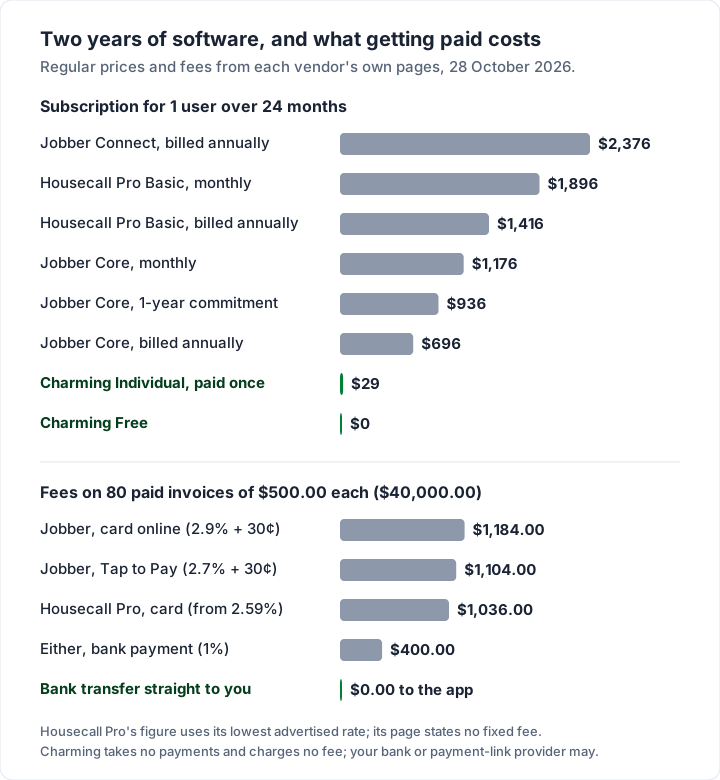
The cheapest lever is not the plan. It is how your clients pay. Moving half of those 80 invoices from card to bank payment saves about $390 a year on Jobber. For the same arithmetic on Square, PayPal and Stripe, see what card payments on an invoice cost.
Which one fits which business#
Both are capable field-service apps, and plenty of trades would be well served by either. Read from the two pricing pages, here is where each has the edge on billing:
- Solo, with clients who pay by card on site: Jobber Core. At $29 a month billed annually it is the cheapest way into either app, and Tap to Pay is on every plan. You chase unpaid invoices yourself until Connect.
- Solo, wanting reminders and financing from day one: Housecall Pro Basic. Reminders and consumer financing are listed on Basic, at a higher price than Jobber Core.
- A crew of 2 to 5 that needs QuickBooks sync: compare Housecall Pro Essentials with Jobber Connect for 5 users. Both are $149 a month billed annually, and both list routing, GPS tracking and checklists. Connect adds automatic payments and Xero sync; Essentials adds commissions and flat-rate pricing.
- A crew of 6 to 8: Housecall Pro Max includes 8 users. Jobber's team tiers are 1, 5, 10 and 15 users, with extra users at $29 a month, so price your exact headcount on both.
- Recurring visits billed monthly: Jobber. Its prompts to invoice “at the same time every month” and automatic payments (Connect) suit cleaning, lawn and pool rounds. Our guide to invoicing for cleaners and home services covers what those invoices should show.
If you rely on automatic reminders, read what each app actually automates. Our guide to what invoicing software can automate separates reminders, recurring invoices and auto-charging.
Do you need field-service software at all?#
Jobber and Housecall Pro earn their price when you schedule people, route vans and take payment on the doorstep. If you are one person whose clients mostly pay by bank transfer or check, a dispatch board may be more than you need.
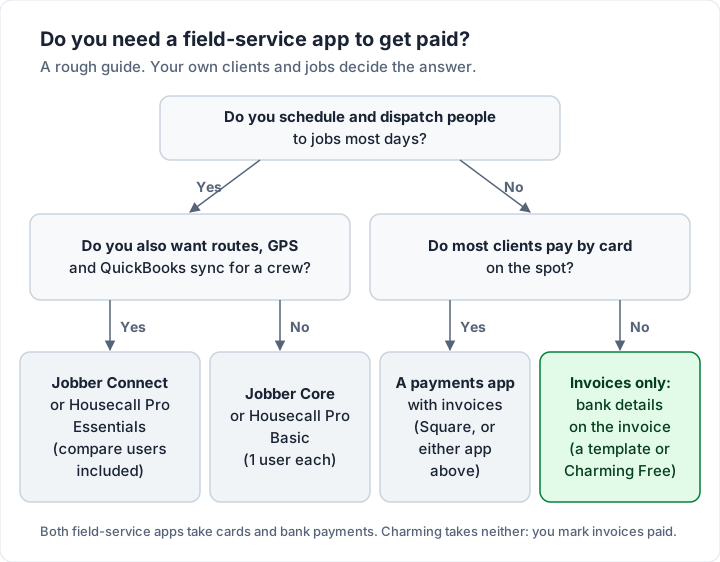
Two questions decide it. Do you dispatch people every day? Do your clients expect to pay by card on the spot? If both answers are no, a clear invoice with itemised labour and materials and your bank details may be all you need. If either answer is yes, Jobber or Housecall Pro will likely pay for itself.
Where Charming fits, and where it does not#
Charming Invoices covers the right-hand path in the chart above: invoices only. Here is what it does, checked in our code on 28 October 2026:
- Free plan with unlimited invoices and clients, for 1 business, with 60 invoice templates including Contractor, Progress Billing and Timesheet.
- 12 trade starter kits, such as the HVAC invoice template and the plumbing invoice template, with typical line items ready to price (they start at $0, so you fill in your own rates).
- Deposits, progress billing and retainage on every plan. Retainage prints on the invoice; it is not tracked as a separate amount owed to you.
- A PDF and a private link you send your way. Issue the invoice, then download the PDF or copy its link and send it however you like. Overdue invoices are flagged; Charming does not send reminders.
- Your bank details and a payment link on the invoice. The client opens the private link, no account needed, with an “Open payment link” button to your own Square, PayPal or Stripe link.
The catches, plainly. Charming does no scheduling, dispatch, routing, GPS, quotes or online booking, and it does not email invoices or send reminders. It takes no card payments, has no Tap to Pay, ACH, automatic payments or financing, and does not sync with QuickBooks. It has no mobile app. Payment tracking is manual: you mark an invoice paid when the money arrives.
Free invoices carry a “Sent with Charming Invoices” line, which is hidden by default on paid plans: Individual is $29 once, Team is $79 once with up to 5 teammates, and Pro is $12 a month or $99 a year. The lifetime plans are final sale. Compare them on the pricing page.
Because Charming processes no payments, it charges no processing fee. If your client pays through your own payment link, that provider charges its fee; a bank transfer usually costs you nothing to receive, depending on your bank. If invoices are all you need, create a free invoice.
Questions people ask#
Does Jobber or Housecall Pro have a free plan?#
No. As of 28 October 2026, both pricing pages list paid plans only, each with a 14-day free trial and no card required. Jobber's trial runs on its Grow plan.
Do Jobber and Housecall Pro charge for bank payments?#
Yes. Both list a 1% fee on bank payments as of 28 October 2026. Jobber's bank payments (ACH) are available in the US. Housecall Pro's FAQ says checks deposited through its mobile app carry no fee.
What is Housecall Pro's card processing fee?#
Its pricing page says card processing rates are “as low as 2.59%”, and its FAQ says card fees “start at 2.59%”. Those are starting rates, so ask for your own rate before you commit.
Does Jobber sync invoices with QuickBooks?#
From the Connect plan up. Jobber's pricing page lists “QuickBooks Online and Xero sync” on Connect, Grow and Plus, not on Core. For how QuickBooks handles invoices on its own, see how QuickBooks invoicing works.
Can I quote and invoice in the same app?#
Yes, in both. Jobber lists “Send professional quotes” on Core; Housecall Pro lists “Estimates & invoicing” on Basic. If the terms blur, here is the difference between an estimate, a quote and an invoice.
Can I invoice from my phone?#
Both apps have iOS and Android apps that send invoices and take payments. If you only need invoicing from a phone, our guide to invoicing from a phone compares lighter options.
The short version#
On invoicing alone, Jobber and Housecall Pro are close. Jobber is cheaper for one person ($29 a month billed annually against $59) and charges 2.9% + 30¢ online. Housecall Pro advertises card rates from 2.59% and includes 5 users on Essentials. Both charge 1% on bank payments, and on a year of card payments the fees can cost more than the software. If you dispatch a crew, pick the one whose user count and features fit your headcount. If you do not, and your clients pay by transfer, an invoice with your bank details may be all you need.
Sources, all read 28 October 2026: Jobber pricing; Jobber invoicing features; Housecall Pro pricing; Housecall Pro invoicing (plumbing page).