CRM with invoicing: built in, add-on or a separate app?

Nnabuike Okoroafor ·
On this page · 10 sections
We make Charming Invoices, an invoicing app. Charming is not a CRM, so it competes with the tools below only on the invoicing half. We say where each CRM is the better fit. Every vendor fact comes from that vendor’s own pages, read on 28 October 2026.
Your client list is in a spreadsheet, your follow-ups are in your inbox, and your invoices are in a third place. Each time a job closes you type the same name, email and address again. A CRM with invoicing puts the client record and the bill in one place, and several products offer it in different ways.
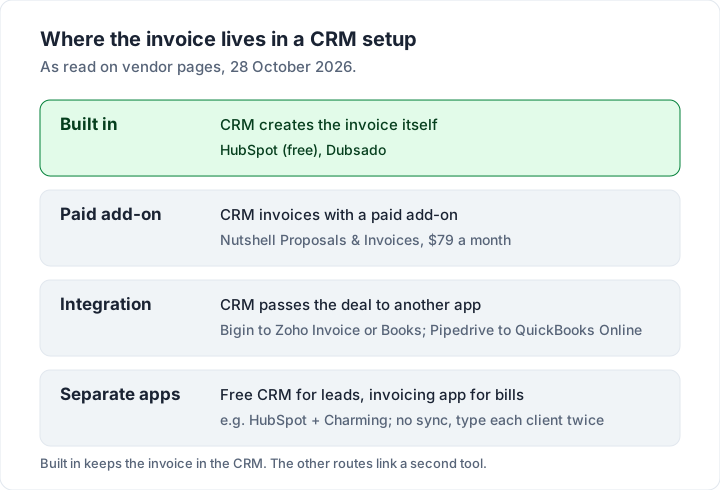
The useful question is not which CRM invoices, but how. Some CRMs build invoicing in, some sell it as a paid add-on, and some hand the invoice to separate accounting software through an integration. This guide sorts the main options that way, prices a team of three for a year with the invoicing part included, and asks whether you need a CRM at all. If you are still choosing an invoicing tool generally, start with what to look for in invoicing software.
CRM with invoicing in short#
- HubSpot builds invoices into its free CRM. Its invoices page says “Invoices are a free feature in HubSpot.”
- Bigin by Zoho hands invoicing to Zoho Invoice or Zoho Books, from the Express plan at US$7 per user a month billed yearly.
- Nutshell sells invoicing as an add-on: “Proposals & Invoices” at $79 a month on top of its per-user plans.
- Dubsado includes invoicing on both plans, from $335 a year, with client portals, and suits creative and service businesses that also need contracts and forms.
- Pipedrive creates invoices through its QuickBooks Online integration. We did not check Pipedrive’s prices for this post, so none are given here.
- Many small businesses can skip the CRM: a free CRM next to a separate invoicing app, or just the client list in your invoicing app, covers it.
What a CRM with invoicing does#
A CRM (customer relationship management software) tracks people before and after they pay: leads, the stage each deal is at, what it is worth, emails and calls, and tasks to follow up. Invoicing software deals with the money end: branded invoices, numbering, payment details, reminders and who still owes what.
| Job | A CRM does it | An invoicing app does it |
|---|---|---|
| Capture leads from a web form | Yes | Usually not |
| Pipeline stages and deal values | Yes | No |
| Log emails, calls and tasks | Yes | No |
| Branded invoices and PDFs | Sometimes, or via an integration | Yes |
| Payment reminders and overdue tracking | Sometimes | Yes |
| Statements of what a client owes | Rarely | Often |
A CRM with invoicing joins the two, so a won deal becomes an invoice without retyping. The difference between products is where that invoice really lives.
Built in, add-on or integration: CRMs compared#
This table shows how each CRM handles invoicing, and the cheapest way in, as read on 28 October 2026. Prices are in US dollars.
| CRM | How invoicing works | Cheapest plan with invoicing | Plan notes |
|---|---|---|---|
| HubSpot | Built in | Free | Limits are listed in HubSpot’s product catalog |
| Bigin by Zoho | Integration with Zoho Invoice or Zoho Books | Express, $9 per user a month ($7 billed yearly) | Bigin Free is single user, no invoicing integration |
| Nutshell | Paid add-on | Foundation $13 per user a month billed annually ($19 monthly) + $79 a month add-on | Foundation limit of 100 open leads |
| Dubsado | Built in | Starter, $335 a year | 1 lead capture form; scheduling on Premier |
| Pipedrive | Integration with QuickBooks Online | Not checked for this post | Works with QuickBooks Online |
HubSpot: a free CRM with free invoices#
HubSpot is the obvious first answer for many readers, and we will say so. Its invoices page says: “Invoices are a free feature in HubSpot. Both free and premium users can access them.” It also says “Invoices software is available in Revenue Hub”, HubSpot’s billing product, which adds more.
What the page describes, as of 28 October 2026:
- Invoices from deals and quotes. You can create invoices “directly from deal records, published quotes, or from the invoices index page”.
- Payments. “To accept payments on invoices, you can use either of the payment processing options, HubSpot payments or Stripe. You can also choose to record payments manually.”
- Recurring invoices. In the app, “You can select either one-time or recurring invoices.”
- QuickBooks Online. A separate integration offers two-way sync for invoices and payments, if you keep your books there.
For limits and requirements, the page points to the HubSpot Product and Service Catalog. We did not find invoice limits listed there on 28 October 2026, so ask HubSpot about any cap or country restriction before you depend on it. Card payments carry the processor’s fees.
Other CRMs that invoice#
Bigin by Zoho, with Zoho Invoice#
Bigin is Zoho’s small-business CRM. Its pricing page lists Free at US$0 for a “Single user” and 500 records. The “Zoho Books, Zoho Invoice and Zoho Meeting Integration” starts on Express, at US$9 per user a month, or US$7 billed yearly. Premier is US$15 (US$12 yearly) and Bigin 360 US$21 (US$18 yearly). Express also lists a QuickBooks integration and payment links through gateways such as Stripe and PayPal.
The invoices themselves live in Zoho Invoice, which is free with “Send up to 500 invoices per year.” and “Add up to two users.”, per its pricing page. Our guide to what the Zoho Invoice free plan includes covers the rest.
Nutshell#
Nutshell’s pricing page lists five tiers at $13, $25, $42, $59 and $79 per user a month billed annually, or $19, $32, $49, $67 and $89 billed monthly, with a 14-day trial with no card. Invoicing is an add-on: “Proposals & Invoices”, at $79 a month, to “Create and send professional quotes, invoices, and contracts directly from your CRM pipeline.” The page notes that “Foundation does have a limit of 100 open leads.”
Pipedrive, with QuickBooks Online#
Pipedrive invoices through an app. Its support article on the QuickBooks integration (last updated 3 September 2026) says you “can create invoices from the deal detail view” and send them to QuickBooks, and the integration can show “when they’re paid or overdue without leaving the Pipedrive app.” It works with QuickBooks Online. We did not check Pipedrive’s prices for this post; see pipedrive.com. For the QuickBooks side, see how QuickBooks invoicing works.
Dubsado: a client-flow tool#
Dubsado is built for client flow: inquiry, proposal, contract, invoice and portal. Dubsado’s pricing page lists Starter at $335 a year and Premier at $525 a year, both with “Invoicing & payment plans”, client portals and unlimited clients. Starter has 1 active lead capture form; scheduling, automated workflows, public proposals and the bookkeeping integration are Premier only. You get “3 additional users for free”, and the trial is 21 days of Premier with no card.
If you need contracts, proposals, scheduling and a client portal as well as invoices, a client-flow tool is the better fit than a plain invoicing app. Our guides to Bonsai’s plans and payment fees and invoicing for photographers cover the same ground, and tools that do quotes and invoices helps if proposals are the main draw.
What a team of three pays in a year#
Take a three-person service business with 40 active clients, each billed once a month: 480 invoices a year. Here is year one with the invoicing part included, at the prices read on 28 October 2026.
| Setup | Year-one cost | Invoicing part |
|---|---|---|
| HubSpot free CRM, free invoices | $0 subscription | Built in; payment fees if clients pay by card |
| Free HubSpot CRM + Charming Team | $79 once | Separate app, up to 5 teammates; no sync |
| Bigin Express, 3 users billed yearly + Zoho Invoice Free | 3 × $7 × 12 = $252 | Zoho Invoice; 480 is under 500 a year; Zoho Invoice lists 2 users |
| Bigin Express, 3 users billed monthly + Zoho Invoice Free | 3 × $9 × 12 = $324 | As above |
| Dubsado Starter | $335 a year | Built in; 3 additional users free |
| Nutshell Foundation, 3 users billed annually + Proposals & Invoices | (3 × $13 + $79) × 12 = $1,416 | Paid add-on |
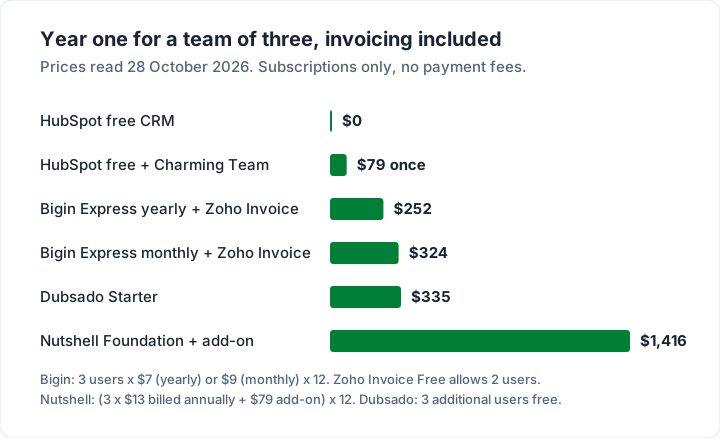
Two notes. Zoho Invoice Free lists up to two users, so plan for how the third person will work. And the first line is $0 because HubSpot lists its invoices as a free feature; if HubSpot fits your work, that is worth knowing.
Do you need a CRM at all?#
Plenty of small businesses do not. If your work comes from referrals and repeat clients, a client list with notes covers what a CRM would.
You probably need a CRM if:
- Leads arrive faster than you can remember them, from forms, ads or calls.
- Deals take weeks and pass through stages, with values you want to forecast.
- Several people follow up and need to see who said what.
You probably do not if you have a few dozen steady clients, each billed on a schedule, and your follow-up is “send the invoice, then remind”. In that case three setups work:
- One tool that does both: HubSpot or Dubsado.
- A free CRM beside a separate invoicing app: for example, HubSpot’s free CRM with Charming. See invoicing apps for small business compared.
- No CRM: the client list inside your invoicing app, with notes.
A free CRM next to Charming#
Charming is the invoicing half of setup 2, or the whole of setup 3. Here is what it does for clients, checked in our code on 28 October 2026:
- Client records with name, email, address, phone and notes, and unlimited clients and invoices on the free plan for 1 business.
- A statement per client: a PDF of their open invoices with ageing, from the clients table. It covers issued invoices with a balance. See statement of open invoices.
- A timeline on each invoice, including when the client viewed it.
- Overdue status: an issued invoice past its due date shows as Overdue. Charming does not email invoices or send reminders; you download the PDF or copy its private link and send it yourself.
- CSV export of invoices, including client name and email.
- Teammates and businesses on paid plans: Team covers up to 5 teammates for $79 once, Pro has unlimited teammates for $12 a month or $99 a year, and paid plans can run several businesses from one account. Letting a bookkeeper or teammate invoice for you explains what each role can do.
The catches, plainly. Charming is not a CRM: no leads, pipeline, deals, tasks, email logging, lead forms, contracts, proposals, scheduling or client portal (the client gets a private link to each invoice). It has no integrations, so nothing syncs with HubSpot or any other CRM, and there is no client import or export: you type each client once in each tool. It takes no card payments, payment tracking is manual, and it is a web app only. Free invoices carry a “Sent with Charming Invoices” line, hidden by default on paid plans. Individual is $29 once; lifetime plans are final sale.
If that trade suits you, compare plans on the pricing page, see invoicing for creative freelancers, or start free.
Questions people ask#
Does HubSpot have invoicing?#
Yes. HubSpot’s invoices page says “Invoices are a free feature in HubSpot. Both free and premium users can access them.” You can create one-time or recurring invoices, take payment through HubSpot payments or Stripe, or record payments manually, as of 28 October 2026.
Is there a free CRM with invoicing?#
HubSpot’s free CRM includes invoices. Bigin’s free plan does not include its Zoho Invoice integration; that starts on Express. A free CRM beside a free invoicing app, such as Zoho Invoice or Charming’s free plan, is another $0 route, without sync.
Can a CRM send recurring invoices?#
HubSpot can, per its invoices page. Dubsado describes its payment plans as “payment schedules”, so check during the trial whether that covers a bill that repeats every month. Otherwise the invoicing tool behind the CRM decides. Our guide to recurring invoice software compares the options.
What is an invoice CRM?#
It is a CRM that can create invoices, either built in (HubSpot, Dubsado), as a paid add-on (Nutshell) or by passing deals to accounting software (Bigin with Zoho Invoice, Pipedrive with QuickBooks Online).
The short version#
A CRM with invoicing comes in three forms: built in (HubSpot, free; Dubsado, from $335 a year), a paid add-on (Nutshell, $79 a month on top of per-user plans) or an integration (Bigin with Zoho Invoice, from US$7 per user a month; Pipedrive with QuickBooks Online). For a team of three, year one ranges from $0 to $1,416. If you have steady clients and few leads, a free CRM beside a separate invoicing app, or no CRM at all, is often enough.
Sources, all read 28 October 2026: HubSpot invoices; Bigin pricing; Zoho Invoice pricing; Nutshell pricing; Dubsado pricing; Pipedrive QuickBooks integration.