Invoice statement template: list every open invoice

Nnabuike Okoroafor ·
On this page · 9 sections
One client, four unpaid invoices, two part payments and a remittance email that says “payment for recent work”. You could forward every invoice again. Or you could send one page that lists every open invoice, what has been paid against each, what is left and how late it is. That page is an invoice statement, and a good invoice statement template lets you produce it in minutes instead of rebuilding it from your inbox every month.
This guide covers what goes on an invoice statement, a filled example with ageing that you can check line by line, the two kinds of statement and which one you need, how to build your own statement template in Excel or Word, and the faster route of generating the statement from the invoices you have already sent.
If you are still deciding whether to send an invoice or a statement at all, start with invoice vs statement. This post assumes you have decided on the statement and want to make one.
In short#
- An invoice statement lists a client's open invoices on one dated page: number, dates, amount, paid, balance and days overdue, with a total due.
- Add an ageing summary. Current, 1 to 30, 31 to 60, 61 to 90 and over 90 days, adding up to the total due, so the client sees at once which money is oldest.
- Two kinds exist. An open-item statement lists what is still unpaid; a balance-forward statement lists every invoice and payment in a period. Both should end at the same balance.
- A spreadsheet works well as a template: balance = amount − paid, days overdue = statement date − due date, then sum by age.
- Update your payments first. A statement is only as accurate as the payments you have recorded.
What an invoice statement is#
An invoice statement (also called a statement of account, a client statement or a statement of outstanding invoices) is a summary of what one client owes you on a given date. It does not ask for payment for new work, and it does not replace the invoices. It points back to them, one line each, so you and the client can agree on the balance.
That is why it carries a statement date rather than a number of its own. It is a snapshot. Next month's statement will show a different picture, and both are correct for their dates. The invoice vs statement post covers the accounting side in more depth; here the focus is the document itself.
What to put on an invoice statement#
Whatever template you use, these are the fields that make a statement useful. The ones marked essential are what the client needs to reconcile it against their own records.
| Field | Essential? | Why it is there |
|---|---|---|
| Your business name, address and contact details | Yes | Who the statement is from |
| The word “Statement” | Yes | So nobody files it as a new invoice |
| Statement date | Yes | The date the balances and ageing are measured on |
| Client name and address | Yes | Whose account it is |
| Invoice number, per row | Yes | What the client matches against their records |
| Issue date and due date, per row | Yes | Without the due date, “overdue” means nothing |
| Original amount, paid and balance, per row | Yes | Shows part payments were credited |
| Days overdue, per row | Recommended | Makes the late items obvious |
| Ageing summary | Recommended | Current, 1–30, 31–60, 61–90 and 90+ days, adding up to the total |
| Total due | Yes | The one number the client may pay |
| Payment details | Yes | Bank details or a payment link, and what reference to use |
| Currency | When you bill in more than one | Never add two currencies into one total |
| A short note | Optional | “If anything does not match your records, tell us” |
Leave off anything that is not about the open balance. A statement is not the place for new charges, a late fee you have not invoiced, or a sales message.
Invoice statement example: four open invoices with ageing#
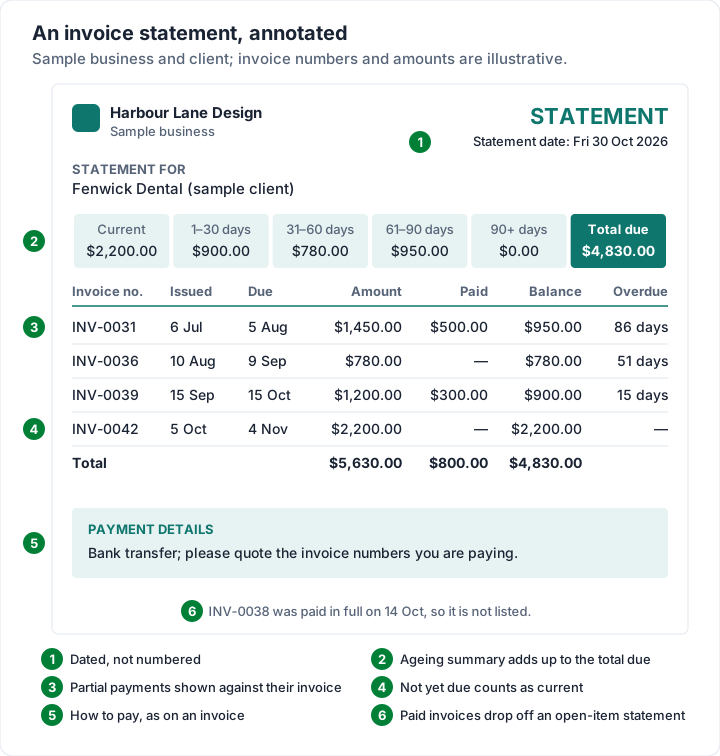
Here is a statement of invoices sample you can check line by line. Every name, number and amount is invented for illustration, and the arithmetic is real. Harbour Lane Design (a sample business) has billed Fenwick Dental (a sample client) five times on Net 30 terms. One invoice has been paid in full, two have been part paid, and one is not yet due. The statement date is Friday 30 October 2026.
First, the invoices as they stand on the statement date:
| Invoice | Issued | Due | Amount | Payments received |
|---|---|---|---|---|
| INV-0031 | Mon 6 Jul 2026 | Wed 5 Aug 2026 | $1,450.00 | $500.00 on Fri 18 Sep |
| INV-0036 | Mon 10 Aug 2026 | Wed 9 Sep 2026 | $780.00 | None |
| INV-0038 | Wed 2 Sep 2026 | Fri 2 Oct 2026 | $640.00 | $640.00 on Wed 14 Oct (paid in full) |
| INV-0039 | Tue 15 Sep 2026 | Thu 15 Oct 2026 | $1,200.00 | $300.00 on Fri 23 Oct |
| INV-0042 | Mon 5 Oct 2026 | Wed 4 Nov 2026 | $2,200.00 | None |
INV-0038 owes nothing, so it does not go on the statement. The other four do:
| Invoice no. | Issued | Due | Amount | Paid | Balance | Days overdue |
|---|---|---|---|---|---|---|
| INV-0031 | 6 Jul 2026 | 5 Aug 2026 | $1,450.00 | $500.00 | $950.00 | 86 |
| INV-0036 | 10 Aug 2026 | 9 Sep 2026 | $780.00 | — | $780.00 | 51 |
| INV-0039 | 15 Sep 2026 | 15 Oct 2026 | $1,200.00 | $300.00 | $900.00 | 15 |
| INV-0042 | 5 Oct 2026 | 4 Nov 2026 | $2,200.00 | — | $2,200.00 | Not yet due |
| Total | $5,630.00 | $800.00 | $4,830.00 |
Days overdue count from the due date to the statement date: 5 August to 30 October is 86 days, 9 September to 30 October is 51, and 15 October to 30 October is 15. INV-0042 is not due until 4 November, so it counts as current.
The ageing summary groups those balances:
| Current | 1–30 days | 31–60 days | 61–90 days | 90+ days | Total due |
|---|---|---|---|---|---|
| $2,200.00 | $900.00 | $780.00 | $950.00 | $0.00 | $4,830.00 |
Drawn as the page the client receives, with what to notice:
And the same balances as a chart, which is what the ageing row is really telling the client:
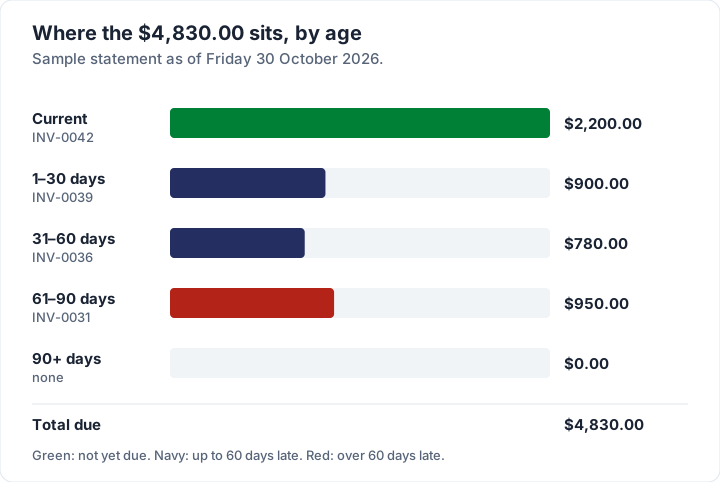
The total alone says the client owes $4,830.00. The ageing says something more useful: $2,200.00 of that is not due yet, and the money that needs a conversation is the $950.00 left on INV-0031, now 86 days late. If you want to track the same buckets across all your clients rather than one, the open invoices report covers that view. To keep those buckets in a spreadsheet, our invoice tracker template builds the formulas column by column, and the same tracker is a free Excel download.
Open-item vs balance-forward statements#
There are two common kinds of client statement, and choosing the right one decides what your invoice statement template needs to hold.
- Open-item statement. Lists only the invoices that still have a balance, with ageing. Paid invoices drop off. This is the example above.
- Balance-forward statement. Starts from an opening balance at the beginning of a period, lists every invoice and payment in that period, and ends at a closing balance. It reads like a bank statement.
For the sample account, October 2026 as a balance-forward statement runs like this:
| Date | Activity | Amount | Running balance |
|---|---|---|---|
| 1 Oct | Opening balance (INV-0031, 0036, 0038, 0039) | $3,570.00 | |
| 5 Oct | Invoice INV-0042 | $2,200.00 | $5,770.00 |
| 14 Oct | Payment, INV-0038 | −$640.00 | $5,130.00 |
| 23 Oct | Payment, INV-0039 | −$300.00 | $4,830.00 |
| 30 Oct | Closing balance | $4,830.00 |
The opening balance is what was unpaid on 30 September: $950.00 on INV-0031 (after the $500.00 paid on 18 September), $780.00 on INV-0036, $640.00 on INV-0038 and $1,200.00 on INV-0039, which is $3,570.00. Both statements end at $4,830.00, as they must:
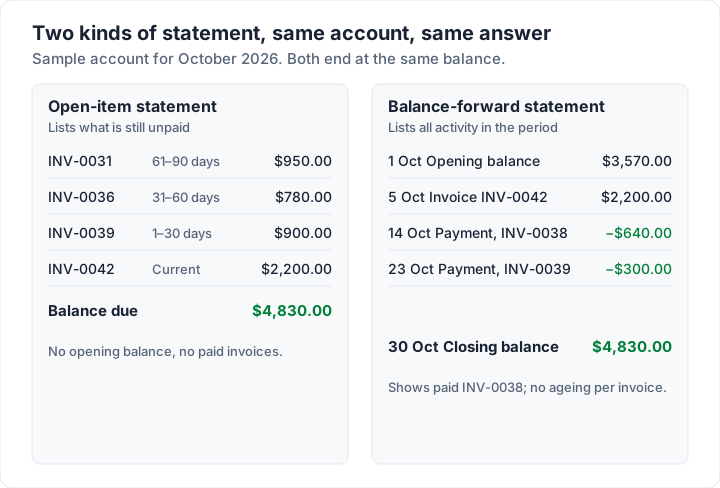
Which one to use:
| Open-item | Balance-forward | |
|---|---|---|
| Shows | What is still unpaid, and how late | Everything that happened in the period |
| Paid invoices | Not shown | Shown, as payments |
| Ageing per invoice | Yes | Not usually |
| Easiest for the client to act on | Yes | Less so: they must work out what is open |
| Good for | Freelancers and small businesses chasing balances | Accounts with lots of small invoices and payments every month |
| Needs | Your invoices and recorded payments | The same, plus a clean opening balance each period |
For most people sending a “monthly statement invoice” to a few repeat clients, the open-item statement is the clearer page. A balance-forward statement suits accounts where the client wants to see every movement, such as a supplier with dozens of deliveries a month.
How to make an invoice statement template in Excel#
If you would rather not build it, download the free statement of account template for Excel. It does what the steps below describe: balance, days overdue and ageing worked out from the statement date, a total due, an amount due now, payment details and a filled-in example tab. It is an Excel file only; there is no Word statement. If you already use our free invoice templates, each saved invoice carries the two numbers a statement needs, in its Amount paid and Balance due cells.
To build your own instead, a statement template is a short spreadsheet on top of that.
Build it once:
- Header. Type your business details, the word “Statement”, a “Statement for” block for the client, and a statement date in cell B2.
- Columns. In row 5, type the headings Invoice no., Issued, Due, Amount, Paid, Balance and Days overdue in columns A to G. Leave rows 6 to 20 for invoices.
- Balance. In F6, enter the formula below and copy it down to F20. It leaves the cell empty when there is no amount.
- Days overdue. In G6, enter the second formula and copy it down. Format column G as a number, not a date, or Excel may show “1900” dates instead of a count.
- Ageing summary. Under the table, add one cell per bucket with the SUMIFS formulas below, and a total.
- Payment details. Add your bank details or payment link and the reference to quote.
The formulas, for the layout above:
Balance (F6):        =IF(D6="","",D6-E6)
Days overdue (G6):   =IF(C6="","",MAX(0,$B$2-C6))
Current:             =SUMIFS($F$6:$F$20,$G$6:$G$20,0)
1-30 days:           =SUMIFS($F$6:$F$20,$G$6:$G$20,">=1",$G$6:$G$20,"<=30")
31-60 days:          =SUMIFS($F$6:$F$20,$G$6:$G$20,">=31",$G$6:$G$20,"<=60")
61-90 days:          =SUMIFS($F$6:$F$20,$G$6:$G$20,">=61",$G$6:$G$20,"<=90")
90+ days:            =SUMIFS($F$6:$F$20,$G$6:$G$20,">90")
Total due:           =SUM(F6:F20)
Then, each time you send one:
- Record every payment first against the invoice it paid. If one payment covered two invoices, split it.
- Delete paid invoices from the list, and add any new ones sent since the last statement.
- Change the statement date in B2. The days overdue and the ageing update by themselves.
- Check that the buckets add up to the total due. If they do not, a row has a date missing.
- Save it as a PDF and attach it to a short email.
Typed into that sheet, the sample account gives days overdue of 86, 51, 15 and 0, the ageing row from the example and a total due of $4,830.00.
A Word version works too: a table with the same seven columns and a totals row. Word will not age the invoices or add up the balances for you, so work them out with a calculator and check the total twice. If you have more than a handful of open invoices, the spreadsheet is less error-prone. The Excel invoice template guide explains the formulas inside the invoice files, if you want to see how their Balance due is worked out.
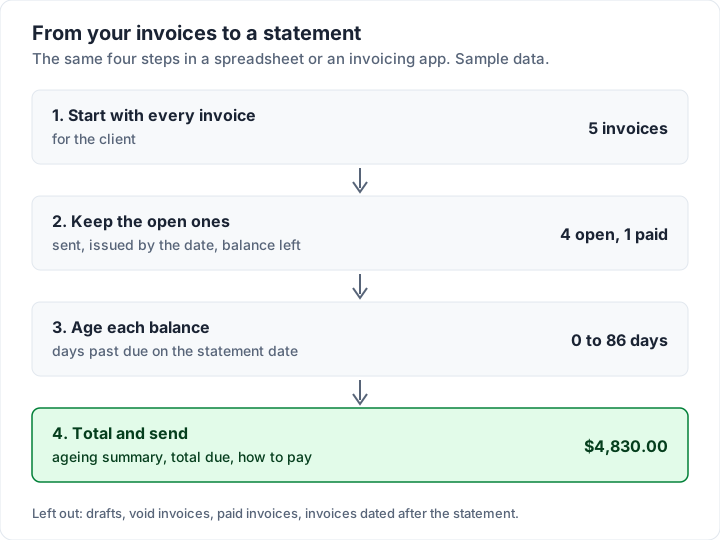
Make the statement from your invoices in Charming#
If your invoices are already in Charming Invoices, you do not need a statement template at all. Each client on your client list has a Statement button, on every plan including the free one. It opens a PDF in your invoice design with:
- Every open invoice for that client: issued, with a balance left, oldest first, showing invoice number, issued and due dates, amount, paid, balance and days overdue.
- An ageing summary (current, 1–30, 31–60, 61–90 and 90+ days) and a total due.
- A section per currency when the client has invoices in more than one, each with its own ageing and total, never one mixed sum.
- Your payment details and payment link, if you have added them, as on your invoices.
- A plain message when nothing is owed: “No outstanding invoices — this account is fully paid.”
What it does not do, plainly:
- Open items only. Paid invoices and the dates of individual payments do not appear. It is not a balance-forward statement and not a full activity history.
- Dated the day you open it. The Statement button produces today's statement.
- Only as current as your records. Charming takes no payments itself and does not know when a client has paid: you record payments (part payments included) and mark invoices paid. Record them first, or the statement will be out of date.
- One client at a time, downloaded as a PDF. Charming does not email the statement for you; you attach it yourself.
- The free plan's footer. Free statements carry a small “Sent with Charming Invoices” line, the same as free invoices. Paid plans, from $29 once, hide it by default.
If that suits how you bill, create a free invoice; once a client has issued invoices, their statement is one click away. Matching a payment that covered several invoices is covered in invoice reconciliation, and what changes once an invoice is fully settled is in what a paid invoice is.
When to send an invoice statement#
A statement earns its place in a few situations:
- The client has two or more open invoices. One page beats several forwarded PDFs, and it stops the newest invoice being paid while the oldest sits.
- Part payments have muddied the picture. The statement shows exactly what was credited where.
- A payment arrived that you cannot match. Send the statement and ask which invoices it covers.
- You bill the same client every month. A statement on a fixed day each month makes the account routine. A dental lab billing a practice for each case is one example; our dental invoice template shows a lab case invoice.
- Before you chase. Sending a statement first gives the client a chance to say “we paid that” before a reminder lands.
When one invoice is a few days late, the invoice itself with a short note is enough. For the wording of a chaser, see overdue invoice follow-up emails, and if you are unsure which word fits which invoice, outstanding vs overdue vs unpaid sorts that out. Charming does not send payment reminders, so the statement and your own follow-up emails do that job between them.
A sample email to carry the statement:
Hi Dana,
Attached is a statement of your account as of 30 October. It lists four open invoices, $4,830.00 in total, of which $2,200.00 is not due until 4 November. The oldest is the $950.00 left on INV-0031, which was due on 5 August.
If anything does not match your records, tell me and I will check it against mine. Payment details are at the bottom of the statement.
Thanks, Sam
In practice, a statement is a summary of your own records rather than a new invoice, so what goes on it is mostly a matter of what helps the client. That is general information, not legal or tax advice; if you are unsure whether any tax rules apply to your statements, ask your accountant.
If you design your own statement, the same rules that make an invoice readable apply: the total due and the oldest balance should be the first things the reader sees. Invoice design principles covers hierarchy, type and colour in detail.
Invoice statement questions#
What is an invoice statement template?#
A reusable layout for a statement of account: your details, the client's, a statement date, a table of open invoices (number, dates, amount, paid, balance, days overdue), an ageing summary, a total due and payment details. In a spreadsheet, formulas work out the balances, days overdue and ageing for you.
What is the difference between an invoice and a statement?#
An invoice asks for payment for one piece of work and has its own number. A statement lists several invoices on one dated page so both sides can agree on what is still owed. A statement does not create a new amount owed. One invoice that bills several jobs not yet invoiced is a different document, a consolidated invoice.
Should paid invoices appear on a statement?#
Not on an open-item statement, which lists only what is unpaid. On a balance-forward statement, payments appear as activity in the period, so a paid invoice shows up as its invoice and its payment.
How often should I send a statement?#
Monthly works well for clients with several open invoices, often on the same day each month. Otherwise, send one when a client has two or more open invoices, after a part payment, or before chasing an overdue balance.
Is there a free invoice statement template in Word or Excel?#
In Excel, yes: our free statement of account template has the balance, days overdue and ageing formulas already in place, with a filled-in example. There is no Word version. The Excel steps above build the same kind of statement yourself in a few minutes, and a Word table works if you add up the balances by hand.
Can a statement have a statement number?#
It can, but it does not need one. A statement is identified by its date and the client's name. The invoices on it are what carry numbers.
Free downloads
No sign-up and no email address. More on the free templates page.
- Download .xlsx: Statement of account for Excel
Statement of account for Excel
Excel .xlsxFor a client with several unpaid invoices: one page listing each one, what is left and how late it is.
- Download .xlsx: Invoice tracker for Excel
Invoice tracker for Excel
Excel .xlsxEvery invoice you have sent on one sheet, with its balance, status and how many days late it is.