Consolidated invoice: one invoice for many jobs, explained

Nnabuike Okoroafor ·
On this page · 12 sections
You visit the same client every week. Each visit is small, and sending an invoice after every one feels like paperwork for its own sake. Their bookkeeper has said, more than once, that four invoices a month for $85.00 each is a lot of matching. So you wonder whether you can send one invoice at the end of the month instead.
You can, and that is what a consolidated invoice is: one invoice that covers several jobs, deliveries or visits for the same client. Search for the term and most of what you find is billing-software documentation about merging records. This guide answers the small-business question instead: when one invoice for many jobs beats separate invoices or a statement, how to lay it out so the client pays it in one go, and a worked month of visits with real numbers.
In short#
- A consolidated invoice is still one invoice: one number, one date, one due date and one total, with a line for each job.
- It is not a statement. A statement lists invoices that already exist. A consolidated invoice replaces the separate invoices you would otherwise send.
- It suits small, regular jobs for one client. It suits less well when the client needs one invoice per order, or when early jobs would wait too long to be paid.
What a consolidated invoice is#
A consolidated invoice combines the charges for several jobs, orders or visits over a period into a single invoice to one client. You might also see it called a summary invoice or a combined invoice. “Consolidated invoicing” or “invoice consolidation” is the practice of billing that way, usually on a fixed cycle such as weekly or monthly.
The key word is “one”. A consolidated invoice gets one invoice number, an issue date, a due date and a total. Each job appears as a line item, usually with its date, so the client can see what they are paying for.
It is not a separate document type with its own rules, more a way of using an ordinary invoice. Our guide to types of invoices lists it alongside the others. If you sell on eBay, “combined invoice” has a narrower meaning there, covered in combined eBay invoice.
Consolidated invoice vs separate invoices vs a statement#
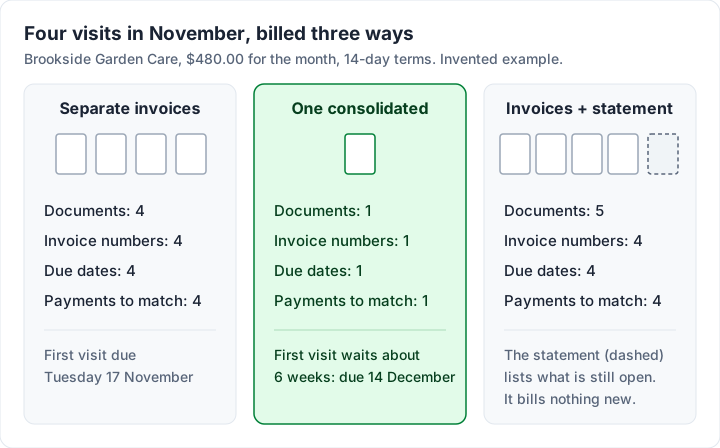
There are three ways to bill a client for a month of small jobs. The table compares them on the points that matter when you get paid.
| Separate invoices | One consolidated invoice | Separate invoices plus a statement | |
|---|---|---|---|
| What it is | One invoice per job | One invoice with a line per job | Invoices per job, then a summary of what is open |
| Invoice numbers used | One per job | One | One per job (a statement is not an invoice) |
| Due dates | One per invoice | One | One per invoice |
| What the client pays against | Each invoice | The one invoice | Each invoice, with the statement as a reminder |
| Best for | Larger jobs, or clients who match each order | Small, regular jobs for one client | Clients with several open invoices to catch up on |
The last column is the one people mix up with a consolidated invoice. A statement does not replace any invoice: the client still pays the invoices it lists. For the difference in detail, see invoice vs statement.
When one invoice for many jobs makes sense#
A consolidated invoice tends to work well when:
- The jobs are small and regular, such as weekly visits, routine maintenance or a run of short tasks for one client.
- The client’s accounts team prefers fewer documents. Each invoice is something they have to approve, enter and pay.
- One purchase order covers several deliveries, and the client is happy to receive one invoice against it.
- You want one due date to track, not four.
When separate invoices are better#
It can work against you when:
- One disputed line holds up the rest. If the client queries one visit, they may hold the whole invoice while it is sorted out.
- The client needs one invoice per order or cost centre. Many accounts teams match each invoice to one purchase order. If that is your client, see what a PO number on an invoice is for, which works through one PO billed over several invoices.
- The early jobs would wait too long. On a monthly invoice with 14-day terms, the first visit of the month is paid about six weeks after you did it.
- The jobs are large. A big job is worth invoicing on its own the day it is done.
If the amount is the same every month, a recurring invoice may suit you better than building a new one each time. See how recurring invoices work. Snow clearing is a seasonal example: the snow removal invoice template puts a month of storms on one invoice, one dated section per storm.
What to put on a consolidated invoice#
A consolidated invoice has everything an ordinary invoice has, plus a little structure so the client can check each job:
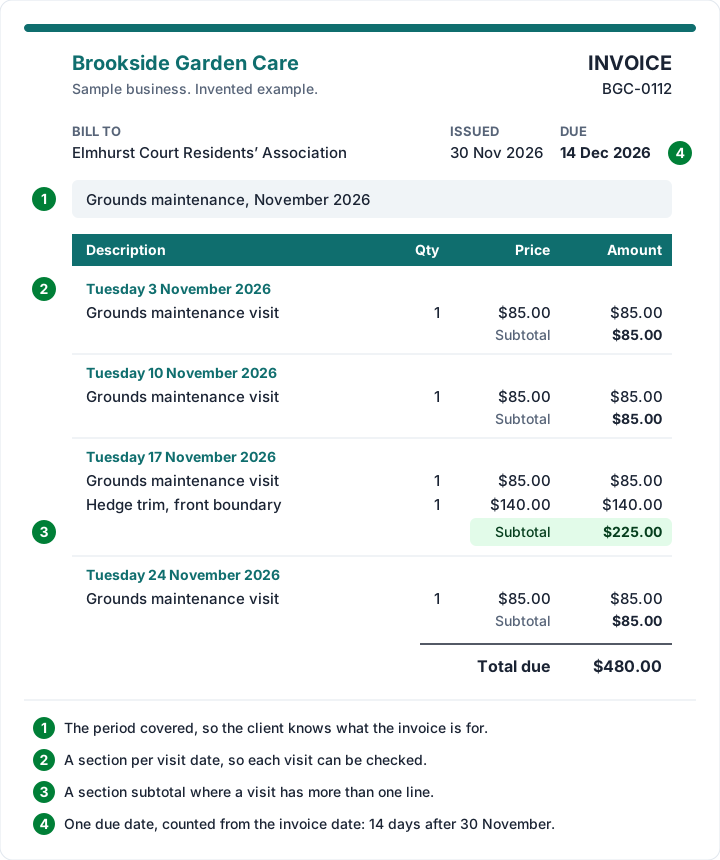
- The period covered, in the header or a note: “Grounds maintenance, November 2026”.
- One line per job, visit or delivery, with its date in the description or as a section heading.
- Sections with subtotals when a visit or site has several lines, so the client sees what each one cost.
- The client’s PO number or reference, if they gave you one.
- One due date, counted from the invoice date, not from the first job. If you are unsure how to count it, see how to calculate an invoice due date.
- One total due, with your payment details.
The detail per line is the same as on any itemised bill; for how much to show, see an itemized invoice.
Worked example: a month of visits on one invoice#
This example is illustrative. Brookside Garden Care, a fictional business, maintains the grounds for the fictional Elmhurst Court Residents’ Association every Tuesday. In November 2026 it made four visits, and on 17 November it also trimmed the front boundary hedge. Its terms are 14 days.
Option A: one consolidated invoice. Invoice BGC-0112 is issued on Monday 30 November 2026 and due on Monday 14 December 2026.
| Section (visit) | Line | Qty × price | Amount |
|---|---|---|---|
| Tuesday 3 November 2026 | Grounds maintenance visit | 1 × $85.00 | $85.00 |
| Tuesday 10 November 2026 | Grounds maintenance visit | 1 × $85.00 | $85.00 |
| Tuesday 17 November 2026 | Grounds maintenance visit | 1 × $85.00 | $85.00 |
| Tuesday 17 November 2026 | Hedge trim, front boundary | 1 × $140.00 | $140.00 |
| Tuesday 24 November 2026 | Grounds maintenance visit | 1 × $85.00 | $85.00 |
| Total due | $480.00 |
Grouped by visit, the 17 November section has a subtotal of $225.00 ($85.00 + $140.00), and the other three sections $85.00 each: $85.00 + $85.00 + $225.00 + $85.00 = $480.00.
Option B: separate invoices plus a statement. Brookside sends four invoices, one after each visit: $85.00, $85.00, $225.00 and $85.00, each due 14 days after its own date. On Monday 30 November it sends a statement listing whichever are still open.
What changes between the two:
- Option A: one number, one payment to match and one due date. The 3 November visit is paid on 14 December at the earliest, 41 days later.
- Option B: four numbers and four payments to match, but the first visit is due on Tuesday 17 November, almost four weeks sooner.
Neither is wrong. For regular, low-value visits to a client who pays reliably, Option A saves both sides time. For the wider picture of billing regular visits, see invoicing for cleaners and home services.
Already invoiced? Send a statement, not a second bill#
A common mistake is to send separate invoices during the month and then a “consolidated invoice” at the end that bills the same jobs again. Now the client has two documents asking for the same money, and either they pay twice or their accounts team rejects both.
If the separate invoices have already gone out, choose one of these:
- Send a statement. It lists the open invoices and their total without billing anything new. See an invoice statement template for the layout, or fill in our free statement of account for Excel.
- Replace them. Void each separate invoice and issue one consolidated invoice in their place, and tell the client which numbers it replaces. How to void an invoice covers the record-keeping.
Decide which way you will bill a client before the month starts, and stick to it.
Consolidated invoices and tax rules#
Some countries have their own rules for summary or consolidated tax invoices. Rules vary by country and by tax registration, so check your tax authority’s guidance or ask an accountant before you change how you invoice. General information, not legal or tax advice.
Doing it in Charming, and what it does not do#
Charming Invoices has no “merge invoices” button and no consolidated-invoice feature. It cannot combine invoices that have already been issued. What it does have is everything needed to build one invoice that covers many jobs, on every plan. Checked in our code on 28 October 2026:
- Up to 200 line items per invoice, each with a description of up to 500 characters, so the job date fits on the line.
- Sections with subtotals. Turn on “Group lines by section” in the Template Studio (it is off by default). Each line then gets an optional Section field of up to 80 characters, such as a visit date or a site, and the invoice prints “under a heading with a subtotal” for each section, as in the example above.
- A draft you build up over the month. Invoice numbers are given when you issue an invoice, so a draft you add visits to each week uses no number until you issue it. After it is issued, you void and reissue it rather than editing it.
- A PO number field that prints in the header, one per invoice.
- Client statements as a PDF, from the Statement button on your client list, listing a client’s open invoices with ageing (current, 1-30, 31-60, 61-90 and 90+ days). A statement is not an invoice and takes no invoice number.
- Recurring invoices on paid plans create a draft on a schedule. They repeat fixed lines, so a month of variable visits still needs editing before you issue it.
The catches, plainly. Charming does not take card payments: clients pay you directly, and you mark each invoice paid yourself, so a partly paid consolidated invoice is something you record by hand. It does not email invoices or send reminders: issue the invoice, download the PDF or copy its private link, and send it however you like. It does not connect to accounting software, and it is a web app, with no app to install. On the free plan, invoices carry a small “Sent with Charming Invoices” line; paid plans hide it on the PDF by default, as the pricing page shows. Lifetime plans are final sale.
If you bill the same client for small jobs every week, create a free invoice, turn on sections, and add each visit to one draft as you go.
Questions people ask#
What is a consolidated invoice?#
One invoice that bills a client for several jobs, orders or visits over a period, with a line for each. It has one number, one due date and one total.
Is a consolidated invoice the same as a statement?#
No. A consolidated invoice is an invoice that the client pays. A statement lists invoices that already exist and their balance, and does not replace them.
Can I combine several invoices into one?#
Only by replacing them: void the separate invoices and issue one invoice that covers the same jobs, telling the client which numbers it replaces. If you only want the client to see the total, send a statement instead.
What is invoice consolidation?#
The practice of billing a client once per period, such as monthly, with all the period’s jobs on one invoice, instead of one invoice per job.
Can one invoice cover several purchase orders?#
Ask the client first. Many accounts teams match one invoice to one purchase order, so they may prefer an invoice per PO. If they agree to one invoice, list each PO number on the lines it covers.
One invoice, many jobs, no double billing#
A consolidated invoice is an ordinary invoice with a line or section per job, sent once a period. Use it for small, regular work for one client, give every job its date, and count the due date from the invoice date. Do not send it on top of invoices you have already issued: use a statement for that. When you are ready to try it, create a free invoice.
Free download
No sign-up and no email address. More on the free templates page.
- Download .xlsx: Statement of account for Excel
Statement of account for Excel
Excel .xlsxFor a client with several unpaid invoices: one page listing each one, what is left and how late it is.