Snow removal invoice template: per push, storm or season

Nnabuike Okoroafor ·
On this page · 9 sections
Snow work is billed differently from almost any other trade. One property can need three pushes on a Sunday, salt twice, and the sidewalks shovelled again before the office opens on Monday. A plain invoice that says “Snow removal, January: 1,485.00” leaves the client to guess how that number happened.
This page gives you a snow removal invoice template to start from, and two invoices for snow removal filled in with real arithmetic: a month of per-push storms for a condominium association, each storm with its own subtotal, and one payment on a seasonal driveway contract with an extra job added. Whether you call it a snow removal invoice or a snow plow invoice, the structure is the same.
General information, not legal or tax advice. This post does not cover contract or liability terms (slip-and-fall, indemnity, insurance or municipal sidewalk rules); ask a lawyer and your insurer about those.
Snow removal invoice template: which file to use#
There is a free snow removal invoice template for Excel and one for Word, with no sign-up. The Excel file has two storms printed in advance, each with lines for plowing, salt and sidewalks, plus loader hours; the Word file has the plowing, salt, sidewalk and loader lines for a single storm or job. Every rate is left blank, so you type your own. More free files, including general and hourly invoice templates, are on the free Word and Excel invoice templates page.
| Your snow work | Best file | Why it fits |
|---|---|---|
| A month of storms for one property, per push or per visit | snow-removal-invoice-template.xlsx (Excel) | 15 lines that calculate, storm lines printed in advance, a Reference / PO number cell for a property manager's order number, and a due date worked out from the payment terms |
| A single storm call-out, or a one-off job such as a roof or a loader clear-out | snow-removal-invoice-template.docx (Word) | A “Description of work” box for the storm, property and date, then a snow and ice work table |
| Seasonal contract instalments | Either file, one line per instalment | The line names the season and the payment number |
| Hourly loader or equipment time | hourly-invoice-template.xlsx (Excel) | A Date column, hours times an hourly rate, and a Total hours line |
The Excel files calculate each amount, the subtotal, total and balance due. The Word files do not: you type the arithmetic yourself. None of the files has true storm sections with their own subtotals. Instead, the snow Excel file pre-prints each storm as a line of its own (“Storm 1: day and date, snowfall depth”) with no quantity, so its amount stays blank, and lists that storm's work below it; type the date and depth, and copy the pattern for more storms.
If you also cut grass in summer, the lawn care and landscaping invoice template has a filled sample for a month of visits. For a general one-job layout, see a job invoice sample.
Per push, per inch or seasonal: the snow plow invoice line#
Snow work is commonly priced in one of four ways. Each one produces a different invoice line, and each one decides who pays more in a heavy winter. The table below describes common practice in the trade; your own agreement with the client sets the terms.
| Pricing model | What triggers a charge | What the invoice line says | Who carries the weather risk |
|---|---|---|---|
| Per push (per visit) | Each time you plow once snow passes the agreed depth (the trigger) | “Plow parking lot (per push)”, quantity = pushes that storm | The client: more snow, more pushes, bigger invoice |
| Per storm (per event), often tiered by depth | Each storm, priced by its depth band (for example 2 to 6 in.) | “Storm of 25 Jan, 6 to 10 in. band”, quantity 1 | Shared: a long storm is one charge, a snowy winter is many |
| Hourly | Time on site for a crew, plow truck or loader | “Loader, stacking and hauling”, quantity in hours | The client |
| Seasonal (fixed contract) | Nothing per storm; the price is agreed for the season | “Seasonal contract, payment 3 of 5”, the same every month | You: a heavy winter costs you, a light one pays you |
Salt and ice melt sit across all four. On per-push work it is usually its own line per application; on seasonal contracts it is often included in the price. Whatever you agreed, the invoice should make it obvious: a salt line, or a note that salt is included.
What a snow removal invoice should show#
On top of the basics (your details, the client, an invoice number, the issue and due dates, the total and how to pay), a snow removal invoice needs the details a property manager uses to check it:
- The property address. A management company or association may pay for several sites. If the billing address differs from the property, show both.
- Each storm's date, and the time on site if you track it. The question is usually “did they come on the 14th?”, not “what is a push worth?”.
- Snowfall depth and the trigger. “Storm 2: 5 in., trigger 2 in.” explains why there were two pushes.
- Pushes, visits and salt applications as quantities. Use units the client can count: push, visit, application.
- Sidewalks, steps and entrances separately from the lot. They are often priced differently and checked by different people.
- Hauling, stacking or loader time, if any, on their own lines with hours.
- The contract or purchase order number. Many property managers need it to approve payment. Putting a PO number on an invoice covers where it goes.
- A due date and payment details. Bank details, a payment link you already use, or both.
If a visit could not be done (a car blocking the drive, a locked gate), say so on the invoice rather than leaving a gap. The guide to billing missed visits and lockouts shows how cleaners word it, and the same wording works for a blocked driveway.
Sample 1: a month of per-push storms on one invoice#
Frostline Snow & Ice (sample business) plows, salts and shovels for the Bellwether Court Condominium Association (sample client) on a per-push contract. Rather than send an invoice after every storm, Frostline sends one per month with each storm as its own section. That is one invoice for many jobs, and it gives the association one payment to approve.
Every name, rate and snowfall figure below is illustrative, not a market rate or a real weather record. No tax line is shown: this post does not cover whether snow work is taxable, so check your state or country's tax agency, or ask an accountant.
- Invoice: INV-0142, dated Monday 2 February 2026, net 15, due Tuesday 17 February 2026
- From: Frostline Snow & Ice (sample business)
- To: Bellwether Court Condominium Association (sample client), 8 Example Avenue, Suite 2
- PO number: BCCA-2526 (illustrative)
- Property: Bellwether Court, 40 Sample Street: parking lot and front sidewalks
- Contract: per push, trigger 2 in.
| Line | Qty | Unit | Rate | Amount |
|---|---|---|---|---|
| Storm 1: Sat 3 Jan 2026, 3 in. | ||||
| Plow parking lot (per push) | 1 | push | 145.00 | 145.00 |
| Salt parking lot (per application) | 1 | application | 85.00 | 85.00 |
| Shovel and ice-melt sidewalks (per visit) | 1 | visit | 55.00 | 55.00 |
| Subtotal | 285.00 | |||
| Storm 2: Wed 14 Jan 2026, 5 in. | ||||
| Plow parking lot (per push) | 2 | push | 145.00 | 290.00 |
| Salt parking lot (per application) | 1 | application | 85.00 | 85.00 |
| Shovel and ice-melt sidewalks (per visit) | 2 | visit | 55.00 | 110.00 |
| Subtotal | 485.00 | |||
| Storm 3: Sun 25 Jan 2026, 8 in. | ||||
| Plow parking lot (per push) | 3 | push | 145.00 | 435.00 |
| Salt parking lot (per application) | 2 | application | 85.00 | 170.00 |
| Shovel and ice-melt sidewalks (per visit) | 2 | visit | 55.00 | 110.00 |
| Subtotal | 715.00 | |||
| Subtotal | 1,485.00 | |||
| Total due | 1,485.00 |
The arithmetic, storm by storm: 145.00 + 85.00 + 55.00 = 285.00; then 2 × 145.00 + 85.00 + 2 × 55.00 = 485.00; then 3 × 145.00 + 2 × 85.00 + 2 × 55.00 = 715.00. Across the month that is 6 pushes, 4 salt applications and 5 sidewalk visits, and 285.00 + 485.00 + 715.00 = 1,485.00.
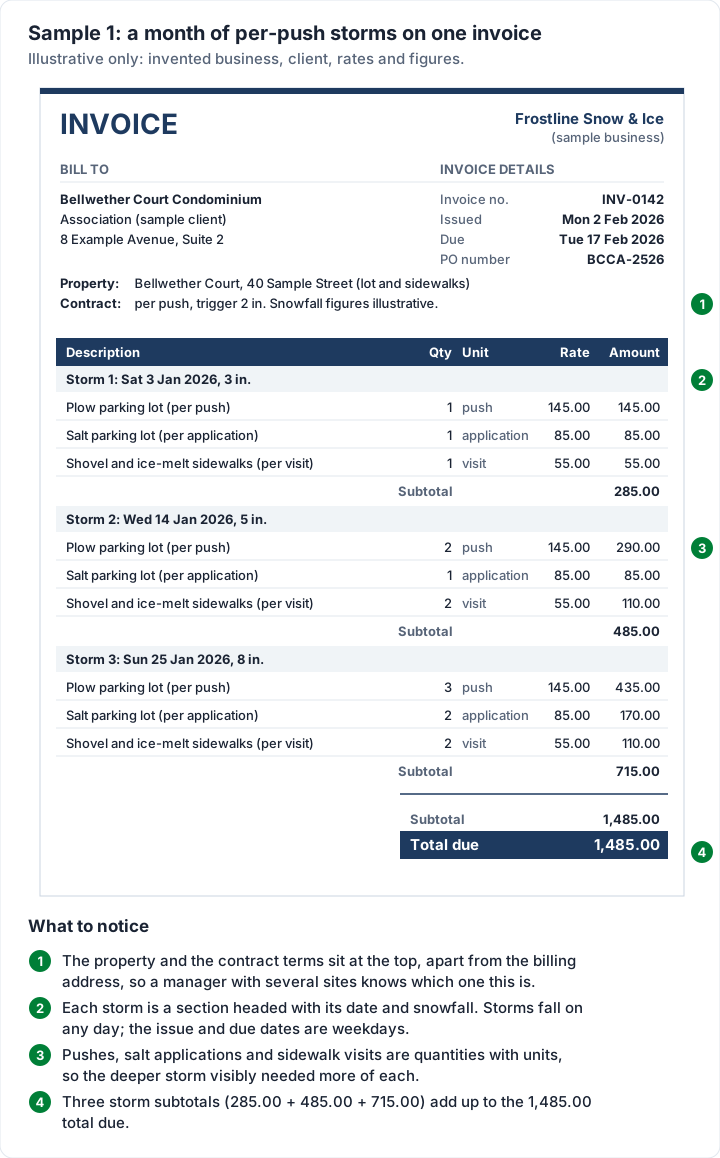
The storms fell on a Saturday, a Wednesday and a Sunday. Those are service dates, and snow does not wait for weekdays. The invoice date and due date are both weekdays, which is when someone is at a desk to approve the payment. How to calculate an invoice due date covers net terms if your contract sets them.
Show the storm, not just the total#
A snow bill arrives in a lump after weeks of weather the client may not have watched closely. A total on its own invites the question of whether it is fair, and contractors feel that question before the client asks it.
A per-storm breakdown answers it before anyone says it. The association's treasurer can see that the 715.00 storm was the 8-inch one, that it took three pushes, and that the rate did not change between storms. How much detail to show on an invoice covers the general case.
When a client does question a charge, the dated sections make the conversation short: “Storm 2, two pushes, here is the time we were on site.” If it goes further than that, see what to do when a client disputes an invoice.
Sample 2: a seasonal contract payment with an extra#
A seasonal contract is the opposite problem. The amount is the same every month, so the invoice needs to say which payment this is and what it covers. Anything outside the contract goes on its own line, so it never looks like a price rise.
The Harrowgate household (sample client) has a seasonal driveway contract with Frostline Snow & Ice from 1 November 2025 to 31 March 2026: 900.00 for the season, paid in five equal monthly payments of 180.00. On Friday 2 January 2026 they also asked Frostline to clear the snow off their porch roof, which the contract does not cover.
- Invoice: INV-0131, dated Monday 5 January 2026, due Thursday 15 January 2026 (10 days)
- From: Frostline Snow & Ice (sample business)
- To: the Harrowgate household (sample client), 7 Example Lane
| Line | Qty | Unit | Rate | Amount |
|---|---|---|---|---|
| Seasonal driveway contract, 1 Nov 2025 to 31 Mar 2026: payment 3 of 5 (January) | 1 | month | 180.00 | 180.00 |
| Extra outside the contract: clear snow from porch roof, Fri 2 Jan 2026 | 1 | job | 60.00 | 60.00 |
| Total due | 240.00 |
The season is 900.00 ÷ 5 = 180.00 a month, and January is the third payment after November and December. Add the 60.00 extra and the total is 240.00. The rates are illustrative.
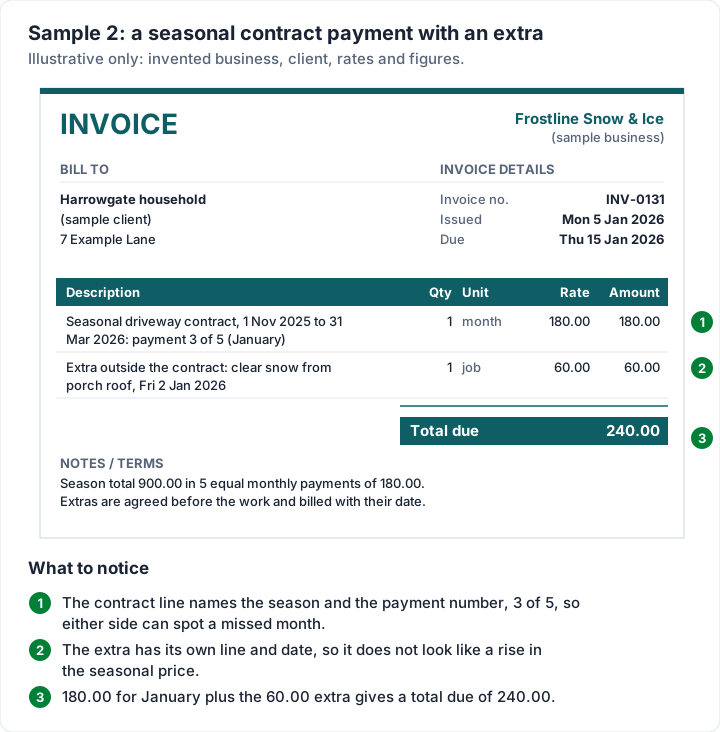
Two habits keep seasonal invoices clean. Write the payment number on every one (“3 of 5”), so a missed payment is easy to spot on both sides. And agree extras before you do them, then bill each one with its date, as here. If you invoice a seasonal contract on a schedule, how recurring invoices work explains the difference between a recurring invoice and a subscription.
Getting paid through the winter#
Snow season is short and cash flow is lumpy: fuel, salt and wages go out during the storms, and payment comes in weeks later. A few habits help:
- Invoice on a fixed day each month. The first working day after the month ends is easy to remember and easy for a property manager to expect.
- Keep the terms short and stated. Net 15 or 10 days, written on the invoice with an actual due date, not just “net”.
- Send a statement to clients with several open invoices. A statement of open invoices lists everything unpaid on one page, with how overdue each one is.
- Remind before the due date, not only after. A short note a few days early reaches the client while the invoice is still current, not after it has slipped down the pile.
- Late fees only if they were agreed. If you plan to charge one, agree the late fee before the work and print it in the terms on every invoice.
- Make paying easy. Bank details and one payment link on every invoice.
Snow removal invoices in Charming Invoices#
The spreadsheet works for a few properties. When it is ten properties and a storm every week, retyping the same lines is what slows you down. This is what Charming Invoices does for a snow business, checked in the code:
- Storm sections with their own subtotals. Give each line a section such as “Storm 1: Sat 3 Jan 2026, 3 in.” (up to 80 characters) and switch on “Group lines by section”. It is on by default in the Contractor template, and it works on any of the 60 templates.
- Your own units. Type push, visit, application or job in the unit field (up to 20 characters).
- A PO number field for the association's contract or work-order number.
- Duplicate. Copy last month's invoice for the same property as a new draft, then change the storms.
- Recurring invoices for seasonal contracts, weekly, monthly, quarterly or yearly, with a start and an optional end date (1 November to 31 March, say). These are on the paid plans, from Individual at $29 once. The catch: each one arrives as a draft for you to review and issue. Nothing is sent to the client automatically, and the draft has the same fixed lines every time, so an extra like the porch roof is added by hand before you issue it.
- Client statements with ageing, for a property manager with several open invoices.
- A PDF and a private link. Issue the invoice, then download the PDF or copy its link and send it however you like. Overdue invoices are flagged; Charming does not send reminders, so set a calendar reminder for the due date.
- Works in a phone browser, and can be added to your home screen. There is no App Store or Google Play app, and it needs a connection.
What it does not do:
- No route planning, dispatch, GPS tracking or photo proof of service, and no weather or snowfall data. Charming does not bill a storm for you; you enter the storms. For crews and routes, field-service invoicing software such as Jobber or Housecall Pro is built for that job.
- No card payments through Charming. You add bank details and a payment link of your own; the client pays you directly, and you mark the invoice paid.
- No separate service-address field. Put the property in the first line, the section or the notes. You can rename the PO number label to “Property”, but the new label then applies to every invoice you issue from that business.
- One tax rate per invoice, if you charge tax at all.
- Free invoices carry a small “Sent with Charming Invoices” line in the footer. Paid plans hide it by default, and you can switch it back on.
If you want to compare tools that send scheduled invoices for you, see software that sends recurring invoices. Otherwise, create a free invoice and type in Sample 1 with one of your own properties.
Snow removal invoice questions#
How do you invoice for snow removal?#
List each storm with its date and snowfall, then the work done in that storm as quantities: pushes, salt applications, sidewalk visits, loader hours. Add the property address, the contract or PO number, a due date and how to pay. One option is a single invoice a month with a section per storm, as in Sample 1.
What is per-push billing?#
You charge a fixed price each time you plow the property once snow passes the agreed trigger depth. A deep or long storm can need two or three pushes, so the invoice shows the number of pushes per storm.
How do seasonal snow contracts get billed?#
Usually as equal instalments over the season, each invoice naming the payment (“3 of 5”) and the season dates. Work outside the contract goes on its own dated line, as in Sample 2.
Do you charge separately for salt?#
It depends on the agreement. On per-push work, salt is commonly a separate line per application; on seasonal contracts it is often included. Either way, say which on the invoice.
Should each storm be its own invoice?#
It can be. One monthly invoice with a section per storm means fewer invoices for the client to approve and fewer payments for you to match, while still showing every storm.
Is there a free snow plow invoice template?#
Yes. Use the snow removal invoice template for Excel for a month of storms and the Word version for a single job. Both are free with no sign-up, with the snow lines printed in advance and the rates left blank.
Free downloads
No sign-up and no email address. More on the free templates page.
- Download .xlsx: Snow removal invoice template for Excel
Snow removal invoice template for Excel
Excel .xlsxFor snow contractors: storms by date, pushes, salt, sidewalks and loader hours.
- Download .docx: Snow removal invoice template for Word
Snow removal invoice template for Word
Word .docxFor snow contractors: storms by date, pushes, salt, sidewalks and loader hours.