Recurring invoice software: what each tool really automates

Nnabuike Okoroafor ·
On this page · 10 sections
We make Charming Invoices, an invoicing app for freelancers and small businesses, so we compete with the tools below. Some of them do things Charming does not, and we say where each one is the better fit. Every vendor fact comes from that vendor’s own pricing or help pages, read on 28 October 2026.
You bill the same clients the same amount every month: a bookkeeping retainer, a cleaning contract, weekly tutoring, a maintenance plan. Typing those invoices by hand is the kind of job that slips in a busy week, so you go looking for recurring invoice software. Then every tool says it does “recurring invoices”, and the word turns out to mean three different things.
This guide sorts recurring invoicing software by what it actually automates, shows the cheapest plan that includes it as of October 2026, lists the client and invoice limits that matter once you bill a dozen retainers, and costs one real retainer book for a year. If you want the mechanics first, our guide to how recurring invoices work explains the idea and how it differs from a subscription.
Recurring invoice software in short#
- “Recurring” means one of three things. The software raises a draft for you to send, sends the invoice for you, or charges a saved card for you. Check which one before you buy.
- Free recurring invoices exist. Zoho Invoice, Square and Invoice Ninja include them on a $0 plan, each with a listed limit: 500 invoices a year on Zoho, 5 clients on Invoice Ninja Free, and card fees on Square.
- Client limits can matter more than prices. FreshBooks Lite ($23.00 a month) covers 5 billable clients, so a book of 12 retainers needs Plus at $43.00 a month.
- Auto-charging a card is subscription billing. Stripe Billing, Invoice Ninja’s auto-billing, FreshBooks with Advanced Payments and Wave with online payments can collect the money as well as send the bill.
- Charming raises drafts only. Recurring invoices are on paid plans from $29 once; nothing is sent or charged without you.
Three things sold as “recurring invoicing”#
Every tool in this guide uses the same phrase, but the automation stops at a different point. That point decides how much you can leave unattended and how much can go wrong unattended.
| Type | What the software does each period | What you still do | Good for |
|---|---|---|---|
| 1. Draft | Creates the invoice and waits | Check it, send it, record payment | Amounts that change, clients you like to look at each month |
| 2. Auto-send | Creates and emails the invoice | Record payment, chase if late | Fixed amounts to stable clients who pay by transfer |
| 3. Auto-charge | Creates the invoice and charges a saved card or bank account | Handle failed payments and refunds | Card-on-file subscriptions and memberships |
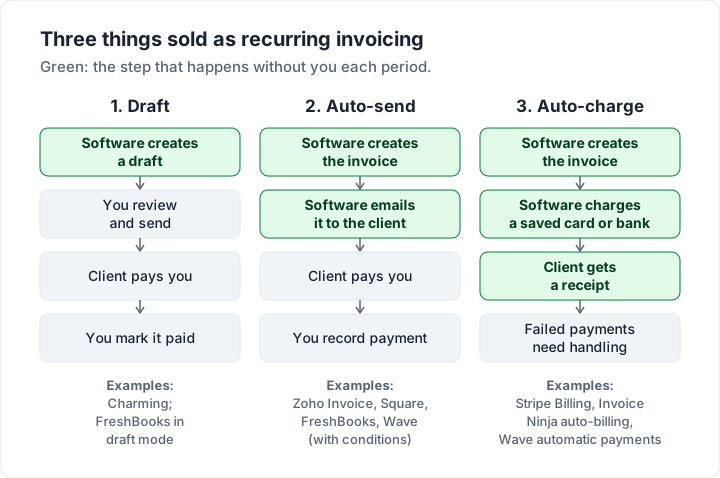
The third type is what many people mean when they say they want recurring billing: a payment plan that charges the client automatically every week or month.
Some tools let you mix types: FreshBooks, for example, can send automatically or create drafts. For a wider map of what invoicing software can automate beyond the recurring schedule, see what invoicing software can automate.
Subscription invoicing software vs recurring invoices#
Subscription invoicing software, such as Stripe Billing, is built around the customer’s plan rather than the invoice. Zoho’s own help page draws the same line: “A recurring invoice is not the same as a subscription.” It goes on to say a subscription “also covers the customer’s plan, pricing, renewals, upgrades, downgrades, pauses, and cancellations.”
You probably need subscription billing if:
- Clients sign up and pay by card without talking to you, like a membership, a software plan or a box delivery.
- The amount depends on usage or changes mid-cycle with upgrades and proration.
- Failed payments need retrying without you writing to anyone.
You probably need recurring invoices if you agree a fixed fee with each client, they pay by bank transfer, and the occasional extra item gets added by hand. That covers most freelancers, bookkeepers, agencies, cleaners and tutors.
Recurring invoicing software compared, October 2026#
This table shows the cheapest plan that includes recurring invoices for each tool, and the limit that matters once you bill a dozen clients. Prices are US list prices, read on 28 October 2026.
| Tool | Recurring type | Cheapest plan with it | Limit to know |
|---|---|---|---|
| Zoho Invoice | Auto-send; auto-charge settings in help | Free, $0 | “Send up to 500 invoices per year”; 2 users |
| Invoice Ninja | Auto-bill | Free, $0 | 5 clients on Free; Ninja Pro $14 a month |
| Square Invoices | Auto-send on a schedule | Free plan, $0 | Card fees: 3.3% + 30¢ online |
| FreshBooks | Auto-send or drafts; auto-pay | Lite, $23.00 a month | 5 billable clients on Lite |
| Stripe Billing | Auto-charge | Pay as you go | 0.7% of Billing volume, plus payment fees |
| QuickBooks Online | Recurring templates | Not Simple Start, per Intuit help | Check plan with Intuit |
| Wave | Auto-send or auto-charge | With Wave online payments or Pro | No sending through Wave without either |
| Charming | Draft only | Individual, $29 once | No auto-send, no auto-charge |
Below are the details behind each row.
Each recurring invoice tool, one by one#
Zoho Invoice#
Zoho’s pricing page lists “Send recurring invoices.” on its single free plan. The same page sets the limits: “Add up to two users.”, “Create a maximum of three projects.” and “Send up to 500 invoices per year.” Free invoices carry “Powered by Zoho Invoice” branding.
Its recurring invoices help page says you can use the feature to “auto-send invoices” to customers you bill at a regular interval, and lists “Auto-charge Preferences” and “Disabling Auto-Charge” among its topics. Weekly billing reaches the limit fastest: 10 weekly clients is 520 invoices a year, over the limit. Our guide to Zoho Invoice limits covers the rest.
FreshBooks#
FreshBooks ticks “Automated Recurring Invoices” on every plan on its pricing page. Lite is $23.00 a month for 5 clients, Plus $43.00 for 50 and Premium $70.00 for unlimited, at the regular price (the page also shows an introductory discount for the first 4 months).
Its recurring template article offers “Weekly, Monthly, Yearly, or Custom” frequencies and a choice between “Send invoices automatically” or “Create draft invoices and send manually”. With Advanced Payments you can tick “Require credit card for automatic payments”. FreshBooks also notes that drafts do not stop a saved payment: invoices generated as drafts “will not stop recurring payments from occurring if payment is saved”. More in our note on FreshBooks client limits.
Invoice Ninja#
Invoice Ninja’s pricing page lists “Auto-Billing & Recurring Invoices” on Free, with “5 Clients + Unlimited Invoicing”. Ninja Pro is $14 a month, or $140 billed annually, and adds unlimited clients, removes “Created by Invoice Ninja” and adds “Auto Late-Payment Reminder Emails”, which Free does not include. Payments run through a gateway you connect, such as Stripe or PayPal. Our guide to Invoice Ninja’s plans compares it with the alternatives.
Square Invoices#
Square’s invoices pricing page says you can “Set up recurring invoices to send on a daily, weekly, monthly, or yearly schedule.” on any plan. On the free plan, online card payments through an invoice cost 3.3% + 30¢, ACH bank transfer 1% with a $1 minimum, and a payment “when a saved card on file is used” 3.5% + 15¢. See how Square invoices work for the rest.
Stripe Billing#
Stripe Billing is subscription billing: it lists recurring billing and subscriptions, automatic reminders, Smart Retries for failed payments and a customer portal. Pay-as-you-go pricing is 0.7% of Billing volume, which “Excludes one-off invoices.” Payment fees come on top: 2.9% + 30¢ per successful card charge, or 0.8% per ACH direct debit with a $5.00 cap. Our guide to Stripe invoicing, explained covers one-off invoices.
QuickBooks Online#
QuickBooks handles recurring invoices as recurring templates. Intuit’s create an invoice help article says: “If you're using QuickBooks Online Simple Start and want to create recurring invoices, you'll need to upgrade your plan.” Confirm the plan with Intuit before you buy; our guide to how QuickBooks invoicing works has the plan table.
Wave#
Wave’s help article Set up a recurring invoice sets the condition: “Automatic sending of recurring invoices and manual sending via Wave are available to businesses that accept online payments through Wave or subscribe to Wave's Pro Plan.” It also says “If you select automatic payments, you can only select automatic sending.” See how Wave invoicing works for the plan and fee details.
A year of one retainer book: what each tool costs#
Here is a realistic book: a bookkeeper bills 12 clients $450.00 a month. That is 144 invoices and $64,800.00 a year. Each tool’s cost depends on its cap and how the money arrives. For how to word each retainer, see how to bill each type of retainer.
| Option | Plan that fits 12 clients | Software, 1 year | Software, 2 years |
|---|---|---|---|
| Zoho Invoice | Free (144 is under 500 a year) | $0 | $0 |
| Charming | Individual, $29 once | $29 | $29 |
| Invoice Ninja | Ninja Pro (Free lists up to 5 clients) | $168 monthly, or $140 a year | $336, or $280 |
| Stripe Billing | Pay as you go, 0.7% of $64,800.00 | $453.60 | $907.20 |
| FreshBooks | Plus (Lite lists 5 clients) | $516 | $1,032 |
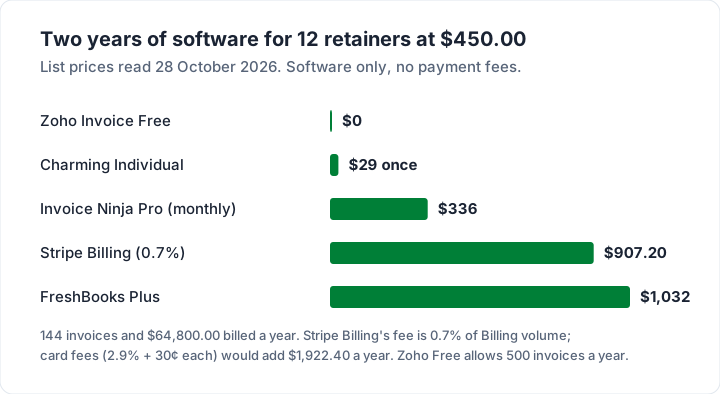
Payment fees are a separate line, and for card payers they are larger than the software. On 144 payments of $450.00:
| How clients pay | Fee per payment | Fees for the year |
|---|---|---|
| Stripe card (2.9% + 30¢) | $13.35 | $1,922.40 |
| Stripe ACH direct debit (0.8%, $5.00 cap) | $3.60 | $518.40 |
| Square online card (3.3% + 30¢) | $15.15 | $2,181.60 |
| Square card on file (3.5% + 15¢) | $15.90 | $2,289.60 |
| Square ACH (1%, $1 minimum) | $4.50 | $648.00 |
| Bank transfer to your account | Your bank’s charges, if any | Usually little or nothing |
So Stripe Billing with card payments costs $2,376.00 in year one ($453.60 + $1,922.40), and $972.00 with ACH. That buys automatic collection and retries, which can be worth it if chasing is your real problem. If your clients already pay by transfer, a free or one-time tool plus your bank details may be all you need. For the full comparison, see what card payments on an invoice cost.
What to check before software sends for you#
Auto-send and auto-charge save time only while nothing changes. Before you switch either on, check these:
- Amounts that move. Extra hours, a price rise or a one-off item will not appear on a fixed template. Draft mode, or a reminder to edit, catches them.
- Clients who leave. A cancelled client keeps receiving invoices, or keeps being charged, until someone stops the schedule.
- Numbering. Some tools number recurring invoices from one shared sequence, so drafts you delete can leave gaps. See how to number invoices.
- Due dates and terms. Check the payment terms the template applies, and that they match your agreement.
- Month ends. A template that starts on the 31st should land on the last day of shorter months, not skip one.
- Tax. If a rate changes, every future invoice inherits the old one until you edit the template. Tax rules vary by place; check your tax authority’s official guidance or ask an accountant. This is general information, not legal or tax advice.
Recurring invoices in Charming, and what they do not do#
Charming is type 1, deliberately. The full mechanism is in our guide to how recurring invoices work; here is what you get, checked in our code on 28 October 2026:
- A template per client: Weekly, Monthly, Quarterly or Yearly, a start date and an optional end date, up to 200 line items, a tax rate and a discount.
- A daily job raises a draft when one is due. It is never sent to your client. The dashboard lists the drafts waiting for your review.
- No invoice number until you issue it, so a draft you delete leaves no gap in your sequence. Once issued, you download the PDF or copy its private link and send it however you like.
- Due 14 days after issue. That is fixed for generated drafts, but you can change it on the draft.
- Pause and resume, and a missed period catches up with one invoice per period, never two.
- Overdue invoices flagged. Charming does not send reminders; follow up from your own inbox.
The catches, plainly. Recurring invoices need a paid plan: Individual is $29 once, Team $79 once with up to 5 teammates, and Pro $12 a month or $99 a year. Lifetime plans are final sale. Charming does not auto-send or email invoices, does not store cards, does not auto-charge, and has no usage-based billing, proration, retries or customer portal. Payment tracking is manual: you mark each invoice paid. If you need card-on-file billing, Stripe Billing or Invoice Ninja is the better fit.
The free plan has unlimited clients and invoices for 1 business, without recurring templates, and carries a “Sent with Charming Invoices” line that is hidden by default on paid plans. Compare plans on the pricing page, or start free and add recurring when you upgrade.
Questions people ask#
Is there free recurring invoice software?#
Yes. As of 28 October 2026, Zoho Invoice (up to 500 invoices a year), Invoice Ninja (up to 5 clients) and Square (card fees when clients pay online) include recurring invoices on a $0 plan. Charming’s free plan does not; recurring starts at $29 once.
Can recurring invoices charge a card automatically?#
In some tools. Stripe Billing, Invoice Ninja’s auto-billing, FreshBooks with Advanced Payments and Wave’s automatic payments can collect from a saved card or bank account. Charming cannot: your client pays you directly and you mark the invoice paid.
Can I change the amount on a recurring invoice each month?#
In draft mode, yes: edit the draft before sending. In auto-send or auto-charge mode, you edit the template before the next run, or the old amount goes out. For true usage-based amounts, subscription billing such as Stripe Billing is built for it.
What is a recurring invoice system?#
It is software that creates an invoice for the same client on a schedule, such as monthly, from a saved template. Depending on the tool, it then leaves a draft, sends the invoice, or charges a saved payment method.
The short version#
Recurring invoice software comes in three types: draft, auto-send and auto-charge. Zoho Invoice, Square and Invoice Ninja include recurring invoices free, each with a cap or fee; FreshBooks needs Plus ($43.00 a month) beyond 5 clients; Stripe Billing charges 0.7% of volume plus card fees and does the collecting for you. For 12 clients at $450.00 a month, two years of software ranges from $0 to $1,032, before payment fees. Charming raises drafts for you to send, from $29 once.
Sources, all read 28 October 2026: Zoho Invoice pricing; Zoho Invoice recurring invoices help; FreshBooks pricing; FreshBooks recurring templates; Invoice Ninja pricing; Square invoices pricing; Stripe Billing pricing; Intuit, create an invoice; Wave, set up a recurring invoice.