Wave invoice: how Wave invoicing works and what it costs

Nnabuike Okoroafor ·
On this page · 10 sections
Disclosure: We make Charming Invoices, an invoicing app, and it appears once in this guide as an alternative. The guide is neutral: every Wave price, fee and limit comes from Wave’s own pricing page and help centre, read on 22 October 2026 and linked, and we say where Wave is the better choice.
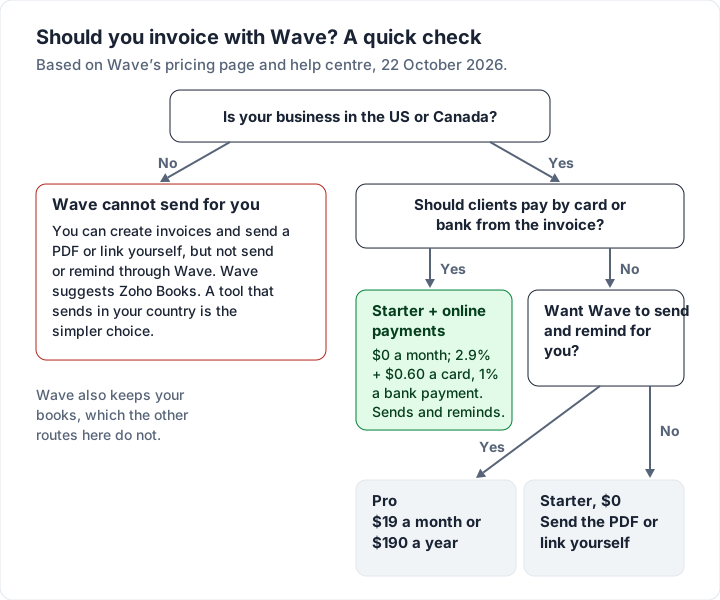
Wave’s Starter plan is $0 and creates unlimited invoices. As of 22 October 2026, sending an invoice by email from Wave or scheduling reminders needs either Wave’s online payments or the Pro plan, and Wave’s help centre says businesses outside the US and Canada cannot send through Wave.
This guide explains how a Wave invoice works today: what Starter and Pro each include, how to create and send an invoice in Wave, what your client sees when they pay, what the fees come to on real invoice amounts, and which situations suit another tool better.
Wave invoicing in five points#
- Starter is $0 with unlimited invoices. Wave’s pricing page lists “Create unlimited estimates, invoices, bills, and bookkeeping records” on Starter, as of 22 October 2026.
- Sending through Wave has a condition. Emailing an invoice from Wave and scheduling reminders need Wave’s online payments switched on or the Pro plan. Otherwise you download a PDF or copy a link and send it yourself.
- Pro is $19 a month or $190 a year (US dollars; $25 or $250 in Canadian dollars), per business. It adds automatic reminders, removes the “Powered by Wave” footer and discounts the first 10 card payments each month.
- Card payments cost 2.9% + $0.60 on Starter, 3.4% + $0.60 for Amex, and bank (ACH) payments 1% with a $1 minimum. On a $500.00 invoice paid by card, that is $15.10.
- Wave is for businesses in the US and Canada. Its help centre says users outside those countries “can no longer send invoices or reminders through Wave.”
What Wave includes for invoicing on Starter and Pro#
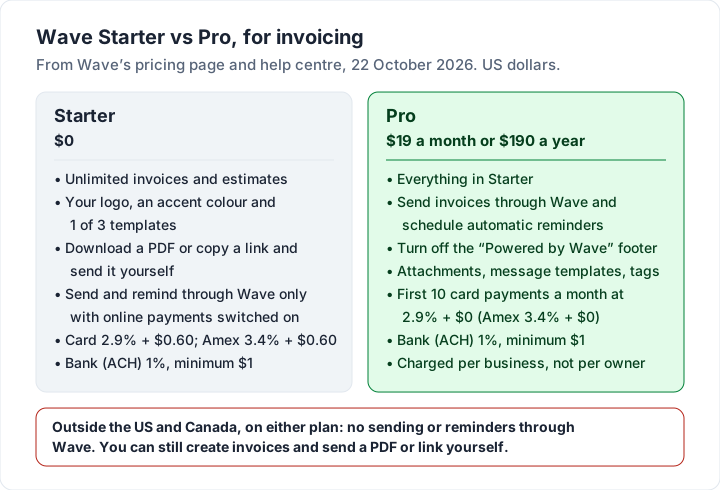
Wave has two plans. Here is what each includes for invoicing, from Wave’s pricing page and the help articles linked through this guide, as of 22 October 2026.
| Invoicing feature | Starter ($0) | Pro ($19 a month or $190 a year) |
|---|---|---|
| Unlimited invoices and estimates | Yes | Yes |
| Your logo, an accent colour, 3 templates | Yes | Yes |
| Download a PDF or share a link | Yes | Yes |
| Send by email through Wave | Only with online payments switched on | Yes |
| Scheduled payment reminders | Only with online payments switched on | Yes |
| Recurring invoices sent by Wave | Only with online payments switched on | Yes |
| Remove the “Powered by Wave” footer | No | Yes |
| Attachments, reusable message templates, tags | No | Yes |
| Card fee (Visa, Mastercard, Discover) | 2.9% + $0.60 | 2.9% + $0 on the first 10 a month, then 2.9% + $0.60 |
| Bank (ACH) payment fee | 1%, minimum $1 | 1%, minimum $1 |
| Invoice from the iOS and Android app | Yes | Yes |
Three details from the small print:
- Online payments need approval. Wave says “Approval to use online payments is subject to eligibility criteria, including identity verification and credit review.” Until you are approved, the Starter column’s “only with online payments” rows are a no.
- Pro is per business. The pricing page says the Pro fee applies per business, not per owner. Two businesses on Pro is $380 a year.
- Design options are the same on both plans. Wave’s help article on customizing invoices says you can upload a logo (JPEG, PNG or GIF, under 5MB, at most 300 by 200 pixels), set an accent colour by hex code and choose one of three templates. “It’s not possible to select a custom font.”
How to create and send an invoice in Wave#
These steps follow Wave’s help article Create an invoice, updated 16 October 2026, for the web version.
- Open your invoices. In the left-side menu, select Sales & Payments, then Invoices, then Create an invoice. The first time, Wave asks you to set up a template, which you can change later.
- Check the number. Wave numbers invoices in order automatically. You can type a different number as long as no other invoice uses it.
- Add the customer. Select Add a customer and choose one, or Create a new customer.
- Set the dates. Choose the invoice date, the payment due date and a P.O. or S.O. number if your client gave you one.
- Add your items. Select Add an item, choose or create a product or service, and enter the quantity and price.
- Add tax per line. Choose a tax from the Tax dropdown on each item. Wave notes that “Taxes only apply to the item they are added to. It’s not possible to add a tax to the entire invoice.”
- Add notes, a discount or a currency. Use Notes / Terms for payment terms, Add a discount under the subtotal, and Currency to bill in a different currency.
- Save, then approve. Select Save and continue. That saves a draft, and Wave says “Wave does not automatically save invoices.” When it is right, select Approve draft to finalise it.
Then send it. Wave’s help article Send an invoice through Wave (updated 29 September 2026) begins: “Businesses that subscribe to Wave’s Pro Plan, accept online payments, or use payroll can send invoices through Wave.” If that is you, select Send next to the invoice, check the recipients, subject and message, and send. You can see later when the client last viewed it.
If it is not you, use More actions, then Export as PDF, or copy the invoice link, and send it from your own email. That works, and your client receives the same invoice. You lose Wave’s scheduled reminders.
Payment terms are set as a default under Business settings, Invoices and estimates: upon receipt, or 15, 30, 45, 60 or 90 days. You can set a custom due date on a single invoice. If you are unsure which to use, our guide to invoice payment terms like Net 30 explains each one.
How clients pay a Wave invoice, and the fees#
If you have Wave’s online payments switched on, your client can pay from the invoice. Wave’s invoicing page says customers can pay “instantly by credit card, secure bank payment (ACH/EFT), or Apple Pay.” Wave deducts its fee and sends the rest to your bank account.
The fees, from Wave’s help article Online payments processing fees and timelines (updated 13 October 2026):
| Payment type | Starter | Pro |
|---|---|---|
| Visa, Mastercard, Discover | 2.9% + $0.60 | 2.9% + $0 for the first 10 a month, then 2.9% + $0.60 |
| American Express | 3.4% + $0.60 | 3.4% + $0 for the first 10 a month, then 3.4% + $0.60 |
| Bank payment (ACH) | 1% (minimum $1 fee) | 1% (minimum $1 fee) |
Discover is available only to US businesses. Payouts take 2 business days for cards and 2 to 7 for bank payments in the US, and 1 and 1 to 6 business days in Canada.
Wave fees on a $500.00 and a $2,000.00 invoice#
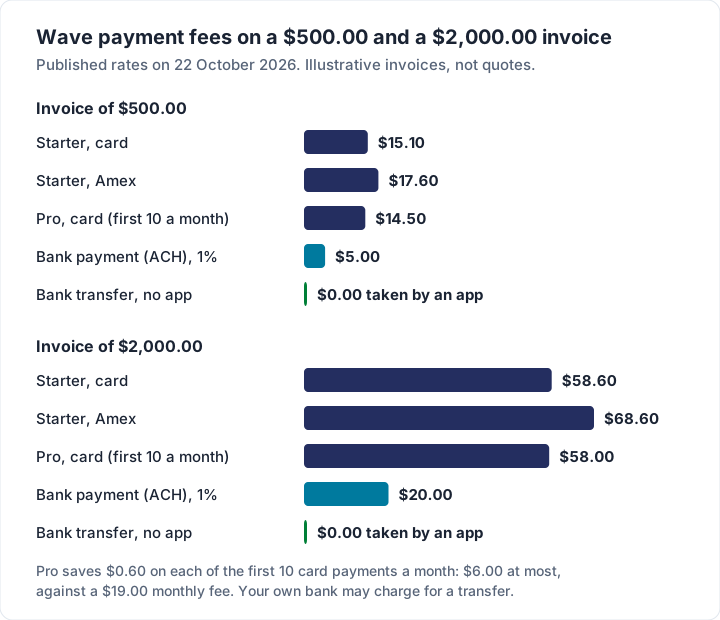
Here is what those rates take from two illustrative invoices.
| How the client pays | Fee on $500.00 | Fee on $2,000.00 |
|---|---|---|
| Card on Starter (2.9% + $0.60) | $15.10 | $58.60 |
| Amex on Starter (3.4% + $0.60) | $17.60 | $68.60 |
| Card on Pro, first 10 a month (2.9%) | $14.50 | $58.00 |
| Bank payment, ACH (1%, minimum $1) | $5.00 | $20.00 |
| Bank transfer straight to you, outside Wave | $0.00 | $0.00 |
Two things follow from the arithmetic:
- Pro’s card discount is $6.00 a month at most. It is $0.60 on each of your first 10 card payments a month, against a fee of $19 a month. The rest of Pro’s value is in reminders, sending and the footer.
- The fixed $0.60 is a larger share of a small invoice. On a $50.00 invoice paid by card, the fee is $2.05, or 4.1%.
Check the fee on your typical invoice size before you choose how clients pay. To compare Wave’s rates with Square, PayPal and Stripe on the same invoices, see our guide to invoice payment fees, and for how to steer clients towards cheaper methods, invoice payment methods.
How to mark a Wave invoice paid#
If your client pays through Wave, the invoice is marked paid automatically. If they pay you outside Wave, by bank transfer, check or cash, record it yourself. From Wave’s help article Mark an invoice as paid (updated 19 July 2026): open the invoice, select Record a payment in the Manage payments section, fill in the details and Submit. A part payment leaves the invoice as Partial until the balance is recorded. If you also import bank transactions into Wave, categorise that deposit as “Payment Received for an Invoice in Wave” and pick the invoice, so the money is not counted twice.
Wave outside the US and Canada: what you can and cannot do#
Wave’s help article Changes for Wave users outside the United States and Canada, last updated 8 September 2026, explains that “In November 2020, Wave announced a shift to focus exclusively on the US and Canada”, and states:
- What stopped: “users outside the US and Canada can no longer send invoices or reminders through Wave.”
- What still works: “You can create unlimited invoices, estimates, and other documents, and customize them with your branding.” You can still send them yourself “through a PDF or link”.
- What Wave suggests instead: its partner Zoho Books, with “one year of free service” for current Wave users who sign up through Wave’s link.
- What may change: “Your existing Wave account will remain active, however, this may change in the future.”
In practice, if your business is in the UK, Australia, Ireland, India or anywhere else outside North America, you can create invoices and keep records in Wave, and you send each invoice yourself as a PDF or link. If you are starting fresh and want the app to send and remind for you, check that it does so in your country.
Recurring invoices, reminders and estimates in Wave#
Recurring invoices. Wave’s help article Set up a recurring invoice (updated 30 September 2026) covers the schedule (frequency, start and end date, time zone), the payment method (automatic card or bank payments, or manual) and the sending method. The condition is the same as for ordinary invoices: “Automatic sending of recurring invoices and manual sending via Wave are available to businesses that accept online payments through Wave or subscribe to Wave’s Pro Plan.” For when a recurring invoice beats a card-on-file subscription, see recurring invoices versus subscriptions.
Reminders. Per Wave’s help article Schedule invoice payment reminders (updated 10 August 2026), “Businesses that accept online payments or subscribe to Wave’s Pro Plan can schedule and send payment reminders through Wave.” You can schedule them 14, 7 and 3 days before the due date, on the due date, and 3, 7 and 14 days after. They go only to the client’s primary email, and stop once the invoice is marked fully paid.
Late fees. Wave’s invoicing FAQ says it “does not have a feature that automatically adds a late fee or interest to your invoice”; you add a line by hand and resend. Our guide to late fees on invoices covers whether and how to charge one.
Estimates. Starter includes unlimited estimates, and Wave’s invoicing page says you can “Request deposits through your Wave estimates.” If you are not sure whether you need an estimate or a quote first, see invoice vs estimate or quote.
Deleting and exporting Wave invoices#
Two rules from the same invoicing FAQ (updated 22 August 2026) are worth knowing before you rely on Wave for records:
- Invoices paid online cannot be deleted. “If an invoice was paid through Wave’s online payment feature, the invoice cannot be deleted, even if it has been refunded.” Wave recommends writing off invoices you do not expect to be paid.
- Deleted invoices are gone. “Deleted invoices cannot be recovered.” Export first if you might need them.
Exporting is one invoice at a time. Wave’s help article Print or export invoices (updated 19 October 2026) says “Invoices cannot be printed or exported in bulk”; you export each as a PDF, or send invoice information to a Google Sheet with Wave Connect. If you plan to move to another tool, budget time for this.
Wave alternatives by situation#
If Wave does not fit, the right alternative depends on why. Facts below are from each vendor’s own pages on 22 October 2026.
| Your situation | Look at | What to know |
|---|---|---|
| You want bookkeeping and card payments, in the US or Canada | Stay on Wave | Starter with online payments sends, reminds and keeps your books for $0 a month plus fees |
| Your accountant uses QuickBooks | QuickBooks Online | Free plan sends 2 invoices a month unless you use QuickBooks Payments; Simple Start is $38 a month at list price |
| You are outside the US and Canada and want a free plan | Zoho Invoice | Free, “up to 500 invoices per year”, 2 users, “Powered by Zoho Invoice” on free accounts; data deleted after 180 days of inactivity, with notice |
| Clients pay by card and you want no subscription | Square Invoices | Free plan sends unlimited invoices; online card payments are 3.3% + 30¢ on Free |
| Clients pay by bank transfer and you want branded invoices with no payment cut | Charming Invoices | Free for 1 business, no card payments (details below) |
For broader comparisons, see the best free invoicing software, the best invoicing software for freelancers and, for a head-to-head of Zoho Invoice and Wave among other options, Invoice Ninja alternatives. Our Zoho Invoice guide reads that free plan line by line. If you want bookkeeping as well and work outside the US and Canada, Xero invoicing explained covers Xero’s US and UK plans and their invoice caps.
Where Charming fits, and its limits#
Charming is built for someone who wants a branded invoice to send their own way, as a PDF or a private link, to clients who pay by bank transfer, wherever the business is.
- On the free plan: unlimited invoices and clients for 1 business; 60 templates, your logo, any brand colour and 30 fonts; a PDF to download or print and a private link your client opens without an account; overdue invoices flagged automatically; and a CSV export of every invoice.
- Getting paid: your bank details and any payment link you already use (a PayPal.me link, or a Stripe or Square payment link) print on the invoice. The client pays you directly and the payment provider charges its own fee; Charming takes nothing.
- The catches: no card payments through Charming, so payment tracking is manual (you record the payment or mark it paid); no bookkeeping or bank feed; no estimates; no mobile app; no email sending or reminders, so you send each invoice and follow-up yourself; and free invoices carry a small “Sent with Charming Invoices” line. Hiding it by default costs $29 once on Individual, or see the pricing page for every plan. Lifetime plans are final sale.
If Wave’s bookkeeping is what you use most, stay. If you mainly send invoices, you can create a free invoice in Charming and compare it with your next Wave invoice.
Wave invoice questions#
Is Wave invoicing free?#
Creating invoices is free on Wave Starter, with no stated limit. Sending them through Wave, scheduling reminders and sending recurring invoices need Wave’s online payments switched on (which then charges 2.9% + $0.60 per card payment) or the Pro plan at $19 a month or $190 a year. On Starter without online payments, you download the PDF or copy a link and send it yourself.
Can I remove Wave branding from invoices?#
Only on Pro. Wave’s help says the “Powered by Wave” footer toggle “is part of Wave’s Pro Plan”. Your own logo and accent colour are available on both plans.
Does Wave work in the UK, Australia or elsewhere outside North America?#
Not for sending. Wave’s help centre says users outside the US and Canada “can no longer send invoices or reminders through Wave”, though existing accounts can still create invoices and send a PDF or link themselves. Wave points those users to Zoho Books.
Can I export my Wave invoices?#
One at a time, as PDFs. Wave says invoices cannot be printed or exported in bulk; Wave Connect can send invoice information to a Google Sheet instead.
Can I accept bank transfers on a Wave invoice?#
Yes, with online payments switched on: a bank (ACH) payment costs 1% with a $1 minimum. You can also print your own bank details in the invoice notes and record the payment by hand when it arrives, which costs nothing through Wave.
What does Wave Pro add?#
Sending and reminders through Wave without online payments, removing the “Powered by Wave” footer, attachments, message templates and tags, and a $0.60 discount on each of the first 10 card payments a month ($6.00 at most, against a $19 monthly price).
The short version#
A Wave invoice is free to create, with unlimited invoices on Starter. What costs money is sending and chasing it through Wave: that needs online payments (2.9% + $0.60 a card, 1% a bank payment) or Pro ($19 a month or $190 a year). Outside the US and Canada, Wave’s help centre says it does not send invoices or reminders. If you are in North America and want free bookkeeping with card payments, Wave is a good choice. If you want branded invoices, reminders and bank-transfer payments without a monthly fee, compare it with a tool built only for that.