Itemized invoice: what it is, with a template and example

Nnabuike Okoroafor ·
On this page · 9 sections
A client has asked for an itemized invoice, or you are about to send one line that says “Website, as agreed” and wondering whether that is enough. Both questions have the same answer underneath: how much detail an invoice should carry, and who gets to decide.
This guide explains what an itemized invoice is, how it differs from a lump-sum invoice, and when each one fits. You will see one real-looking job invoiced three ways, with numbers that add up to the same total every time, a free itemized invoice template, and what to do when a client asks you to break down a fixed fee you never agreed to itemise. (British spelling is “itemised”; the US “itemized” is what most people search for, so we use it for the name of the document.)
For every field an invoice needs, not just the line items, see the field-by-field invoice checklist.
What an itemized invoice is#
An itemized invoice is an invoice that lists the goods or services you are billing for one by one, instead of as a single total. Each line usually shows four things:
- Description: what the line is for, in words the client recognises.
- Quantity: how many hours, units, items or days.
- Unit price: the rate for one of them.
- Line total: quantity times unit price.
Under the lines come the subtotal, any discount or fee, any tax, and the total due. Everything else on the invoice (your details, the client's details, the invoice number, dates and payment details) is the same as on any other invoice; what an invoice is covers those basics.
The point of itemising is that a reader can check each part of the price separately. The point of not itemising is that a fixed price stays a fixed price. Both are legitimate, and most invoices sit somewhere between the two.
Itemized vs lump-sum invoice: how much detail to show#
“Itemised” is not one setting. There are roughly four levels of detail, and the right one depends on how the work was priced, not on how much you want to impress the client.
| Level of detail | What the lines look like | Fits when |
|---|---|---|
| Lump sum | One line: “Office network setup, as quoted” × 1 | You quoted a fixed price for a defined job and the client accepted it |
| Deliverables | One line per agreed deliverable or milestone | A fixed-price project with a scope that names separate deliverables |
| Labour and materials | Hours and rate on one line, each material or product on its own | You priced by time and materials, or bought equipment for the client |
| Full detail | Every task, date and part, with hours per task | Time-and-materials work for a client who checks timesheets, or a contract that asks for it |
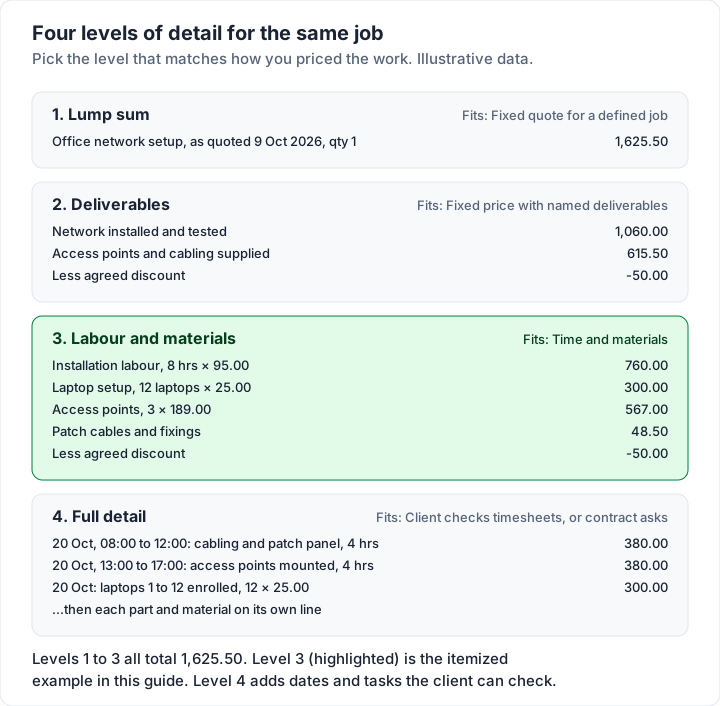
Two rules of thumb sit behind that table.
Match the invoice to the quote. If you quoted one price, invoice one price, perhaps with the deliverables named. If you quoted a rate, invoice the hours. An invoice that suddenly shows more or less detail than the quote is what prompts the “can you break this down?” email.
Separate anything the client might treat differently. Products and labour, reimbursable expenses, rush fees and discounts are easier to approve on their own lines, even on an otherwise simple invoice. If you bill a job with both, invoicing a job with parts and labour covers how goods and services sit on one invoice. For expenses you paid on the client's behalf, the reimbursement invoice guide shows how to list each one.
Itemized invoice example: one job, three ways#
Here is one job, invoiced three ways. Kestrel Point IT Services (sample business) set up an office network for Ashby & Pryce Architects (sample client): a day of installation work, three Wi-Fi access points, cables and fixings, and setting up 12 laptops. The work was done on Tuesday 20 October 2026, the invoice is dated Friday 23 October 2026 and payment is due on Monday 23 November 2026.
Every name and price here is invented and illustrative. Tax is left out on purpose: whether tax applies to labour, to equipment, or to both depends on where you and the client are.
Version A: the lump-sum invoice#
| Description | Qty | Unit price | Amount |
|---|---|---|---|
| Office network setup, as quoted 9 Oct 2026 | 1 | 1,625.50 | 1,625.50 |
| Total due | 1,625.50 |
Short, and perfectly valid when the client accepted a fixed quote. The quote date in the description ties the invoice to what was agreed.
Version B: the itemized invoice, line by line#
| Description | Qty | Unit | Rate | Amount |
|---|---|---|---|---|
| Network installation labour | 8 | hrs | 95.00 | 760.00 |
| Wi-Fi access points, ceiling mounted | 3 | each | 189.00 | 567.00 |
| Patch cables and fixings | 1 | lot | 48.50 | 48.50 |
| Laptop setup and enrolment | 12 | laptops | 25.00 | 300.00 |
| Subtotal | 1,675.50 | |||
| Discount (agreed for 12 or more laptops) | −50.00 | |||
| Total due | 1,625.50 |
The arithmetic: 8 × 95.00 = 760.00, 3 × 189.00 = 567.00, 1 × 48.50 = 48.50 and 12 × 25.00 = 300.00. Those add up to 1,675.50; less the 50.00 discount, the total is 1,625.50. On a real invoice, name the access point model in the description so the client can match it to the delivery.
Version C: itemised in sections, with subtotals#
The same lines, grouped under two headings so a reader sees labour and equipment at a glance:
| Section and description | Qty | Rate | Amount |
|---|---|---|---|
| Labour | |||
| Network installation labour (hrs) | 8 | 95.00 | 760.00 |
| Laptop setup and enrolment (laptops) | 12 | 25.00 | 300.00 |
| Labour subtotal | 1,060.00 | ||
| Equipment and materials | |||
| Wi-Fi access points, ceiling mounted | 3 | 189.00 | 567.00 |
| Patch cables and fixings | 1 | 48.50 | 48.50 |
| Equipment and materials subtotal | 615.50 | ||
| Subtotal | 1,675.50 | ||
| Discount (agreed for 12 or more laptops) | −50.00 | ||
| Total due | 1,625.50 |
The section subtotals check out: 1,060.00 + 615.50 = 1,675.50.
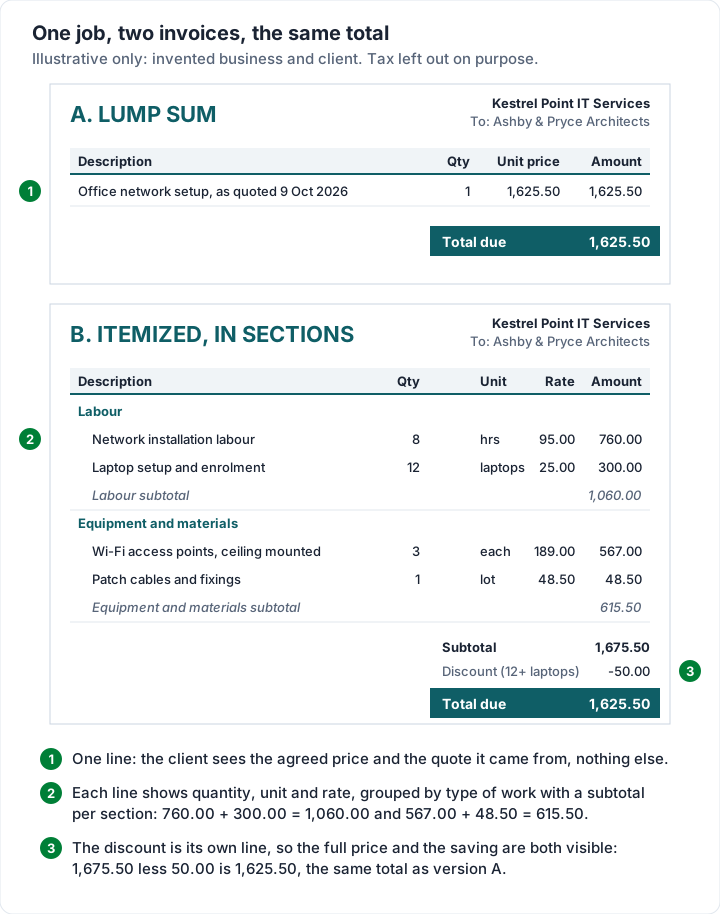
All three invoices ask for exactly 1,625.50. What changes is what the client can see: in Version A, nothing but the price; in Version B, every rate; in Version C, where the money went by type of work. A trade business billing larger jobs will recognise Version C; itemising labour and materials covers the contractor version in more depth. The job invoice template has a filled-in labour and materials sample, with a deposit credited. A body shop invoice goes one step further, with parts, body labour, refinish labour, paint and sublet in their own sections.
Do you have to itemise an invoice?#
There is no single answer, because the rules depend on the country, sometimes the state, the industry and the contract. Many clients and some sectors expect line items; a contract can require them; and some tax systems set out what a tax invoice must show. If you need a definite answer for your business, ask an accountant who knows where you trade.
One primary source that addresses this directly is HMRC's guidance for UK VAT-registered businesses. Paragraph 16.3.2 of VAT Notice 700 covers the unit price on a VAT invoice. After saying when a unit price is needed, it continues (as of 28 October 2026):
“If the supply cannot be broken down into countable elements, then the total tax exclusive price will be the unit price. Additionally, the ‘unit price’ may not need to be shown at all if it is not:
- normally provided in a particular business sector
- required by the customer”
That applies to UK VAT invoices only, and it is one paragraph of a longer list of what a VAT invoice must show. Our guide to what HMRC lists for a UK VAT invoice goes through the full list. Outside UK VAT, do not assume either way: rules vary, so check with an accountant.
General information, not legal or tax advice.
When a client asks you to break down a fixed fee#
This is where itemising stops being a formatting choice. A client accepted a fixed price, the work is done, and now they want to see hours or costs before they pay. Often the client simply wants to confirm they received everything in the agreed scope. A calm, factual reply usually works best, for example:
“This job was quoted and agreed as a fixed price for the scope in our quote of 9 October, so the invoice shows that price. Here is the list of what was delivered against that scope.”
A balanced way to handle the request:
- Check what you agreed. Re-read the quote or contract. If it promised a breakdown, or the price was based on time and materials, provide one. If it was a fixed price for a defined scope, you are describing the job, not your costs.
- Describe the deliverables, not your margin. You can list what was delivered against the agreed scope (Version A with the deliverables named, or Version C with section headings) without disclosing your hourly cost. That often answers what the client actually wanted to know: did they get everything they paid for?
- Separate a genuine query from a negotiation. If the client thinks a line is wrong, treat it as a dispute and ask which part and why; how to handle a disputed invoice walks through the replies. If they want a discount after the fact, that is a negotiation, and you can decline it politely.
- Fix it for next time. State on the quote whether the invoice will be itemised. Invoice vs estimate vs quote covers how a quote sets the price, and what an invoice and a contract each do explains why the agreement, not the invoice, settles what was promised.
What clients look for in an itemized invoice#
From the client's side, an itemized invoice is how they check they were charged what they expected. When a client asks for a breakdown, a prompt, clear answer keeps the invoice moving. When you do itemise, these habits make the invoice easy to approve:
- Descriptions a non-specialist understands. “Laptop setup and enrolment” beats an internal job code.
- Units that match the quote. If you quoted per laptop, bill per laptop, not per hour.
- Fees on their own lines. A rush fee, call-out fee or materials markup hidden inside another line looks like a price rise when the client finds it.
- Discounts shown, not netted off. List the full price and the discount separately so the client sees the saving; how to show a discount on an invoice has the options.
- Dates where they matter. For work over several days, the date on each line saves the client checking a timesheet.
Free itemized invoice template#
If you want a file rather than an app, the free templates page has Excel and Word invoice templates, with no sign-up. For an itemized invoice, use invoice-template.xlsx:
| Column or cell | What it does |
|---|---|
| Description, Quantity, Rate | You type one line per item; there are 15 lines, and you can insert more |
| Amount | Calculates quantity × rate, rounded to the cent, and stays blank until both are filled in |
| Subtotal | Adds up the Amount column |
| Discount (fixed amount) | A fixed amount taken off before tax |
| Tax rate (%) and Tax | Type the rate as a plain number (20 for 20%); tax is calculated on the discounted subtotal |
| Total and Balance due | Subtotal less discount plus tax, then less anything already paid |
The Excel file has no separate unit column, so write the unit into the description (“Network installation labour, hours”), as in Version C above. The Word files, invoice-template.docx and service-invoice-template.docx, look the same on paper but do not calculate, so add up the totals twice. Our guide to the Excel invoice template with formulas walks through every cell, and blank invoice templates compares the blank layouts.
Itemized invoices in Charming Invoices#
If you send itemised invoices regularly, typing lines into a spreadsheet gets old. Here is what Charming Invoices does with line items, checked in the code:
- Up to 200 line items per invoice, each with a description of up to 500 characters, a quantity with up to 3 decimal places and a unit price. Line totals, the subtotal, the discount and the tax calculate as you type.
- Units and sections. Each line can carry a unit (“hrs”, “laptops”, “each”) and a section heading. Turn on “Group lines by section” in the Template Studio and the invoice prints each section with its own subtotal, as in Version C. The Contractor and Timesheet templates have this on already, along with a total-hours line; on the other templates the unit column and grouping are off until you switch them on.
- Starter kits. On a new invoice with no lines yet, “Start from a kit” inserts a ready-made line structure (hourly consulting, a web design retainer, a photography shoot and others, plus trade kits). Prices start at 0.00 so you fill in your own.
- A fixed discount on its own line, as an amount rather than a percentage. It cannot be more than the subtotal.
- 60 templates on every plan, a PDF to download or print and a private link your client opens without an account, which you send however you like.
On the paid plans you can also save lines you bill often and drop them into any invoice, and describe a job in a sentence for AI to draft the lines (it leaves any price it does not know at 0, so you fill those in before issuing).
The catches, plainly:
- One tax rate per invoice. There is no per-line tax, so you cannot tax the equipment and not the labour on the same invoice.
- No item codes, SKUs or inventory. Charming is for invoicing work and items you describe, not for stock control.
- The unit price prints with 2 decimals. You can enter up to 4, but the PDF shows 2, so keep rates in whole cents if the client checks the arithmetic.
- No card payments through Charming. Your payment details or payment link print on the invoice, the client pays you directly, and you record the payment and mark it paid.
- Free invoices carry a small “Sent with Charming Invoices” line in the footer. Paid plans hide it by default: Individual is $29 once, Team $79 once and Pro $12 a month or $99 a year. The lifetime plans are final sale; the pricing page has the details.
Create a free invoice and rebuild Version C with one of your own jobs, or browse the invoice templates first.
Itemized invoice questions#
What is an itemized invoice?#
An invoice that lists each product or service on its own line, with a description, quantity, unit price and line total, followed by the subtotal, any discount or tax, and the total due. A lump-sum invoice shows the same job as a single line. It is a standard invoice written in more detail, and the types of invoices covers the other kinds, from deposit invoices to credit notes. If you want one invoice for several jobs rather than more detail on one, see what a consolidated invoice is.
Is an itemised receipt the same thing?#
No. An invoice asks for payment; a receipt confirms a payment has been made. Both can list items line by line. The difference between invoice and receipt explains when you send each.
Can I refuse to itemise an invoice?#
Your quote or contract is the place to look. If it was a fixed price and did not promise a breakdown, invoicing the agreed price and describing the deliverables is a common answer. If the contract, your client's purchase terms or a tax rule where you trade asks for more detail, that is what decides it. When in doubt, check the agreement and ask an accountant or lawyer.
Do I have to show my hourly rate?#
If you billed by the hour, or agreed to show it, the rate belongs on the invoice. On a fixed-price job, many businesses show the deliverables without an hourly rate; your contract, and any tax rule where you trade, may say otherwise. For UK VAT invoices, HMRC's paragraph 16.3.2 (quoted above) is the source on when a unit price is needed.
How detailed should line descriptions be?#
Detailed enough that the client can match each line to the quote and the work without asking you. Name the deliverable, the date or period, and the unit. Leave out internal codes the client will not recognise.
Is there a free itemized invoice template?#
Yes. invoice-template.xlsx on the free templates page calculates each line, the subtotal, a fixed discount, tax and the total, with no sign-up. The Word versions look similar but do not calculate.