Body shop invoice and mobile detailing invoice samples

Nnabuike Okoroafor ·
On this page · 9 sections
The car is back in one piece, the paint matches, and the owner is standing at the counter with their keys in one hand and a card in the other. A body shop invoice has to explain, in a few seconds, why a dented bumper cost what it did: the parts, the body work, the refinish time, the paint and materials, and anything you sent out to a specialist. A mobile detailer has the same problem in a driveway, with a package, a few add-ons and a travel charge to explain.
This guide is for both: the collision or paint shop billing a repair, and the one-person detailer billing a wash, a full detail or a ceramic coating. It covers which free file to start from, what each invoice should show, and three samples worked through to the cent.
General information, not legal or tax advice. This post does not cover any state's rules on auto repair invoices, estimates or the authorisation of work; check your state's auto repair regulator or consumer protection office, or ask a lawyer. The samples are illustrative, with invented businesses and rates that are not market rates.
Body shop invoice template: which file to use#
There is no body-shop-specific download on our site, and no detailing one either. What there is: four free, generic files on the free Word and Excel invoice templates page, no sign-up needed, and two of them fit a repair or a detail well. This table matches the file to the job:
| Your job | Best file | Why it fits |
|---|---|---|
| A repair with parts and labour, typed by hand | service-invoice-template.docx (Word) | A description-of-work box and a labour and materials table, ending in “Less deposit paid” and “Balance due”. You add up every total yourself |
| Any job where you want the arithmetic done for you | invoice-template.xlsx (Excel) | Lines that multiply quantity by rate, then subtotal, discount, one tax rate, total, amount paid and balance due |
| Mechanical repair rather than body work | The mechanic invoice template page | A filled repair order with diagnosis, parts, labour and core charges, plus a blank PDF |
| A branded PDF that adds up and can be emailed | Charming's Contractor template | Parts, labour and materials in sections with subtotals and a total-hours line (more below) |
The Word file is the quickest to print and fill in, but it does not calculate. If adding up is where mistakes happen, use the Excel file; our guide to the Excel invoice template with formulas walks through it field by field. For a general trades layout, see a labour invoice template with a deck repair worked through.
What a body shop invoice shows#
A body shop invoice carries the basics every invoice needs (your details, the vehicle owner's, an invoice number, the date and how to pay), plus the parts a collision repair adds. Our guide on invoicing a job with parts and labour explains why parts and labour sit on separate lines; these are the body-shop parts:
- The vehicle. Year, make, model, plate or VIN, and the odometer reading if your shop records it. It tells everyone which car the bill is for.
- A repair order or claim number. Your RO number, and the insurer's claim number if one is involved, so every document about the job can be matched.
- Parts, each described. Part name, quantity, price, and whether it is new, used, rebuilt or aftermarket. Ask your state's auto repair regulator what, if anything, applies to how you describe parts, rather than relying on a template.
- Body labour. The hours spent removing, repairing and refitting panels, with the rate.
- Refinish labour. The hours spent preparing and painting, often at a separate line or rate, so the owner can see paint time apart from metal work.
- Paint and materials. The paint, clear coat and consumables used in refinishing. In practice, shops bill this one of two ways: a rate per refinish hour, or the actual materials itemised. Either way, it gets its own line.
- Sublet work. Work sent to an outside specialist and billed through the shop: a wheel alignment, glass, a sensor calibration. Many shops bill sublet at cost and label it so.
- Towing or storage, if the car came in on a truck or sat on your lot. A towing company bills its own work on a tow invoice template; you bill only what your shop charged.
- A warranty note, if your shop gives one on its work, in your own words.
How much detail to give on each line is a judgement call. Our guide on how much detail to show on an invoice sets out when a line-by-line breakdown helps and when it just adds noise.
For example, California's Bureau of Automotive Repair publishes a page titled “Write It Right: Documentation and authorization requirements for automotive repair dealers” (the page loaded when we checked on 28 October 2026). The mechanic invoice template page links more official sources. We do not summarise any of them here.
Body shop invoice sample: a customer-pay bumper repair#
Here is a complete invoice for a rear bumper repair paid by the vehicle owner, with no insurer involved (shops call this a customer-pay job). Every name, address and rate below is illustrative, not a market rate.
- From: Cinderford Auto Body (sample business), 8 Sample Street
- To: the Stonemoor household (sample client), 31 Sample Street
- Vehicle: a mid-size sedan; year, make, model and VIN typed into the notes
- Dropped off: Monday 19 October 2026
- Invoice date: Thursday 22 October 2026, due on receipt (paid at collection)
| Section | Work performed | Qty | Unit | Rate | Amount |
|---|---|---|---|---|---|
| Parts | Rear bumper cover, new | 1 | each | 289.00 | 289.00 |
| Parts | Bumper clips and fasteners | 1 | set | 18.50 | 18.50 |
| Subtotal | 307.50 | ||||
| Body labour | Repair and refit rear bumper cover | 2.5 | hrs | 60.00 | 150.00 |
| Subtotal | 150.00 | ||||
| Refinish labour | Refinish bumper cover, blend left quarter panel | 3 | hrs | 60.00 | 180.00 |
| Subtotal | 180.00 | ||||
| Paint and materials | Paint and materials, per refinish hour | 3 | refinish hr | 38.00 | 114.00 |
| Subtotal | 114.00 | ||||
| Sublet | Parking sensor calibration (outside vendor, at cost) | 1 | job | 95.00 | 95.00 |
| Subtotal | 95.00 | ||||
| Subtotal | 846.50 | ||||
| Total due | 846.50 |
The arithmetic:
- Parts: 289.00 + 18.50 = 307.50.
- Labour: 2.5 hours × 60.00 = 150.00 of body labour, and 3 hours × 60.00 = 180.00 of refinish labour.
- Paint and materials: 3 refinish hours × 38.00 = 114.00. The quantity matches the refinish labour line, which is the point of billing per refinish hour.
- Sublet: 95.00, passed through at cost.
- Total: 307.50 + 150.00 + 180.00 + 114.00 + 95.00 = 846.50.
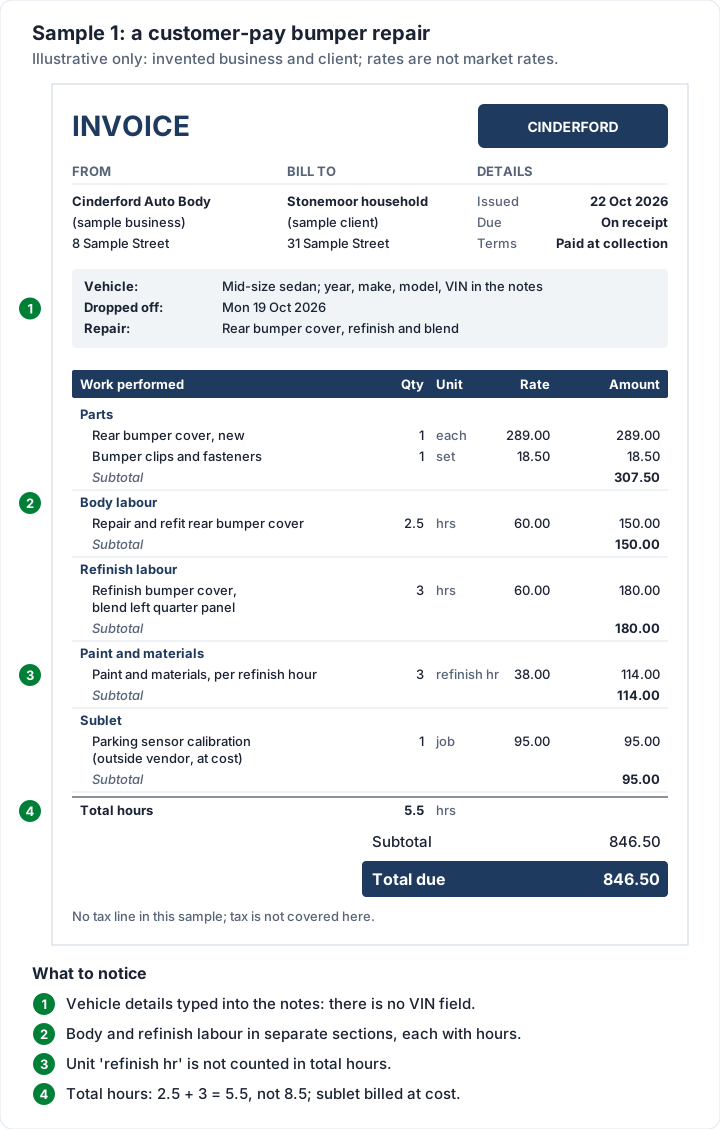
One detail is easy to miss. If your invoice adds up labour hours (Charming's Contractor template does), the paint and materials line must not count as labour. In this sample its unit is “refinish hr”, not “hrs”, so the total hours print as 5.5 (2.5 body plus 3 refinish), not 8.5. For more on itemising labour and materials on trade invoices, see our contractor guide.
No tax line appears in the sample on purpose. This post does not cover whether parts, labour or paint and materials are taxable; check your state or country's tax agency, or ask an accountant.
When an insurer pays part of the bill#
Insurance jobs look different from customer-pay jobs, and the difference is mostly about who pays which part. In practice:
- The estimate usually comes from an estimating system, used by the shop, the insurer or both, and any extra damage found during the repair goes back to the insurer as a supplement. Those documents come from that system, not from your invoicing tool.
- The insurer usually pays its share of the approved repair, and the vehicle owner usually pays the deductible: the part of a covered repair the policyholder pays.
- Arrangements vary by insurer, by state, and by whether the shop is on the insurer's direct-repair programme. Ask the insurer how it wants to be billed, and check your state's rules. This post does not cover claims law or who owes any gap.
On the invoice itself, you have two practical choices. You can send one invoice to the vehicle owner for the full repair, record the insurer's payment against it with a note (the cheque or claim number), and leave the deductible as the balance due. Or you can send two invoices, one for the insurer's share and one for the owner's. The first keeps the whole repair on one page; the second suits an insurer that wants its own invoice. Our guide on when an invoice counts as paid covers recording partial payments until the balance reaches zero.
Mobile detailing invoice: packages, add-ons and travel#
A mobile detailing invoice is simpler than a body shop one, but detailers run into the same question at the end of every job: what exactly did that price include? The answer is a menu, written out as lines:
- The package as one line, named the way your price list names it, with the vehicle size: “Full detail package, SUV”. A short list of what the package includes heads off “I thought that came with it”.
- Each add-on as its own line: pet hair removal, headlight restoration, engine bay, odour treatment. Add-ons hidden inside the package price are the ones clients query.
- Condition surcharges on their own line, if you charge extra for heavy soiling or sand, so the base package price stays the price on your menu.
- Travel beyond your service area, as a line with miles and a per-mile rate, or a flat fee. Say where the free radius ends.
- The vehicle, typed into the notes or the first line: year, make, model and colour, so the client knows which car this was.
Mobile work also changes when you get paid. Many detailers ask for payment at handover, which on an invoice reads as due on receipt; our guide on what due on receipt really means covers how clients read it. On bigger jobs such as paint correction and ceramic coating, many detailers take a deposit at booking, because the product is bought and the day is blocked out.
That logic is not unique to cars. In a public online discussion among videographers, talking about shoots rather than details, one commenter (not a Charming customer, like everyone we quote) put the travel point bluntly:
The reason for the upfront half; get paid for your time that day for the shoot. Your gas, your toll, your time, get that upfront.
If clients pay at the car, make paying easy: print your bank details or a payment link, and see what payment methods to offer on an invoice for the trade-offs.
Mobile detailing invoice samples: a full detail and a ceramic coating#
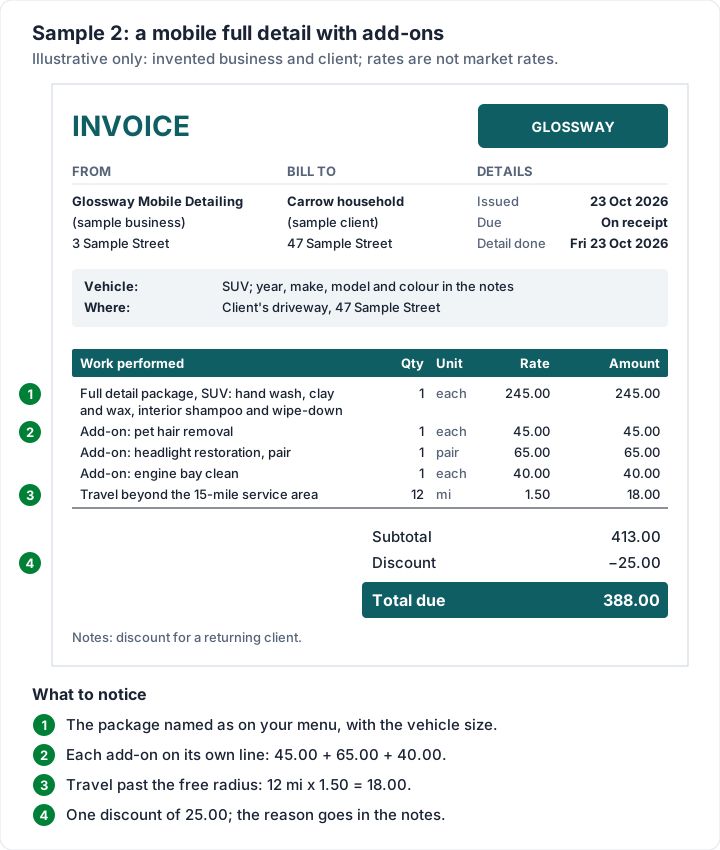
Both samples come from Glossway Mobile Detailing (sample business), billing the Carrow household (sample client). Prices are illustrative, not market rates.
Sample 2: a full detail with add-ons and a discount. Detail done at the client's driveway on Friday 23 October 2026; invoice the same day, due on receipt.
| Work performed | Qty | Unit | Rate | Amount |
|---|---|---|---|---|
| Full detail package, SUV: hand wash, clay and wax, interior shampoo and wipe-down | 1 | each | 245.00 | 245.00 |
| Add-on: pet hair removal | 1 | each | 45.00 | 45.00 |
| Add-on: headlight restoration, pair | 1 | pair | 65.00 | 65.00 |
| Add-on: engine bay clean | 1 | each | 40.00 | 40.00 |
| Travel beyond the 15-mile service area | 12 | mi | 1.50 | 18.00 |
| Subtotal | 413.00 | |||
| Discount | −25.00 | |||
| Total due | 388.00 |
The package and three add-ons come to 245.00 + 45.00 + 65.00 + 40.00 = 395.00. Travel is 12 miles × 1.50 = 18.00, so the subtotal is 413.00. Take off the 25.00 discount and 388.00 is due. The reason for the discount (a returning client, say) goes in the notes; our guide on how to show a discount on an invoice covers the wording.
Sample 3: a ceramic coating with a deposit. The client booked a two-day job and paid a 200.00 deposit. Work done Tuesday 27 and Wednesday 28 October 2026; invoice Wednesday 28 October 2026, due on receipt.
| Work performed | Qty | Unit | Rate | Amount |
|---|---|---|---|---|
| Paint correction, one-step polish | 6 | hrs | 75.00 | 450.00 |
| Ceramic coating, 2-year package, sedan | 1 | each | 650.00 | 650.00 |
| Subtotal | 1,100.00 | |||
| Deposit received | −200.00 | |||
| Total due | 900.00 |
Six hours × 75.00 = 450.00, plus 650.00 for the coating, makes 1,100.00. The 200.00 deposit comes off, leaving 900.00. The full price stays visible above the credit, which is what the client compares with the quote. Our guide on how the deposit shows on the final invoice covers asking for the deposit in the first place. “2-year package” is the name of the product on the menu; any promise about how long a coating lasts belongs in your own written terms, not on an invoice line.
Body shop and detailing invoices in Charming#
If you write more than a few of these a week, retyping the layout gets old. Charming Invoices is a web app for making invoices you download and send your way, and this is what it does for a repair or a detail, checked in the code:
- The Contractor template. One of 60 templates on every plan, including Free. It prints lines in sections with a subtotal for each, a Unit column, a “Total hours” line and a “Customer acceptance” line for a signature. The description column is headed “Work performed”.
- Sections you name. Type a section on each line (“Parts”, “Body labour”, “Refinish labour”, “Paint and materials”, “Sublet”, up to 80 characters) and consecutive lines with the same section print under one heading with a subtotal. The Contractor template groups lines by default; any other template can switch on “Group lines by section” in the Template Studio.
- Total hours that count only hours. Lines with the unit h, hr, hrs, hour or hours are added up; “refinish hr”, “each” and “job” are not. That is why Sample 1 prints 5.5 hours.
- An RO or claim number field. The PO number field can be renamed, for example to “RO no.”. The new label applies to every invoice you issue from that business from then on (invoices already issued keep theirs), so pick one that suits all your jobs. There is no dedicated VIN or odometer field: type those into the notes or the first line.
- A starter kit. “Start from a kit” includes an “Auto repair order” kit with labour, parts and sublet lines. It is built for mechanical repair, not body work, and its prices load at 0.00 for you to fill in.
- Deposits and partial payments. Type a deposit into “Deposit already received” and it prints as “Deposit received” above “Total due”. Use “Record a payment” for each payment that arrives, with a method and a note such as the insurer's cheque number.
- A PDF to download or print and a private link you send however you like, and a “Viewed by the client” entry on the invoice's timeline when the owner opens the link. Charming does not email the invoice or send reminders; overdue invoices are flagged so you know whom to follow up. It works in a phone browser and can be added to your home screen; there is no app-store app.
On the paid plans (from Individual, $29 once), you can save your detailing menu (packages and add-ons) as reusable lines, and AI drafting can turn a sentence such as “full detail on an SUV with pet hair and headlights” into line items. AI drafting leaves any price it does not know at 0 and never sends anything; you check every line.
The catches, plainly:
- No card payments through Charming, and no tap-to-pay at the car. Your bank details or your own payment link print on the invoice; you record the payment or mark it paid yourself.
- No estimating, no insurer supplements, no photos on invoices, no parts ordering, no scheduling and no vehicle history.
- One client per invoice. A job paid by an insurer and an owner needs one invoice with both payments recorded, or two invoices.
- No signature capture. The “Customer acceptance” line is for a pen on a printed copy.
- Free invoices carry a small “Sent with Charming Invoices” line in the footer. Paid plans hide it by default and can switch it back on. The lifetime plans are final sale.
If that suits your shop or your van, create a free invoice and rebuild Sample 1 with your own parts and rates.
When you need shop software instead#
An invoice is the last step of a repair. Shops that write estimates in an estimating system, order parts, track cars through the bays and send supplements to insurers need shop-management software, and that is a different purchase. Our comparison of auto repair invoice software prices the options plan by plan and sets out where a plain invoicing tool is enough.
For a mobile detailer, the equivalent is booking and route planning. If you want online booking, scheduling and invoices in one place, see our comparison of field-service invoicing software. If you already book by phone or text and only need a clean invoice at the end, a simpler tool will do.
Body shop and detailing invoice questions#
What should a body shop invoice include?#
Your details and the vehicle owner's, an invoice number and date, the vehicle (year, make, model, plate or VIN), your RO number and any claim number, each part described, body and refinish labour with hours and rates, paint and materials, sublet work, the total due and how to pay. Ask your state's auto repair regulator whether anything else applies to you.
How do body shops bill paint and materials?#
In practice, two ways: a rate per refinish hour, or the actual materials itemised. Whichever you use, give it its own line or section so it is not hidden in labour, and if your invoice totals the hours, use a unit like “refinish hr” so it is not counted as labour time.
What is sublet on a body shop invoice?#
Sublet is work sent to an outside specialist and billed through the shop, such as an alignment, glass or a sensor calibration. Many shops bill it at cost and say so on the line.
Should a mobile detailer charge for travel?#
Many do, beyond a stated service area. Put it on its own line, as miles times a rate or a flat fee, and tell the client where the free radius ends before you book the job.
Do detailers take a deposit?#
Many take one on longer or product-heavy jobs such as paint correction and ceramic coating; it is your call, set out in your booking terms. Agree it at booking, then show it as “Deposit received” on the final invoice, as in Sample 3.
Is there a free body shop invoice template?#
Not a body-shop-specific one. The free Word service template and the Excel invoice template on our downloads page both work for a repair, with no sign-up. For a branded PDF with parts, labour and paint in subtotalled sections, create a free invoice in Charming with the Contractor template.