Job invoice template: a filled-in sample that adds up

Nnabuike Okoroafor ·
On this page · 9 sections
The job is finished, the tools are back in the van, and the client is waiting for a number. A job invoice is the bill for that one piece of work: what you did, where, on which days, what it cost in labour and materials, and how much is left to pay after any deposit. Get those parts on the page in an order the client can follow and most of the awkward questions never get asked.
The awkward part is real, and it is common. In a public forum thread about feeling awkward when sending invoices, one freelancer (not a Charming customer, like everyone quoted on this page) described a tradesperson they had hired:
Actually saying that, we had a handyman over on the weekend and he'd only just started up. He was pretty shy about it too.
A clear job invoice template takes some of that shyness out of the moment, because the page does the explaining. Below: which free file to use, what to show, two samples worked through to the cent (a deck repair with a deposit, and a labour-only job), fixed-price breakdowns, and work orders.
Free job invoice template: which file to use#
The free templates page has Word and Excel invoice templates, with no sign-up. None is labelled “job invoice”, but two of them fit a job well. This table matches the file to the kind of job you are billing:
| Your job | Best file | Why it fits |
|---|---|---|
| One job with labour, materials and maybe a deposit | service-invoice-template.docx (Word) | A “Description of work” box with “Job / project”, “Site address”, “Date(s) of work” and “Work performed”; a labour and materials table; then “Less deposit paid” and “Balance due” |
| Any job where you want the totals worked out for you | invoice-template.xlsx (Excel) | 15 lines that calculate quantity times rate, then subtotal, discount, one tax rate, total, amount paid, balance due and the due date |
| Labour billed by the hour, day by day | hourly-invoice-template.xlsx (Excel) | A date and hours on each line, and the total hours added up |
| A trade with its own page on the site | The blank PDF on that trade's page | Each of the 12 invoice templates by trade has a “Download a blank PDF” button and a filled example |
| A branded PDF that adds up and can be emailed | Charming's Contractor template | Labour and materials in sections with subtotals and total hours (see the Charming section below) |
One difference matters more than the rest: the Word files do not calculate. You type every amount and every total. The Excel files do the arithmetic, so they are the safer choice if adding up is where mistakes creep in. Our guide to the Excel invoice template with formulas walks through the Excel files field by field. Movers have their own guide: the moving company invoice template works through a local move billed by crew hours.
For building or renovation work in stages, see the contractor invoice template; for repair visits with several small tasks, the handyman invoice example. This page is for the one-off job in between. Two trades bill jobs their own way: the snow removal invoice template covers per-push and per-storm work, and the body shop invoice samples split parts, labour, paint and sublet work.
What a job invoice should show#
Beyond the basics every invoice carries (your details, the client's, an invoice number, the date and how to pay), a job invoice needs the details a client uses to match the bill to the work they saw. The field-by-field invoice checklist covers the basics; these are the job-specific parts:
- A job name or number. “Deck repair, back garden” or a job number you also wrote on the quote. It ties the invoice to the conversation that came before it. If you have no quote layout yet, there is a free estimate template for Excel and Word, and how a filled-in estimate becomes the final invoice is worked through line by line.
- The site address. It may not be the billing address. Landlords, property managers and adult children paying for a parent's repair all pay for work at an address that is not theirs.
- The date or dates of work. The client remembers which days you were there; matching them builds trust in everything below.
- The work performed. A short, plain description in the order you did it: what was removed, what was replaced, what was rebuilt.
- Labour, priced the way you agreed. By the hour (quantity in hours, times your rate) or by the job (quantity 1, unit “job”). Both can sit on one invoice.
- Materials, at the price you agreed. Many trades bill materials at cost and keep the receipts in case the client asks; others add a handling charge. Whichever you do, say it on the line.
- Call-out or trip charge, and disposal. If you charge to turn up or to take the waste away, each gets its own line so it does not look hidden inside the labour.
- The deposit already paid, taken off. The client sees the full price, the credit and what is left.
- A due date and payment details. A real date, not only “14 days”, and the account or link to pay into.
Sales tax on labour and materials depends on where you work and on what the job is. Rules vary; check your state or country's tax agency, or ask an accountant before adding a tax line. The samples below leave tax out on purpose. For a deeper look at itemising labour and materials on bigger building jobs, see what a contractor invoice should show.
Job invoice sample: a deck repair with labour, materials and a deposit#
Here is a complete job invoice for a two-day deck repair. Every name, address, job number and rate below is illustrative, not a market rate.
- From: Quarry Lane Odd Jobs (sample business)
- To: Sample Client (sample client), 14 Sample Street
- Job: Deck repair, back garden; Job no. J-1042 (illustrative)
- Dates of work: Tuesday 20 October and Wednesday 21 October 2026
- Invoice date: Thursday 22 October 2026, due in 14 days, so due Thursday 5 November 2026
- Deposit for materials: 200.00, received before the job started
| Section | Work performed | Qty | Unit | Rate | Amount |
|---|---|---|---|---|---|
| Labour | Remove and replace 9 rotten deck boards | 6 | hrs | 55.00 | 330.00 |
| Labour | Rebuild back steps: 3 new treads and stringers | 1 | job | 240.00 | 240.00 |
| Labour subtotal | 570.00 | ||||
| Materials | Pressure-treated deck boards, 12 ft (at cost) | 9 | each | 18.47 | 166.23 |
| Materials | Stair stringers (at cost) | 3 | each | 24.98 | 74.94 |
| Materials | Exterior deck screws, 5 lb box (at cost) | 1 | box | 39.97 | 39.97 |
| Materials subtotal | 281.14 | ||||
| Other | Call-out charge | 1 | 45.00 | 45.00 | |
| Other | Disposal of old boards (tip fee) | 1 | 28.00 | 28.00 | |
| Other subtotal | 73.00 | ||||
| Subtotal | 924.14 | ||||
| Deposit received | −200.00 | ||||
| Total due | 724.14 |
The arithmetic, line by line:
- Labour: 6 hours × 55.00 = 330.00 for the boards, plus 240.00 for the steps priced by the job, so 570.00.
- Materials: 9 × 18.47 = 166.23, 3 × 24.98 = 74.94 and one box of screws at 39.97, so 281.14.
- Other: 45.00 + 28.00 = 73.00.
- Subtotal: 570.00 + 281.14 + 73.00 = 924.14. Take off the 200.00 deposit and 724.14 is due.
The last two rows use the wording Charming's PDF prints, “Deposit received” and “Total due”. In the Word service template the same two rows are called “Less deposit paid” and “Balance due”, and you type both amounts yourself.
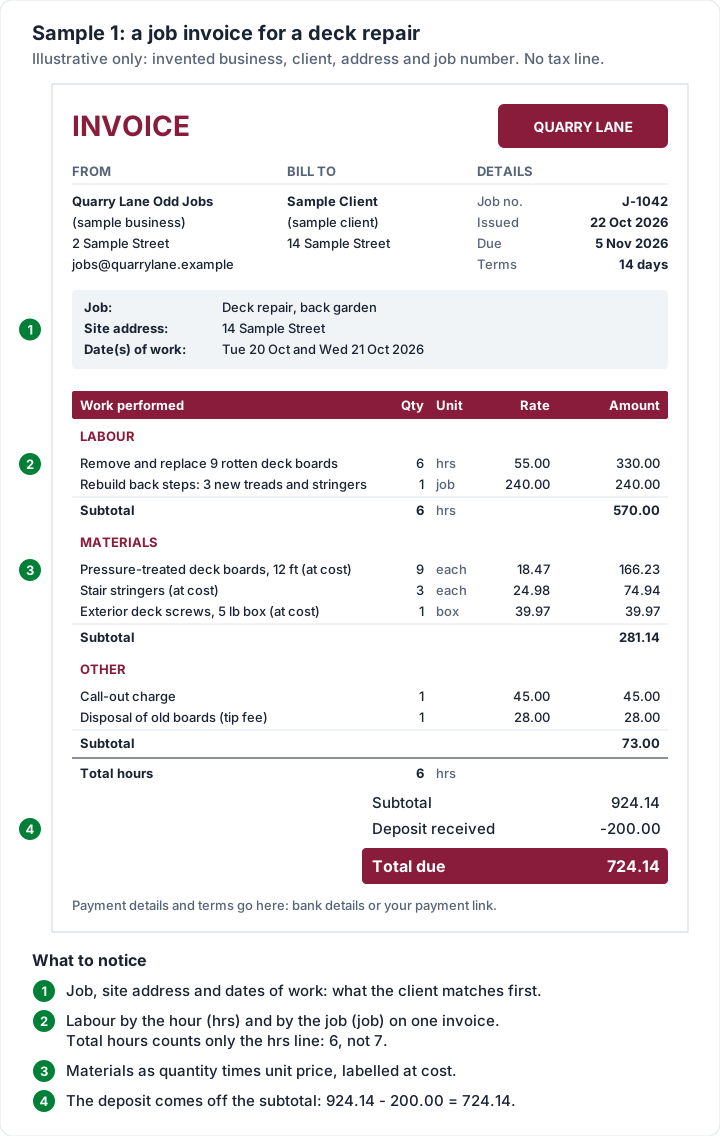
Three things are worth copying from this sample, whatever your trade:
- Hourly and fixed-price labour side by side. In this sample, the boards are billed by the hour because the number of rotten boards was not known until the old ones came up, and the steps are a fixed price agreed in advance. Each line says which it is through its unit, “hrs” or “job”.
- Materials as quantity times unit price. “9 boards at 18.47” lets the client check the receipt. A single “Materials 281.14” line invites the question you are trying to avoid. If the client asked for the receipts, send copies with the invoice.
- The deposit shown as a credit, not hidden. The full job price stays visible, which matters if the client is claiming the cost back from a landlord or an insurer. Our guide to how the deposit shows on the final invoice covers asking for one and crediting it.
Labour invoice template: a labour-only job invoice#
Sometimes the client buys the materials or hires the equipment, and you supply only the work. That is a labour invoice: the same layout without a materials section. Here Quarry Lane Odd Jobs (sample business) cleared and loaded a garage with two workers on Friday 23 October 2026, and the client hired the skip (a dumpster, in American English) directly.
- Invoice date: Monday 26 October 2026, due in 7 days, so due Monday 2 November 2026
- Work performed: garage clear-out, sorting and loading into the client's skip
| Work performed | Qty | Unit | Rate | Amount |
|---|---|---|---|---|
| Labour: lead worker, garage clear-out and loading | 7.5 | hrs | 45.00 | 337.50 |
| Labour: second worker | 7.5 | hrs | 38.00 | 285.00 |
| Total due | 622.50 |
Each line is hours times that worker's rate: 7.5 × 45.00 = 337.50 and 7.5 × 38.00 = 285.00, so 622.50 in all, and the total hours come to 15. The rates are illustrative, not market rates.
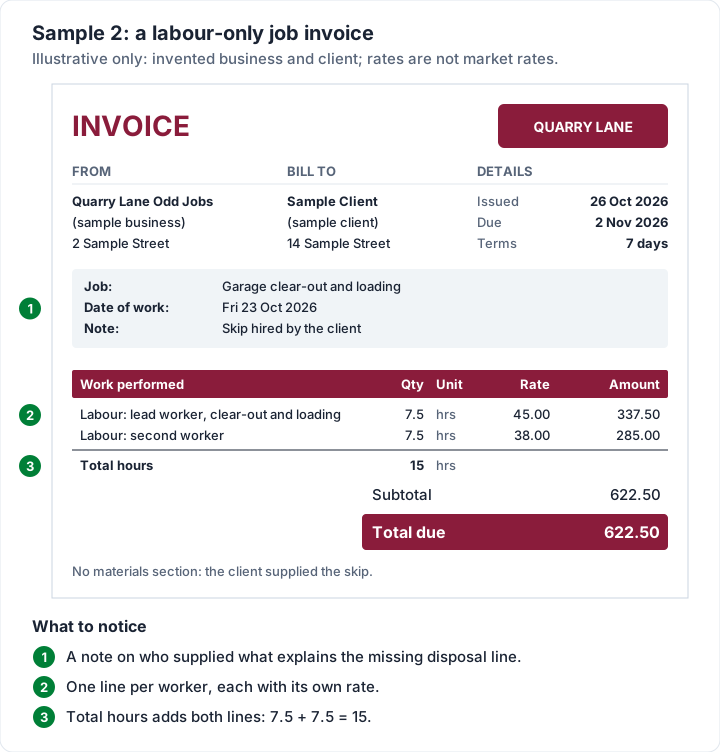
Keep one line per worker or role, with its own rate, and add a note saying who supplied what: “Skip hired by the client” answers the question of why there is no disposal line.
If your work is mostly hours with no materials at all, the hourly invoice template has a filled example built around a timesheet.
Fixed price or itemised: when the client asks for a breakdown#
You quoted 1,200.00 for the job, the client agreed, the work is done, and now they want to know how the 1,200.00 splits up. Sometimes the reason is simple: someone else (a landlord, an employer, an insurer) is paying them back and wants the detail.
Opinions differ on how much to share. In a small-business forum thread about clients asking for detailed breakdowns of pricing, one commenter drew the line like this:
You’re happy to provide the totals of hrs / costs of tooling / sum of personnel, however the methodology of how you company delivers obviously something you can’t share as it’s your corporate process and procedures.
On a small job invoice that line usually falls in a practical place: the client can see what was done, the materials and the price agreed, without a minute-by-minute account of how you did it. A fixed-price job can still show its parts, as long as the parts add up to the agreed price and nothing new appears. Our guide to itemised vs lump-sum invoices sets out when each one works and how to split a fixed price honestly.
If the final price came in above the quote, that is a different conversation, and it is better had before the invoice than on it. See what to do when the final price exceeds the estimate.
Work order vs job invoice#
The two documents sit at opposite ends of the same job, and searches for a “work order invoice” often mix them up.
| Work order | Job invoice | |
|---|---|---|
| When | Before or during the job | After the job, or after a stage of it |
| What it says | Do this work, at this address, by this date | This work was done; this is what it costs |
| Who it is for | You or your crew (sometimes the client signs it) | The person paying |
| Amounts | Often none, or the agreed price | Every line priced, a total and a due date |
In practice, many trades turn a work order into an invoice by adding the hours, the materials and the prices once the work is done. Field-service apps are built around that step, keeping the job and its invoice in one record. If you need scheduling, dispatch and work orders in one place, see our comparison of field-service invoicing software. A plain invoicing tool, Charming included, starts at the invoice.
If the job is one stage of a signed agreement, the invoice also has to match the contract's payment schedule. That is covered in our guide to invoicing work done under a contract.
Getting paid for small jobs#
Small jobs are easy to leave unbilled for a few days, and a bill that is never written down is easy to put off paying. In a small-business forum thread about clients who do not pay on time, one commenter put it plainly:
learned this one the hard way. had a buddy I did a job for who kept saying he'd pay me next week for like 2 months.
Habits that help, none of which needs special software:
- Send the invoice the day the job is done, while the client can still picture the work.
- Take a deposit for materials on bigger jobs, so you are not funding the client's repair. The deck sample above does this.
- Make paying easy. Put your bank details or payment link on the invoice. Our guide to what payment methods to offer on an invoice compares the options.
- Agree the terms before you start, including any late fee. A late fee you add after the fact rarely helps; see the habit that matters most: agree the late fee before the work.
- Follow up on the due date, politely and in writing, if nothing has arrived.
Job invoices in Charming Invoices#
If you send more than a few job invoices a month, retyping the same layout gets old. Charming Invoices is a web app for making invoices you download and send your way, and this is what it does for a job like the deck repair, checked in the code:
- The Contractor template. One of 60 templates on every plan, including Free. It prints labour and materials in sections with a subtotal for each, a Unit column, a “Total hours” line and a “Customer acceptance” sign-off line. The description column is labelled “Work performed”.
- Sections on any line. Type a section name on each line (“Labour”, “Materials”, or your own, up to 80 characters) and lines with the same name are grouped under it with a subtotal. Grouping is on in the Contractor template and can be switched on in the others.
- Total hours that count only hours. Lines with the unit “hrs” (or h, hr, hour, hours) are added up; a line priced per job is not, so the deck sample prints 6 total hours, not 7.
- A job number field. The PO number field can be renamed, for example to “Job no.”. The new label applies to every invoice from that business.
- The deposit credited. Enter the deposit on the final invoice and it prints as “Deposit received” with a minus sign above “Total due”.
- A starter kit for small jobs. The 12 trade starter kits include a “Handyman visit” kit with task, materials and trip-charge lines. Kits load with prices at 0.00 for you to fill in.
- A PDF to download or print and a private link you send however you like, and a “Viewed by the client” note on the invoice’s timeline when the client opens the link. Charming does not email the invoice or send reminders; overdue invoices are flagged so you know whom to follow up.
On the paid plans (from Individual, $29 once), you can save lines such as “Call-out charge” to reuse, and AI drafting can turn one sentence like “replaced 9 deck boards and rebuilt the back steps” into line items. AI drafting leaves any price it does not know at 0 and never sends anything; you check every line.
The catches, plainly:
- No card payments through Charming. Your bank details and a payment link of your own print on the invoice; the client pays you directly, and you record the payment or mark it paid.
- No work orders, scheduling or job costing, no estimates or quotes in the app (the free estimate template above is a separate file), and no photo or receipt attachments.
- The “Customer acceptance” line is for a pen signature on a printed copy. Charming does not collect signatures.
- The deposit is typed by hand. Charming does not take the deposit and does not link it to an earlier deposit invoice.
- Free invoices carry a small “Sent with Charming Invoices” line in the footer. Paid plans hide it by default and can switch it back on. The lifetime plans are final sale.
If that suits how you work, create a free invoice and rebuild the deck repair sample with your own job.
Job invoice questions#
What is a job invoice?#
A job invoice is the bill for one piece of work: the job, where and when it was done, the labour and materials with their prices, any deposit already paid, the total due and how to pay. “Job” here simply means a single piece of work, not a job vacancy.
Can I charge for travel or a call-out?#
Many trades do. Agree it with the client before the job, then put it on its own line (“Call-out charge”), so it is visible rather than folded into the labour rate.
Should materials be billed at cost?#
That is a pricing choice, not a rule. Many trades bill materials at cost and charge for their time separately; others add a handling margin. Whichever you choose, label the line so the client knows, and keep the receipts.
Does a job invoice need a signature?#
Our guide on whether invoices need to be signed covers that question. If you want a sign-off line anyway, Charming's Contractor template prints a “Customer acceptance” line for a pen signature on a printed copy.
Is there a free job invoice template?#
Yes. The Word service template on the free downloads page has the job, site address, dates and labour and materials table built in, and the Excel invoice template calculates the totals. Both are free with no sign-up. For a branded PDF that adds itself up, create a free invoice in Charming with the Contractor template.
Free downloads
No sign-up and no email address. More on the free templates page.
- Download .xlsx: Estimate or quote template for Excel
Estimate or quote template for Excel
Excel .xlsxPrice a job before you start: scope, line items, a valid-until date and an optional deposit.
- Download .docx: Estimate or quote template for Word
Estimate or quote template for Word
Word .docxThe estimate as a Word document: scope of work, prices, deposit and acceptance lines.