Moving company invoice template, with a worked local move

Nnabuike Okoroafor ·
On this page · 9 sections
Your client reads a moving invoice at the end of a long, tiring day, surrounded by boxes, often in a house they do not know yet. If the total looks higher than they expected, they will go through it line by line. A good moving company invoice template makes that easy: who moved what, from where to where, for how many hours, with how many people, and what is left to pay after the deposit.
This page gives you the free files that fit a move, the fields a moving invoice should show, a local hourly move worked through to the cent, a short labour-only sample for loading help, and the paperwork an interstate move adds next to the invoice, quoted from the federal text rather than paraphrased.
General information, not legal or tax advice. Where a federal rule is mentioned, we quote and link the official text; rules for local moves vary by state, so check with your state's regulator or a lawyer about your own situation.
Moving company invoice template: which file to use#
There is a free moving company invoice template for Excel and one for Word, with no sign-up. Both have moving lines printed in advance (crew and truck hours, travel time, boxes, tape, mattress bags and bed frame disassembly) with every rate left blank, so you type your own prices. More free files, including general invoice templates, are on the free Word and Excel invoice templates page.
| What you need | Best file | How to use it for a move |
|---|---|---|
| Totals calculated for you | moving-invoice-template.xlsx (Excel) | 15 lines that multiply Qty / hours by rate, then subtotal, discount, one tax rate, total, a “Less deposit paid” row, balance due and the due date |
| One move, typed out, with a deposit | moving-invoice-template.docx (Word) | Its “Description of work” box has “Job / project”, “Site address” and “Date(s) of work”. There is only one address line, so write the origin and destination in “Work performed”. Its totals end with “Less deposit paid” and “Balance due” |
| Hourly loading help, several days | hourly-invoice-template.xlsx (Excel) | A date and hours on each line, with total hours added up |
| A branded PDF you can email | Charming's Contractor template | Sections with subtotals, a Unit column and a total hours line (see the Charming section below) |
The Word files do not calculate: you type every amount and total. The Excel files do the arithmetic. For a general walk-through of a job-style invoice, see our job invoice template; the invoice templates by trade cover trades such as roofing and towing, but not moving.
What a moving invoice should show#
On top of the basics (your business details, the client's, an invoice number, the date, the total and how to pay; the field-by-field invoice checklist has the full list), a moving invoice needs the details a client uses to check the day against the bill. This table shows each one with an example:
| Field | Example | Why the client needs it |
|---|---|---|
| Order or job number | Order no. M-2210 | Ties the invoice to the estimate or booking |
| Move date | Friday 16 October 2026 | Confirms which job this is |
| Origin and destination | Apt 3C, 40 Sample Street to 7 Example Lane | The two addresses are the move |
| Crew size and truck | 3 movers and a 26 ft truck | Explains the hourly rate |
| Start and finish times | On site 8:00 to 13:30 | Lets the client check the hours |
| Rate basis | Hourly, flat rate, or by distance or weight | Shows how the total was built |
| Travel time | Depot to origin, destination back to depot | A common “what is this?” line if it is not labelled |
| Packing materials | 20 medium boxes at 2.49 | Count and unit price, not one lump sum |
| Additional services | Disassemble and reassemble 2 bed frames | Extras on their own lines |
| Deposit | Deposit received when booked | Shows the full price and the credit |
| Payment terms and methods | Due on receipt; bank transfer or payment link | Tells the client how and when to pay |
How much detail to show is your call; our guide to how much detail to show on an invoice weighs itemised lines against a single total. On a moving invoice, itemised usually wins, because most of the questions are about the hours and the boxes. Put your accepted payment methods on the invoice too; see what payment methods to offer on an invoice.
Sales tax on moving services and on boxes you sell varies by place. Rules vary; check your state or country's tax agency, or ask an accountant before adding a tax line. The samples below leave tax out.
Moving company invoice sample: a local hourly move#
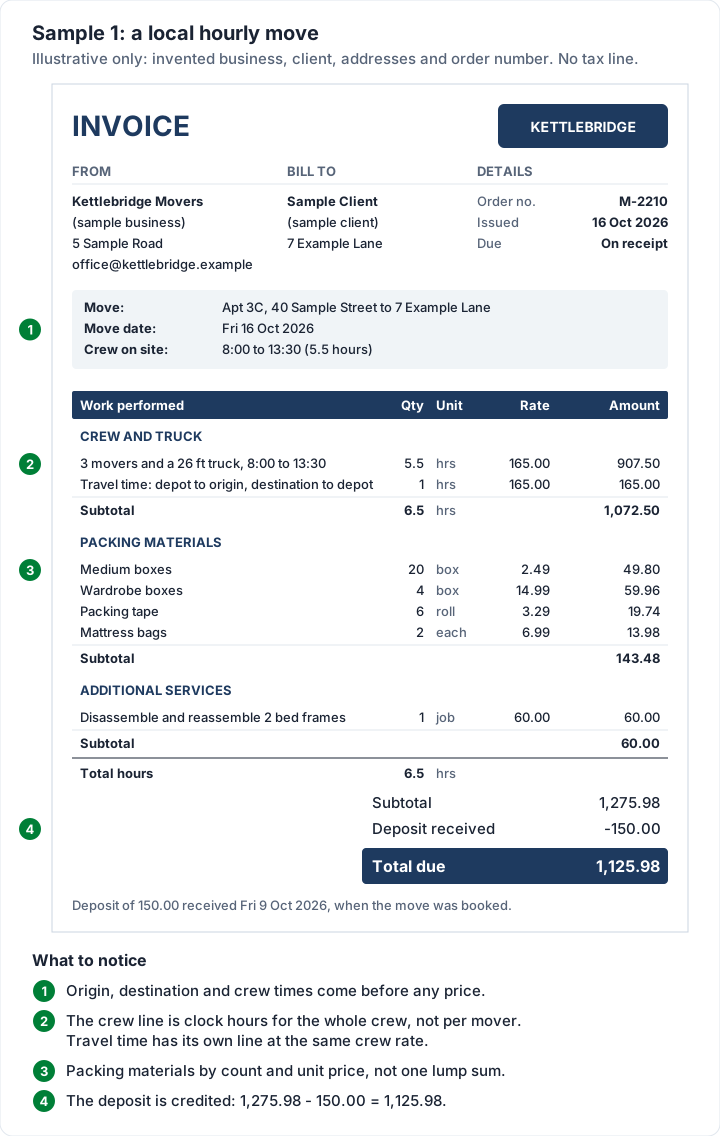
Here is a complete invoice for a local move from a two-bedroom apartment to a house across town. Every name, address, order number and rate below is illustrative, not a market rate.
- From: Kettlebridge Movers (sample business)
- To: Sample Client (sample client)
- Move: Apt 3C, 40 Sample Street to 7 Example Lane; Order no. M-2210 (illustrative)
- Move date: Friday 16 October 2026, crew on site 8:00 to 13:30 (5.5 hours)
- Deposit: 150.00, received Friday 9 October 2026 when the move was booked
- Invoice date: Friday 16 October 2026, due on receipt
| Section | Line | Qty | Unit | Rate | Amount |
|---|---|---|---|---|---|
| Crew and truck | 3 movers and a 26 ft truck, 8:00 to 13:30 | 5.5 | hrs | 165.00 | 907.50 |
| Crew and truck | Travel time: depot to origin, and destination back to depot | 1 | hrs | 165.00 | 165.00 |
| Crew and truck subtotal | 1,072.50 | ||||
| Packing materials | Medium boxes | 20 | box | 2.49 | 49.80 |
| Packing materials | Wardrobe boxes | 4 | box | 14.99 | 59.96 |
| Packing materials | Packing tape | 6 | roll | 3.29 | 19.74 |
| Packing materials | Mattress bags | 2 | each | 6.99 | 13.98 |
| Packing materials subtotal | 143.48 | ||||
| Additional services | Disassemble and reassemble 2 bed frames | 1 | job | 60.00 | 60.00 |
| Subtotal | 1,275.98 | ||||
| Deposit received | −150.00 | ||||
| Total due | 1,125.98 |
The arithmetic:
- Crew and truck: 5.5 × 165.00 = 907.50 on site, plus 1 × 165.00 = 165.00 travel time, so 1,072.50.
- Packing materials: 20 × 2.49 = 49.80, 4 × 14.99 = 59.96, 6 × 3.29 = 19.74 and 2 × 6.99 = 13.98, so 143.48.
- Additional services: 60.00 for the bed frames, priced by the job.
- Subtotal: 1,072.50 + 143.48 + 60.00 = 1,275.98. Take off the 150.00 deposit and 1,125.98 is due.
The last two rows use the wording Charming's PDF prints, “Deposit received” and “Total due”. In the moving files and the Word service template the same rows are “Less deposit paid” and “Balance due”.
“Due on receipt” suits a move because the job ends in a single day and the client is there when it does; our guide explains what due on receipt really means and when to give longer terms instead.
Crew hours, not mover-hours#
The main line is the one clients misread most easily. It bills the crew's clock time: 5.5 hours from 8:00 to 13:30, at one rate for 3 movers and the truck together. It does not bill each mover separately. Three people working 5.5 hours is 16.5 mover-hours, but in this sample the quantity is 5.5, because the rate already covers the whole crew.
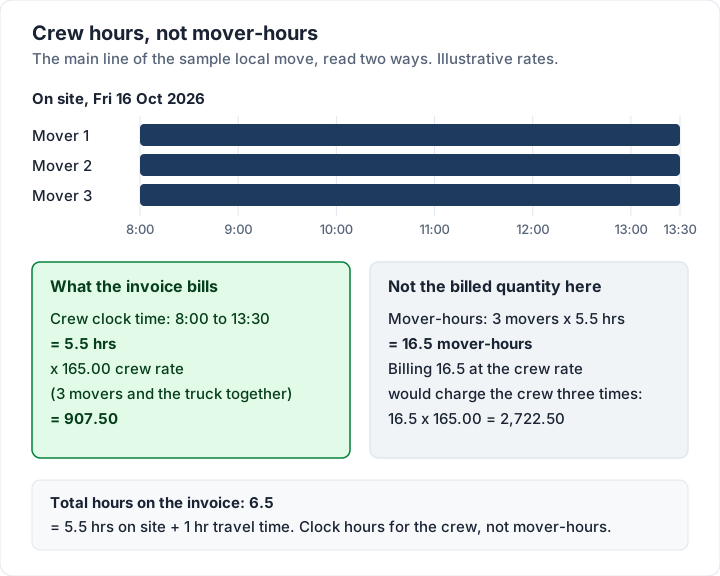
If you price per mover instead (say, a rate for each person per hour), write it that way: one line per mover, or the mover-hours as the quantity with “per mover” in the description. Either works, as long as the line says which.
Hourly, flat rate or by weight: how the bill changes#
How you price a move shapes the invoice, and the invoice should mirror the quote. These are the common bases in practice:
- Hourly. Common for local moves: a crew rate times clock hours, plus travel time if you charge it, plus materials and extras. The final bill depends on how long the day takes, so the start and finish times matter.
- Flat rate. One agreed price for the move. The invoice can still list the parts (crew, materials, extras), as long as they add up to the agreed price, and anything extra the client asked for on the day gets its own line.
- By weight or distance. Common on longer moves, where the price is built from the weight of the shipment and the distance travelled.
For interstate moves, the federal booklet in 49 CFR Part 375, Appendix A, defines the two kinds of estimate. A binding estimate:
Estimate, Binding—This is a written agreement made in advance with your mover. It guarantees the total cost of the move based upon the quantities and services shown on the estimate.
And a non-binding estimate:
Estimate, Non-Binding—This is what your mover believes the cost will be, based upon the estimated weight of the shipment and the services requested. A non-binding estimate is not binding on the mover. The final charges will be based upon the actual weight of your shipment, the services provided, and the tariff provisions in effect.
Those definitions come from the eCFR text of Appendix A to Part 375, read on 28 October 2026. For the general difference between the three documents, see the difference between an estimate, a quote and an invoice.
Interstate moves: the paperwork next to the invoice#
An interstate move comes with documents that sit beside the invoice. The booklet sets out its own scope in its first lines:
The Federal Motor Carrier Safety Administration's (FMCSA) regulations protect consumers of interstate moves and define the rights and responsibilities of consumers (shippers) and household goods motor carriers (movers).
It defines the bill of lading like this:
Bill of Lading—The receipt for your shipment and the contract for its transportation.
And in its section on weight tickets, it ties them to the invoice directly:
Your mover must obtain weight tickets if your shipment is moving under a non- binding estimate.
The weight tickets must be presented with the invoice.
(The stray space in “non- binding” is in the official text.) The same booklet describes the liability options for an interstate shipment; read them on the eCFR page rather than relying on a summary. All quotes here are from the eCFR, 49 CFR Part 375, Appendix A, as of 28 October 2026. The FMCSA also publishes Protect Your Move pages for consumers; we quote the eCFR text here.
Local moves are a separate question. The booklet's own opening line, quoted above, describes it as being about interstate moves. For a move inside one state, check what your state's regulator publishes (often a public utilities, transportation or consumer affairs agency) or ask a lawyer.
Hauling freight for brokers and shippers is a different business again, with a different invoice; if that is your work, see the trucking invoice template.
Deposits, damage claims and disputed lines#
Three things can go wrong after a move that correct arithmetic does not fix.
- The deposit is forgotten. Show it as a credit on the final invoice, with the date it was paid, so the client sees the full price and what they have already covered. Our guide to how the deposit shows on the final invoice covers the deposit invoice and the credit.
- Something was damaged. A damage claim is a separate matter from the invoice. How it is handled depends on your terms, the type of move and the rules where you operate. Keeping the claim and the invoice apart makes each one easier to follow.
- One line is disputed. If the client queries the hours or the travel time, the start and finish times on the invoice are your best evidence. See what to do when a client disputes an invoice for how to handle a query on one line without holding up the rest.
If you also rent out storage or equipment, the deposits work differently; our guide to the booking deposit vs security deposit on a rental invoice explains the difference. And if you offer move-out cleaning as an add-on, invoicing for cleaners and home services covers how cleaners bill those jobs.
Labour-only moves: loading help#
Some clients hire their own truck and book you only to load it. The invoice is shorter, but the same rules apply: the crew, the hours and what the rate covers. Here Kettlebridge Movers (sample business) sent 2 movers to load a client's rental truck on Friday 23 October 2026, a 3-hour booking, invoiced the same day and due on receipt.
| Line | Qty | Unit | Rate | Amount |
|---|---|---|---|---|
| Loading help: 2 movers (client's rental truck) | 3 | hrs | 110.00 | 330.00 |
| Total due | 330.00 |
That is 3 × 110.00 = 330.00, with the crew rate covering both movers. The rate is illustrative. Writing “client's rental truck” on the line answers the question of why there is no truck charge.
Moving invoices in Charming Invoices#
If you send moving invoices every week, retyping the crew line, the box prices and your payment details gets old. Charming Invoices is a web app for making invoices you download and send however you like, and this is what it does for a move, checked in the code:
- The Contractor template, one of 60 templates on every plan, including Free. It prints lines in sections with a subtotal for each (“Crew and truck”, “Packing materials”, “Additional services”), a Unit column for hrs, box, roll or each, and a “Total hours” line. Grouping by section can be switched on in the other templates too.
- Total hours that add up the hour lines. Lines with the unit “hrs” are added; boxes and jobs are not. In the sample it prints 6.5: the crew's 5.5 hours on site plus 1 hour of travel. It adds the quantities you typed, so it shows clock hours for the crew, not mover-hours.
- An order number field. The PO number field can be renamed, for example to “Order no.” or “Bill of lading no.”. The label applies to every invoice from that business.
- The deposit credited. Enter the deposit on the final invoice and it prints as “Deposit received” with a minus sign above “Total due”.
- Notes and terms on the PDF, up to 5,000 characters, for the move addresses, what the rate covers or your payment terms.
- A PDF and a private link, which you send however you like once the invoice is issued, and a “Viewed by the client” note on the invoice’s timeline when the client opens the link. Overdue invoices are flagged; Charming does not send reminders.
On the paid plans (from Individual, $29 once), you can save lines such as “Medium boxes” and “Travel time” to reuse, and turn on recurring invoices for regular clients such as storage.
The catches, plainly:
- No card payments through Charming. Your bank details and a payment link of your own print on the invoice. The client pays you directly, and you record the payment or mark it paid. There is no card terminal for moving day.
- No estimates, inventories, bills of lading or weight tickets. Charming makes the invoice only. Crew scheduling and dispatch are not there either; see our comparison of field-service invoicing software if you need them.
- No mover starter kit. The 12 trade kits do not include moving, so you type the lines (or save them on a paid plan).
- The deposit is typed by hand. Charming does not collect it.
- Free invoices carry a small “Sent with Charming Invoices” line in the footer. Paid plans hide it by default and can switch it back on. The lifetime plans are final sale.
If that suits how you work, create a free invoice and rebuild the local move sample with your own rates.
Moving invoice questions#
What should a moving company invoice include?#
Your details and the client's, an invoice and order number, the move date, the origin and destination, the crew size and truck, the start and finish times, each charge with its quantity and rate (crew time, travel time, materials, extras), any deposit already paid, the total due and how to pay.
Do movers charge for travel time?#
Some do, especially on hourly moves, for the drive from their depot to the first address and back from the last. If you charge it, say so in the quote and give it its own labelled line on the invoice, as in the sample.
Is a bill of lading an invoice?#
No. The federal booklet defines it as “The receipt for your shipment and the contract for its transportation.” The invoice is the bill: what the move cost and what is left to pay.
Can I take a deposit for a move?#
Many movers ask for one when the move is booked. Show it on the final invoice as a credit with the date it was paid, as in the sample, so the client sees the full price and the balance.
Is there a free moving company invoice template?#
Yes. There is a free moving company invoice template for Excel, which adds up the totals, and one for Word, which does not, with no sign-up. Both have crew hours, travel time, packing materials and extras printed in advance and the rates left blank; write the origin and destination into the description. For a branded PDF that adds itself up, create a free invoice in Charming with the Contractor template.
Free downloads
No sign-up and no email address. More on the free templates page.
- Download .xlsx: Moving company invoice template for Excel
Moving company invoice template for Excel
Excel .xlsxFor movers: crew and truck hours, travel time, packing materials and extras.
- Download .docx: Moving company invoice template for Word
Moving company invoice template for Word
Word .docxFor movers: crew and truck hours, travel time, packing materials and extras.