Reimbursement invoice: how to bill expenses to a client

Nnabuike Okoroafor ·
On this page · 11 sections
You paid for a location permit, hired some props and drove 84 miles to a client's event. The work is done, and now that money needs to come back to you on the invoice. Put it there as one vague line called “Expenses” and the client's accounts team will probably ask what it is. Put it there clearly, with the agreement and the receipts behind it, and it gets paid with everything else.
This guide covers the reimbursement invoice in that sense: billing a client for costs you paid on their behalf. It explains what counts as a reimbursable expense, what to agree before you spend, how to show each cost on the invoice, mileage and travel lines, whether to pass costs through at cost or add a markup, receipts, and how sales tax and UK VAT come into it. A worked example with real numbers runs through the middle.
General information, not legal or tax advice. Tax on expenses depends on where you are and what the expense is, so check the official pages linked below and ask an accountant about your own situation.
In short#
- A reimbursement invoice bills a client for costs you paid for their job, such as permits, materials bought for them, travel or mileage. Usually the expenses go on your normal invoice, in their own section.
- Agree it before you spend: which costs are billable, at cost or with a markup, and what needs approval first.
- One expense, one line, with what it was, when, and a receipt reference.
- Pass-through or markup: both are common business practice. Whichever you choose, the client should know about it before the invoice arrives.
- Tax on expenses varies. In the US it depends on your state and the expense. In the UK, HMRC's VAT guidance separates a “disbursement” from a “recharge”; the UK section below quotes it.
Two meanings of “reimbursement invoice”#
The phrase covers two different situations, and they are easy to mix up.
A business billing a client for expenses. You are a freelancer, contractor or small business. You paid for something the job needed, and you want the client to pay you back. This is an invoice, and it is what this guide covers.
An employee claiming money back from an employer. If you work for a company and paid for a train ticket or a client lunch, that is your employer's expense process: an expense report or claim form, not an invoice. Ask your finance team how they handle it.
Billing for expenses is one of several kinds of invoice you might send; the main types of invoices puts them side by side.
What counts as a reimbursable expense#
A reimbursable expense is a cost you pay because a particular client's job needs it, which the client has agreed to cover. The agreement is what makes it reimbursable, not the type of cost. A permit you pull for one client's event is an easy case. Your own laptop is not.
This table shows the usual split. Treat it as a starting point for the conversation with your client, not a rule:
| Usually billable, if agreed | Usually not billable |
|---|---|
| Permits, licences or fees paid for the client's job | Your own software subscriptions, used for every client |
| Materials, props or stock bought for that client | Your equipment, tools and their upkeep |
| Travel to a job outside your normal area | Your normal commute or local travel |
| Mileage for a specific trip | Office rent, phone and internet |
| Third-party services the client asked for (a courier, a specialist, prints) | Your own time spent organising any of the above, unless agreed as a fee |
| Hotel nights for an away job | Training, insurance and other running costs of your business |
Materials you sell as part of a job are slightly different. If you buy timber at trade price and sell it on as part of a renovation, that is usually itemised as materials, not as an expense reimbursement. Itemising labour and materials and invoicing a job with parts and labour cover that case.
Agree it before you spend#
Most expense disputes are not about the amount. They are about surprise. The client did not know an expense was coming, or assumed it was included in your fee. A short written agreement before the job prevents both.
Put four things in your contract, proposal or confirming email:
- What is billable. Name the kinds of cost: “permits, prop hire, travel beyond 30 miles from the studio”.
- At cost or with a markup. If you add a handling fee or markup, say how much and on what.
- An approval threshold. For example, any single expense over $200 needs written approval first.
- Receipts. Say that you will send a copy of the receipt for each expense with the invoice.
A sample clause, to adapt and check against your own contract (it is an example, not legal wording):
Expenses: The client will reimburse reasonable expenses incurred for this project, billed at cost with receipts, including permits, prop hire and travel beyond 30 miles from the studio. Prop hire carries a 10% handling fee. Any single expense over $200 will be approved by the client in writing before it is incurred.
If your work runs under a formal agreement, invoicing work done under a contract explains how the invoice should mirror what the contract says.
How to show expenses on an invoice#
The aim is simple: someone who was not there should be able to read each expense line and know what it was, why the client is paying for it and where the proof is.
- One line per expense. “Location permit” and “Prop hire” are two lines, not one line called “Expenses”. The same principle as an itemized invoice, applied to costs.
- A description that answers what, when and why. “Location permit for the 14 October event, paid on your behalf (receipt R-1)” beats “Permit”.
- A receipt reference on each line. Number your receipts R-1, R-2 and so on, and use the same numbers on the copies you send.
- Expenses in their own section with a subtotal. A heading such as “Expenses” under your fees, with its own subtotal, lets the client see the fee and the costs separately.
- Quantity and a unit where the cost is a rate. Mileage, nights and days read best as quantity times rate, with the unit spelled out.
Everything else on the invoice stays the same: your details, the client's, a unique invoice number, dates, terms and how to pay. The field-by-field invoice checklist covers those.
Mileage on an invoice#
Bill mileage as a quantity of miles times an agreed rate per mile, with the start and end points in the description: “Mileage, studio to venue and back, 84 miles at $0.65”. Agree the rate up front, the same way you agree a markup.
Some businesses base their rate on a published figure, such as a government standard mileage rate; others set their own. Either way, write the rate on the invoice so the client can check the arithmetic. The $0.65 used in this guide is an illustrative agreed rate, not any official rate. To log trips from the odometer, our free mileage log totals the billable miles at the rate you type in; it comes with no rate filled in.
Invoicing travel expenses#
Travel lines work the same way as any other expense: one line per cost, with the date and the route or place. “Train, Boston to New York, 3 November, round trip (receipt R-4)” is clear. “Travel, $186.40” invites a question. For hotel nights, use a quantity of nights and the nightly rate. For meals on an away job, check first whether the client covers them at all, and whether they set a daily limit.
Pass-through or markup?#
You have two common ways to bill an expense:
- Pass-through (at cost): you bill exactly what you paid. Simple and easy to check against the receipt.
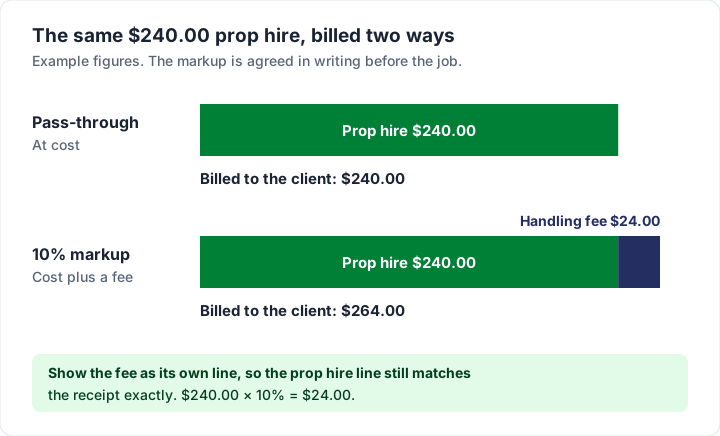
- Markup (cost plus): you bill what you paid plus an agreed percentage. “Cost plus” pricing just means cost plus an agreed margin. Businesses that do this usually say it covers the time spent sourcing, paying for and carrying the cost until the client pays.
Here is the same $240.00 prop hire billed both ways:
| Pass-through | 10% markup | |
|---|---|---|
| Prop hire, as paid | $240.00 | $240.00 |
| Handling fee | — | $24.00 |
| Billed to the client | $240.00 | $264.00 |
Whichever you choose, put it in writing before the job and show it on the invoice. The clearest way to show a markup is as its own line (“Prop handling fee, 10% as agreed”), so the receipt still matches the cost line exactly. Some clients and some kinds of work do not allow a markup on expenses at all, so check your contract before you add one.
Receipts: what to keep and how to send them#
A receipt is the proof that you spent the money. The difference between invoice and receipt is worth knowing here: the receipt you got from the prop hire company is their receipt to you, and it backs up a line on your invoice to your client.
What to keep: the original receipt or the supplier's invoice for every expense you bill, plus anything that shows the client agreed to it (the email approving a cost over your threshold, for example). Keep them with the invoice they support.
How to send them:
- Attached to the email that sends the invoice, as a PDF or photo for each receipt, named to match the reference (“R-1 location permit.pdf”).
- A shared folder link in the invoice notes, if there are many receipts.
- A separate email sent the same day, with the invoice number in the subject line.
Whichever you use, put the receipt references in the invoice notes, such as “Receipts R-1 and R-2 sent by email with this invoice”. If a client still queries an expense, what to do when a client disputes an invoice covers the next steps.
The hard part is often the bookkeeping, not the invoice. One field technician in the research we read put it like this (the quote comes from a public online discussion; the person is not a Charming customer):
I am just in a horrible habit of not reconciling everything through the year. I then have to go through each WO and Project to reconcile mileage and costs to tickets and all other aspects.
Logging each expense against the job as you spend it, with the receipt number, saves that year-end search. Our free expense reimbursement sheet is built for that: one row per cost with its receipt reference and any agreed markup, and a total of what is still to bill.
A worked example: event photography with expenses#
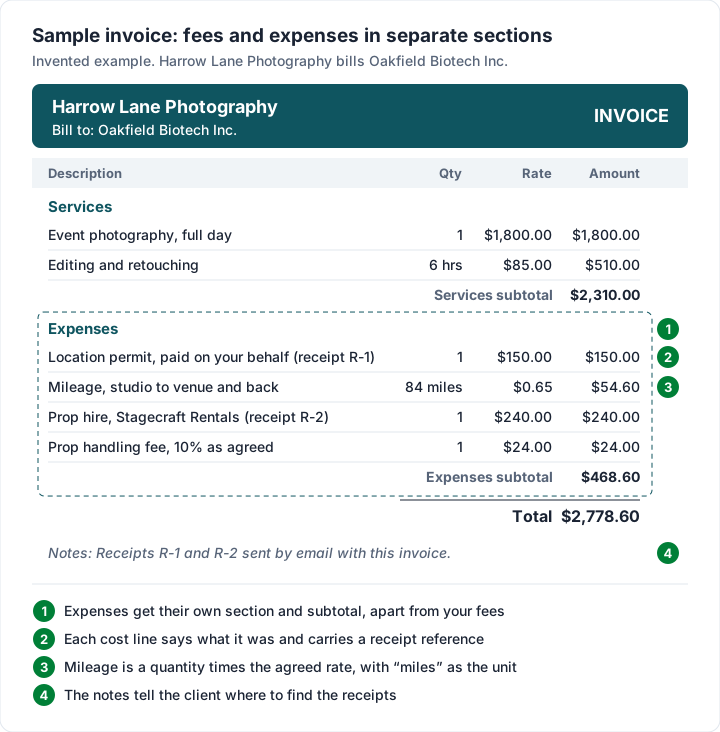
This example is invented. Harrow Lane Photography shoots a corporate event for Oakfield Biotech Inc. The contract allows expenses at cost and a 10% handling fee on props, agreed by email before the job.
| Line | Qty | Rate | Amount |
|---|---|---|---|
| Services | |||
| Event photography, full day | 1 | $1,800.00 | $1,800.00 |
| Editing and retouching | 6 hrs | $85.00 | $510.00 |
| Services subtotal | $2,310.00 | ||
| Expenses | |||
| Location permit, paid on your behalf (receipt R-1) | 1 | $150.00 | $150.00 |
| Mileage, studio to venue and back | 84 miles | $0.65 | $54.60 |
| Prop hire, Stagecraft Rentals (receipt R-2) | 1 | $240.00 | $240.00 |
| Prop handling fee, 10% as agreed | 1 | $24.00 | $24.00 |
| Expenses subtotal | $468.60 | ||
| Total | $2,778.60 |
Without the handling fee, the same invoice would be $2,754.60. Mileage is 84 × $0.65 = $54.60, and the handling fee is 10% of $240.00 = $24.00. The rate per mile is the agreed rate, not an official mileage rate.
Tax is shown as 0% here to keep the arithmetic visible. Whether sales tax applies depends on your state and on what the expense is, which the next section covers.
For more on how photographers structure a shoot invoice, see how photographers should invoice.
Sales tax and VAT on expenses you pass on#
In the US#
Whether sales tax applies to expenses you pass on depends on your state and on what the expense is; check your state tax agency's page or ask an accountant. The same goes for income tax: how reimbursements count for your income tax is a question for your accountant.
In the UK: disbursement or recharge#
For VAT-registered businesses, HMRC separates two kinds of cost passed to a customer. The quotes below are from GOV.UK's guide VAT: costs or disbursements passed to customers, as of 28 October 2026.
From the section “Disbursements: costs to exclude from VAT calculations”:
A payment made to suppliers on behalf of your customers is called a ‘disbursement’ if you pass the cost on to your customers when you invoice them.
The same section says “To treat a payment as a disbursement all of the following must apply:”
- you paid the supplier on your customer’s behalf and acted as the agent of your customer
- your customer received, used or had the benefit of the goods or services you paid for on their behalf
- it was your customer’s responsibility to pay for the goods or services, not yours
- you had permission from your customer to make the payment
- your customer knew that the goods or services were from another supplier, not from you
- you show the costs separately on your invoice
- you pass on the exact amount of each cost to your customer when you invoice them
- the goods and services you paid for are in addition to the cost of your own services
From the section “What isn’t a disbursement”:
It’s up to you whether or not you itemise costs like these on your invoices. If you do show them separately when you invoice your customers they’re known as ‘recharges’, and not disbursements. You’ll have to charge VAT on them whether you paid any VAT or not.
The same section gives travel as an example of a cost that is not a disbursement: “an airline ticket that you buy to visit a client or to travel to a job, if you recharge the cost to your client you must charge VAT because the flight was for you, not for the client”.
From the section “Showing disbursements and recharges on your invoices”: “If you exclude disbursements from the VAT calculations you must itemise them separately on your VAT invoices.” HMRC's own example, a website design consultant who travels to a client and buys a hosting package on the client's behalf, lists the items that invoice might include:
- design services - £2,500
- travelling expenses - £300
- amount on which VAT is due - £2,800
- VAT at 20% - £560
- disbursements - £150
- total including VAT - £3510
HMRC's own explanation of that example: “The £300 travel cost that the consultant recharges to the client is not a disbursement so the consultant must charge VAT on it. But the cost of the website hosting package is a disbursement and can be excluded from the VAT calculation”. The guide has more detail, and VAT Notice 700, section 25.1 covers disbursements further. For everything else a UK VAT invoice shows, see what HMRC lists for a UK VAT invoice. If you are not sure which of your costs are disbursements, ask an accountant before you invoice.
Expenses in Charming, and what it does not do#
Charming Invoices handles expenses as ordinary line items, which covers most of what this guide describes:
- One line per expense, with a description of up to 500 characters, so there is room for the date, the purpose and the receipt reference.
- Units on the quantity. Each line has an optional free-text unit of up to 20 characters, such as “miles”, “nights” or “hrs”. Quantities take up to 3 decimal places and rates up to 4.
- An “Expenses” section with its own subtotal. Give lines a section label (up to 80 characters) and turn on “Group lines by section” in the Template Studio, and the invoice prints your fees and your expenses as separate groups, each with a subtotal.
- Notes for the receipt references, such as “Receipts R-1 and R-2 sent by email with this invoice”.
- Totals to the cent as you type, for up to 200 line items per invoice.
- A starter kit for shoots. The “Photography shoot” starter kit already includes a “Travel and expenses” line, priced at $0.00 for you to fill in.
- Saved line items on paid plans, so a line such as “Mileage, per mile” at your agreed rate is one click away. Not on the free plan; see pricing.
The catches, plainly:
- No expense tracking in the app. Charming does not log expenses, has no billable flag and does not capture or scan receipts. You keep your expense log (such as the free expense sheet above) and receipts elsewhere and type each expense in as a line.
- No attachments. Charming cannot attach receipts to an invoice. Charming stores only the invoice PDF, so attach receipts to your own email when you send it, or share a folder link in the notes.
- One tax rate per invoice, applied to the whole subtotal after any discount. There is no per-line taxable or non-taxable setting, so you cannot tax your fee but not an expense on the same invoice. For UK VAT, this means Charming cannot lay out a disbursement HMRC-style, with VAT on the fee and recharges and the disbursement outside the VAT total. If you bill disbursements, use accounting software with per-line tax, or ask your accountant how to bill them.
- A discount applies to everything. An invoice-level discount reduces the whole subtotal, expenses included, and a line cannot go below zero. To discount only your fee, lower the fee line's price and say so in its description. How to show a discount on an invoice has the options.
- Payments are tracked by hand, and Charming does not take card payments. Free-plan invoices carry a “Sent with Charming Invoices” line; on paid plans it is hidden by default.
If you need expense tracking with receipt capture, accounting tools do it. As of 28 October 2026, QuickBooks Online's expense-tracking page describes adding a billable expense to an invoice with the receipt attached, and Zoho Invoice's features page describes linking billable expenses to customers and converting them into invoices. For the QuickBooks steps, see the QuickBooks invoice guide. For tracking time rather than costs, billable vs non-billable hours covers that side.
If you keep your receipts in a folder and just need a clear invoice with fees and expenses in separate sections, create a free invoice.
Questions people ask#
What is a reimbursement invoice?#
An invoice, or a section of one, that bills a client for costs you paid for their job, such as permits, materials bought for them, travel or mileage. It is different from an employee's expense claim, which goes through the employer's own expense process.
How do I invoice for expenses?#
Agree in advance which costs the client covers, then put each expense on its own line with what it was, the date and a receipt reference, ideally in an “Expenses” section with its own subtotal. Send copies of the receipts with the invoice.
Should I charge a markup on expenses?#
It is a business choice, and both pass-through and markup are common. If you add one, agree the percentage in writing first and show it as its own line. Some contracts and clients do not allow a markup on expenses, so check yours.
Do I need to send receipts with an invoice?#
Clients usually expect them for expenses, and an expense line without a receipt is more likely to be queried. Send a copy of each receipt with the invoice, labelled to match the reference on the line, and keep the originals.
Can I invoice for mileage?#
Yes, if your client has agreed to cover it. Bill it as a quantity of miles times an agreed rate per mile, with the route in the description, so the client can check the arithmetic.
What is a disbursement on an invoice?#
In general use, a cost you paid on a client's behalf and pass on to them. In UK VAT, “disbursement” has a specific meaning with conditions that decide whether VAT is charged; the GOV.UK guide quoted above lists them, and calls costs that are not disbursements but are shown separately on your invoice “recharges”.
Free downloads
No sign-up and no email address. More on the free templates page.
- Download .xlsx: Expense reimbursement sheet
Expense reimbursement sheet
Excel .xlsxFor costs you pay on a client's behalf: log each one with its receipt, add any agreed markup, and see what is still to bill.
- Download .xlsx: Mileage log
Mileage log
Excel .xlsxFor trips you bill to clients: log each journey from the odometer, mark it billable, and total the miles at the rate you agreed.