Time tracking and invoicing: billable hours to a paid invoice

Nnabuike Okoroafor ·
On this page · 11 sections
Disclosure: We make Charming Invoices, an invoicing app with no time tracker: no timer, no timesheet entry and no import of tracked time. This guide names the trackers to use instead, and shows what an invoicing app can still do with the hours once you have them.
You bill by the hour, so the hours are the invoice. Track them badly and you undercharge, or you send a total the client cannot check. Track them well but price them badly, and you can be busy every day of the month and still fall short of what you meant to earn.
Time tracking and invoicing are two jobs that meet at one number: the hours you can bill. This guide covers both. It explains billable and non-billable hours, works through the arithmetic that turns a month of tracked time into an hourly rate, compares time tracking and invoicing software on what each plan actually includes (prices as of 28 October 2026), and shows how to put tracked hours on an invoice your client can follow.
Time tracking and invoicing in short#
- Track all your working time, not only client work. The non-billable hours decide what your billable hours must cost.
- Price from your billable hours. If 104.5 of 152.0 hours are billable, your rate has to cover all 152.0.
- Pick the tool by plan, not by brand. Clockify invoices from its Standard plan; Harvest includes invoicing on its free plan, for 1 seat and 2 projects; Toggl Track’s pricing page does not list invoicing by plan, though its help centre describes invoices on Free.
- Two tools are fine. A tracker for the hours and a separate invoicing app for the bill works, as long as you check the totals before sending.
- Show the hours on the invoice in a way the client can check: dated groups, decimal hours, a total, and the rounding you agreed.
Billable vs non-billable hours#
Billable hours are the hours you can charge a client for: work done for that client, within the scope you agreed. Non-billable hours are everything else you need to do to run the business, which no single client pays for directly.
The line is not fixed. It depends on your contract. A kick-off call might be billable for one client and free for another. What matters is that you decide in advance and track both kinds.
| Usually billable | Usually non-billable |
|---|---|
| Design, writing, development or consulting work in scope | Admin, bookkeeping and filing |
| Client meetings and calls, if your agreement says so | Proposals, pitches and sales calls |
| Revisions within the agreed rounds | Invoicing and chasing payments |
| Research done for a specific client job | Learning and courses |
| Travel time, if agreed in writing | Revisions beyond scope that you choose not to bill |
That last row deserves attention. Unbilled revisions are often where the hours leak: a small change here, another there, never invoiced. A change request on a web development invoice shows one way to bill them instead.
Billable hours are not the same as hours invoiced. You can work billable hours and not have invoiced them yet. If the words “billing” and “invoicing” blur for you, billing vs invoicing separates them.
Why track the non-billable hours too#
If you track only the client hours, you see what you billed. You do not see what it cost you to bill it. The ratio between the two is your utilisation:
Utilisation = billable hours ÷ total hours worked
A freelancer who works 152.0 hours and bills 104.5 of them has a utilisation of 68.75%. Nearly a third of the working month is spent on things no client pays for directly. That is normal; the hours are not wasted, they are the cost of having a business. But your rate has to pay for them.
Tracking both kinds also shows you where to cut. If invoicing and client email take 9.0 hours a month, that is a number you can try to reduce. You cannot reduce what you never measured.
Pricing from tracked time: the arithmetic#
Here is a worked example with an illustrative freelancer. Every number is invented to show the method; replace them with yours.
Over 4 weeks, they tracked 152.0 hours:
| Bucket | Hours |
|---|---|
| Billable client work | 104.5 |
| Admin and bookkeeping | 14.0 |
| Proposals and sales | 12.5 |
| Invoicing and client email | 9.0 |
| Learning | 6.0 |
| Unbilled revisions | 6.0 |
| Non-billable total | 47.5 |
Their target from client work is $6,000.00 for the 4 weeks.
- Utilisation: 104.5 ÷ 152.0 = 68.75%.
- Rate needed on billable hours: $6,000.00 ÷ 104.5 = $57.42 an hour. Round up to $58.00.
- Check it: 104.5 × $58.00 = $6,061.00, just over the target.
Now the common mistake. If they priced as if every hour were billable, they would divide by all 152.0 hours: $6,000.00 ÷ 152.0 = $39.47 an hour. But only 104.5 hours can be invoiced, so at $39.47 they would bill 104.5 × $39.47 = $4,124.62. That is $1,875.38 short of the target, every 4 weeks, while working exactly as hard.
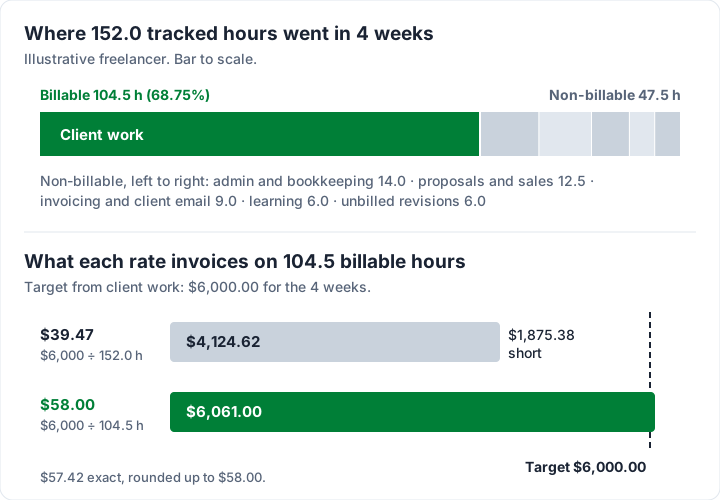
The same target needs a very different rate depending on how many hours you can bill:
| Billable hours in 4 weeks | Rate needed for $6,000.00 |
|---|---|
| 120.0 | $50.00 |
| 104.5 | $57.42 |
| 90.0 | $66.67 |
| 80.0 | $75.00 |
This is also why a rate that sounds high to a client can be modest in practice. If you want more on the psychology of the number itself, how designers undercut their own rate covers it for creative work.
Rounding, minimums and showing hours on the invoice#
Hours from a tracker arrive as minutes. The invoice needs a number the client can read and check. Three decisions get you there.
- Rounding increment. Many freelancers round each entry or each day to the nearest 6 or 15 minutes. There is no universal rule: it is a policy you agree with the client and state on the invoice. A 15-minute increment turns 2 hours 41 minutes into 2.75 hours. How to invoice for hours worked bills one week three ways (exact time, nearest quarter hour, always up) to show what the setting changes.
- Minimum charge. Some set a minimum per call or per task (for example, 30 minutes). Put it in your agreement before you put it on an invoice.
- Decimal hours, not minutes. Write 9.75 hours, not 9 hours 45 minutes. The arithmetic on the invoice then works line by line.
On the invoice, group the hours the way the client thinks about the work: by week, by project or by deliverable. Give each line a short description of the task, the hours, the rate and the amount, then a total of hours as well as money. If something is capped (“not to exceed 30 hours”), say how many hours remain. How consultants should structure an invoice goes further on hourly wording, and the hourly invoice template shows a filled example you can copy.
Time tracking and invoicing software compared#
This table shows three dedicated time trackers and what each plan includes for billing, from each vendor’s own pricing page, read on 28 October 2026. Prices are in US dollars, per seat per month. “Annual” means billed yearly.
| Tool | Free plan | Billable rates from | Invoicing from | Entry paid price |
|---|---|---|---|---|
| Clockify | $0; card says “For up to 5 users” | Basic | Standard: $5.49 annual, $6.99 monthly | Basic: $3.99 annual, $4.99 monthly |
| Toggl Track | $0; FAQ says up to 3 users | Starter | Not listed by plan on the pricing page (see below) | Starter: $9 annual, $12 monthly |
| Harvest | $0 forever; 1 seat, 2 projects, invoicing included | Not listed by plan | Free | Teams: $9 annual, $11 monthly |
A few notes the table cannot carry:
- Clockify lists billable rates (“Enter hourly rates for users and projects, and see how much you earn”) from Basic, and invoicing from tracked time and expenses from Standard. Pro is $7.99 annual or $9.99 monthly, Enterprise $11.99 or $14.99.
- Toggl Track has Premium at $16 annual or $24 monthly, and Enterprise on request. The pricing page does not say which plans include invoices. Toggl’s help centre article on creating invoices in Toggl Track says: “Invoices created by users on the Free plan will have the Toggl logo on the downloaded PDF file.” So invoices exist on Free, branded with Toggl’s logo; billable rates start on Starter.
- Harvest lists invoicing on its free plan, for 1 seat and 2 projects. Teams is $9 a seat a month billed annually ($108 a seat a year) or $11 monthly; Enterprise is $14 or $17.50.
Prices and plan features change; check each page before you buy. Promotions are left out.
Invoicing apps that also track time. If you would rather start from the invoice side, some invoicing apps include time tracking. Our reviews, read in October 2026, cover three: how FreshBooks invoicing works (time tracking on every plan, unbilled time pulled onto an invoice), what the Zoho Invoice free plan includes (time logging and projects listed on the free plan) and our Invoice Ninja review (projects and time tracking on its free plan, up to 5 clients). Check their current pages; we have not re-read them for this post. For law firms, legal billing software often captures time straight into the bill; lawyer invoicing software compares those tools with a simple invoicing app.
Which kind of tool fits you#
- Several people tracking time across many projects: a tracker with built-in invoicing (Clockify Standard, Harvest Teams, Toggl Track paid plans) is the better fit. Rates per person and per project, and an “uninvoiced time” view, save real work.
- A solo freelancer with one or two ongoing clients: Harvest Free covers it if 2 projects is enough. Otherwise a free tracker plus a separate invoicing app works.
- You want accounting too: an invoicing and accounting app with time tracking, such as FreshBooks, keeps it in one place, at a monthly price.
For the wider choice, eight questions to ask any invoicing app and invoicing apps for freelancers compared look beyond time tracking.
One app or two: a tracker plus an invoicing app#
Plenty of freelancers use a tracker for the hours and something else for the invoice. It is a perfectly good setup when you have a handful of clients. The first choice is whether to log hours in a spreadsheet or a dedicated tracker. A spreadsheet works until the entries get long and the rounding gets inconsistent. A dedicated tracker fixes both, and a free plan is enough for most solo work. The workflow with two tools runs like this:
- Track everything in the tracker, tagging each entry billable or not, and by client.
- At the end of the period, run a report for one client: billable hours, grouped by week or project.
- Apply your rounding and check the totals against your calendar. Anything that looks too long or too short is worth a second look before the client sees it.
- Copy the grouped totals onto the invoice, one line per task or week, with the rate.
- Check the invoice total against hours × rate before sending.
- Keep the report. If the client queries an hour, you have the detail.
The cost of two tools is the copying at step 4. With 3 clients a month, that is a few minutes each. With 30, a tracker that invoices directly earns its price. If you bill the same client every month, billing a retainer on a schedule is another way to cut the repetition.
How to put tracked hours on a Charming invoice#
Charming does not track time. Once your tracker has the hours, though, it has the parts to present them clearly. All of these were checked in the code on 28 October 2026.
- Hours as the quantity. Quantities take up to 3 decimal places, so 9.75 or 12.5 hours go in as they are.
- A unit per line. The unit field suggests “hrs” (along with “days”, “sessions” and others), or takes any text up to 20 characters.
- Sections. A section heading per line (up to 80 characters), such as “Week of 2 November 2026”, groups the lines.
- A Total hours line. Lines whose unit is an hour unit (h, hr, hrs, hour or hours) add up into a Total hours line. It is on by default in the Timesheet and Contractor templates, and any template can switch it on in the Template Studio.
- The Timesheet template. One of the 60 templates, all on the free plan: “Time entries grouped by week or project, with hours per group and a total hours line,” titled “Timesheet Invoice”.
Here is one client’s invoice from the worked example, billed at $58.00 an hour:
| Section | Line | Hours | Amount |
|---|---|---|---|
| Week of 2 November 2026 | Brand guidelines | 12.5 | $725.00 |
| Week of 9 November 2026 | Packaging design | 9.75 | $565.50 |
| Week of 16 November 2026 | Print-ready files | 4.25 | $246.50 |
| Total hours | 26.5 | $1,537.00 |
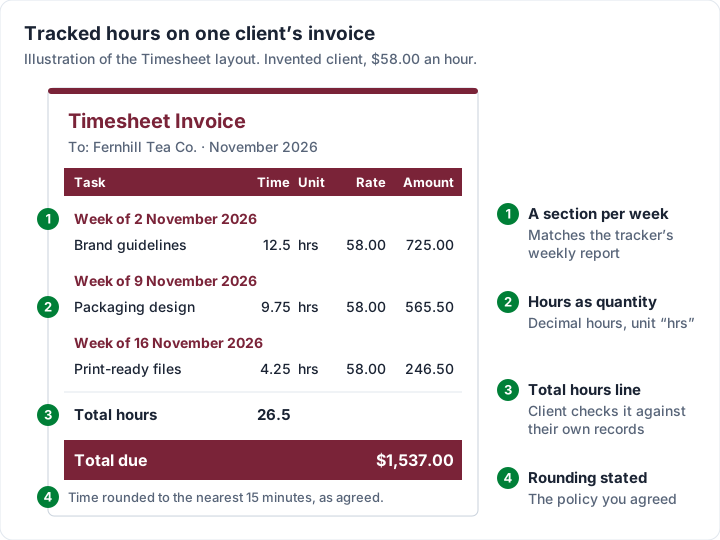
On paid plans, a saved line item such as “Design — per hour” saves retyping the rate, and recurring invoices create a draft each cycle for you to fill with that period’s hours. AI drafting, also on paid plans, can turn a short description of the work into line items; it leaves any price it does not know at 0 and never sends anything.
What it does not do, plainly:
- No timer, no timesheets in the app, no import. You type the hours in from your tracker, or from our free hourly timesheet for Excel if you log time in a spreadsheet.
- No card payments. Clients pay you directly, by the methods you list on the invoice, and you mark it paid yourself.
- Free carries a “Sent with Charming Invoices” line on the PDF and the invoice page.
- Plans: Free is $0 forever. Individual is $29 once, Team $79 once (up to 5 teammates), Pro $12 a month or $99 a year. Lifetime plans are final sale. The pricing page has the full list.
When not to bill by the hour#
Hourly billing is honest and easy to explain, but it caps what you earn at the hours in a week, and it rewards slowness. Some work fits other models better:
- Fixed fee: you price the outcome, not the time. Track the hours anyway, privately, to learn whether your fixed fees are right.
- Retainers: a monthly fee for a block of availability or hours. Tracking tells you whether the block is being used. See unused retainer hours for how to show them.
- Sessions or blocks: tutoring, coaching and similar work is often sold by the session. Showing lessons used from a prepaid block uses sessions as the unit instead of hours.
Some creative people object to timers altogether. One designer in a public discussion, not a Charming customer, wrote:
Trying to fit that into rigid minute-by-minute timer slots just kills the natural creative workflow.
That is a fair objection to minute-level timing during the work. It is less of an objection to knowing, at the end of the month, roughly how many hours went where. A rough weekly log can be enough to price your next fixed fee well.
Questions people ask about time tracking and invoicing#
What are billable hours?#
Hours you can charge a client for: work done for them within the scope you agreed. Which tasks count is set by your agreement, so write it down before the work starts.
Is admin time billable?#
Usually not. Your own admin, bookkeeping and invoicing are the cost of running the business, which your hourly rate covers. Client-specific admin, such as a status report they asked for, can be billable if you agreed it.
Can I invoice in 15-minute blocks?#
Yes, if your client agrees. Rounding is a policy, not a rule. State it in your agreement and on the invoice (for example, “time rounded to the nearest 15 minutes”) so nobody is surprised.
Do I need software to track my hours?#
No. A spreadsheet or a notebook works if you are consistent. Our free hourly timesheet is a ready-made weekly sheet that splits billable from non-billable hours and works out the amount to invoice. Software helps once you have several clients or projects, or when you want reports of billable time that has not been invoiced. The free plans above cover most solo freelancers.
Does Charming Invoices have a time tracker?#
No. Charming does not track time. Use a tracker such as Clockify, Toggl Track or Harvest for the hours, then put them on a Charming invoice with hour units, weekly sections and a Total hours line.
From tracked hours to a paid invoice#
Track every working hour for a month, split billable from non-billable, and divide your target by the billable hours. That gives you the rate. Then pick a tracker on the plan that includes what you need, and send invoices that show the hours clearly enough for the client to check.
If you already have a tracker and want a clear, branded invoice to put the hours on, you can create a free invoice in Charming Invoices.
Free download
No sign-up and no email address. More on the free templates page.
- Download .xlsx: Weekly timesheet for hourly work
Weekly timesheet for hourly work
Excel .xlsxFor anyone who bills by the hour: log a week of time, split billable from non-billable, and get the hours and amount to put on the invoice.