How to invoice for consulting services

Nnabuike Okoroafor ·
On this page · 9 sections
Consulting is hard to invoice because the work is mostly invisible. There is no box of materials and no finished photo, only calls, documents and judgement. So when an invoice for consulting services arrives with one line reading “Advisory services — $4,500.00”, the client has nothing to check it against. The person who approves it was often not in your meetings, and a total they cannot check is a total they query.
This guide covers how to structure the invoice for the three ways consultants usually bill (hourly, fixed fee and retainer), how to describe the work so it reads as delivered, how much hours detail to show, how to bill expenses, and how a retainer draw works on paper. Near the end are two worked examples with illustrative numbers: an hourly invoice, and a monthly retainer with extra hours billed on top.
General information, not legal or tax advice. Where a rule is mentioned, we quote and link the official page; ask an accountant or lawyer about your own situation.
For the general list of fields every invoice needs (numbers, dates, payment details), the field-by-field invoice checklist has it. This post is about what is specific to consulting invoicing. If you are new to working for yourself, invoicing as a freelancer, start to finish covers the workflow around the invoice.
Hourly, fixed fee or retainer: the invoice follows the agreement#
The single biggest decision happens before the invoice exists: how you agreed to be paid. The invoice should mirror that agreement exactly, in the same units and the same words. If the engagement letter says “up to 20 hours a month at $150.00 an hour”, the invoice should show hours at $150.00, not a lump sum.
Here is how the three models change what goes on the page:
| Billing model | What the client agreed to | What the invoice should show | Where queries usually come from |
|---|---|---|---|
| Hourly | A rate, sometimes a cap | Hours per task or period, the rate, total hours | Hours that look high for the task |
| Fixed fee | A price for a defined scope | The deliverable or milestone, the agreed amount | Scope that is not obviously finished |
| Retainer | A prepaid amount or a monthly commitment | What was used, what was drawn, what remains | A balance the client cannot reconcile |
Here is the same idea as three invoices, using the figures from later in this guide:
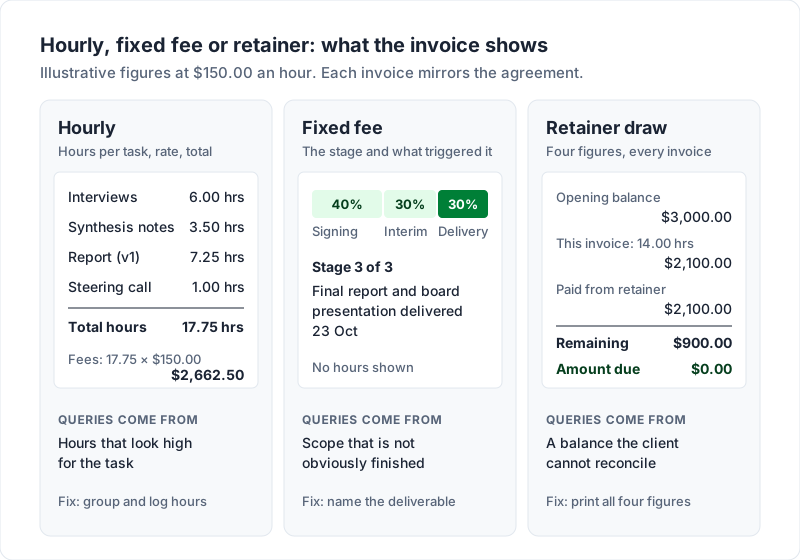
Mixed engagements are common: a fixed fee for a diagnostic, then hourly support. Put each model in its own section of the invoice, with its own heading, so the client never has to work out which rule a line falls under.
Describe deliverables so the client approves without queries#
Whatever the model, the description column does most of the work. Each line on a consultant invoice should name three things: what was done, what it produced, and which part of the engagement it belongs to.
Compare these:
-
Vague: “Consulting — October”
-
Better: “Pricing review: analysis of current tiers and competitor pricing, written recommendations (v1)”
-
Vague: “Meetings”
-
Better: “Steering call, 14 Oct: reviewed interview findings with leadership team”
-
Vague: “Phase 2”
-
Better: “Phase 2 — Market entry assessment: final report and board presentation delivered 23 Oct”
The better versions do not add length for its own sake. They give the approver something to match against their own records: a document they received, a meeting they attended, a milestone in the contract. That match is what lets a finance team approve without emailing you first.
Use the client’s vocabulary, not yours. If the client calls it “the Q3 operations project”, so should the invoice. If they gave you a purchase order or project code, put it on the invoice too; some accounts teams cannot pay an invoice without one.
The same principle shows up in other trades. Designers run into it when a whole project collapses into “design services”, which your invoice is arguing against your rate goes into in more detail. Translators and interpreters do too, and the translator invoice template shows word-count, certified-page and interpreting lines a client can check.
How to bill a client hourly without inviting a debate about speed#
Hourly billing has an awkward side effect: it puts your speed on the page. A line that says “Report drafting — 11.5 hrs” invites the question of whether it should have taken eleven and a half hours. You cannot remove that question entirely, but you can make the hours easy to accept.
- Group hours by task or by week. A sequence of grouped entries reads as a record of work. One large figure reads as an estimate.
- Attach the outcome to the hours. “Report drafting, 11.5 hrs” is weaker than “Pricing recommendations report, draft and revisions after steering call, 11.5 hrs”.
- State your increment and apply it consistently. Whether you bill in 15-minute or 6-minute blocks, say so in your terms, and do not round some entries up and others down.
- Show the total hours. If the client agreed a cap, the total hours line lets them check it in one glance.
- Keep the detailed log available, not necessarily printed. Some clients want every entry on the invoice. Most want task-level lines and the detail on request. Ask which they prefer at the start.
This hours-worked invoice sample shows the pattern on one page: dated tasks, weekly subtotals and a single rate.
The hours have to come from somewhere, and the invoice is often the last step of a process that begins in a timer or spreadsheet. Whatever tool you use, the hours on the invoice should match your log exactly, so that if a client asks, the answer takes one email. If your log is a spreadsheet, our free hourly timesheet for Excel totals a week of billable hours and the amount to invoice. Turning that log into invoice lines (decimal hours, rounding each entry, copying the lines across) is covered step by step in how to invoice for hours worked. Our comparison of time tracking and invoicing software covers tools that turn tracked hours into an invoice, and the legal invoice template shows grouped time entries at two hourly rates.
Fixed-fee consulting invoices: bill the milestone, not the effort#
On a fixed fee, the client agreed to a price for an outcome. Showing hours on a fixed-fee invoice usually does more harm than good: it reopens a negotiation you already settled. Show the deliverable and the agreed amount.
Fixed-fee work is usually billed in stages. A typical structure, as an example only:
- On signing: 40% of the fee, described as “Market entry assessment — 40% on engagement start, per agreement dated 1 Sep 2026”.
- At a milestone: 30%, described by the milestone (“Interim findings presented 2 Oct”).
- On delivery: the final 30% (“Final report and board presentation delivered 23 Oct”).
Each invoice should say which stage it is and what was delivered to trigger it. A client who can see “stage 3 of 3” and the delivery date has nothing left to ask.
Expenses: separate, at cost, with receipts#
Travel, software bought for the engagement, venue hire for a workshop: if your agreement lets you pass costs through, bill them as their own section, never folded into your fees.
- One line per expense, with the date and what it was for: “Train fare, client site visit 7 Oct”.
- Bill at cost unless you agreed otherwise. A markup that was never discussed is the kind of surprise that turns one question into a review of the whole invoice.
- Attach or offer the receipts. Many clients will not reimburse an expense without one. Our free expense reimbursement sheet logs each cost with its receipt reference and shows what is still to bill.
- Get large expenses approved first. An invoice is not the place a client should learn about a flight.
How reimbursed expenses are treated for tax, and whether tax applies to them, depends on where you and your client are. We will not guess at your situation here, so ask an accountant or check your tax authority’s guidance.
Retainer invoice for consultants: how a draw works#
A retainer comes in two forms, and the invoice is different for each.
A monthly commitment (“20 hours a month, billed on the 1st”) is a recurring invoice for a fixed amount, with any overage billed separately. Recurring billing has its own mechanics, which billing a retainer on a schedule covers.
A prepaid balance is the one that needs the most explaining. The client pays upfront, say $3,000.00, and each invoice draws from that balance. It differs from a deposit, which is part of the price of one job and comes off that job’s final bill; how deposit invoices work covers that case. Each draw invoice should show four figures, in this order:
| Line | Example |
|---|---|
| Opening balance | $3,000.00 |
| This invoice: 14.00 hrs at $150.00 | $2,100.00 |
| Paid from retainer | $2,100.00 |
| Remaining balance | $900.00 |
The amount due on that invoice is $0.00, because the retainer covers it. If the work had come to 22 hours ($3,300.00), the retainer would cover $3,000.00 and the invoice would show $300.00 due, with a remaining balance of $0.00. Printing all four figures every time means the client can reconcile the retainer from your invoices alone, without a spreadsheet of their own.
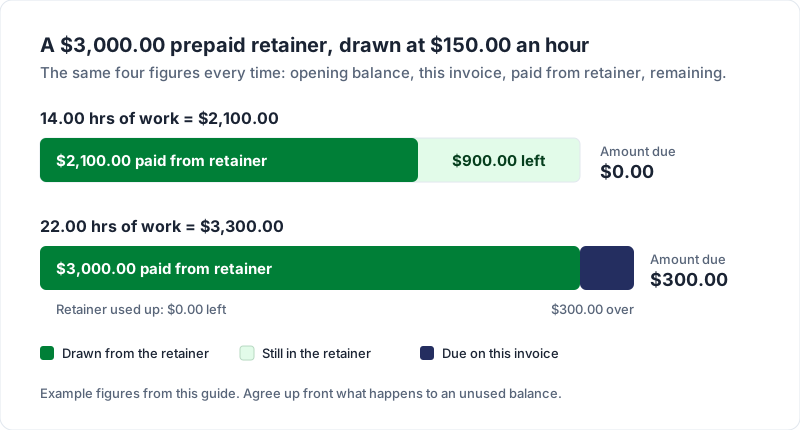
Agree up front what happens to an unused balance at the end of the engagement, and what happens when it runs low. Being clear about that before the work starts makes the later invoices less awkward to send. The retainer invoice guide has wording for rollover caps, top-ups and refunds. To keep track of the balance between invoices, our free retainer tracker for Excel is a running balance of money paid in, work drawn and refunds, for your own records; it is not trust or client-money accounting. Clear terms on the invoice (due date, what the retainer covers, how top-ups work) make any follow-up a reminder of an agreement rather than a favour. Choosing those terms is covered in what net 30 means and how to set payment terms.
An example invoice for consulting services#
Here is a complete consulting invoice, hourly plus one expense, with illustrative numbers and a sample business. Use it as a pattern, not as figures to copy. If you would rather start from a file, consulting invoice templates for Excel and Word come with hourly, retainer and fixed-fee samples filled in.
- Invoice: INV-2026-014, issued 31 Oct 2026, due 30 Nov 2026 (Net 30)
- From: Northbank Advisory (sample)
- To: Harbour Foods Ltd, Accounts Payable (sample), PO 4471
- Engagement: Pricing review, hourly per agreement dated 1 Sep 2026, $150.00 an hour, billed in 15-minute increments
| Description | Time | Rate | Amount |
|---|---|---|---|
| Week of 5 Oct | |||
| Stakeholder interviews, 5 of 8 complete | 6.00 hrs | $150.00 | $900.00 |
| Interview synthesis notes, shared 10 Oct | 3.50 hrs | $150.00 | $525.00 |
| Week of 12 Oct | |||
| Pricing recommendations report, draft and revisions (v1) | 7.25 hrs | $150.00 | $1,087.50 |
| Steering call, 14 Oct: findings review with leadership | 1.00 hrs | $150.00 | $150.00 |
| Expenses (at cost, receipts attached) | |||
| Train fare, client site visit 7 Oct | 1 | $86.40 | $86.40 |
| Total hours | 17.75 hrs | ||
| Total due | $2,748.90 |
Payment: bank transfer to the account shown, reference INV-2026-014.
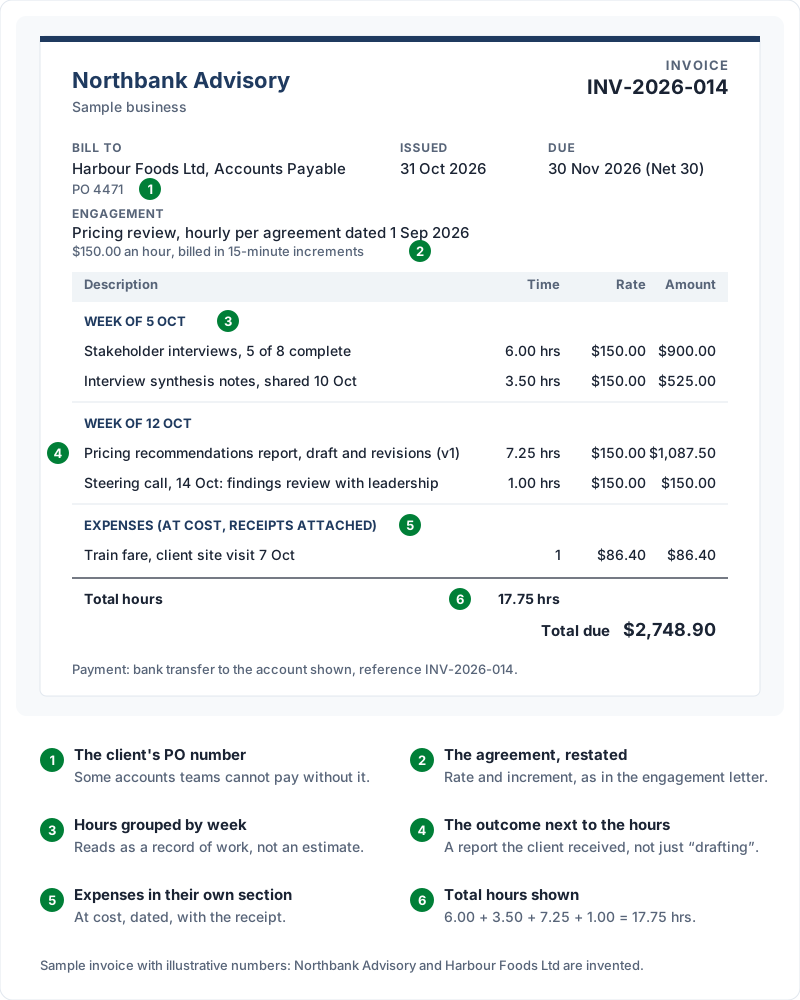
Every number on it can be checked: hours against your log, the rate against the agreement, the expense against the receipt, and the total against the lines. If you charge tax, show it on its own line after the subtotal; what goes on a VAT invoice or your tax authority covers the details.
Consultant invoicing: a worked example with a retainer and extra hours#
Many consultants sell a monthly retainer with a set number of hours included, and bill any hours over that at an agreed rate. This is not the prepaid balance above: nothing is drawn down, so the invoice carries two things, next month’s fee and last month’s hours over the allowance.
The terms, for a sample business, Hartsfell Advisory:
- Retainer: $2,400.00 a month for advisory support, up to 16.00 hours, billed in advance on the 1st.
- Extra hours: $165.00 an hour, billed on the next month’s invoice, rounded to the nearest quarter hour.
- Unused hours: they do not roll over. Your own agreement should say which way it goes.
February 2027 starts on a Monday and has exactly four weeks, so four copies of the weekly timesheet cover it. With the rounding set to “Nearest 0.25 h”, the timesheet totals came out like this:
| Week starting (Monday) | Week total | Non-billable hours | Hours to invoice |
|---|---|---|---|
| 1 Feb 2027 | 5.00 | 0.50 | 4.50 |
| 8 Feb 2027 | 5.25 | 0.00 | 5.25 |
| 15 Feb 2027 | 3.75 | 0.00 | 3.75 |
| 22 Feb 2027 | 6.00 | 0.00 | 6.00 |
| February | 20.00 | 0.50 | 19.50 |
The half hour marked non-billable (internal admin) never reaches the invoice. Of the 19.50 billable hours, 16.00 are covered by the February retainer the client already paid, which leaves 3.50 hours to bill. The invoice goes out on Monday 1 March 2027, due Monday 15 March 2027 (Net 14):
| Description | Qty | Rate | Amount |
|---|---|---|---|
| March 2027 retainer: advisory support, up to 16.00 hours (1 to 31 March) | 1 | $2,400.00 | $2,400.00 |
| February 2027 hours over the retainer: 19.50 billable hours against 16.00 included (timesheets for the weeks of 1, 8, 15 and 22 Feb attached) | 3.50 | $165.00 | $577.50 |
| Total due | $2,977.50 |
What makes this consultant invoice easy to approve:
- Each line names its own period. The retainer is for March, in advance; the extra hours are for February, in arrears. Without the months, an approver sees two charges for “advisory support” and asks why.
- The arithmetic is on the line. 19.50 against 16.00 included is 3.50 hours, and 3.50 × $165.00 is $577.50. The approver checks it without a calculator.
- The timesheets go with it. Four weekly totals that add up to 19.50 are the evidence for the second line. Send them, or offer them, with the invoice.
- A month under the allowance has no second line. If February had come to 14.00 hours, the invoice would carry the March retainer only.
- Overage is easier to bill when it was expected. Telling the client when the month passes its included hours, before the extra work is done, keeps the extra line from being a surprise.
The free files cover the hours side: the hourly timesheet holds one week, one client and one rate per tab, takes hours as decimals only, and does not time anything or connect to any app. For a month billed purely by the hour, its billable entries copy onto the hourly invoice template for Excel, whose total hours then match the timesheet’s. The retainer tracker is for prepaid balances; its own notes send a monthly fee with included hours to the timesheet instead. For the covering email, the free invoice email templates include one for a monthly retainer or recurring invoice.
In Charming, both lines go on an ordinary invoice. On the paid plans, a recurring template can raise the retainer line as a draft each month (Free has no recurring invoices); you add the extra-hours line to the draft before you issue it, because the hours are different every month.
Where Charming fits, and where it does not#
Charming Invoices has a Timesheet template built for the hourly layout above: line items grouped under headings such as “Week of 5 Oct”, hours per group, and a “Total hours” line that counts every line whose unit is hours (such as h, hr or hrs). The catch: Timesheet is a layout, not a time tracker. There is no timer, and Charming does not import hours from a time-tracking tool, so you type the hours in yourself from your own log.
For prepaid retainers, the Retainer template prints the opening balance, the amount paid from the retainer and the remaining balance, and the amount due is calculated after the draw, so a fully covered invoice shows $0.00 due. Duplicate an issued invoice and the copy opens with what the last one left in the retainer. Both templates are on the free plan. Charming does not hold the retainer money or take card payments: your client pays you directly, and you record the payment and mark it paid yourself. Free invoices also carry a small “Sent with Charming Invoices” line in the footer.
Whatever you use, an invoice for consulting services comes down to the same method: mirror the agreement, name the deliverable, show hours that match your log, keep expenses separate, and print the retainer arithmetic every time. If you want to try the layouts with your own numbers, create a free invoice.
Free downloads
No sign-up and no email address. More on the free templates page.
- Download .xlsx: Weekly timesheet for hourly work
Weekly timesheet for hourly work
Excel .xlsxFor anyone who bills by the hour: log a week of time, split billable from non-billable, and get the hours and amount to put on the invoice.
- Download .xlsx: Retainer tracker
Retainer tracker
Excel .xlsxFor prepaid and drawdown retainers: a running balance of money paid in, work drawn from it and anything refunded, with a low-balance alert.
- Download .xlsx: Expense reimbursement sheet
Expense reimbursement sheet
Excel .xlsxFor costs you pay on a client's behalf: log each one with its receipt, add any agreed markup, and see what is still to bill.